Skip to content

General Questions

2.3k Topics 11.3k Posts

Not sure where your question goes? Ask here. ModalAI engineers and the community answer questions about any VOXL product.

  • VOXL 2 Time of Flight (TOF) Depth Sensor

    Unsolved
    1
    0 Votes
    1 Posts
    336 Views
    No one has replied
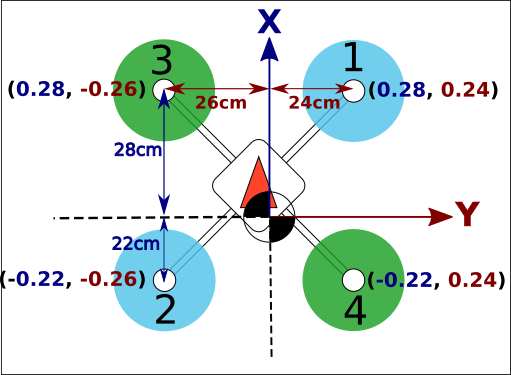
  • PX4 quad drone "Motor Position Coordinate System"

    Unsolved
    1
    1
    0 Votes
    1 Posts
    820 Views
    No one has replied
  • Looking for a replacement Battery and help with charging

    Unsolved
    1
    0 Votes
    1 Posts
    452 Views
    No one has replied
  • voxl-camera-server saying Boson doesn't support 640x512 resolution when starting

    Unsolved
    14
    0 Votes
    14 Posts
    2k Views
    Alex KushleyevA
    @Matthew-Wellner , thanks for the update! Out of curiosity, does the properly configured Boson work with original hardware + the CCI workaround in the kernel? It would be helpful for us to have that information for debugging. Please send back the non-working adapters when you get a chance. Thank you! Alex
  • doodle labs and joystick setup

    Unsolved
    30
    0 Votes
    30 Posts
    6k Views
    Jetson NanoJ
    @Eric-Katzfey Thank you for reverting back, I am able to get the turtle mode working now, The error was due to the safety parameters, once i changed it to the FPV setup, it was working. Once again thank you for the support. It was really helpful.
  • Problem of overconsumption. HELP!

    Unsolved
    3
    0 Votes
    3 Posts
    589 Views
    Daniel RinconD
    Hi @Alex-Kushleyev ! Thank you very much for responding. Here is a diagram of how we use the cameras. Almost everything comes from the factory. I made some optimizations, such as ensuring that our mission manager does not consume or open a video consumption channel, but only consumes data, which has improved things, but I have not been able to significantly improve consumption and temperature issues. Sometimes the open vins reaches over 100% consumption and dies in the process (state -1), which is extremely risky for autonomous operation. I also noticed that it has a certain delay, which can lead to erroneous coordinates or erratic movements. I saw that you recommend a fan. Which one would you recommend? Do you sell them? I look forward to your comments and possible help, thank you very much. [image: 1755897753273-diagrama.png]
  • SKU Availability and GPS Fix Anticipated date

    Unsolved
    1
    0 Votes
    1 Posts
    274 Views
    No one has replied
  • This topic is deleted!

    1
    1 Votes
    1 Posts
    18 Views
    No one has replied
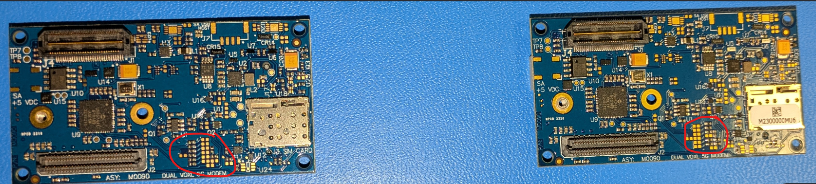
  • 5G Modem Carrier Board Quectel modem support?

    Unsolved
    6
    1
    0 Votes
    6 Posts
    2k Views
    VinnyV
    Hi @salman3141 I'm not sure of all the details of which kits/skus are no longer available. Please feel free to start a new forum post asking about SKU availability and the appropriate folks will respond. I do know our team is working on improving GPS performance across our entire fleet and are planning on better and more tightly integrated custom designs in the future. I cannot however promise any availability dates but we are aware of some performance inconsistencies and have not ignored it.
  • Rust on ModalAI ESC Component? Do I need to be concerned?

    2
    0 Votes
    2 Posts
    626 Views
    VinnyV
    @Jaroslav-Richters Yes, we are aware there is a component on our ESC assemblies and other circuit card assemblies (CCAs), specifically, the Vishay IHLP series inductor, that is at risk of visible oxidation. We’ve looked into it closely and want to provide a clear update for everyone: Performance: Vishay, the inductor manufacturer, has confirmed in a published white paper that this oxidation does not affect electrical performance or reliability. There is no need for concern or an RMA, functionality is not impacted. If desired, you may clean any visible rust using your preferred cleaning agent suitable for your production or maintenance process. For full details, you can review their white paper here: Vishay IHLP Oxidation White Paper (PDF): Root Cause: The visible oxidation is most likely related to our use of a water-soluble flux during assembly, which requires steam cleaning to remove residue. However, given Vishay’s acknowledgment of the issue, there may be other factors at play and not just our processing steps. Mitigation: We have already begun including desiccant in all ESD shield bags for ESC assemblies and any other CCAs with the IHLP inductor. If further action is needed, we are prepared to implement additional measures, such as extended baking of the boards after cleaning or applying protective coatings to the inductors. Commitment: You can expect improvement in upcoming shipments. We take cosmetic quality seriously and will continue to monitor and enhance our process as needed. We appreciate all customer feedback; clear communication about issues like this help us get better. Thanks for helping us raise the bar.
  • Unricking VOXL 2 - Failing after flashing the Flat Build

    Unsolved
    1
    0 Votes
    1 Posts
    331 Views
    No one has replied
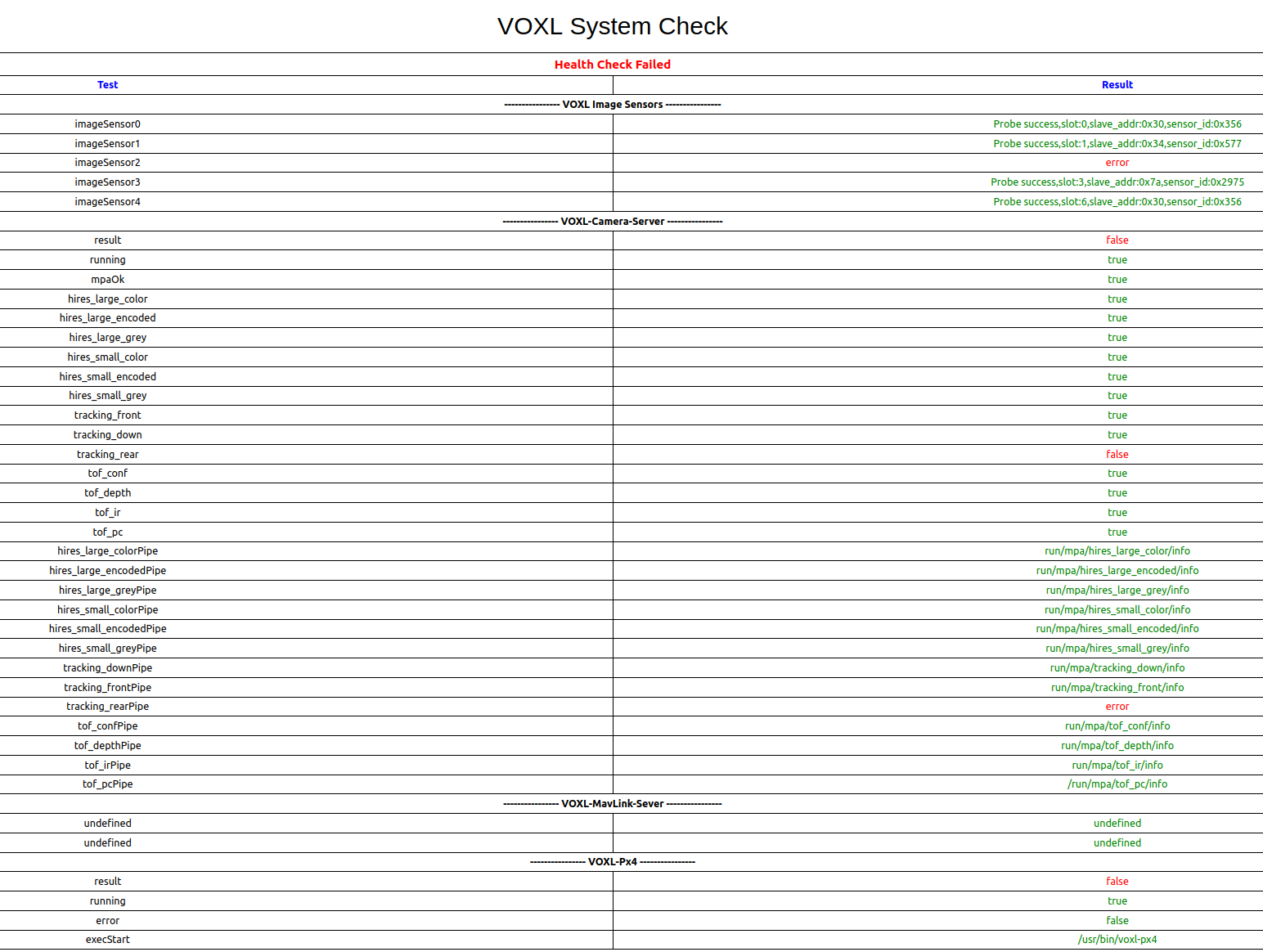
  • Rear Tracking Camera Not Working

    Unsolved
    5
    1
    0 Votes
    5 Posts
    807 Views
    Alex KushleyevA
    @george-kollamkulam , i am assuming the drone is already set up with the correct camera config (you can also re-do it using voxl-configure-cameras and select 27. If your drone was incorrectly set up in C28 configuration, you would see the same error. One way to check this before re-running voxl-configure-cameras is to list contents of /usr/lib/camera and see which sensormodule files are in there. For C27, you should see three AR0144 sensormodules (for slots 0, 2, 6), one IMX412 sensormodule for slot 1 and another one for the TOF in slot 3. From debug info when running voxl-camera-server -l, the three types of cameras have different sensor ID, as follows: AR0144: 0x0356 IMX412: 0x0577 TOF : 0x2975 Assuming that step above will result in the same issue (AR0144 camera (sensor ID 0x0356) not detected in camera slot 2), then i think you need to inspect the M0173 board and specifically the connection of the camera in port J5 of M0173. Make sure the ucoax cable is plugged in properly, similarly like others. Unfortunately that will require some disassembly. You could also double check first the ucoax connection at the camera itself if that is easier to access. If you have a spare AR0144 camera, you could try to disconnect the camera cable from the non-functioning camera and connect the spare AR0144 to see if the camera is the issue or the cable (or downstream connections). Hopefully it is just a software mis-configuration, but please inspect the cables as suggested. Alex
  • unable to bind after voxl-sdk upgrade

    Unsolved
    1
    0 Votes
    1 Posts
    296 Views
    No one has replied
  • Depth images from Max2?

    Unsolved
    2
    0 Votes
    2 Posts
    421 Views
    ModeratorM
    @Breanne-Crockett yes, the depth sensor is pointed straight forward We do not have support for Realsense
  • Upgrading Starling 2 Max (C28) model to C29 Model

    Unsolved
    2
    0 Votes
    2 Posts
    506 Views
    ModeratorM
    @lohithvamsi it is probably easiest to return Please reach out at https://modalai.com/contact and reference this post.
  • 0 Votes
    1 Posts
    332 Views
    No one has replied
  • Flir Boson+ Issues on VOXL2 Mini

    Unsolved
    6
    0 Votes
    6 Posts
    1k Views
    Alex KushleyevA
    @jonathankampia , Have you checked that your Boson actually works (using a USB interface with either Flir GUI or a UVC interface)? Also, is your Boson configured to send MIPI data in 8-bit raw format? The camera server cannot change the FPS of Boson (or any of its streaming parameters). In fact there is no communication at all happening from VOXL2 to Boson (besides just probing / detection) - all the settings have to be configured by the user prior connecting to VOXL2 (including resolution, fps, etc). https://docs.modalai.com/M0153/#boson-software-setup Please double check these points.. Alex
  • Screws for Starling 2 Max Top Bracket

    Unsolved
    2
    0 Votes
    2 Posts
    393 Views
    tomT
    @wilt From the production team, these should work for you: https://www.mcmaster.com/99461A923/
  • Using VOXL Mini 4-in-1 ESC (UART) + VOXL 2 IO (PWM) at the same time

    Unsolved
    3
    0 Votes
    3 Posts
    735 Views
    Gary HolmgrenG
    @Alex-Kushleyev Thanks for clarifying this!
  • 0 Votes
    1 Posts
    397 Views
    No one has replied