Skip to content

General Questions

2.2k Topics 11.3k Posts

Not sure where your question goes? Ask here. ModalAI engineers and the community answer questions about any VOXL product.

  • 0 Votes
    5 Posts
    506 Views
    Eric KatzfeyE
    @aspen The landing detector in PX4 isn't perfect (obviously) so in this case it didn't detect the landing. I would map one of the switches to toggle between arm and disarm so that when the drone lands you can disarm via switch. Did you try the v1.16 package?
  • Voxl2 Docker (Ubuntu 22) with OpenCL/Adreno

    Unsolved
    20
    0 Votes
    20 Posts
    5k Views
    Alex KushleyevA
    @Peter-Milani , I see. this looks like a generic implementation of OpenCL for ARM from 3rd party (not Qualcomm), and i think it also overwrites the proprietary opencl libraries, disabling the GPU opencl support. However, you could make two separate docker images, one for each use case (cpu and gpu) Alex
  • voxl2 unbrick fails

    Unsolved
    5
    0 Votes
    5 Posts
    637 Views
    N. ChenN
    @N-Chen To anyone reading this, maybe encountering the same issue in the future. I've tested the board with a guy that has a lot of experience with the voxl2 board, According to him, the board was faulty, probably some electrical issue, the amperage did not cross 0.1, and the board usually runs on something like 0.5. I've replaced my board as well as my power-supply cables (which were also under par).
  • M0094

    Unsolved
    1
    0 Votes
    1 Posts
    308 Views
    No one has replied
  • Blue UAS Certification of PX4 Autonomy Developer Kit & Camera Mounting

    Unsolved
    2
    0 Votes
    2 Posts
    330 Views
    VinnyV
    Hi @dylangresham Stinger is intended to be a complete drone package for developers, integrators, and system providers who do not require additional customization. We believe it includes all the necessary functionality for the FPV use case. Starling 2, Starling 2 Max, and the PX4 Developer Editions, on the other hand, are designed to be customizable platforms that developers and integrators can modify to suit their specific products and use cases. By design, these are not fully Blue List–certified turnkey drones, since any additions, removals, or changes made by the end developer would require recertification. That said, because most (if not all) of the subcomponents used in these platforms are already listed on the Blue UAS components list, the end-user certification process should be straightforward. ModalAI parts will pass screening easily thanks to their existing certifications. I hope that clarifies the rationale.
  • Turtle mode compatibility with non Modalai ESC

    Unsolved
    17
    0 Votes
    17 Posts
    1k Views
    Jetson NanoJ
    @Eric-Katzfey Thank you for reverting back. I am trying to proceed with the same approach. I am facing some errors while going with this approach , I am trying to debug them. Another approach :- I am also thinking to hardcode the joystick based turtle mode to the voxl_esc.cpp. The manual control values will be monitored and once the value of the assigned button is clicked, the turtle mode will be enabled. Do you think it is a good approach?
  • VOXL Mapper and VOA Support on Starling 2 Max (C28 Configuration)

    Unsolved
    2
    0 Votes
    2 Posts
    493 Views
    Zachary Lowell 0Z
    You will need the SKU supporting the TOF to accurately run current versions of voxl-mapper and VOA. Zach
  • External monitor

    Unsolved
    2
    0 Votes
    2 Posts
    369 Views
    Zachary Lowell 0Z
    The system has an HDMI out so you can plug it into an external monitor yes: https://docs.modalai.com/vrx-ground-unit-developer-guide/
  • Adding yolo v8 to tflite server

    Unsolved
    3
    0 Votes
    3 Posts
    556 Views
    Zachary Lowell 0Z
    @Ido-Goldstein to run yolov8 run voxl-configure-tflite-server and then when it prompts you to select your model, you can select yolov8. YOLOV11 is also currently supported however is still CPU bound so I would recommend using yolov8 for GPU processing
  • This topic is deleted!

    1
    0 Votes
    1 Posts
    3 Views
    No one has replied
  • Drift issue with Openvins

    Unsolved
    1
    1 Votes
    1 Posts
    850 Views
    No one has replied
  • VOXL 2 J18 port for External FC

    Unsolved
    15
    0 Votes
    15 Posts
    1k Views
    Jetson NanoJ
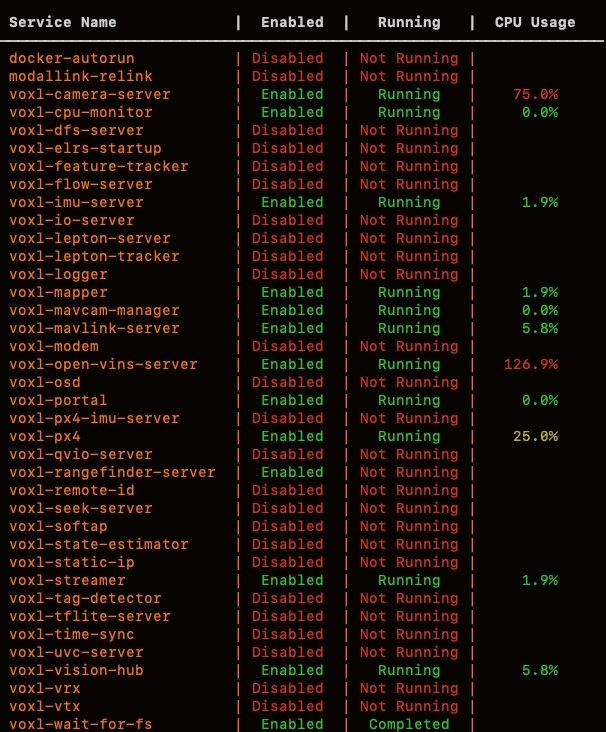
    @Eric-Katzfey hey, I observed something while the above behaviour still persists. The modem and the camera server is showing not running while checking through the inspect services command. I do not know whether this is related to this issue, but the voxl 2 is rebooting after sometime, the reboot is not constant and I am not able to able to find the reason for the reboot. Can everything be related to each other. I am using the Microhard modem [image: 1762769045502-screenshot-from-2025-11-10-15-27-45.png] [image: 1762769045568-screenshot-from-2025-11-10-15-30-27.png]
  • IMX412 Colour

    Unsolved
    10
    2
    0 Votes
    10 Posts
    1k Views
    Alex KushleyevA
    Also, a quick note.. regarding what preview resolution to use with IMX412 camera with MISP enabled.. For best quality (non-EIS applications, where the output is 16:9 aspect ratio, such as 3840x2160, 1920x1080, 1280x720), you should select 3840x2160 as the preview resolution. For EIS applications, the full frame 4040x3040 resolution should be used because it will allow more stabilization margin. selecting 3840x2160 will tell the camera to crop this region from the full frame 4040x3040, since we don't need the rest of the image. For low latency applications, you can use input resolution of 1936x1080. Note that this is slightly non-standard (as opposed to 1920x1080 because the 1936x1080 resolution allows faster processing. So you could have input resolution of 1936x1080 and output resolution of 1920x1080, 1280x720, etc. Alex
  • Starling 2 Max mast kit?

    Unsolved
    1
    0 Votes
    1 Posts
    547 Views
    No one has replied
  • GPS not connecting to Voxl 2

    Unsolved
    5
    0 Votes
    5 Posts
    605 Views
    Eric KatzfeyE
    @alan123 If it keeps reporting changing to a new UART baudrate then that's an indication that it isn't connecting at all to the GPS unit. You could also put an oscilloscope on the lines to see if you can detect traffic from the GPS and from VOXL 2.
  • This topic is deleted!

    1
    2
    0 Votes
    1 Posts
    22 Views
    No one has replied
  • Ribbon connectors for ModalAI cameras to Board

    Unsolved
    4
    0 Votes
    4 Posts
    694 Views
    VinnyV
    Hi @snowt33nshi All of our ucoax based image sensors use the same cables. Be careful mating adapters to sensors as they are not all compatible as noted here: https://docs.modalai.com/micro-coax-user-guide/ Hope this helps.
  • MSU-M0149-1 IR Filter

    Unsolved
    3
    0 Votes
    3 Posts
    799 Views
    Alex KushleyevA
    @dvz , The lens in the MSU-M0149 camera module should come with IR filter installed, which means that you will not be able to detect IR light. You can test with an IR LED or a phone that has an IR scanner (many phones do) or explicitly check for the filter by unscrewing the lens. The IR filters installed in the lenses inside MSU-M0149 are not designed to be easily removable. Attempting to do so will void the warranty and may cause damage to the camera / lens or personal injury. Small pieces of the glass filter could come loose. Do not do it. I just tried to remove the IR filter and i was able to remove it, the filter was broken in process. I unscrewed the lens from the lens holder. The adhesive holding the lens in lens holder, if present, is not permanent and can be scraped off if needed. Then I used a sharp point of an x-acto knife to pry the IR lens off. See images below. We do not have an option to purchase M0149 camera without an IR filter. However, a newer version of this camera (https://www.modalai.com/products/msu-m0166) has an option to select a lens without IR filter. Please note that M0166 camera uses different (ucoax) cables and adapters for connecting to VOXL2, so this is something to consider if you do decide to switch. If you would like to purchase a lens without IR filter (it is very similar to the one in MSU-M0149, but without IR filter, similar overall specs), please send us a request, the part number is JSD5501-C0 (mention no IR filter, just in case). This is the lens shipped with M0166 with no IR filter option. https://www.modalai.com/pages/contact-us Warning : Attempting to remove the IR filter will void the warranty and may cause damage to the camera / lens or personal injury [image: 1761619962288-m0149_ir_filter_removal1.jpg] [image: 1761619969078-m0149_ir_filter_removal2.jpg]
  • This topic is deleted!

    4
    0 Votes
    4 Posts
    32 Views
  • VOXL 2 mini queries

    Unsolved
    3
    0 Votes
    3 Posts
    576 Views
    Eric KatzfeyE
    @Jetson-Nano Regarding question #1, Yes, you can attach an external FC over the UART.