Skip to content
  • Categories
  • Recent
  • Tags
  • Popular
  • Users
  • Groups
Collapse
Brand Logo

ModalAI Forum

  1. ModalAI Support Forum
  2. VOXL Accessories
  3. Cellular Modems
  4. Which LTE CARRIER SHOULD I ORDER FOR CANADA

Which LTE CARRIER SHOULD I ORDER FOR CANADA

Scheduled Pinned Locked Moved Cellular Modems
19 Posts 4 Posters 2.7k Views 4 Watching
  • Oldest to Newest
  • Newest to Oldest
  • Most Votes
Reply
  • Reply as topic
Log in to reply
This topic has been deleted. Only users with topic management privileges can see it.
  • Chad SweetC Offline
    Chad SweetC Offline
    Chad Sweet
    ModalAI Team
    wrote on last edited by
    #4

    VOXL-ACC-LTEH-7610 seems like it should work on each of those carriers

    1 Reply Last reply
    0
    • Aldo Castro FreireA Offline
      Aldo Castro FreireA Offline
      Aldo Castro Freire
      Regular
      wrote on last edited by
      #5

      Yes, thank you I am trying to use a rogers SIM CARD, So I should order the LTE modem with the US Carrier (WP7610) right ?

      1 Reply Last reply
      0
      • Aldo Castro FreireA Offline
        Aldo Castro FreireA Offline
        Aldo Castro Freire
        Regular
        wrote on last edited by
        #6

        Should I be worried that the US carrier does not cover B7 band?

        1 Reply Last reply
        0
        • Aldo Castro FreireA Offline
          Aldo Castro FreireA Offline
          Aldo Castro Freire
          Regular
          wrote on last edited by
          #7

          I got the modem but, i am not sure it is working. I don't get any ip

          1 Reply Last reply
          0
          • Chad SweetC Offline
            Chad SweetC Offline
            Chad Sweet
            ModalAI Team
            wrote on last edited by
            #8

            Have you followed the instructions? https://docs.modalai.com/lte-v2-modem-manual/

            Also, you will need to know the APN for your carrier and set it properly. You can look at the voxl-modem source code for how to set the APN

            1 Reply Last reply
            0
            • Aldo Castro FreireA Offline
              Aldo Castro FreireA Offline
              Aldo Castro Freire
              Regular
              wrote on last edited by
              #9

              Yes I followed the instructions. Yes I know the apn carrier of my provider. I used before. Also my wifi set up is on does it matter?

              1 Reply Last reply
              0
              • Aldo Castro FreireA Offline
                Aldo Castro FreireA Offline
                Aldo Castro Freire
                Regular
                wrote on last edited by
                #10

                This is the apn I used: just type ltemobile.apn
                When it ask for it in the configuration.

                https://www.rogers.com/customer/support/article/rogers-lte-apn-settings

                tomT 1 Reply Last reply
                0
                • Aldo Castro FreireA Aldo Castro Freire

                  This is the apn I used: just type ltemobile.apn
                  When it ask for it in the configuration.

                  https://www.rogers.com/customer/support/article/rogers-lte-apn-settings

                  tomT Offline
                  tomT Offline
                  tom
                  admin
                  wrote on last edited by
                  #11

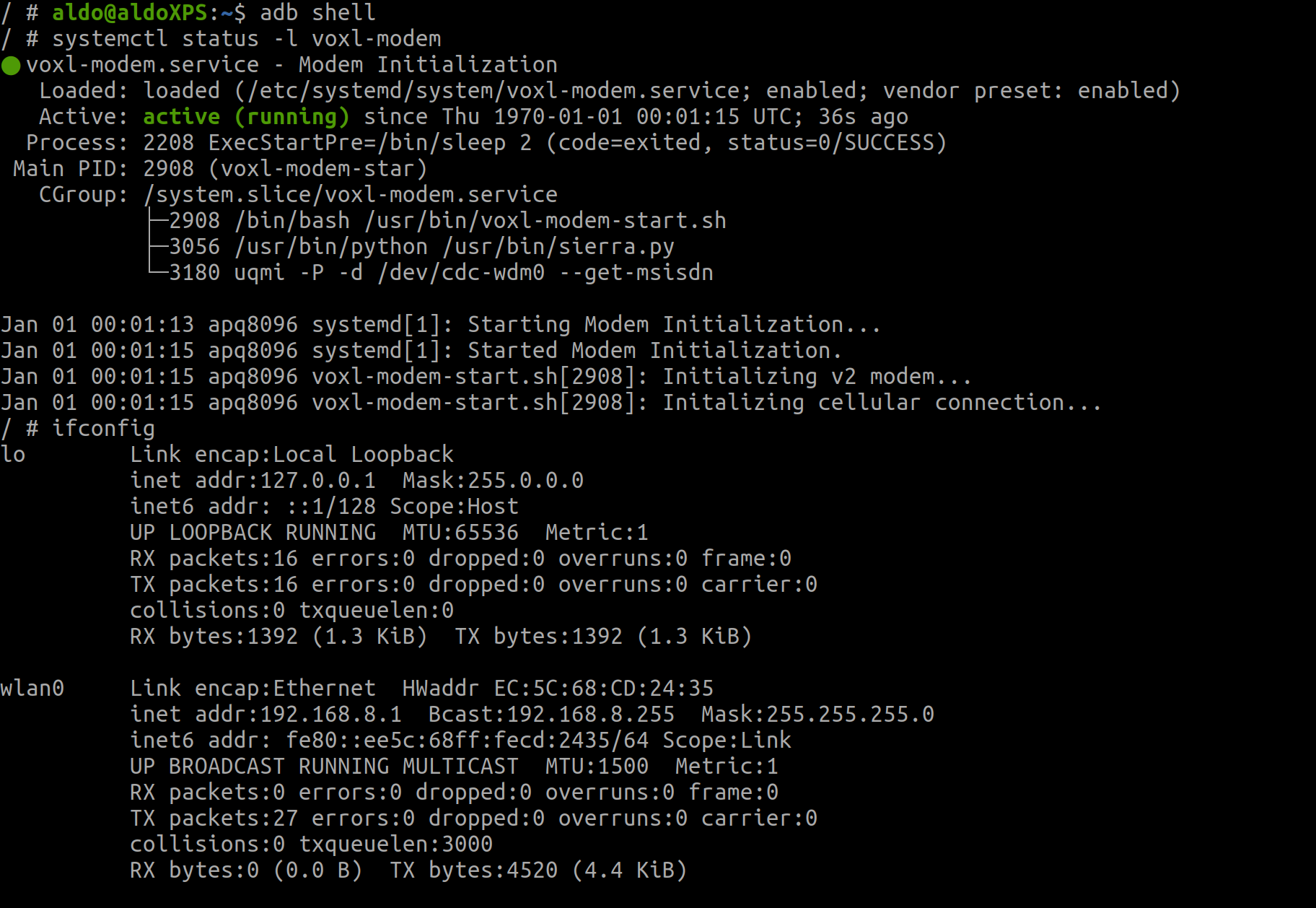
                  @Aldo-Castro-Freire Can you post the outputs of both systemctl status -l voxl-modem and ifconfig

                  1 Reply Last reply
                  0
                  • Aldo Castro FreireA Offline
                    Aldo Castro FreireA Offline
                    Aldo Castro Freire
                    Regular
                    wrote on last edited by
                    #12

                    these are the outputs:
                    5ec57739-dd9c-4970-87b5-21e26c4abafb-image.png

                    Aldo Castro FreireA 1 Reply Last reply
                    0
                    • Aldo Castro FreireA Aldo Castro Freire

                      these are the outputs:
                      5ec57739-dd9c-4970-87b5-21e26c4abafb-image.png

                      Aldo Castro FreireA Offline
                      Aldo Castro FreireA Offline
                      Aldo Castro Freire
                      Regular
                      wrote on last edited by
                      #13

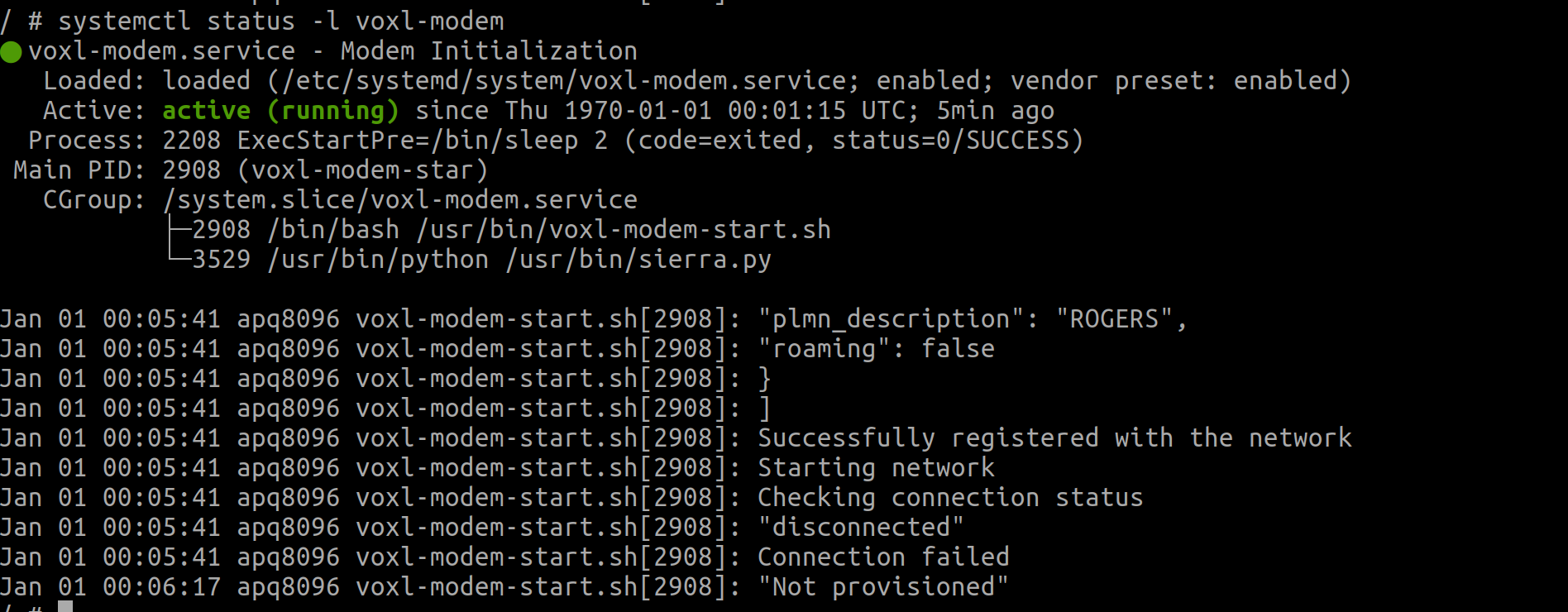
                      wait the first one changed:
                      d1249b29-2db4-4450-9ab6-d1ee188a0fc8-image.png

                      1 Reply Last reply
                      0
                      • tomT Offline
                        tomT Offline
                        tom
                        admin
                        wrote on last edited by
                        #14

                        Have you tested this SIM card previously? With another phone perhaps to determine that it is activated correctly?

                        1 Reply Last reply
                        0
                        • tomT Offline
                          tomT Offline
                          tom
                          admin
                          wrote on last edited by tom
                          #15

                          Antoher thing to try is to disable the modem startup script using systemctl disable voxl-modem and then rebooting your voxl. After you reboot, ADB back in and run voxl-modem-start.sh. This should allow you to see the script's entire output.

                          1 Reply Last reply
                          0
                          • Aldo Castro FreireA Offline
                            Aldo Castro FreireA Offline
                            Aldo Castro Freire
                            Regular
                            wrote on last edited by
                            #16

                            okay that worked, one more question for the openVPN I am new to yocto linux, how do I know if the daemon was able to connect to the openVPN server, my IP still the same.

                            1 Reply Last reply
                            0
                            • tomT Offline
                              tomT Offline
                              tom
                              admin
                              wrote on last edited by
                              #17

                              OpenVPN will usually create a new network interface, similar to tun or tun0 and should route traffic through there. If you run ifconfig you will see a list of network interfaces. You will also need to make sure that OpenVPN is starting after you have connected to the internet as it will most likely fail to connect to the VPN and not retry with default settings.

                              Aldo Castro FreireA 1 Reply Last reply
                              0
                              • tomT tom

                                OpenVPN will usually create a new network interface, similar to tun or tun0 and should route traffic through there. If you run ifconfig you will see a list of network interfaces. You will also need to make sure that OpenVPN is starting after you have connected to the internet as it will most likely fail to connect to the VPN and not retry with default settings.

                                Aldo Castro FreireA Offline
                                Aldo Castro FreireA Offline
                                Aldo Castro Freire
                                Regular
                                wrote on last edited by
                                #18

                                @tom thanks apparently the openvpn version needed to be updated the default version that comes with voxl does not work for me

                                modaltbM 1 Reply Last reply
                                0
                                • Aldo Castro FreireA Aldo Castro Freire

                                  @tom thanks apparently the openvpn version needed to be updated the default version that comes with voxl does not work for me

                                  modaltbM Offline
                                  modaltbM Offline
                                  modaltb
                                  ModalAI Team
                                  wrote on last edited by
                                  #19

                                  @Aldo-Castro-Freire thanks for the feedback, do you mind sharing the openVPN Client and Server versions you ended up using that worked?

                                  We've tested using server v2.4.8, voxl-vpn (v2.1.3 inside that), and OpenVPN Connect ver 3.2.2 on Adroid.

                                  1 Reply Last reply
                                  0

                                  Hello! It looks like you're interested in this conversation, but you don't have an account yet.

                                  Getting fed up of having to scroll through the same posts each visit? When you register for an account, you'll always come back to exactly where you were before, and choose to be notified of new replies (either via email, or push notification). You'll also be able to save bookmarks and upvote posts to show your appreciation to other community members.

                                  With your input, this post could be even better 💗

                                  Register Login
                                  Reply
                                  • Reply as topic
                                  Log in to reply
                                  • Oldest to Newest
                                  • Newest to Oldest
                                  • Most Votes


                                  ModalAI
                                  Categories Recent Tags ModalAI.com Docs
                                  © 2026 ModalAI® · Accelerating autonomy for smaller, smarter, safer drones · Powered by NodeBB
                                  • Login

                                  • Login or register to search.
                                  • First post
                                    Last post
                                  0
                                  • Categories
                                  • Recent
                                  • Tags
                                  • Popular
                                  • Users
                                  • Groups