Skip to content
  • Categories
  • Recent
  • Tags
  • Popular
  • Users
  • Groups
Collapse
Brand Logo

ModalAI Forum

  1. ModalAI Support Forum
  2. VOXL Dev Drones
  3. Starling & Starling 2
  4. VOXL-2 Drone M0054-2 Boot Issue After C26 Camera Update

VOXL-2 Drone M0054-2 Boot Issue After C26 Camera Update

Scheduled Pinned Locked Moved Starling & Starling 2
voxl2starling2
21 Posts 3 Posters 4.3k Views 3 Watching
  • Oldest to Newest
  • Newest to Oldest
  • Most Votes
Reply
  • Reply as topic
Log in to reply
This topic has been deleted. Only users with topic management privileges can see it.
  • A Offline
    A Offline
    antenna-eng
    wrote on last edited by antenna-eng
    #1

    Hi everyone,
    I recently upgraded my VOXL2 Starling drone to the C26 camera package. I didn’t have the TOF sensor and needed one to run the VOXL Mapper (and have obstacle avoidance). I disassembled the drone, removed the old camera interface modules. Then installed the new camera interface module (now a larger single board). I then reassembled the drone.

    I’m running into an issue with my VOXL-2 board (M0054-2) after attempting to update the camera to a C26 configuration. Here’s what I’ve done so far:

    1. I 3D printed the mounts and connected everything according to the C26 setup.
    2. After connecting the new camera, the drone powers on, plays the boot chime, and shows the following status lights:
      • D1: Green
      • DS1: Green

    However, the drone doesn’t fully boot and doesn’t show up via USB connection.
    Troubleshooting Steps Taken:

    • I tried putting the drone into fastboot mode, but it still didn’t register any USB connection. (I couldn’t confirm visually if it entered fastboot mode as there don’t seem to be any indicator lights for this.)
    • I followed the Emergency Download Mode guide (https://docs.modalai.com/voxl2-unbricking/) to attempt a recovery. I reached the “Provision” step, where I was supposed to provision the device through the web UI. However, this step failed.
    • I could see Qualcomm’s chip listed in my USB devices, so there seems to be some connectivity at that level.
      At this point, I’m stuck and not sure how to proceed. Has anyone experienced something similar or have any suggestions on how to get the drone up and running again?

    Thanks,
    Daniel

    tomT 1 Reply Last reply
    0
    • A antenna-eng

      Hi everyone,
      I recently upgraded my VOXL2 Starling drone to the C26 camera package. I didn’t have the TOF sensor and needed one to run the VOXL Mapper (and have obstacle avoidance). I disassembled the drone, removed the old camera interface modules. Then installed the new camera interface module (now a larger single board). I then reassembled the drone.

      I’m running into an issue with my VOXL-2 board (M0054-2) after attempting to update the camera to a C26 configuration. Here’s what I’ve done so far:

      1. I 3D printed the mounts and connected everything according to the C26 setup.
      2. After connecting the new camera, the drone powers on, plays the boot chime, and shows the following status lights:
        • D1: Green
        • DS1: Green

      However, the drone doesn’t fully boot and doesn’t show up via USB connection.
      Troubleshooting Steps Taken:

      • I tried putting the drone into fastboot mode, but it still didn’t register any USB connection. (I couldn’t confirm visually if it entered fastboot mode as there don’t seem to be any indicator lights for this.)
      • I followed the Emergency Download Mode guide (https://docs.modalai.com/voxl2-unbricking/) to attempt a recovery. I reached the “Provision” step, where I was supposed to provision the device through the web UI. However, this step failed.
      • I could see Qualcomm’s chip listed in my USB devices, so there seems to be some connectivity at that level.
        At this point, I’m stuck and not sure how to proceed. Has anyone experienced something similar or have any suggestions on how to get the drone up and running again?

      Thanks,
      Daniel

      tomT Offline
      tomT Offline
      tom
      admin
      wrote on last edited by
      #2

      @antenna-eng Can you try removing any peripherals including cameras from the board and see if you can get it to enumerate?

      1 Reply Last reply
      0
      • A Offline
        A Offline
        antenna-eng
        wrote on last edited by
        #3

        Hi Tom,

        I did try removing all of the cameras. Still had the same result. After removing the cameras, I next removed the Wifi board to see if that was causing an issue. Also had the same result. At that point, the only board connected to the VOXL 2 was the power board.

        tomT 1 Reply Last reply
        0
        • A antenna-eng

          Hi Tom,

          I did try removing all of the cameras. Still had the same result. After removing the cameras, I next removed the Wifi board to see if that was causing an issue. Also had the same result. At that point, the only board connected to the VOXL 2 was the power board.

          tomT Offline
          tomT Offline
          tom
          admin
          wrote on last edited by
          #4

          @antenna-eng When the switch is set to OFF and the board is powered and plugged in to your machine, what do you see with lsusb?

          A 2 Replies Last reply
          0
          • tomT tom

            @antenna-eng When the switch is set to OFF and the board is powered and plugged in to your machine, what do you see with lsusb?

            A Offline
            A Offline
            antenna-eng
            wrote on last edited by
            #5

            @tom I ran lsusb before connecting and after to see the change. Only the normal system USB devices are appearing.

            1 Reply Last reply
            0
            • tomT tom

              @antenna-eng When the switch is set to OFF and the board is powered and plugged in to your machine, what do you see with lsusb?

              A Offline
              A Offline
              antenna-eng
              wrote on last edited by
              #6

              @tom Is the VOXL2 board is malfunctioning? Is there any other way to test the board?

              tomT 1 Reply Last reply
              0
              • A antenna-eng

                @tom Is the VOXL2 board is malfunctioning? Is there any other way to test the board?

                tomT Offline
                tomT Offline
                tom
                admin
                wrote on last edited by
                #7

                @antenna-eng Are you running linux natively on your machine or are you using a VM?

                A 1 Reply Last reply
                0
                • tomT tom

                  @antenna-eng Are you running linux natively on your machine or are you using a VM?

                  A Offline
                  A Offline
                  antenna-eng
                  wrote on last edited by
                  #8

                  @tom I'm using WSL Ubuntu to connect to it. It was working well previously.

                  tomT VinnyV 2 Replies Last reply
                  0
                  • A antenna-eng

                    @tom I'm using WSL Ubuntu to connect to it. It was working well previously.

                    tomT Offline
                    tomT Offline
                    tom
                    admin
                    wrote on last edited by
                    #9

                    @antenna-eng It's possible that the board is booting into a mode that WSL doesn't recognize. I haven't used WSL myself, I would recommend booting a linux machine or dual booting your machine if possible.

                    Does the windows device manager recognize it at all? It may be enumerating as a different device type depending on the state of the board

                    1 Reply Last reply
                    0
                    • A antenna-eng

                      @tom I'm using WSL Ubuntu to connect to it. It was working well previously.

                      VinnyV Offline
                      VinnyV Offline
                      Vinny
                      ModalAI Team
                      wrote on last edited by
                      #10

                      Hi @antenna-eng
                      I've tried WSL for years internally with no luck.. it just does not work!!
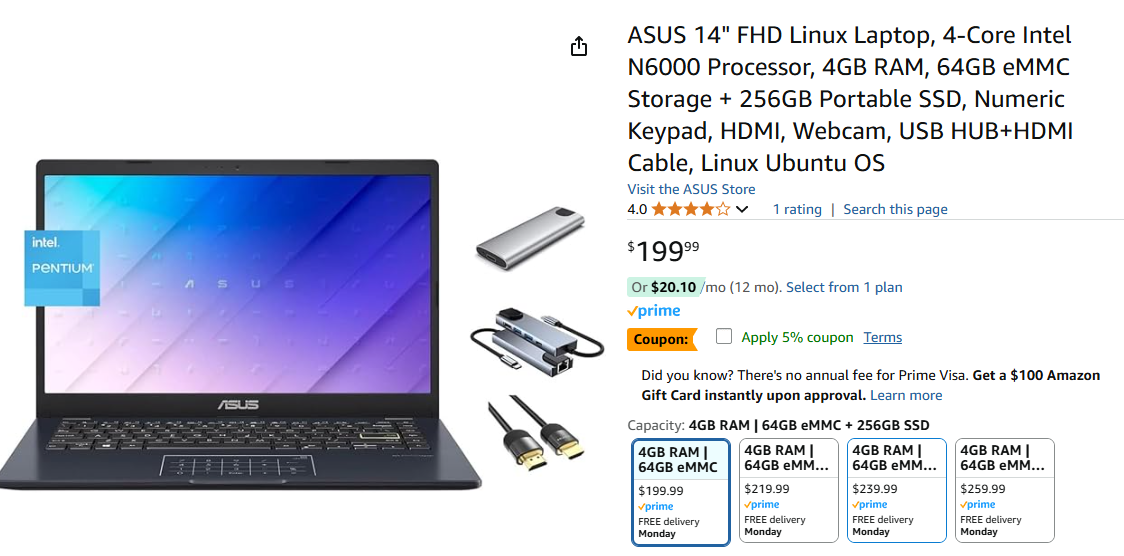
                      It's worth buying a $300 Ubuntu laptop and know your issues may all be solved!!! I just searched AMZN and found some for less than $250!!!

                      VinnyV A 3 Replies Last reply
                      0
                      • VinnyV Vinny

                        Hi @antenna-eng
                        I've tried WSL for years internally with no luck.. it just does not work!!
                        It's worth buying a $300 Ubuntu laptop and know your issues may all be solved!!! I just searched AMZN and found some for less than $250!!!

                        VinnyV Offline
                        VinnyV Offline
                        Vinny
                        ModalAI Team
                        wrote on last edited by
                        #11

                        @antenna-eng 17c7725c-359e-4e0d-a25f-4e693524da7d-image.png

                        1 Reply Last reply
                        0
                        • VinnyV Vinny

                          Hi @antenna-eng
                          I've tried WSL for years internally with no luck.. it just does not work!!
                          It's worth buying a $300 Ubuntu laptop and know your issues may all be solved!!! I just searched AMZN and found some for less than $250!!!

                          A Offline
                          A Offline
                          antenna-eng
                          wrote on last edited by
                          #12

                          @Vinny I also have other Linux systems (Ubuntu, Redhat, etc) that I can use. We were using WSL to connect to it and it was working fine. We can try some other systems to rule out that issue.

                          1 Reply Last reply
                          0
                          • VinnyV Vinny

                            Hi @antenna-eng
                            I've tried WSL for years internally with no luck.. it just does not work!!
                            It's worth buying a $300 Ubuntu laptop and know your issues may all be solved!!! I just searched AMZN and found some for less than $250!!!

                            A Offline
                            A Offline
                            antenna-eng
                            wrote on last edited by
                            #13

                            @Vinny I was reminded after my post that our team did try the system on Ubuntu. Just to check, one of my team members just tried it on a Ubuntu system we have and it doesn't show up as a USB device. What do you think we should do?

                            VinnyV tomT 2 Replies Last reply
                            0
                            • A antenna-eng

                              @Vinny I was reminded after my post that our team did try the system on Ubuntu. Just to check, one of my team members just tried it on a Ubuntu system we have and it doesn't show up as a USB device. What do you think we should do?

                              VinnyV Offline
                              VinnyV Offline
                              Vinny
                              ModalAI Team
                              wrote on last edited by
                              #14

                              Hi @antenna-eng ,
                              @tom has you covered, I was just expressing my experiences with WSL in the hopes it helped.
                              Thanks!

                              1 Reply Last reply
                              0
                              • A antenna-eng

                                @Vinny I was reminded after my post that our team did try the system on Ubuntu. Just to check, one of my team members just tried it on a Ubuntu system we have and it doesn't show up as a USB device. What do you think we should do?

                                tomT Offline
                                tomT Offline
                                tom
                                admin
                                wrote on last edited by
                                #15

                                @antenna-eng What do you see with lsusb?

                                A 1 Reply Last reply
                                0
                                • tomT tom

                                  @antenna-eng What do you see with lsusb?

                                  A Offline
                                  A Offline
                                  antenna-eng
                                  wrote on last edited by
                                  #16

                                  @tom
                                  The VOXL board isn't appearing when connected. I'm just seeing the system USB bus devices and things like the mouse/keyboard. Below is the output of lsusb

                                  drone@ubuntu:~$ lsusb
                                  Bus 002 Device 002: ID 2109:0822 VIA Labs, Inc. USB3.1 Hub
                                  Bus 002 Device 001: ID 1d6b:0003 Linux Foundation 3.0 root hub
                                  Bus 001 Device 005: ID 0bda:c811 Realtek Semiconductor Corp. 802.11ac NIC
                                  Bus 001 Device 004: ID 046d:c31c Logitech, Inc. Keyboard K120
                                  Bus 001 Device 003: ID 046d:c05a Logitech, Inc. M90/M100 Optical Mouse
                                  Bus 001 Device 002: ID 2109:2822 VIA Labs, Inc. USB2.0 Hub
                                  Bus 001 Device 001: ID 1d6b:0002 Linux Foundation 2.0 root hub

                                  tomT 1 Reply Last reply
                                  0
                                  • A antenna-eng

                                    @tom
                                    The VOXL board isn't appearing when connected. I'm just seeing the system USB bus devices and things like the mouse/keyboard. Below is the output of lsusb

                                    drone@ubuntu:~$ lsusb
                                    Bus 002 Device 002: ID 2109:0822 VIA Labs, Inc. USB3.1 Hub
                                    Bus 002 Device 001: ID 1d6b:0003 Linux Foundation 3.0 root hub
                                    Bus 001 Device 005: ID 0bda:c811 Realtek Semiconductor Corp. 802.11ac NIC
                                    Bus 001 Device 004: ID 046d:c31c Logitech, Inc. Keyboard K120
                                    Bus 001 Device 003: ID 046d:c05a Logitech, Inc. M90/M100 Optical Mouse
                                    Bus 001 Device 002: ID 2109:2822 VIA Labs, Inc. USB2.0 Hub
                                    Bus 001 Device 001: ID 1d6b:0002 Linux Foundation 2.0 root hub

                                    tomT Offline
                                    tomT Offline
                                    tom
                                    admin
                                    wrote on last edited by
                                    #17

                                    @antenna-eng Can you run sudo dmesg -wH and then plug in the board to your machine and see if it's enumerating?

                                    A 1 Reply Last reply
                                    0
                                    • tomT tom

                                      @antenna-eng Can you run sudo dmesg -wH and then plug in the board to your machine and see if it's enumerating?

                                      A Offline
                                      A Offline
                                      antenna-eng
                                      wrote on last edited by
                                      #18

                                      @tom Using the dmesg -wH command you provided, I can't see the device enumerating after plugging it in. I also tried different USB cables just to check. Still no change.

                                      tomT 1 Reply Last reply
                                      0
                                      • A antenna-eng

                                        @tom Using the dmesg -wH command you provided, I can't see the device enumerating after plugging it in. I also tried different USB cables just to check. Still no change.

                                        tomT Offline
                                        tomT Offline
                                        tom
                                        admin
                                        wrote on last edited by
                                        #19

                                        @antenna-eng How are you powering the board?

                                        A 1 Reply Last reply
                                        0
                                        • tomT tom

                                          @antenna-eng How are you powering the board?

                                          A Offline
                                          A Offline
                                          antenna-eng
                                          wrote on last edited by
                                          #20

                                          @tom I connected it to the battery. I made sure the battery was charged.

                                          tomT 1 Reply Last reply
                                          0

                                          Hello! It looks like you're interested in this conversation, but you don't have an account yet.

                                          Getting fed up of having to scroll through the same posts each visit? When you register for an account, you'll always come back to exactly where you were before, and choose to be notified of new replies (either via email, or push notification). You'll also be able to save bookmarks and upvote posts to show your appreciation to other community members.

                                          With your input, this post could be even better 💗

                                          Register Login
                                          Reply
                                          • Reply as topic
                                          Log in to reply
                                          • Oldest to Newest
                                          • Newest to Oldest
                                          • Most Votes


                                          ModalAI
                                          Categories Recent Tags ModalAI.com Docs
                                          © 2026 ModalAI® · Accelerating autonomy for smaller, smarter, safer drones · Powered by NodeBB
                                          • Login

                                          • Don't have an account? Register

                                          • Login or register to search.
                                          • First post
                                            Last post
                                          0
                                          • Categories
                                          • Recent
                                          • Tags
                                          • Popular
                                          • Users
                                          • Groups