Skip to content
  • Categories
  • Recent
  • Tags
  • Popular
  • Users
  • Groups
Collapse
Brand Logo

ModalAI Forum

  1. ModalAI Support Forum
  2. VOXL Accessories
  3. Microhard Modems
  4. Flight Deck with Microhard Radio not connecting to QGC

Flight Deck with Microhard Radio not connecting to QGC

Scheduled Pinned Locked Moved Microhard Modems
13 Posts 3 Posters 2.5k Views 2 Watching
  • Oldest to Newest
  • Newest to Oldest
  • Most Votes
Reply
  • Reply as topic
Log in to reply
This topic has been deleted. Only users with topic management privileges can see it.
  • Daniel RyuD Offline
    Daniel RyuD Offline
    Daniel Ryu
    Regular
    wrote on last edited by
    #1

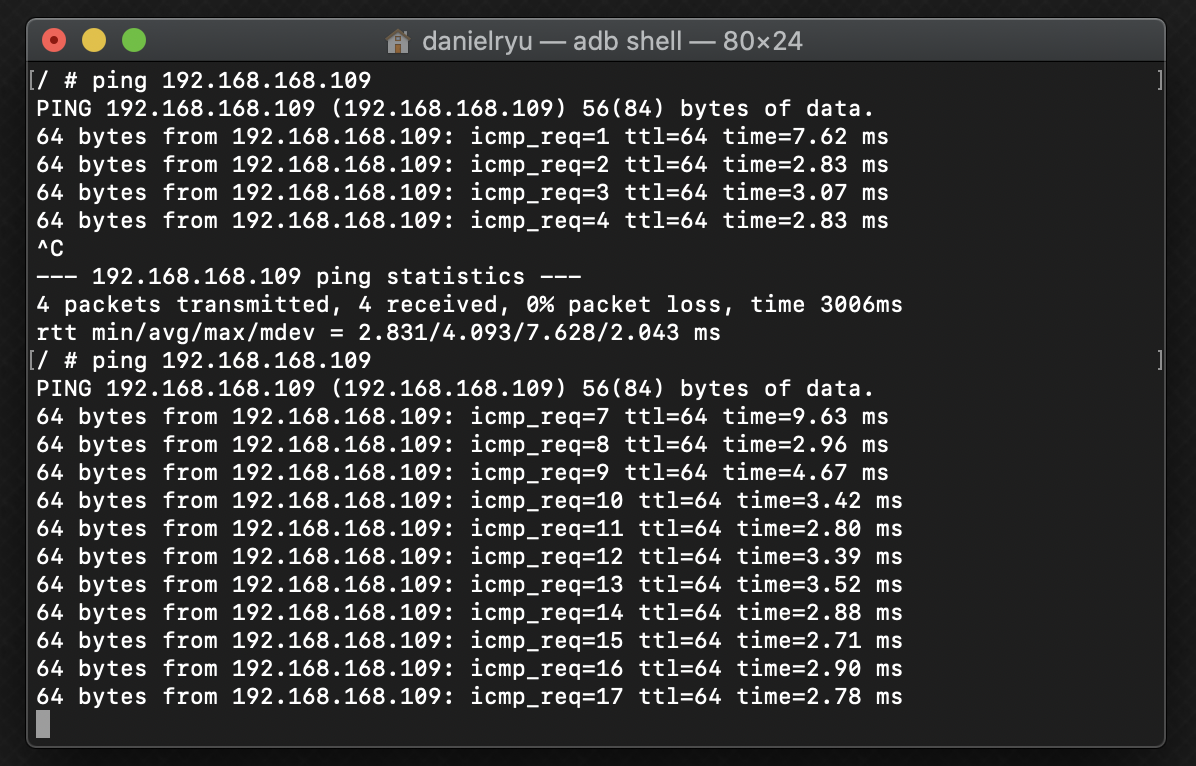
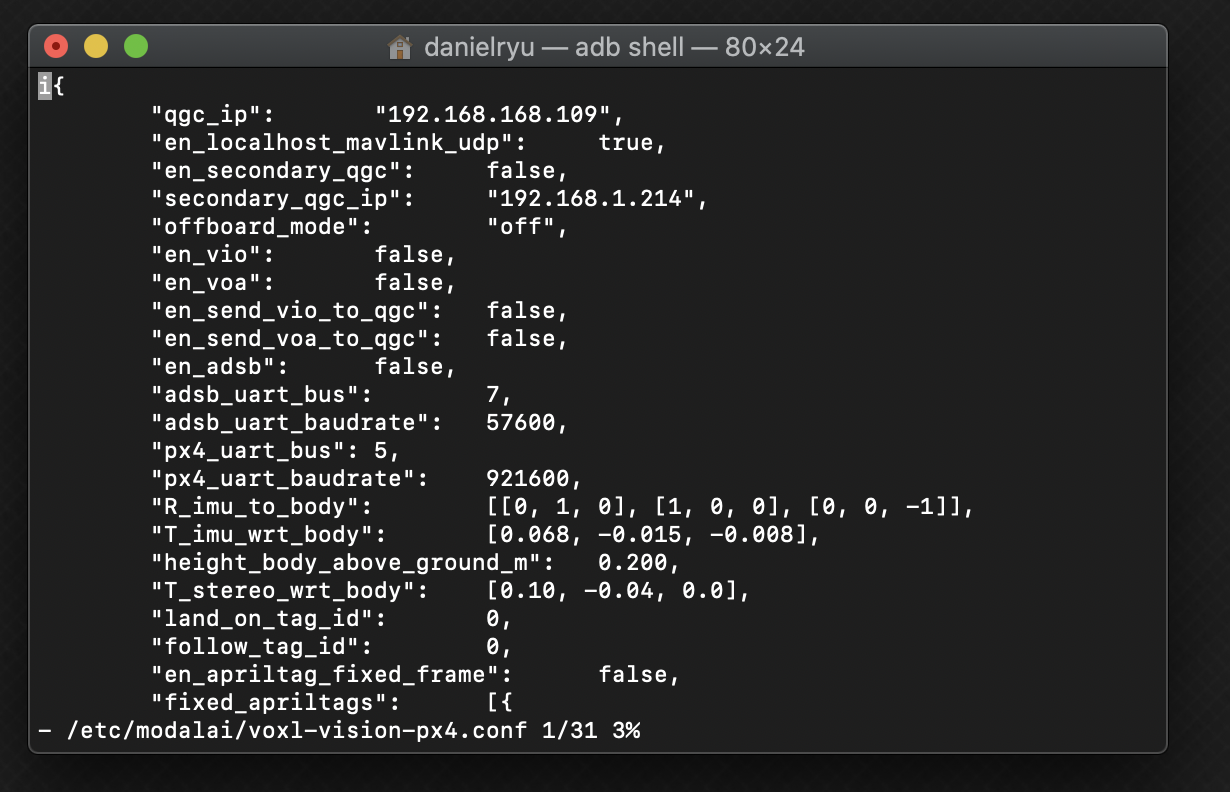
    Following this guide here, I was able to connect one microhard radio from my PC to one wired to the flight deck. With VOXL shell, I was able to ping the PC's ip address. As per the guide, I updated the qgc_ip field in voxl-vision-px4.conf to my PC's ip address and reset the px4 service. However, QGC is still unable to find the drone. Any tips on what I am missing to have QGC find the drone?

    As a further note, when the Flight Deck is connected by wire to the PC (USB to QGC), my PC locates and connects to the drone.

    volx-vision-px4.conf
    32c004b1-3861-4cc3-bd3c-57cb05ddf3c9-image.png

    Pinging computer IP:
    90f2ff45-e3ac-49c1-8f0b-ce3921893141-image.png

    PC Microhard radio IP: 192.168.168.1
    VOXL Microhard radio IP: 192.168.168.2

    1 Reply Last reply
    0
    • tomT Offline
      tomT Offline
      tom
      admin
      wrote on last edited by tom
      #2

      Hi @Daniel-Ryu ,

      One thing I would recommend doing is setting up the voxl-vision-px4 service using voxl-configure-vision-px4. It's possible that voxl-vision-px4 is in a weird state and this can help reset it and flush out any issues.

      Another thing to check is to turn off all other networks on your PC side of things, i.e. WiFi and any other ethernet connections you may have connected. They can sometimes interfere with things depending on their settings.

      Let me know if this solution helps.

      Daniel RyuD 1 Reply Last reply
      0
      • tomT tom

        Hi @Daniel-Ryu ,

        One thing I would recommend doing is setting up the voxl-vision-px4 service using voxl-configure-vision-px4. It's possible that voxl-vision-px4 is in a weird state and this can help reset it and flush out any issues.

        Another thing to check is to turn off all other networks on your PC side of things, i.e. WiFi and any other ethernet connections you may have connected. They can sometimes interfere with things depending on their settings.

        Let me know if this solution helps.

        Daniel RyuD Offline
        Daniel RyuD Offline
        Daniel Ryu
        Regular
        wrote on last edited by
        #3

        @tom ran voxl-configure-vision-px4 as per the instructions here and disabled all other networks. No change in situation. Since I can ping from the Flight Deck (using adb shell) to my laptop running QGC, I'm wondering whether the QGC connection service on the Flight Deck can even find the Microhard radio its connected to. Does this sound plausible? Let me know if there are any pictures/screenshots I can upload that would help diagnose this issue.

        1 Reply Last reply
        0
        • Chad SweetC Offline
          Chad SweetC Offline
          Chad Sweet
          ModalAI Team
          wrote on last edited by
          #4

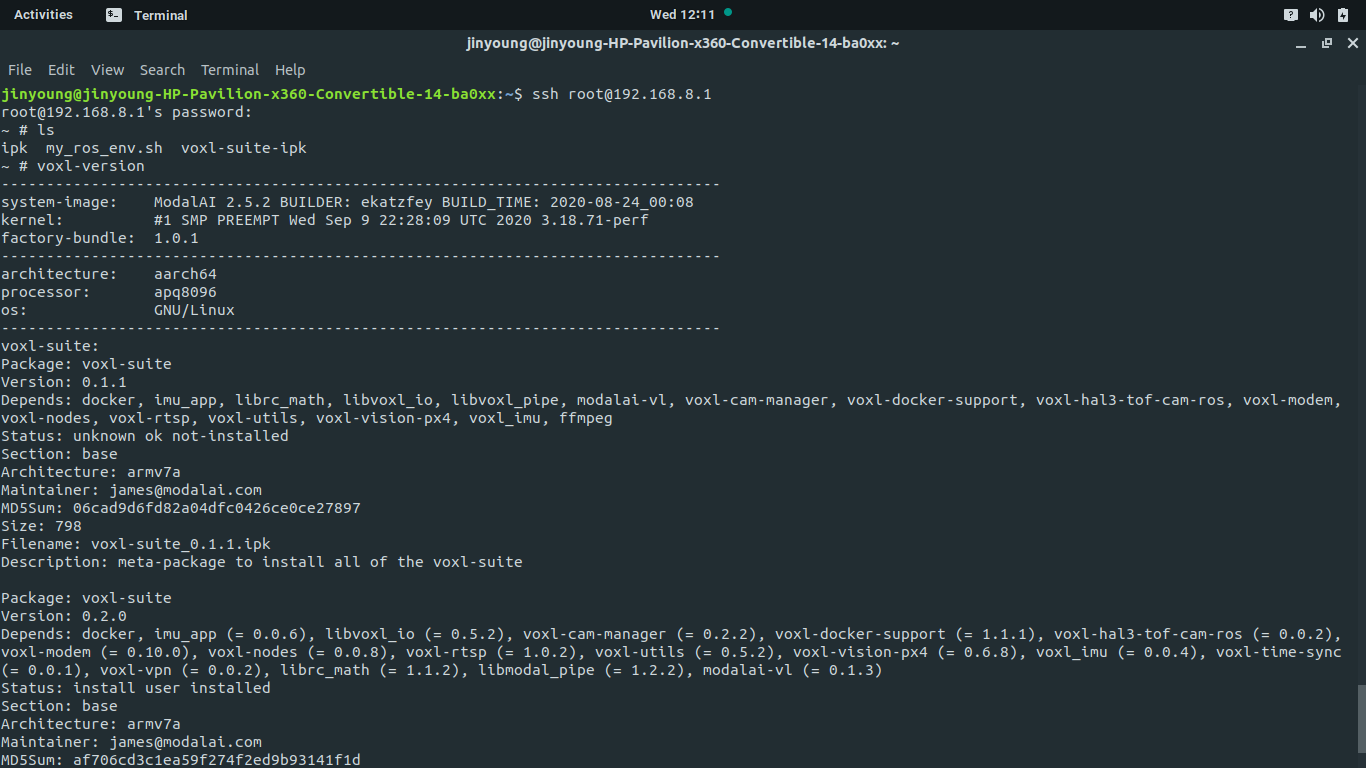
          This is pretty broadly used, so maybe some configuration has gotten wonky. Can you please share which version of software you are using? https://docs.modalai.com/voxl-utils/#voxl-version

          1 Reply Last reply
          0
          • Daniel RyuD Offline
            Daniel RyuD Offline
            Daniel Ryu
            Regular
            wrote on last edited by
            #5

            Screenshot from 2020-12-23 12-11-58.png

            1 Reply Last reply
            0
            • Daniel RyuD Offline
              Daniel RyuD Offline
              Daniel Ryu
              Regular
              wrote on last edited by
              #6

              If it helps, when connected to the flight deck via wifi following the quickstart on m500, my laptop QGC can connect to the flight deck

              1 Reply Last reply
              0
              • tomT Offline
                tomT Offline
                tom
                admin
                wrote on last edited by
                #7

                Hi @Daniel-Ryu,

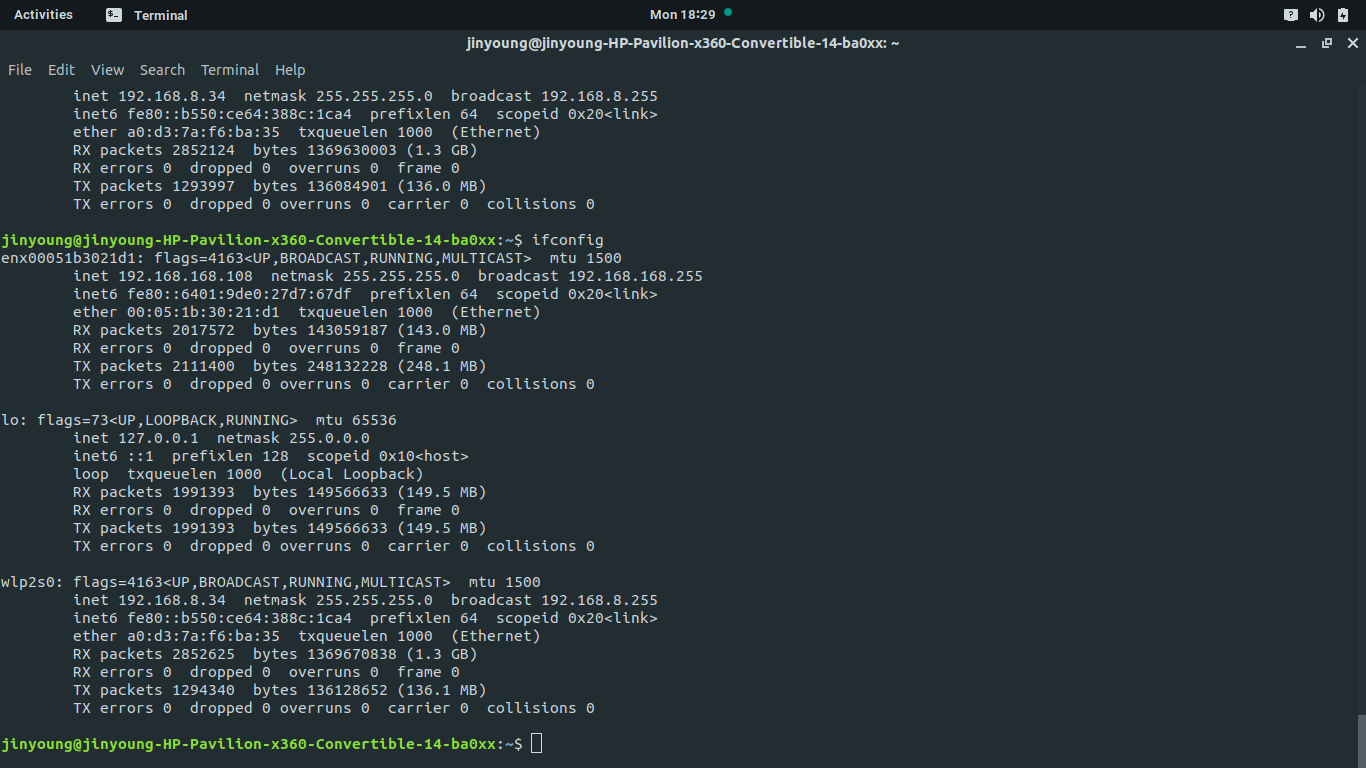
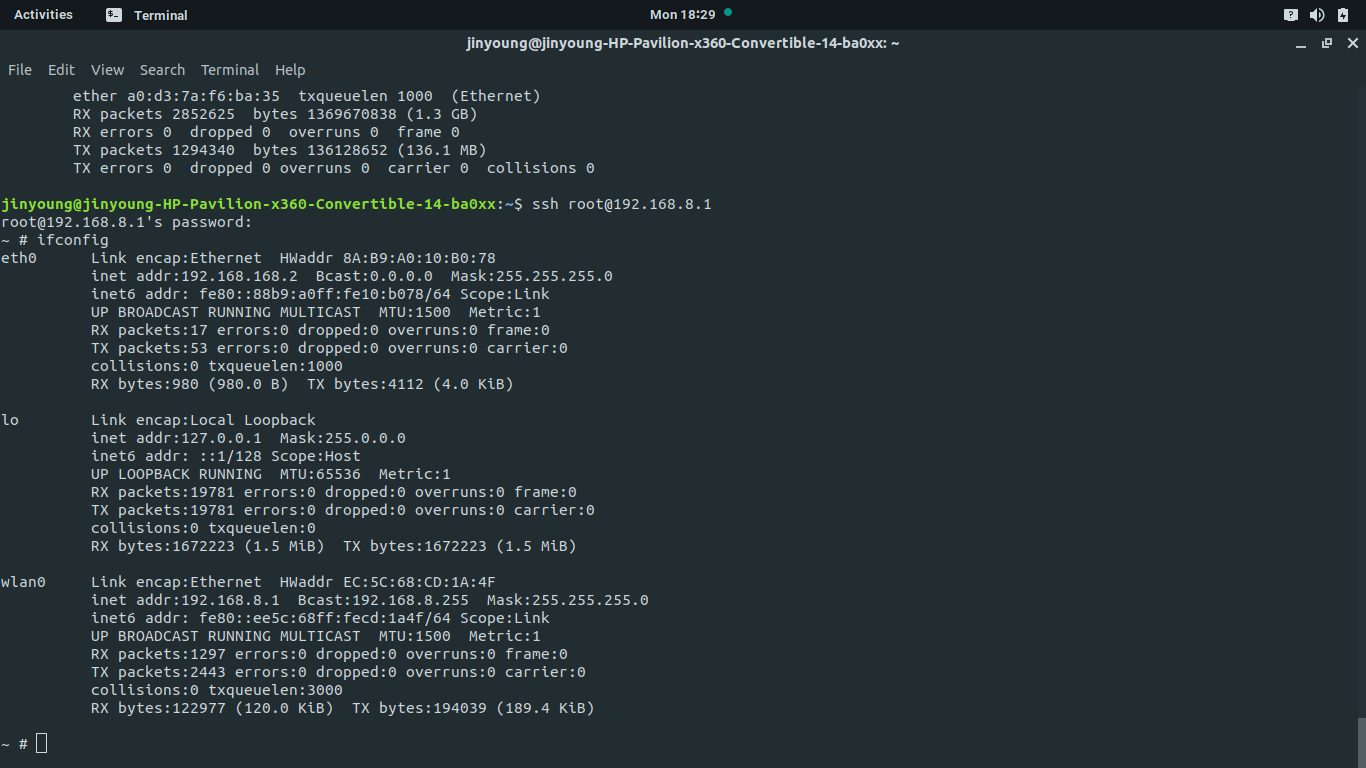
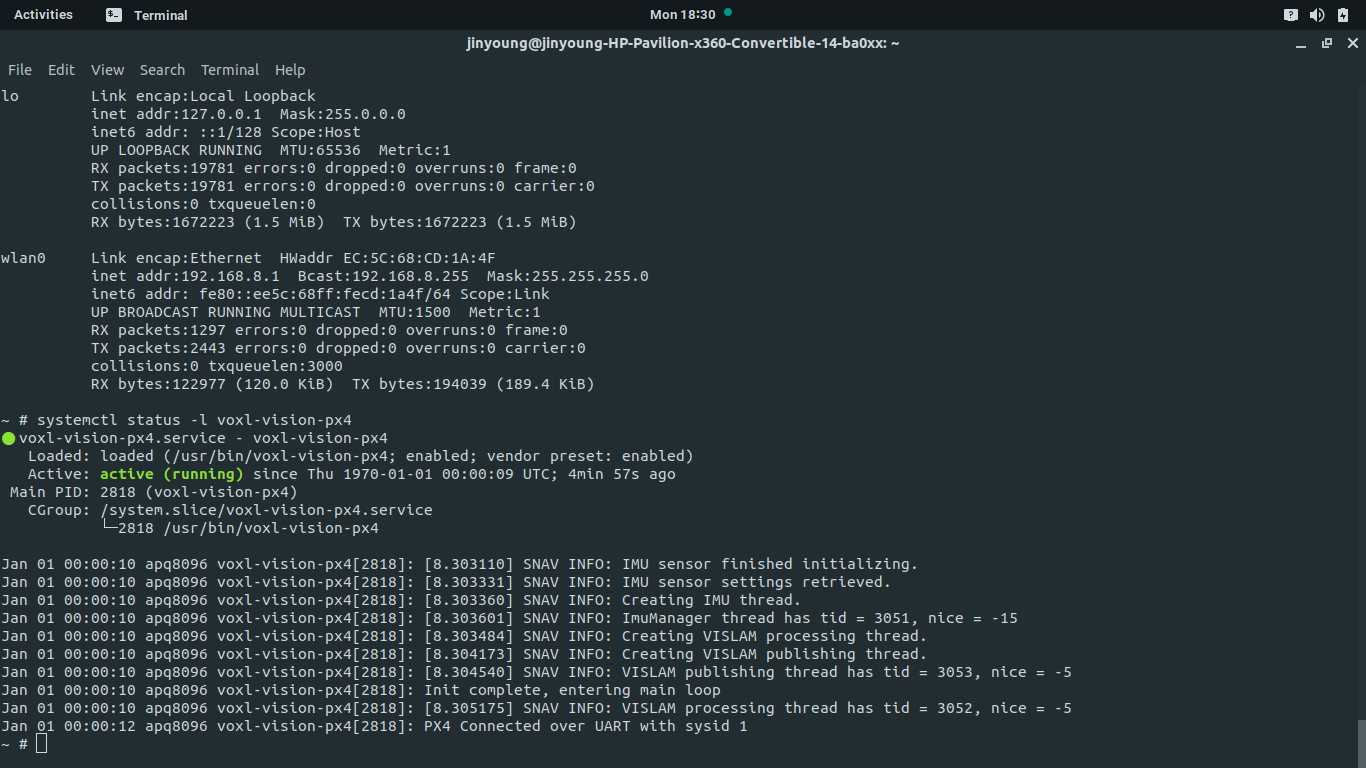
                Can you post the output from ifconfig on both your PC and VOXL when everything is powered on.

                1 Reply Last reply
                0
                • tomT Offline
                  tomT Offline
                  tom
                  admin
                  wrote on last edited by
                  #8

                  And could I also see the status of voxl-vision-px4 using systemctl status -l voxl-vision-px4

                  Daniel RyuD 1 Reply Last reply
                  0
                  • Daniel RyuD Offline
                    Daniel RyuD Offline
                    Daniel Ryu
                    Regular
                    wrote on last edited by
                    #9

                    Screenshot from 2020-12-28 18-29-17.png Screenshot from 2020-12-28 18-29-45.png Screenshot from 2020-12-28 18-30-47.png

                    1 Reply Last reply
                    0
                    • tomT tom

                      And could I also see the status of voxl-vision-px4 using systemctl status -l voxl-vision-px4

                      Daniel RyuD Offline
                      Daniel RyuD Offline
                      Daniel Ryu
                      Regular
                      wrote on last edited by
                      #10

                      @tom forgot to tag your name

                      1 Reply Last reply
                      0
                      • tomT Offline
                        tomT Offline
                        tom
                        admin
                        wrote on last edited by
                        #11

                        Hi @Daniel-Ryu ,

                        From the screenshots you provided it looks as though your ground control station has the IP address of 192.168.168.108 while in voxl-vision-px4.conf you have it set to 192.168.168.109. It is possible that the IP address of your ground control station changed after a reboot and voxl-vision-px4 is still looking for the old IP.

                        To prevent this problem in the future you should be able to set a static IP for your wired connection on your Ubuntu ground station.

                        1 Reply Last reply
                        0
                        • Daniel RyuD Offline
                          Daniel RyuD Offline
                          Daniel Ryu
                          Regular
                          wrote on last edited by
                          #12

                          @tom That was the problem! Thank you

                          tomT 1 Reply Last reply
                          1
                          • Daniel RyuD Daniel Ryu

                            @tom That was the problem! Thank you

                            tomT Offline
                            tomT Offline
                            tom
                            admin
                            wrote on last edited by
                            #13

                            @Daniel-Ryu Great to hear! I appreciate your patience with this.

                            1 Reply Last reply
                            0

                            Hello! It looks like you're interested in this conversation, but you don't have an account yet.

                            Getting fed up of having to scroll through the same posts each visit? When you register for an account, you'll always come back to exactly where you were before, and choose to be notified of new replies (either via email, or push notification). You'll also be able to save bookmarks and upvote posts to show your appreciation to other community members.

                            With your input, this post could be even better 💗

                            Register Login
                            Reply
                            • Reply as topic
                            Log in to reply
                            • Oldest to Newest
                            • Newest to Oldest
                            • Most Votes


                            ModalAI
                            Categories Recent Tags ModalAI.com Docs
                            © 2026 ModalAI® · Accelerating autonomy for smaller, smarter, safer drones · Powered by NodeBB
                            • Login

                            • Login or register to search.
                            • First post
                              Last post
                            0
                            • Categories
                            • Recent
                            • Tags
                            • Popular
                            • Users
                            • Groups