Skip to content
  • Categories
  • Recent
  • Tags
  • Popular
  • Users
  • Groups
Collapse
Brand Logo

ModalAI Forum

  1. ModalAI Support Forum
  2. General Questions
  3. Unable to setup VIO on external flight controller

Unable to setup VIO on external flight controller

Scheduled Pinned Locked Moved Unsolved General Questions
vioexternal fcposition-modevoxl2
7 Posts 3 Posters 2.5k Views 3 Watching
  • Oldest to Newest
  • Newest to Oldest
  • Most Votes
Reply
  • Reply as topic
Log in to reply
This topic has been deleted. Only users with topic management privileges can see it.
  • KevinChanK Offline
    KevinChanK Offline
    KevinChan
    wrote on last edited by
    #1

    Unable to setup VIO on external flight controller.
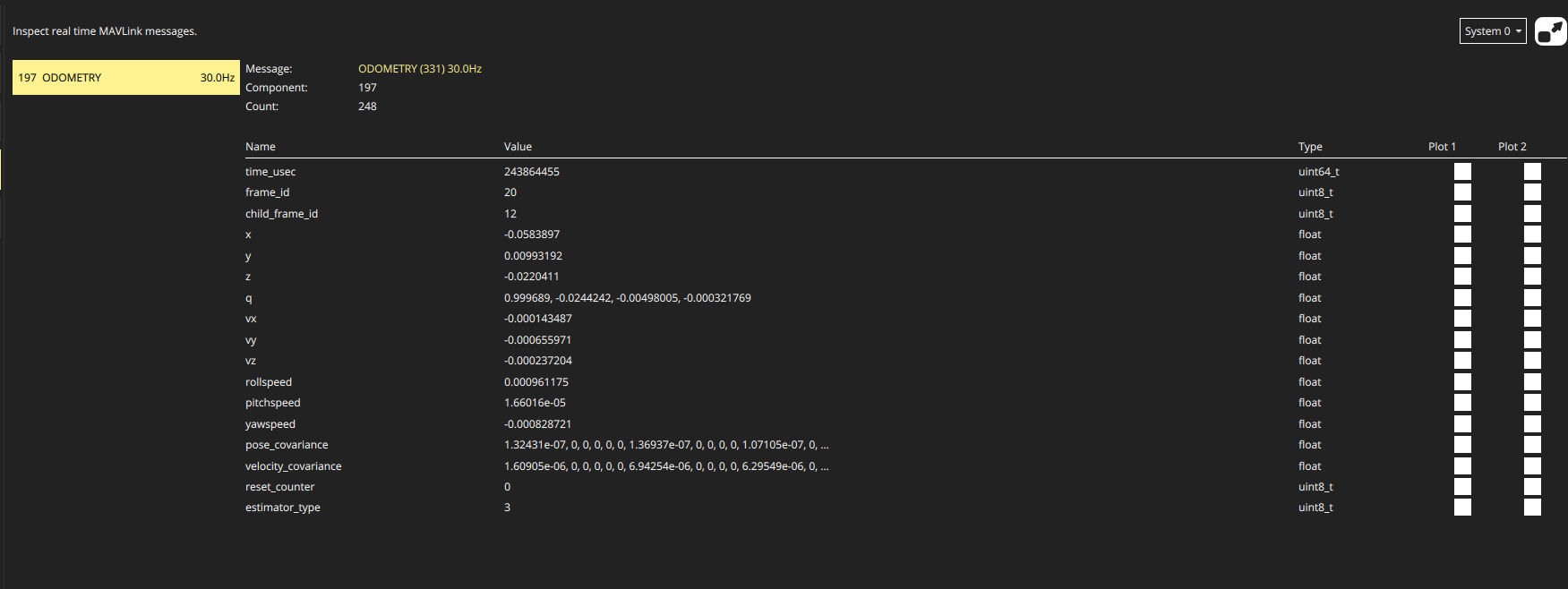
    I have set up and received Mavlink odometry message from Voxl 2.
    I have also set up the EKF2_AID_MASK value to 280.
    But I am still unable to switch to position mode with the error code "check for position estimate"

    POSITION_TARGET_LOCAL_NED xyz values are nan.
    What am I missing?
    Thank you~
    e0631970-6055-4ed9-a6ac-993921d6426e-image.png

    1 Reply Last reply
    0
    • Chad SweetC Offline
      Chad SweetC Offline
      Chad Sweet
      ModalAI Team
      wrote on last edited by
      #2

      In our troubleshooting VIO guide here, it says:

      If LOCAL_POSITION_NED and MAVLink Odometry message are reading 0 for X and Y after movement of the robot, it is likely PX4’s EKF2 is set to require a magnetomter to initialize.

      PX4 1.12 and later have the following parameters which enable using VIO without a magnetometer:

      ## disable mag
      SYS_HAS_MAG	0
      EKF2_MAG_TYPE	5
      
      KevinChanK 1 Reply Last reply
      0
      • KevinChanK Offline
        KevinChanK Offline
        KevinChan
        wrote on last edited by KevinChan
        #3

        @Chad-Sweet said in Unable to setup VIO on external flight controller:

        EKF2_MAG_TYPE 5

        I have set both parameters.
        I have also set EKF2_HGT_MODE to vision.
        And it's still not working 😞

        In fact, LOCAL_POSITION_NED is nowhere to be found in mavlink, only POSITION_TARGET_LOCAL_NED, are they the same?
        I am currently using PX4 1.13.3
        Thank you for your swift reply~

        1 Reply Last reply
        0
        • Chad SweetC Chad Sweet

          In our troubleshooting VIO guide here, it says:

          If LOCAL_POSITION_NED and MAVLink Odometry message are reading 0 for X and Y after movement of the robot, it is likely PX4’s EKF2 is set to require a magnetomter to initialize.

          PX4 1.12 and later have the following parameters which enable using VIO without a magnetometer:

          ## disable mag
          SYS_HAS_MAG	0
          EKF2_MAG_TYPE	5
          
          KevinChanK Offline
          KevinChanK Offline
          KevinChan
          wrote on last edited by
          #4

          @Chad-Sweet After about a week of debugging, turns out external flight controller only works on the older version of firmware, VOXL2 Platform 0.9.
          Instead of the newest one VOXL2 Platform 1.3.1-0.8 or VOXL2 Platform 1.2.1-0.7.
          PLEASE state it in your documentation!
          I initially need to install the 1.2 version since I need to communicate with VOXL2 IO
          Thank you

          1 Reply Last reply
          0
          • Chad SweetC Offline
            Chad SweetC Offline
            Chad Sweet
            ModalAI Team
            wrote on last edited by
            #5

            Thank you for bringing this to our attention. There could be a regression. Our latest platform image is 0.9.5 which corresponds to system image 1.5.5 . Can you please help clarify which version you found not to work? Maybe there is a mismatch with what you are trying to achieve?

            https://docs.modalai.com/voxl2-system-image/#155-platform-release-095

            KevinChanK 1 Reply Last reply
            0
            • Chad SweetC Chad Sweet

              Thank you for bringing this to our attention. There could be a regression. Our latest platform image is 0.9.5 which corresponds to system image 1.5.5 . Can you please help clarify which version you found not to work? Maybe there is a mismatch with what you are trying to achieve?

              https://docs.modalai.com/voxl2-system-image/#155-platform-release-095

              KevinChanK Offline
              KevinChanK Offline
              KevinChan
              wrote on last edited by
              #6

              @Chad-Sweet Platform 1.3.1-0.8 and Platform 1.2.1-0.7 doesn't work, 0.9.5 works. Didn't try 0.9

              1 Reply Last reply
              0
              • tomT Offline
                tomT Offline
                tom
                admin
                wrote on last edited by
                #7

                @KevinChan 0.9.5 is the newest, 0.9 is second newest, 1.3.1-0.8 (0.8) is super old. We changed our naming scheme some time ago so I can understand the confusion

                1 Reply Last reply
                0

                Reading along? Create a free ModalAI Forum account to join in.

                With an account you can reply, ask your own question, get an email when a ModalAI engineer answers, and mark the reply that solved it. Your place in each thread is saved between visits.

                Questions about VOXL, Flight Core, ESCs and ModalAI drones are answered here by the engineers who build them.

                Register Login
                Reply
                • Reply as topic
                Log in to reply
                • Oldest to Newest
                • Newest to Oldest
                • Most Votes


                ModalAI
                Categories Recent Tags ModalAI.com Docs
                © 2026 ModalAI® · Accelerating autonomy for smaller, smarter, safer drones · Powered by NodeBB
                • Login

                • Don't have an account? Register

                • Login or register to search.
                • First post
                  Last post
                0
                • Categories
                • Recent
                • Tags
                • Popular
                • Users
                • Groups

