Skip to content
  • Categories
  • Recent
  • Tags
  • Popular
  • Users
  • Groups
Collapse
Brand Logo

ModalAI Forum

  1. ModalAI Support Forum
  2. VOXL Dev Kits
  3. VOXL-CAM
  4. Having issues Configuring ROS on VOXL CAM

Having issues Configuring ROS on VOXL CAM

Scheduled Pinned Locked Moved VOXL-CAM
21 Posts 5 Posters 6.8k Views 3 Watching
  • Oldest to Newest
  • Newest to Oldest
  • Most Votes
Reply
  • Reply as topic
Log in to reply
This topic has been deleted. Only users with topic management privileges can see it.
  • Bright NnadiB Offline
    Bright NnadiB Offline
    Bright Nnadi
    Contributor
    wrote on last edited by
    #10

    Saying the same thing 0f949cb3-ad26-4db0-b6b4-1a0998e38e3d.jpg

    1 Reply Last reply
    0
    • Chad SweetC Offline
      Chad SweetC Offline
      Chad Sweet
      ModalAI Team
      wrote on last edited by
      #11

      Assuming you are trying to run ROS master on your VOXL, first find out what is your VOXL's IP? Let's call that <VOXL IP>

      Then, can you ping that IP from the computer you are trying to run Rviz?

      $ ping <VOXL IP>
      

      If so, on VOXL edit your ROS environment

      export ROS_IP="<VOXL IP>"
      

      Then start ROS on the VOXL. Monitor the output of the ROS master when it launches, you should see the "roscore" IP the same as what you just configured.

      If so, configure the ROS environment on your PC

      What is the IP of your PC on the same network as the VOXL? We'll call that <PC IP>

      Configure the PC's ROS environment as such:

      export ROS_MASTER_URI="http://<VOXL IP>:11311"
      export ROS_IP="<PC IP>"
      

      Then launch RViz

      Note: The instructions above are configuring the master to be the VOXL by pointing both VOXL and the PC to the VOXL's IP address as master. Checkout slides 7,8,9 in the presentation here

      Bright NnadiB KrisK 3 Replies Last reply
      0
      • Chad SweetC Chad Sweet

        Assuming you are trying to run ROS master on your VOXL, first find out what is your VOXL's IP? Let's call that <VOXL IP>

        Then, can you ping that IP from the computer you are trying to run Rviz?

        $ ping <VOXL IP>
        

        If so, on VOXL edit your ROS environment

        export ROS_IP="<VOXL IP>"
        

        Then start ROS on the VOXL. Monitor the output of the ROS master when it launches, you should see the "roscore" IP the same as what you just configured.

        If so, configure the ROS environment on your PC

        What is the IP of your PC on the same network as the VOXL? We'll call that <PC IP>

        Configure the PC's ROS environment as such:

        export ROS_MASTER_URI="http://<VOXL IP>:11311"
        export ROS_IP="<PC IP>"
        

        Then launch RViz

        Note: The instructions above are configuring the master to be the VOXL by pointing both VOXL and the PC to the VOXL's IP address as master. Checkout slides 7,8,9 in the presentation here

        Bright NnadiB Offline
        Bright NnadiB Offline
        Bright Nnadi
        Contributor
        wrote on last edited by
        #12

        @Chad-Sweet thanks Chad, so I got Rviz working now !![0_1660157598192_05B72248-F814-4C2F-947E-4443E4FB94F3.jpeg](Uploading 45%)

        1 Reply Last reply
        0
        • Bright NnadiB Offline
          Bright NnadiB Offline
          Bright Nnadi
          Contributor
          wrote on last edited by
          #13

          Is the IP address of my VOXL CAM 192.168.8.1

          1 Reply Last reply
          0
          • Chad SweetC Chad Sweet

            Assuming you are trying to run ROS master on your VOXL, first find out what is your VOXL's IP? Let's call that <VOXL IP>

            Then, can you ping that IP from the computer you are trying to run Rviz?

            $ ping <VOXL IP>
            

            If so, on VOXL edit your ROS environment

            export ROS_IP="<VOXL IP>"
            

            Then start ROS on the VOXL. Monitor the output of the ROS master when it launches, you should see the "roscore" IP the same as what you just configured.

            If so, configure the ROS environment on your PC

            What is the IP of your PC on the same network as the VOXL? We'll call that <PC IP>

            Configure the PC's ROS environment as such:

            export ROS_MASTER_URI="http://<VOXL IP>:11311"
            export ROS_IP="<PC IP>"
            

            Then launch RViz

            Note: The instructions above are configuring the master to be the VOXL by pointing both VOXL and the PC to the VOXL's IP address as master. Checkout slides 7,8,9 in the presentation here

            Bright NnadiB Offline
            Bright NnadiB Offline
            Bright Nnadi
            Contributor
            wrote on last edited by
            #14

            @Chad-Sweet I’m connected to the VOXL using Adb not wifi

            1 Reply Last reply
            0
            • ? Offline
              ? Offline
              A Former User
              wrote on last edited by
              #15

              ROS uses wifi to communicate, not ADB. You'll need to connect the drone and you computer to the same network in order to use ros. This can either be done by connecting the drone to your home/work network or by setting the drone to serve as an AP. Instructions for either can be found here

              KrisK 2 Replies Last reply
              0
              • Chad SweetC Chad Sweet

                Assuming you are trying to run ROS master on your VOXL, first find out what is your VOXL's IP? Let's call that <VOXL IP>

                Then, can you ping that IP from the computer you are trying to run Rviz?

                $ ping <VOXL IP>
                

                If so, on VOXL edit your ROS environment

                export ROS_IP="<VOXL IP>"
                

                Then start ROS on the VOXL. Monitor the output of the ROS master when it launches, you should see the "roscore" IP the same as what you just configured.

                If so, configure the ROS environment on your PC

                What is the IP of your PC on the same network as the VOXL? We'll call that <PC IP>

                Configure the PC's ROS environment as such:

                export ROS_MASTER_URI="http://<VOXL IP>:11311"
                export ROS_IP="<PC IP>"
                

                Then launch RViz

                Note: The instructions above are configuring the master to be the VOXL by pointing both VOXL and the PC to the VOXL's IP address as master. Checkout slides 7,8,9 in the presentation here

                KrisK Offline
                KrisK Offline
                Kris
                Regular
                wrote on last edited by Kris
                #16

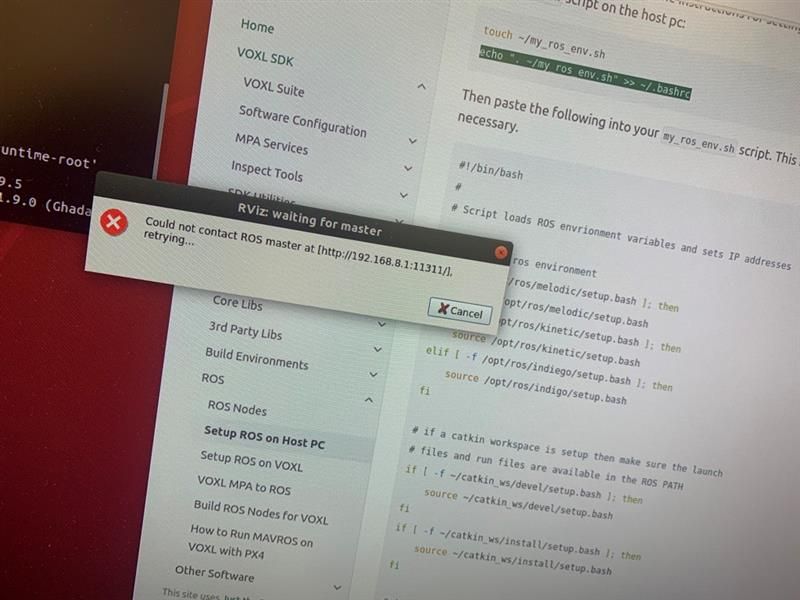
                @Chad-Sweet I am also having the same issue. I am not sure what im doing wrong.

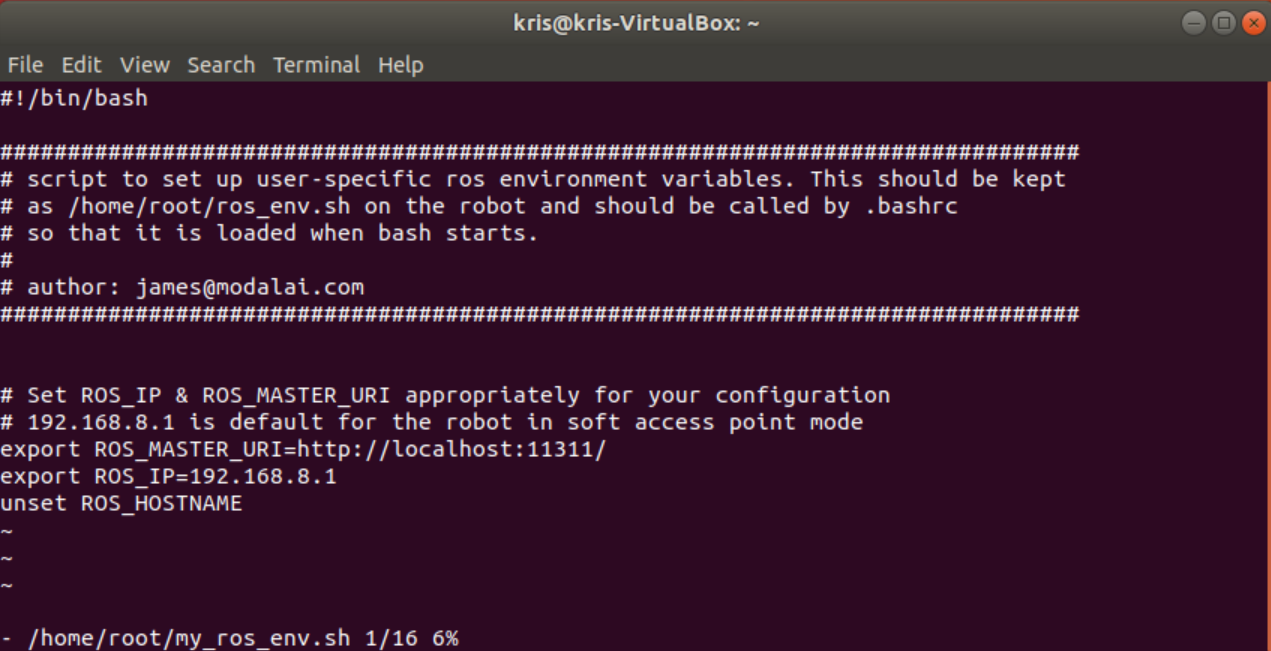
                This is my PC (my_ros_env.sh)
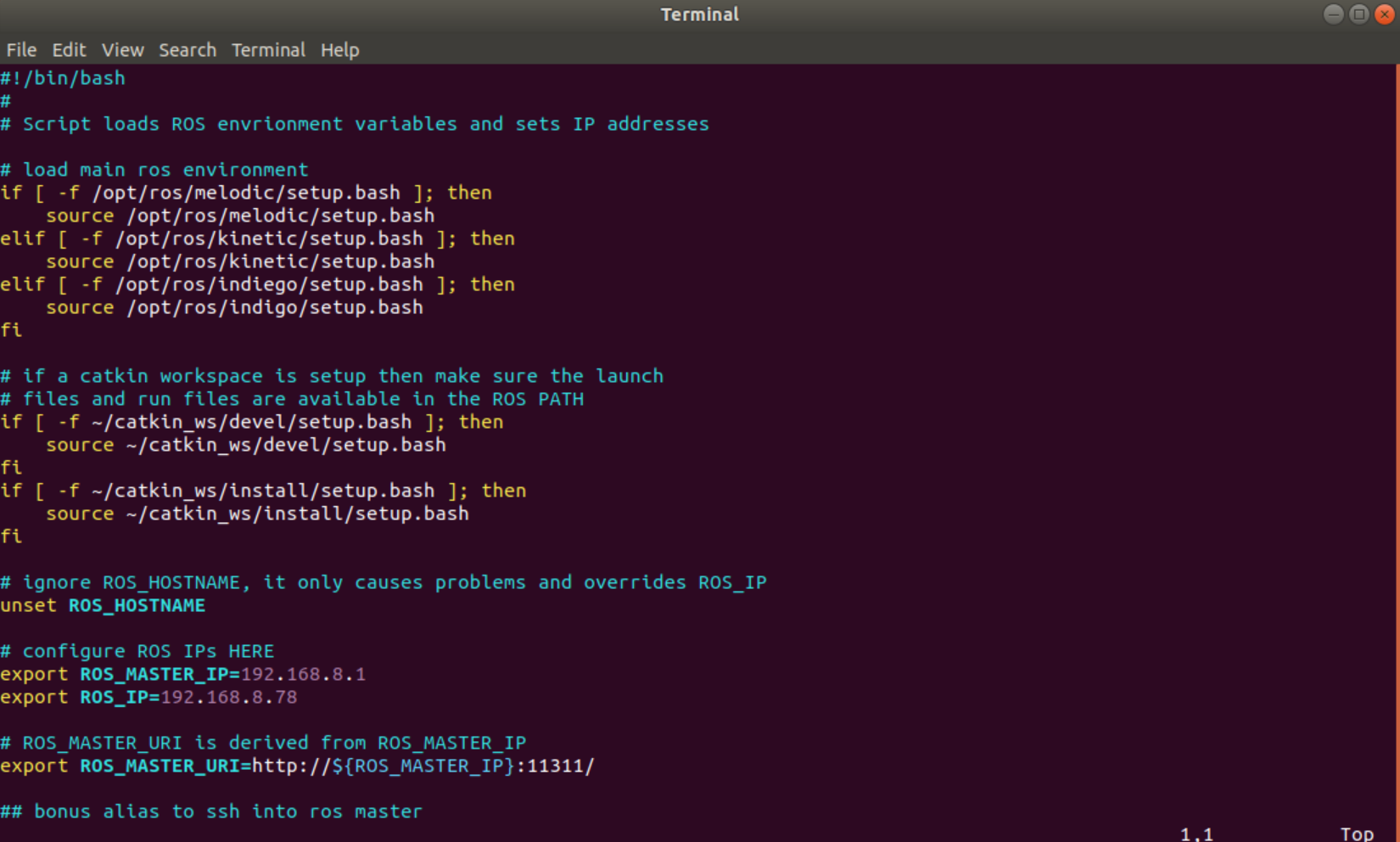
                PC my_ros_env.sh.png

                This is my VOXL (my_ros_env.sh)
                VOXL my_ros_env.sh.png

                This is what I get when I try to show my voxl-env
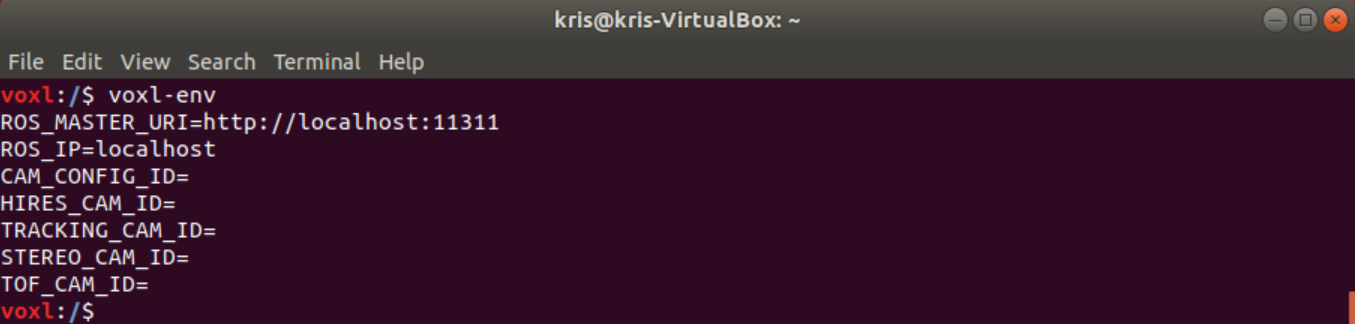
                VOXL env.png

                Setting up environment variables for ROS is a little confusing for me.

                I am using wifi to communicate with VOXL.
                My VOXL IP is the usual 192.168.8.1
                My PC IP is 192.168.8.78

                I am stuck here.
                Could someone please point me in the right direction?

                KrisK 1 Reply Last reply
                0
                • KrisK Kris

                  @Chad-Sweet I am also having the same issue. I am not sure what im doing wrong.

                  This is my PC (my_ros_env.sh)
                  PC my_ros_env.sh.png

                  This is my VOXL (my_ros_env.sh)
                  VOXL my_ros_env.sh.png

                  This is what I get when I try to show my voxl-env
                  VOXL env.png

                  Setting up environment variables for ROS is a little confusing for me.

                  I am using wifi to communicate with VOXL.
                  My VOXL IP is the usual 192.168.8.1
                  My PC IP is 192.168.8.78

                  I am stuck here.
                  Could someone please point me in the right direction?

                  KrisK Offline
                  KrisK Offline
                  Kris
                  Regular
                  wrote on last edited by
                  #17

                  Just wondering why my voxl environments are all blank everytime I try to view them. Should I " export " the values manually?

                  1 Reply Last reply
                  0
                  • ? A Former User

                    ROS uses wifi to communicate, not ADB. You'll need to connect the drone and you computer to the same network in order to use ros. This can either be done by connecting the drone to your home/work network or by setting the drone to serve as an AP. Instructions for either can be found here

                    KrisK Offline
                    KrisK Offline
                    Kris
                    Regular
                    wrote on last edited by
                    #18

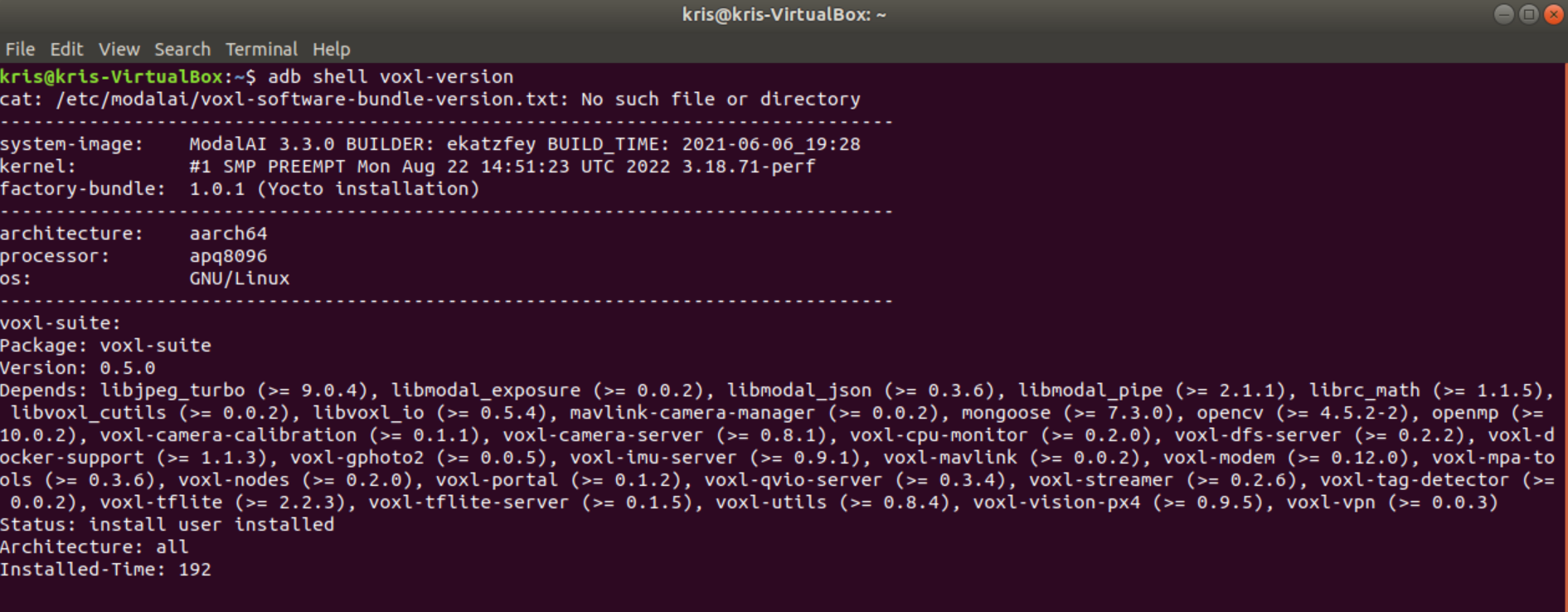
                    My Voxl System Image-
                    Voxl System Image Version.png

                    1 Reply Last reply
                    0
                    • ? A Former User

                      ROS uses wifi to communicate, not ADB. You'll need to connect the drone and you computer to the same network in order to use ros. This can either be done by connecting the drone to your home/work network or by setting the drone to serve as an AP. Instructions for either can be found here

                      KrisK Offline
                      KrisK Offline
                      Kris
                      Regular
                      wrote on last edited by
                      #19

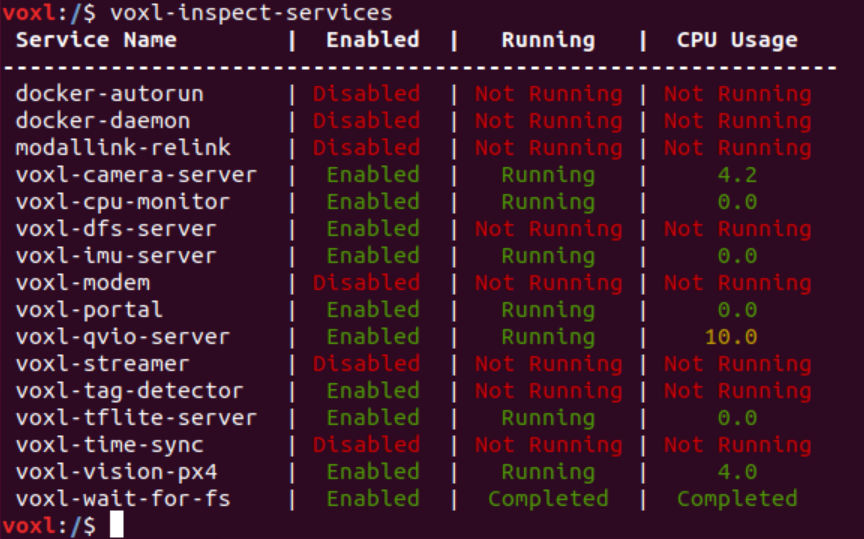
                      My current voxl services-
                      Voxl Inspect Services.png

                      1 Reply Last reply
                      0
                      • ? Offline
                        ? Offline
                        A Former User
                        wrote on last edited by
                        #20

                        Hi,

                        It looks like you're on a pretty old release of our software stack (3.3.0-0.5), you should download the latest release (3.8.0-0.7) from our downloads page and we'll be better able to support issues that you're having since there's a good chance we've fixed them in the 10 months since the 0.5 release.


                        KrisK 1 Reply Last reply
                        0
                        • ? A Former User

                          Hi,

                          It looks like you're on a pretty old release of our software stack (3.3.0-0.5), you should download the latest release (3.8.0-0.7) from our downloads page and we'll be better able to support issues that you're having since there's a good chance we've fixed them in the 10 months since the 0.5 release.

                          KrisK Offline
                          KrisK Offline
                          Kris
                          Regular
                          wrote on last edited by
                          #21

                          @Alex-Gardner Thank you for your help 🙂

                          1 Reply Last reply
                          0

                          Hello! It looks like you're interested in this conversation, but you don't have an account yet.

                          Getting fed up of having to scroll through the same posts each visit? When you register for an account, you'll always come back to exactly where you were before, and choose to be notified of new replies (either via email, or push notification). You'll also be able to save bookmarks and upvote posts to show your appreciation to other community members.

                          With your input, this post could be even better 💗

                          Register Login
                          Reply
                          • Reply as topic
                          Log in to reply
                          • Oldest to Newest
                          • Newest to Oldest
                          • Most Votes


                          ModalAI
                          Categories Recent Tags ModalAI.com Docs
                          © 2026 ModalAI® · Accelerating autonomy for smaller, smarter, safer drones · Powered by NodeBB
                          • Login

                          • Don't have an account? Register

                          • Login or register to search.
                          • First post
                            Last post
                          0
                          • Categories
                          • Recent
                          • Tags
                          • Popular
                          • Users
                          • Groups