
Having issues Configuring ROS on VOXL CAM
-
You need to set your Ubuntu development environment with ROS to point to the ROS Master process on the VOXL.
Check out: https://answers.ros.org/question/35603/ros_master_uri-change-it-and-save-it/
So for example if the IP address of the VOXL is
192.168.1.118then you need to executeexport ROS_MASTER_URI=http://192.168.1.118:11311on the Ubuntu system and then runrvizfrom the same terminal.You then also need to run the MAVROS or MPA ROS Bridge on the VOXL along with the ROS master node.
Start ros master:
roscoremavros: https://docs.modalai.com/mavros/
On the voxl you need to edit the ROS_IP to match your voxl's IP address so that other hosts can connect to it.
If this doesn't work, consider examining your firewall on your ubuntu system to make sure it isn't block ROS traffic. If it's a vanilla ROS/Ubuntu install you should be fine.
-
You need to set your Ubuntu development environment with ROS to point to the ROS Master process on the VOXL.
Check out: https://answers.ros.org/question/35603/ros_master_uri-change-it-and-save-it/
So for example if the IP address of the VOXL is
192.168.1.118then you need to executeexport ROS_MASTER_URI=http://192.168.1.118:11311on the Ubuntu system and then runrvizfrom the same terminal.You then also need to run the MAVROS or MPA ROS Bridge on the VOXL along with the ROS master node.
Start ros master:
roscoremavros: https://docs.modalai.com/mavros/
On the voxl you need to edit the ROS_IP to match your voxl's IP address so that other hosts can connect to it.
If this doesn't work, consider examining your firewall on your ubuntu system to make sure it isn't block ROS traffic. If it's a vanilla ROS/Ubuntu install you should be fine.
@Steve-Turner I updated the ROS_MASTER_URI but its still saying the same thing and saying it cannot contact ROS master
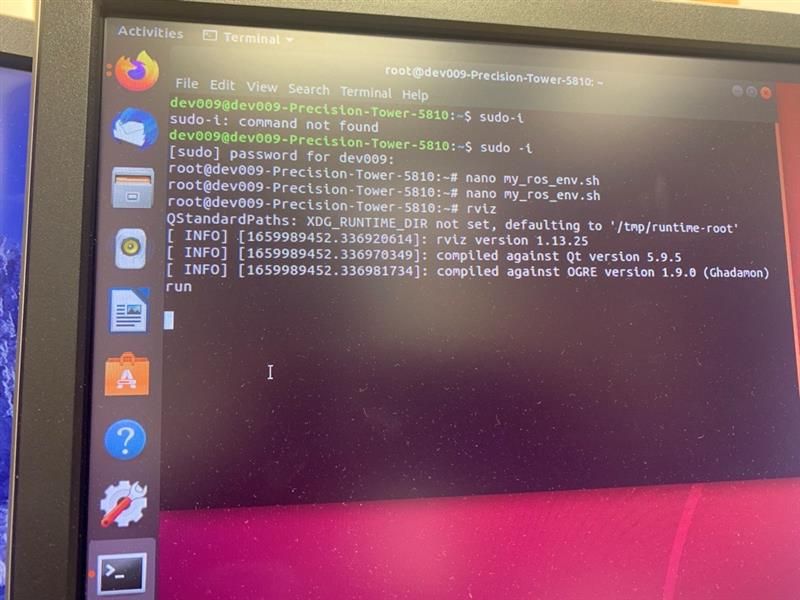
-
Saying the same thing
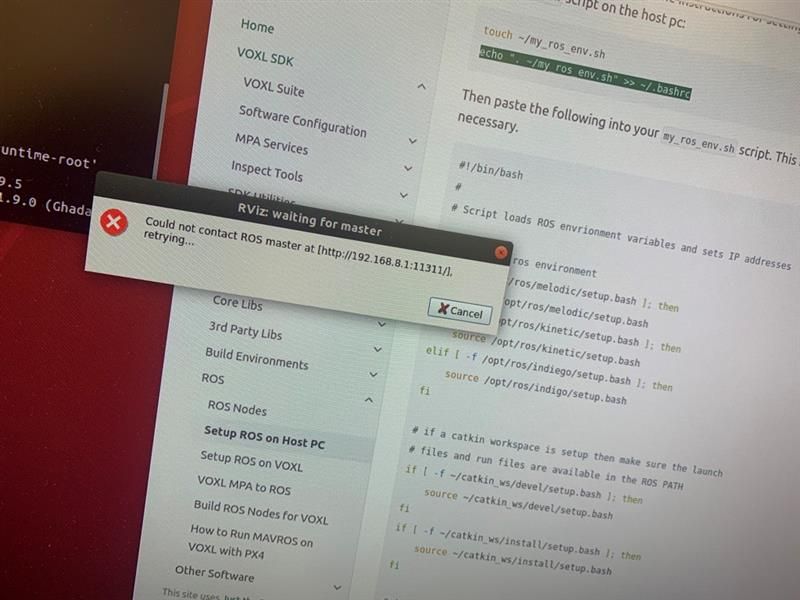
-
Assuming you are trying to run ROS master on your VOXL, first find out what is your VOXL's IP? Let's call that <VOXL IP>
Then, can you ping that IP from the computer you are trying to run Rviz?
$ ping <VOXL IP>If so, on VOXL edit your ROS environment
export ROS_IP="<VOXL IP>"Then start ROS on the VOXL. Monitor the output of the ROS master when it launches, you should see the "roscore" IP the same as what you just configured.
If so, configure the ROS environment on your PC
What is the IP of your PC on the same network as the VOXL? We'll call that <PC IP>
Configure the PC's ROS environment as such:
export ROS_MASTER_URI="http://<VOXL IP>:11311"
export ROS_IP="<PC IP>"
Then launch RViz
Note: The instructions above are configuring the master to be the VOXL by pointing both VOXL and the PC to the VOXL's IP address as master. Checkout slides 7,8,9 in the presentation here
-
Assuming you are trying to run ROS master on your VOXL, first find out what is your VOXL's IP? Let's call that <VOXL IP>
Then, can you ping that IP from the computer you are trying to run Rviz?
$ ping <VOXL IP>If so, on VOXL edit your ROS environment
export ROS_IP="<VOXL IP>"Then start ROS on the VOXL. Monitor the output of the ROS master when it launches, you should see the "roscore" IP the same as what you just configured.
If so, configure the ROS environment on your PC
What is the IP of your PC on the same network as the VOXL? We'll call that <PC IP>
Configure the PC's ROS environment as such:
export ROS_MASTER_URI="http://<VOXL IP>:11311"
export ROS_IP="<PC IP>"
Then launch RViz
Note: The instructions above are configuring the master to be the VOXL by pointing both VOXL and the PC to the VOXL's IP address as master. Checkout slides 7,8,9 in the presentation here
@Chad-Sweet thanks Chad, so I got Rviz working now !
-
Is the IP address of my VOXL CAM 192.168.8.1
-
Assuming you are trying to run ROS master on your VOXL, first find out what is your VOXL's IP? Let's call that <VOXL IP>
Then, can you ping that IP from the computer you are trying to run Rviz?
$ ping <VOXL IP>If so, on VOXL edit your ROS environment
export ROS_IP="<VOXL IP>"Then start ROS on the VOXL. Monitor the output of the ROS master when it launches, you should see the "roscore" IP the same as what you just configured.
If so, configure the ROS environment on your PC
What is the IP of your PC on the same network as the VOXL? We'll call that <PC IP>
Configure the PC's ROS environment as such:
export ROS_MASTER_URI="http://<VOXL IP>:11311"
export ROS_IP="<PC IP>"
Then launch RViz
Note: The instructions above are configuring the master to be the VOXL by pointing both VOXL and the PC to the VOXL's IP address as master. Checkout slides 7,8,9 in the presentation here
@Chad-Sweet I’m connected to the VOXL using Adb not wifi
-
ROS uses wifi to communicate, not ADB. You'll need to connect the drone and you computer to the same network in order to use ros. This can either be done by connecting the drone to your home/work network or by setting the drone to serve as an AP. Instructions for either can be found here
-
Assuming you are trying to run ROS master on your VOXL, first find out what is your VOXL's IP? Let's call that <VOXL IP>
Then, can you ping that IP from the computer you are trying to run Rviz?
$ ping <VOXL IP>If so, on VOXL edit your ROS environment
export ROS_IP="<VOXL IP>"Then start ROS on the VOXL. Monitor the output of the ROS master when it launches, you should see the "roscore" IP the same as what you just configured.
If so, configure the ROS environment on your PC
What is the IP of your PC on the same network as the VOXL? We'll call that <PC IP>
Configure the PC's ROS environment as such:
export ROS_MASTER_URI="http://<VOXL IP>:11311"
export ROS_IP="<PC IP>"
Then launch RViz
Note: The instructions above are configuring the master to be the VOXL by pointing both VOXL and the PC to the VOXL's IP address as master. Checkout slides 7,8,9 in the presentation here
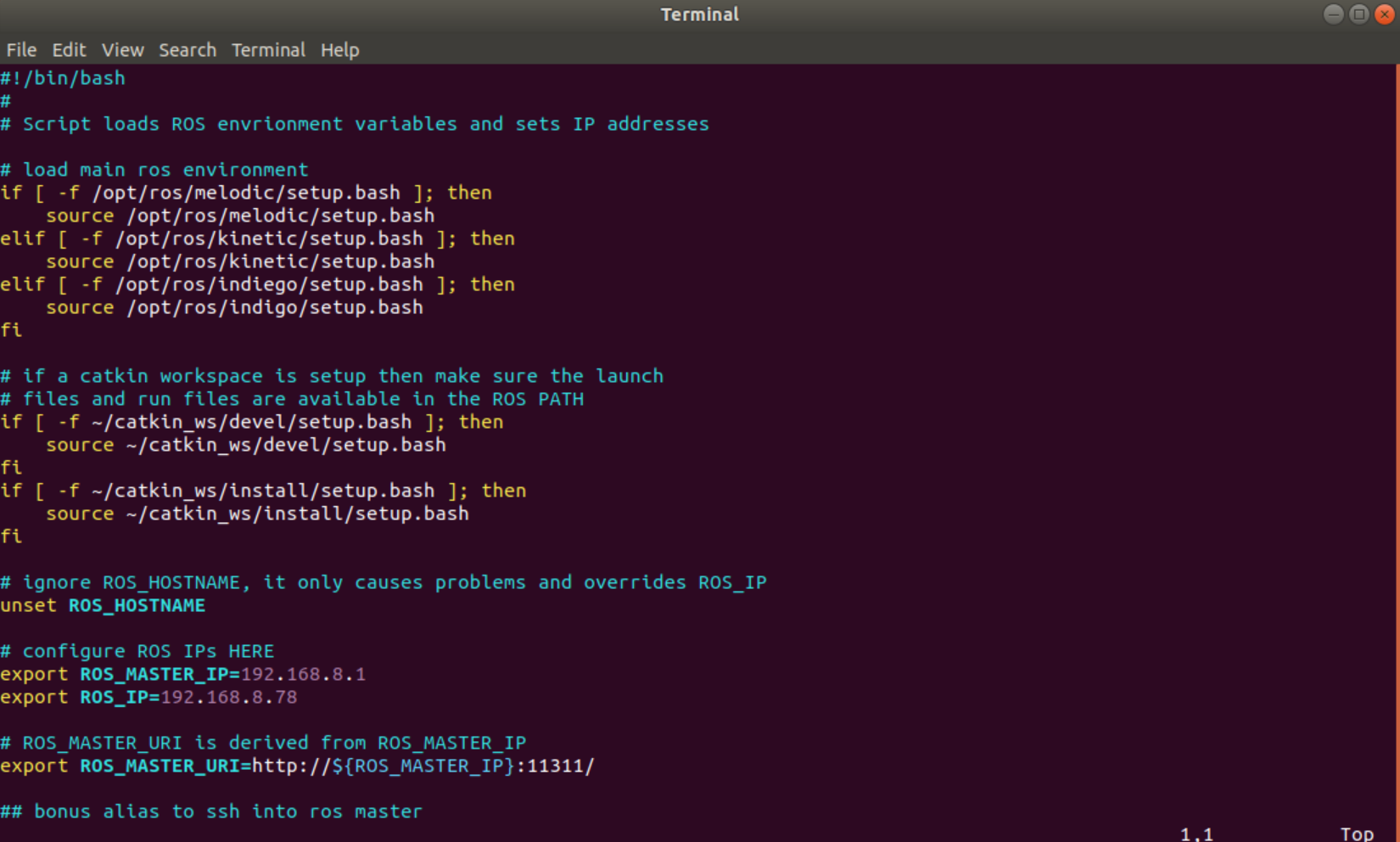
@Chad-Sweet I am also having the same issue. I am not sure what im doing wrong.
This is my PC (my_ros_env.sh)
This is my VOXL (my_ros_env.sh)
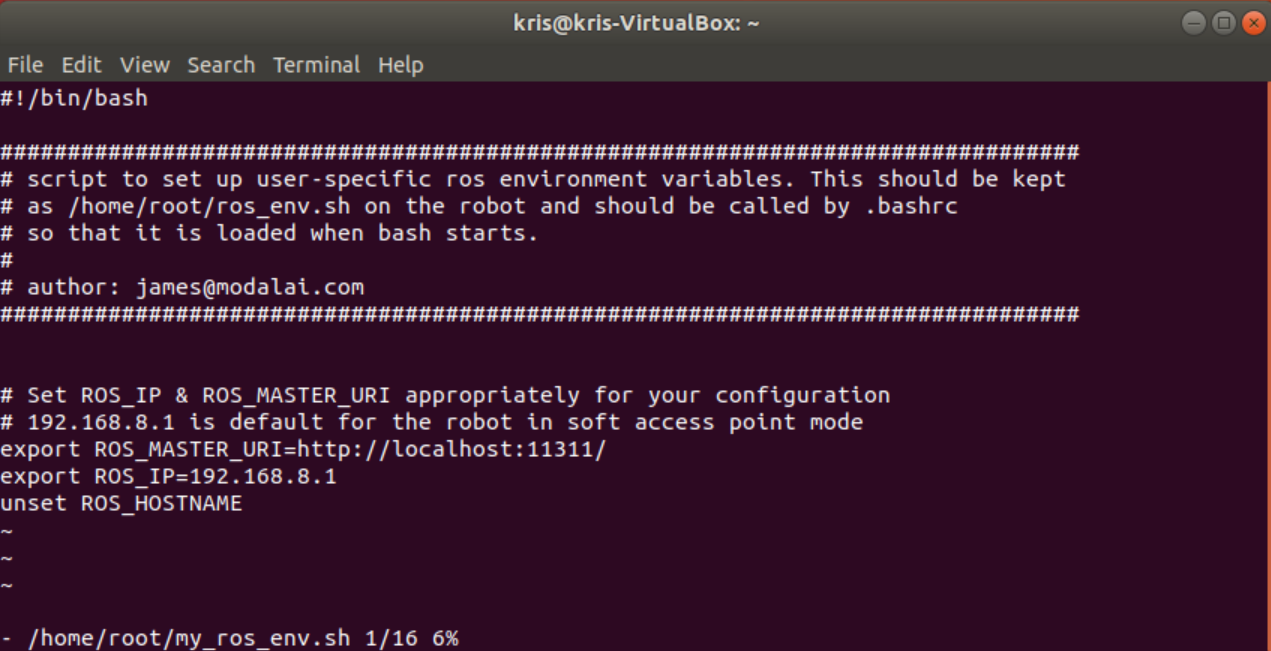
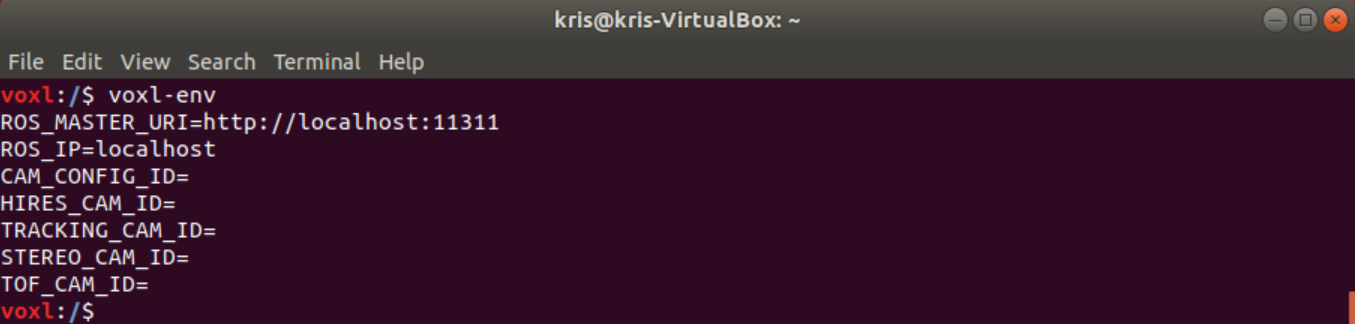
This is what I get when I try to show my voxl-env
Setting up environment variables for ROS is a little confusing for me.
I am using wifi to communicate with VOXL.
My VOXL IP is the usual 192.168.8.1
My PC IP is 192.168.8.78I am stuck here.
Could someone please point me in the right direction? -
@Chad-Sweet I am also having the same issue. I am not sure what im doing wrong.
This is my PC (my_ros_env.sh)
This is my VOXL (my_ros_env.sh)
This is what I get when I try to show my voxl-env
Setting up environment variables for ROS is a little confusing for me.
I am using wifi to communicate with VOXL.
My VOXL IP is the usual 192.168.8.1
My PC IP is 192.168.8.78I am stuck here.
Could someone please point me in the right direction? -
ROS uses wifi to communicate, not ADB. You'll need to connect the drone and you computer to the same network in order to use ros. This can either be done by connecting the drone to your home/work network or by setting the drone to serve as an AP. Instructions for either can be found here
-
ROS uses wifi to communicate, not ADB. You'll need to connect the drone and you computer to the same network in order to use ros. This can either be done by connecting the drone to your home/work network or by setting the drone to serve as an AP. Instructions for either can be found here
-
Hi,
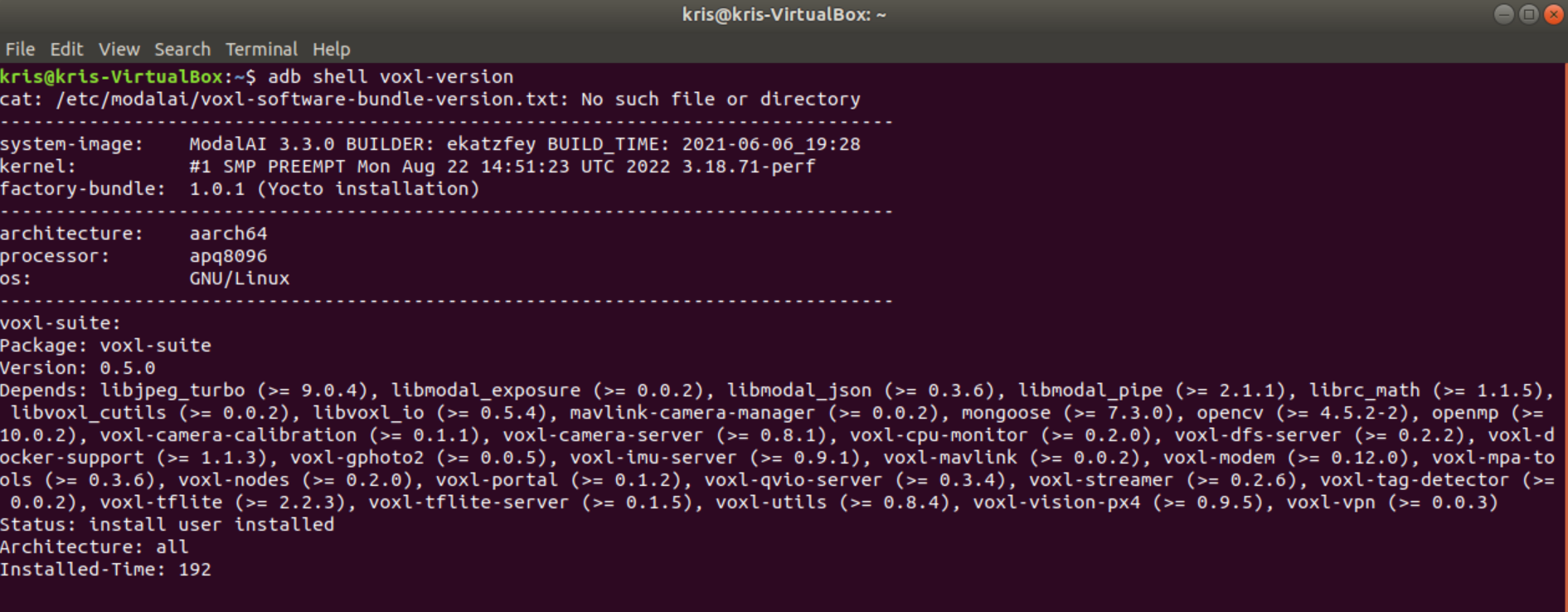
It looks like you're on a pretty old release of our software stack (3.3.0-0.5), you should download the latest release (3.8.0-0.7) from our downloads page and we'll be better able to support issues that you're having since there's a good chance we've fixed them in the 10 months since the 0.5 release.
-
Hi,
It looks like you're on a pretty old release of our software stack (3.3.0-0.5), you should download the latest release (3.8.0-0.7) from our downloads page and we'll be better able to support issues that you're having since there's a good chance we've fixed them in the 10 months since the 0.5 release.





Reading along? Create a free ModalAI Forum account to join in.
With an account you can reply, ask your own question, get an email when a ModalAI engineer answers, and mark the reply that solved it. Your place in each thread is saved between visits.
Questions about VOXL, Flight Core, ESCs and ModalAI drones are answered here by the engineers who build them.
Register Login