Skip to content
  • Categories
  • Recent
  • Tags
  • Popular
  • Users
  • Groups
Collapse
Brand Logo

ModalAI Forum

  1. ModalAI Support Forum
  2. Ask your questions right here!
  3. QGC sensors - compass remains red

QGC sensors - compass remains red

Scheduled Pinned Locked Moved Ask your questions right here!
19 Posts 4 Posters 2.5k Views 2 Watching
  • Oldest to Newest
  • Newest to Oldest
  • Most Votes
Reply
  • Reply as topic
Log in to reply
This topic has been deleted. Only users with topic management privileges can see it.
  • S suvasis

    hi,

    QGC sensors - compass remains red even after the vehicle in all the 6 orientations images are shown in green.

    I rebooted many times and set the compass orientations to green images, still the compass remain red.

    How do I resolve this?

    Thanks.
    suvasis

    Eric KatzfeyE Offline
    Eric KatzfeyE Offline
    Eric Katzfey
    ModalAI Team
    wrote on last edited by
    #2

    @suvasis What vehicle are you trying to calibrate? Are there any other error messages?

    1 Reply Last reply
    0
    • S Offline
      S Offline
      suvasis
      Contributor
      wrote on last edited by
      #3

      hi eric,

      From QGC->Sensors

      Passed

      1. Gyroscope
      2. Accelerometer
      3. Level Horizon

      However, compass remains red even after the vehicle in all the 6 orientations images are shown in green.

      When I click "ok", the compass remains red, I repeat the orientation process again, the compass redness doesn't go away. I tried via wifi as well as USB c direct connection. This hasn't helped.

      Thanks.
      suvasis

      Eric KatzfeyE 1 Reply Last reply
      0
      • S suvasis

        hi eric,

        From QGC->Sensors

        Passed

        1. Gyroscope
        2. Accelerometer
        3. Level Horizon

        However, compass remains red even after the vehicle in all the 6 orientations images are shown in green.

        When I click "ok", the compass remains red, I repeat the orientation process again, the compass redness doesn't go away. I tried via wifi as well as USB c direct connection. This hasn't helped.

        Thanks.
        suvasis

        Eric KatzfeyE Offline
        Eric KatzfeyE Offline
        Eric Katzfey
        ModalAI Team
        wrote on last edited by
        #4

        @suvasis What vehicle are you talking about? Is this a drone from ModalAI or a custom drone?

        1 Reply Last reply
        0
        • S Offline
          S Offline
          suvasis
          Contributor
          wrote on last edited by
          #5

          hi Eric,

          I am using VOXL® 2 Flight Deck and 4-in-1 esc which I bought separately. I wired up the esc and voxl2 and the drone is holybro model. so it's a custom made drone.

          Thanks.
          suvasis

          Eric KatzfeyE 2 Replies Last reply
          0
          • S suvasis

            hi Eric,

            I am using VOXL® 2 Flight Deck and 4-in-1 esc which I bought separately. I wired up the esc and voxl2 and the drone is holybro model. so it's a custom made drone.

            Thanks.
            suvasis

            Eric KatzfeyE Offline
            Eric KatzfeyE Offline
            Eric Katzfey
            ModalAI Team
            wrote on last edited by
            #6

            @suvasis How are you launching px4? Are you starting it directly yourself (e.g. px4 -s <my-startup-script>) or are you using the convenience script in /usr/bin/voxl-px4?

            1 Reply Last reply
            0
            • S suvasis

              hi Eric,

              I am using VOXL® 2 Flight Deck and 4-in-1 esc which I bought separately. I wired up the esc and voxl2 and the drone is holybro model. so it's a custom made drone.

              Thanks.
              suvasis

              Eric KatzfeyE Offline
              Eric KatzfeyE Offline
              Eric Katzfey
              ModalAI Team
              wrote on last edited by
              #7

              @suvasis My guess is that you are not correctly specifying the orientation of the magnetometer when starting the driver.

              1 Reply Last reply
              0
              • S Offline
                S Offline
                suvasis
                Contributor
                wrote on last edited by
                #8

                hi Eric,
                I connected using wifi. /usr/bin/voxl-px4 is the command I am using.

                Can you point me to the documentation? Also should I use usbc only and not wifi?

                Thanks.
                suvasis

                Eric KatzfeyE 2 Replies Last reply
                0
                • S suvasis

                  hi Eric,
                  I connected using wifi. /usr/bin/voxl-px4 is the command I am using.

                  Can you point me to the documentation? Also should I use usbc only and not wifi?

                  Thanks.
                  suvasis

                  Eric KatzfeyE Offline
                  Eric KatzfeyE Offline
                  Eric Katzfey
                  ModalAI Team
                  wrote on last edited by
                  #9

                  @suvasis /usr/bin/voxl-px4 is a bash script and has some inline documentation. It relies on the startup configuration script /etc/modalai/voxl-px4.config which also has some inline documentation.

                  1 Reply Last reply
                  0
                  • S suvasis

                    hi Eric,
                    I connected using wifi. /usr/bin/voxl-px4 is the command I am using.

                    Can you point me to the documentation? Also should I use usbc only and not wifi?

                    Thanks.
                    suvasis

                    Eric KatzfeyE Offline
                    Eric KatzfeyE Offline
                    Eric Katzfey
                    ModalAI Team
                    wrote on last edited by
                    #10

                    @suvasis For magnetometer rotation it is specified as the -R option on the start line in /etc/modalai/voxl-px4.config. For example: qshell ist8310 start -R 10 -X -b 1 has a rotation specified by the -R option. This is from the standard PX4 documentation.

                    Abdullah01A 1 Reply Last reply
                    0
                    • S Offline
                      S Offline
                      suvasis
                      Contributor
                      wrote on last edited by
                      #11

                      hi Eric

                      For magnetometer rotation it is specified as the -R option on the start line in /etc/modalai/voxl-px4.config

                      IS it the magnetometer not an inherent part of the VOXL2 board? Is it part of GPS? I have not attached GPS to my drone yet, For compass do I need GPS?
                      Thanks.
                      suvasis

                      1 Reply Last reply
                      0
                      • S Offline
                        S Offline
                        suvasis
                        Contributor
                        wrote on last edited by
                        #12

                        hi Eric,
                        I have not hooked up the GPS to my vehicle.

                        I run the following commands:

                        (do't see magnetometer anywhere)
                        voxl2:~$ sudo journalctl -u voxl-px4 -f

                        -- Logs begin at Tue 2022-09-06 03:18:07 UTC. --
                        Mar 21 17:49:39 m0054 bash[1748]: INFO [muorb] SLPI: Advertising remote topic vehicle_command
                        Mar 21 17:49:39 m0054 bash[1748]: INFO [commander] Handling Commander command 176
                        Mar 21 17:49:39 m0054 bash[1748]: INFO [muorb] SLPI: Advertising remote topic vehicle_command_ack
                        Mar 21 17:49:39 m0054 bash[1748]: INFO [mavlink] mode: Onboard, data rate: 100000 B/s on udp port 14556 remote port 14557
                        Mar 21 17:49:39 m0054 bash[1748]: INFO [muorb] SLPI: Marking DeviceNode(vehicle_command) as advertised in process_remote_topic
                        Mar 21 17:49:39 m0054 bash[1748]: INFO [px4] Startup script returned successfully
                        Mar 21 17:49:39 m0054 bash[1748]: INFO [mavlink] partner IP: 127.0.0.1
                        Mar 21 17:49:39 m0054 bash[1748]: INFO [muorb] SLPI: Advertising remote topic telemetry_status
                        Mar 21 17:49:39 m0054 bash[1748]: INFO [PreFlightCheck] Failed EKF health preflight check while waiting for filter to settle
                        Mar 21 17:49:39 m0054 bash[1748]: INFO [muorb] SLPI: Advertising remote topic timesync_status

                        and

                        (also don't see any address)
                        voxl2:~$ sudo i2cdetect -y -r 1
                        0 1 2 3 4 5 6 7 8 9 a b c d e f
                        00: -- -- -- -- -- -- -- -- -- -- -- -- --
                        10: -- -- -- -- -- -- -- -- -- -- -- -- -- -- -- --
                        20: -- -- -- -- -- -- -- -- -- -- -- -- -- -- -- --
                        30: -- -- -- -- -- -- -- -- -- -- -- -- -- -- -- --
                        40: -- -- -- -- -- -- -- -- -- -- -- -- -- -- -- --
                        50: -- -- -- -- -- -- -- -- -- -- -- -- -- -- -- --
                        60: -- -- -- -- -- -- -- -- -- -- -- -- -- -- -- --
                        70: -- -- -- -- -- -- -- --

                        1 Reply Last reply
                        0
                        • Chad SweetC Offline
                          Chad SweetC Offline
                          Chad Sweet
                          ModalAI Team
                          wrote on last edited by
                          #13

                          There is no magnetometer on VOXL 2, you need to connect the GPS unit that includes the magnetometer

                          1 Reply Last reply
                          0
                          • S Offline
                            S Offline
                            suvasis
                            Contributor
                            wrote on last edited by
                            #14

                            Thankyou Chris, looks like QGC estimated heading information derived from other sensors, like the gyroscope and accelerometer, rather than a magnetometer. I got false idea from QGC.

                            1 Reply Last reply
                            0
                            • Eric KatzfeyE Eric Katzfey

                              @suvasis For magnetometer rotation it is specified as the -R option on the start line in /etc/modalai/voxl-px4.config. For example: qshell ist8310 start -R 10 -X -b 1 has a rotation specified by the -R option. This is from the standard PX4 documentation.

                              Abdullah01A Offline
                              Abdullah01A Offline
                              Abdullah01
                              Contributor
                              wrote on last edited by
                              #15

                              @Eric-Katzfey said in QGC sensors - compass remains red:

                              qshell ist8310 start

                              Thank you.

                              So, if my GPS is in the opposite orientation of the voxl imu by Yaw 180 deg, so I need to change it form 10 to (4), right?

                              Eric KatzfeyE 1 Reply Last reply
                              0
                              • Abdullah01A Abdullah01

                                @Eric-Katzfey said in QGC sensors - compass remains red:

                                qshell ist8310 start

                                Thank you.

                                So, if my GPS is in the opposite orientation of the voxl imu by Yaw 180 deg, so I need to change it form 10 to (4), right?

                                Eric KatzfeyE Offline
                                Eric KatzfeyE Offline
                                Eric Katzfey
                                ModalAI Team
                                wrote on last edited by
                                #16

                                @Abdullah01 The IMU rotation is handled separately. For the magnetometer in a Holybro GPS unit the rotation is specified as 10 (roll 180, yaw 90) when the unit is mounted on the drone with the arrow pointing towards to front of the drone. If you reverse this and the arrow points to the rear of the drone then you would specify 14 (roll 180, yaw 270).

                                Abdullah01A 1 Reply Last reply
                                0
                                • Eric KatzfeyE Eric Katzfey

                                  @Abdullah01 The IMU rotation is handled separately. For the magnetometer in a Holybro GPS unit the rotation is specified as 10 (roll 180, yaw 90) when the unit is mounted on the drone with the arrow pointing towards to front of the drone. If you reverse this and the arrow points to the rear of the drone then you would specify 14 (roll 180, yaw 270).

                                  Abdullah01A Offline
                                  Abdullah01A Offline
                                  Abdullah01
                                  Contributor
                                  wrote on last edited by Abdullah01
                                  #17

                                  @Eric-Katzfey said in QGC sensors - compass remains red:

                                  mounted on the drone with the arrow pointing towards to front of the drone. If you reverse this and the arrow points to the rear of the drone then you would specify 14 (roll 180, yaw 270).

                                  Ok, that means our config file is correct.

                                  During the sensor calibration for the accelerometer shows an error in the orientation error pic showsWhatsApp Image 2023-06-13 at 2.19.53 PM.jpeg here

                                  Also, for the compass calibration, once I restart the drone after finishing the calibration it goes away and I need to calibrate it again.

                                  BTW, the voxl orientation is different than the GPS., and changed the config file to rotate the voxl orientation. Do think this might be the issue?

                                  You can see this in the drone setup below, where the original orientation of the voxl is opposite to the drone's front
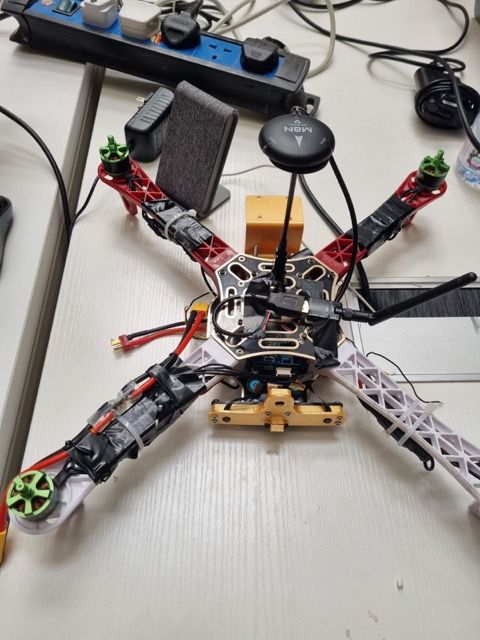
                                  WhatsApp Image 2023-06-14 at 2.47.49 PM Medium.jpeg

                                  So, what do you think is the issue? Also, we are using I/O Board do think it needs a different setup?

                                  Thank you for your support

                                  Eric KatzfeyE 1 Reply Last reply
                                  0
                                  • Abdullah01A Abdullah01

                                    @Eric-Katzfey said in QGC sensors - compass remains red:

                                    mounted on the drone with the arrow pointing towards to front of the drone. If you reverse this and the arrow points to the rear of the drone then you would specify 14 (roll 180, yaw 270).

                                    Ok, that means our config file is correct.

                                    During the sensor calibration for the accelerometer shows an error in the orientation error pic showsWhatsApp Image 2023-06-13 at 2.19.53 PM.jpeg here

                                    Also, for the compass calibration, once I restart the drone after finishing the calibration it goes away and I need to calibrate it again.

                                    BTW, the voxl orientation is different than the GPS., and changed the config file to rotate the voxl orientation. Do think this might be the issue?

                                    You can see this in the drone setup below, where the original orientation of the voxl is opposite to the drone's front

                                    WhatsApp Image 2023-06-14 at 2.47.49 PM Medium.jpeg

                                    So, what do you think is the issue? Also, we are using I/O Board do think it needs a different setup?

                                    Thank you for your support

                                    Eric KatzfeyE Offline
                                    Eric KatzfeyE Offline
                                    Eric Katzfey
                                    ModalAI Team
                                    wrote on last edited by
                                    #18

                                    @Abdullah01 Looks like it is the IMU rotation that isn't being specified correctly. It's kind of hard to tell in the picture but, at a minimum, the board is rotated 180 degrees. So it's the IMU rotation that needs to be set.

                                    Abdullah01A 1 Reply Last reply
                                    0
                                    • Eric KatzfeyE Eric Katzfey

                                      @Abdullah01 Looks like it is the IMU rotation that isn't being specified correctly. It's kind of hard to tell in the picture but, at a minimum, the board is rotated 180 degrees. So it's the IMU rotation that needs to be set.

                                      Abdullah01A Offline
                                      Abdullah01A Offline
                                      Abdullah01
                                      Contributor
                                      wrote on last edited by
                                      #19

                                      @Eric-Katzfey said in QGC sensors - compass remains red:

                                      t isn't being specified correctly. It's kind of hard to tell in the picture but, at a minimum, the board is rotated 180 degrees. So it's the IMU rotation that needs to be set.

                                      yes, the board is rotated 180 degrees. So, how do I set the rotation of the IMU to 180 degrees? is it in the same config file?

                                      I rotate it 180 degrees as shown below
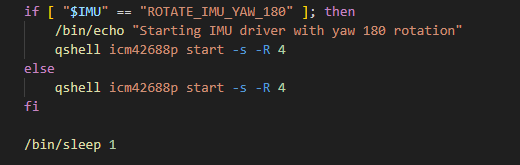
                                      AAAA.png

                                      1 Reply Last reply
                                      0

                                      Hello! It looks like you're interested in this conversation, but you don't have an account yet.

                                      Getting fed up of having to scroll through the same posts each visit? When you register for an account, you'll always come back to exactly where you were before, and choose to be notified of new replies (either via email, or push notification). You'll also be able to save bookmarks and upvote posts to show your appreciation to other community members.

                                      With your input, this post could be even better 💗

                                      Register Login
                                      Reply
                                      • Reply as topic
                                      Log in to reply
                                      • Oldest to Newest
                                      • Newest to Oldest
                                      • Most Votes


                                      ModalAI
                                      Categories Recent Tags ModalAI.com Docs
                                      © 2026 ModalAI® · Accelerating autonomy for smaller, smarter, safer drones · Powered by NodeBB
                                      • Login

                                      • Don't have an account? Register

                                      • Login or register to search.
                                      • First post
                                        Last post
                                      0
                                      • Categories
                                      • Recent
                                      • Tags
                                      • Popular
                                      • Users
                                      • Groups