
QGC sensors - compass remains red
-
hi Eric,
I connected using wifi. /usr/bin/voxl-px4 is the command I am using.Can you point me to the documentation? Also should I use usbc only and not wifi?
Thanks.
suvasis@suvasis
/usr/bin/voxl-px4is a bash script and has some inline documentation. It relies on the startup configuration script/etc/modalai/voxl-px4.configwhich also has some inline documentation. -
hi Eric,
I connected using wifi. /usr/bin/voxl-px4 is the command I am using.Can you point me to the documentation? Also should I use usbc only and not wifi?
Thanks.
suvasis@suvasis For magnetometer rotation it is specified as the
-Roption on the start line in/etc/modalai/voxl-px4.config. For example:qshell ist8310 start -R 10 -X -b 1has a rotation specified by the-Roption. This is from the standard PX4 documentation. -
hi Eric
For magnetometer rotation it is specified as the -R option on the start line in /etc/modalai/voxl-px4.config
IS it the magnetometer not an inherent part of the VOXL2 board? Is it part of GPS? I have not attached GPS to my drone yet, For compass do I need GPS?
Thanks.
suvasis -
hi Eric,
I have not hooked up the GPS to my vehicle.I run the following commands:
(do't see magnetometer anywhere)
voxl2:~$ sudo journalctl -u voxl-px4 -f-- Logs begin at Tue 2022-09-06 03:18:07 UTC. --
Mar 21 17:49:39 m0054 bash[1748]: INFO [muorb] SLPI: Advertising remote topic vehicle_command
Mar 21 17:49:39 m0054 bash[1748]: INFO [commander] Handling Commander command 176
Mar 21 17:49:39 m0054 bash[1748]: INFO [muorb] SLPI: Advertising remote topic vehicle_command_ack
Mar 21 17:49:39 m0054 bash[1748]: INFO [mavlink] mode: Onboard, data rate: 100000 B/s on udp port 14556 remote port 14557
Mar 21 17:49:39 m0054 bash[1748]: INFO [muorb] SLPI: Marking DeviceNode(vehicle_command) as advertised in process_remote_topic
Mar 21 17:49:39 m0054 bash[1748]: INFO [px4] Startup script returned successfully
Mar 21 17:49:39 m0054 bash[1748]: INFO [mavlink] partner IP: 127.0.0.1
Mar 21 17:49:39 m0054 bash[1748]: INFO [muorb] SLPI: Advertising remote topic telemetry_status
Mar 21 17:49:39 m0054 bash[1748]: INFO [PreFlightCheck] Failed EKF health preflight check while waiting for filter to settle
Mar 21 17:49:39 m0054 bash[1748]: INFO [muorb] SLPI: Advertising remote topic timesync_statusand
(also don't see any address)
voxl2:~$ sudo i2cdetect -y -r 1
0 1 2 3 4 5 6 7 8 9 a b c d e f
00: -- -- -- -- -- -- -- -- -- -- -- -- --
10: -- -- -- -- -- -- -- -- -- -- -- -- -- -- -- --
20: -- -- -- -- -- -- -- -- -- -- -- -- -- -- -- --
30: -- -- -- -- -- -- -- -- -- -- -- -- -- -- -- --
40: -- -- -- -- -- -- -- -- -- -- -- -- -- -- -- --
50: -- -- -- -- -- -- -- -- -- -- -- -- -- -- -- --
60: -- -- -- -- -- -- -- -- -- -- -- -- -- -- -- --
70: -- -- -- -- -- -- -- -- -
There is no magnetometer on VOXL 2, you need to connect the GPS unit that includes the magnetometer
-
Thankyou Chris, looks like QGC estimated heading information derived from other sensors, like the gyroscope and accelerometer, rather than a magnetometer. I got false idea from QGC.
-
@suvasis For magnetometer rotation it is specified as the
-Roption on the start line in/etc/modalai/voxl-px4.config. For example:qshell ist8310 start -R 10 -X -b 1has a rotation specified by the-Roption. This is from the standard PX4 documentation.@Eric-Katzfey said in QGC sensors - compass remains red:
qshell ist8310 start
Thank you.
So, if my GPS is in the opposite orientation of the voxl imu by Yaw 180 deg, so I need to change it form 10 to (4), right?
-
@Eric-Katzfey said in QGC sensors - compass remains red:
qshell ist8310 start
Thank you.
So, if my GPS is in the opposite orientation of the voxl imu by Yaw 180 deg, so I need to change it form 10 to (4), right?
@Abdullah01 The IMU rotation is handled separately. For the magnetometer in a Holybro GPS unit the rotation is specified as 10 (roll 180, yaw 90) when the unit is mounted on the drone with the arrow pointing towards to front of the drone. If you reverse this and the arrow points to the rear of the drone then you would specify 14 (roll 180, yaw 270).
-
@Abdullah01 The IMU rotation is handled separately. For the magnetometer in a Holybro GPS unit the rotation is specified as 10 (roll 180, yaw 90) when the unit is mounted on the drone with the arrow pointing towards to front of the drone. If you reverse this and the arrow points to the rear of the drone then you would specify 14 (roll 180, yaw 270).
@Eric-Katzfey said in QGC sensors - compass remains red:
mounted on the drone with the arrow pointing towards to front of the drone. If you reverse this and the arrow points to the rear of the drone then you would specify 14 (roll 180, yaw 270).
Ok, that means our config file is correct.
During the sensor calibration for the accelerometer shows an error in the orientation error pic shows
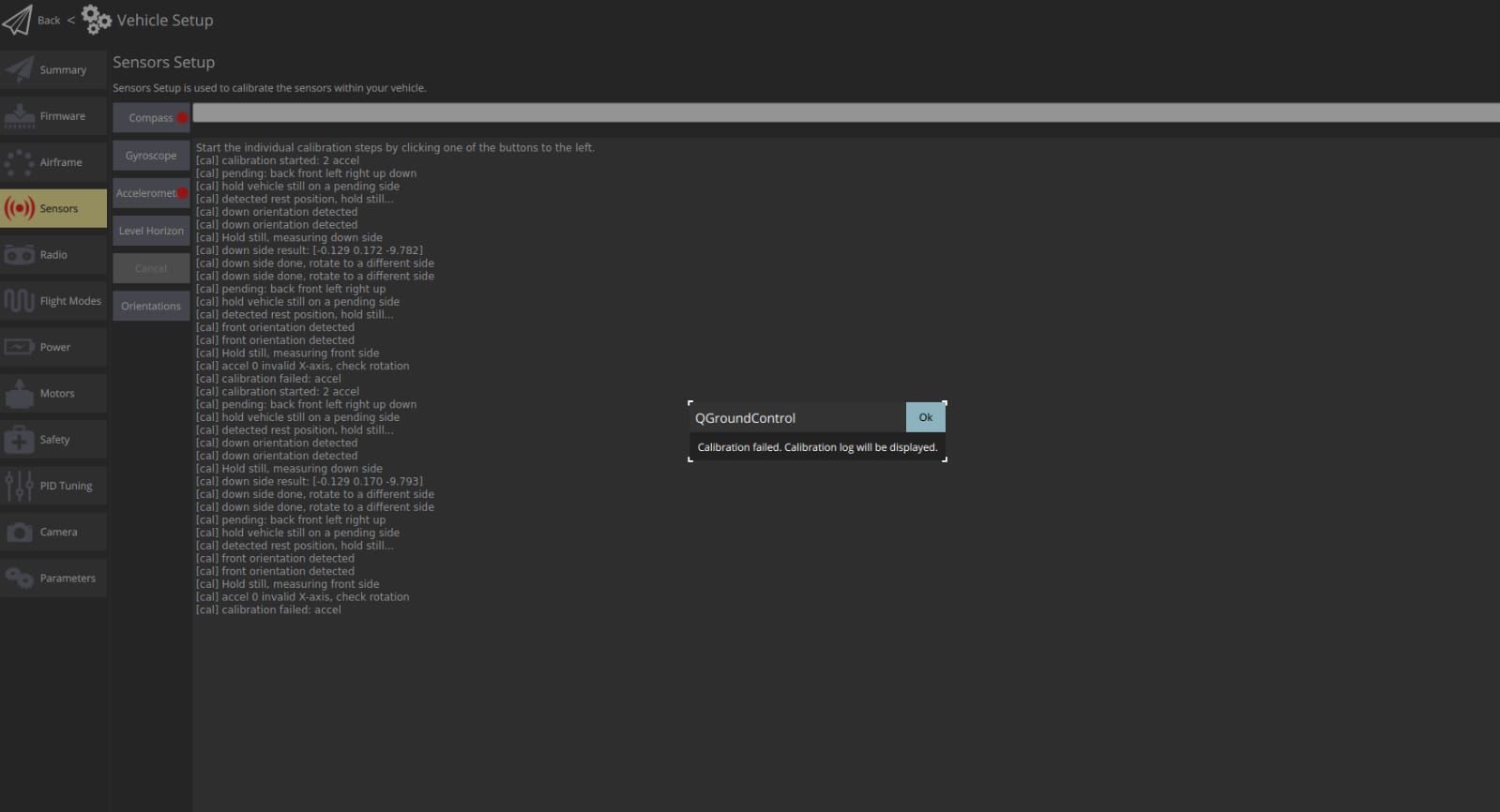 here
hereAlso, for the compass calibration, once I restart the drone after finishing the calibration it goes away and I need to calibrate it again.
BTW, the voxl orientation is different than the GPS., and changed the config file to rotate the voxl orientation. Do think this might be the issue?
You can see this in the drone setup below, where the original orientation of the voxl is opposite to the drone's front
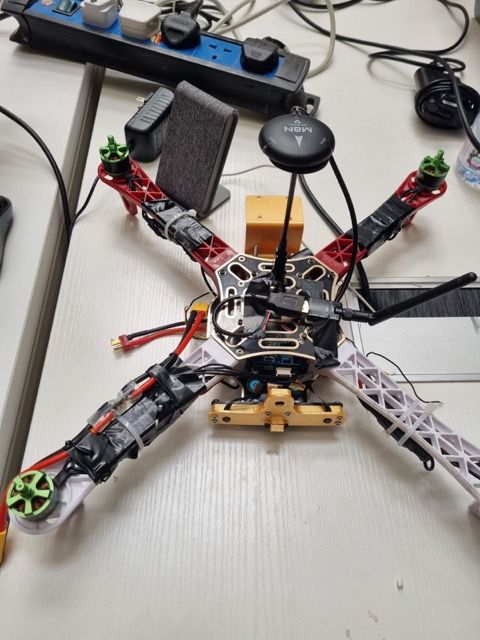
So, what do you think is the issue? Also, we are using I/O Board do think it needs a different setup?
Thank you for your support
-
@Eric-Katzfey said in QGC sensors - compass remains red:
mounted on the drone with the arrow pointing towards to front of the drone. If you reverse this and the arrow points to the rear of the drone then you would specify 14 (roll 180, yaw 270).
Ok, that means our config file is correct.
During the sensor calibration for the accelerometer shows an error in the orientation error pic shows
hereAlso, for the compass calibration, once I restart the drone after finishing the calibration it goes away and I need to calibrate it again.
BTW, the voxl orientation is different than the GPS., and changed the config file to rotate the voxl orientation. Do think this might be the issue?
You can see this in the drone setup below, where the original orientation of the voxl is opposite to the drone's front
So, what do you think is the issue? Also, we are using I/O Board do think it needs a different setup?
Thank you for your support
@Abdullah01 Looks like it is the IMU rotation that isn't being specified correctly. It's kind of hard to tell in the picture but, at a minimum, the board is rotated 180 degrees. So it's the IMU rotation that needs to be set.
-
@Abdullah01 Looks like it is the IMU rotation that isn't being specified correctly. It's kind of hard to tell in the picture but, at a minimum, the board is rotated 180 degrees. So it's the IMU rotation that needs to be set.
@Eric-Katzfey said in QGC sensors - compass remains red:
t isn't being specified correctly. It's kind of hard to tell in the picture but, at a minimum, the board is rotated 180 degrees. So it's the IMU rotation that needs to be set.
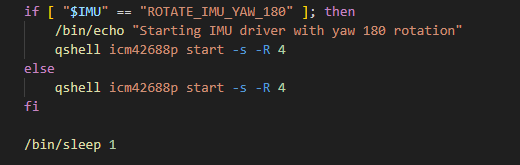
yes, the board is rotated 180 degrees. So, how do I set the rotation of the IMU to 180 degrees? is it in the same config file?
I rotate it 180 degrees as shown below



Reading along? Create a free ModalAI Forum account to join in.
With an account you can reply, ask your own question, get an email when a ModalAI engineer answers, and mark the reply that solved it. Your place in each thread is saved between visits.
Questions about VOXL, Flight Core, ESCs and ModalAI drones are answered here by the engineers who build them.
Register Login