
ADB Connecting Issue with VOXL2 Board
-
@dlee What steps were done before the board wouldn't ADB? Did the board go through the whole flashing procedure before "waiting for ADB"? What we've seen is after a hard reset, the fast boot switch on the Voxl2 needs to be pushed for either 25 seconds or boot the board holding the button down for 4 seconds. If you've already attempted this, what was the outcome?
-
@Adrian-Hidalgo The board went through the whole flashing procedure. I checked the voxl-suite is running. So I did my works. But after reboot, voxl2 adb couldn't connet to my companion pc.
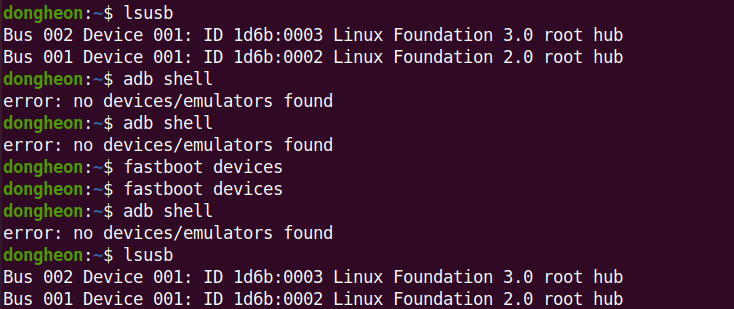
@dlee what's the output if you type
lsusb -
@dlee what's the output if you type
lsusb -
-
@dlee This is with VOXL2 powered and plugged in via. USB-C? Are you running Ubuntu natively or in a VM?
-
@dlee What do you see come through when you run
dmesg -wH, then plug in power and USB to VOXL2.It also doesn't hurt to try a different port on your host PC, i.e. going from USB3 to USB2
-
@dlee If nothing changed it's likely a cable or port issue. If there's LEDs going on VOXL2 when powered then it is booting.
-
@dlee Is it detected when forced into emergency boot mode via. the switch? Or can you force it into fastboot via. the button?
@tom I did flashing and QDL, again. Re-flashing was successful. But when I reboot it, connection problem occur. I checked status using
dmesg -wHandlsusb. This is the output.lsusbBus 004 Device 001: ID 1d6b:0003 Linux Foundation 3.0 root hub Bus 003 Device 001: ID 1d6b:0002 Linux Foundation 2.0 root hub Bus 002 Device 018: ID 05c6:901d Qualcomm, Inc. QUSB_BULK_SN:73AD68FF Bus 002 Device 001: ID 1d6b:0003 Linux Foundation 3.0 root hub Bus 001 Device 003: ID 0c45:6a09 Microdia Integrated_Webcam_HD Bus 001 Device 002: ID 8087:0029 Intel Corp. Bus 001 Device 001: ID 1d6b:0002 Linux Foundation 2.0 root hubdmesg -wH[Feb 7 10:07] Lockdown: systemd-logind: hibernation is restricted; see man kernel_lockdown.7 [ +9.642102] wlp4s0: deauthenticating from e6:f5:32:36:39:23 by local choice (Reason: 3=DEAUTH_LEAVING) [Feb 7 10:08] wlp4s0: authenticate with 5e:5b:69:67:36:b5 [ +0.007679] wlp4s0: send auth to 5e:5b:69:67:36:b5 (try 1/3) [ +0.149577] wlp4s0: authenticate with 5e:5b:69:67:36:b5 [ +0.000009] wlp4s0: send auth to 5e:5b:69:67:36:b5 (try 1/3) [ +0.002812] wlp4s0: authenticated [ +0.006113] wlp4s0: associate with 5e:5b:69:67:36:b5 (try 1/3) [ +0.006320] wlp4s0: RX AssocResp from 5e:5b:69:67:36:b5 (capab=0x431 status=0 aid=2) [ +0.021818] wlp4s0: associated [ +0.086613] wlp4s0: Limiting TX power to 30 (30 - 0) dBm as advertised by 5e:5b:69:67:36:b5 [ +0.072842] IPv6: ADDRCONF(NETDEV_CHANGE): wlp4s0: link becomes ready [Feb 7 10:09] Lockdown: systemd-logind: hibernation is restricted; see man kernel_lockdown.7 [Feb 7 10:17] usb 2-1: USB disconnect, device number 9 [Feb 7 10:19] xhci_hcd 0000:05:00.3: Timeout while waiting for setup device command [ +5.375225] xhci_hcd 0000:05:00.3: Timeout while waiting for setup device command [ +0.207982] usb 2-1: device not accepting address 10, error -62 [ +11.183109] usb 2-1: new SuperSpeed Plus Gen 2x1 USB device number 12 using xhci_hcd [ +0.025567] usb 2-1: New USB device found, idVendor=05c6, idProduct=901d, bcdDevice= 0.00 [ +0.000008] usb 2-1: New USB device strings: Mfr=1, Product=2, SerialNumber=3 [ +0.000002] usb 2-1: Product: QUSB_BULK_SN:73AD68FF [ +0.000002] usb 2-1: Manufacturer: Qualcomm CDMA Technologies MSM [ +0.000001] usb 2-1: SerialNumber: 8cc63c2c [Feb 7 10:20] usb 2-1: USB disconnect, device number 12 [ +19.466698] xhci_hcd 0000:05:00.3: Timeout while waiting for setup device command [ +5.375457] xhci_hcd 0000:05:00.3: Timeout while waiting for setup device command [ +0.207938] usb 2-1: device not accepting address 13, error -62 [ +11.099012] usb 2-1: new SuperSpeed Plus Gen 2x1 USB device number 15 using xhci_hcd [ +0.026684] usb 2-1: New USB device found, idVendor=05c6, idProduct=901d, bcdDevice= 0.00 [ +0.000013] usb 2-1: New USB device strings: Mfr=1, Product=2, SerialNumber=3 [ +0.000005] usb 2-1: Product: QUSB_BULK_SN:73AD68FF [ +0.000003] usb 2-1: Manufacturer: Qualcomm CDMA Technologies MSM [ +0.000003] usb 2-1: SerialNumber: 8cc63c2c [Feb 7 10:22] usb 2-1: USB disconnect, device number 15 [ +25.073739] xhci_hcd 0000:05:00.3: Timeout while waiting for setup device command [ +5.375419] xhci_hcd 0000:05:00.3: Timeout while waiting for setup device command [ +0.208126] usb 2-1: device not accepting address 16, error -62 -
@tom I can use fastboot mode above the board.
And I got a different problem another voxl2 board (I have 3 of voxl2 boards) video link. When I connected board to my companion pc using adb cable, the connection is maintained for a very short time and disconnected. Do you know about this problem? -
@dlee Yes, that is how the system image is flashed, which is required after a QDL flash. See here: https://docs.modalai.com/platform-releases/#4-run-install-script
The install script can be run while the board is in fastboot mode. Look for it with
fastboot devices -
@dlee Yes, that is how the system image is flashed, which is required after a QDL flash. See here: https://docs.modalai.com/platform-releases/#4-run-install-script
The install script can be run while the board is in fastboot mode. Look for it with
fastboot devices



Reading along? Create a free ModalAI Forum account to join in.
With an account you can reply, ask your own question, get an email when a ModalAI engineer answers, and mark the reply that solved it. Your place in each thread is saved between visits.
Questions about VOXL, Flight Core, ESCs and ModalAI drones are answered here by the engineers who build them.
Register Login