Skip to content
  • Categories
  • Recent
  • Tags
  • Popular
  • Users
  • Groups
Collapse
Brand Logo

ModalAI Forum

  1. ModalAI Support Forum
  2. VOXL Compute & Autopilot
  3. VOXL 2
  4. ADB Connecting Issue with VOXL2 Board

ADB Connecting Issue with VOXL2 Board

Scheduled Pinned Locked Moved VOXL 2
35 Posts 6 Posters 7.6k Views 3 Watching
  • Oldest to Newest
  • Newest to Oldest
  • Most Votes
Reply
  • Reply as topic
Log in to reply
This topic has been deleted. Only users with topic management privileges can see it.
  • tomT tom

    @dlee This is with VOXL2 powered and plugged in via. USB-C? Are you running Ubuntu natively or in a VM?

    dleeD Offline
    dleeD Offline
    dlee
    Regular
    wrote on last edited by
    #10

    @tom Yepp, powered by power adapter. ADB connected by USB-C. Ubuntu natively, not VM.

    1 Reply Last reply
    0
    • tomT Offline
      tomT Offline
      tom
      admin
      wrote on last edited by tom
      #11

      @dlee What do you see come through when you run dmesg -wH, then plug in power and USB to VOXL2.

      It also doesn't hurt to try a different port on your host PC, i.e. going from USB3 to USB2

      dleeD 1 Reply Last reply
      0
      • tomT tom

        @dlee What do you see come through when you run dmesg -wH, then plug in power and USB to VOXL2.

        It also doesn't hurt to try a different port on your host PC, i.e. going from USB3 to USB2

        dleeD Offline
        dleeD Offline
        dlee
        Regular
        wrote on last edited by
        #12

        @tom Nothing changed. I did USB-C and USB-B(3.0), already.

        1 Reply Last reply
        0
        • tomT Offline
          tomT Offline
          tom
          admin
          wrote on last edited by
          #13

          @dlee If nothing changed it's likely a cable or port issue. If there's LEDs going on VOXL2 when powered then it is booting.

          dleeD 1 Reply Last reply
          0
          • tomT tom

            @dlee If nothing changed it's likely a cable or port issue. If there's LEDs going on VOXL2 when powered then it is booting.

            dleeD Offline
            dleeD Offline
            dlee
            Regular
            wrote on last edited by
            #14

            @tom I changed port and cables. It didn't work, too. I tried everything.

            1 Reply Last reply
            0
            • tomT Offline
              tomT Offline
              tom
              admin
              wrote on last edited by
              #15

              @dlee Is it detected when forced into emergency boot mode via. the switch? Or can you force it into fastboot via. the button?

              dleeD 1 Reply Last reply
              0
              • tomT tom

                @dlee Is it detected when forced into emergency boot mode via. the switch? Or can you force it into fastboot via. the button?

                dleeD Offline
                dleeD Offline
                dlee
                Regular
                wrote on last edited by
                #16

                @tom I did flashing and QDL, again. Re-flashing was successful. But when I reboot it, connection problem occur. I checked status using dmesg -wH and lsusb. This is the output.

                lsusb

                Bus 004 Device 001: ID 1d6b:0003 Linux Foundation 3.0 root hub
                Bus 003 Device 001: ID 1d6b:0002 Linux Foundation 2.0 root hub
                Bus 002 Device 018: ID 05c6:901d Qualcomm, Inc. QUSB_BULK_SN:73AD68FF
                Bus 002 Device 001: ID 1d6b:0003 Linux Foundation 3.0 root hub
                Bus 001 Device 003: ID 0c45:6a09 Microdia Integrated_Webcam_HD
                Bus 001 Device 002: ID 8087:0029 Intel Corp. 
                Bus 001 Device 001: ID 1d6b:0002 Linux Foundation 2.0 root hub


                dmesg -wH

                [Feb 7 10:07] Lockdown: systemd-logind: hibernation is restricted; see man kernel_lockdown.7
                [  +9.642102] wlp4s0: deauthenticating from e6:f5:32:36:39:23 by local choice (Reason: 3=DEAUTH_LEAVING)
                [Feb 7 10:08] wlp4s0: authenticate with 5e:5b:69:67:36:b5
                [  +0.007679] wlp4s0: send auth to 5e:5b:69:67:36:b5 (try 1/3)
                [  +0.149577] wlp4s0: authenticate with 5e:5b:69:67:36:b5
                [  +0.000009] wlp4s0: send auth to 5e:5b:69:67:36:b5 (try 1/3)
                [  +0.002812] wlp4s0: authenticated
                [  +0.006113] wlp4s0: associate with 5e:5b:69:67:36:b5 (try 1/3)
                [  +0.006320] wlp4s0: RX AssocResp from 5e:5b:69:67:36:b5 (capab=0x431 status=0 aid=2)
                [  +0.021818] wlp4s0: associated
                [  +0.086613] wlp4s0: Limiting TX power to 30 (30 - 0) dBm as advertised by 5e:5b:69:67:36:b5
                [  +0.072842] IPv6: ADDRCONF(NETDEV_CHANGE): wlp4s0: link becomes ready
                [Feb 7 10:09] Lockdown: systemd-logind: hibernation is restricted; see man kernel_lockdown.7
                [Feb 7 10:17] usb 2-1: USB disconnect, device number 9
                [Feb 7 10:19] xhci_hcd 0000:05:00.3: Timeout while waiting for setup device command
                [  +5.375225] xhci_hcd 0000:05:00.3: Timeout while waiting for setup device command
                [  +0.207982] usb 2-1: device not accepting address 10, error -62
                [ +11.183109] usb 2-1: new SuperSpeed Plus Gen 2x1 USB device number 12 using xhci_hcd
                [  +0.025567] usb 2-1: New USB device found, idVendor=05c6, idProduct=901d, bcdDevice= 0.00
                [  +0.000008] usb 2-1: New USB device strings: Mfr=1, Product=2, SerialNumber=3
                [  +0.000002] usb 2-1: Product: QUSB_BULK_SN:73AD68FF
                [  +0.000002] usb 2-1: Manufacturer: Qualcomm CDMA Technologies MSM
                [  +0.000001] usb 2-1: SerialNumber: 8cc63c2c
                [Feb 7 10:20] usb 2-1: USB disconnect, device number 12
                [ +19.466698] xhci_hcd 0000:05:00.3: Timeout while waiting for setup device command
                [  +5.375457] xhci_hcd 0000:05:00.3: Timeout while waiting for setup device command
                [  +0.207938] usb 2-1: device not accepting address 13, error -62
                [ +11.099012] usb 2-1: new SuperSpeed Plus Gen 2x1 USB device number 15 using xhci_hcd
                [  +0.026684] usb 2-1: New USB device found, idVendor=05c6, idProduct=901d, bcdDevice= 0.00
                [  +0.000013] usb 2-1: New USB device strings: Mfr=1, Product=2, SerialNumber=3
                [  +0.000005] usb 2-1: Product: QUSB_BULK_SN:73AD68FF
                [  +0.000003] usb 2-1: Manufacturer: Qualcomm CDMA Technologies MSM
                [  +0.000003] usb 2-1: SerialNumber: 8cc63c2c
                [Feb 7 10:22] usb 2-1: USB disconnect, device number 15
                [ +25.073739] xhci_hcd 0000:05:00.3: Timeout while waiting for setup device command
                
                [  +5.375419] xhci_hcd 0000:05:00.3: Timeout while waiting for setup device command
                [  +0.208126] usb 2-1: device not accepting address 16, error -62
                
                
                1 Reply Last reply
                0
                • tomT Offline
                  tomT Offline
                  tom
                  admin
                  wrote on last edited by
                  #17

                  @dlee Are you able to force it into fastboot with the button?

                  dleeD 1 Reply Last reply
                  0
                  • tomT tom

                    @dlee Are you able to force it into fastboot with the button?

                    dleeD Offline
                    dleeD Offline
                    dlee
                    Regular
                    wrote on last edited by
                    #18

                    @tom I can use fastboot mode above the board.
                    And I got a different problem another voxl2 board (I have 3 of voxl2 boards) video link. When I connected board to my companion pc using adb cable, the connection is maintained for a very short time and disconnected. Do you know about this problem?

                    1 Reply Last reply
                    0
                    • tomT Offline
                      tomT Offline
                      tom
                      admin
                      wrote on last edited by
                      #19

                      @dlee I haven't seen that behavior before. Try adb kill-server then adb shell again

                      dleeD 1 Reply Last reply
                      0
                      • tomT tom

                        @dlee I haven't seen that behavior before. Try adb kill-server then adb shell again

                        dleeD Offline
                        dleeD Offline
                        dlee
                        Regular
                        wrote on last edited by
                        #20

                        @tom Same. Anyway, can I do something using fastboot?

                        1 Reply Last reply
                        0
                        • tomT Offline
                          tomT Offline
                          tom
                          admin
                          wrote on last edited by
                          #21

                          @dlee Yes, that is how the system image is flashed, which is required after a QDL flash. See here: https://docs.modalai.com/platform-releases/#4-run-install-script

                          The install script can be run while the board is in fastboot mode. Look for it with fastboot devices

                          dleeD 1 Reply Last reply
                          0
                          • tomT tom

                            @dlee Yes, that is how the system image is flashed, which is required after a QDL flash. See here: https://docs.modalai.com/platform-releases/#4-run-install-script

                            The install script can be run while the board is in fastboot mode. Look for it with fastboot devices

                            dleeD Offline
                            dleeD Offline
                            dlee
                            Regular
                            wrote on last edited by dlee
                            #22

                            @tom I already did QDL flash.

                            This is what I did.

                            1. QDL flash
                            2. Voxl2 flash using fastboot mode
                            3. Connect to the voxl-suite
                            4. After I reboot, adb shell didn't work.
                              error: no devices/emulators found.

                            I tried many times of this from 1 to 4.

                            1 Reply Last reply
                            0
                            • tomT Offline
                              tomT Offline
                              tom
                              admin
                              wrote on last edited by
                              #23

                              @dlee In that case I would RMA it as that is not normal behavior: https://www.modalai.com/pages/rma

                              1 Reply Last reply
                              0
                              • dleeD Offline
                                dleeD Offline
                                dlee
                                Regular
                                wrote on last edited by
                                #24

                                @tom One more question. Since we have three VOXL2 boards behaving the same way can we buy one RMA (PCB) diagnostic for all three boards or do we have to purchase a RMA (PCB) diagnostic for each board that is faulty?

                                Thanks.

                                1 Reply Last reply
                                0
                                • tomT Offline
                                  tomT Offline
                                  tom
                                  admin
                                  wrote on last edited by
                                  #25

                                  @dlee I didn't realize all 3 were exhibiting this behavior, if that's the case something else is going on.

                                  What system image and voxl-suite are you flashing on top of the QDL image? Are you loading or running anything else on top of that??

                                  1 Reply Last reply
                                  0
                                  • tomT Offline
                                    tomT Offline
                                    tom
                                    admin
                                    wrote on last edited by
                                    #26

                                    @dlee Do you have anything plugged in to your VOXL2s? cameras? modems? add-on boards, usb devices etc.?

                                    dleeD 1 Reply Last reply
                                    0
                                    • tomT tom

                                      @dlee Do you have anything plugged in to your VOXL2s? cameras? modems? add-on boards, usb devices etc.?

                                      dleeD Offline
                                      dleeD Offline
                                      dlee
                                      Regular
                                      wrote on last edited by dlee
                                      #27

                                      @tom I plugged microhard module to use station wifi on voxl (not in microhard). But when I detach the microhard modem, it still didn't work.

                                      1 Reply Last reply
                                      0
                                      • tomT Offline
                                        tomT Offline
                                        tom
                                        admin
                                        wrote on last edited by
                                        #28

                                        @dlee Remove the microhard modem and anything else you have plugged in. Does it then allow you to stay in ADB?

                                        dleeD 1 Reply Last reply
                                        0
                                        • tomT tom

                                          @dlee Remove the microhard modem and anything else you have plugged in. Does it then allow you to stay in ADB?
                                          dleeD Offline
                                          dleeD Offline
                                          dlee
                                          Regular
                                          wrote on last edited by
                                          #29

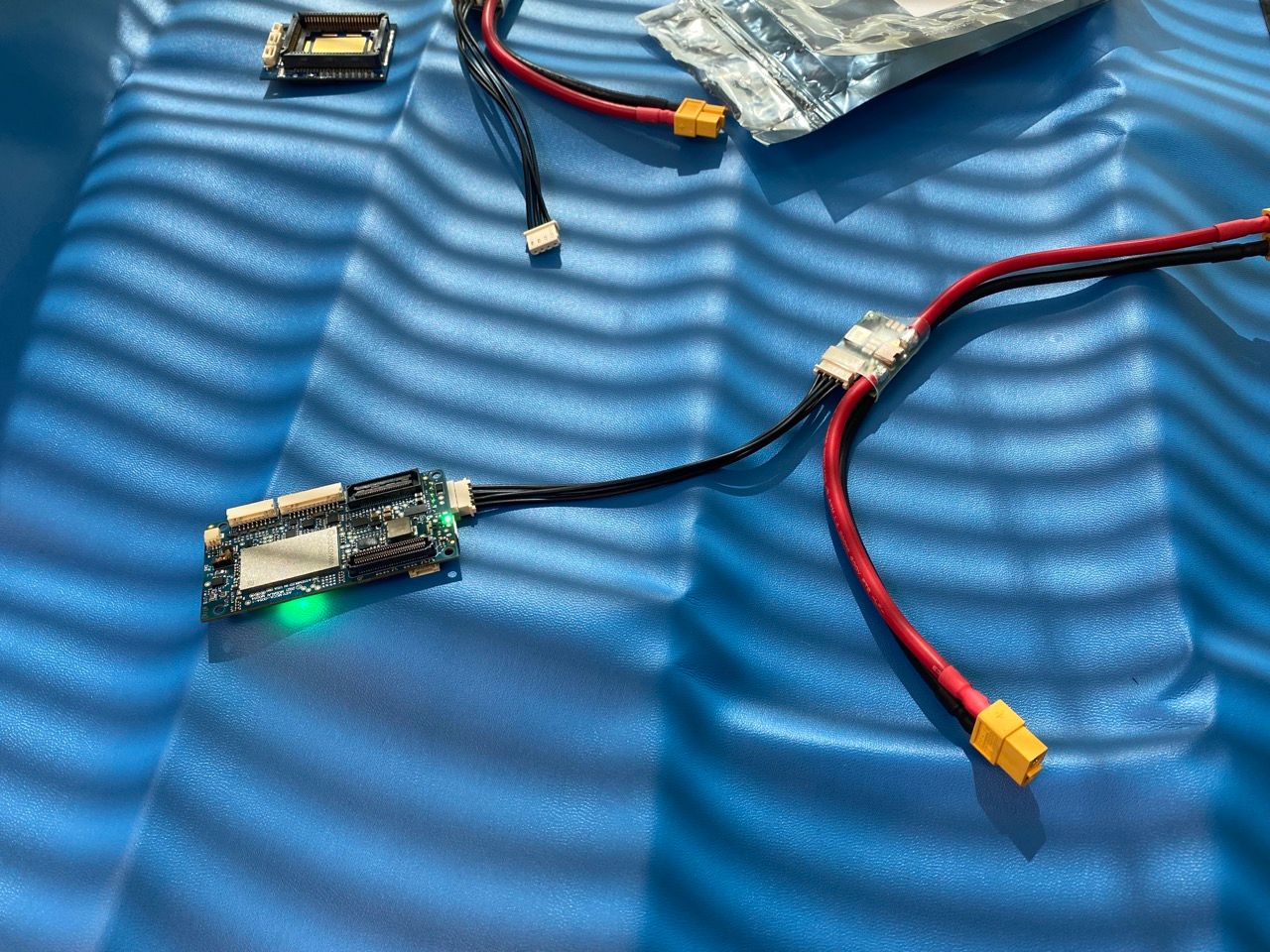
                                          @tom Removed it. ADB wasn't detected. Do you have some advices my setup?
                                          IMG_6989 Large.jpeg

                                          1 Reply Last reply
                                          0

                                          Hello! It looks like you're interested in this conversation, but you don't have an account yet.

                                          Getting fed up of having to scroll through the same posts each visit? When you register for an account, you'll always come back to exactly where you were before, and choose to be notified of new replies (either via email, or push notification). You'll also be able to save bookmarks and upvote posts to show your appreciation to other community members.

                                          With your input, this post could be even better 💗

                                          Register Login
                                          Reply
                                          • Reply as topic
                                          Log in to reply
                                          • Oldest to Newest
                                          • Newest to Oldest
                                          • Most Votes


                                          ModalAI
                                          Categories Recent Tags ModalAI.com Docs
                                          © 2026 ModalAI® · Accelerating autonomy for smaller, smarter, safer drones · Powered by NodeBB
                                          • Login

                                          • Don't have an account? Register

                                          • Login or register to search.
                                          • First post
                                            Last post
                                          0
                                          • Categories
                                          • Recent
                                          • Tags
                                          • Popular
                                          • Users
                                          • Groups