Skip to content
  • Categories
  • Recent
  • Tags
  • Popular
  • Users
  • Groups
Collapse
Brand Logo

ModalAI Forum

  1. ModalAI Support Forum
  2. Ask your questions right here!
  3. VOXL2 ADB not working

VOXL2 ADB not working

Scheduled Pinned Locked Moved Ask your questions right here!
18 Posts 5 Posters 3.7k Views 3 Watching
  • Oldest to Newest
  • Newest to Oldest
  • Most Votes
Reply
  • Reply as topic
Log in to reply
This topic has been deleted. Only users with topic management privileges can see it.
  • D Offline
    D Offline
    darwin.keem
    Contributor
    wrote on last edited by
    #1

    Hi, we have a problem with using Sentinel through ADB.

    We bought Sentinel and we were able to connect with ADB. Also, other packages such as voxl-mapper worked fine. We needed more accurate map in indoor, so we disassembled VOXL Flight Deck and replaced Hi-Res camera with PMD ToF Sensor from VOXL CAM. However, from that point, connecting through ADB doesn’t work.

    To resolve this problem we tried reflashing by fastboot.

    1. Fastboot mode by pressing SW1 for 30 secs.
    2. $ fastboot device
    3. $ sudo ./install.sh -f
    

    Flashing finished but doesn’t do anything but only printing “Waiting for ADB”. adb devices couldn’t detect any device.

    What we have checked:

    1. Reflashing using Fastboot
    2. Power
    • Using Gens ACE 3S, 60C, 5000mAh and Sentinel’s power module
    1. Cable
    • Using USB A to C, wasn’t causing problem before.
    • Connecting cable after 10 secs. powering.
    1. Environment
    • Tested through variety of devices(PC, laptop, windows, mac, ubuntu)
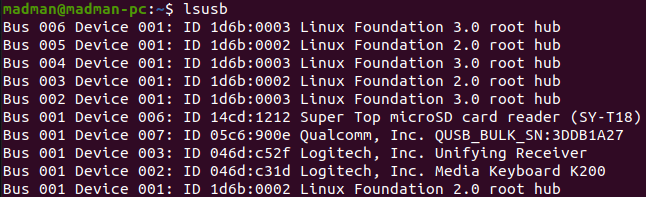
    1. lsusb
    • Detects usb to “Qualcomm, Inc~”
    1. adb
    • Version 1.0.39
    • Tried adb kill-server

    How can we connect through ADB? Thanks.

    1 Reply Last reply
    0
    • Adrian HidalgoA Offline
      Adrian HidalgoA Offline
      Adrian Hidalgo
      ModalAI Team
      wrote on last edited by
      #2

      @darwin-keem sorry to hear you're having issues. You may want to check the camera connections again. If one of the camera connections is not fully seated, it'll prevent full boot of the VOXL2.
      You mentioned that you plugged in the TOF. That might be the cause. Unfortunately, TOF is not yet fully supported on the VOXL2. We'll keep you posted when it does.

      D 1 Reply Last reply
      0
      • tomT Offline
        tomT Offline
        tom
        admin
        wrote on last edited by
        #3

        @darwin-keem What's the whole output of what it shows up as in lsusb ? It's possible it has been bricked, in which case you will need to use the "QDL" tool in order to get it going again: https://docs.modalai.com/voxl2-qdl/

        D 1 Reply Last reply
        0
        • tomT tom

          @darwin-keem What's the whole output of what it shows up as in lsusb ? It's possible it has been bricked, in which case you will need to use the "QDL" tool in order to get it going again: https://docs.modalai.com/voxl2-qdl/

          D Offline
          D Offline
          darwin.keem
          Contributor
          wrote on last edited by
          #4

          @tom This is the full output of lsusb.

          Untitled.png

          1 Reply Last reply
          0
          • Adrian HidalgoA Adrian Hidalgo

            @darwin-keem sorry to hear you're having issues. You may want to check the camera connections again. If one of the camera connections is not fully seated, it'll prevent full boot of the VOXL2.
            You mentioned that you plugged in the TOF. That might be the cause. Unfortunately, TOF is not yet fully supported on the VOXL2. We'll keep you posted when it does.

            D Offline
            D Offline
            darwin.keem
            Contributor
            wrote on last edited by
            #5

            @Adrian-Hidalgo We disconnected ToF and reconnected with the original Hi-Res camera. Also, we've checked the camera connections, but had no issue about it. However, we've disconnected GPS module, as we don't need it. Can this be the reason?

            1 Reply Last reply
            0
            • D Offline
              D Offline
              darwin.keem
              Contributor
              wrote on last edited by
              #6

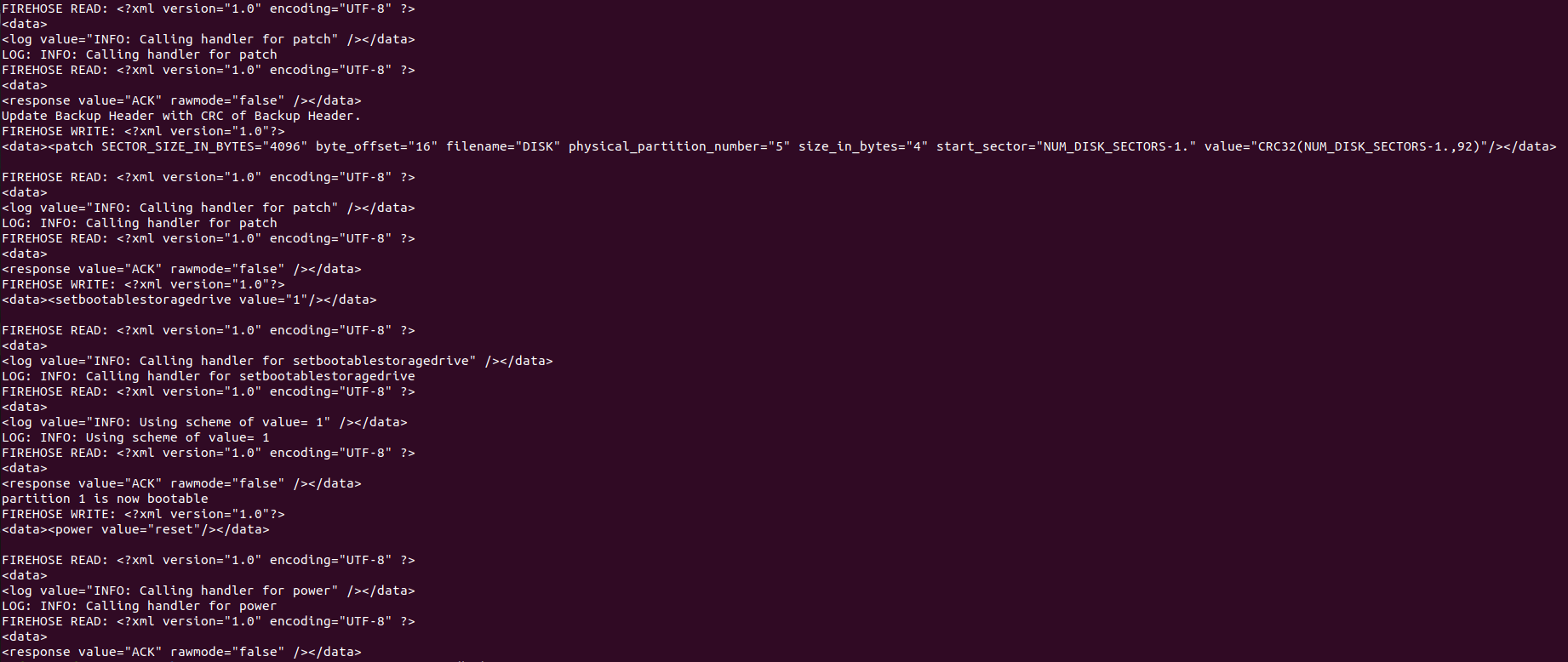
              @tom We've ran factory reset with qdl and this is the output.
              Untitled-2.png

              After performing qdl, if we run lsusb without turning off the power, it gives us this.

              Untitled-3.png

              If we cycle power and run lsusb, it is still shown below. It is not recognized as 05c6:901d.

              Untitled-4.png

              1 Reply Last reply
              0
              • tomT Offline
                tomT Offline
                tom
                admin
                wrote on last edited by
                #7

                @darwin-keem After running the QDL flash and removing power did you switch back off the EDL switch on VOXL2 before powering back on?

                D 1 Reply Last reply
                0
                • tomT tom

                  @darwin-keem After running the QDL flash and removing power did you switch back off the EDL switch on VOXL2 before powering back on?

                  D Offline
                  D Offline
                  darwin.keem
                  Contributor
                  wrote on last edited by
                  #8

                  @tom Yes, we did.

                  1 Reply Last reply
                  0
                  • tomT Offline
                    tomT Offline
                    tom
                    admin
                    wrote on last edited by
                    #9

                    @darwin-keem Did the output of the QDL flash look complete? Did it reach the point seen in this doc: https://docs.modalai.com/Qualcomm-Flight-RB5-QDL/

                    <response value="ACK" rawmode="false" /></data>
                    partition 1 is now bootable
                    FIREHOSE WRITE: <?xml version="1.0"?>
                    <data><power value="reset"/></data>
                    
                    FIREHOSE READ: <?xml version="1.0" encoding="UTF-8" ?>
                    <data>
                    <log value="INFO: Calling handler for power" /></data>
                    LOG: INFO: Calling handler for power
                    FIREHOSE READ: <?xml version="1.0" encoding="UTF-8" ?>
                    <data>
                    <response value="ACK" rawmode="false" /></data>
                    
                    1 Reply Last reply
                    0
                    • D Offline
                      D Offline
                      darwin.keem
                      Contributor
                      wrote on last edited by
                      #10

                      @tom Yes, it reached the point. The result is written on the previous replies.

                      1 Reply Last reply
                      0
                      • tomT Offline
                        tomT Offline
                        tom
                        admin
                        wrote on last edited by
                        #11

                        @darwin-keem Apologies, I missed that reply. Are you able to force the VOXL2 into fastboot via. the button? You can follow this video for instructions: https://www.youtube.com/watch?v=IM3PnW7cipQ

                        1 Reply Last reply
                        0
                        • D Offline
                          D Offline
                          darwin.keem
                          Contributor
                          wrote on last edited by
                          #12

                          @tom Yes, entering into fastboot mode is possible. We tried re-flashing with voxl2_platform_1.3.1-0.8/system-image/flash-system-image.sh. But after flashing, it doesn't go after but only waiting for ADB.

                          Done Flashing
                          [--------------------------------------------------------](100%)
                          rebooting...
                          
                          finished. total time: 0.050s
                          [INFO] Waiting for ADB
                          1 Reply Last reply
                          0
                          • D Offline
                            D Offline
                            darwin.keem
                            Contributor
                            wrote on last edited by darwin.keem
                            #13

                            We need VOXL 2 to work urgently. Can we get any remote assist? Thanks.

                            Eric KatzfeyE 1 Reply Last reply
                            0
                            • D darwin.keem

                              We need VOXL 2 to work urgently. Can we get any remote assist? Thanks.

                              Eric KatzfeyE Online
                              Eric KatzfeyE Online
                              Eric Katzfey
                              ModalAI Team
                              wrote on last edited by
                              #14

                              @darwin-keem This can mean that you have a damaged power cable from the APM to the VOXL 2. The cables are Robotis 184-903-0081-000 Cable-4P if you don't have a spare to try.

                              D 2 Replies Last reply
                              0
                              • Eric KatzfeyE Eric Katzfey

                                @darwin-keem This can mean that you have a damaged power cable from the APM to the VOXL 2. The cables are Robotis 184-903-0081-000 Cable-4P if you don't have a spare to try.

                                D Offline
                                D Offline
                                darwin.keem
                                Contributor
                                wrote on last edited by
                                #15

                                @Eric-Katzfey Thanks. We will try as soon as possible. Are there any more possible solutions that might solve this problem?

                                1 Reply Last reply
                                0
                                • Eric KatzfeyE Eric Katzfey

                                  @darwin-keem This can mean that you have a damaged power cable from the APM to the VOXL 2. The cables are Robotis 184-903-0081-000 Cable-4P if you don't have a spare to try.

                                  D Offline
                                  D Offline
                                  darwin.keem
                                  Contributor
                                  wrote on last edited by
                                  #16

                                  @Eric-Katzfey We've tried replacing power cable with a spare. Tried fastboot and qdl again, but it doesn't work.

                                  1 Reply Last reply
                                  0
                                  • modaltbM Offline
                                    modaltbM Offline
                                    modaltb
                                    ModalAI Team
                                    wrote on last edited by
                                    #17

                                    @darwin-keem ,

                                    Going through the thread above, a link was provided for the RB5 Flight QDL, but you have a VOXL2 Sentinel.... So for QDL on VOXL 2 the link is: https://docs.modalai.com/voxl2-qdl/

                                    And you should be using these files for the QDL process:

                                    VOXL2 QDL Image 14.1a_1.1.2
                                    r14.1a_1.1.2-M0054-14.1a-FLAT-V3.zip

                                    Can you confirm that is what you have used? This is what we would use as the first step towards troubleshooting as well internally.

                                    What I normally do is remove any hardware connections to the bare minimum if I'm having issues with bootup..... If camera connectors have issues, it can prevent bootup for sure.

                                    D 1 Reply Last reply
                                    0
                                    • modaltbM modaltb

                                      @darwin-keem ,

                                      Going through the thread above, a link was provided for the RB5 Flight QDL, but you have a VOXL2 Sentinel.... So for QDL on VOXL 2 the link is: https://docs.modalai.com/voxl2-qdl/

                                      And you should be using these files for the QDL process:

                                      VOXL2 QDL Image 14.1a_1.1.2
                                      r14.1a_1.1.2-M0054-14.1a-FLAT-V3.zip

                                      Can you confirm that is what you have used? This is what we would use as the first step towards troubleshooting as well internally.

                                      What I normally do is remove any hardware connections to the bare minimum if I'm having issues with bootup..... If camera connectors have issues, it can prevent bootup for sure.

                                      D Offline
                                      D Offline
                                      darwin.keem
                                      Contributor
                                      wrote on last edited by
                                      #18

                                      @modaltb Yes, we used r14.1a_1.1.2-M0054-14.1a-FLAT-V3.zip as well.

                                      We will make a try with removing all the hardware connection.

                                      1 Reply Last reply
                                      0

                                      Hello! It looks like you're interested in this conversation, but you don't have an account yet.

                                      Getting fed up of having to scroll through the same posts each visit? When you register for an account, you'll always come back to exactly where you were before, and choose to be notified of new replies (either via email, or push notification). You'll also be able to save bookmarks and upvote posts to show your appreciation to other community members.

                                      With your input, this post could be even better 💗

                                      Register Login
                                      Reply
                                      • Reply as topic
                                      Log in to reply
                                      • Oldest to Newest
                                      • Newest to Oldest
                                      • Most Votes


                                      ModalAI
                                      Categories Recent Tags ModalAI.com Docs
                                      © 2026 ModalAI® · Accelerating autonomy for smaller, smarter, safer drones · Powered by NodeBB
                                      • Login

                                      • Login or register to search.
                                      • First post
                                        Last post
                                      0
                                      • Categories
                                      • Recent
                                      • Tags
                                      • Popular
                                      • Users
                                      • Groups