
RNDIS Connection
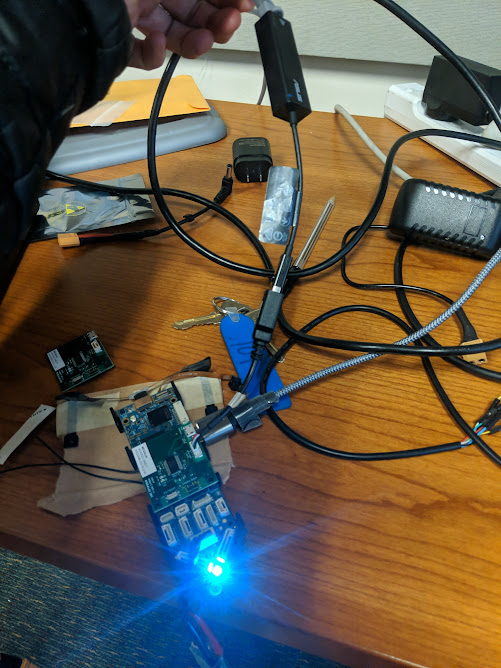
-
@wilkinsaf Okay not sure if you've built the voxl kernel yourself previously but here is the project used to do so: https://gitlab.com/voxl-public/system-image-build/voxl-build/-/tree/master
And then kernel mods get pulled in from https://gitlab.com/voxl-public/system-image-build/meta-voxl
The master branch of
meta-voxlalready has the necessary mods but in case you want to take a look at them, they're here:
https://gitlab.com/voxl-public/system-image-build/meta-voxl/-/commit/ab321adb2b0a9c8dd28b2793b445ddf7dccedc68 -
@wilkinsaf Okay not sure if you've built the voxl kernel yourself previously but here is the project used to do so: https://gitlab.com/voxl-public/system-image-build/voxl-build/-/tree/master
And then kernel mods get pulled in from https://gitlab.com/voxl-public/system-image-build/meta-voxl
The master branch of
meta-voxlalready has the necessary mods but in case you want to take a look at them, they're here:
https://gitlab.com/voxl-public/system-image-build/meta-voxl/-/commit/ab321adb2b0a9c8dd28b2793b445ddf7dccedc68I flashed the new kernel and tried the RNDIS connection. I did not see anything come up.
I then wiped the card and did a full reflash (just to make sure) and did not see the connection come up.It sounds like you just spoke with Seth. I am sure he mentioned we do not specifically need an RNDIS connection, but an internet connection over USB in general.
II am not sure how VOXL does this connection. I saw some qmi files, so I assumed it was some custom programming. Would you be able to add some insight into how the VOXL makes connections to its modems? We usually leverage modem-manager on linux devices, but I doubt that is present on yocto
-
When you say an internet connection over USB, are you meaning just using USB to ethernet (tethered) ? In which case you could just use a USB to ethernet adapter like this one: https://www.cablecreation.com/collections/usb-2-0-3-0/products/usb-ethernet-adapter
-
https://docs.modalai.com/usb-to-ethernet-with-voxl/
Not all usb to ethernet adapters are supported. A lot of people around the office use the apple ones but they have since been discontinued and are hard to find online so the other one I linked works as well.
-
https://docs.modalai.com/usb-to-ethernet-with-voxl/
Not all usb to ethernet adapters are supported. A lot of people around the office use the apple ones but they have since been discontinued and are hard to find online so the other one I linked works as well.
@tom AAAHHHH
hence
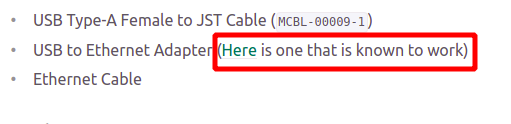
Because not all are the same. Yes, that is what we mean. USB to Ethernet tethered. However, it appears that these are not all of the same. Some work and some don't.
We have a couple different here I can try. I wonder what makes the apple ones work in particular. Our goal is to try and get different modems working over USB. One provides RNDIS. Apparently another does usb to ethernet interface.
My knowledge on these network connections over usb is (obviously) novice.
Would you recommend looking through voxl-modem to see how a connection is made, or is there another informational page you recommend?
-
@tom AAAHHHH
hence
Because not all are the same. Yes, that is what we mean. USB to Ethernet tethered. However, it appears that these are not all of the same. Some work and some don't.
We have a couple different here I can try. I wonder what makes the apple ones work in particular. Our goal is to try and get different modems working over USB. One provides RNDIS. Apparently another does usb to ethernet interface.
My knowledge on these network connections over usb is (obviously) novice.
Would you recommend looking through voxl-modem to see how a connection is made, or is there another informational page you recommend?
@wilkinsaf We are just attempting to understand how VOXL can make these network connections (bring up eth0 and such)
-
@wilkinsaf Any sort of process used to support usb to ethernet is located at the kernel level (I believe). voxl-modem for example isn't used at all for bringing up a usb to ethernet dongle connection.
So if the usb to ethernet dongle is supported (we've only tried out a couple and stuck with ones that have worked for us), the network interface should "just come up" wihtout any intervention from voxl-modem
-
I find using
dmesg -wHsuper helpful when debugging usb devices as you can monitor which driver is picking up the hardware that is being plugged in and then you can inspect the driver itself if needed. Although, if the hardware is unrecognized by the kernel you may not see anything in dmesg -
I find using
dmesg -wHsuper helpful when debugging usb devices as you can monitor which driver is picking up the hardware that is being plugged in and then you can inspect the driver itself if needed. Although, if the hardware is unrecognized by the kernel you may not see anything in dmesg@tom said in RNDIS Connection:
dmesg -wH
Apologies for the delay Tom.
I got some extra hardware and I am trying again to form RNDIS connection. I see the usb device and captured log from
dmesg -wHcommand[ +0.234046] usb 1-1: new high-speed USB device number 3 using xhci-hcd [ +0.153446] usb 1-1: New USB device found, idVendor=1d6b, idProduct=0104 [ +0.000049] usb 1-1: New USB device strings: Mfr=1, Product=2, SerialNumber=3 [ +0.000027] usb 1-1: Product: RNDIS Gadget [ +0.000022] usb 1-1: Manufacturer: DTC [ +0.000023] usb 1-1: SerialNumber: 0123678945 [ +0.059949] rndis_host 1-1:1.0 usb0: register 'rndis_host' at usb-xhci-hcd.0.auto-1, RNDIS device, ffffffc0ec10b610 [ +0.001060] mdss_register_panel: mdss mdp resource not initialized yet [ +0.000047] mdss_wb soc:qcom,mdss_wb_panel: unable to register writeback panel [ +0.012804] cdc_acm 1-1:1.2: This device cannot do calls on its own. It is not a modem. [ +0.013688] wcd9335-slim tasha-slim-pgd: Platform data from device tree [ +0.000347] wcd9335-slim tasha-slim-pgd: cdc-vdd-buck: vol=[1800000 1800000]uV, curr=[650000]uA, ond 0 [ +0.000082] wcd9335-slim tasha-slim-pgd: cdc-buck-sido: vol=[1800000 1800000]uV, curr=[250000]uA, ond 0 [ +0.000062] wcd9335-slim tasha-slim-pgd: cdc-vdd-tx-h: vol=[1800000 1800000]uV, curr=[25000]uA, ond 0 [ +0.000059] wcd9335-slim tasha-slim-pgd: cdc-vdd-rx-h: vol=[1800000 1800000]uV, curr=[25000]uA, ond 0 [ +0.000068] wcd9335-slim tasha-slim-pgd: cdc-vddpx-1: vol=[1800000 1800000]uV, curr=[10000]uA, ond 0 [ +0.000025] wcd9335-slim tasha-slim-pgd: Looking up qcom,cdc-micbias-ldoh-v property in node /soc/slim@91c0000/tasha_codec failed [ +0.000025] wcd9335-slim tasha-slim-pgd: Looking up qcom,cdc-micbias-cfilt1-mv property in node /soc/slim@91c0000/tasha_codec failed [ +0.002282] cdc_acm 1-1:1.2: ttyACM0: USB ACM device [ +0.005805] wcd9335-slim tasha-slim-pgd: Looking up qcom,cdc-micbias-cfilt2-mv property in node /soc/slim@91c0000/tasha_codec failed [ +0.000036] wcd9335-slim tasha-slim-pgd: Looking up qcom,cdc-micbias-cfilt3-mv property in node /soc/slim@91c0000/tasha_codec failed [ +0.000030] wcd9335-slim tasha-slim-pgd: Looking up qcom,cdc-micbias1-cfilt-sel property in node /soc/slim@91c0000/tasha_codec failed [ +0.000034] wcd9335-slim tasha-slim-pgd: Looking up qcom,cdc-micbias2-cfilt-sel property in node /soc/slim@91c0000/tasha_codec failed [ +0.000020] wcd9335-slim tasha-slim-pgd: Looking up qcom,cdc-micbias3-cfilt-sel property in node /soc/slim@91c0000/tasha_codec failed [ +0.000021] wcd9335-slim tasha-slim-pgd: Looking up qcom,cdc-micbias4-cfilt-sel property in node /soc/slim@91c0000/tasha_codec failed [ +0.000180] wcd9335-slim tasha-slim-pgd: Looking up qcom,cdc-mic-unmute-delay property in node /soc/slim@91c0000/tasha_codec failed [ +0.000040] wcd9335-slim tasha-slim-pgd: wcd9xxx_slim_probe: codec type is 2 [ +0.170558] wcd9xxx_slim_probe: failed to get slimbus tasha-slim-pgd logical address: -6 [ +0.003819] mdss_register_panel: mdss mdp resource not initialized yet [ +0.000058] mdss_wb soc:qcom,mdss_wb_panel: unable to register writeback panel [ +0.018967] wcd9335-slim tasha-slim-pgd: Platform data from device tree [ +0.000134] wcd9335-slim tasha-slim-pgd: cdc-vdd-buck: vol=[1800000 1800000]uV, curr=[650000]uA, ond 0 [ +0.000034] wcd9335-slim tasha-slim-pgd: cdc-buck-sido: vol=[1800000 1800000]uV, curr=[250000]uA, ond 0 [ +0.000032] wcd9335-slim tasha-slim-pgd: cdc-vdd-tx-h: vol=[1800000 1800000]uV, curr=[25000]uA, ond 0 [ +0.000032] wcd9335-slim tasha-slim-pgd: cdc-vdd-rx-h: vol=[1800000 1800000]uV, curr=[25000]uA, ond 0 [ +0.000033] wcd9335-slim tasha-slim-pgd: cdc-vddpx-1: vol=[1800000 1800000]uV, curr=[10000]uA, ond 0 [ +0.000016] wcd9335-slim tasha-slim-pgd: Looking up qcom,cdc-micbias-ldoh-v property in node /soc/slim@91c0000/tasha_codec failed [ +0.000011] wcd9335-slim tasha-slim-pgd: Looking up qcom,cdc-micbias-cfilt1-mv property in node /soc/slim@91c0000/tasha_codec failed [ +0.000012] wcd9335-slim tasha-slim-pgd: Looking up qcom,cdc-micbias-cfilt2-mv property in node /soc/slim@91c0000/tasha_codec failed [ +0.000013] wcd9335-slim tasha-slim-pgd: Looking up qcom,cdc-micbias-cfilt3-mv property in node /soc/slim@91c0000/tasha_codec failed [ +0.000014] wcd9335-slim tasha-slim-pgd: Looking up qcom,cdc-micbias1-cfilt-sel property in node /soc/slim@91c0000/tasha_codec failed [ +0.000011] wcd9335-slim tasha-slim-pgd: Looking up qcom,cdc-micbias2-cfilt-sel property in node /soc/slim@91c0000/tasha_codec failed [ +0.000010] wcd9335-slim tasha-slim-pgd: Looking up qcom,cdc-micbias3-cfilt-sel property in node /soc/slim@91c0000/tasha_codec failed [ +0.000011] wcd9335-slim tasha-slim-pgd: Looking up qcom,cdc-micbias4-cfilt-sel property in node /soc/slim@91c0000/tasha_codec failed [ +0.000059] wcd9335-slim tasha-slim-pgd: Looking up qcom,cdc-mic-unmute-delay property in node /soc/slim@91c0000/tasha_codec failed [ +0.000027] wcd9335-slim tasha-slim-pgd: wcd9xxx_slim_probe: codec type is 2 [ +0.156933] wcd9xxx_slim_probe: failed to get slimbus tasha-slim-pgd logical address: -6not seeing the RNDIS interface, but I am going to look closer into this
-
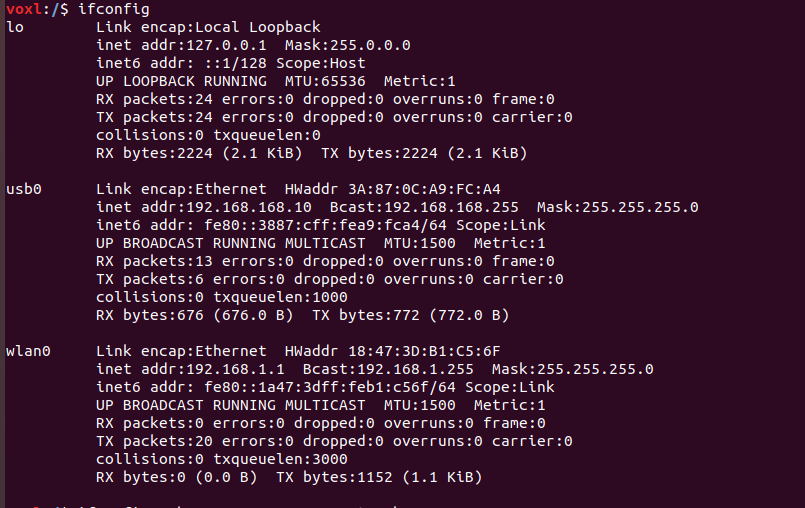
Cool, lets see if I can actually talk over it
-
@wilkinsaf Awesome! Looks like you've made some good progress
-
S skl1g14 referenced this topic on


Reading along? Create a free ModalAI Forum account to join in.
With an account you can reply, ask your own question, get an email when a ModalAI engineer answers, and mark the reply that solved it. Your place in each thread is saved between visits.
Questions about VOXL, Flight Core, ESCs and ModalAI drones are answered here by the engineers who build them.
Register Login