Skip to content
  • Categories
  • Recent
  • Tags
  • Popular
  • Users
  • Groups
Collapse
Brand Logo

ModalAI Forum

  1. ModalAI Support Forum
  2. Ask your questions right here!
  3. microhard integration with voxl2, not able to get the data.

microhard integration with voxl2, not able to get the data.

Scheduled Pinned Locked Moved Ask your questions right here!
10 Posts 2 Posters 1.2k Views 1 Watching
  • Oldest to Newest
  • Newest to Oldest
  • Most Votes
Reply
  • Reply as topic
Log in to reply
This topic has been deleted. Only users with topic management privileges can see it.
  • Jetson NanoJ Offline
    Jetson NanoJ Offline
    Jetson Nano
    Veteran
    wrote on last edited by Jetson Nano
    #1

    Hello @Vinny @tom @Alex-Kushleyev @modaltb @Eric-Katzfey
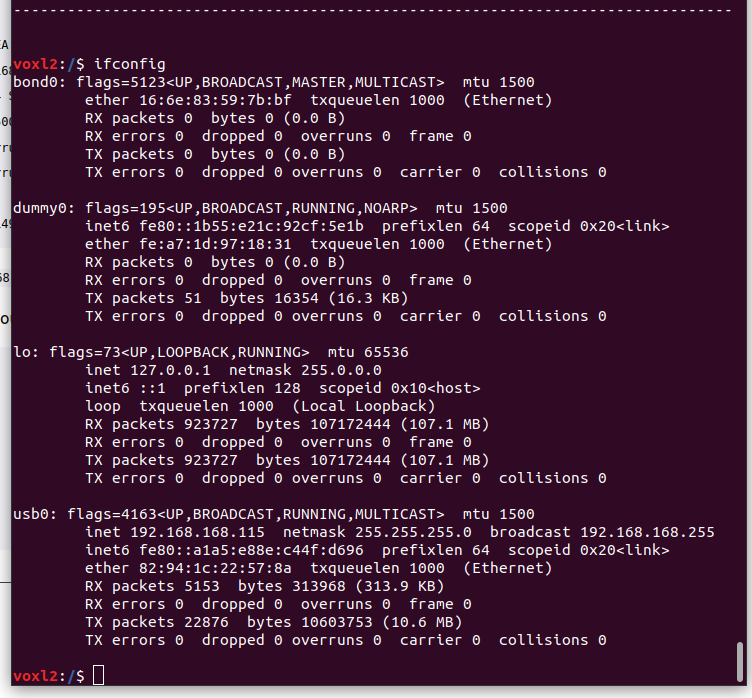
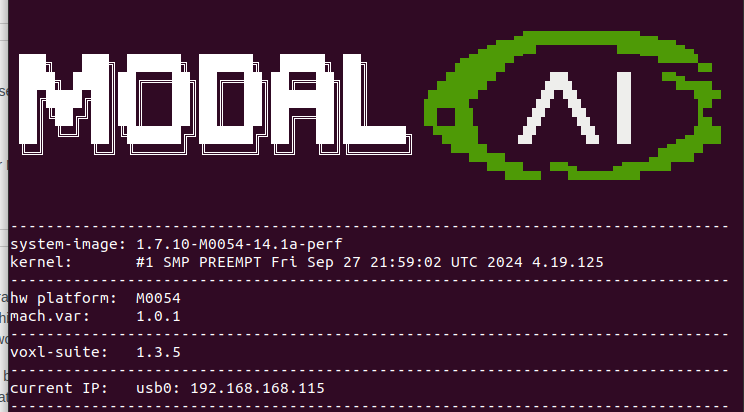
    I am trying to integrate microhard with voxl2. I was able to set up the master connection in the voxl side, as well as setup slave side. Both of the microhard modules are showing connected, but the ip address on the slave side is varying and ip address on the voxl side, thats the master side is also varying.
    Can anyone help me with the error.
    0564f849-7d09-45c9-9a58-93b69fea20ff-Screenshot from 2025-04-11 18-55-01.png b1e05ca4-8f37-4cbc-87b9-859ed1e9257b-Screenshot from 2025-04-11 18-58-50.png
    1540c9e1-f78d-47f1-a4df-4994683c8932-Screenshot from 2025-04-11 19-08-58.png

    tomT 1 Reply Last reply
    0
    • Jetson NanoJ Jetson Nano

      Hello @Vinny @tom @Alex-Kushleyev @modaltb @Eric-Katzfey
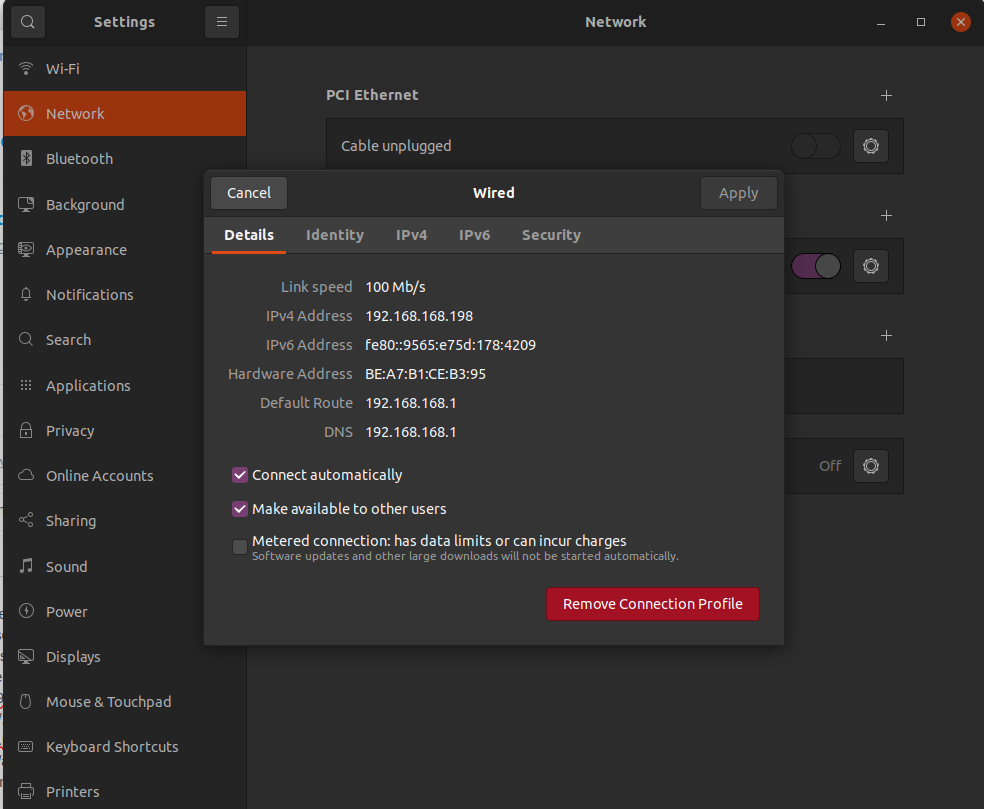
      I am trying to integrate microhard with voxl2. I was able to set up the master connection in the voxl side, as well as setup slave side. Both of the microhard modules are showing connected, but the ip address on the slave side is varying and ip address on the voxl side, thats the master side is also varying.
      Can anyone help me with the error.
      0564f849-7d09-45c9-9a58-93b69fea20ff-Screenshot from 2025-04-11 18-55-01.png b1e05ca4-8f37-4cbc-87b9-859ed1e9257b-Screenshot from 2025-04-11 18-58-50.png
      1540c9e1-f78d-47f1-a4df-4994683c8932-Screenshot from 2025-04-11 19-08-58.png

      tomT Offline
      tomT Offline
      tom
      admin
      wrote on last edited by
      #2

      @Jetson-Nano See here how to set a static IP for microhard on the VOXL side: https://docs.modalai.com/microhard-add-on-manual/#software-setup

      For the ground station side you'll have to manually assign an IP, like we do for Doodle modems here: https://docs.modalai.com/doodle-labs-user-guide/#ground-station-software-setup

      Jetson NanoJ 1 Reply Last reply
      0
      • tomT tom

        @Jetson-Nano See here how to set a static IP for microhard on the VOXL side: https://docs.modalai.com/microhard-add-on-manual/#software-setup

        For the ground station side you'll have to manually assign an IP, like we do for Doodle modems here: https://docs.modalai.com/doodle-labs-user-guide/#ground-station-software-setup

        Jetson NanoJ Offline
        Jetson NanoJ Offline
        Jetson Nano
        Veteran
        wrote on last edited by
        #3

        @tom Thanks for reverting back. I repeated those steps and now the IP is static, still I am not able to get the data from the VOXL 2 board. Is there any thing else I am required to setup.

        tomT 1 Reply Last reply
        0
        • Jetson NanoJ Jetson Nano

          @tom Thanks for reverting back. I repeated those steps and now the IP is static, still I am not able to get the data from the VOXL 2 board. Is there any thing else I am required to setup.

          tomT Offline
          tomT Offline
          tom
          admin
          wrote on last edited by
          #4

          @Jetson-Nano Are you able to ping from VOXL2 to the onboard Microhard board or the other Microhard board with the modules specified IPs? Usually 192.168.168.1 for master and 192.168.168.2 for slave

          Jetson NanoJ 2 Replies Last reply
          0
          • tomT tom

            @Jetson-Nano Are you able to ping from VOXL2 to the onboard Microhard board or the other Microhard board with the modules specified IPs? Usually 192.168.168.1 for master and 192.168.168.2 for slave

            Jetson NanoJ Offline
            Jetson NanoJ Offline
            Jetson Nano
            Veteran
            wrote on last edited by Jetson Nano
            #5

            @tom I am able to ping the onboard microhard board, by ping 192.168.168.1, but when I try ping 192.168.168.2 or the custom ip I set, it is showing host destination unreachable

            Jetson NanoJ 1 Reply Last reply
            0
            • Jetson NanoJ Jetson Nano

              @tom I am able to ping the onboard microhard board, by ping 192.168.168.1, but when I try ping 192.168.168.2 or the custom ip I set, it is showing host destination unreachable

              Jetson NanoJ Offline
              Jetson NanoJ Offline
              Jetson Nano
              Veteran
              wrote on last edited by Jetson Nano
              #6

              @tom I was able to get the data,, i had to change the ip address in voxl-mavlink-server. Also slave connection was not getting established automatically, I had to do it manually.

              Now I am able to get both portal data and start QGC.

              1 Reply Last reply
              0
              • tomT tom

                @Jetson-Nano Are you able to ping from VOXL2 to the onboard Microhard board or the other Microhard board with the modules specified IPs? Usually 192.168.168.1 for master and 192.168.168.2 for slave

                Jetson NanoJ Offline
                Jetson NanoJ Offline
                Jetson Nano
                Veteran
                wrote on last edited by
                #7

                @tom I would like to know whether I could use two microhard ground units to communicate with each other. one on air and another on the ground side.

                tomT 1 Reply Last reply
                0
                • Jetson NanoJ Jetson Nano

                  @tom I would like to know whether I could use two microhard ground units to communicate with each other. one on air and another on the ground side.

                  tomT Offline
                  tomT Offline
                  tom
                  admin
                  wrote on last edited by
                  #8

                  @Jetson-Nano Yes, you can. You just need to make sure one is a "master" and one is a "slave"

                  Jetson NanoJ 1 Reply Last reply
                  0
                  • tomT tom

                    @Jetson-Nano Yes, you can. You just need to make sure one is a "master" and one is a "slave"

                    Jetson NanoJ Offline
                    Jetson NanoJ Offline
                    Jetson Nano
                    Veteran
                    wrote on last edited by
                    #9

                    @tom I had an additional query , when i connect the microhard ground module to the windows system, I am able to get the portal on browser through the ip address 192.168.168.100. when I assign the ip to the QGC, it is not loading.
                    This was not an issue in ubuntu, in ubuntu the QGC was loading automatically.

                    tomT 1 Reply Last reply
                    0
                    • Jetson NanoJ Jetson Nano

                      @tom I had an additional query , when i connect the microhard ground module to the windows system, I am able to get the portal on browser through the ip address 192.168.168.100. when I assign the ip to the QGC, it is not loading.
                      This was not an issue in ubuntu, in ubuntu the QGC was loading automatically.

                      tomT Offline
                      tomT Offline
                      tom
                      admin
                      wrote on last edited by
                      #10

                      @Jetson-Nano We have never used Microhard on windows but it's possible your firewall is blocking UDP data on that port

                      1 Reply Last reply
                      0

                      Hello! It looks like you're interested in this conversation, but you don't have an account yet.

                      Getting fed up of having to scroll through the same posts each visit? When you register for an account, you'll always come back to exactly where you were before, and choose to be notified of new replies (either via email, or push notification). You'll also be able to save bookmarks and upvote posts to show your appreciation to other community members.

                      With your input, this post could be even better 💗

                      Register Login
                      Reply
                      • Reply as topic
                      Log in to reply
                      • Oldest to Newest
                      • Newest to Oldest
                      • Most Votes


                      ModalAI
                      Categories Recent Tags ModalAI.com Docs
                      © 2026 ModalAI® · Accelerating autonomy for smaller, smarter, safer drones · Powered by NodeBB
                      • Login

                      • Don't have an account? Register

                      • Login or register to search.
                      • First post
                        Last post
                      0
                      • Categories
                      • Recent
                      • Tags
                      • Popular
                      • Users
                      • Groups