
Stereo cameras not working with 14.5cm extension cable
-
[[topic:post-is-deleted]]
Hi @Gary-Holmgren
We wrote this up some time ago to help explain the "why" of these longer flexes not always working.
Link here
You can read in the report that not every configuration is readily supported, and may take some custom tweaks to make it work, such as slowing down the MIPI rates.
Alex has you covered otherwise! -
Hi @Gary-Holmgren
We wrote this up some time ago to help explain the "why" of these longer flexes not always working.
Link here
You can read in the report that not every configuration is readily supported, and may take some custom tweaks to make it work, such as slowing down the MIPI rates.
Alex has you covered otherwise!@Vinny @Gary-Holmgren
I'm running into the same problem, unfortunally using the longer extension cables the camera server fail to start,
I have read the article about MIPI CSI protocols, is it possible to lower the speed to use the cameras with the longer extension cable? In case how can I do it?
thank you! -
@Vinny @Gary-Holmgren
I'm running into the same problem, unfortunally using the longer extension cables the camera server fail to start,
I have read the article about MIPI CSI protocols, is it possible to lower the speed to use the cameras with the longer extension cable? In case how can I do it?
thank you!HI @robertociuch
I'm sure @Alex-Kushleyev has a few config files ready to go for lower clock speeds. But, these are not broadly supported as far as I know, so you will need to be sure you apply them after every SDK update and retest.
Can you confirm your image sensor setup you have now and which one is the problem child?Alex, correct me if I am wrong on any thing I just wrote

-
HI @robertociuch
I'm sure @Alex-Kushleyev has a few config files ready to go for lower clock speeds. But, these are not broadly supported as far as I know, so you will need to be sure you apply them after every SDK update and retest.
Can you confirm your image sensor setup you have now and which one is the problem child?Alex, correct me if I am wrong on any thing I just wrote
@Vinny
I am using the Sentinel configuration:
stereo front - Omnivision OV7251
stereo rear - Omnivision OV7251
tracking - Omnivision OV7251
hi-res - Sony IMX214 (eventually I will use the IMX412, but I still need to try it) -
HI @robertociuch
I'm sure @Alex-Kushleyev has a few config files ready to go for lower clock speeds. But, these are not broadly supported as far as I know, so you will need to be sure you apply them after every SDK update and retest.
Can you confirm your image sensor setup you have now and which one is the problem child?Alex, correct me if I am wrong on any thing I just wrote
Hi @Vinny and @Alex-Kushleyev,
any update about the config files?
Thank you -
Hi @Vinny and @Alex-Kushleyev,
any update about the config files?
Thank you@Riccardo-Benedetti and @robertociuch (and anyone else), can you please clarify which specific cameras in which position (slot / connector) you are looking to use with longer extension cables?
I am looking into how we could make the modified drivers available.
Alex
-
@Riccardo-Benedetti and @robertociuch (and anyone else), can you please clarify which specific cameras in which position (slot / connector) you are looking to use with longer extension cables?
I am looking into how we could make the modified drivers available.
Alex
Hi @Alex-Kushleyev ,
I use a configuration like the photo below, I still need to test the IMX412 hi-res with a custom extension cable,
do you think it would be better to lower the bitrate also for that camera?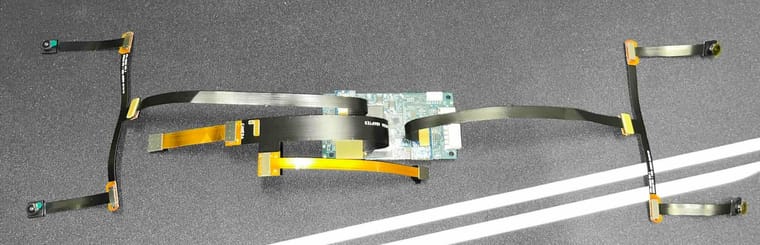
-
Hi @Alex-Kushleyev ,
I use a configuration like the photo below, I still need to test the IMX412 hi-res with a custom extension cable,
do you think it would be better to lower the bitrate also for that camera?@robertociuch , ok, got it, so basically two stereo pairs is what we can address first.
For stereo pairs, i think there is some issues due to additional length of stereo splitter and the flex connected to the ov7251 cameras. So that is why lowering the mipi rate is needed.
Regarding IMX412, we have some flexibility in modifying the MIPI transfer rate as well, but lowering it may affect maximum resolution / fps (depending on what resolution / fps you need). IMX412 does work with our M0036 extension flex (14.5cm). We can discuss what you need after sorting out the stereo pairs. However, please try your new flex as well to see if it just works out of the box.
Lets do the following: i can share modified camera drivers for the stereo pairs, so you can test and confirm that it works and then I will discuss internally how to make them available in our standard release. I'll follow up later today or tomorrow morning.
Alex
-
@robertociuch , ok, got it, so basically two stereo pairs is what we can address first.
For stereo pairs, i think there is some issues due to additional length of stereo splitter and the flex connected to the ov7251 cameras. So that is why lowering the mipi rate is needed.
Regarding IMX412, we have some flexibility in modifying the MIPI transfer rate as well, but lowering it may affect maximum resolution / fps (depending on what resolution / fps you need). IMX412 does work with our M0036 extension flex (14.5cm). We can discuss what you need after sorting out the stereo pairs. However, please try your new flex as well to see if it just works out of the box.
Lets do the following: i can share modified camera drivers for the stereo pairs, so you can test and confirm that it works and then I will discuss internally how to make them available in our standard release. I'll follow up later today or tomorrow morning.
Alex
@Alex-Kushleyev
I have replaced the built-in hires camera with IMX412 camera (https://www.modalai.com/collections/all/products/msu-m0107?variant=45747768557872).
I used M0036 cable as well, and it worked.
This is myvoxl-camera-server.conffor the setting{ "version": 0.1, "cameras": [{ "type": "ov7251", "name": "tracking", "enabled": true, "camera_id": 0, "fps": 30, "en_rotate": false, "en_preview": true, "preview_width": 640, "preview_height": 480, "en_raw_preview": true, "ae_mode": "lme_msv", "ae_desired_msv": 60, "exposure_min_us": 20, "exposure_max_us": 33000, "gain_min": 54, "gain_max": 8000, "exposure_soft_min_us": 5000, "ae_filter_alpha": 0.600000023841858, "ae_ignore_fraction": 0.20000000298023224, "ae_slope": 0.05000000074505806, "ae_exposure_period": 1, "ae_gain_period": 1 }, { "type": "imx412", "name": "hires", "enabled": true, "camera_id": 1, "fps": 30, "en_preview": false, "preview_width": 640, "preview_height": 480, "en_raw_preview": false, "en_small_video": true, "small_video_width": 1024, "small_video_height": 768, "small_venc_mode": "h265", "small_venc_br_ctrl": "cqp", "small_venc_Qfixed": 30, "small_venc_Qmin": 15, "small_venc_Qmax": 40, "small_venc_nPframes": 9, "small_venc_mbps": 2, "en_large_video": true, "large_video_width": 4056, "large_video_height": 3040, "large_venc_mode": "h265", "large_venc_br_ctrl": "cqp", "large_venc_Qfixed": 38, "large_venc_Qmin": 15, "large_venc_Qmax": 50, "large_venc_nPframes": 29, "large_venc_mbps": 30, "en_snapshot": true, "en_snapshot_width": 4056, "en_snapshot_height": 3040, "ae_mode": "isp" }] }
By the way, I have a question regarding "camera_id" in
/etc/modalai/voxl-camera-server.conf.
I set up the camera with04 - ov7251 tracking imx214 hiresand can see the "camera_id"0for the ov7251. For imx214, "camera_id" is set as1.
The camera connection is exactly same in the above photo (J7)Isn't J7 port's "camera_id"
2and3as described in https://docs.modalai.com/voxl2-image-sensors/#sdk-110-system-image-17x?
I would like to know what is the correct "camera_id" for the (ov7251+imx214) and (ov7251+imx412).
Also, I was wondering if the photo posted on the website was correct.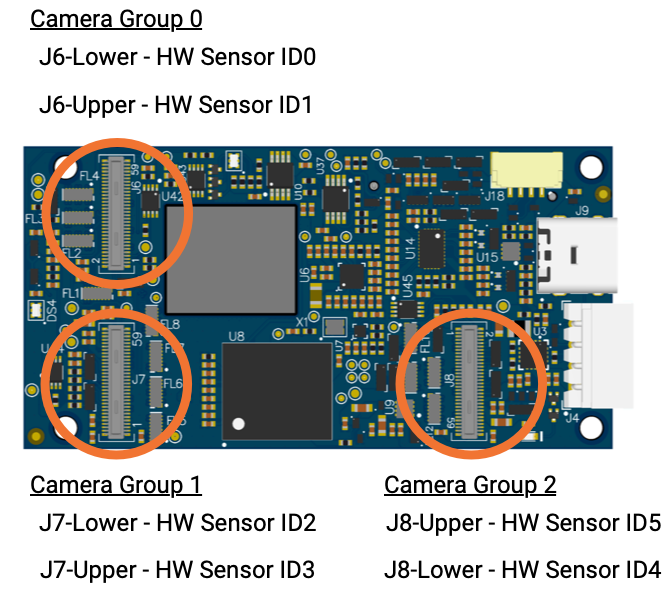
-
@robertociuch , ok, got it, so basically two stereo pairs is what we can address first.
For stereo pairs, i think there is some issues due to additional length of stereo splitter and the flex connected to the ov7251 cameras. So that is why lowering the mipi rate is needed.
Regarding IMX412, we have some flexibility in modifying the MIPI transfer rate as well, but lowering it may affect maximum resolution / fps (depending on what resolution / fps you need). IMX412 does work with our M0036 extension flex (14.5cm). We can discuss what you need after sorting out the stereo pairs. However, please try your new flex as well to see if it just works out of the box.
Lets do the following: i can share modified camera drivers for the stereo pairs, so you can test and confirm that it works and then I will discuss internally how to make them available in our standard release. I'll follow up later today or tomorrow morning.
Alex
One more question.
I foundimx214withM0036cable is not working.
I thought it is just a cable.
I do not have any knowledge, could you please why it is not working with a cable?Thanks in advance.
-
@Alex-Kushleyev
I have replaced the built-in hires camera with IMX412 camera (https://www.modalai.com/collections/all/products/msu-m0107?variant=45747768557872).
I used M0036 cable as well, and it worked.
This is myvoxl-camera-server.conffor the setting{ "version": 0.1, "cameras": [{ "type": "ov7251", "name": "tracking", "enabled": true, "camera_id": 0, "fps": 30, "en_rotate": false, "en_preview": true, "preview_width": 640, "preview_height": 480, "en_raw_preview": true, "ae_mode": "lme_msv", "ae_desired_msv": 60, "exposure_min_us": 20, "exposure_max_us": 33000, "gain_min": 54, "gain_max": 8000, "exposure_soft_min_us": 5000, "ae_filter_alpha": 0.600000023841858, "ae_ignore_fraction": 0.20000000298023224, "ae_slope": 0.05000000074505806, "ae_exposure_period": 1, "ae_gain_period": 1 }, { "type": "imx412", "name": "hires", "enabled": true, "camera_id": 1, "fps": 30, "en_preview": false, "preview_width": 640, "preview_height": 480, "en_raw_preview": false, "en_small_video": true, "small_video_width": 1024, "small_video_height": 768, "small_venc_mode": "h265", "small_venc_br_ctrl": "cqp", "small_venc_Qfixed": 30, "small_venc_Qmin": 15, "small_venc_Qmax": 40, "small_venc_nPframes": 9, "small_venc_mbps": 2, "en_large_video": true, "large_video_width": 4056, "large_video_height": 3040, "large_venc_mode": "h265", "large_venc_br_ctrl": "cqp", "large_venc_Qfixed": 38, "large_venc_Qmin": 15, "large_venc_Qmax": 50, "large_venc_nPframes": 29, "large_venc_mbps": 30, "en_snapshot": true, "en_snapshot_width": 4056, "en_snapshot_height": 3040, "ae_mode": "isp" }] }
By the way, I have a question regarding "camera_id" in
/etc/modalai/voxl-camera-server.conf.
I set up the camera with04 - ov7251 tracking imx214 hiresand can see the "camera_id"0for the ov7251. For imx214, "camera_id" is set as1.
The camera connection is exactly same in the above photo (J7)Isn't J7 port's "camera_id"
2and3as described in https://docs.modalai.com/voxl2-image-sensors/#sdk-110-system-image-17x?
I would like to know what is the correct "camera_id" for the (ov7251+imx214) and (ov7251+imx412).
Also, I was wondering if the photo posted on the website was correct.@voxltester , the hardware sensor IDs (also known as camera slot IDs) are described correctly in our documentation. However, the camera server is not aware of the hardware IDs because the camera framework remaps the HW sensor ids (camera slot ids) to what we call
camera_id.camera_idforvoxl-camera-serverare derived from the HW sensor ids. Thecamera_idswill be in the same order as HW sensor IDs butcamera_idswill start from0and will be consecutive.So that if you have CameraX plugged in to J6 Upper (HW sensor ID1) and CameraY plugged in to J7 Lower (HW sensor ID2), for
voxl-camera-server, the CameraX will havecamera_id=0, the CameraY will havecamera_id=1Alex
-
One more question.
I foundimx214withM0036cable is not working.
I thought it is just a cable.
I do not have any knowledge, could you please why it is not working with a cable?Thanks in advance.
@voxltester , is your IMX214 camera working without the M0036 cable? Do you have another M0036 cable to try?
When you say it is not working, is it detected when you run
voxl-camera-server -lor not? The two possibilities are:- the camera is not detected using
voxl-camera-server -l - the camera IS detected using
voxl-camera-server -lbut does not stream any images
Alex
- the camera is not detected using
-
@voxltester , is your IMX214 camera working without the M0036 cable? Do you have another M0036 cable to try?
When you say it is not working, is it detected when you run
voxl-camera-server -lor not? The two possibilities are:- the camera is not detected using
voxl-camera-server -l - the camera IS detected using
voxl-camera-server -lbut does not stream any images
Alex
I started testing a single stereo pair (front), plugged in to J6 and it works with a single M0036 extension (14.5cm). I tried two different M0036 cables. I am using SDK 1.3.0.
In the original post of this thread, i mistakenly thought that the user was trying to connect TWO M0036 extenders back to back and that does not work unless the mipi rate is lowered. But the single M0036 seems to work fine.
Can you please provide some more details about your test:
- SDK version that you are using
- what camera configuration option do you select when setting up camera configs
- does the same configuration work with shorter flexes? (M0074)
- can you try to enable only one stereo pair at a time (disable all the other cameras in
voxl-camera-server.conf) and see if front stereo works and (separately) rear stereo works? - does
voxl-camera-server -ldetect all the cameras that are physically connected to the board?
Alex
- the camera is not detected using
-
@voxltester , is your IMX214 camera working without the M0036 cable? Do you have another M0036 cable to try?
When you say it is not working, is it detected when you run
voxl-camera-server -lor not? The two possibilities are:- the camera is not detected using
voxl-camera-server -l - the camera IS detected using
voxl-camera-server -lbut does not stream any images
Alex
Thank you for the information. Now I understood about the parameters and numbers.
Regarding IMX214 (https://www.modalai.com/products/msu-m0025-2) + M0036 cable (https://www.modalai.com/products/m0036),
it is working without M0036 cable. (hires and tracking cameras are connected only with M0084 (https://www.modalai.com/collections/accessories/products/msu-m0084)You are correct.
The camera IS detected usingvoxl-camera-server -lbut does not stream any images!!
I can see the detected cameras withvoxl-camera-server -l,DEBUG: Cam idx: 0, Cam slot: 2, Slave Address: 0x00E2, Sensor Id: 0x7750 DEBUG: Cam idx: 1, Cam slot: 3, Slave Address: 0x0020, Sensor Id: 0x0214 DEBUG: Note: This list comes from the HAL module and may not be indicative DEBUG: of configurations that have full pipelines DEBUG: Number of cameras: 2Cam idx: 0is tracking, andCam idx: 1is IMX214
But I cannot see the output of hires camera with M0036 cable.| Pipe Name | bytes | wide | hgt |exp(ms)| gain | frame id |latency(ms)| fps | mbps | format | hires_large_color | | hires_large_encoded | | hires_large_grey | | hires_small_color | | hires_small_encoded | | hires_small_grey | | hires_snapshot | | qvio_overlay | 368640 | 640 | 576 | 4.75 | 51 | 15635 | 35.0 | 30.0 | 88.5 | RAW8 | tflite | | tracking | 307200 | 640 | 480 | 4.75 | 51 | 15636 | 11.6 | 30.0 | 73.7 | RAW8Any thought?
- the camera is not detected using
-
I started testing a single stereo pair (front), plugged in to J6 and it works with a single M0036 extension (14.5cm). I tried two different M0036 cables. I am using SDK 1.3.0.
In the original post of this thread, i mistakenly thought that the user was trying to connect TWO M0036 extenders back to back and that does not work unless the mipi rate is lowered. But the single M0036 seems to work fine.
Can you please provide some more details about your test:
- SDK version that you are using
- what camera configuration option do you select when setting up camera configs
- does the same configuration work with shorter flexes? (M0074)
- can you try to enable only one stereo pair at a time (disable all the other cameras in
voxl-camera-server.conf) and see if front stereo works and (separately) rear stereo works? - does
voxl-camera-server -ldetect all the cameras that are physically connected to the board?
Alex
I tried with only one M0036 extension cable and it works, but as I connect the second pair of cameras with one more M0036 extension it starts to have some issues, the camera server sometimes starts but most of the times it doesn't, if it does I get a mixed preview of the cameras in the voxl portal, for example I want to see a preview of one pair of stereo and instead of seeing left and right cameras I see one of the front and one of the rear, and then it crashes,
I already tried to replace the extensions, the cameras and even the voxl with brand new pieces but that configuration doesn't work, the only way is to use the shorter extension cables M0074 on one of the stereo pair (or both), with that extension I never got any type of problem.
I am using the SDK 1.3.0
The camera preset I am using is the 11 (sentinel)
The camera server detects all the cameras, if I disable one of the two stereo pairs it seem to work -
I tried with only one M0036 extension cable and it works, but as I connect the second pair of cameras with one more M0036 extension it starts to have some issues, the camera server sometimes starts but most of the times it doesn't, if it does I get a mixed preview of the cameras in the voxl portal, for example I want to see a preview of one pair of stereo and instead of seeing left and right cameras I see one of the front and one of the rear, and then it crashes,
I already tried to replace the extensions, the cameras and even the voxl with brand new pieces but that configuration doesn't work, the only way is to use the shorter extension cables M0074 on one of the stereo pair (or both), with that extension I never got any type of problem.
I am using the SDK 1.3.0
The camera preset I am using is the 11 (sentinel)
The camera server detects all the cameras, if I disable one of the two stereo pairs it seem to work@robertociuch , I understand. Please hang in there, i will test the dual stereo configuration, each with a single M0036 extension cable. I should get back to you later today.
Alex
-
@robertociuch , I understand. Please hang in there, i will test the dual stereo configuration, each with a single M0036 extension cable. I should get back to you later today.
Alex
@robertociuch , I tested the dual stereo configuration with M0036 14.5cm extensions on each stereo. Stereo pairs plugged into J6 and J8, just like Camera Configuration 11 shows (link), I unplugged all other cameras. Seems to be working fine. I am attaching the
voxl-camera-server.conffile with just stereo set up. Also, i am using SDK 1.3.2, however it should be working with older SDKs. If you find that installing the longer flex is an issue, it is possible that the flex itself is problematic. You can test the stereo pairs individually to find if there is a particular cable that is bad.Also, please double check that the following sensormodules (camera drivers) are present in the correct location:
voxl2:/$ ls /usr/lib/camera/*combo*
/usr/lib/camera/com.qti.sensormodule.ov7251_combo_0.bin  /usr/lib/camera/com.qti.sensormodule.ov7251_combo_4.bin
/usr/lib/camera/com.qti.sensormodule.ov7251_combo_1.bin  /usr/lib/camera/com.qti.sensormodule.ov7251_combo_5.bin
{ "version": 0.1, "fsync_en": false, "fsync_gpio": 109, "cameras": [{ "type": "ov7251", "name": "stereo_front", "enabled": true, "camera_id": 0, "camera_id_second": 1, "independent_exposure": false, "fps": 30, "en_rotate": true, "en_rotate_second": true, "en_preview": true, "preview_width": 640, "preview_height": 480, "en_raw_preview": true, "ae_mode": "lme_msv", "ae_desired_msv": 60, "exposure_min_us": 20, "exposure_max_us": 33000, "gain_min": 54, "gain_max": 8000, "exposure_soft_min_us": 5000, "ae_filter_alpha": 0.600000023841858, "ae_ignore_fraction": 0.20000000298023224, "ae_slope": 0.05000000074505806, "ae_exposure_period": 1, "ae_gain_period": 1 }, { "type": "ov7251", "name": "stereo_rear", "enabled": true, "camera_id": 3, "camera_id_second": 2, "independent_exposure": false, "fps": 30, "en_rotate": false, "en_rotate_second": false, "en_preview": true, "preview_width": 640, "preview_height": 480, "en_raw_preview": true, "ae_mode": "lme_msv", "ae_desired_msv": 60, "exposure_min_us": 20, "exposure_max_us": 33000, "gain_min": 54, "gain_max": 8000, "exposure_soft_min_us": 5000, "ae_filter_alpha": 0.600000023841858, "ae_ignore_fraction": 0.20000000298023224, "ae_slope": 0.05000000074505806, "ae_exposure_period": 1, "ae_gain_period": 1 }] }





Reading along? Create a free ModalAI Forum account to join in.
With an account you can reply, ask your own question, get an email when a ModalAI engineer answers, and mark the reply that solved it. Your place in each thread is saved between visits.
Questions about VOXL, Flight Core, ESCs and ModalAI drones are answered here by the engineers who build them.
Register Login