Skip to content
  • Categories
  • Recent
  • Tags
  • Popular
  • Users
  • Groups
Collapse
Brand Logo

ModalAI Forum

  1. ModalAI Support Forum
  2. VOXL Compute & Autopilot
  3. VOXL 2 Mini
  4. Setup issues with the Voxl 2 Mini with Hires and Tracking Cameras

Setup issues with the Voxl 2 Mini with Hires and Tracking Cameras

Scheduled Pinned Locked Moved VOXL 2 Mini
11 Posts 6 Posters 2.5k Views 2 Watching
  • Oldest to Newest
  • Newest to Oldest
  • Most Votes
Reply
  • Reply as topic
Log in to reply
This topic has been deleted. Only users with topic management privileges can see it.
  • Nicholas HansenN Offline
    Nicholas HansenN Offline
    Nicholas Hansen
    Contributor
    wrote on last edited by
    #1

    I have the Voxl2 mini with the IMX214 Hires sensor and the Tracking camera kit. I have them connect as pictured in the setup page here (https://docs.modalai.com/voxl2-mini-image-sensors/#mdk-m0104-1-c4---hires-tracking)

    When I try to test the camera server I have not gotten any data from the streamer. I have updated to the most recent sdk. I have also tried with the cameras connected to J6 and re configured the camIDs all across the 4 with no luck. Any ideas to point me in the right direct for trouble-shooting this would be greatly appreciated

    voxl2-mini:/$ voxl-camera-server
    GPS server Connected

    configuration for 2 cameras:

    cam #0
    name: hires
    sensor type: imx214
    isEnabled: 1
    camId: 3
    camId2: -1
    fps: 30

    en_preview:          0
    pre_width:           640
    pre_height:          480
    pre_format:          nv21
    
    en_small_video:      1
    small_video_width:   1024
    small_video_height:  768
    
    en_large_video:      1
    large_video_width:   4096
    large_video_height:  2160
    
    en_snapshot:         1
    snap_width:          4160
    snap_height:         3120
    
    ae_mode:             isp
    standby_enabled:     0
    decimator:           1
    independent_exposure:0
    

    cam #1
    name: tracking0
    sensor type: ov7251
    isEnabled: 1
    camId: 2
    camId2: -1
    fps: 30

    en_preview:          1
    pre_width:           640
    pre_height:          480
    pre_format:          raw8
    
    en_small_video:      0
    small_video_width:   -1
    small_video_height:  -1
    
    en_large_video:      0
    large_video_width:   -1
    large_video_height:  -1
    
    en_snapshot:         0
    snap_width:          -1
    snap_height:         -1
    
    ae_mode:             lme_msv
    standby_enabled:     0
    decimator:           1
    independent_exposure:0
    

    =================================================================
    Starting Camera: hires

    Segmentation fault:
    Fault thread: voxl-camera-ser(tid: 2452)
    Fault address: 0x567278c6cc
    Address not mapped.
    Segmentation fault

    Nicholas HansenN 1 Reply Last reply
    1
    • Nicholas HansenN Nicholas Hansen

      I have the Voxl2 mini with the IMX214 Hires sensor and the Tracking camera kit. I have them connect as pictured in the setup page here (https://docs.modalai.com/voxl2-mini-image-sensors/#mdk-m0104-1-c4---hires-tracking)

      When I try to test the camera server I have not gotten any data from the streamer. I have updated to the most recent sdk. I have also tried with the cameras connected to J6 and re configured the camIDs all across the 4 with no luck. Any ideas to point me in the right direct for trouble-shooting this would be greatly appreciated

      voxl2-mini:/$ voxl-camera-server
      GPS server Connected

      configuration for 2 cameras:

      cam #0
      name: hires
      sensor type: imx214
      isEnabled: 1
      camId: 3
      camId2: -1
      fps: 30

      en_preview:          0
      pre_width:           640
      pre_height:          480
      pre_format:          nv21
      
      en_small_video:      1
      small_video_width:   1024
      small_video_height:  768
      
      en_large_video:      1
      large_video_width:   4096
      large_video_height:  2160
      
      en_snapshot:         1
      snap_width:          4160
      snap_height:         3120
      
      ae_mode:             isp
      standby_enabled:     0
      decimator:           1
      independent_exposure:0
      

      cam #1
      name: tracking0
      sensor type: ov7251
      isEnabled: 1
      camId: 2
      camId2: -1
      fps: 30

      en_preview:          1
      pre_width:           640
      pre_height:          480
      pre_format:          raw8
      
      en_small_video:      0
      small_video_width:   -1
      small_video_height:  -1
      
      en_large_video:      0
      large_video_width:   -1
      large_video_height:  -1
      
      en_snapshot:         0
      snap_width:          -1
      snap_height:         -1
      
      ae_mode:             lme_msv
      standby_enabled:     0
      decimator:           1
      independent_exposure:0
      

      =================================================================
      Starting Camera: hires

      Segmentation fault:
      Fault thread: voxl-camera-ser(tid: 2452)
      Fault address: 0x567278c6cc
      Address not mapped.
      Segmentation fault

      Nicholas HansenN Offline
      Nicholas HansenN Offline
      Nicholas Hansen
      Contributor
      wrote on last edited by
      #2

      @Nicholas-Hansen I got a new duplex board assuming that was the issue, and still have the same errors.

      1 Reply Last reply
      1
      • R Offline
        R Offline
        ramarao
        wrote on last edited by
        #3

        I am also getting the same fault/error messages from camera server. Would like to know if the issue has been resolved.

        ModeratorM 1 Reply Last reply
        0
        • R ramarao

          I am also getting the same fault/error messages from camera server. Would like to know if the issue has been resolved.

          ModeratorM Offline
          ModeratorM Offline
          Moderator
          ModalAI Team
          wrote on last edited by
          #4

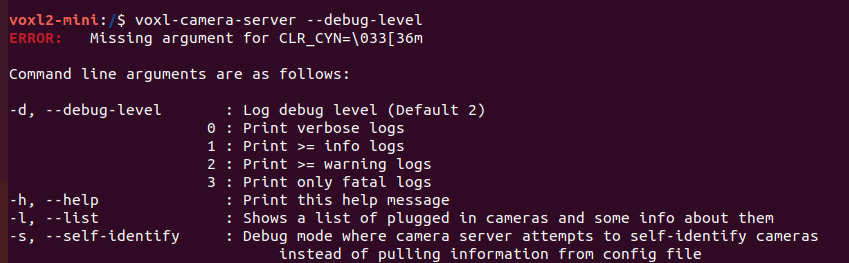
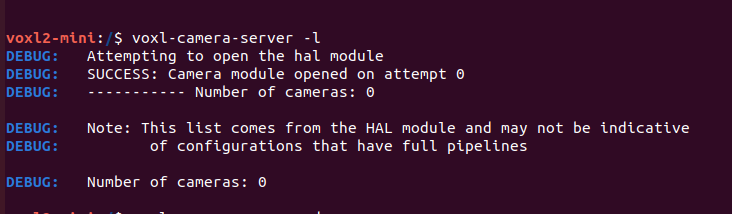
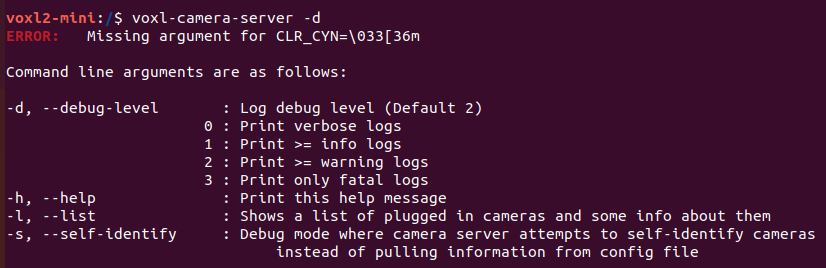
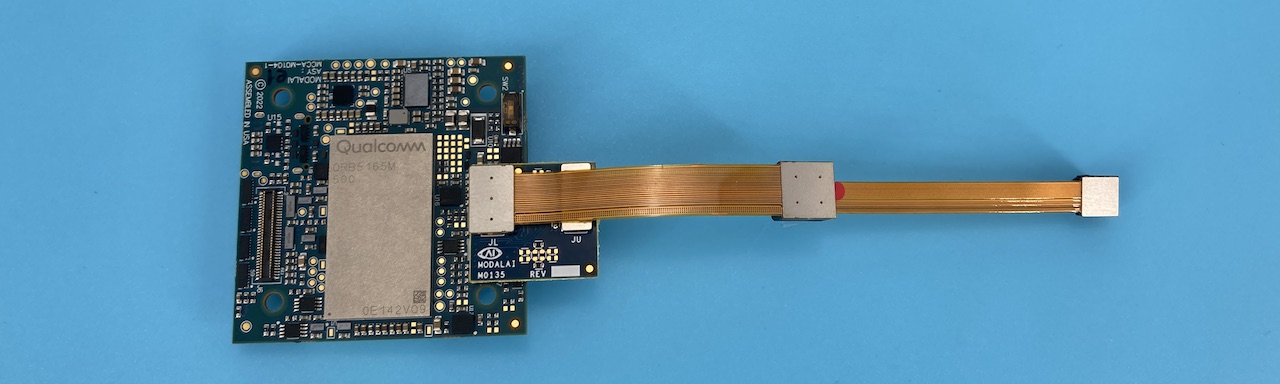
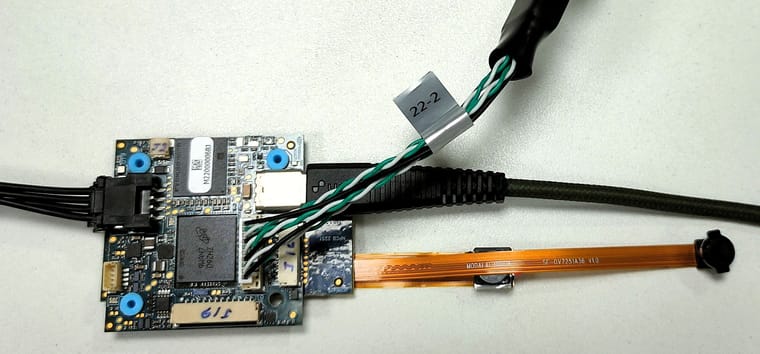
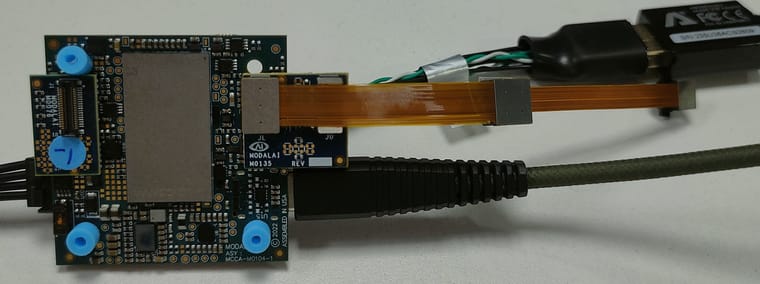
          Please run voxl-camera-server -d and voxl-camera-server -l and take a picture of your setup

          T 1 Reply Last reply
          0
          • T Offline
            T Offline
            Trinadh
            Contributor
            wrote on last edited by
            #5

            @Moderator , Hi i am also getting the same issue . and done the thing as you mentioned please check the pictures the error was not cleared.Screenshot from 2023-10-26 11-42-49.png Screenshot from 2023-10-26 11-43-36.png Screenshot from 2023-10-26 11-47-52.png ![IMG20231026114600.jpg](Request Entity Too Large) ![IMG20231026114611.jpg](Request Entity Too Large) ![IMG20231026114623.jpg](Request Entity Too Large)

            1 Reply Last reply
            0
            • ModeratorM Moderator

              Please run voxl-camera-server -d and voxl-camera-server -l and take a picture of your setup

              T Offline
              T Offline
              Trinadh
              Contributor
              wrote on last edited by
              #6

              @Moderator IMG20231026114600.jpg IMG20231026114611.jpg

              tomT 1 Reply Last reply
              0
              • T Trinadh

                @Moderator IMG20231026114600.jpg IMG20231026114611.jpg

                tomT Offline
                tomT Offline
                tom
                admin
                wrote on last edited by
                #7

                @Trinadh Try voxl-camera-server -d 0

                tomT 1 Reply Last reply
                0
                • tomT tom

                  @Trinadh Try voxl-camera-server -d 0

                  tomT Offline
                  tomT Offline
                  tom
                  admin
                  wrote on last edited by
                  #8

                  @tom but it looks like you're using the wrong port. You should be using J7 not J6, take a closer look at the docs page you linked.

                  T 1 Reply Last reply
                  0
                  • tomT tom

                    @tom but it looks like you're using the wrong port. You should be using J7 not J6, take a closer look at the docs page you linked.

                    T Offline
                    T Offline
                    Trinadh
                    Contributor
                    wrote on last edited by
                    #9

                    @tom Hi Tom, thank for the input, we have placed the board and camera as per the VOXL document. and the command you specified is also been checked the result was the same.

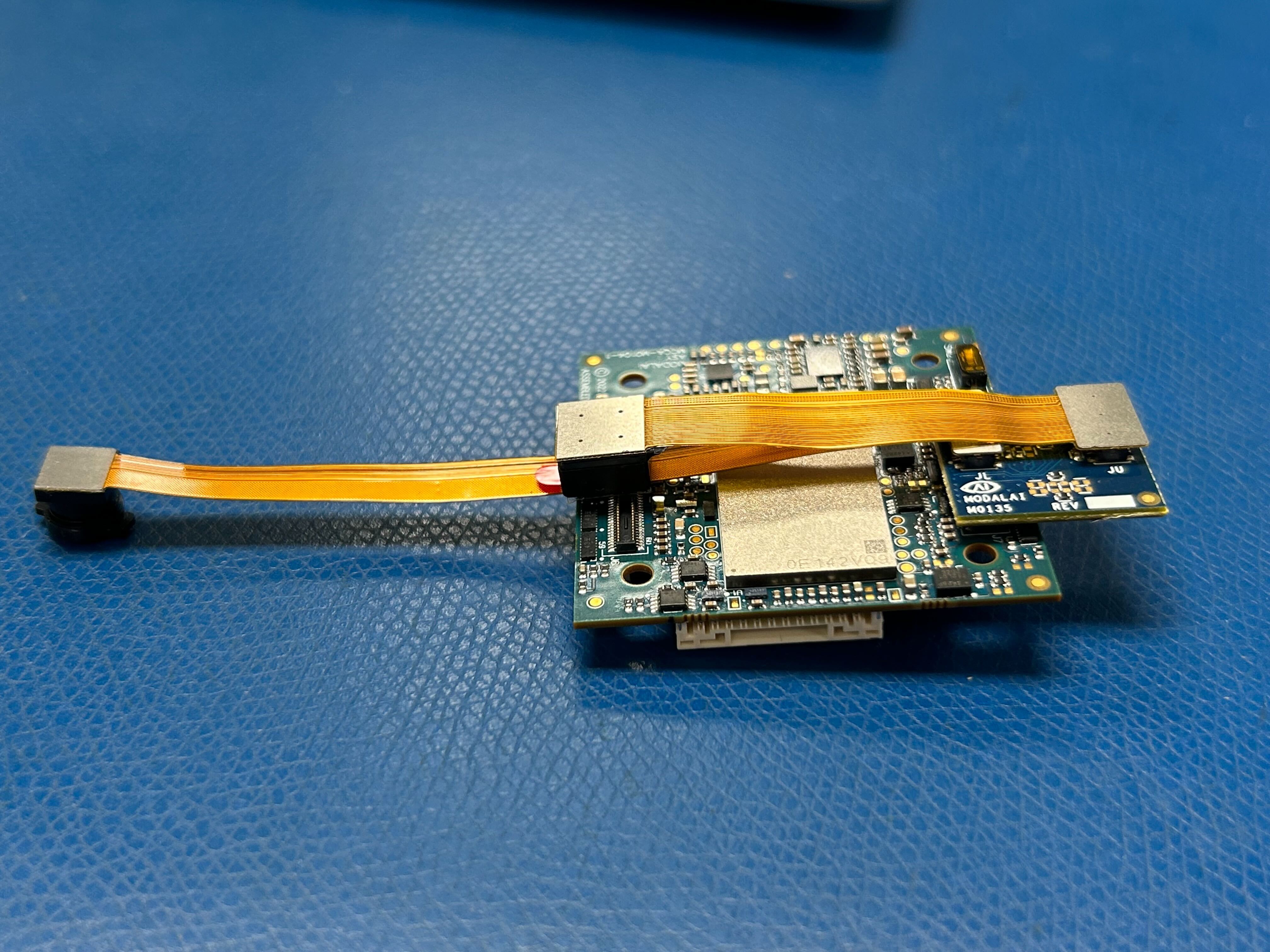
                    For reference I am Placing the Camera connection given in VOXL Document9781094e-7c6d-495e-b501-3519eacd8f6c-image.png

                    We have placed the camera modules as per picture.

                    T 1 Reply Last reply
                    0
                    • T Trinadh

                      @tom Hi Tom, thank for the input, we have placed the board and camera as per the VOXL document. and the command you specified is also been checked the result was the same.

                      For reference I am Placing the Camera connection given in VOXL Document9781094e-7c6d-495e-b501-3519eacd8f6c-image.png

                      We have placed the camera modules as per picture.

                      T Offline
                      T Offline
                      Trinadh
                      Contributor
                      wrote on last edited by
                      #10

                      @Trinadh The issue is clear by using the below commands.

                      camera-server-config-helper hires:imx214:0 tracking0:ov7251:1

                      voxl-camera-server -d 3

                      1 Reply Last reply
                      0
                      • LucaVertiqL Offline
                        LucaVertiqL Offline
                        LucaVertiq
                        Contributor
                        wrote on last edited by LucaVertiq
                        #11

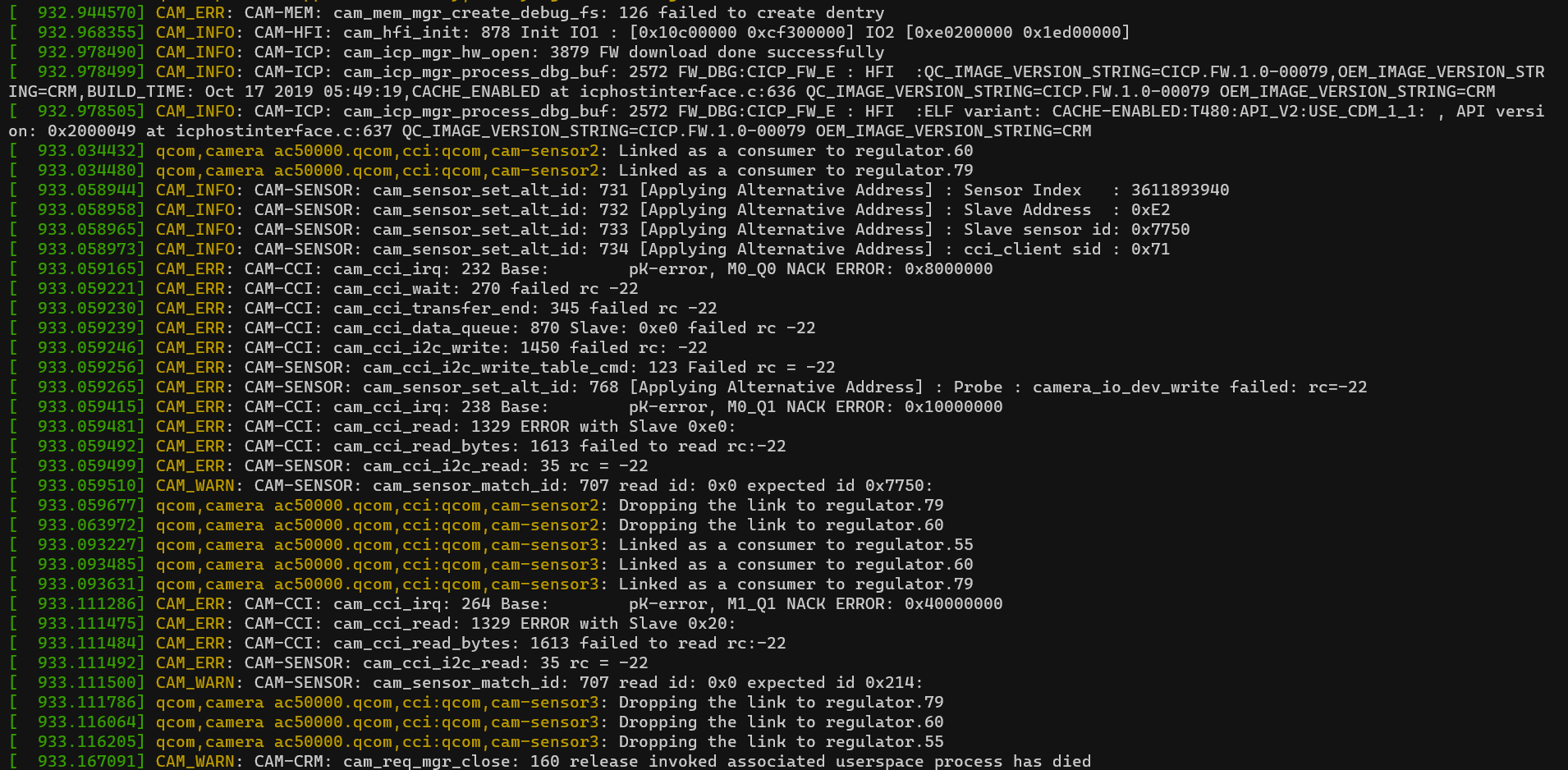
                        I am having these same issues. I'm on voxl suite 1.1.0. Voxl camera server shows 0 cameras connected. When I use dmesg right after I get this: 56fd6d22-d63c-4478-a07c-bcc3379c6b2c-image.png
                        My setup is as shown here:
                        https://docs.modalai.com/images/voxl2-mini/MDK-M0104-1-C4-b.jpg

                        And I've used

                        camera-server-config-helper hires:imx214:0 tracking0:ov7251:1
                        

                        For configuration.

                        Am I doing something obviously wrong?

                        Thanks

                        1 Reply Last reply
                        0

                        Hello! It looks like you're interested in this conversation, but you don't have an account yet.

                        Getting fed up of having to scroll through the same posts each visit? When you register for an account, you'll always come back to exactly where you were before, and choose to be notified of new replies (either via email, or push notification). You'll also be able to save bookmarks and upvote posts to show your appreciation to other community members.

                        With your input, this post could be even better 💗

                        Register Login
                        Reply
                        • Reply as topic
                        Log in to reply
                        • Oldest to Newest
                        • Newest to Oldest
                        • Most Votes


                        ModalAI
                        Categories Recent Tags ModalAI.com Docs
                        © 2026 ModalAI® · Accelerating autonomy for smaller, smarter, safer drones · Powered by NodeBB
                        • Login

                        • Don't have an account? Register

                        • Login or register to search.
                        • First post
                          Last post
                        0
                        • Categories
                        • Recent
                        • Tags
                        • Popular
                        • Users
                        • Groups