Skip to content
  • Categories
  • Recent
  • Tags
  • Popular
  • Users
  • Groups
Collapse
Brand Logo

ModalAI Forum

voxl-phoenixV

voxl-phoenix

@voxl-phoenix
Contributor
Unfollow Follow
About
Posts
24
Topics
11
Shares
0
Groups
1
Followers
0
Following
0

Posts

Recent Best Controversial

  • Exploration with voxl-mapper.
    voxl-phoenixV voxl-phoenix

    Hi, I have setup the voxl-mapper on my VOXL 2 with TOF camera. I have tested figure 8 and trajectory following. They are working perfectly.

    I would like to know how can I send the goal/ trajectory setpoints to the voxl-mapper to use rrt* to create the trajectory and to follow that.

    I don't think I can just send it to /fmu/in/trajectory_setpoint, can I?

    thanks in advance.

    Mapping and Planning

  • VOXL 2 not booting
    voxl-phoenixV voxl-phoenix

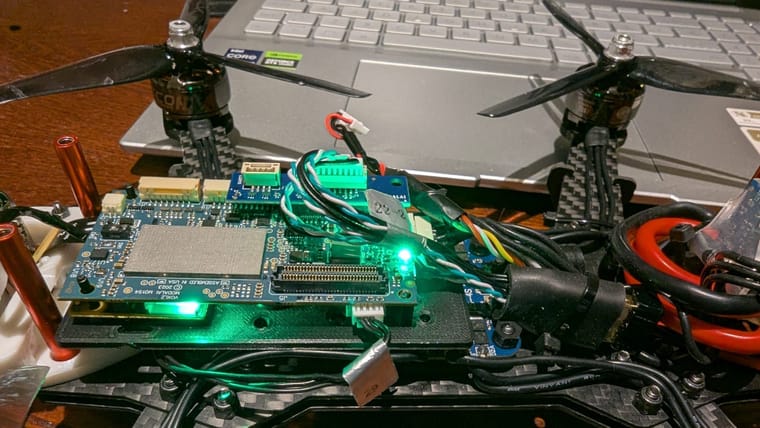
    I'm using VOXL2 I have connected the coax board to the voxl . when I screw the board on the drone firmly. the voxl boots up and works fine but I loose connection often. when I unscrew the voxl 2 and try to boot it. it doesn't boot. I have tried installing new SDK and downgrading it. no affect.
    this behaviour is very weard I can't understand what is going on and what could be the reason.WhatsApp Image 2025-03-25 at 01.05.03.jpeg

    VOXL 2 voxl2 camera module

  • Hires cam not working with voxl2
    voxl-phoenixV voxl-phoenix

    @Alex-Kushleyev I have got this camera two days back and I have connected it and tested them both they, worked fine. I had to unbrick my board so I unbricked it and installed new SDK 1.4.1.

    It was working fine before and after installation. I have just disconnected the camera and conected it again, because I was installing it in the holder that I 3D printed, just before installing I have tested it once, it is not working since than. only once I have disconnected the cable and connected it again, it stopped working. I have checked there is no damage to cables or board. I have handled them properly.

    VOXL 2

  • Hires cam not working with voxl2
    voxl-phoenixV voxl-phoenix

    @Alex-Kushleyev

    Thank you @Alex-Kushleyev
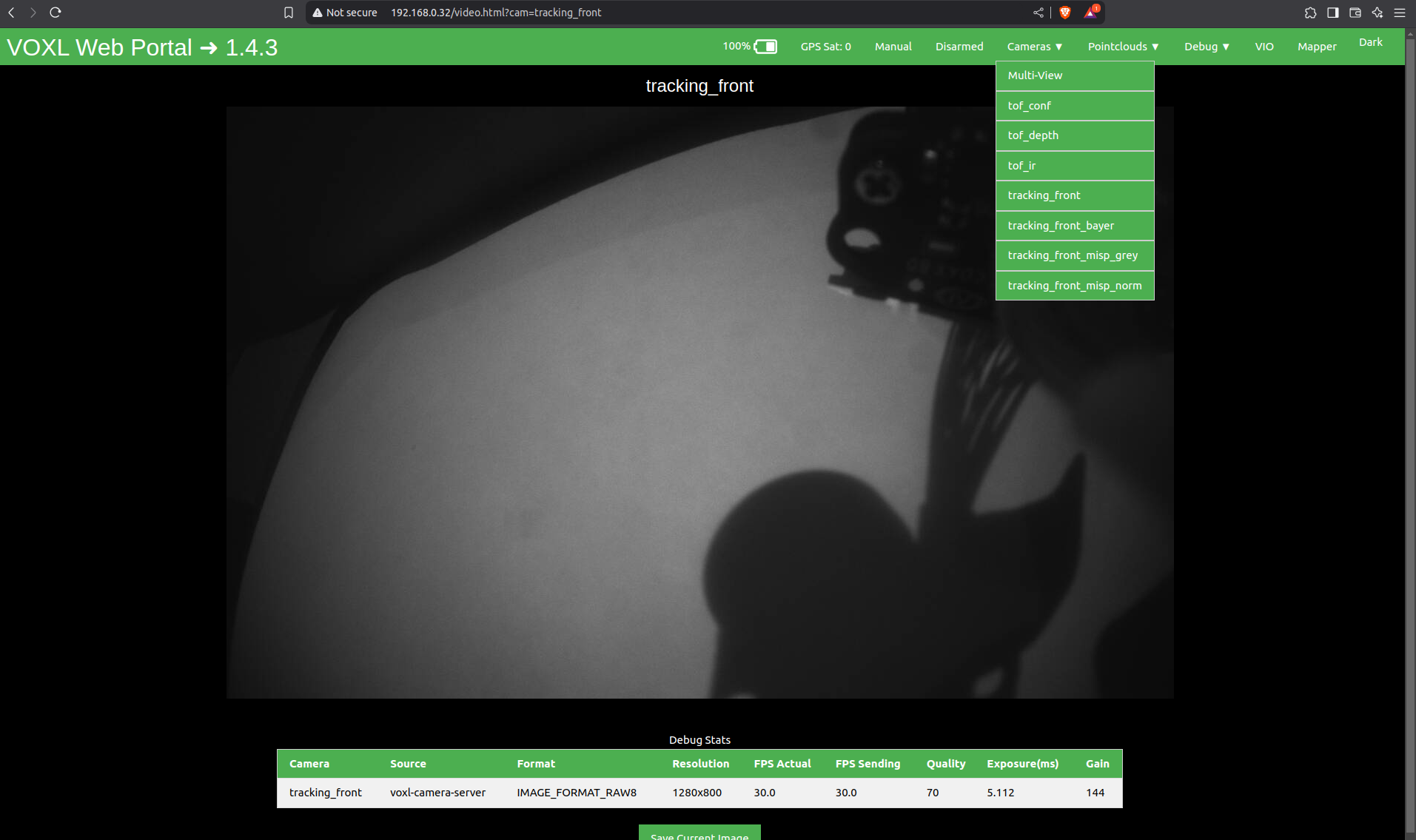
    This is the output from my voxl-inspect-cam -a

    |                Pipe Name |  bytes  | wide |  hgt |exp(ms)| gain | frame id |lt
    |                 tof_conf |   43200 |  180 |  240 |  2.70 |    0 |     2824 | 8
    |                tof_depth |   43200 |  180 |  240 |  2.70 |    0 |     2824 | 8
    |                   tof_ir |   43200 |  180 |  240 |  2.70 |    0 |     2824 | 8
    |           tracking_front | 1024000 | 1280 |  800 | 12.00 | 1596 |     8926 | 8
    |     tracking_front_bayer | 1024000 | 1280 |  800 | 12.00 | 1596 |     8926 | 8
    | tracking_front_misp_grey | 1024000 | 1280 |  800 | 12.00 | 1596 |     8926 | 8
    | tracking_front_misp_norm | 1024000 | 1280 |  800 | 12.00 | 1596 |     8926 | 8


    This is the output when I run voxl-camera-server.

    voxl-camera-server 
    existing instance of voxl-camera-server found, attempting to stop it
    MISP awb str: auto
    Setting MISP AWB to Autodetected system image 1.8.2
    using new imx412 defaults
    MISP awb str: auto
    Setting MISP AWB to Auto=================================================================
    configuration for 4 cameras:
    
    cam #0
        name:                tracking_front
        sensor type:         ar0144
        isEnabled:           1
        camId:               0
        camId2:              -1
        fps:                 30
        en_rotate:           1
        en_rotate2:          0
    
        en_preview:          1
        pre_width:           1280
        pre_height:          800
        en_raw_preview:      1
    
        en_small_video:      0
        small_video_width:   -1
        small_video_height:  -1
    
        en_large_video:      0
        large_video_width:   -1
        large_video_height:  -1
    
        en_misp:             1
        misp_width:          1280
        misp_height:         800
    
        en_snapshot:         0
        snap_width:          -1
        snap_height:         -1
        exif_focal_length:   0.000000
        exif_focal_len_35mm_format:0
        exif_fnumber:        0.000000
    
        ae_mode:             lme_msv
        msv_exposure_min_us: 20
        msv_exposure_max_us: 12000
        gain_min           : 54
        gain_max           : 8000
        standby_enabled:     0
        decimator:           1
        independent_exposure:0
    
    cam #1
        name:                hires
        sensor type:         imx412
        isEnabled:           1
        camId:               1
        camId2:              -1
        fps:                 30
        en_rotate:           0
        en_rotate2:          0
    
        en_preview:          0
        pre_width:           640
        pre_height:          480
        en_raw_preview:      0
    
        en_small_video:      1
        small_video_width:   1024
        small_video_height:  768
    
        en_large_video:      1
        large_video_width:   4056
        large_video_height:  3040
    
        en_misp:             0
        misp_width:          -1
        misp_height:         -1
    
        en_snapshot:         1
        snap_width:          4056
        snap_height:         3040
        exif_focal_length:   3.100000
        exif_focal_len_35mm_format:17
        exif_fnumber:        1.240000
    
        ae_mode:             isp
        msv_exposure_min_us: 20
        msv_exposure_max_us: 33000
        gain_min           : 54
        gain_max           : 8000
        standby_enabled:     0
        decimator:           1
        independent_exposure:0
    
    cam #2
        name:                tof
        sensor type:         pmd-tof-liow2
        isEnabled:           1
        camId:               2
        camId2:              -1
        fps:                 10
        en_rotate:           1
        en_rotate2:          0
    
        en_preview:          1
        pre_width:           240
        pre_height:          1629
        en_raw_preview:      1
    
        en_small_video:      0
        small_video_width:   -1
        small_video_height:  -1
    
        en_large_video:      0
        large_video_width:   -1
        large_video_height:  -1
    
        en_misp:             0
        misp_width:          -1
        misp_height:         -1
    
        en_snapshot:         0
        snap_width:          -1
        snap_height:         -1
        exif_focal_length:   0.000000
        exif_focal_len_35mm_format:0
        exif_fnumber:        0.000000
    
        ae_mode:             off
        msv_exposure_min_us: 0
        msv_exposure_max_us: 6000
        gain_min           : 0
        gain_max           : 0
        standby_enabled:     0
        decimator:           5
        independent_exposure:0
    
    cam #3
        name:                tracking_down
        sensor type:         ar0144
        isEnabled:           1
        camId:               3
        camId2:              -1
        fps:                 30
        en_rotate:           0
        en_rotate2:          0
    
        en_preview:          1
        pre_width:           1280
        pre_height:          800
        en_raw_preview:      1
    
        en_small_video:      0
        small_video_width:   -1
        small_video_height:  -1
    
        en_large_video:      0
        large_video_width:   -1
        large_video_height:  -1
    
        en_misp:             1
        misp_width:          1280
        misp_height:         800
    
        en_snapshot:         0
        snap_width:          -1
        snap_height:         -1
        exif_focal_length:   0.000000
        exif_focal_len_35mm_format:0
        exif_fnumber:        0.000000
    
        ae_mode:             lme_msv
        msv_exposure_min_us: 20
        msv_exposure_max_us: 12000
        gain_min           : 54
        gain_max           : 8000
        standby_enabled:     0
        decimator:           1
        independent_exposure:0
    
    fsync_en:            1
    fsync_gpio:          109
    =================================================================
    thread is locked to cores: 4 5 6 7
    connected to mavlink pipe
    Connected to cpu-monitor
    Starting Camera: tracking_front (id #0)
    gbm_create_device(156): Info: backend name is: msm_drm
    MISP Initializing!!!
     Detected 1 platform(s)
     Detected 1 GPU device(s)
    Starting Camera: hires (id #1)
    ERROR:   Camera 1 failed to find supported stream config: 1024x768
    WARNING: Failed to start cam hires due to invalid resolution
    WARNING: assuming cam is missing and trying to compensate
    Starting Camera: tof (originally id #2) with id offset: 1
    Starting Camera: tracking_down (originally id #3) with id offset: 1
    WARNING: cam tracking_down (id 2) does not seem to be alive
    
    ------ voxl-camera-server: Started 2 of 4 cameras
    
    ------ voxl-camera-server: Camera server is now running
    camera tracking_front frame size: 1024000 (1540096 alloc).. raw bpp: 8
    WARNING: [ROYALE_WARNING] {ROYALE_FRAME_DROP}: Dropped 10223 frame(s).
    WARNING: [ROYALE_WARNING] {ROYALE_RAW_FRAME_STATS}: Raw frame drop stats: Bridge 10223 frames dropped, FC 0 frames dropped, 9 frames delivered.
    WARNING: [ROYALE_WARNING] {ROYALE_FRAME_DROP}: Dropped 9 frame(s).
    WARNING: [ROYALE_WARNING] {ROYALE_RAW_FRAME_STATS}: Raw frame drop stats: Bridge 9 frames dropped, FC 0 frames dropped, 81 frames delivered.
    ^C
    received SIGINT Ctrl-C
    
    ------ voxl-camera-server: Camera server is now stopping
    WARNING: Deleting buffers: 6 of 16 still in use
    WARNING: Deleting buffers: 6 of 16 still in use
    
    ------ voxl-camera-server: Camera server exited gracefully, returning 0


    this is my voxl sdk info

    voxl2:~$ voxl-version 
    --------------------------------------------------------------------------------
    system-image: 1.8.02-M0054-14.1a-perf
    kernel:       #1 SMP PREEMPT Mon Nov 11 22:47:44 UTC 2024 4.19.125
    --------------------------------------------------------------------------------
    hw platform:  M0054
    mach.var:     1.0.1
    --------------------------------------------------------------------------------
    voxl-suite:   1.4.3
    --------------------------------------------------------------------------------
    Packages:


    5459cf57-ddf0-4dc7-9473-e57c44cde652-image.png

    d0567585-033c-4f56-a57a-d6954b50c545.jpeg

    Thank you for help.

    VOXL 2

  • Hires cam not working with voxl2
    voxl-phoenixV voxl-phoenix

    @Alex-Kushleyev I have only three cameras one TOF, Tracking, Hires each. TOF and Tracking are working properly.

    for calibration I',m just calibrating Tracking camera with fish eye

    voxl-calibrate-cameras -f -s 8x5 -l 0.029
    

    it is trying to calibrate extrinsics automatically.

    VOXL 2

  • Hires cam not working with voxl2
    voxl-phoenixV voxl-phoenix

    @Alex-Kushleyev

    sorry for the trouble, but I can't get my head around why this is happening,

    voxl2:~$ ls /usr/lib/camera/*sensormodule*
    /usr/lib/camera/com.qti.sensormodule.ar0144_combo_0.bin
    /usr/lib/camera/com.qti.sensormodule.ar0144_combo_6.bin
    /usr/lib/camera/com.qti.sensormodule.imx412_fpv_1.bin
    /usr/lib/camera/com.qti.sensormodule.irs2975c_3.bin
    voxl2:~$
    

    is there any chance my SDK installation might be corrupt. I have tried using 1.4.1 and 1.4.0.

    VOXL 2

  • Hires cam not working with voxl2
    voxl-phoenixV voxl-phoenix

    @Alex-Kushleyev
    Yeah I did follow the exact camera connections given on C26 configuration except that I don't have a down tracking camera. everything else is same. It's weird that it worked at start and than no response at all.

    VOXL 2

  • Hires cam not working with voxl2
    voxl-phoenixV voxl-phoenix

    @Alex-Kushleyev Thank you for the advise , I have been using the kernal image which includes M0173 breakout board.

    voxl2:~$ voxl-camera-server -l
    existing instance of voxl-camera-server found, attempting to stop it
    DEBUG:   Attempting to open the hal module
    DEBUG:   SUCCESS: Camera module opened on attempt 0
    DEBUG:   ----------- Number of cameras: 2
    
    DEBUG:   Cam idx: 0, Cam slot: 0, Slave Address: 0x0030, Sensor Id: 0x0356
    DEBUG:   Cam idx: 1, Cam slot: 3, Slave Address: 0x007A, Sensor Id: 0x2975
    DEBUG:   Note: This list comes from the HAL module and may not be indicative
    DEBUG:   	of configurations that have full pipelines
    
    DEBUG:   Number of cameras: 2
    
    
    ====================================
    Stats for camera: 0
    
    ANDROID_SCALER_AVAILABLE_RAW_SIZES:
    These are likely supported by the sensor
    1280 x  800
    1280 x  800
    
    ANDROID_SCALER_AVAILABLE_STREAM_CONFIGURATIONS:
    These are NOT necessarily supported by the sensor
    1280 x  800 HAL_PIXEL_FORMAT_YCbCr_420_888
    1280 x  800 HAL_PIXEL_FORMAT_BLOB
    1280 x  768 HAL_PIXEL_FORMAT_YCbCr_420_888
    1280 x  768 HAL_PIXEL_FORMAT_BLOB
    1280 x  720 HAL_PIXEL_FORMAT_YCbCr_420_888
    1280 x  720 HAL_PIXEL_FORMAT_BLOB
    1024 x  738 HAL_PIXEL_FORMAT_YCbCr_420_888
    1024 x  738 HAL_PIXEL_FORMAT_BLOB
    1024 x  768 HAL_PIXEL_FORMAT_YCbCr_420_888
    1024 x  768 HAL_PIXEL_FORMAT_BLOB
     864 x  480 HAL_PIXEL_FORMAT_YCbCr_420_888
     864 x  480 HAL_PIXEL_FORMAT_BLOB
     800 x  600 HAL_PIXEL_FORMAT_YCbCr_420_888
     800 x  600 HAL_PIXEL_FORMAT_BLOB
     800 x  480 HAL_PIXEL_FORMAT_YCbCr_420_888
     800 x  480 HAL_PIXEL_FORMAT_BLOB
     720 x  480 HAL_PIXEL_FORMAT_YCbCr_420_888
     720 x  480 HAL_PIXEL_FORMAT_BLOB
     640 x  512 HAL_PIXEL_FORMAT_YCbCr_420_888
     640 x  512 HAL_PIXEL_FORMAT_BLOB
     640 x  480 HAL_PIXEL_FORMAT_YCbCr_420_888
     640 x  480 HAL_PIXEL_FORMAT_BLOB
     640 x  400 HAL_PIXEL_FORMAT_YCbCr_420_888
     640 x  400 HAL_PIXEL_FORMAT_BLOB
     640 x  360 HAL_PIXEL_FORMAT_YCbCr_420_888
     640 x  360 HAL_PIXEL_FORMAT_BLOB
     352 x  288 HAL_PIXEL_FORMAT_YCbCr_420_888
     352 x  288 HAL_PIXEL_FORMAT_BLOB
     320 x  240 HAL_PIXEL_FORMAT_YCbCr_420_888
     320 x  240 HAL_PIXEL_FORMAT_BLOB
     240 x  320 HAL_PIXEL_FORMAT_YCbCr_420_888
     240 x  320 HAL_PIXEL_FORMAT_BLOB
     176 x  144 HAL_PIXEL_FORMAT_YCbCr_420_888
     176 x  144 HAL_PIXEL_FORMAT_BLOB
    1280 x  800 HAL_PIXEL_FORMAT_RAW10
    1280 x  800 HAL_PIXEL_FORMAT_RAW12
    1280 x  800 HAL_PIXEL_FORMAT_RAW16
    1280 x  800 HAL_PIXEL_FORMAT_RAW_OPAQUE
    
    ANDROID_SENSOR_INFO_SENSITIVITY_RANGE
    	min = 54
    	max = 1596
    
    ANDROID_SENSOR_MAX_ANALOG_SENSITIVITY
    	1596
    
    ANDROID_SENSOR_INFO_EXPOSURE_TIME_RANGE
    	min = 0ns
    	max = 1318629735ns
    
    
    ====================================
    Stats for camera: 1
    
    ANDROID_SCALER_AVAILABLE_RAW_SIZES:
    These are likely supported by the sensor
     240 x 1629
    
    ANDROID_SCALER_AVAILABLE_STREAM_CONFIGURATIONS:
    These are NOT necessarily supported by the sensor
     240 x  320 HAL_PIXEL_FORMAT_YCbCr_420_888
     240 x  320 HAL_PIXEL_FORMAT_BLOB
     176 x  144 HAL_PIXEL_FORMAT_YCbCr_420_888
     176 x  144 HAL_PIXEL_FORMAT_BLOB
     240 x 1629 HAL_PIXEL_FORMAT_RAW10
     240 x 1629 HAL_PIXEL_FORMAT_RAW12
     240 x 1629 HAL_PIXEL_FORMAT_RAW16
     240 x 1629 HAL_PIXEL_FORMAT_RAW_OPAQUE
    
    ANDROID_SENSOR_INFO_SENSITIVITY_RANGE
    	min = 54
    	max = 0
    
    ANDROID_SENSOR_MAX_ANALOG_SENSITIVITY
    	0
    
    ANDROID_SENSOR_INFO_EXPOSURE_TIME_RANGE
    	min = 0ns
    	max = 0ns
    
    ====================================
    Number of cameras detected: 2
    ====================================
    voxl2:~$ voxl-version | grep mach
    mach.var:     1.0.1
    voxl2:~$ 


    I have TOF, tracking and Hires connected to the board it worked fine as soon as connected for first time than I can see no response from Hires but Tracking and TOF are working properly.

    VOXL 2

  • Hires cam not working with voxl2
    voxl-phoenixV voxl-phoenix

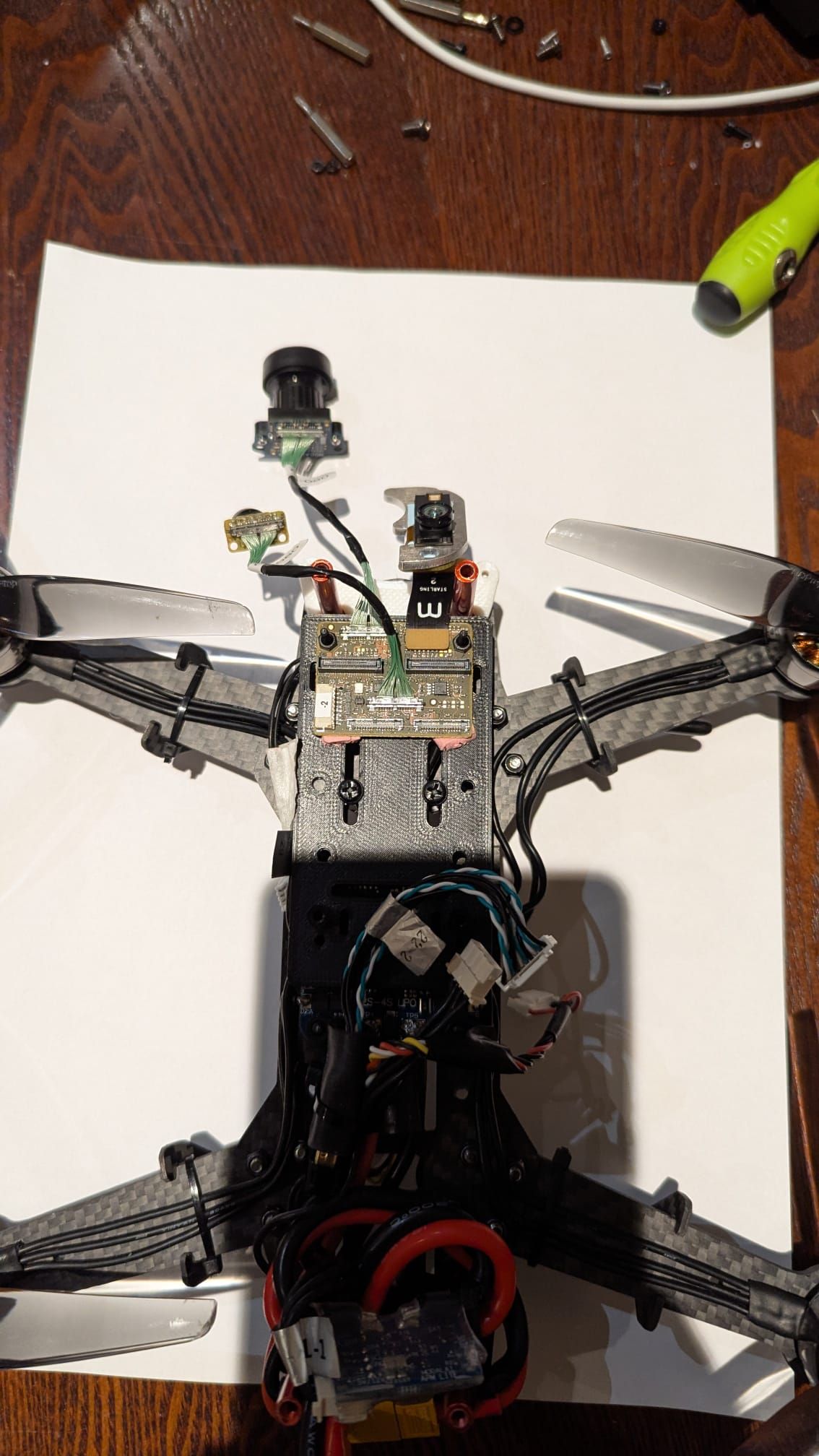
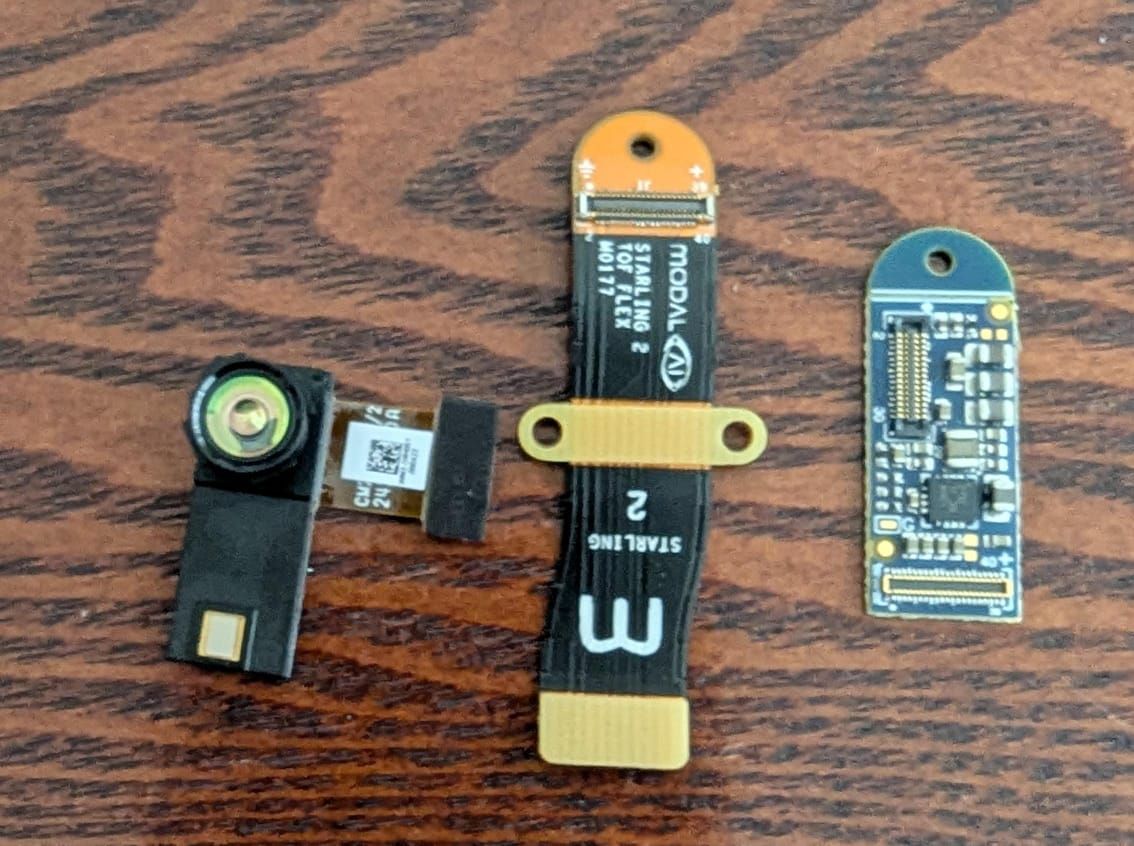
    I'm using a VOXL 2 flight controller with an M0173 Starling 2 Front End. The setup includes tracking camera, PMD TOF and a high-resolution (hires) IMX412 camera. While the tracking cameras and TOF are detected and functioning, I'm unable to get any response from the hires camera.

    I have tried reconnnecting camera again and reinstalled SDK. and downgraded to SDK 1.4.0.

    when I connected them first it worked properly and I havr disconnected the cable and connected again , it is not showing at all. I have checked reconnecting the cable properly multiple times. I even tried swapping Tracking cable to Hires but no use.

    Error I have got from voxl-camera-server

    fsync_en:            1
    fsync_gpio:          109
    =================================================================
    thread is locked to cores: 4 5 6 7
    connected to mavlink pipe
    Connected to cpu-monitor
    Starting Camera: tracking_front (id #0)
    gbm_create_device(156): Info: backend name is: msm_drm
    MISP Initializing!!!
     Detected 1 platform(s)
     Detected 1 GPU device(s)
    Starting Camera: hires (id #1)
    ERROR:   Camera 1 failed to find supported stream config: 1024x768
    WARNING: Failed to start cam hires due to invalid resolution
    WARNING: assuming cam is missing and trying to compensate
    Starting Camera: tof (originally id #2) with id offset: 1
    Starting Camera: tracking_down (originally id #3) with id offset: 1
    WARNING: cam tracking_down (id 2) does not seem to be alive
    
    ------ voxl-camera-server: Started 2 of 4 cameras
    
    ------ voxl-camera-server: Camera server is now running
    

    please suggest me any fixes for this.

    My SKU is :

    family code: MCCA-M0054 (voxl2-board-only)
    compute board: 4 (voxl2)
    hw version: 1
    cam config: 26
    modem config: ()
    tx config: ()
    extras config: ()
    SKU: MCCA-M0054-C26-T0-M0-X0

    this is my voxl-camera-server.config file

    cat /etc/modalai/voxl-camera-server.conf 
    /**
     * voxl-camera-server Configuration File
     *
     * Each camera has configurations for up to 4 HAL3 streams:
     *    - `preview` stream for raw unprocessed images from CV cameras
     *    - `small_video` 720p (ish) h264/h265 compressed for fpv video streaming
     *    - `large_video` 4k (ish) h264/h265 for onboard video recording to disk
     *    - `snapshot` ISP-processed JPG snapshots that get saved to disk
     *
     * on QRB5165 platforms (VOXL2 and VOXL2 mini) you can only have 3 of the 4 enabled
     *
     * This file is generated from default values by voxl-configure-cameras.
     * Do not expect arbitrary resolutions to work, the ISP and video compression
     * pipelines only support very specific resolutions.
     *
     * The default video compression mode is cqp or Constant Quantization Parameter
     *
     *
     *
     */
    {
    	"version":	0.1,
    	"fsync_en":	true,
    	"fsync_gpio":	109,
    	"cameras":	[{
    			"type":	"ar0144",
    			"name":	"tracking_front",
    			"enabled":	true,
    			"camera_id":	0,
    			"fps":	30,
    			"en_rotate":	true,
    			"en_preview":	true,
    			"preview_width":	1280,
    			"preview_height":	800,
    			"en_raw_preview":	true,
    			"en_misp":	true,
    			"misp_width":	1280,
    			"misp_height":	800,
    			"misp_venc_enable":	false,
    			"misp_venc_mode":	"h264",
    			"misp_venc_br_ctrl":	"cqp",
    			"misp_venc_Qfixed":	30,
    			"misp_venc_Qmin":	15,
    			"misp_venc_Qmax":	50,
    			"misp_venc_nPframes":	29,
    			"misp_venc_mbps":	2,
    			"misp_venc_osd":	false,
    			"misp_awb":	"auto",
    			"ae_mode":	"lme_msv",
    			"gain_min":	54,
    			"gain_max":	8000,
    			"ae_desired_msv":	60,
    			"exposure_min_us":	20,
    			"exposure_max_us":	12000,
    			"exposure_soft_min_us":	5000,
    			"ae_filter_alpha":	0.600000023841858,
    			"ae_ignore_fraction":	0.20000000298023224,
    			"ae_slope":	0.05000000074505806,
    			"ae_exposure_period":	1,
    			"ae_gain_period":	1
    		}, {
    			"type":	"imx412",
    			"name":	"hires",
    			"enabled":	true,
    			"camera_id":	1,
    			"fps":	30,
    			"en_preview":	false,
    			"preview_width":	640,
    			"preview_height":	480,
    			"en_raw_preview":	false,
    			"en_small_video":	true,
    			"small_video_width":	1024,
    			"small_video_height":	768,
    			"small_venc_mode":	"h264",
    			"small_venc_br_ctrl":	"cqp",
    			"small_venc_Qfixed":	30,
    			"small_venc_Qmin":	15,
    			"small_venc_Qmax":	40,
    			"small_venc_nPframes":	9,
    			"small_venc_mbps":	2,
    			"small_venc_osd":	false,
    			"en_large_video":	true,
    			"large_video_width":	4056,
    			"large_video_height":	3040,
    			"large_venc_mode":	"h264",
    			"large_venc_br_ctrl":	"cqp",
    			"large_venc_Qfixed":	40,
    			"large_venc_Qmin":	15,
    			"large_venc_Qmax":	50,
    			"large_venc_nPframes":	29,
    			"large_venc_mbps":	40,
    			"large_venc_osd":	false,
    			"en_snapshot":	true,
    			"en_snapshot_width":	4056,
    			"en_snapshot_height":	3040,
    			"exif_focal_length":	3.0999999046325684,
    			"exif_focal_length_in_35mm_format":	17,
    			"exif_fnumber":	1.2400000095367432,
    			"ae_mode":	"isp",
    			"gain_min":	54,
    			"gain_max":	8000
    		}, {
    			"type":	"pmd-tof-liow2",
    			"name":	"tof",
    			"enabled":	true,
    			"camera_id":	2,
    			"fps":	10,
    			"en_rotate":	true,
    			"ae_mode":	"off",
    			"gain_min":	0,
    			"gain_max":	0,
    			"exposure_max_us":	6000,
    			"standby_enabled":	false,
    			"decimator":	5
    		}, {
    			"type":	"ar0144",
    			"name":	"tracking_down",
    			"enabled":	true,
    			"camera_id":	3,
    			"fps":	30,
    			"en_rotate":	false,
    			"en_preview":	true,
    			"preview_width":	1280,
    			"preview_height":	800,
    			"en_raw_preview":	true,
    			"en_misp":	true,
    			"misp_width":	1280,
    			"misp_height":	800,
    			"misp_venc_enable":	false,
    			"misp_venc_mode":	"h264",
    			"misp_venc_br_ctrl":	"cqp",
    			"misp_venc_Qfixed":	30,
    			"misp_venc_Qmin":	15,
    			"misp_venc_Qmax":	50,
    			"misp_venc_nPframes":	29,
    			"misp_venc_mbps":	2,
    			"misp_venc_osd":	false,
    			"misp_awb":	"auto",
    			"ae_mode":	"lme_msv",
    			"gain_min":	54,
    			"gain_max":	8000,
    			"ae_desired_msv":	60,
    			"exposure_min_us":	20,
    			"exposure_max_us":	12000,
    			"exposure_soft_min_us":	5000,
    			"ae_filter_alpha":	0.600000023841858,
    			"ae_ignore_fraction":	0.20000000298023224,
    			"ae_slope":	0.05000000074505806,
    			"ae_exposure_period":	1,
    			"ae_gain_period":	1
    		}]
    }
    
    
    VOXL 2

  • Zenoh on voxl-2
    voxl-phoenixV voxl-phoenix

    @Beniamino-Pozzan Thank you so much for the info,
    I wanted to try it and realised foxy has no support and with Ubuntu 18.04 on voxl-2 it is not possible to use any other ROS-2 installations easily. I will use ros2 plugin by keeping microdds as default middleware.
    I hope newer ROS versions will be available for VOXL-2.

    PX4 Autonomy Developer Kit

  • Zenoh on voxl-2
    voxl-phoenixV voxl-phoenix

    Hi I'm trying to use zenoh as middleware in my voxl-2 I can see it defaults to microdds. is there any support for zenoh by voxl-services.
    I'm not able to build it from source for foxy. any suggestions on this?
    thank you.

    PX4 Autonomy Developer Kit

  • connectors for TOF camera on voxl-2
    voxl-phoenixV voxl-phoenix

    @Vinny Thank you so much for the info. I already have tracking and IMX412 cameras. I want to just buy Board. I have a small query, do I need any extra cables or connectors to connect this frontend camera connecter to VOXL 2 or does it come with the board when I order just the board only?

    Thank you.

    Ask your questions right here!

  • connectors for TOF camera on voxl-2
    voxl-phoenixV voxl-phoenix

    Thank you for the reply @Alex-Kushleyev, This is the cam Configuration I have got. WhatsApp Image 2025-01-31 at 10.01.22_b2304754.jpg WhatsApp Image 2025-01-31 at 10.01.22_6703ce59.jpg .

    Thanks for help once again.

    Ask your questions right here!

  • Performance of the VOXL ESC
    voxl-phoenixV voxl-phoenix

    Re: Performance VOXL Mini 4-in-1 ESC

    Hi, I would like to know what the performance of the VOXL 4-in-1 ESC MDK-M0134-1-01 would be, if I use a 5 inch propellers with EMAX ECO II Series 2207 2400 KV motors. I belive the total velocity would be 12–15A at full throttle for each motor or it might go up even higher and I have a 3s battery for my setup.

    thank you.

    ESCs

  • connectors for TOF camera on voxl-2
    voxl-phoenixV voxl-phoenix

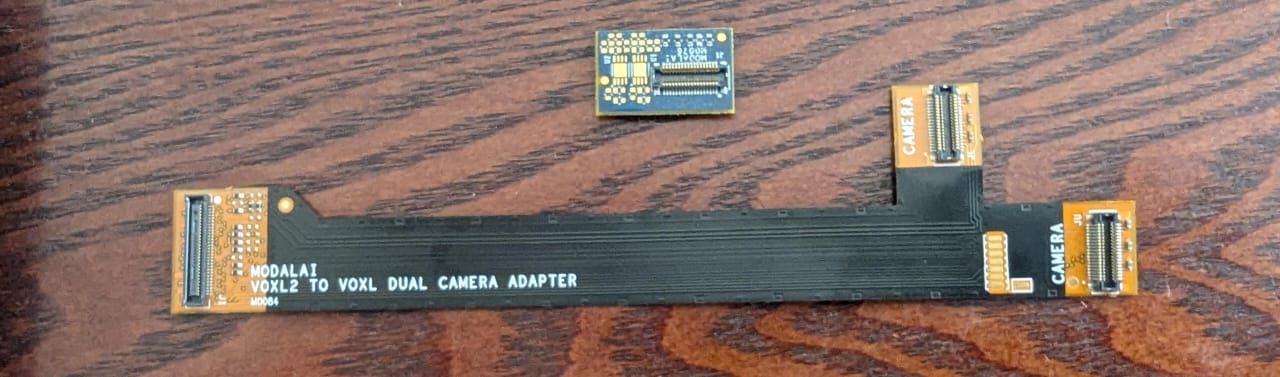
    Hi, I have recently purchased a TOf camera for mapping, I have tried to connect it with my voxl-2, I belive I'm missing somehting. I have interposers MDK-M0076-1-00, and a dual camera adapter MSU-M0084-1-01.

    I couldn't figure out what I missed for this, please any suggestions?

    Thank you,
    Best.

    Ask your questions right here!

  • TBS crossfire nano receiver with VOXL 2 USB3.0 / UART Expansion Adapter M0151-1-00 expansion board.
    voxl-phoenixV voxl-phoenix

    @Eric-Katzfey Thank you for the suggestion. but I have some constraints to use a prebuilt drone I have to build a custom one. so as you suggested I can use just a 12-pin adapter. I'm not intending to use any GPS or GNSS module.
    do you think that works?

    thank you.

    VOXL 2

  • TBS crossfire nano receiver with VOXL 2 USB3.0 / UART Expansion Adapter M0151-1-00 expansion board.
    voxl-phoenixV voxl-phoenix

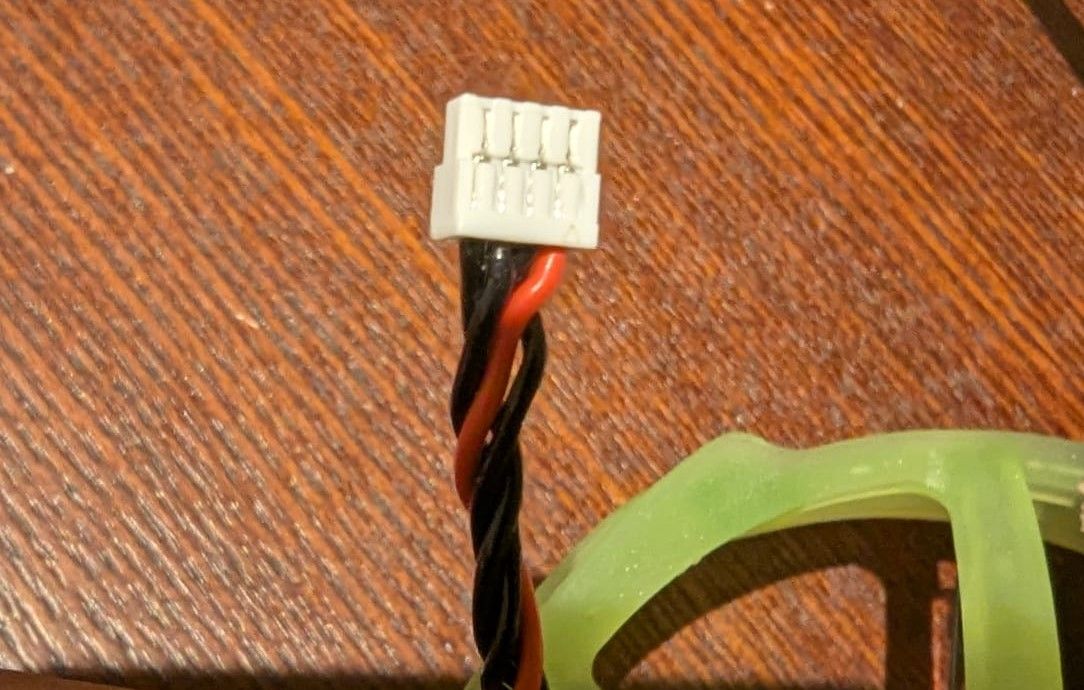
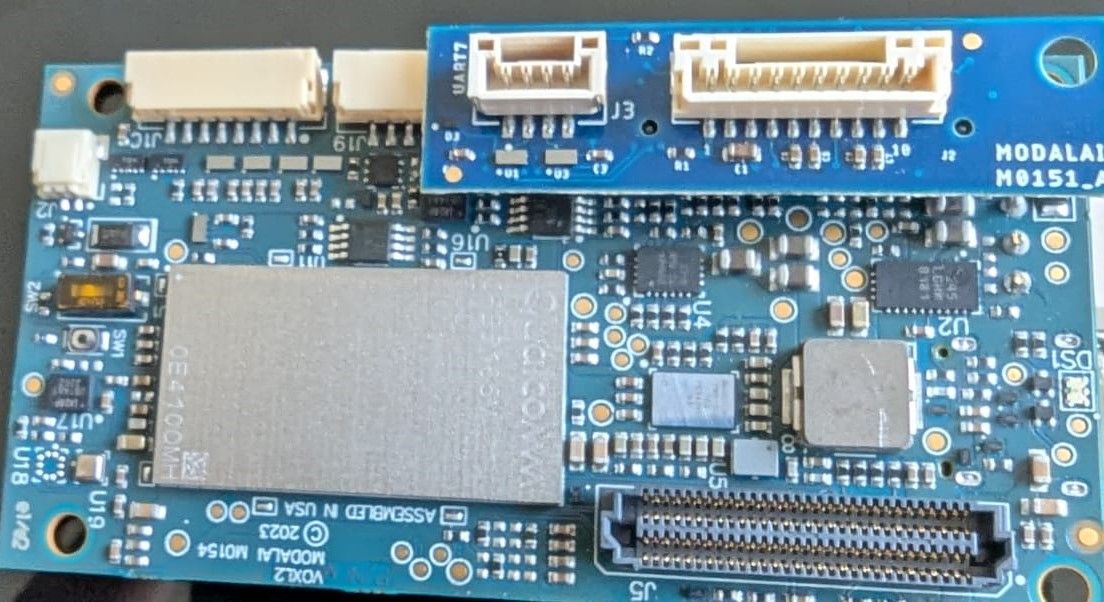
    @Eric-Katzfey My apologies I'm really new to drones. I don't know which firmware that I should use for the connector. I already have a TBS crossfire RC with me which I used with voxl-flight. so I thought it would be easy for me to use it with the UART expansion port.
    WhatsApp Image 2024-12-20 at 17.35.21_cef7473c.jpg

    can you please suggest me what will be the best approach. which connector can I use to connect this to J19 port.
    thanks.

    VOXL 2

  • TBS crossfire nano receiver with VOXL 2 USB3.0 / UART Expansion Adapter M0151-1-00 expansion board.
    voxl-phoenixV voxl-phoenix

    I have a tbs crossfire receiver. I want to know can I connect this with the j3 UART-usb3.0 expansion board as it has support for UART7.
    thanks in advance.

    WhatsApp Image 2024-12-20 at 13.25.39_60a0b62d.jpg

    VOXL 2
  • Login

  • Don't have an account? Register

  • Login or register to search.
  • First post
    Last post
0
  • Categories
  • Recent
  • Tags
  • Popular
  • Users
  • Groups