Skip to content
  • Categories
  • Recent
  • Tags
  • Popular
  • Users
  • Groups
Collapse
Brand Logo

ModalAI Forum

J

Jacob Camarillo

@Jacob Camarillo
ModalAI Team
Unfollow Follow
About
Posts
13
Topics
0
Shares
0
Groups
3
Followers
0
Following
0

Posts

Recent Best Controversial

  • Custom companion data Stinger → Ground Control Station
    J Jacob Camarillo

    Hi Alex,

    Thanks for clarifying the direction. For UAS → GCS with your current voxl-vtx 1.7.1:

    1. Autopilot telemetry already goes VTX → VRX → Ethernet UDP:
    • voxl-vtx subscribes to the autopilot's MAVLink stream from voxl-mavlink-server and sends it over the RF link next to the video. The VRX then re-sends it as UDP to:

      • destination: gcs_ip in /etc/modalai/voxl-vrx.conf (default 10.0.0.1), port 14550 (fixed in 1.7.1)
      • source: the VRX at 10.0.0.2
      • Give your GCS laptop 10.0.0.1 on the VRX Ethernet link (or set gcs_ip to its address) and listen on UDP 14550. QGC will pick it up automatically.
    • This is a one-way telemetry snapshot, not a transparent MAVLink link. The VTX sends at mavlink_telem_rate_hz (30 Hz in your config) and keeps one message of each message ID per send window.

    1. Custom companion data: not supported in this release.
    • voxl-vtx only forwards what voxl-mavlink-server publishes on its mavlink_onboard pipe, and that pipe only carries messages received from the autopilot. If a companion app writes MAVLink into that pipe, voxl-mavlink-server sends it to the autopilot and doesn't publish it back onto the pipe, so voxl-vtx never sees it.

    • Writing to the mavlink_to_gcs pipe doesn't help either: voxl-mavlink-server sends those messages out its own UDP sockets, and they have no way to reach the ground over the MVX link. There is currently no supported way to put your observation data onto the VTX → VRX link.

    1. Upgrading to SDK 1.6.4, if these features are useful to you:
      Your voxl-vtx 1.7.1 is older than what ships in SDK 1.6.4, the latest SDK release for Stinger. SDK 1.6.4 includes voxl-vtx 2.2.x, which adds:
    • Parameter, mission and FTP forwarding to the GCS, so QGC can read and set parameters and download missions over the MVX link.
    • GCS → drone MAVLink through the VRX. MAVLink your GCS sends to the VRX on the GCS port is forwarded over the link to the aircraft, for example mission uploads. By default this forwarding stops while the vehicle is armed. To keep GCS → drone MAVLink flowing in flight, set this in /etc/modalai/voxl-vrx.conf and restart voxl-vrx: "allow_mavlink_forward_while_armed": true
      • Only enable this if you want the GCS able to send commands to the aircraft while it is armed. MANUAL_CONTROL messages are dropped.
    • A configurable GCS port (mavlink_gcs_port), replacing the fixed 14550.
    • None of these add a path for custom companion data, so they don't solve the observation use case.
    1. WiFi client mode with the VTX active:
      On the Stinger the M0185 is the VTX radio, and it runs in raw injection/monitor mode while it sends video. It can't also join a network as a WiFi client. A TCP/IP WiFi link would need a second, separate WiFi adapter. Even then, running it on the same band as the video link could hurt video quality, so we'd advise against it for a flight setup unless you deconflict the frequency used by each network device.
    General Questions

  • Stinger VRX not turning on
    J Jacob Camarillo

    @Grier Gotcha, please fill out this RMA form: https://www.modalai.com/pages/rma?_pos=1&_sid=6dd8dbced&_ss=r

    Please link this forum post in the RMA form as well

    General Questions

  • Stinger VRX not turning on
    J Jacob Camarillo

    @Grier Thank you for sharing this information. That middle adapter (cable matter) should work, that is the same one that we use. Are there any other devices plugged into the display and is the display set to the corresponding HDMI input that the VRX is connected to? Can you also please confirm that the USB-C cable connected to the VRX is fully connected?

    General Questions

  • Stinger VRX not turning on
    J Jacob Camarillo

    Could you share some information on the adapters that you have tried? This is the adapter we usually use: https://www.cablematters.com/pc-1368-125-48gbps-usb-c-to-hdmi-21-adapter-supports-8k-60hz-4k-240hz-hdr.aspx.

    Could you also share some information about your display? Are you trying to power the display via the VRX?

    General Questions

  • Stinger VRX not turning on
    J Jacob Camarillo

    @Grier Do you have another USB-C to HDMI converter that you could try?

    General Questions

  • Voxl IO on Voxl2 J19 port
    J Jacob Camarillo

    Hi @xav04 , sorry to hear you are having problems! Can you share the contents of your voxl-px4.conf (/etc/modalai/voxl-px4.conf)? I would like to get a bit more information to understand what your use case is, is it SBUS RC only as in the link you shared?

    I would also recommend double checking that the voxl2-io driver is running in px4, you can either use QGC or run voxl-px4 with daemon mode disabled then run the command qshell voxl2_io status to check (px4-qshell voxl2_io status will not show you the actual status info).

    -Jacob

    VOXL 2 and VOXL 2 Mini voxl-2-io

  • ELRS
    J Jacob Camarillo

    Hi @Jetson-Nano, we only support flashing the 915Mhz BetaFPV Nano Rx via voxl2. You will need to follow the instructions on the ELRS website to flash the 2.4G RX that you have, search on this quickstart page in the receivers section and follow the instructions for your particular rx.

    You can download the ELRS configurator which is the tool provided by ELRS for flashing transmitters and receivers.

    -Jacob

    ESCs, Sensors and Accessories

  • Do i need to calibrate 4 in 1 ESC for Voxl 2?
    J Jacob Camarillo

    HI @AP123, you can find information about calibration for M0134 here. The calibration procedure in voxl2_io driver in voxl-px4 is not designed to work with 4 in 1 ESC, it is for off the shelf ESCs such as BLHeli. Additional information about if you need to calibrate your 4 in 1 ESC can be found in this repo.

    I believe we already provide parameters (calibration) for 4 in 1 ESC for certain motor/propeller combinations which can be loaded via voxl-esc utility on voxl2.

    From tech docs:

    Q: When is ESC Calibration Required?
    A: When switching battery types (from 3S LiPo to 4S LiPo, etc), or when a new type of motor or new type of propeller is used.
    
    ESCs, Sensors and Accessories esc

  • Voxl 2 IO and PWM outputs
    J Jacob Camarillo

    Hi @AP123, a couple things to check:

    • Do you have the new bootloader? The legacy bootloader (SDKs before 1.1.1) and the new firmware are not compatible, you won't be able to update the firmware on your Voxl2 IO using the legacy bootloader (it doesn't support flashing via UART). The new bootloader will enable firmware updates for Voxl2 IO board via Voxl2 (removing the need for STLink). We aren't currently distributing the new bootloader so you will need to send your Voxl2 IO back to us and we can send you replacement(s) with the new bootloader and firmware already loaded. You can email contact@modalai.com to get this process started.
    • The firmware flashing script expects the Voxl2 IO to be connected to J18 on your voxl2. If it is connected to J19 and you wish to keep it there, then you will need to update the flashing script to use J19 (change --device /dev/slpi-uart-2 to --device /dev/spli-uart-7)
    • Once you have your Voxl2 IO updated, make sure to load the voxl2_io_enable_pwm.params in the voxl2_io_helpers menu from the voxl-configure-px4-params wizard if you plan to use the Voxl2 IO for PWM outputs.
    • Finally, if you have issues with your ESCs all not spinning the same rate its a good idea to run the calibration process if you are using ESCs that came from ModalAI (not the 4-in-1 ESCs though). The process is shown in our tech docs.

    Jacob

    VOXL 2 and VOXL 2 Mini voxl2 voxl-2

  • FC2 schematic and board file
    J Jacob Camarillo

    Hi @daniel, you can find a functional description including drawings and a block diagram here. You can also find information regarding connectors/pinout on the next page of the documentation, here.

    Flight Core and Legacy VOXL flight-core-v2

  • Setting up Joystick Button to Activate AUX1 For Turtle Mode
    J Jacob Camarillo

    Hi @Jeremy-Frederick I'm not sure if we intended to support turtle mode via joystick or have tested this functionality out so I can't guarantee that this will satisfy what you are trying to accomplish, but from what I can see in the code the steps I listed below would be a good place to start. So to enable turtle mode you will need to:

    • Set up your joystick in QGC (In joystick tab select your joystick/controller and set up your channels, etc)

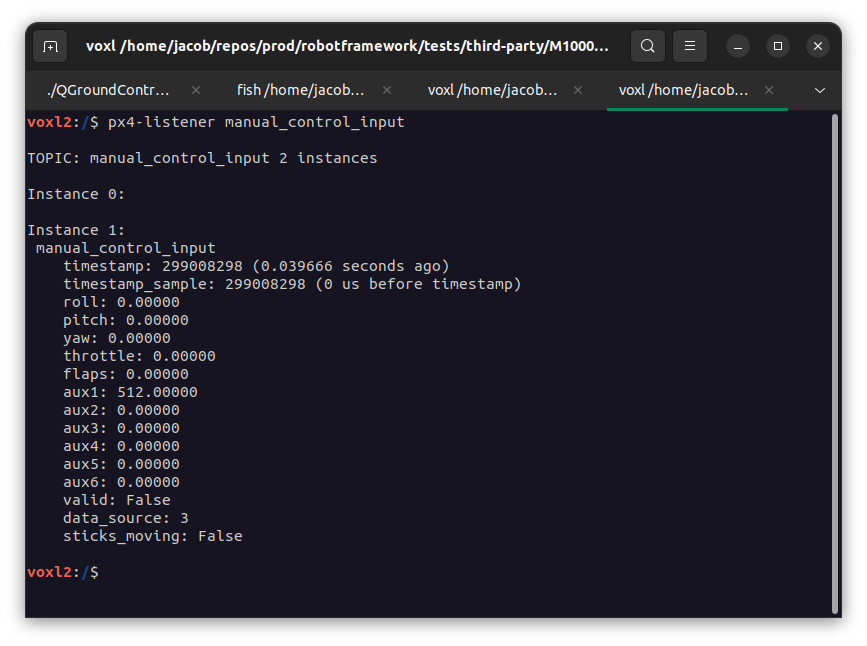
    • You can now press buttons on your joystick while running the command px4-listener manual_control_input to see which buttons provide a non-zero value in the aux1 or aux2 fields (Some of them might not! See image below for example of non-zero value, 512 here)
      aux1

    • Once you know which buttons can be used (give a non-zero value when pressed), then enable turtle mode by setting the parameter MODAL_IO_MODE to either 1 or 2 (depending which aux channel you want to enable/control turtle mode). You may need to reboot your vehicle here!

    • Finally you will need to hold down one of the buttons while in turtle mode (unless you have a button/switch on your joystick that is not a momentary button/switch)

    Aside from what I mentioned here, you could use this ELRS LED driver we have here on how we implemented a similar feature (LED bar controlled by buttons on a controller/joystick) as a reference for how you could implement the functionality you want if the steps here don't work for you.

    If you haven't already seen this page you can find more info about turtle mode parameters on our tech docs.

    General Questions

  • SSH into VOXL
    J Jacob Camarillo

    hi @Siddhanth to ssh onto the voxl you will need the IP address of the voxl. This means you will need to setup wifi on the voxl and then acquire the IP address. Once you have the IP address, you can run the command as in the image you posted above and the default password is oelinux123:

    ssh root@<IP ADDRESS>
    
    VOXL 2 and VOXL 2 Mini voxl-2

  • binding reciever to external 900mhz module
    J Jacob Camarillo

    @cantfaxglitter Hi, what version of ELRS is currently on your transmitter? Also, what version of ELRS is currently loaded on your betafpv receiver? You can run the command voxl-elrs --version and it will give you the firmware version for the receiver. This sounds like it could be mismatched versions of ELRS between the transmitter and the receiver, they both need to be on version 3+

    Development Drones starling
  • Login

  • Don't have an account? Register

  • Login or register to search.
  • First post
    Last post
0
  • Categories
  • Recent
  • Tags
  • Popular
  • Users
  • Groups