
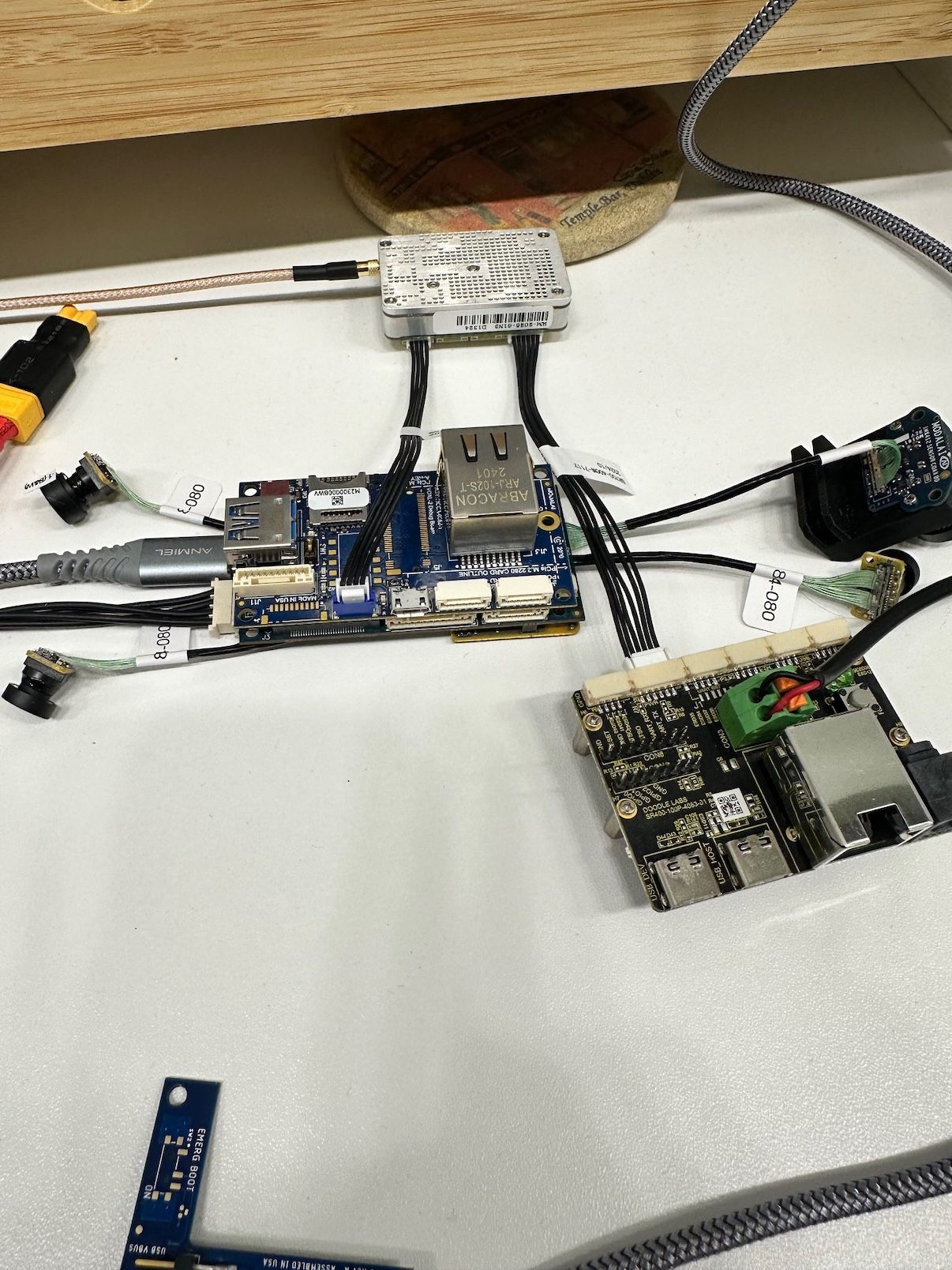
VOXL 2 Ethernet and USB Hub Add-on with Doodle lab radio
-
-
This solution doesn't work
@AidanGallagher With an M0130 USB breakout board
M0130: https://www.modalai.com/products/m0130-3?variant=48186331693360
You can use this cable:
MCBL-00085: https://www.modalai.com/products/mcbl-00085?_pos=2&_sid=0c5d87c5e&_ss=rand get rid of the need for the doodle breakout board
-
@AidanGallagher With an M0130 USB breakout board
M0130: https://www.modalai.com/products/m0130-3?variant=48186331693360
You can use this cable:
MCBL-00085: https://www.modalai.com/products/mcbl-00085?_pos=2&_sid=0c5d87c5e&_ss=rand get rid of the need for the doodle breakout board
@tom that's cool we will take a look at that in the future.
Any idea why I cannot use the J12 port on the ethernet expansion board? -
@tom that's cool we will take a look at that in the future.
Any idea why I cannot use the J12 port on the ethernet expansion board? -
@AidanGallagher I don't, if you tried connecting internet over ethernet or some other ethernet device does it work?
@tom I haven't tried the ethernet port yet. I have used the physical USB port with a WiFi dongle and that worked well.
-
@tom that's cool we will take a look at that in the future.
Any idea why I cannot use the J12 port on the ethernet expansion board?Hi @AidanGallagher
That USB2 port Port, J12, on M0062 is not much different than many other expansion board USB ports. It goes through a HUB, and as Tom pointed out, if you use M0130, your setup will simplify.
M00130 is the only USB2 product we have that can power the Doodle directly: https://docs.modalai.com/expansion-design-guide/#usb-expansion-over-j3--j5
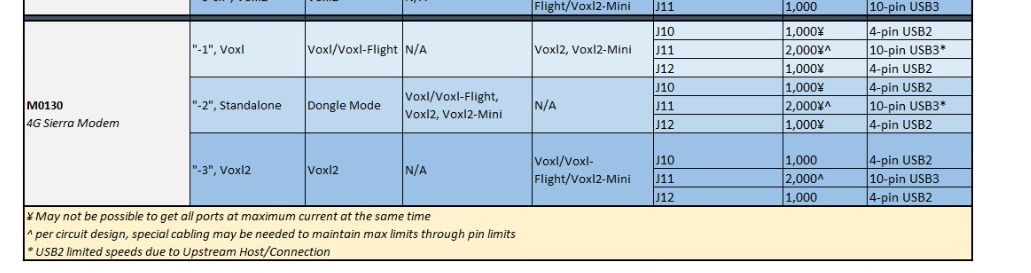
I'm not entirely sure either why your M0062 will not work, but I'm thinking it may be something with the grounding and VBUS connection due to the external board you use for power, and it not sharing a ground with the M0062 where the USB comes from. For example, our MCBL-00085-1 handles all that: https://docs.modalai.com/cable-datasheets/#mcbl-00085
Our USB3 debug board does not have a current limiting IC like M0062 has, and will not impact USB operations. However, with M0062, since it goes through the hub, and it has power control, if anything goes wrong with power or ground, the port may be disabled.
I would first try to see if your J12 port works normally, with a thumb drive for example (or I think you did that with a WiFi and were good). Then, if you want to try to share some more ground connections between your M0062 and the external power supply, that could be a good test.But, we do suggest you change to an M0130 as you will have a much nicer setup long term.
Hope that helps. -
Hi @AidanGallagher ,
I'm using the same setup and had success with changes all instances of eth0 to eth1 under $MODEM == "doodle" under $PLATFORM == "qrb5165-rb5 in the script /usr/bin/voxl-modem-start
It appears that when using the hub, the hub's build-in USB to ethernet chip always appears as eth0 (smsc75xx), even if nothing is plugged in
The stock modem script at /usr/bin/voxl-modem-start hard-codes doodles static ip to eth0.
under dmesg -w, when the dodole radio i plugged in (or just later on in the boot sequence), smsc95xx is assigned to eth1.
as a result, the ip ends of being assigned to the wrong interface and the radio cannot pass traffic
@Vinny , is there a better way to make these changes? something that won't get overwritten when a modal ai update occurs?
-
Hi @AidanGallagher ,
I'm using the same setup and had success with changes all instances of eth0 to eth1 under $MODEM == "doodle" under $PLATFORM == "qrb5165-rb5 in the script /usr/bin/voxl-modem-start
It appears that when using the hub, the hub's build-in USB to ethernet chip always appears as eth0 (smsc75xx), even if nothing is plugged in
The stock modem script at /usr/bin/voxl-modem-start hard-codes doodles static ip to eth0.
under dmesg -w, when the dodole radio i plugged in (or just later on in the boot sequence), smsc95xx is assigned to eth1.
as a result, the ip ends of being assigned to the wrong interface and the radio cannot pass traffic
@Vinny , is there a better way to make these changes? something that won't get overwritten when a modal ai update occurs?
Hi @shawn_ricardo
That is more of a question for @tom -
Hi @AidanGallagher ,
I'm using the same setup and had success with changes all instances of eth0 to eth1 under $MODEM == "doodle" under $PLATFORM == "qrb5165-rb5 in the script /usr/bin/voxl-modem-start
It appears that when using the hub, the hub's build-in USB to ethernet chip always appears as eth0 (smsc75xx), even if nothing is plugged in
The stock modem script at /usr/bin/voxl-modem-start hard-codes doodles static ip to eth0.
under dmesg -w, when the dodole radio i plugged in (or just later on in the boot sequence), smsc95xx is assigned to eth1.
as a result, the ip ends of being assigned to the wrong interface and the radio cannot pass traffic
@Vinny , is there a better way to make these changes? something that won't get overwritten when a modal ai update occurs?
-
@shawn_ricardo Not really a better way at this point, I'd like to at some point just make the network interface able to be specified in the config file as opposed to hard-coded as eth0, but haven't gotten to that yet
@tom @shawn_ricardo Thanks very much - ill give that a try


Reading along? Create a free ModalAI Forum account to join in.
With an account you can reply, ask your own question, get an email when a ModalAI engineer answers, and mark the reply that solved it. Your place in each thread is saved between visits.
Questions about VOXL, Flight Core, ESCs and ModalAI drones are answered here by the engineers who build them.
Register Login