Skip to content
  • Categories
  • Recent
  • Tags
  • Popular
  • Users
  • Groups
Collapse
Brand Logo

ModalAI Forum

  1. ModalAI Support Forum
  2. VOXL Accessories
  3. VOXL 2 Ethernet and USB Hub Add-on with Doodle lab radio

VOXL 2 Ethernet and USB Hub Add-on with Doodle lab radio

Scheduled Pinned Locked Moved VOXL Accessories
18 Posts 4 Posters 6.5k Views 2 Watching
  • Oldest to Newest
  • Newest to Oldest
  • Most Votes
Reply
  • Reply as topic
Log in to reply
This topic has been deleted. Only users with topic management privileges can see it.
  • A AidanGallagher

    Hi,

    Can I connect a doodle lab radio to the J12 connector on the Ethernet and USB Hub board?

    I have connected it and ran voxl-configure-modem

    When I check ifconfig eth0 the IP details looks correct but I cannot ping any other IP address on the Doodle network.

    Regards
    Aidan

    tomT Offline
    tomT Offline
    tom
    admin
    wrote on last edited by
    #2

    @AidanGallagher Are you able to ping the doodle modem itself? Also double check you aren't trying to use an IP that is already being used on the doodle network

    A 1 Reply Last reply
    0
    • tomT tom

      @AidanGallagher Are you able to ping the doodle modem itself? Also double check you aren't trying to use an IP that is already being used on the doodle network

      A Offline
      A Offline
      AidanGallagher
      Contributor
      wrote on last edited by
      #3

      @tom Cannot ping the modem and I am certain its a free IP address.

      I tried a USB Expansion Board with Fastboot v2 I had on another setup and it works so the issues does seem to be on related to this board.
      Is there a jumper I need to set to enable the J12 header?

      Regards
      Aidan

      tomT 1 Reply Last reply
      0
      • A AidanGallagher

        @tom Cannot ping the modem and I am certain its a free IP address.

        I tried a USB Expansion Board with Fastboot v2 I had on another setup and it works so the issues does seem to be on related to this board.
        Is there a jumper I need to set to enable the J12 header?

        Regards
        Aidan

        tomT Offline
        tomT Offline
        tom
        admin
        wrote on last edited by
        #4

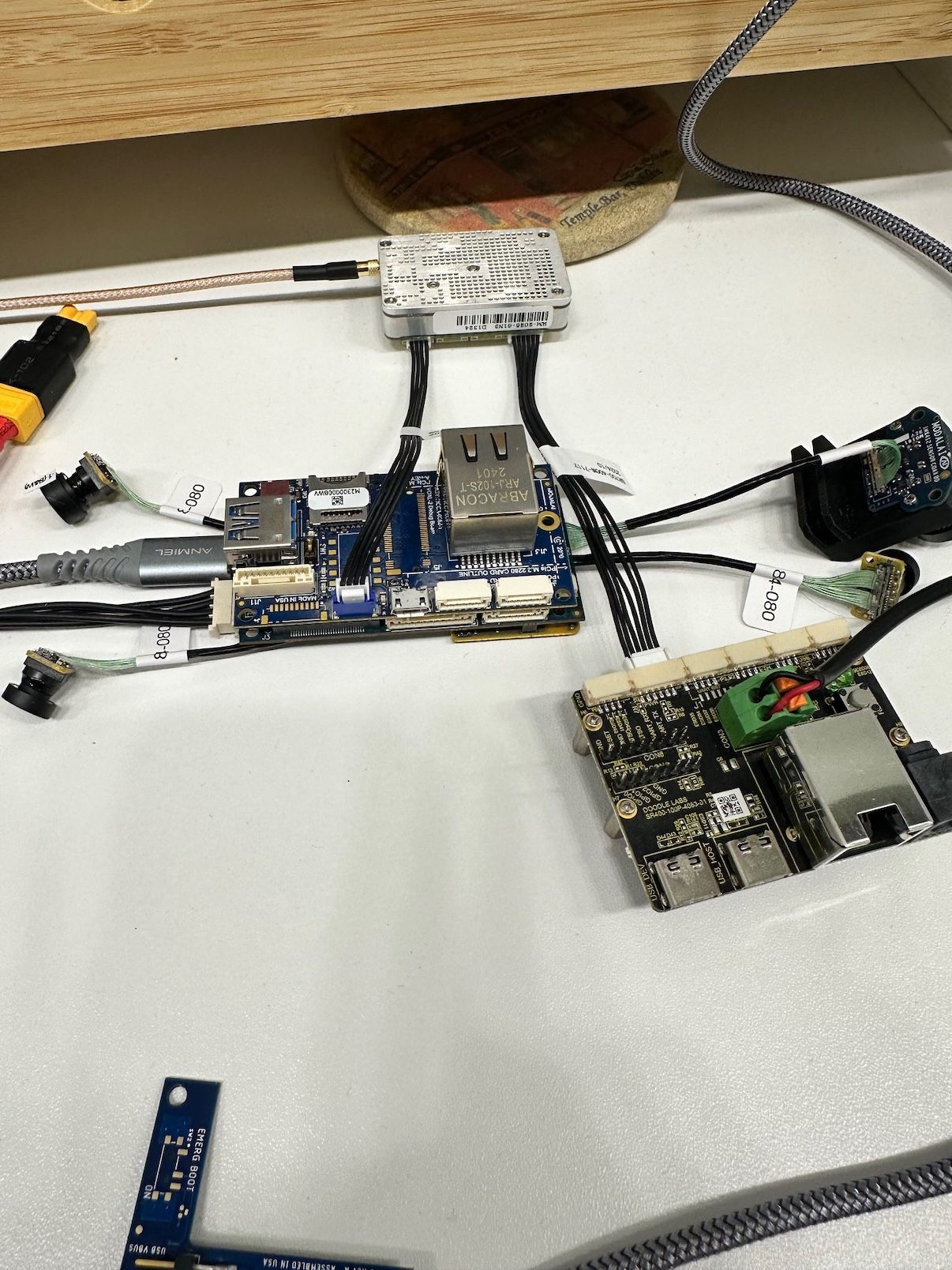
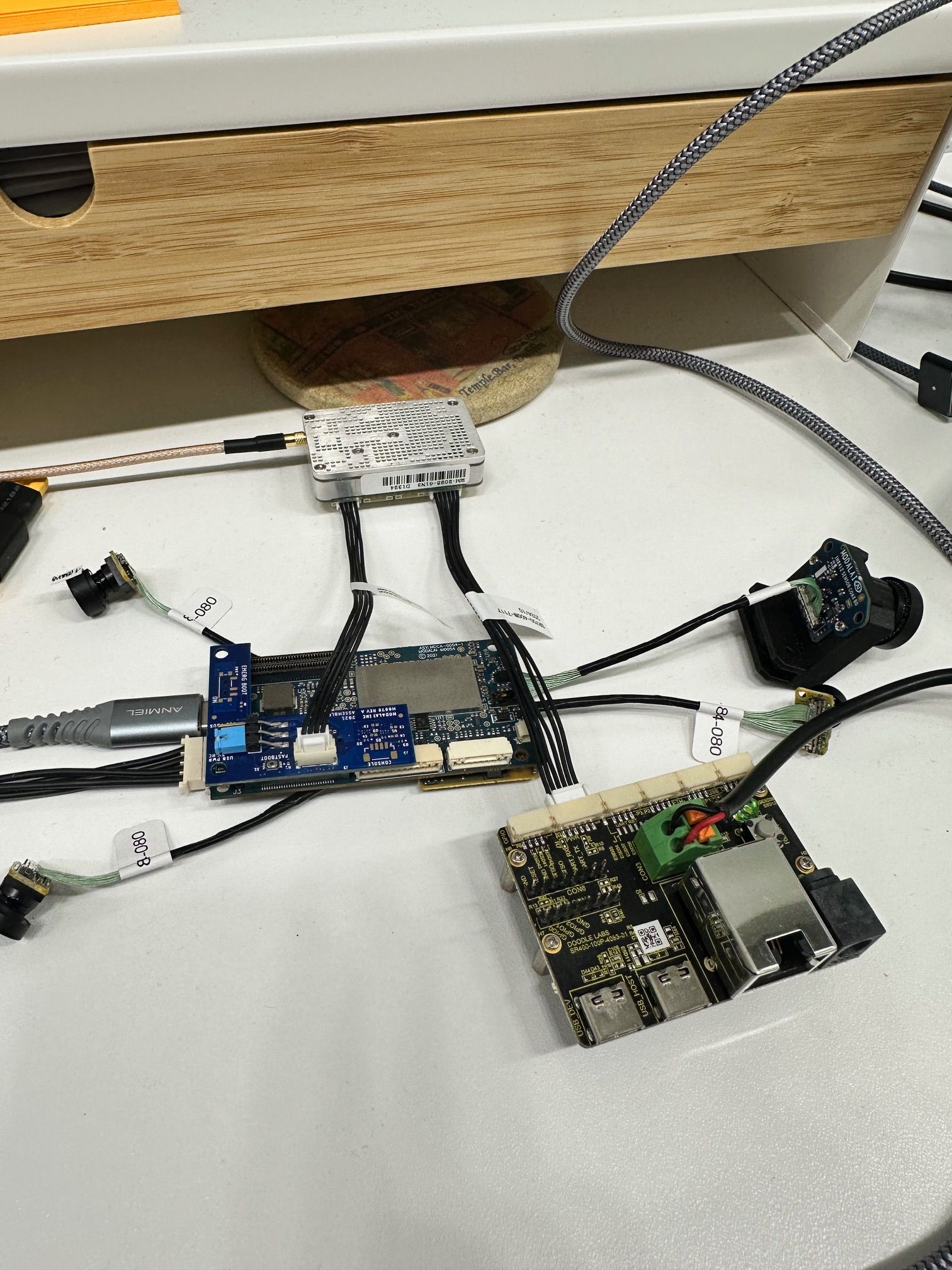
        @AidanGallagher Can you post a picture of the setup you're using?

        A 1 Reply Last reply
        0
        • tomT tom

          @AidanGallagher Can you post a picture of the setup you're using?

          A Offline
          A Offline
          AidanGallagher
          Contributor
          wrote on last edited by
          #5

          @tom ill do that tomorrow when I'm back in the office
          A 1 Reply Last reply
          0
          • A AidanGallagher

            @tom ill do that tomorrow when I'm back in the office

            A Offline
            A Offline
            AidanGallagher
            Contributor
            wrote on last edited by
            #6

            image1.jpeg

            A 1 Reply Last reply
            0
            • A AidanGallagher

              image1.jpeg

              A Offline
              A Offline
              AidanGallagher
              Contributor
              wrote on last edited by
              #7

              That's my working solution

              A 1 Reply Last reply
              0
              • A AidanGallagher

                That's my working solution

                A Offline
                A Offline
                AidanGallagher
                Contributor
                wrote on last edited by
                #8

                image0.jpeg

                A 1 Reply Last reply
                0
                • A AidanGallagher

                  image0.jpeg

                  A Offline
                  A Offline
                  AidanGallagher
                  Contributor
                  wrote on last edited by
                  #9

                  This solution doesn't work

                  tomT 1 Reply Last reply
                  0
                  • A AidanGallagher

                    This solution doesn't work

                    tomT Offline
                    tomT Offline
                    tom
                    admin
                    wrote on last edited by
                    #10

                    @AidanGallagher With an M0130 USB breakout board

                    M0130: https://www.modalai.com/products/m0130-3?variant=48186331693360

                    You can use this cable:
                    MCBL-00085: https://www.modalai.com/products/mcbl-00085?_pos=2&_sid=0c5d87c5e&_ss=r

                    and get rid of the need for the doodle breakout board

                    A 1 Reply Last reply
                    0
                    • tomT tom

                      @AidanGallagher With an M0130 USB breakout board

                      M0130: https://www.modalai.com/products/m0130-3?variant=48186331693360

                      You can use this cable:
                      MCBL-00085: https://www.modalai.com/products/mcbl-00085?_pos=2&_sid=0c5d87c5e&_ss=r

                      and get rid of the need for the doodle breakout board

                      A Offline
                      A Offline
                      AidanGallagher
                      Contributor
                      wrote on last edited by
                      #11

                      @tom that's cool we will take a look at that in the future.
                      Any idea why I cannot use the J12 port on the ethernet expansion board?

                      tomT VinnyV 2 Replies Last reply
                      0
                      • A AidanGallagher

                        @tom that's cool we will take a look at that in the future.
                        Any idea why I cannot use the J12 port on the ethernet expansion board?

                        tomT Offline
                        tomT Offline
                        tom
                        admin
                        wrote on last edited by
                        #12

                        @AidanGallagher I don't, if you tried connecting internet over ethernet or some other ethernet device does it work?

                        A 1 Reply Last reply
                        0
                        • tomT tom

                          @AidanGallagher I don't, if you tried connecting internet over ethernet or some other ethernet device does it work?

                          A Offline
                          A Offline
                          AidanGallagher
                          Contributor
                          wrote on last edited by
                          #13

                          @tom I haven't tried the ethernet port yet. I have used the physical USB port with a WiFi dongle and that worked well.

                          1 Reply Last reply
                          0
                          • A AidanGallagher

                            @tom that's cool we will take a look at that in the future.
                            Any idea why I cannot use the J12 port on the ethernet expansion board?

                            VinnyV Offline
                            VinnyV Offline
                            Vinny
                            ModalAI Team
                            wrote on last edited by
                            #14

                            Hi @AidanGallagher
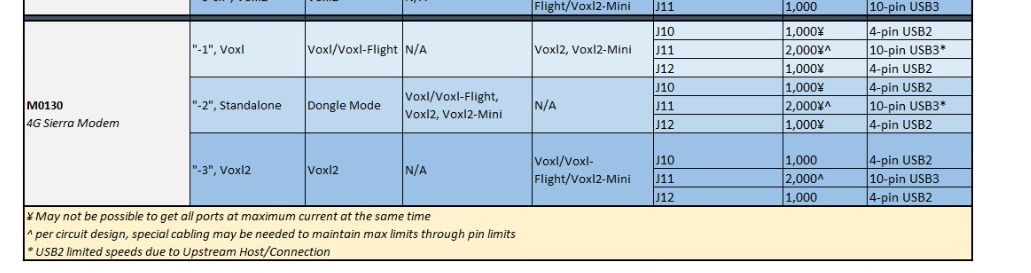
                            That USB2 port Port, J12, on M0062 is not much different than many other expansion board USB ports. It goes through a HUB, and as Tom pointed out, if you use M0130, your setup will simplify.
                            M00130 is the only USB2 product we have that can power the Doodle directly: https://docs.modalai.com/expansion-design-guide/#usb-expansion-over-j3--j5
                            a205f92a-157c-434b-a197-e935fa7ed148-image.png
                            I'm not entirely sure either why your M0062 will not work, but I'm thinking it may be something with the grounding and VBUS connection due to the external board you use for power, and it not sharing a ground with the M0062 where the USB comes from. For example, our MCBL-00085-1 handles all that: https://docs.modalai.com/cable-datasheets/#mcbl-00085
                            Our USB3 debug board does not have a current limiting IC like M0062 has, and will not impact USB operations. However, with M0062, since it goes through the hub, and it has power control, if anything goes wrong with power or ground, the port may be disabled.
                            I would first try to see if your J12 port works normally, with a thumb drive for example (or I think you did that with a WiFi and were good). Then, if you want to try to share some more ground connections between your M0062 and the external power supply, that could be a good test.

                            But, we do suggest you change to an M0130 as you will have a much nicer setup long term.
                            Hope that helps.

                            1 Reply Last reply
                            0
                            • S Offline
                              S Offline
                              shawn_ricardo
                              Contributor
                              wrote on last edited by shawn_ricardo
                              #15

                              Hi @AidanGallagher ,

                              I'm using the same setup and had success with changes all instances of eth0 to eth1 under $MODEM == "doodle" under $PLATFORM == "qrb5165-rb5 in the script /usr/bin/voxl-modem-start

                              It appears that when using the hub, the hub's build-in USB to ethernet chip always appears as eth0 (smsc75xx), even if nothing is plugged in

                              The stock modem script at /usr/bin/voxl-modem-start hard-codes doodles static ip to eth0.

                              under dmesg -w, when the dodole radio i plugged in (or just later on in the boot sequence), smsc95xx is assigned to eth1.

                              as a result, the ip ends of being assigned to the wrong interface and the radio cannot pass traffic

                              @Vinny , is there a better way to make these changes? something that won't get overwritten when a modal ai update occurs?

                              VinnyV tomT 2 Replies Last reply
                              0
                              • S shawn_ricardo

                                Hi @AidanGallagher ,

                                I'm using the same setup and had success with changes all instances of eth0 to eth1 under $MODEM == "doodle" under $PLATFORM == "qrb5165-rb5 in the script /usr/bin/voxl-modem-start

                                It appears that when using the hub, the hub's build-in USB to ethernet chip always appears as eth0 (smsc75xx), even if nothing is plugged in

                                The stock modem script at /usr/bin/voxl-modem-start hard-codes doodles static ip to eth0.

                                under dmesg -w, when the dodole radio i plugged in (or just later on in the boot sequence), smsc95xx is assigned to eth1.

                                as a result, the ip ends of being assigned to the wrong interface and the radio cannot pass traffic

                                @Vinny , is there a better way to make these changes? something that won't get overwritten when a modal ai update occurs?

                                VinnyV Offline
                                VinnyV Offline
                                Vinny
                                ModalAI Team
                                wrote on last edited by
                                #16

                                Hi @shawn_ricardo
                                That is more of a question for @tom

                                1 Reply Last reply
                                0
                                • S shawn_ricardo

                                  Hi @AidanGallagher ,

                                  I'm using the same setup and had success with changes all instances of eth0 to eth1 under $MODEM == "doodle" under $PLATFORM == "qrb5165-rb5 in the script /usr/bin/voxl-modem-start

                                  It appears that when using the hub, the hub's build-in USB to ethernet chip always appears as eth0 (smsc75xx), even if nothing is plugged in

                                  The stock modem script at /usr/bin/voxl-modem-start hard-codes doodles static ip to eth0.

                                  under dmesg -w, when the dodole radio i plugged in (or just later on in the boot sequence), smsc95xx is assigned to eth1.

                                  as a result, the ip ends of being assigned to the wrong interface and the radio cannot pass traffic

                                  @Vinny , is there a better way to make these changes? something that won't get overwritten when a modal ai update occurs?

                                  tomT Offline
                                  tomT Offline
                                  tom
                                  admin
                                  wrote on last edited by
                                  #17

                                  @shawn_ricardo Not really a better way at this point, I'd like to at some point just make the network interface able to be specified in the config file as opposed to hard-coded as eth0, but haven't gotten to that yet

                                  A 1 Reply Last reply
                                  1
                                  • tomT tom

                                    @shawn_ricardo Not really a better way at this point, I'd like to at some point just make the network interface able to be specified in the config file as opposed to hard-coded as eth0, but haven't gotten to that yet

                                    A Offline
                                    A Offline
                                    AidanGallagher
                                    Contributor
                                    wrote on last edited by
                                    #18

                                    @tom @shawn_ricardo Thanks very much - ill give that a try

                                    1 Reply Last reply
                                    0

                                    Hello! It looks like you're interested in this conversation, but you don't have an account yet.

                                    Getting fed up of having to scroll through the same posts each visit? When you register for an account, you'll always come back to exactly where you were before, and choose to be notified of new replies (either via email, or push notification). You'll also be able to save bookmarks and upvote posts to show your appreciation to other community members.

                                    With your input, this post could be even better 💗

                                    Register Login
                                    Reply
                                    • Reply as topic
                                    Log in to reply
                                    • Oldest to Newest
                                    • Newest to Oldest
                                    • Most Votes


                                    ModalAI
                                    Categories Recent Tags ModalAI.com Docs
                                    © 2026 ModalAI® · Accelerating autonomy for smaller, smarter, safer drones · Powered by NodeBB
                                    • Login

                                    • Login or register to search.
                                    • First post
                                      Last post
                                    0
                                    • Categories
                                    • Recent
                                    • Tags
                                    • Popular
                                    • Users
                                    • Groups