
Install libopencv on Starling 2
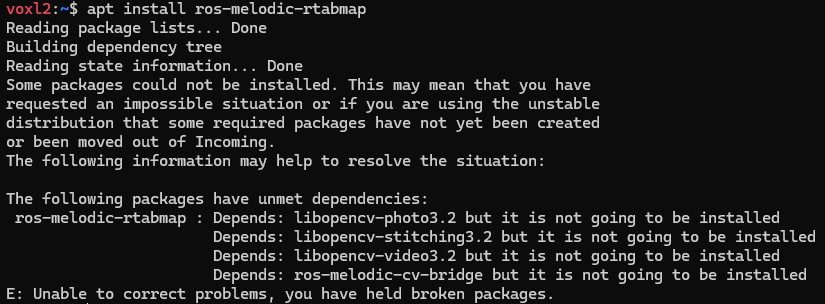
-
Just to add to this..
voxl-opencvpackage that is installed on voxl2 by default will conflict with standard opencv packages. This is not ideal, in future we may move to using opencv from standard packages and not have our own package, but this is how the packages are set up right now and there are a few voxl packages that depend on voxl-opencv, so uninstalling it could break some other dependencies.I agree that docker may be the best solution here, so you have full flexibility over the installed packages. You can still run the minimal ROS on the host OS on voxl2 (to handle mpa to ROS stuff) and all the processing inside a docker container.
Alex
@Alex-Kushleyev @wilkinsaf Thanks for your answers! Actually, I've done something similar with docker, but I still have a few problems with the data format that mpa_to_ros sends. To address this, I did the following:
#!/usr/bin/env python
import rospy
import cv2
import numpy as np
from sensor_msgs.msg import Image, CameraInfo
from cv_bridge import CvBridge, CvBridgeError
import yaml

class CamImageConverter:
    def __init__(self):
        self.bridge = CvBridge()

        # Subscribers
        rospy.Subscriber("/drone/tof_depth/image_raw", Image, self.depth_callback)
        rospy.Subscriber("/drone/hires/image_raw", Image, self.rgb_callback)
        rospy.Subscriber("/drone/tracking_front/image_raw", Image, self.tracking_callback)

        # Publishers
        self.depth_pub = rospy.Publisher("/drone/tof_depth/image", Image, queue_size=1000)

        self.rgb_pub = rospy.Publisher("/drone/hires/image", Image, queue_size=1000)
        self.rgb_info_pub = rospy.Publisher("/drone/hires/camera_info", CameraInfo, queue_size=1000)
        self.tracking_pub = rospy.Publisher("/drone/tracking_front/image", Image, queue_size=1000)
        self.tracking_info_pub = rospy.Publisher("/drone/tracking_front/camera_info", CameraInfo, queue_size=1000)

        self.camera_info_msg = self.load_camera_info("/root/ros_ws/src/cam_converter/calibration/ost.yaml")

        rospy.Timer(rospy.Duration(1.0 / 30), self.publish_tracking_info)
        rospy.Timer(rospy.Duration(1.0 / 30), self.publish_rgb_info)

    def load_camera_info(self, filename):
        with open(filename, "r") as file:
            calib_data = yaml.safe_load(file)
            camera_info_msg = CameraInfo()
            camera_info_msg.height = calib_data["image_height"]
            camera_info_msg.width = calib_data["image_width"]
            camera_info_msg.distortion_model = calib_data["distortion_model"]
            camera_info_msg.D = calib_data["distortion_coefficients"]["data"]
            camera_info_msg.K = calib_data["camera_matrix"]["data"]
            camera_info_msg.R = calib_data["rectification_matrix"]["data"]
            camera_info_msg.P = calib_data["projection_matrix"]["data"]
            return camera_info_msg

    def depth_callback(self, msg):
        try:
            # Convertir le message ROS en une image OpenCV
            raw_image = self.bridge.imgmsg_to_cv2(msg, desired_encoding="mono8")

            # Normalisation de l'image pour améliorer la qualité
            depth_image = cv2.normalize(raw_image, None, 0, 65535, cv2.NORM_MINMAX).astype(np.uint16)

            # Publier l'image convertie
            converted_msg = self.bridge.cv2_to_imgmsg(depth_image, encoding="16UC1")
            converted_msg.header.frame_id = 'tof_link'
            converted_msg.header.stamp = rospy.Time.now()
            self.depth_pub.publish(converted_msg)

        except CvBridgeError as e:
            rospy.logerr("CvBridge Error: {0}".format(e))

    def rgb_callback(self, msg):
        try:
            # Convertir le message ROS en une image OpenCV
            raw_image = self.bridge.imgmsg_to_cv2(msg, desired_encoding="passthrough")

            # Conversion YUV422 ou NV12 en RGB8
            if msg.encoding == "yuv422":
                rgb_image = cv2.cvtColor(raw_image, cv2.COLOR_YUV2RGB_Y422)
            elif msg.encoding == "nv12":
                yuv_image = np.frombuffer(msg.data, dtype=np.uint8).reshape((msg.height * 3 // 2, msg.width))
                rgb_image = cv2.cvtColor(yuv_image, cv2.COLOR_YUV2RGB_NV12)
            else:
                rospy.logerr("Unsupported encoding: {}".format(msg.encoding))
                return

            # Redimensionner l'image RGB pour qu'elle ait la même taille que l'image ToF (240x180)
            resized_rgb_image = cv2.resize(rgb_image, (180, 240), interpolation=cv2.INTER_LINEAR)

            # Publier l'image convertie et redimensionnée
            converted_msg = self.bridge.cv2_to_imgmsg(resized_rgb_image, encoding="rgb8")
            converted_msg.header.frame_id = 'hires_link'
            converted_msg.header.stamp = rospy.Time.now()
            self.rgb_pub.publish(converted_msg)

        except CvBridgeError as e:
            rospy.logerr("CvBridge Error: {0}".format(e))

    def tracking_callback(self, msg):
        try:
            # Convertir le message ROS en une image OpenCV
            raw_image = self.bridge.imgmsg_to_cv2(msg, desired_encoding="passthrough")

            # Redimensionner l'image RGB pour qu'elle ait la même taille que l'image ToF (240x180)
            resized_image = cv2.resize(raw_image, (180, 240), interpolation=cv2.INTER_LINEAR)

            # Publier l'image convertie et redimensionnée
            converted_msg = self.bridge.cv2_to_imgmsg(resized_image)
            converted_msg.header.frame_id = 'tracking_front_link'
            converted_msg.header.stamp = rospy.Time.now()
            self.tracking_pub.publish(converted_msg)

        except CvBridgeError as e:
            rospy.logerr("CvBridge Error: {0}".format(e))

    def publish_rgb_info(self, event):
        self.camera_info_msg.header.stamp = rospy.Time.now()
        self.camera_info_msg.header.frame_id = 'hires_link'
        self.rgb_info_pub.publish(self.camera_info_msg)

    def publish_tracking_info(self, event):
        camera_info_msg = CameraInfo()
        camera_info_msg.header.frame_id = 'tracking_front_link'
        camera_info_msg.header.stamp = rospy.Time.now()

        camera_info_msg.height = 240
        camera_info_msg.width = 180
        camera_info_msg.distortion_model = 'plumb_bob'
        camera_info_msg.D = [5.0234834483837899e-02, 3.2967878240805777e-02, -1.6468916528340826e-02, 1.8155367951008903e-03]
        camera_info_msg.K = [4.6177826259848081e+02, 0., 6.1505488982380564e+02, 0., 4.6160870283061041e+02, 4.1065345867690684e+02, 0., 0., 1.]
        camera_info_msg.R = [1.0, 0.0, 0.0, 0.0, 1.0, 0.0, 0.0, 0.0, 1.0]
        camera_info_msg.P = [4.6177826259848081e+02, 0., 6.1505488982380564e+02, 0., 0., 4.6160870283061041e+02, 4.1065345867690684e+02, 0., 0., 0., 1., 0.]

        self.tracking_info_pub.publish(camera_info_msg)


def main():
    rospy.init_node('cam_image_converter', anonymous=True)
    CamImageConverter()
    rospy.spin()

if __name__ == '__main__':
    main()
I don't know if this is the right way to do it, but it seems to work. Do you have any suggestions for implementing this directly on the Voxl2?
Also, I have a few problems with camera calibrations and the drone model. Do you have any files that contain all the data for the cameras (ToF, tracking, and high-resolution) and a model of the drone that I can use in RViz and Gazebo? This could really help me.
For more context, I'm trying to implement this project for Autonomous SLAM with ROS. Has anyone already used RTAB-Map on this drone? Do you have any advice to solve this problem?
Thank you for your help
-
@Alex-Kushleyev @wilkinsaf Thanks for your answers! Actually, I've done something similar with docker, but I still have a few problems with the data format that mpa_to_ros sends. To address this, I did the following:
#!/usr/bin/env python
import rospy
import cv2
import numpy as np
from sensor_msgs.msg import Image, CameraInfo
from cv_bridge import CvBridge, CvBridgeError
import yaml

class CamImageConverter:
    def __init__(self):
        self.bridge = CvBridge()

        # Subscribers
        rospy.Subscriber("/drone/tof_depth/image_raw", Image, self.depth_callback)
        rospy.Subscriber("/drone/hires/image_raw", Image, self.rgb_callback)
        rospy.Subscriber("/drone/tracking_front/image_raw", Image, self.tracking_callback)

        # Publishers
        self.depth_pub = rospy.Publisher("/drone/tof_depth/image", Image, queue_size=1000)

        self.rgb_pub = rospy.Publisher("/drone/hires/image", Image, queue_size=1000)
        self.rgb_info_pub = rospy.Publisher("/drone/hires/camera_info", CameraInfo, queue_size=1000)
        self.tracking_pub = rospy.Publisher("/drone/tracking_front/image", Image, queue_size=1000)
        self.tracking_info_pub = rospy.Publisher("/drone/tracking_front/camera_info", CameraInfo, queue_size=1000)

        self.camera_info_msg = self.load_camera_info("/root/ros_ws/src/cam_converter/calibration/ost.yaml")

        rospy.Timer(rospy.Duration(1.0 / 30), self.publish_tracking_info)
        rospy.Timer(rospy.Duration(1.0 / 30), self.publish_rgb_info)

    def load_camera_info(self, filename):
        with open(filename, "r") as file:
            calib_data = yaml.safe_load(file)
            camera_info_msg = CameraInfo()
            camera_info_msg.height = calib_data["image_height"]
            camera_info_msg.width = calib_data["image_width"]
            camera_info_msg.distortion_model = calib_data["distortion_model"]
            camera_info_msg.D = calib_data["distortion_coefficients"]["data"]
            camera_info_msg.K = calib_data["camera_matrix"]["data"]
            camera_info_msg.R = calib_data["rectification_matrix"]["data"]
            camera_info_msg.P = calib_data["projection_matrix"]["data"]
            return camera_info_msg

    def depth_callback(self, msg):
        try:
            # Convertir le message ROS en une image OpenCV
            raw_image = self.bridge.imgmsg_to_cv2(msg, desired_encoding="mono8")

            # Normalisation de l'image pour améliorer la qualité
            depth_image = cv2.normalize(raw_image, None, 0, 65535, cv2.NORM_MINMAX).astype(np.uint16)

            # Publier l'image convertie
            converted_msg = self.bridge.cv2_to_imgmsg(depth_image, encoding="16UC1")
            converted_msg.header.frame_id = 'tof_link'
            converted_msg.header.stamp = rospy.Time.now()
            self.depth_pub.publish(converted_msg)

        except CvBridgeError as e:
            rospy.logerr("CvBridge Error: {0}".format(e))

    def rgb_callback(self, msg):
        try:
            # Convertir le message ROS en une image OpenCV
            raw_image = self.bridge.imgmsg_to_cv2(msg, desired_encoding="passthrough")

            # Conversion YUV422 ou NV12 en RGB8
            if msg.encoding == "yuv422":
                rgb_image = cv2.cvtColor(raw_image, cv2.COLOR_YUV2RGB_Y422)
            elif msg.encoding == "nv12":
                yuv_image = np.frombuffer(msg.data, dtype=np.uint8).reshape((msg.height * 3 // 2, msg.width))
                rgb_image = cv2.cvtColor(yuv_image, cv2.COLOR_YUV2RGB_NV12)
            else:
                rospy.logerr("Unsupported encoding: {}".format(msg.encoding))
                return

            # Redimensionner l'image RGB pour qu'elle ait la même taille que l'image ToF (240x180)
            resized_rgb_image = cv2.resize(rgb_image, (180, 240), interpolation=cv2.INTER_LINEAR)

            # Publier l'image convertie et redimensionnée
            converted_msg = self.bridge.cv2_to_imgmsg(resized_rgb_image, encoding="rgb8")
            converted_msg.header.frame_id = 'hires_link'
            converted_msg.header.stamp = rospy.Time.now()
            self.rgb_pub.publish(converted_msg)

        except CvBridgeError as e:
            rospy.logerr("CvBridge Error: {0}".format(e))

    def tracking_callback(self, msg):
        try:
            # Convertir le message ROS en une image OpenCV
            raw_image = self.bridge.imgmsg_to_cv2(msg, desired_encoding="passthrough")

            # Redimensionner l'image RGB pour qu'elle ait la même taille que l'image ToF (240x180)
            resized_image = cv2.resize(raw_image, (180, 240), interpolation=cv2.INTER_LINEAR)

            # Publier l'image convertie et redimensionnée
            converted_msg = self.bridge.cv2_to_imgmsg(resized_image)
            converted_msg.header.frame_id = 'tracking_front_link'
            converted_msg.header.stamp = rospy.Time.now()
            self.tracking_pub.publish(converted_msg)

        except CvBridgeError as e:
            rospy.logerr("CvBridge Error: {0}".format(e))

    def publish_rgb_info(self, event):
        self.camera_info_msg.header.stamp = rospy.Time.now()
        self.camera_info_msg.header.frame_id = 'hires_link'
        self.rgb_info_pub.publish(self.camera_info_msg)

    def publish_tracking_info(self, event):
        camera_info_msg = CameraInfo()
        camera_info_msg.header.frame_id = 'tracking_front_link'
        camera_info_msg.header.stamp = rospy.Time.now()

        camera_info_msg.height = 240
        camera_info_msg.width = 180
        camera_info_msg.distortion_model = 'plumb_bob'
        camera_info_msg.D = [5.0234834483837899e-02, 3.2967878240805777e-02, -1.6468916528340826e-02, 1.8155367951008903e-03]
        camera_info_msg.K = [4.6177826259848081e+02, 0., 6.1505488982380564e+02, 0., 4.6160870283061041e+02, 4.1065345867690684e+02, 0., 0., 1.]
        camera_info_msg.R = [1.0, 0.0, 0.0, 0.0, 1.0, 0.0, 0.0, 0.0, 1.0]
        camera_info_msg.P = [4.6177826259848081e+02, 0., 6.1505488982380564e+02, 0., 0., 4.6160870283061041e+02, 4.1065345867690684e+02, 0., 0., 0., 1., 0.]

        self.tracking_info_pub.publish(camera_info_msg)


def main():
    rospy.init_node('cam_image_converter', anonymous=True)
    CamImageConverter()
    rospy.spin()

if __name__ == '__main__':
    main()
I don't know if this is the right way to do it, but it seems to work. Do you have any suggestions for implementing this directly on the Voxl2?
Also, I have a few problems with camera calibrations and the drone model. Do you have any files that contain all the data for the cameras (ToF, tracking, and high-resolution) and a model of the drone that I can use in RViz and Gazebo? This could really help me.
For more context, I'm trying to implement this project for Autonomous SLAM with ROS. Has anyone already used RTAB-Map on this drone? Do you have any advice to solve this problem?
Thank you for your help
I do not have an suggestions for implementing this directly on voxl2. as mentioned the voxl-opencv might conflict with standard opencv. I have also seen other packages conflict and python versions conflict depending on the ROS version you are using.
Far easier and cleaner to use a docker image, and creates less headache in the long run.when you say data for cameras, what do you mean? I do not believe Modal has a DIRECT model of the drone in RViz or Gazebo. But you can follow this guide to get HITL working in Gazebo with the voxl2 hardware: https://docs.modalai.com/voxl2-PX4-hitl/
-
I do not have an suggestions for implementing this directly on voxl2. as mentioned the voxl-opencv might conflict with standard opencv. I have also seen other packages conflict and python versions conflict depending on the ROS version you are using.
Far easier and cleaner to use a docker image, and creates less headache in the long run.when you say data for cameras, what do you mean? I do not believe Modal has a DIRECT model of the drone in RViz or Gazebo. But you can follow this guide to get HITL working in Gazebo with the voxl2 hardware: https://docs.modalai.com/voxl2-PX4-hitl/
and video: https://www.youtube.com/watch?v=ysvpJdXFWaM
-
I do not have an suggestions for implementing this directly on voxl2. as mentioned the voxl-opencv might conflict with standard opencv. I have also seen other packages conflict and python versions conflict depending on the ROS version you are using.
Far easier and cleaner to use a docker image, and creates less headache in the long run.when you say data for cameras, what do you mean? I do not believe Modal has a DIRECT model of the drone in RViz or Gazebo. But you can follow this guide to get HITL working in Gazebo with the voxl2 hardware: https://docs.modalai.com/voxl2-PX4-hitl/
@wilkinsaf Okay, thanks for your reply. Sorry, that was not clear. What I mean by data for cameras is data that I can send to RTAB-Map as a sensor_msgs/CameraInfo message. There is some data in the extrinsics files for tracking, but not for other sensors.
-
@wilkinsaf Okay, thanks for your reply. Sorry, that was not clear. What I mean by data for cameras is data that I can send to RTAB-Map as a sensor_msgs/CameraInfo message. There is some data in the extrinsics files for tracking, but not for other sensors.
@Judoor-0 Gotcha. Let me know if this doesnt answer your question.
you can use voxl mpa to ros2: https://gitlab.com/voxl-public/voxl-sdk/utilities/voxl-mpa-to-ros2
and this will allow you to access camera frame information -
@Judoor-0 Gotcha. Let me know if this doesnt answer your question.
you can use voxl mpa to ros2: https://gitlab.com/voxl-public/voxl-sdk/utilities/voxl-mpa-to-ros2
and this will allow you to access camera frame information -
@wilkinsaf Does mpa to ros do the same thing? Because I currently use ROS1. And for ROS1, mpa to ros only sends camera images or point cloud, not camera_infos.
I am working on something very similar as well and am facing the same issue.
I need to run RTAB-MAP for SLAM using the drone's sensors (Video and IMU). But RTAB-MAP expects camera_info (the camera matrix and other variables, as explained by @Judoor-0 above) along with video data.
One way to provide this information to RTAB-MAP is by creating a seperate publisher and publish this data over a ROS topic as done in one of the posts above. But I suspect it would be better if the voxl-mpa-to-ros package could provide the exact camera matrix and other variables (as specified here - https://docs.ros.org/en/noetic/api/sensor_msgs/html/msg/CameraInfo.html) as a ROS topic directly.
Kindly let us know if there is any way to implement this.
@Judoor-0, were you able to run SLAM using the stereo data from the drone? Or did you use depth data from a depth camera? The RB5 flight drone that I am using does not provide depth data directly, and hence I was thinking of using the Stereo data package within RTAB-MAP.
Thanks!
-
I am working on something very similar as well and am facing the same issue.
I need to run RTAB-MAP for SLAM using the drone's sensors (Video and IMU). But RTAB-MAP expects camera_info (the camera matrix and other variables, as explained by @Judoor-0 above) along with video data.
One way to provide this information to RTAB-MAP is by creating a seperate publisher and publish this data over a ROS topic as done in one of the posts above. But I suspect it would be better if the voxl-mpa-to-ros package could provide the exact camera matrix and other variables (as specified here - https://docs.ros.org/en/noetic/api/sensor_msgs/html/msg/CameraInfo.html) as a ROS topic directly.
Kindly let us know if there is any way to implement this.
@Judoor-0, were you able to run SLAM using the stereo data from the drone? Or did you use depth data from a depth camera? The RB5 flight drone that I am using does not provide depth data directly, and hence I was thinking of using the Stereo data package within RTAB-MAP.
Thanks!
The easiest way to do this, perhaps, is to create a python script that reads the camera calibration json and publishes a latched message via rospy. Similarly it could be done in C++ with a little more effort.. I don't think this currently exists.
Alex
-
The easiest way to do this, perhaps, is to create a python script that reads the camera calibration json and publishes a latched message via rospy. Similarly it could be done in C++ with a little more effort.. I don't think this currently exists.
Alex
-
I am working on something very similar as well and am facing the same issue.
I need to run RTAB-MAP for SLAM using the drone's sensors (Video and IMU). But RTAB-MAP expects camera_info (the camera matrix and other variables, as explained by @Judoor-0 above) along with video data.
One way to provide this information to RTAB-MAP is by creating a seperate publisher and publish this data over a ROS topic as done in one of the posts above. But I suspect it would be better if the voxl-mpa-to-ros package could provide the exact camera matrix and other variables (as specified here - https://docs.ros.org/en/noetic/api/sensor_msgs/html/msg/CameraInfo.html) as a ROS topic directly.
Kindly let us know if there is any way to implement this.
@Judoor-0, were you able to run SLAM using the stereo data from the drone? Or did you use depth data from a depth camera? The RB5 flight drone that I am using does not provide depth data directly, and hence I was thinking of using the Stereo data package within RTAB-MAP.
Thanks!
@Prabhav-Gupta I didn't use the stereo data because I don't have one on my drone. I used the point cloud returned by the TOF. But I know that with RTAB-Map you can easily use stereo without depth. There are some examples that may help you in the rtabmap_ros website.
-
@Prabhav-Gupta I didn't use the stereo data because I don't have one on my drone. I used the point cloud returned by the TOF. But I know that with RTAB-Map you can easily use stereo without depth. There are some examples that may help you in the rtabmap_ros website.
@Judoor-0 Thanks a lot, I will look into it.
-
The easiest way to do this, perhaps, is to create a python script that reads the camera calibration json and publishes a latched message via rospy. Similarly it could be done in C++ with a little more effort.. I don't think this currently exists.
Alex
I was trying to create this script -
@Alex-Kushleyev said in Install libopencv on Starling 2:
The easiest way to do this, perhaps, is to create a python script that reads the camera calibration json and publishes a latched message via rospy. Similarly it could be done in C++ with a little more effort.. I don't think this currently exists.
and need some help.
I am working with the RB5 drone and found this in the
/data/modalai/folder in the drone:In
opencv_stereo_front_extrinsics.yml:rb5:/data/modalai$ cat opencv_stereo_front_extrinsics.yml %YAML:1.0 --- R: !!opencv-matrix rows: 3 cols: 3 dt: d data: [ 9.9995382093423246e-01, -9.1903872613942166e-03, -2.8094093711296423e-03, 9.2509466314868449e-03, 9.9970714036476482e-01, 2.2361875818584419e-02, 2.6030723098620125e-03, -2.2386832864208624e-02, 9.9974599460505953e-01 ] T: !!opencv-matrix rows: 3 cols: 1 dt: d data: [ -7.9639069991921108e-02, -9.0666624431155548e-05, -1.0799460870486485e-03 ] reprojection_error: 2.7322523335815047e-01 calibration_time: "2022-04-08 23:15:23"and in
opencv_stereo_front_intrinsics.yml:rb5:/data/modalai$ cat opencv_stereo_front_intrinsics.yml %YAML:1.0 --- M1: !!opencv-matrix rows: 3 cols: 3 dt: d data: [ 5.0159907997903338e+02, 0., 2.9377341710319376e+02, 0., 5.0083699409439379e+02, 2.3544444409742863e+02, 0., 0., 1. ] D1: !!opencv-matrix rows: 5 cols: 1 dt: d data: [ -1.6571748643440132e-01, 6.3134583515870882e-02, 2.4908601395800438e-03, 6.9258577723375913e-04, 0. ] reprojection_error1: 1.8877343672847582e-01 M2: !!opencv-matrix rows: 3 cols: 3 dt: d data: [ 5.0289492433892644e+02, 0., 3.1156572782508289e+02, 0., 5.0234014337071841e+02, 2.4962793784523797e+02, 0., 0., 1. ] D2: !!opencv-matrix rows: 5 cols: 1 dt: d data: [ -1.6640627389329365e-01, 6.4800083011513396e-02, 1.1988146735987267e-04, -6.3680006718804514e-04, 0. ] reprojection_error2: 1.8906708149286014e-01 width: 640 height: 480 distortion_model: plumb_bob calibration_time: "2022-04-08 23:15:23"To create the script that publishes CameraInfo, I need to figure out the information within these two files that correspond to the variables within the CameraInfo class as given here: https://docs.ros.org/en/noetic/api/sensor_msgs/html/msg/CameraInfo.html
sensor_msgs/CameraInfo:
std_msgs/Header header
uint32 height
uint32 width
string distortion_model
float64[] D
float64[9] K
float64[9] R
float64[12] P
uint32 binning_x
uint32 binning_y
sensor_msgs/RegionOfInterest roi
Some of the variable mappings are clear, such as height, width, distortion model, R and D.
How do I map K and P required by CameraInfo from the Calibration files? And anything else that I should potentially look out for while doing this mapping?
Thanks!
-
I was trying to create this script -
@Alex-Kushleyev said in Install libopencv on Starling 2:
The easiest way to do this, perhaps, is to create a python script that reads the camera calibration json and publishes a latched message via rospy. Similarly it could be done in C++ with a little more effort.. I don't think this currently exists.
and need some help.
I am working with the RB5 drone and found this in the
/data/modalai/folder in the drone:In
opencv_stereo_front_extrinsics.yml:rb5:/data/modalai$ cat opencv_stereo_front_extrinsics.yml %YAML:1.0 --- R: !!opencv-matrix rows: 3 cols: 3 dt: d data: [ 9.9995382093423246e-01, -9.1903872613942166e-03, -2.8094093711296423e-03, 9.2509466314868449e-03, 9.9970714036476482e-01, 2.2361875818584419e-02, 2.6030723098620125e-03, -2.2386832864208624e-02, 9.9974599460505953e-01 ] T: !!opencv-matrix rows: 3 cols: 1 dt: d data: [ -7.9639069991921108e-02, -9.0666624431155548e-05, -1.0799460870486485e-03 ] reprojection_error: 2.7322523335815047e-01 calibration_time: "2022-04-08 23:15:23"and in
opencv_stereo_front_intrinsics.yml:rb5:/data/modalai$ cat opencv_stereo_front_intrinsics.yml %YAML:1.0 --- M1: !!opencv-matrix rows: 3 cols: 3 dt: d data: [ 5.0159907997903338e+02, 0., 2.9377341710319376e+02, 0., 5.0083699409439379e+02, 2.3544444409742863e+02, 0., 0., 1. ] D1: !!opencv-matrix rows: 5 cols: 1 dt: d data: [ -1.6571748643440132e-01, 6.3134583515870882e-02, 2.4908601395800438e-03, 6.9258577723375913e-04, 0. ] reprojection_error1: 1.8877343672847582e-01 M2: !!opencv-matrix rows: 3 cols: 3 dt: d data: [ 5.0289492433892644e+02, 0., 3.1156572782508289e+02, 0., 5.0234014337071841e+02, 2.4962793784523797e+02, 0., 0., 1. ] D2: !!opencv-matrix rows: 5 cols: 1 dt: d data: [ -1.6640627389329365e-01, 6.4800083011513396e-02, 1.1988146735987267e-04, -6.3680006718804514e-04, 0. ] reprojection_error2: 1.8906708149286014e-01 width: 640 height: 480 distortion_model: plumb_bob calibration_time: "2022-04-08 23:15:23"To create the script that publishes CameraInfo, I need to figure out the information within these two files that correspond to the variables within the CameraInfo class as given here: https://docs.ros.org/en/noetic/api/sensor_msgs/html/msg/CameraInfo.html
sensor_msgs/CameraInfo:
std_msgs/Header header
uint32 height
uint32 width
string distortion_model
float64[] D
float64[9] K
float64[9] R
float64[12] P
uint32 binning_x
uint32 binning_y
sensor_msgs/RegionOfInterest roi
Some of the variable mappings are clear, such as height, width, distortion model, R and D.
How do I map K and P required by CameraInfo from the Calibration files? And anything else that I should potentially look out for while doing this mapping?
Thanks!
K is your M1 and M2 matrices for both cameras (3x3 Intrinsic camera matrix)
The link you shared has information how to compute the P matrix. I am not sure if it would be used by your application though.
Alex
-
K is your M1 and M2 matrices for both cameras (3x3 Intrinsic camera matrix)
The link you shared has information how to compute the P matrix. I am not sure if it would be used by your application though.
Alex
Cool, Thanks a lot!


Reading along? Create a free ModalAI Forum account to join in.
With an account you can reply, ask your own question, get an email when a ModalAI engineer answers, and mark the reply that solved it. Your place in each thread is saved between visits.
Questions about VOXL, Flight Core, ESCs and ModalAI drones are answered here by the engineers who build them.
Register Login