
I can't see OBSTACLE_DISTANCE on QGC
-
I am attempting to use VOXL2 to connect to an external flight controller for collision prevention. I can see the information from voa_pc_out on VOXL2, but I am unable to see the information from OBSTACLE_DISTANCE on QGC. VOXL2 is connected to the telemetry 2 port of the external flight controller via UART. Here are my MAVLink parameter settings:
MAV_1_CONFIG : TELEM 2
MAV_1_FLOW_CTRL : Auto-detected
MAV_1_FORWARD : Disabled
MAV_1_MODE : Onboard
MAV_1_RADIO_CTL : Enabled
MAV_1_RATE : 0
SER_TEL2_BAUD : 921600
COM_OBS_AVOID : EnabledOn the VOXL2, it is connected to the USB/UART add-on board at J3, and the parameters in the voxl-mavlink-server.conf file are set as follows:
{
"primary_static_gcs_ip": "192.168.8.10",
"secondary_static_gcs_ip": "192.168.124.197",
"onboard_port_to_autopilot": 14556,
"onboard_port_from_autopilot": 14557,
"gcs_port_to_autopilot": 14558,
"gcs_port_from_autopilot": 14559,
"en_external_uart_ap": true,
"autopilot_uart_bus": 1,
"autopilot_uart_baudrate": 921600,
"en_external_ap_timesync": 1,
"en_external_ap_heartbeat": 1,
"udp_mtu": 0,
"gcs_timeout_s": 4.5
}Then, when I use the "mavlink status" command on QGC to check, I see that the rx loss is 63.1%, why is this problem happening? How can I resolve it?"
-
I am attempting to use VOXL2 to connect to an external flight controller for collision prevention. I can see the information from voa_pc_out on VOXL2, but I am unable to see the information from OBSTACLE_DISTANCE on QGC. VOXL2 is connected to the telemetry 2 port of the external flight controller via UART. Here are my MAVLink parameter settings:
MAV_1_CONFIG : TELEM 2
MAV_1_FLOW_CTRL : Auto-detected
MAV_1_FORWARD : Disabled
MAV_1_MODE : Onboard
MAV_1_RADIO_CTL : Enabled
MAV_1_RATE : 0
SER_TEL2_BAUD : 921600
COM_OBS_AVOID : EnabledOn the VOXL2, it is connected to the USB/UART add-on board at J3, and the parameters in the voxl-mavlink-server.conf file are set as follows:
{
"primary_static_gcs_ip": "192.168.8.10",
"secondary_static_gcs_ip": "192.168.124.197",
"onboard_port_to_autopilot": 14556,
"onboard_port_from_autopilot": 14557,
"gcs_port_to_autopilot": 14558,
"gcs_port_from_autopilot": 14559,
"en_external_uart_ap": true,
"autopilot_uart_bus": 1,
"autopilot_uart_baudrate": 921600,
"en_external_ap_timesync": 1,
"en_external_ap_heartbeat": 1,
"udp_mtu": 0,
"gcs_timeout_s": 4.5
}Then, when I use the "mavlink status" command on QGC to check, I see that the rx loss is 63.1%, why is this problem happening? How can I resolve it?"
Have you verified the voltage level of your UART match?
-
@Moderator
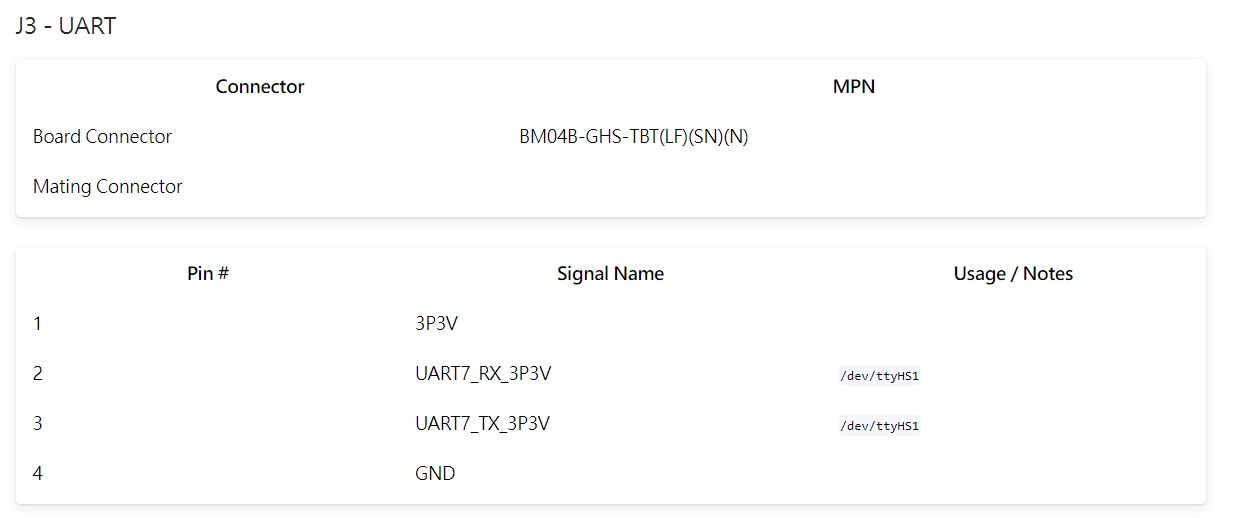
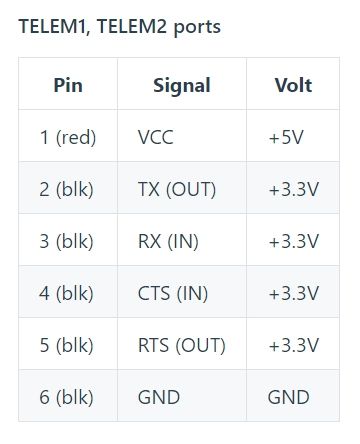
The external flight controller I am using is Cube Orange+. The voltage level of UART on both the USB/UART add-on board at J3 and the Cube Orange+ telemetry port (telem2) is shown in the image below
add-on board:
cube orange+:
-
@Moderator
The external flight controller I am using is Cube Orange+. The voltage level of UART on both the USB/UART add-on board at J3 and the Cube Orange+ telemetry port (telem2) is shown in the image below
add-on board:
cube orange+:
Hi @rogerli
Are you only connecting the UART and GND?
You need a 2-2, 3-3, and 4-6 cable.
Not sure what the CUBE connector is, but maybe our https://docs.modalai.com/cable-datasheets/#mcbl-00067 will work for you?Be sure the 3.3V and 5V is not connected.
Hope this helps. -
I am attempting to use VOXL2 to connect to an external flight controller for collision prevention. I can see the information from voa_pc_out on VOXL2, but I am unable to see the information from OBSTACLE_DISTANCE on QGC. VOXL2 is connected to the telemetry 2 port of the external flight controller via UART. Here are my MAVLink parameter settings:
MAV_1_CONFIG : TELEM 2
MAV_1_FLOW_CTRL : Auto-detected
MAV_1_FORWARD : Disabled
MAV_1_MODE : Onboard
MAV_1_RADIO_CTL : Enabled
MAV_1_RATE : 0
SER_TEL2_BAUD : 921600
COM_OBS_AVOID : EnabledOn the VOXL2, it is connected to the USB/UART add-on board at J3, and the parameters in the voxl-mavlink-server.conf file are set as follows:
{
"primary_static_gcs_ip": "192.168.8.10",
"secondary_static_gcs_ip": "192.168.124.197",
"onboard_port_to_autopilot": 14556,
"onboard_port_from_autopilot": 14557,
"gcs_port_to_autopilot": 14558,
"gcs_port_from_autopilot": 14559,
"en_external_uart_ap": true,
"autopilot_uart_bus": 1,
"autopilot_uart_baudrate": 921600,
"en_external_ap_timesync": 1,
"en_external_ap_heartbeat": 1,
"udp_mtu": 0,
"gcs_timeout_s": 4.5
}Then, when I use the "mavlink status" command on QGC to check, I see that the rx loss is 63.1%, why is this problem happening? How can I resolve it?"
Shot in the dark I would turn off MAV_1_FORWARD if it is enabled.
Also, do you have any other mavlink based device that is connected? If so I would unplug it to see if this helps resolve the issue
-
I only connected UART and GND, and VOXL2 is only connected to the Cube Orange+, a WiFi dongle, and a stereo camera.
I can use the "listener obstacle_distance" command on QGC's MAVLink console to obtain depth information about obstacles, and I have successfully enabled collision prevention for the drone in position mode. However, I still cannot see "obstacle_distance" on the MAVLink inspector.

-
I only connected UART and GND, and VOXL2 is only connected to the Cube Orange+, a WiFi dongle, and a stereo camera.
I can use the "listener obstacle_distance" command on QGC's MAVLink console to obtain depth information about obstacles, and I have successfully enabled collision prevention for the drone in position mode. However, I still cannot see "obstacle_distance" on the MAVLink inspector.
@rogerli What messages do you see in mavlink inspector?
-
@rogerli What messages do you see in mavlink inspector?
@Eric-Katzfey said in I can't see OBSTACLE_DISTANCE on QGC:
mavlink inspector
This is the messages I see in the MAVLink inspector.
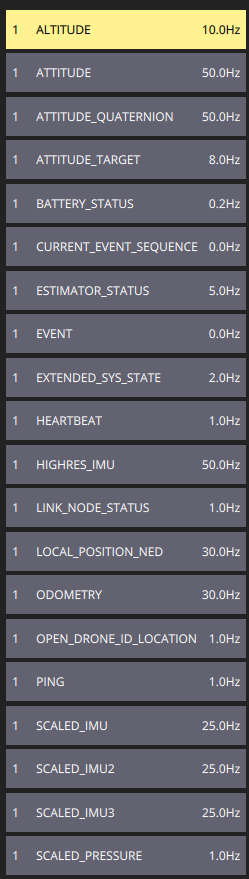
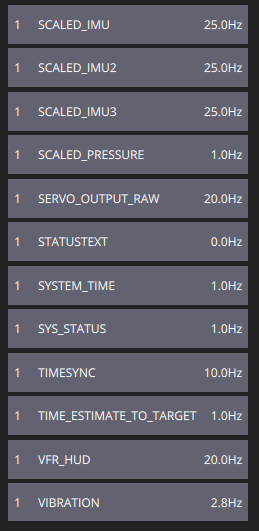
-
@Eric-Katzfey said in I can't see OBSTACLE_DISTANCE on QGC:
mavlink inspector
This is the messages I see in the MAVLink inspector.
@rogerli The OBSTACLE_DISTANCE Mavlink message is based on the
obstacle_distance_fusedtopic. Can you do listener on that topic to see if it is being published? -
@rogerli The OBSTACLE_DISTANCE Mavlink message is based on the
obstacle_distance_fusedtopic. Can you do listener on that topic to see if it is being published?@Eric-Katzfey said in I can't see OBSTACLE_DISTANCE on QGC:
No, I am unable to use the listener command to see the obstacle_distance_fused message. How can I enable this feature?
-
@Eric-Katzfey said in I can't see OBSTACLE_DISTANCE on QGC:
No, I am unable to use the listener command to see the obstacle_distance_fused message. How can I enable this feature?
@rogerli What is the parameter CP_DIST set to?
-
@rogerli What is the parameter CP_DIST set to?
@Eric-Katzfey I am having a similar problem, where I can see obstacle_distance, but not obstacle_distance_fused using the listener command. When I checked CP_DIST it was set to -1 so I set it to 1 and then I could briefly see both with the listener command, and was able to see obstacle_distance using the mavlink inspector. After unplugging then replugging in my pixhawk, this was gone and I was back to only being able to see obstacle_distance with the listener command. Was there something that could've changed during my restart? I checked CP_DIST and it was still set to 1 even afterwards.
The only notable differences between my system and the original users is that my connection is across ethernet.
-
@Eric-Katzfey I am having a similar problem, where I can see obstacle_distance, but not obstacle_distance_fused using the listener command. When I checked CP_DIST it was set to -1 so I set it to 1 and then I could briefly see both with the listener command, and was able to see obstacle_distance using the mavlink inspector. After unplugging then replugging in my pixhawk, this was gone and I was back to only being able to see obstacle_distance with the listener command. Was there something that could've changed during my restart? I checked CP_DIST and it was still set to 1 even afterwards.
The only notable differences between my system and the original users is that my connection is across ethernet.
@Inverse-AJ A quick look at the code shows that CP_DIST has to be greater than 0 and current flight mode has to be manual position mode. What flight mode are you in?
-
@Inverse-AJ A quick look at the code shows that CP_DIST has to be greater than 0 and current flight mode has to be manual position mode. What flight mode are you in?
@Eric-Katzfey I was previously in "Hold" mode, but I tried in "manual" and still am not seeing the obstacle_distance_fused message. I noticed one other difference in my parameters which is that COM_OBS_AVOID doesn't exist for me.
Another question, I had previously re-flashed the Pixhawk firmware after changing the file: "PX4Autopilot/src/modules/uxrce_dds_client/dds_topics.yaml". I had added the following to the publications section:
- topic: /fmu/out/obstacle_distance_fused
type: px4_msgs::msg::ObstacleDistance
However, it had no effect so I reverted back to the default px4 firmware shown on QGC. Is that change necessary to see the message or should I leave the default?
- topic: /fmu/out/obstacle_distance_fused
-
@Inverse-AJ A quick look at the code shows that CP_DIST has to be greater than 0 and current flight mode has to be manual position mode. What flight mode are you in?
@Eric-Katzfey Small update. I also tried it with the custom firmware with that additional publication added (from previous reply), and the result has not changed. obstacle_distance_fused still shows up as "never published" when using the listener. However, with the custom firmware I get warnings from QGC about missing parameters: BAT1_V_LOAD_DROP, BAT2_V_LOAD_DROP, and COM_OBS_AVOID. I pulled the most recent main branch for the PX4 Repository to build it, so maybe there's not support by QGC yet?
-
@Eric-Katzfey Small update. I also tried it with the custom firmware with that additional publication added (from previous reply), and the result has not changed. obstacle_distance_fused still shows up as "never published" when using the listener. However, with the custom firmware I get warnings from QGC about missing parameters: BAT1_V_LOAD_DROP, BAT2_V_LOAD_DROP, and COM_OBS_AVOID. I pulled the most recent main branch for the PX4 Repository to build it, so maybe there's not support by QGC yet?
@Inverse-AJ Have you asked this question on PX4 forum? https://discuss.px4.io/c/px4/25
-
@Inverse-AJ Have you asked this question on PX4 forum? https://discuss.px4.io/c/px4/25
@Eric-Katzfey I had not since this discussion was the closest I could find to my issue. But I have created one now: Cannot see obstacle_distance_fused on QGC
-
@Eric-Katzfey I had not since this discussion was the closest I could find to my issue. But I have created one now: Cannot see obstacle_distance_fused on QGC
@Inverse-AJ @rogerli
Hi, I also struggled with the OBSTACLE_DISTANCE MAVLink message not appearing in the MAVLink Inspector. Moreover, obstacle avoidance was not functioning after I upgraded v1.3.5 to ModalAI SDK v1.5.0. If you're experiencing this issue, ensure the following:Set MPC_POS_MODE to 0 (Simple Position Control) or 3 (Smooth Position Control). The default value (4, Acceleration-based Input) is incompatible with ModalAI’s VOXL platform.
Set COM_OBS_AVOID to 1. This enables obstacle avoidance in PX4.
Set CP_DIST to a value greater than 0. This specifies the critical distance for collision prevention.
Ensure your drone has a valid home position or local position from QVIO. This is required for proper navigation.
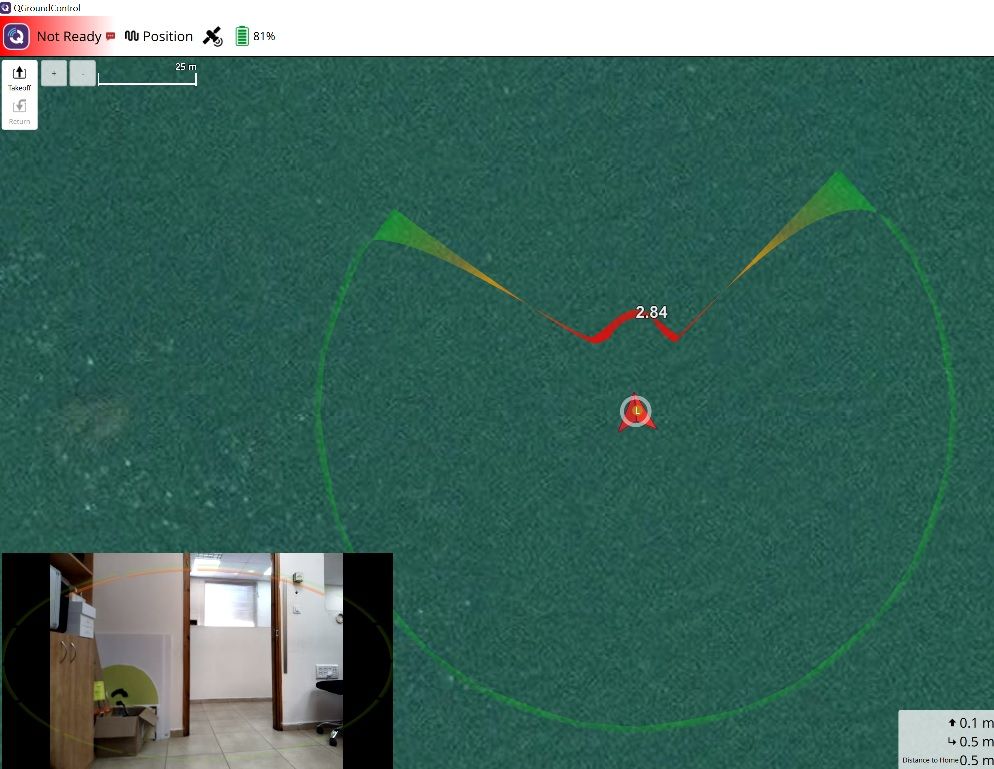
Ensure your drone is in Position Hold mode. Obstacle avoidance requires this flight mode.Although the OBSTACLE_DISTANCE message does not appear in the MAVLink Inspector, QGroundControl displays the obstacle distance overlay in its telemetry view, and the drone successfully performs obstacle avoidance. Note: This applies to ModalAI SDK v1.5.0; check for updates in newer versions.





Reading along? Create a free ModalAI Forum account to join in.
With an account you can reply, ask your own question, get an email when a ModalAI engineer answers, and mark the reply that solved it. Your place in each thread is saved between visits.
Questions about VOXL, Flight Core, ESCs and ModalAI drones are answered here by the engineers who build them.
Register Login