Skip to content
  • Categories
  • Recent
  • Tags
  • Popular
  • Users
  • Groups
Collapse
Brand Logo

ModalAI Forum

  1. ModalAI Support Forum
  2. Ask your questions right here!
  3. Support Request Format for Best Results
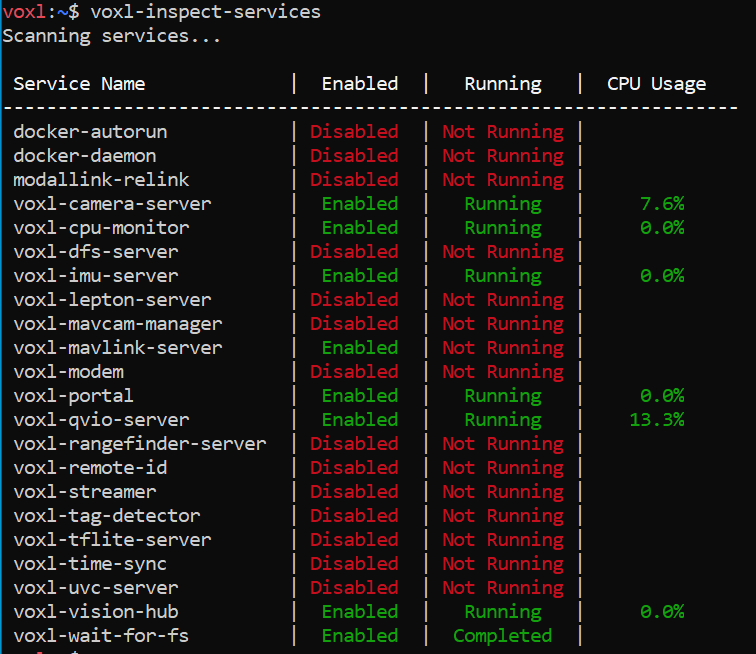
  4. Factory reset Seeker

Factory reset Seeker

Scheduled Pinned Locked Moved Support Request Format for Best Results
18 Posts 3 Posters 3.4k Views 2 Watching
  • Oldest to Newest
  • Newest to Oldest
  • Most Votes
Reply
  • Reply as topic
Log in to reply
This topic has been deleted. Only users with topic management privileges can see it.
  • U Offline
    U Offline
    utari_ais
    Contributor
    wrote on last edited by
    #1

    I was wondering how I can factory reset the seeker. I have had numerous problems trying to set it up so I just want to start afresh.

    Thanks in advance!

    Alex KushleyevA 1 Reply Last reply
    0
    • U utari_ais

      I was wondering how I can factory reset the seeker. I have had numerous problems trying to set it up so I just want to start afresh.

      Thanks in advance!

      Alex KushleyevA Offline
      Alex KushleyevA Offline
      Alex Kushleyev
      ModalAI Team
      wrote on last edited by
      #2

      @utari_ais ,

      Have you tried installing the latest SDK and going through the configuration steps during the SDK installation?

      U 1 Reply Last reply
      0
      • Alex KushleyevA Alex Kushleyev

        @utari_ais ,

        Have you tried installing the latest SDK and going through the configuration steps during the SDK installation?

        U Offline
        U Offline
        utari_ais
        Contributor
        wrote on last edited by
        #3

        @Alex-Kushleyev Yes I have. For some reason, the px4-config file is always empty (the file that I have to edit the ground station's IP into), this keeps happening with multiple SDKs that I have tried installing

        tomT 1 Reply Last reply
        0
        • U utari_ais

          @Alex-Kushleyev Yes I have. For some reason, the px4-config file is always empty (the file that I have to edit the ground station's IP into), this keeps happening with multiple SDKs that I have tried installing

          tomT Online
          tomT Online
          tom
          admin
          wrote on last edited by
          #4

          @utari_ais What file are you talking about? What is the file name and path?

          U 1 Reply Last reply
          0
          • tomT tom

            @utari_ais What file are you talking about? What is the file name and path?

            U Offline
            U Offline
            utari_ais
            Contributor
            wrote on last edited by
            #5

            @tom /etc/modalai/voxl-vision-px4.conf

            I'm following this guide: https://docs.modalai.com/seeker-user-guide-network/

            tomT 1 Reply Last reply
            0
            • U utari_ais

              @tom /etc/modalai/voxl-vision-px4.conf

              I'm following this guide: https://docs.modalai.com/seeker-user-guide-network/

              tomT Online
              tomT Online
              tom
              admin
              wrote on last edited by tom
              #6

              @utari_ais The gcs IP setting was moved a while back into /etc/modalai/voxl-mavlink-server.conf, look for the primary_static_gcs_ip field.

              voxl-vision-px4 was also renamed to voxl-vision-hub

              U 1 Reply Last reply
              0
              • tomT tom

                @utari_ais The gcs IP setting was moved a while back into /etc/modalai/voxl-mavlink-server.conf, look for the primary_static_gcs_ip field.

                voxl-vision-px4 was also renamed to voxl-vision-hub

                U Offline
                U Offline
                utari_ais
                Contributor
                wrote on last edited by
                #7

                @tom is there somewhere I can find the changes, the main documentation isn't updated so it is rather confusing

                tomT 2 Replies Last reply
                0
                • U utari_ais

                  @tom is there somewhere I can find the changes, the main documentation isn't updated so it is rather confusing

                  tomT Online
                  tomT Online
                  tom
                  admin
                  wrote on last edited by
                  #8

                  @utari_ais What page are you referencing?

                  1 Reply Last reply
                  0
                  • U utari_ais

                    @tom is there somewhere I can find the changes, the main documentation isn't updated so it is rather confusing

                    tomT Online
                    tomT Online
                    tom
                    admin
                    wrote on last edited by
                    #9

                    @utari_ais

                    Link Preview Image
                    VOXL Developer Bootcamp

                    ModalAI technical documentation for VOXL and VOXL 2 Companion Computers for PX4 and ArduPilot Obstacle Avoidance and GPS-denied navigation, assembled in the USA

                    favicon

                    ModalAI Technical Docs (docs.modalai.com)

                    Link Preview Image
                    Connect to QGC

                    ModalAI technical documentation for VOXL and VOXL 2 Companion Computers for PX4 and ArduPilot Obstacle Avoidance and GPS-denied navigation, assembled in the USA

                    favicon

                    ModalAI Technical Docs (docs.modalai.com)

                    U 1 Reply Last reply
                    0
                    • tomT tom

                      @utari_ais

                      Link Preview Image
                      VOXL Developer Bootcamp

                      ModalAI technical documentation for VOXL and VOXL 2 Companion Computers for PX4 and ArduPilot Obstacle Avoidance and GPS-denied navigation, assembled in the USA

                      favicon

                      ModalAI Technical Docs (docs.modalai.com)

                      Link Preview Image
                      Connect to QGC

                      ModalAI technical documentation for VOXL and VOXL 2 Companion Computers for PX4 and ArduPilot Obstacle Avoidance and GPS-denied navigation, assembled in the USA

                      favicon

                      ModalAI Technical Docs (docs.modalai.com)

                      U Offline
                      U Offline
                      utari_ais
                      Contributor
                      wrote on last edited by
                      #10

                      @tom I have run into the same problem again. I am using this guide https://docs.modalai.com/qgc-wifi/

                      I am unable to connect the seeker to QGC. It worked last week, but now its not. I have correctly put the gcp IP setting in voxl-mavlink-server.conf and followed all the steps.

                      I am also unable to connect the spektrum transmitter to the drone, I always get a bind failed error whenever I try with QGC connected.

                      Any help is appreciated.

                      Alex KushleyevA 1 Reply Last reply
                      0
                      • U utari_ais

                        @tom I have run into the same problem again. I am using this guide https://docs.modalai.com/qgc-wifi/

                        I am unable to connect the seeker to QGC. It worked last week, but now its not. I have correctly put the gcp IP setting in voxl-mavlink-server.conf and followed all the steps.

                        I am also unable to connect the spektrum transmitter to the drone, I always get a bind failed error whenever I try with QGC connected.

                        Any help is appreciated.

                        Alex KushleyevA Offline
                        Alex KushleyevA Offline
                        Alex Kushleyev
                        ModalAI Team
                        wrote on last edited by
                        #11

                        @utari_ais , are you able to establish the connection from GCS (instead of voxl2 trying to connect to GCS)? As described here : https://docs.modalai.com/qgc-wifi/#initiating-connection-to-voxl-from-qgroundcontrol

                        U 1 Reply Last reply
                        0
                        • Alex KushleyevA Alex Kushleyev

                          @utari_ais , are you able to establish the connection from GCS (instead of voxl2 trying to connect to GCS)? As described here : https://docs.modalai.com/qgc-wifi/#initiating-connection-to-voxl-from-qgroundcontrol

                          U Offline
                          U Offline
                          utari_ais
                          Contributor
                          wrote on last edited by
                          #12

                          @Alex-Kushleyev Nope. I have followed all the steps but nothing happens. QGC still says "Disconnected".

                          Alex KushleyevA 1 Reply Last reply
                          0
                          • U utari_ais

                            @Alex-Kushleyev Nope. I have followed all the steps but nothing happens. QGC still says "Disconnected".

                            Alex KushleyevA Offline
                            Alex KushleyevA Offline
                            Alex Kushleyev
                            ModalAI Team
                            wrote on last edited by
                            #13

                            @utari_ais can you please make sure that both voxl-px4 and voxl-mavlink-server are running?

                            voxl2:/$ voxl-inspect-services | grep mavlink
                             voxl-mavlink-server      |  Enabled  |   Running   |     0.6%
                            voxl2:/$ voxl-inspect-services | grep voxl-px4
                             voxl-px4                 | Enabled  |   Running   |    25.1%
                            
                            U 1 Reply Last reply
                            0
                            • Alex KushleyevA Alex Kushleyev

                              @utari_ais can you please make sure that both voxl-px4 and voxl-mavlink-server are running?

                              voxl2:/$ voxl-inspect-services | grep mavlink
                               voxl-mavlink-server      |  Enabled  |   Running   |     0.6%
                              voxl2:/$ voxl-inspect-services | grep voxl-px4
                               voxl-px4                 | Enabled  |   Running   |    25.1%
                              
                              U Offline
                              U Offline
                              utari_ais
                              Contributor
                              wrote on last edited by
                              #14

                              @Alex-Kushleyev Here's what I see. I don't know why its not showing voxl-px4 as a service at all. image.png
                              Alex KushleyevA U 2 Replies Last reply
                              0
                              • U utari_ais

                                @Alex-Kushleyev Here's what I see. I don't know why its not showing voxl-px4 as a service at all. image.png

                                Alex KushleyevA Offline
                                Alex KushleyevA Offline
                                Alex Kushleyev
                                ModalAI Team
                                wrote on last edited by Alex Kushleyev
                                #15

                                @utari_ais , you may need to run voxl-configure-mpa to set up the board parameters (including px4) according to your device / drone. did you do that after SDK install?

                                1 Reply Last reply
                                0
                                • U utari_ais

                                  @Alex-Kushleyev Here's what I see. I don't know why its not showing voxl-px4 as a service at all. image.png

                                  U Offline
                                  U Offline
                                  utari_ais
                                  Contributor
                                  wrote on last edited by
                                  #16

                                  @utari_ais I remember doing this. Let me try again.

                                  U 1 Reply Last reply
                                  0
                                  • U utari_ais

                                    @utari_ais I remember doing this. Let me try again.

                                    U Offline
                                    U Offline
                                    utari_ais
                                    Contributor
                                    wrote on last edited by
                                    #17

                                    @Alex-Kushleyev is there anyway I can hard reset the drone? I think clearing it out and reinstalling might just do the trick


                                    tomT 1 Reply Last reply
                                    0
                                    • U utari_ais

                                      @Alex-Kushleyev is there anyway I can hard reset the drone? I think clearing it out and reinstalling might just do the trick

                                      tomT Online
                                      tomT Online
                                      tom
                                      admin
                                      wrote on last edited by
                                      #18

                                      @utari_ais Since you're using a voxl1 px4 is running on the flight core not on the voxl itself like voxl2. Therefore there is no voxl-px4 service on voxl1

                                      1 Reply Last reply
                                      0

                                      Hello! It looks like you're interested in this conversation, but you don't have an account yet.

                                      Getting fed up of having to scroll through the same posts each visit? When you register for an account, you'll always come back to exactly where you were before, and choose to be notified of new replies (either via email, or push notification). You'll also be able to save bookmarks and upvote posts to show your appreciation to other community members.

                                      With your input, this post could be even better 💗

                                      Register Login
                                      Reply
                                      • Reply as topic
                                      Log in to reply
                                      • Oldest to Newest
                                      • Newest to Oldest
                                      • Most Votes


                                      ModalAI
                                      Categories Recent Tags ModalAI.com Docs
                                      © 2026 ModalAI® · Accelerating autonomy for smaller, smarter, safer drones · Powered by NodeBB
                                      • Login

                                      • Don't have an account? Register

                                      • Login or register to search.
                                      • First post
                                        Last post
                                      0
                                      • Categories
                                      • Recent
                                      • Tags
                                      • Popular
                                      • Users
                                      • Groups