
Factory reset Seeker
-
@utari_ais The gcs IP setting was moved a while back into
/etc/modalai/voxl-mavlink-server.conf, look for theprimary_static_gcs_ipfield.voxl-vision-px4was also renamed tovoxl-vision-hub@tom is there somewhere I can find the changes, the main documentation isn't updated so it is rather confusing
-
@tom is there somewhere I can find the changes, the main documentation isn't updated so it is rather confusing
-
@tom is there somewhere I can find the changes, the main documentation isn't updated so it is rather confusing
-
@tom I have run into the same problem again. I am using this guide https://docs.modalai.com/qgc-wifi/
I am unable to connect the seeker to QGC. It worked last week, but now its not. I have correctly put the gcp IP setting in voxl-mavlink-server.conf and followed all the steps.
I am also unable to connect the spektrum transmitter to the drone, I always get a bind failed error whenever I try with QGC connected.
Any help is appreciated.
-
@tom I have run into the same problem again. I am using this guide https://docs.modalai.com/qgc-wifi/
I am unable to connect the seeker to QGC. It worked last week, but now its not. I have correctly put the gcp IP setting in voxl-mavlink-server.conf and followed all the steps.
I am also unable to connect the spektrum transmitter to the drone, I always get a bind failed error whenever I try with QGC connected.
Any help is appreciated.
@utari_ais , are you able to establish the connection from GCS (instead of voxl2 trying to connect to GCS)? As described here : https://docs.modalai.com/qgc-wifi/#initiating-connection-to-voxl-from-qgroundcontrol
-
@utari_ais , are you able to establish the connection from GCS (instead of voxl2 trying to connect to GCS)? As described here : https://docs.modalai.com/qgc-wifi/#initiating-connection-to-voxl-from-qgroundcontrol
@Alex-Kushleyev Nope. I have followed all the steps but nothing happens. QGC still says "Disconnected".
-
@Alex-Kushleyev Nope. I have followed all the steps but nothing happens. QGC still says "Disconnected".
@utari_ais can you please make sure that both
voxl-px4andvoxl-mavlink-serverare running?voxl2:/$ voxl-inspect-services | grep mavlink voxl-mavlink-server | Enabled | Running | 0.6% voxl2:/$ voxl-inspect-services | grep voxl-px4 voxl-px4 | Enabled | Running | 25.1% -
@utari_ais can you please make sure that both
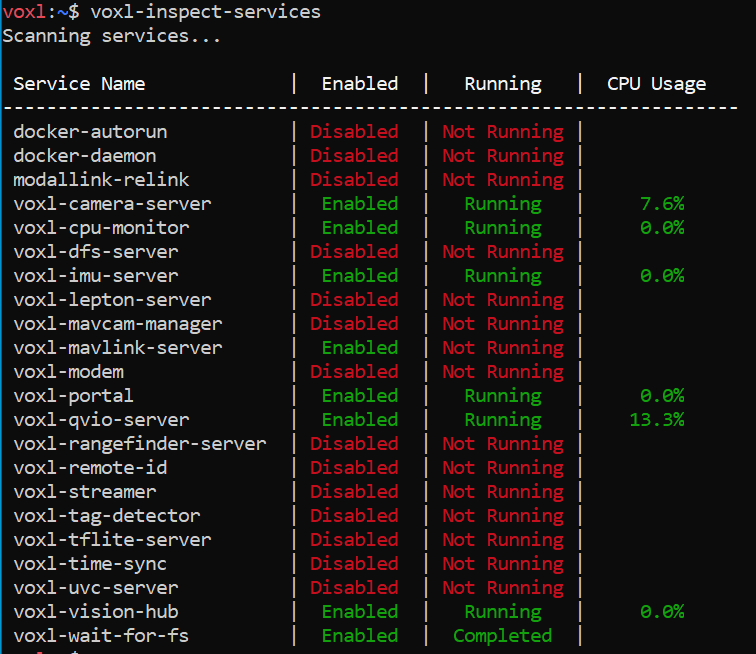
voxl-px4andvoxl-mavlink-serverare running?voxl2:/$ voxl-inspect-services | grep mavlink voxl-mavlink-server | Enabled | Running | 0.6% voxl2:/$ voxl-inspect-services | grep voxl-px4 voxl-px4 | Enabled | Running | 25.1%@Alex-Kushleyev Here's what I see. I don't know why its not showing voxl-px4 as a service at all.
-
@Alex-Kushleyev Here's what I see. I don't know why its not showing voxl-px4 as a service at all.
@utari_ais , you may need to run
voxl-configure-mpato set up the board parameters (including px4) according to your device / drone. did you do that after SDK install? -
@Alex-Kushleyev Here's what I see. I don't know why its not showing voxl-px4 as a service at all.
@utari_ais I remember doing this. Let me try again.
-
@utari_ais I remember doing this. Let me try again.
@Alex-Kushleyev is there anyway I can hard reset the drone? I think clearing it out and reinstalling might just do the trick
-
@Alex-Kushleyev is there anyway I can hard reset the drone? I think clearing it out and reinstalling might just do the trick


Reading along? Create a free ModalAI Forum account to join in.
With an account you can reply, ask your own question, get an email when a ModalAI engineer answers, and mark the reply that solved it. Your place in each thread is saved between visits.
Questions about VOXL, Flight Core, ESCs and ModalAI drones are answered here by the engineers who build them.
Register Login