Skip to content
  • Categories
  • Recent
  • Tags
  • Popular
  • Users
  • Groups
Collapse
Brand Logo

ModalAI Forum

  1. ModalAI Support Forum
  2. Ask your questions right here!
  3. Gimbal camera streaming not starting

Gimbal camera streaming not starting
Scheduled Pinned Locked Moved Ask your questions right here!
19 Posts 4 Posters 3.0k Views 4 Watching
  • Oldest to Newest
  • Newest to Oldest
  • Most Votes
Reply
  • Reply as topic
Log in to reply
This topic has been deleted. Only users with topic management privileges can see it.
  • Daniel RyuD Offline
    Daniel RyuD Offline
    Daniel Ryu
    Regular
    wrote on last edited by
    #5

    When trying to run "voxl-docker -i voxl-emulator" as part of setting up voxl-ffmpeg, I get this error below:

    Error while pulling image: Get https://index.docker.io/v1/repositories/library/voxl-emulator/images: x509: certificate has expired or is not yet valid

    How do I fix this?

    1 Reply Last reply
    0
    • tomT Offline
      tomT Offline
      tom
      admin
      wrote on last edited by
      #6

      @Daniel-Ryu Have you downloaded and loaded the voxl-emulator image from https://developer.modalai.com/asset/download/75 ?

      Daniel RyuD 1 Reply Last reply
      0
      • tomT tom

        @Daniel-Ryu Have you downloaded and loaded the voxl-emulator image from https://developer.modalai.com/asset/download/75 ?

        Daniel RyuD Offline
        Daniel RyuD Offline
        Daniel Ryu
        Regular
        wrote on last edited by
        #7

        @tom Sorry, to clarify: I want to be able to run ffmpeg and stream from the gimbal from my m500, not from a voxl-emulator. Am I misunderstanding and instead must install the voxl-emulator to run ffmpeg?

        1 Reply Last reply
        0
        • tomT Offline
          tomT Offline
          tom
          admin
          wrote on last edited by
          #8

          @Daniel-Ryu voxl-emulator can be used to build packages for VOXL on your Linux PC. You can read about it here: https://docs.modalai.com/install-voxl-docker/

          Daniel RyuD 1 Reply Last reply
          0
          • tomT tom

            @Daniel-Ryu voxl-emulator can be used to build packages for VOXL on your Linux PC. You can read about it here: https://docs.modalai.com/install-voxl-docker/

            Daniel RyuD Offline
            Daniel RyuD Offline
            Daniel Ryu
            Regular
            wrote on last edited by
            #9

            @tom That was it, thank you. I have just one suggestion: please include in the voxl-ffmpeg instructions to run ./install_on_voxl.sh at the end to deploy the ipk

            1 Reply Last reply
            0
            • Daniel RyuD Offline
              Daniel RyuD Offline
              Daniel Ryu
              Regular
              wrote on last edited by
              #10

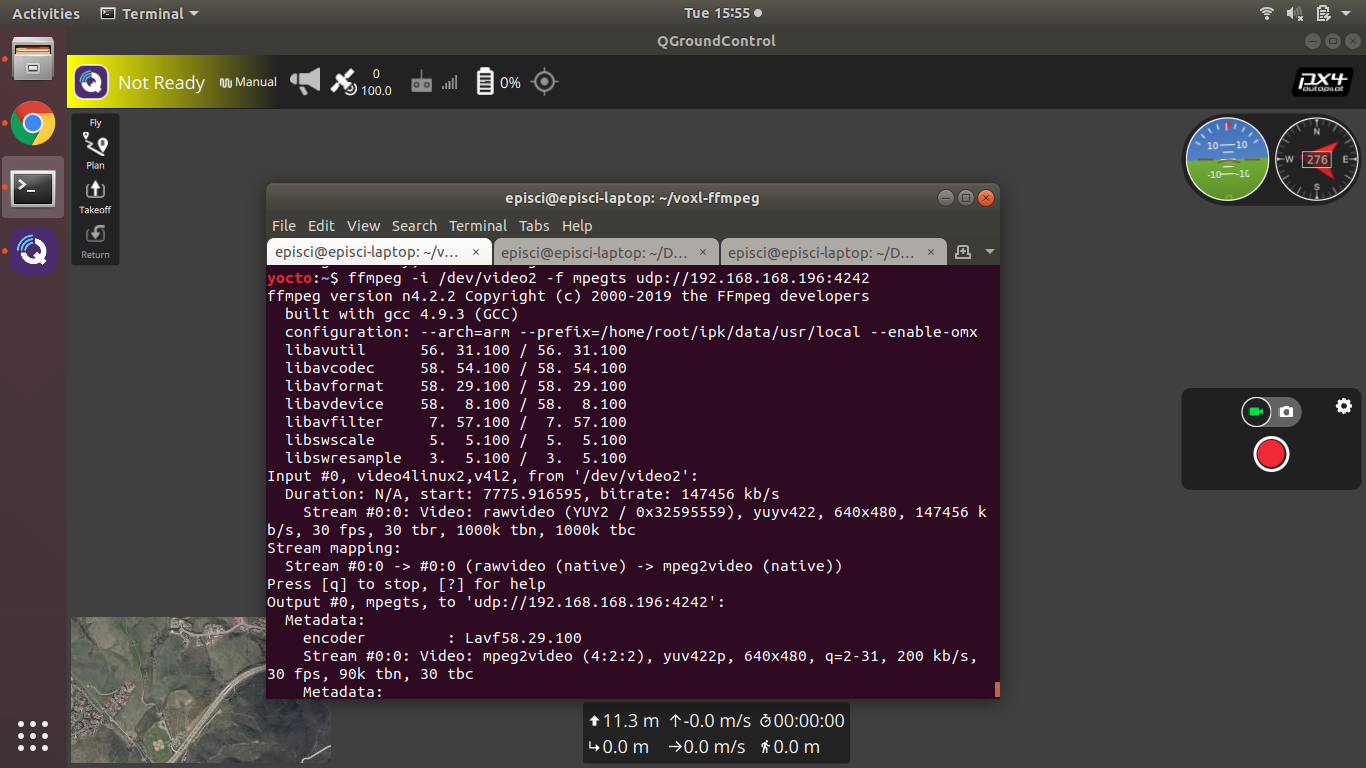
              Screenshot from 2021-07-06 15-55-10.png

              ffmpegs is working but I am still unable to stream to QGC. I'm using the same ip of QGC that is in voxl-vision-px4.conf that allows the drone to even connect to QGC in the first place. Here are all my settings.
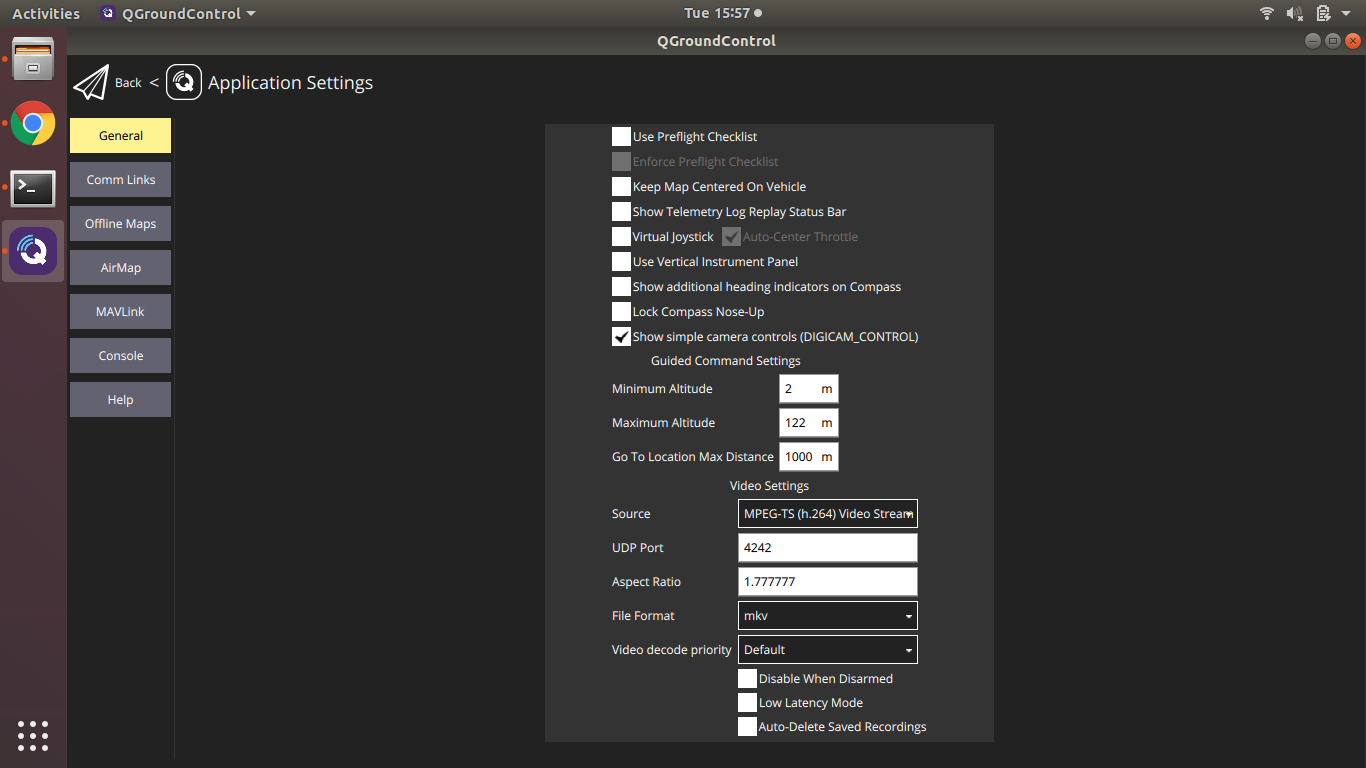
              Screenshot from 2021-07-06 15-57-24.png

              Eric KatzfeyE 1 Reply Last reply
              0
              • Daniel RyuD Daniel Ryu

                Screenshot from 2021-07-06 15-55-10.png

                ffmpegs is working but I am still unable to stream to QGC. I'm using the same ip of QGC that is in voxl-vision-px4.conf that allows the drone to even connect to QGC in the first place. Here are all my settings.

                Screenshot from 2021-07-06 15-57-24.png

                Eric KatzfeyE Online
                Eric KatzfeyE Online
                Eric Katzfey
                ModalAI Team
                wrote on last edited by
                #11

                @Daniel-Ryu Are you able to see the video in another viewer, like VLC?

                Daniel RyuD 1 Reply Last reply
                0
                • Eric KatzfeyE Eric Katzfey

                  @Daniel-Ryu Are you able to see the video in another viewer, like VLC?

                  Daniel RyuD Offline
                  Daniel RyuD Offline
                  Daniel Ryu
                  Regular
                  wrote on last edited by
                  #12

                  @Eric-Katzfey Yes, I can get the video to stream following the instructions here https://docs.modalai.com/uvc-streaming/

                  Daniel RyuD 1 Reply Last reply
                  0
                  • Daniel RyuD Daniel Ryu

                    @Eric-Katzfey Yes, I can get the video to stream following the instructions here https://docs.modalai.com/uvc-streaming/

                    Daniel RyuD Offline
                    Daniel RyuD Offline
                    Daniel Ryu
                    Regular
                    wrote on last edited by
                    #13

                    Also, could https://docs.modalai.com/voxl-m500-gimbal-user-guide/#streaming-to-qgroundcontrol this guide have a link to this guide here https://docs.modalai.com/uvc-streaming? I came across the second one quite by accident, despite them accomplishing similar purposes

                    1 Reply Last reply
                    0
                    • Daniel RyuD Offline
                      Daniel RyuD Offline
                      Daniel Ryu
                      Regular
                      wrote on last edited by
                      #14

                      One more question: there's a config file referred to in this guide which is supposed to demonstrate how the gimbal can be controlled from the RC. Which one is it? https://docs.modalai.com/voxl-m500-gimbal-user-guide/#streaming-to-qgroundcontrol

                      1 Reply Last reply
                      0
                      • modaltbM Offline
                        modaltbM Offline
                        modaltb
                        ModalAI Team
                        wrote on last edited by
                        #15

                        Here's a video that can help: https://youtu.be/eYr8nyFid0E?t=26

                        PX4 params here: https://gitlab.com/voxl-public/flight-core-px4/px4-parameters/-/blob/master/helpers/gimbal_dx8_config.params

                        1 Reply Last reply
                        0
                        • Daniel RyuD Offline
                          Daniel RyuD Offline
                          Daniel Ryu
                          Regular
                          wrote on last edited by
                          #16

                          My DX8 looks and behaves differently from the one in the video. Is there a way to confirm that the knob and the switch right next to it are indeed channels 8 and 7, respectively?
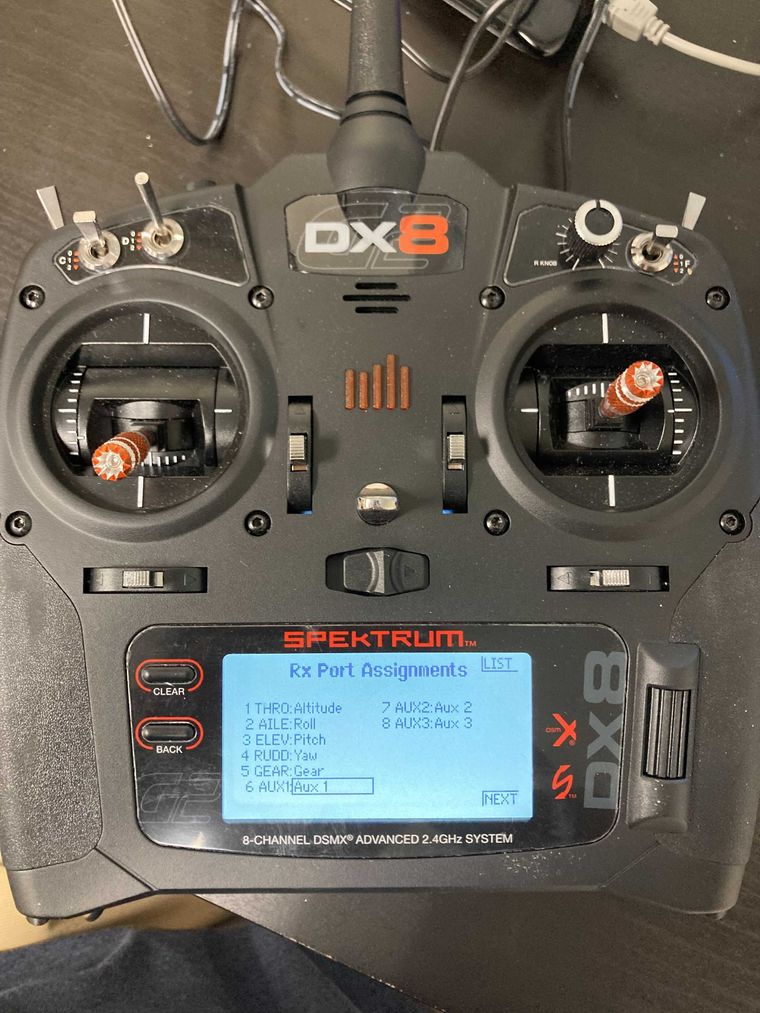
                          Image from iOS.jpg

                          1 Reply Last reply
                          0
                          • modaltbM Offline
                            modaltbM Offline
                            modaltb
                            ModalAI Team
                            wrote on last edited by
                            #17

                            You can get a good feel from the radio configuration setup in QGC, where you can see the channel assignments -> roughly here https://docs.modalai.com/configure-rc-radio/

                            1 Reply Last reply
                            0
                            • Daniel RyuD Offline
                              Daniel RyuD Offline
                              Daniel Ryu
                              Regular
                              wrote on last edited by
                              #18

                              I'm still having trouble working out the controller and the gimbal. Here's a video of what I did. The channel monitor acknowledges one switch as channel 6 (which I set to RC_MAP_AUX1) but doesn't seem to respond to the dial. https://we.tl/t-HWHzLeJ46h

                              1 Reply Last reply
                              0
                              • Daniel RyuD Offline
                                Daniel RyuD Offline
                                Daniel Ryu
                                Regular
                                wrote on last edited by
                                #19

                                Solution: sometimes when just binding the RC controller, the inputs aren't shown. Make sure to restart drone after rebinding. Additionally, I've found different controllers have different lever/switch inputs, so its good to use QGC to look for the responsive switches and assign the ones you want accordingly


                                1 Reply Last reply
                                1

                                Hello! It looks like you're interested in this conversation, but you don't have an account yet.

                                Getting fed up of having to scroll through the same posts each visit? When you register for an account, you'll always come back to exactly where you were before, and choose to be notified of new replies (either via email, or push notification). You'll also be able to save bookmarks and upvote posts to show your appreciation to other community members.

                                With your input, this post could be even better 💗

                                Register Login
                                Reply
                                • Reply as topic
                                Log in to reply
                                • Oldest to Newest
                                • Newest to Oldest
                                • Most Votes


                                ModalAI
                                Categories Recent Tags ModalAI.com Docs
                                © 2026 ModalAI® · Accelerating autonomy for smaller, smarter, safer drones · Powered by NodeBB
                                • Login

                                • Login or register to search.
                                • First post
                                  Last post
                                0
                                • Categories
                                • Recent
                                • Tags
                                • Popular
                                • Users
                                • Groups