Skip to content
  • Categories
  • Recent
  • Tags
  • Popular
  • Users
  • Groups
Collapse
Brand Logo

ModalAI Forum

  1. ModalAI Support Forum
  2. Ask your questions right here!
  3. Microhard Carrier USB Dongles do not work with microhard pMDDL2450

Microhard Carrier USB Dongles do not work with microhard pMDDL2450

Scheduled Pinned Locked Moved Ask your questions right here!
16 Posts 3 Posters 3.1k Views 3 Watching
  • Oldest to Newest
  • Newest to Oldest
  • Most Votes
Reply
  • Reply as topic
Log in to reply
This topic has been deleted. Only users with topic management privileges can see it.
  • R Offline
    R Offline
    Ross
    wrote on last edited by
    #1

    Microhard pMDDL2450 is not recognised by Windows/linux or Android when using the USB of Microhard Carrier USB Dongle.

    The error message in Windows can be seen in the attached photo. Android/linux also not working. Tested across multiple PC's and Mobile devices.
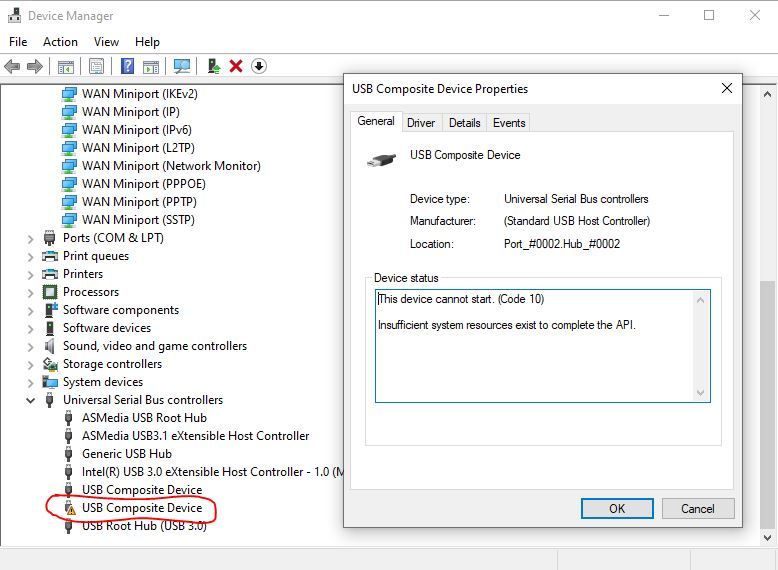
    RNDIS no other device available.JPG

    We have noticed that all the ModalAI Carrier dongles that use LAN7500 do not work! however all 5 carrier dongles with a LAN 7850 chip work Ok.

    We have installed RNDIS in windows as per normal when connecting a new device, Android usually just works however it does not.
    This seems to be a hardware issue between Microhard PMDDL2450 and ModalAI carrier dongle.

    Is this a known issue? Currently we have around 40 Carrier dongles that cannot be used because of this issue. Please can technical support help look into this.

    1 Reply Last reply
    0
    • Chad SweetC Offline
      Chad SweetC Offline
      Chad Sweet
      ModalAI Team
      wrote on last edited by
      #2

      We frequently use Linux with those dongles, and switched to LAN7500 3 years ago. They also typically work with recent Android phones/tablets. (Galaxy S20 for instance)

      We do not use windows though

      Have you tried different cables?

      1 Reply Last reply
      0
      • R Offline
        R Offline
        Ross
        wrote on last edited by
        #3

        Hi Chad,

        The thing we noticed is that the dongles we tested with the LAN7500 do not connect to any platform.
        We mainly use Linux for dev and Android to deploy to our customers. Neither work unfortunately.
        The few dongles with the LAN7850 all work fine and can connect.

        This is not a cable issue, we have working dongles using the same cables.
        We have tried multiple different dongles with the LAN7500 chips, all have exactly the same problem.
        Power supplied in the lab by Linear Rigol supplies.

        Removing the pMDDL2450 from the modal dongle using an extractor tool and adding it into the Microhard eval kit baseboard
        and it works fine. (Using the resistor mod to make it USB capable) It appears the radios seem to operate fine.

        Perhaps the modal dongle has some component value on the edge? We cannot really debug the modal dongle at the hardware level.
        (we do not have schematics and your engineers would be better positioned to do that etc)

        The fact the units with the LAN7850 work ok with the exact same radio (extracted and tested the same pMDDL2450)
        We really need to urgently solve this, we have 40 units that we cannot use at the moment and a customer delivery looming.

        Best Regards,

        Ross

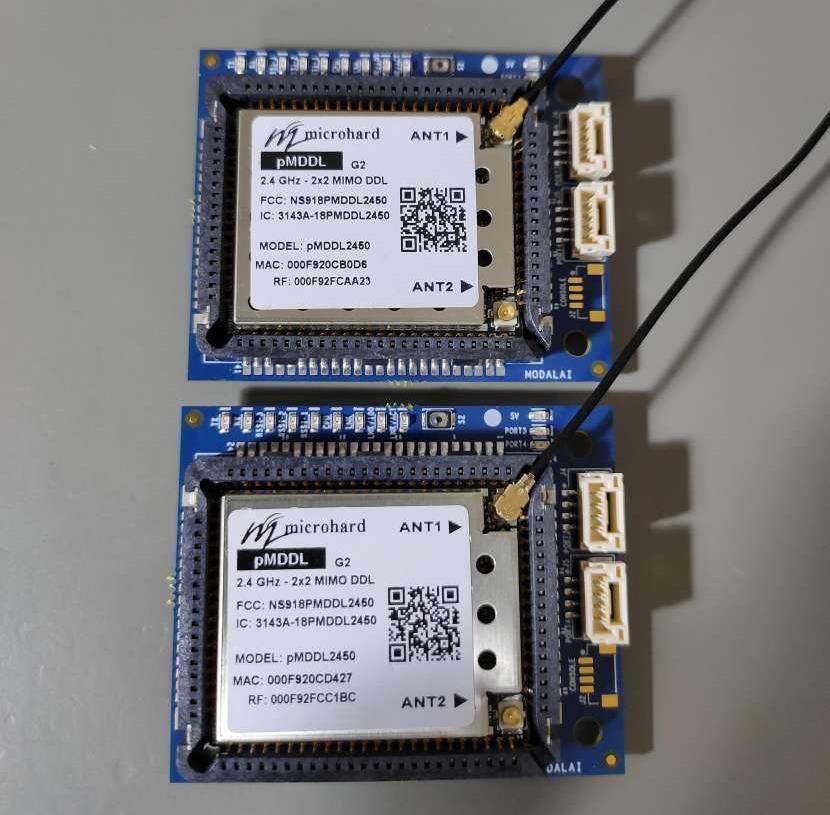
        Modal AI Dongle Issues PMDDL2450.jpg

        pMDDL2450 microhard baseboard.JPEG

        1 Reply Last reply
        0
        • Chad SweetC Offline
          Chad SweetC Offline
          Chad Sweet
          ModalAI Team
          wrote on last edited by
          #4

          We use these internally and have dozens of customers integrating as well. Can you take a picture of your setup? Are you sure you're plugged in to the correct connector?

          On Linux, what does lsusb output?

          R 1 Reply Last reply
          0
          • Chad SweetC Offline
            Chad SweetC Offline
            Chad Sweet
            ModalAI Team
            wrote on last edited by
            #5

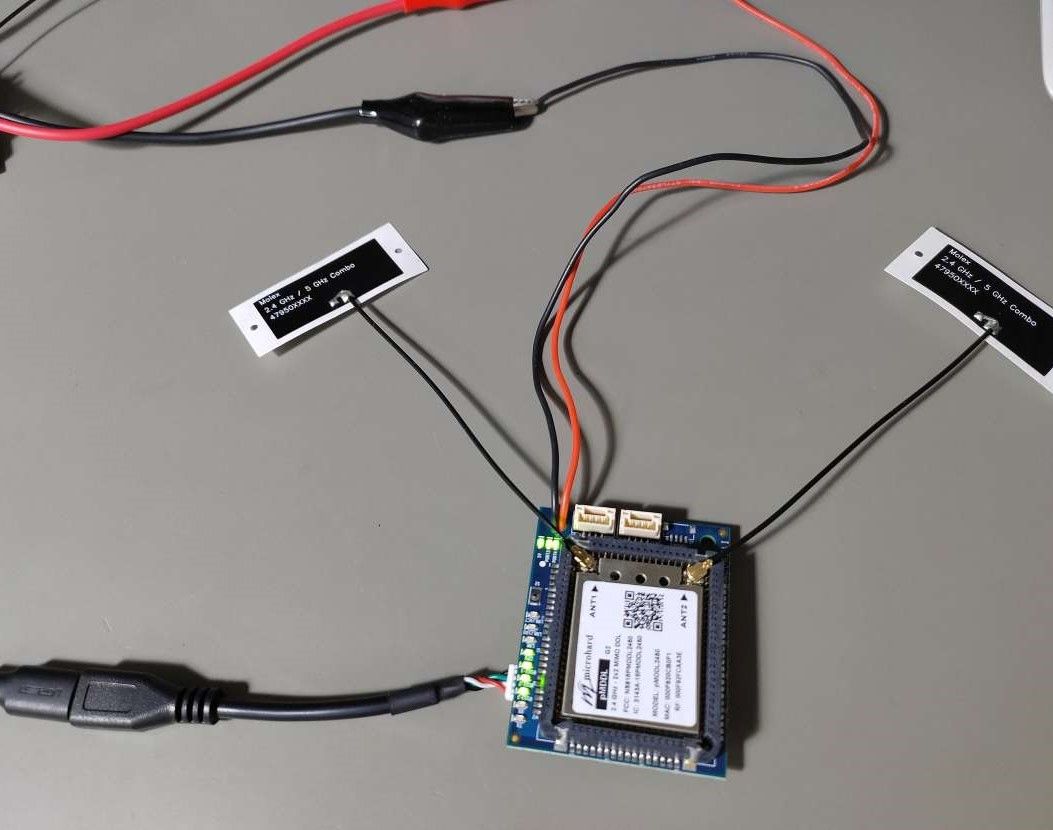
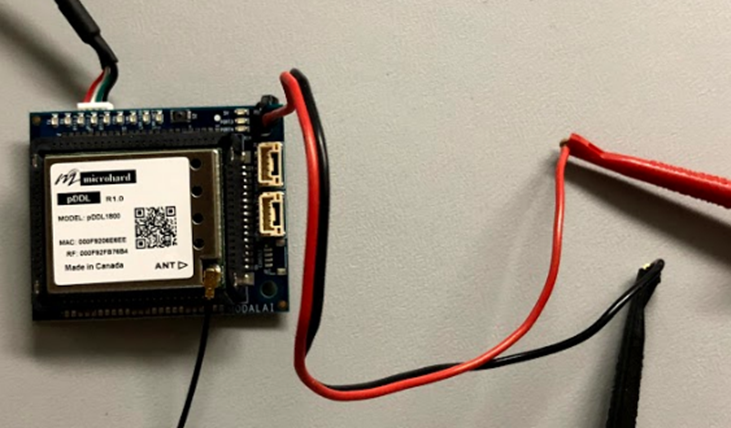
            Your should be connected like the image below. We test all of the units prior to shipment using a ping between two boards. It is very likely a setup issue
            8794f201-22ba-4514-98c3-49441abb3b9d-image.png

            R 1 Reply Last reply
            0
            • Chad SweetC Chad Sweet

              We use these internally and have dozens of customers integrating as well. Can you take a picture of your setup? Are you sure you're plugged in to the correct connector?

              On Linux, what does lsusb output?

              R Offline
              R Offline
              Ross
              wrote on last edited by
              #6

              @Chad-Sweet we are 100% sure we use the correct connector.
              Like i said we have all 5 x LAN7580 versions working A ok. No issues.

              1 Reply Last reply
              0
              • Chad SweetC Offline
                Chad SweetC Offline
                Chad Sweet
                ModalAI Team
                wrote on last edited by Chad Sweet
                #7

                @Chad-Sweet said in Microhard Carrier USB Dongles do not work with microhard pMDDL2450:

                On Linux, what does lsusb output?

                On Linux, what does lsusb output?

                Can you please send a picture of your Microhard dongle connected to a Linux computer?

                1 Reply Last reply
                0
                • Chad SweetC Chad Sweet

                  Your should be connected like the image below. We test all of the units prior to shipment using a ping between two boards. It is very likely a setup issue

                  8794f201-22ba-4514-98c3-49441abb3b9d-image.png

                  R Offline
                  R Offline
                  Ross
                  wrote on last edited by
                  #8

                  @Chad-Sweet Have you tested the LAN7500 dongle version with a recent pMDDL2450 as in our image? You can see the version we have is a pMDDL2450 'G2'. This is the only version that microhard now sell of the pMDDL2450- 'latest version'.
                  Perhaps there is some incompatibility with LAN7500 whilst the LAN7850 works fine.

                  We are 99.99% sure this is related to the recent pMDDL2450 and the LAN7500 dongle version. I will repeat that when this pMDDL2450 is inserted into the official microhard eval kit it works and when used in the LAN7850 modal Dongle it works ok. It's only the LAN7500 versions that have an issue. For the first two days of debugging this we also thought we had made a mistake somewhere but we are very confident about the issue.

                  I'll send you an image of the setup tomorrow once im back in the office.

                  Best Regards,

                  Ross

                  1 Reply Last reply
                  0
                  • R Offline
                    R Offline
                    Ross
                    wrote on last edited by
                    #9

                    Re: Microhard Carrier USB Dongles do not work with microhard pMDDL2450

                    Hi Chad, Please see the requested info below.

                    lsusb of LAN7500 Dongle - not working on any platform.
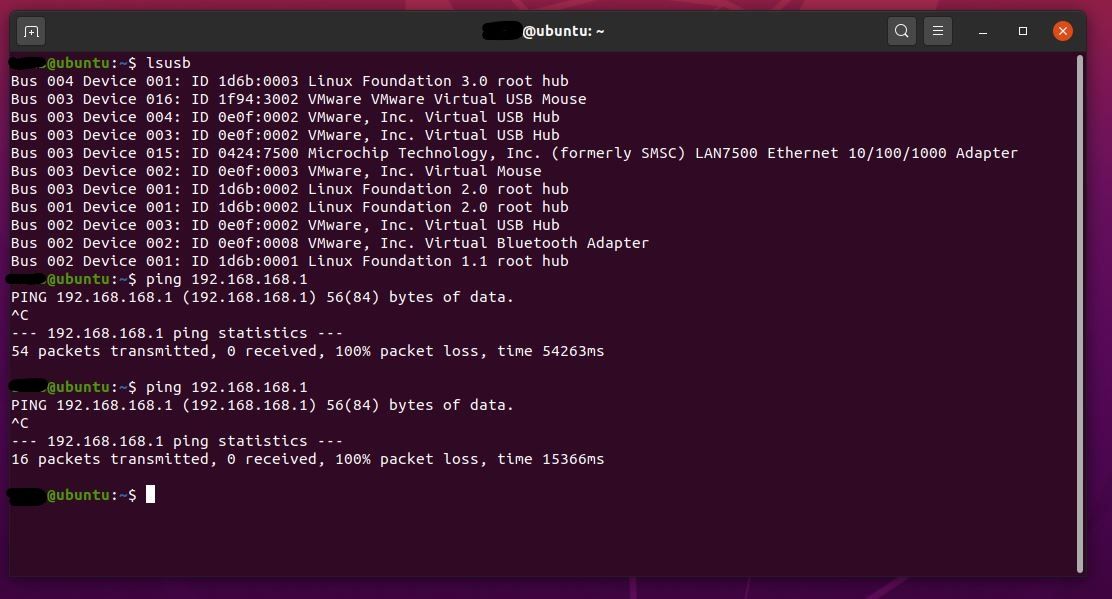
                    lsusb microhardpMDDL2450 LAN7500 Dongle_.jpg

                    lsusb of LAN7850 Dongle - Working fine on all platforms - Linux/Android and Windows.
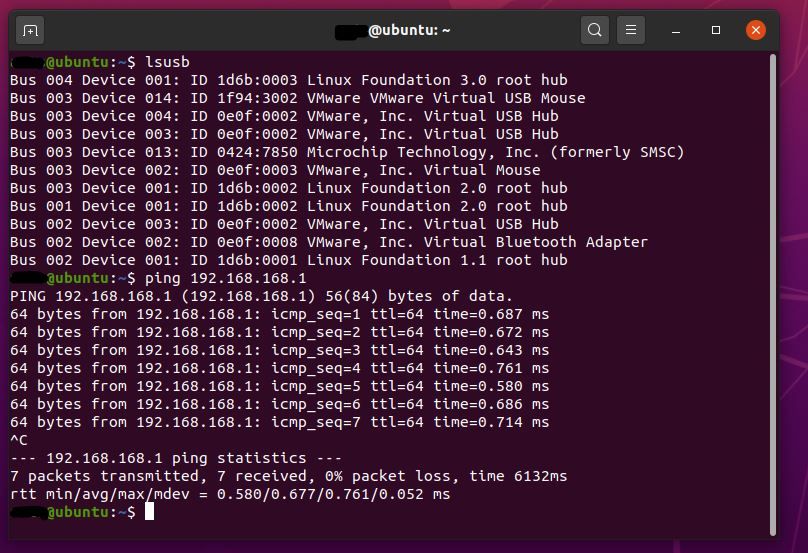
                    lsusb microhardpMDDL2450 LAN7850 Dongle.JPG

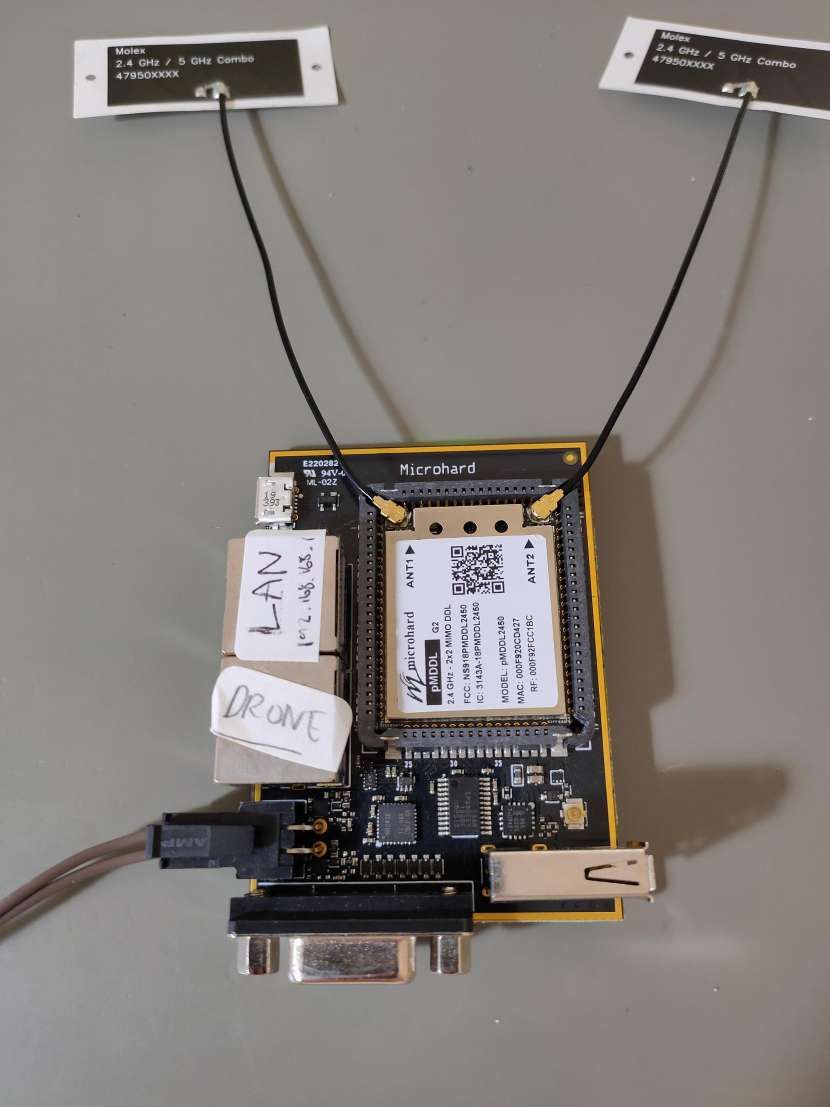
                    Dongle connected image -
                    Modal AI Dongle Connection.JPEG

                    1 Reply Last reply
                    0
                    • tomT Offline
                      tomT Offline
                      tom
                      admin
                      wrote on last edited by
                      #10

                      @Ross I'm going to replicate your setup right now. However, you can see the LAN7500 device enumerating in your first screenshot. What does ifconfig look like when that same device is plugged in and powered on?

                      1 Reply Last reply
                      0
                      • tomT Offline
                        tomT Offline
                        tom
                        admin
                        wrote on last edited by
                        #11

                        @Ross I have replicated your setup as seen below, just using an APM for cable (shouldn't make a difference).
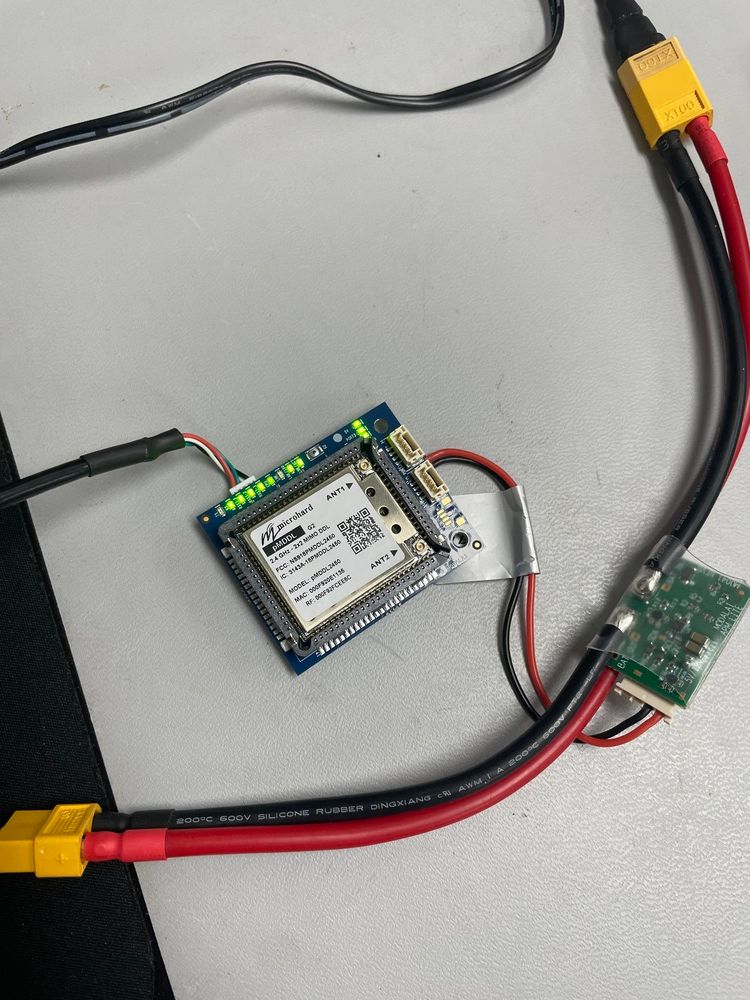
                        IMG-2902 (1).jpg

                        3dc34f7d-32fc-4ec2-9bc4-091b4a641b2e-image.png

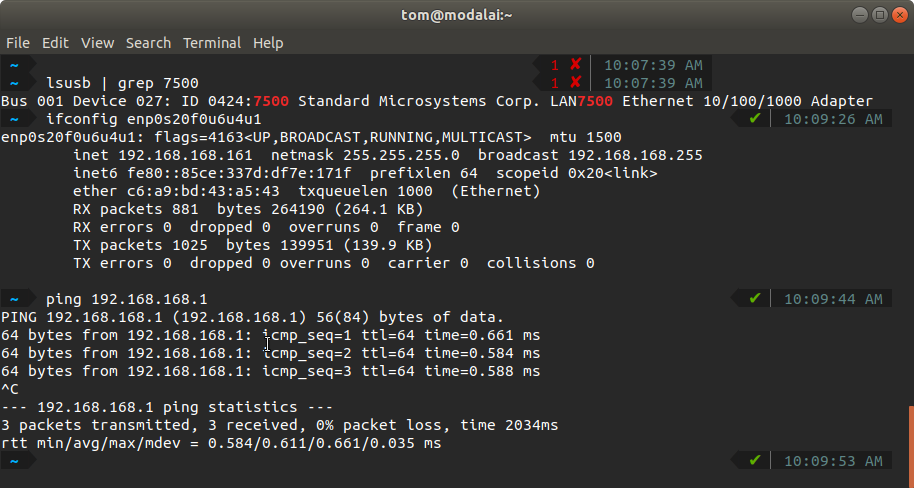
                        Just like yours, it is enumerating and can be seen in lsusb

                        You can use ifconfig to look at the list of network interfaces on your host device. It will enumerate as type "USB ethernet"
                        and will be auto-assigned an IP address by the modem (in the form 192.168.168.*)

                        As you can see, mine gave my host PC an address of 192.168.168.161

                        Next, I pinged the modem. My modem was setup in "master" mode, so it has an IP of 192.168.168.1. You can read more about the difference between slave and master modes here: https://docs.modalai.com/microhard-add-on-manual/

                        It's possible yours is in "slave" mode and therefore has an IP of 192.168.168.2

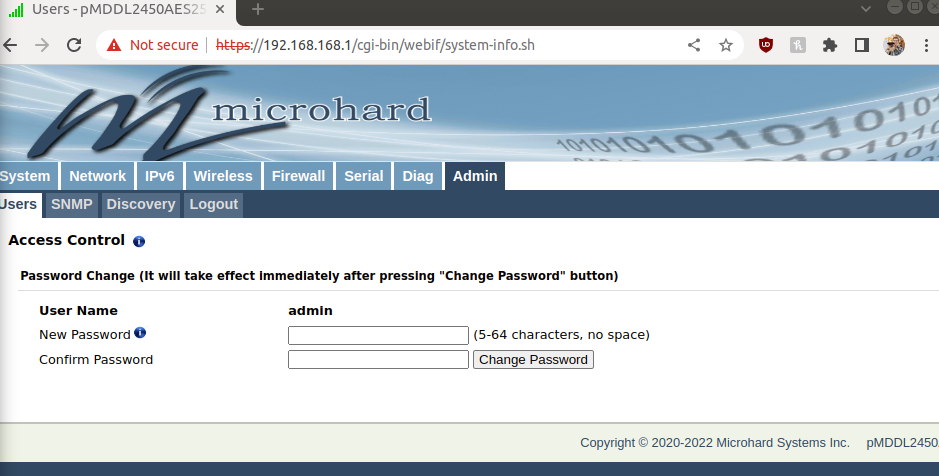
                        In order to modify the settings you can navigate in your browser to the IP of the modem, as seen below:
                        238ef0d1-017a-4d45-ab5a-00051b20aba7-image.png

                        Here you can change modes and modify any other modem settings.

                        The default login is:
                        user: admin
                        password: admin

                        In order for two Microhard modems to talk to eachother, one needs to be in "master" mode and the other needs to be in "slave" mode. Microhard recommends having the drone be "master" and the ground station to be "slave"

                        R 1 Reply Last reply
                        0
                        • R Offline
                          R Offline
                          Ross
                          wrote on last edited by
                          #12

                          Hi @tom, Thanks.
                          I will get you a screengrab tomorrow when back at the desk.
                          This should be easy to replicate your side but you will need the same radio and only using the LAN7500 version of your dongle.
                          As i mentioned to @Chad-Sweet its the pMDDL2450 - microhard call it a 'g2' revision.
                          According to Microhard its the only one they sell now.

                          1 Reply Last reply
                          0
                          • Chad SweetC Offline
                            Chad SweetC Offline
                            Chad Sweet
                            ModalAI Team
                            wrote on last edited by
                            #13

                            You can see in Tom's picture, we are using "G2" as well. This is the most common setup

                            1 Reply Last reply
                            0
                            • tomT tom

                              @Ross I have replicated your setup as seen below, just using an APM for cable (shouldn't make a difference).

                              IMG-2902 (1).jpg

                              3dc34f7d-32fc-4ec2-9bc4-091b4a641b2e-image.png

                              Just like yours, it is enumerating and can be seen in lsusb

                              You can use ifconfig to look at the list of network interfaces on your host device. It will enumerate as type "USB ethernet"
                              and will be auto-assigned an IP address by the modem (in the form 192.168.168.*)

                              As you can see, mine gave my host PC an address of 192.168.168.161

                              Next, I pinged the modem. My modem was setup in "master" mode, so it has an IP of 192.168.168.1. You can read more about the difference between slave and master modes here: https://docs.modalai.com/microhard-add-on-manual/

                              It's possible yours is in "slave" mode and therefore has an IP of 192.168.168.2

                              In order to modify the settings you can navigate in your browser to the IP of the modem, as seen below:
                              238ef0d1-017a-4d45-ab5a-00051b20aba7-image.png

                              Here you can change modes and modify any other modem settings.

                              The default login is:
                              user: admin
                              password: admin

                              In order for two Microhard modems to talk to eachother, one needs to be in "master" mode and the other needs to be in "slave" mode. Microhard recommends having the drone be "master" and the ground station to be "slave"

                              R Offline
                              R Offline
                              Ross
                              wrote on last edited by
                              #14

                              @tom is this using the LAN7500 version or the LAN7580?
                              using the LAN7580 works perfect with all the units we have here.
                              We have 40 of the LAN7500 and the 5 we picked out and tested all have the same issue.

                              1 Reply Last reply
                              0
                              • R Offline
                                R Offline
                                Ross
                                wrote on last edited by
                                #15

                                @tom i see from the lsusb it looked like a LAN7500.
                                If you have the 7500 working there with a g2 version then I am not sure what to make of the boards we have here.
                                We have used the radios for many years so setting them up is quite normal for us.

                                1 Reply Last reply
                                0
                                • tomT Offline
                                  tomT Offline
                                  tom
                                  admin
                                  wrote on last edited by
                                  #16

                                  @Ross Again, what do you see with ifconfig? Are you able to get a network interface up and an IP assigned?

                                  1 Reply Last reply
                                  0
                                  • R rjpking92 referenced this topic on

                                  Hello! It looks like you're interested in this conversation, but you don't have an account yet.

                                  Getting fed up of having to scroll through the same posts each visit? When you register for an account, you'll always come back to exactly where you were before, and choose to be notified of new replies (either via email, or push notification). You'll also be able to save bookmarks and upvote posts to show your appreciation to other community members.

                                  With your input, this post could be even better 💗

                                  Register Login
                                  Reply
                                  • Reply as topic
                                  Log in to reply
                                  • Oldest to Newest
                                  • Newest to Oldest
                                  • Most Votes


                                  ModalAI
                                  Categories Recent Tags ModalAI.com Docs
                                  © 2026 ModalAI® · Accelerating autonomy for smaller, smarter, safer drones · Powered by NodeBB
                                  • Login

                                  • Don't have an account? Register

                                  • Login or register to search.
                                  • First post
                                    Last post
                                  0
                                  • Categories
                                  • Recent
                                  • Tags
                                  • Popular
                                  • Users
                                  • Groups