Skip to content
  • Categories
  • Recent
  • Tags
  • Popular
  • Users
  • Groups
Collapse
Brand Logo

ModalAI Forum

  1. ModalAI Support Forum
  2. Ask your questions right here!
  3. Trouble with EM7565 startup...

Trouble with EM7565 startup...

Scheduled Pinned Locked Moved Ask your questions right here!
24 Posts 3 Posters 6.1k Views 3 Watching
  • Oldest to Newest
  • Newest to Oldest
  • Most Votes
Reply
  • Reply as topic
Log in to reply
This topic has been deleted. Only users with topic management privileges can see it.
  • Eric KatzfeyE Eric Katzfey

    @Ed-Sutter I'm speaking specifically of VOXL, not your host computer, but it's the same idea. It's the actual Linux device driver for that piece of hardware. For example: https://gitlab.com/voxl-public/system-image-build/apq8096-kernel/-/blob/main/drivers/net/usb/qmi_wwan.c#L772

    Ed SutterE Offline
    Ed SutterE Offline
    Ed Sutter
    Regular
    wrote on last edited by
    #7

    @Eric-Katzfey got it... Thanks!

    1 Reply Last reply
    0
    • Eric KatzfeyE Eric Katzfey

      @Ed-Sutter I'm speaking specifically of VOXL, not your host computer, but it's the same idea. It's the actual Linux device driver for that piece of hardware. For example: https://gitlab.com/voxl-public/system-image-build/apq8096-kernel/-/blob/main/drivers/net/usb/qmi_wwan.c#L772

      Ed SutterE Offline
      Ed SutterE Offline
      Ed Sutter
      Regular
      wrote on last edited by Ed Sutter
      #8
      This post is deleted!
      1 Reply Last reply
      0
      • Eric KatzfeyE Eric Katzfey

        @Ed-Sutter I'm speaking specifically of VOXL, not your host computer, but it's the same idea. It's the actual Linux device driver for that piece of hardware. For example: https://gitlab.com/voxl-public/system-image-build/apq8096-kernel/-/blob/main/drivers/net/usb/qmi_wwan.c#L772

        Ed SutterE Offline
        Ed SutterE Offline
        Ed Sutter
        Regular
        wrote on last edited by
        #9

        @Eric-Katzfey Update... I don't have your USB expansion board yet (being ordered), but I was able to get things working by just using a powered USB hub; so I'm assuming it will work the same with the new expansion board.

        1 Reply Last reply
        0
        • tomT tom

          @Ed-Sutter Do you know how much power the m.2 to USB adapter you're plugging in is pulling? Depending on which add-on board you're plugging it into on VOXL, it may not be able to provide the required current. Some of our add-on boards' USB ports max out at 0.5 A (M0030, M0017, M0048).

          When we've tested with 3rd party modem USB adapters in the past we've had to use our debug board v2 (M0078): https://www.modalai.com/products/voxl-debug-board-v2?_pos=4&_sid=bc3d50f8c&_ss=r

          which allows you to provide a higher current to the USB port.

          Source for uqmi lives here: https://gitlab.com/voxl-public/voxl-sdk/utilities/voxl-modem/-/tree/master/src/modem/uqmi

          Ed SutterE Offline
          Ed SutterE Offline
          Ed Sutter
          Regular
          wrote on last edited by Ed Sutter
          #10

          @tom I received the new USB add-on (M0078). I just wanna be sure I understand this... All I need to do to get more current is to move the jumper over to the USB-VBUS position? I assume that just bypasses any current-limiting protection that would be provided by the USB driver?
          true?

          1 Reply Last reply
          0
          • tomT Offline
            tomT Offline
            tom
            admin
            wrote on last edited by
            #11

            @Ed-Sutter You'll actually have the jumper on the USB PWR side as seen in this photo: b1cb3851-0bd7-4729-9655-23228ccef458-image.png
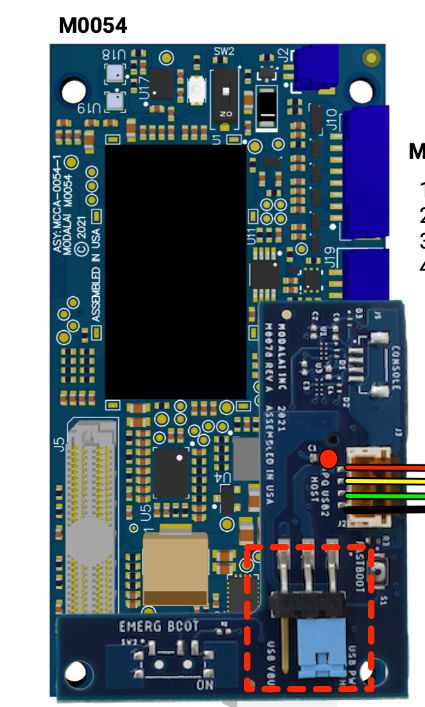
            but otherwise yes you've got the right idea

            Ed SutterE 2 Replies Last reply
            0
            • tomT tom

              @Ed-Sutter You'll actually have the jumper on the USB PWR side as seen in this photo: b1cb3851-0bd7-4729-9655-23228ccef458-image.png
              but otherwise yes you've got the right idea

              Ed SutterE Offline
              Ed SutterE Offline
              Ed Sutter
              Regular
              wrote on last edited by
              #12

              @tom Cool! Just tried it with the EM7565...

              ifconfig wwan0
              wwan0     Link encap:UNSPEC  HWaddr 00-00-00-00-00-00-00-00-00-00-00-00-00-00-00-00
                        inet addr:10.234.85.224  P-t-P:10.234.85.224  Mask:255.255.255.192
                        UP POINTOPOINT RUNNING NOARP MULTICAST  MTU:1500  Metric:1
                        RX packets:2 errors:0 dropped:0 overruns:0 frame:0
                        TX packets:2 errors:0 dropped:0 overruns:0 carrier:0
                        collisions:0 txqueuelen:1000
                        RX bytes:604 (604.0 B)  TX bytes:656 (656.0 B)
              

              The modem came right up!
              Thanks

              1 Reply Last reply
              0
              • tomT Offline
                tomT Offline
                tom
                admin
                wrote on last edited by
                #13

                @Ed-Sutter Beautiful! Glad to hear that

                1 Reply Last reply
                0
                • tomT tom

                  @Ed-Sutter You'll actually have the jumper on the USB PWR side as seen in this photo: b1cb3851-0bd7-4729-9655-23228ccef458-image.png
                  but otherwise yes you've got the right idea

                  Ed SutterE Offline
                  Ed SutterE Offline
                  Ed Sutter
                  Regular
                  wrote on last edited by
                  #14

                  @tom Do you guys have any plans to support the EM7565 with an alternative adapter?

                  1 Reply Last reply
                  0
                  • tomT Offline
                    tomT Offline
                    tom
                    admin
                    wrote on last edited by
                    #15

                    @Ed-Sutter Not that I know of at the moment. Is there a specific reason why you're choosing to go with this card as opposed to others? I know you mentioned earlier that it supports certain bands you need.

                    Ed SutterE 1 Reply Last reply
                    0
                    • tomT tom

                      @Ed-Sutter Not that I know of at the moment. Is there a specific reason why you're choosing to go with this card as opposed to others? I know you mentioned earlier that it supports certain bands you need.

                      Ed SutterE Offline
                      Ed SutterE Offline
                      Ed Sutter
                      Regular
                      wrote on last edited by
                      #16

                      @tom Yea, that's it, we need a band that is not supported by any of the modems that fit your add-on board. 😞
                      Anyway, now that I've had some time to work with it (the EM7565), things aren't as good as I initially thought...
                      I've been testing this in various ways and just getting more confused... Initially I was using voxl-streamer to push video over LTE to VLC on another machine. It starts up just fine (video is clean), but the video just stops after some random time (usually less than an hour). So I thought -maybe- my LTE service (I'm using a SIM card on my own AT&T account that is supposed to be used with a flip phone) was doing some throttling. I reduced the load to just open a TCP connection and send small messages (over LTE) every second. Same thing happens. Then I tried running the same thing but now just using WiFi while the wwan0 is up and alive... Same thing even on WiFi! Once it gets in this state, I can't ping out at all (on either interface), but all interfaces are up and I am able to ssh into VOXL. If I remove the EM7565, things are fine on WiFi.

                      Does this make any sense at all?
                      Can you think of anything I can do to diagnose this?
                      I have a small (cheap) USB power monitor in line with the modem and it never exceeds 100mA on the display.

                      1 Reply Last reply
                      0
                      • tomT Offline
                        tomT Offline
                        tom
                        admin
                        wrote on last edited by
                        #17

                        @Ed-Sutter Does it work if you only have one of the network interfaces up at once? For example, only having wwan0 up or only having wlan0 up? I'm wondering if some weird routing issue happens

                        Ed SutterE 1 Reply Last reply
                        0
                        • tomT tom

                          @Ed-Sutter Does it work if you only have one of the network interfaces up at once? For example, only having wwan0 up or only having wlan0 up? I'm wondering if some weird routing issue happens

                          Ed SutterE Offline
                          Ed SutterE Offline
                          Ed Sutter
                          Regular
                          wrote on last edited by
                          #18

                          @tom Good thought! I'll try turning down wlan0 while using wwan0...

                          1 Reply Last reply
                          0
                          • tomT Offline
                            tomT Offline
                            tom
                            admin
                            wrote on last edited by
                            #19

                            @Ed-Sutter And to be safe if you're in station mode I would set your ssid and pass to dummy values, i.e voxl-wifi station tmp tmp because I've seen in the past where wlan0 will try to bring itself back up after you manually force it down.

                            Ed SutterE 3 Replies Last reply
                            0
                            • tomT tom

                              @Ed-Sutter And to be safe if you're in station mode I would set your ssid and pass to dummy values, i.e voxl-wifi station tmp tmp because I've seen in the past where wlan0 will try to bring itself back up after you manually force it down.

                              Ed SutterE Offline
                              Ed SutterE Offline
                              Ed Sutter
                              Regular
                              wrote on last edited by Ed Sutter
                              #20

                              @tom Ok, I tried what you said (good idea by the way)... I turned down the wlan0 link and did a very minimial TCP/IP data transfer loop (about 25 characters a second) and after about 15 minutes things just got wonky. I terminated the test, and again, I wasn't able to ping out.
                              So this morning I was going to reverse the interfaces (enable wlan0 and turn down wwan0) and repeat, but didn't get that far cause I noticed this...

                              $: adb shell
                              / # ifconfig
                              docker0   Link encap:Ethernet  HWaddr 02:42:A2:AB:4C:25
                                        inet addr:----------  Bcast:0.0.0.0  Mask:255.255.0.0
                                        inet6 addr: ----------------/64 Scope:Link
                                        UP BROADCAST MULTICAST  MTU:1500  Metric:1
                                        RX packets:0 errors:0 dropped:0 overruns:0 frame:0
                                        TX packets:3 errors:0 dropped:0 overruns:0 carrier:0
                                        collisions:0 txqueuelen:0
                                        RX bytes:0 (0.0 B)  TX bytes:216 (216.0 B)
                              
                              lo        Link encap:Local Loopback
                                        inet addr:127.0.0.1  Mask:255.0.0.0
                                        inet6 addr: ::1/128 Scope:Host
                                        UP LOOPBACK RUNNING  MTU:65536  Metric:1
                                        RX packets:0 errors:0 dropped:0 overruns:0 frame:0
                                        TX packets:0 errors:0 dropped:0 overruns:0 carrier:0
                                        collisions:0 txqueuelen:0
                                        RX bytes:0 (0.0 B)  TX bytes:0 (0.0 B)
                              
                              wlan0     Link encap:Ethernet  HWaddr 18:47:3D:B1:BE:0F
                                        inet addr:192.168.1.230  Bcast:192.168.1.255  Mask:255.255.255.0
                                        inet6 addr: ----------------/64 Scope:Link
                                        inet6 addr: ----------------------------/64 Scope:Global
                                        UP BROADCAST RUNNING MULTICAST  MTU:1500  Metric:1
                                        RX packets:221 errors:0 dropped:0 overruns:0 frame:0
                                        TX packets:46 errors:0 dropped:0 overruns:0 carrier:0
                                        collisions:0 txqueuelen:3000
                                        RX bytes:45620 (44.5 KiB)  TX bytes:4536 (4.4 KiB)
                              
                              wwan0     Link encap:UNSPEC  HWaddr 00-00-00-00-00-00-00-00-00-00-00-00-00-00-00-00
                                        inet addr:--.--.--.--  P-t-P:--.--.--.--  Mask:255.255.255.192
                                        UP POINTOPOINT RUNNING NOARP MULTICAST  MTU:1500  Metric:1
                                        RX packets:22 errors:0 dropped:0 overruns:0 frame:0
                                        TX packets:22 errors:0 dropped:0 overruns:0 carrier:0
                                        collisions:0 txqueuelen:1000
                                        RX bytes:2350 (2.2 KiB)  TX bytes:2164 (2.1 KiB)
                              
                              / # ping google.com
                              PING google.com (142.251.40.238) 56(84) bytes of data.
                              64 bytes from lga34s39-in-f14.1e100.net (142.251.40.238): icmp_req=1 ttl=55 time=38.8 ms
                              64 bytes from lga34s39-in-f14.1e100.net (142.251.40.238): icmp_req=2 ttl=55 time=43.0 ms
                              ^C
                              --- google.com ping statistics ---
                              2 packets transmitted, 2 received, 0% packet loss, time 1002ms
                              rtt min/avg/max/mdev = 38.858/40.949/43.041/2.101 ms
                              / # ip link set dev wwan0 down
                              / # ping google.com
                              ping: unknown host google.com
                              / # ping 142.250.204.14
                              PING 142.250.204.14 (142.250.204.14) 56(84) bytes of data.
                              64 bytes from 142.250.204.14: icmp_req=1 ttl=117 time=199 ms
                              64 bytes from 142.250.204.14: icmp_req=2 ttl=117 time=218 ms
                              ^C
                              --- 142.250.204.14 ping statistics ---
                              2 packets transmitted, 2 received, 0% packet loss, time 1001ms
                              rtt min/avg/max/mdev = 199.439/208.882/218.325/9.443 ms
                              / #
                              

                              This is just after rebooting VOXL (I replaced some network addresses with dashes). Notice that the initial ping succeeds (using DNS), then I shut down wwan0, then second ping (using dns) fails, but when I use direct IP addess it succeeds.
                              It seems like the DNS server configuration information in linux gets wonked after bringing wwan0 down.
                              Any thoughts?

                              1 Reply Last reply
                              0
                              • tomT tom

                                @Ed-Sutter And to be safe if you're in station mode I would set your ssid and pass to dummy values, i.e voxl-wifi station tmp tmp because I've seen in the past where wlan0 will try to bring itself back up after you manually force it down.

                                Ed SutterE Offline
                                Ed SutterE Offline
                                Ed Sutter
                                Regular
                                wrote on last edited by
                                #21

                                @tom One thing I just noticed...
                                If I boot up without an LTE modem, then /etc/resolv.conf is:

                                # Generated by dhcpcd from wlan0
                                # /etc/resolv.conf.head can replace this line
                                domain myfiosgateway.com
                                nameserver 192.168.1.1
                                # /etc/resolv.conf.tail can replace this line
                                

                                That (above) makes sense. That's my ISP (Fios) and wifi subnet in my home.
                                If I boot up with the LTE modem, then /etc/resolve.conf is:

                                nameserver 172.26.38.1
                                

                                Looks like something in the modem startup overwrites /etc/resolv.conf. The script "enable-dns.sh" is called by voxl-modem-start.sh, but it only writes to /etc/resolve.conf if it doesn't already exist (plus it writes 8.8.8.8, which apparently is Google dns).
                                Any idea how this is being written?

                                1 Reply Last reply
                                0
                                • tomT tom

                                  @Ed-Sutter And to be safe if you're in station mode I would set your ssid and pass to dummy values, i.e voxl-wifi station tmp tmp because I've seen in the past where wlan0 will try to bring itself back up after you manually force it down.

                                  Ed SutterE Offline
                                  Ed SutterE Offline
                                  Ed Sutter
                                  Regular
                                  wrote on last edited by
                                  #22

                                  @tom I'm starting a new thread on this...

                                  1 Reply Last reply
                                  0
                                  • Eric KatzfeyE Eric Katzfey

                                    @Ed-Sutter I'm speaking specifically of VOXL, not your host computer, but it's the same idea. It's the actual Linux device driver for that piece of hardware. For example: https://gitlab.com/voxl-public/system-image-build/apq8096-kernel/-/blob/main/drivers/net/usb/qmi_wwan.c#L772

                                    Ed SutterE Offline
                                    Ed SutterE Offline
                                    Ed Sutter
                                    Regular
                                    wrote on last edited by Ed Sutter
                                    #23

                                    @Eric-Katzfey Somehow this slipped through the cracks... I just looked in that file and I don't see the VID/PID of the EM7565 listed. So a couple of questions:

                                    1. What does this mean?
                                    2. Do you know what is involved in getting it listed?

                                    I have the latest driver files from Sierra Wireless, and they do have what I need. Is this a module that I can update on VOXL?
                                    Ed

                                    1 Reply Last reply
                                    0
                                    • Eric KatzfeyE Eric Katzfey

                                      @Ed-Sutter I'm speaking specifically of VOXL, not your host computer, but it's the same idea. It's the actual Linux device driver for that piece of hardware. For example: https://gitlab.com/voxl-public/system-image-build/apq8096-kernel/-/blob/main/drivers/net/usb/qmi_wwan.c#L772

                                      Ed SutterE Offline
                                      Ed SutterE Offline
                                      Ed Sutter
                                      Regular
                                      wrote on last edited by
                                      #24

                                      @Eric-Katzfey @tom Digging a bit deeper into this, I see that the voxl-build procedure does patch the qmi_wwan.c file, and after the patch, the VID/PID for EM7565 is in there. On one hand this is good news because it implies that the kernel does have support for the modem I'm trying to use; however, its not-so-good news for me because running with that modem has not reliable on VOXL. 😞
                                      Aside from verifying that I am actually running the same version on my VOXL-Flight-Deck as is being built in voxl-build (see below), I'm at a loss regarding other things to do to debug this. Any thoughts on this?
                                      Following is the output of voxl-version on my board:

                                      / # voxl-version
                                      cat: /etc/modalai/voxl-software-bundle-version.txt: No such file or directory
                                      --------------------------------------------------------------------------------
                                      system-image:    ModalAI 3.3.0 BUILDER: ekatzfey BUILD_TIME: 2021-06-06_19:28
                                      kernel:          #1 SMP PREEMPT Sun Jun 6 19:41:01 UTC 2021 3.18.71-perf
                                      factory-bundle:  1.0.1 (Yocto installation)
                                      --------------------------------------------------------------------------------
                                      architecture:    aarch64
                                      processor:       apq8096
                                      os:              GNU/Linux
                                      --------------------------------------------------------------------------------
                                      voxl-suite:
                                      Package: voxl-suite
                                      Version: 0.5.0
                                      Depends: libjpeg_turbo (>= 9.0.4), libmodal_exposure (>= 0.0.2), libmodal_json (>= 0.3.6), libmodal_pipe (>= 2.1.1), lib
                                      rc_math (>= 1.1.5), libvoxl_cutils (>= 0.0.2), libvoxl_io (>= 0.5.4), mavlink-camera-manager (>= 0.0.2), mongoose (>= 7.
                                      3.0), opencv (>= 4.5.2-2), openmp (>= 10.0.2), voxl-camera-calibration (>= 0.1.1), voxl-camera-server (>= 0.8.1), voxl-c
                                      pu-monitor (>= 0.2.0), voxl-dfs-server (>= 0.2.2), voxl-docker-support (>= 1.1.3), voxl-gphoto2 (>= 0.0.5), voxl-imu-ser
                                      ver (>= 0.9.1), voxl-mavlink (>= 0.0.2), voxl-modem (>= 0.12.0), voxl-mpa-tools (>= 0.3.6), voxl-nodes (>= 0.2.0), voxl-
                                      portal (>= 0.1.2), voxl-qvio-server (>= 0.3.4), voxl-streamer (>= 0.2.6), voxl-tag-detector (>= 0.0.2), voxl-tflite (>=
                                      2.2.3), voxl-tflite-server (>= 0.1.5), voxl-utils (>= 0.8.4), voxl-vision-px4 (>= 0.9.5), voxl-vpn (>= 0.0.3)
                                      Status: install user installed
                                      Section: base
                                      Architecture: all
                                      Maintainer: james@modalai.com
                                      MD5Sum: 172dd2541a4b01ec415651b5ded3afab
                                      Size: 1956
                                      Filename: voxl-suite_0.5.0_202111041852.ipk
                                      Description: meta-package for voxl-suite software collection
                                      Installed-Time: 144
                                      
                                      --------------------------------------------------------------------------------

                                      
                                      1 Reply Last reply
                                      0

                                      Hello! It looks like you're interested in this conversation, but you don't have an account yet.

                                      Getting fed up of having to scroll through the same posts each visit? When you register for an account, you'll always come back to exactly where you were before, and choose to be notified of new replies (either via email, or push notification). You'll also be able to save bookmarks and upvote posts to show your appreciation to other community members.

                                      With your input, this post could be even better 💗

                                      Register Login
                                      Reply
                                      • Reply as topic
                                      Log in to reply
                                      • Oldest to Newest
                                      • Newest to Oldest
                                      • Most Votes


                                      ModalAI
                                      Categories Recent Tags ModalAI.com Docs
                                      © 2026 ModalAI® · Accelerating autonomy for smaller, smarter, safer drones · Powered by NodeBB
                                      • Login

                                      • Don't have an account? Register

                                      • Login or register to search.
                                      • First post
                                        Last post
                                      0
                                      • Categories
                                      • Recent
                                      • Tags
                                      • Popular
                                      • Users
                                      • Groups
