Skip to content
  • Categories
  • Recent
  • Tags
  • Popular
  • Users
  • Groups
Collapse
Brand Logo

ModalAI Forum

  1. ModalAI Support Forum
  2. VOXL Compute & Autopilot
  3. VOXL Flight
  4. UVC-Server to QGC Stream Activation

UVC-Server to QGC Stream Activation

Scheduled Pinned Locked Moved VOXL Flight
17 Posts 2 Posters 2.3k Views 2 Watching
  • Oldest to Newest
  • Newest to Oldest
  • Most Votes
Reply
  • Reply as topic
Log in to reply
This topic has been deleted. Only users with topic management privileges can see it.
  • Caleb RievleyC Caleb Rievley

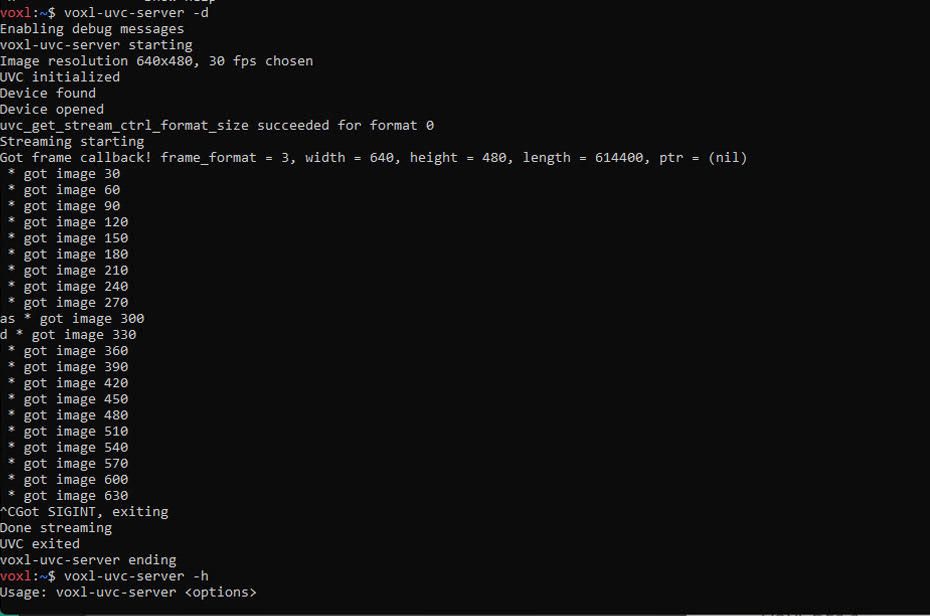
    The voxl-uvc-server is recognizing our camera. How can we initiate the stream and view it on QGC?
    unnamed.jpg

    Eric KatzfeyE Offline
    Eric KatzfeyE Offline
    Eric Katzfey
    ModalAI Team
    wrote on last edited by
    #2

    @Caleb-Rievley The documentation for voxl-uvc-server is here: https://docs.modalai.com/voxl-uvc-server/. To get the stream to show on QGC you use it in conjunction with voxl-streamer. The documentation for voxl-streamer is here: https://docs.modalai.com/voxl-streamer/. Specifically, take a look at this section: https://docs.modalai.com/voxl-streamer/#streaming-uvc-cameras-from-voxl-uvc-server

    Caleb RievleyC 1 Reply Last reply
    0
    • Caleb RievleyC Offline
      Caleb RievleyC Offline
      Caleb Rievley
      Contributor
      wrote on last edited by
      #3

      After using command, voxl-streamer , the prompt says Using configuration file /etc/modai/voxl-streamer.conf and does nothing else. The documentation says that it should output that the stream is available @rtsp..... Is this normal?

      Caleb RievleyC 1 Reply Last reply
      0
      • Caleb RievleyC Caleb Rievley

        After using command, voxl-streamer , the prompt says Using configuration file /etc/modai/voxl-streamer.conf and does nothing else. The documentation says that it should output that the stream is available @rtsp..... Is this normal?

        Caleb RievleyC Offline
        Caleb RievleyC Offline
        Caleb Rievley
        Contributor
        wrote on last edited by
        #4

        a8fba5f2-2abd-42a1-93ab-5167fd1416ba-image.png

        Eric KatzfeyE 1 Reply Last reply
        0
        • Eric KatzfeyE Eric Katzfey

          @Caleb-Rievley The documentation for voxl-uvc-server is here: https://docs.modalai.com/voxl-uvc-server/. To get the stream to show on QGC you use it in conjunction with voxl-streamer. The documentation for voxl-streamer is here: https://docs.modalai.com/voxl-streamer/. Specifically, take a look at this section: https://docs.modalai.com/voxl-streamer/#streaming-uvc-cameras-from-voxl-uvc-server

          Caleb RievleyC Offline
          Caleb RievleyC Offline
          Caleb Rievley
          Contributor
          wrote on last edited by
          #5

          @Eric-Katzfey By the way, we are using a USB camera. It shows up as a UVC Camera so I believe that it is compatible.

          Eric KatzfeyE 1 Reply Last reply
          0
          • Caleb RievleyC Caleb Rievley

            a8fba5f2-2abd-42a1-93ab-5167fd1416ba-image.png

            Eric KatzfeyE Offline
            Eric KatzfeyE Offline
            Eric Katzfey
            ModalAI Team
            wrote on last edited by
            #6

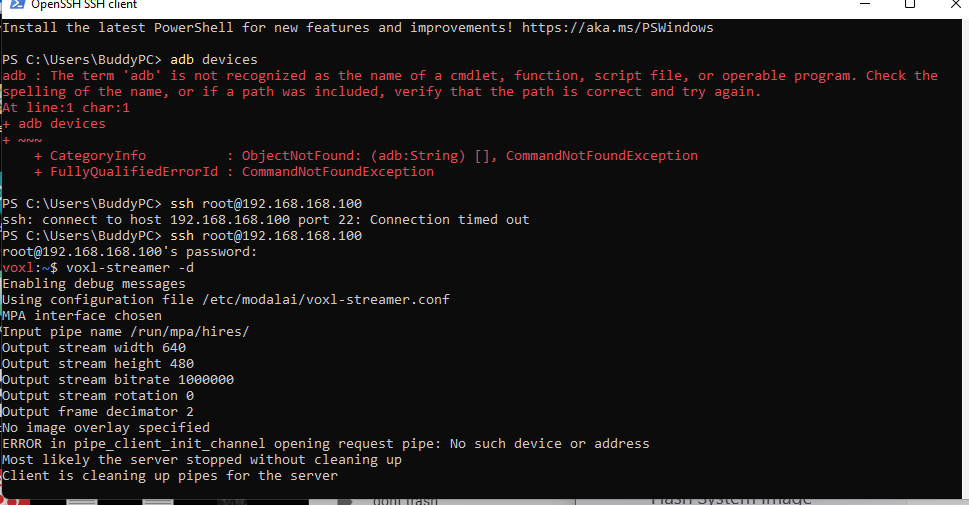
            @Caleb-Rievley Use voxl-streamer -d to get more verbose output.

            Caleb RievleyC 1 Reply Last reply
            0
            • Eric KatzfeyE Eric Katzfey

              @Caleb-Rievley Use voxl-streamer -d to get more verbose output.

              Caleb RievleyC Offline
              Caleb RievleyC Offline
              Caleb Rievley
              Contributor
              wrote on last edited by
              #7

              @Eric-Katzfey
              56b4e87e-3a64-4103-a7dd-e45b05083eea-image.png

              Eric KatzfeyE 1 Reply Last reply
              0
              • Caleb RievleyC Caleb Rievley

                @Eric-Katzfey By the way, we are using a USB camera. It shows up as a UVC Camera so I believe that it is compatible.

                Eric KatzfeyE Offline
                Eric KatzfeyE Offline
                Eric Katzfey
                ModalAI Team
                wrote on last edited by
                #8

                @Caleb-Rievley If voxl-uvc-server found it then it should be a valid USB UVC camera.

                1 Reply Last reply
                0
                • Caleb RievleyC Caleb Rievley

                  @Eric-Katzfey
                  56b4e87e-3a64-4103-a7dd-e45b05083eea-image.png

                  Eric KatzfeyE Offline
                  Eric KatzfeyE Offline
                  Eric Katzfey
                  ModalAI Team
                  wrote on last edited by
                  #9

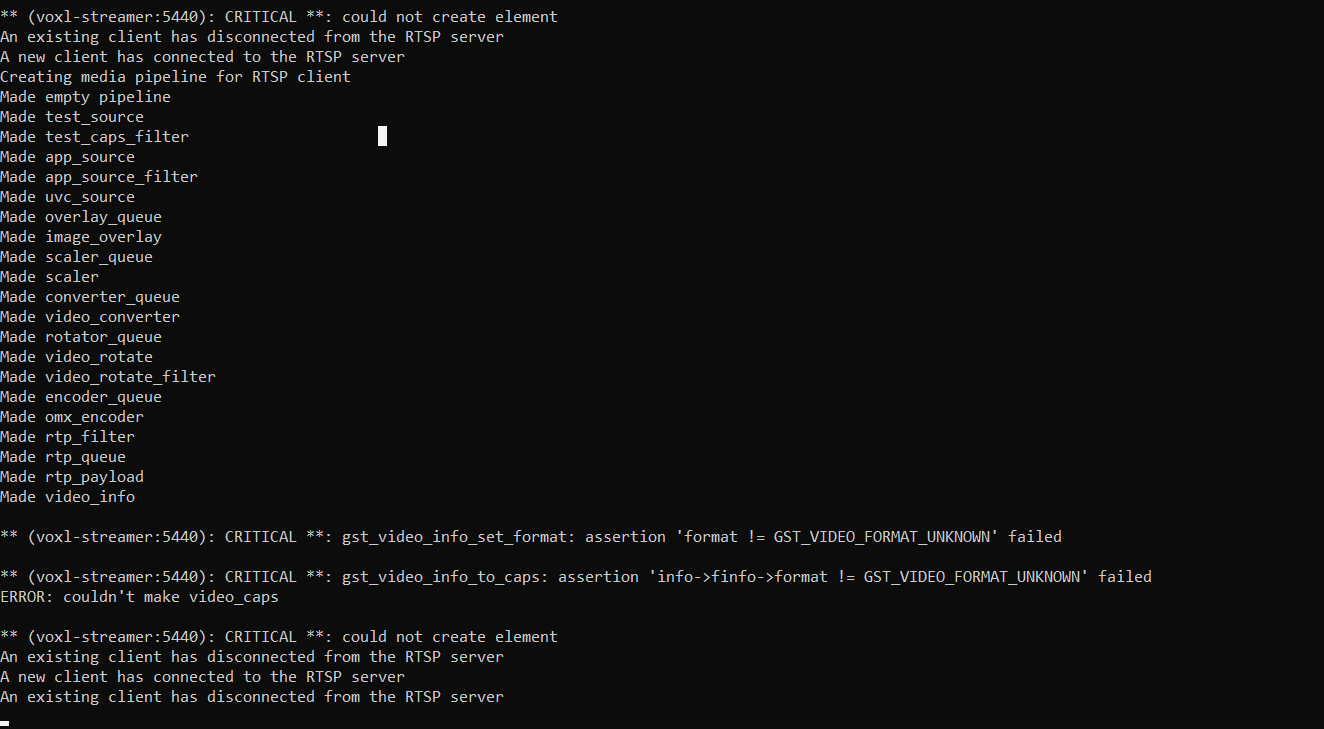
                  @Caleb-Rievley Were you able to access https://docs.modalai.com/voxl-streamer/? That documentation explains how to configure and choose the desired camera. In the output above it shows that you did not choose a configuration which means that it is defaulting to the hires camera configuration.

                  Caleb RievleyC 2 Replies Last reply
                  0
                  • Caleb RievleyC Offline
                    Caleb RievleyC Offline
                    Caleb Rievley
                    Contributor
                    wrote on last edited by
                    #10

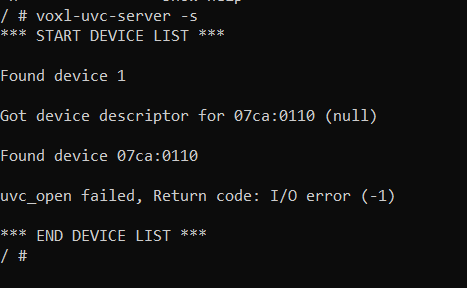
                    What configuration do we use for a USB UVC camera?
                    67db3260-5b21-46cc-9646-db1e6124a782-image.png

                    1 Reply Last reply
                    0
                    • Eric KatzfeyE Eric Katzfey

                      @Caleb-Rievley Were you able to access https://docs.modalai.com/voxl-streamer/? That documentation explains how to configure and choose the desired camera. In the output above it shows that you did not choose a configuration which means that it is defaulting to the hires camera configuration.

                      Caleb RievleyC Offline
                      Caleb RievleyC Offline
                      Caleb Rievley
                      Contributor
                      wrote on last edited by
                      #11

                      @Eric-Katzfey I also tried this

                      4d3e21b4-48b1-401f-8e32-e73fb34cb512-image.png

                      1 Reply Last reply
                      0
                      • Eric KatzfeyE Eric Katzfey

                        @Caleb-Rievley Were you able to access https://docs.modalai.com/voxl-streamer/? That documentation explains how to configure and choose the desired camera. In the output above it shows that you did not choose a configuration which means that it is defaulting to the hires camera configuration.

                        Caleb RievleyC Offline
                        Caleb RievleyC Offline
                        Caleb Rievley
                        Contributor
                        wrote on last edited by
                        #12

                        @Eric-Katzfey

                        f5fe9f74-57d1-40d4-9935-0853799f2856-image.png

                        Eric KatzfeyE 1 Reply Last reply
                        0
                        • Caleb RievleyC Caleb Rievley

                          @Eric-Katzfey

                          f5fe9f74-57d1-40d4-9935-0853799f2856-image.png

                          Eric KatzfeyE Offline
                          Eric KatzfeyE Offline
                          Eric Katzfey
                          ModalAI Team
                          wrote on last edited by
                          #13

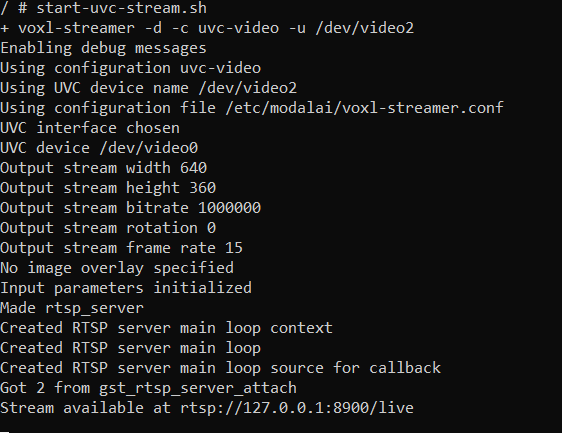
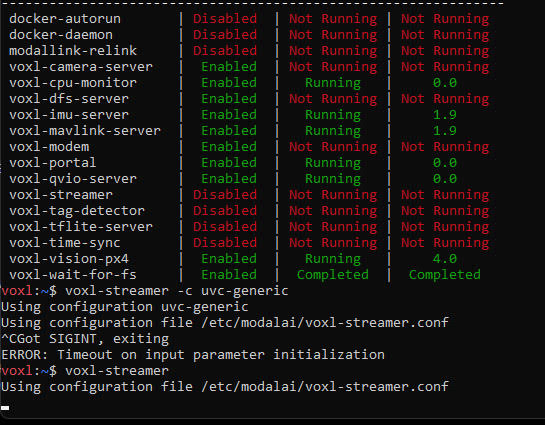
                          @Caleb-Rievley Once voxl-uvc-server has started successfully you can use voxl-streamer to stream the video. As per the instructions at: https://docs.modalai.com/voxl-streamer/#streaming-uvc-cameras-from-voxl-uvc-server you need to use configuration uvc-generic, not uvc-video. And don't use the -u option.

                          Caleb RievleyC 1 Reply Last reply
                          0
                          • Eric KatzfeyE Eric Katzfey

                            @Caleb-Rievley Once voxl-uvc-server has started successfully you can use voxl-streamer to stream the video. As per the instructions at: https://docs.modalai.com/voxl-streamer/#streaming-uvc-cameras-from-voxl-uvc-server you need to use configuration uvc-generic, not uvc-video. And don't use the -u option.

                            Caleb RievleyC Offline
                            Caleb RievleyC Offline
                            Caleb Rievley
                            Contributor
                            wrote on last edited by
                            #14

                            @Eric-Katzfey

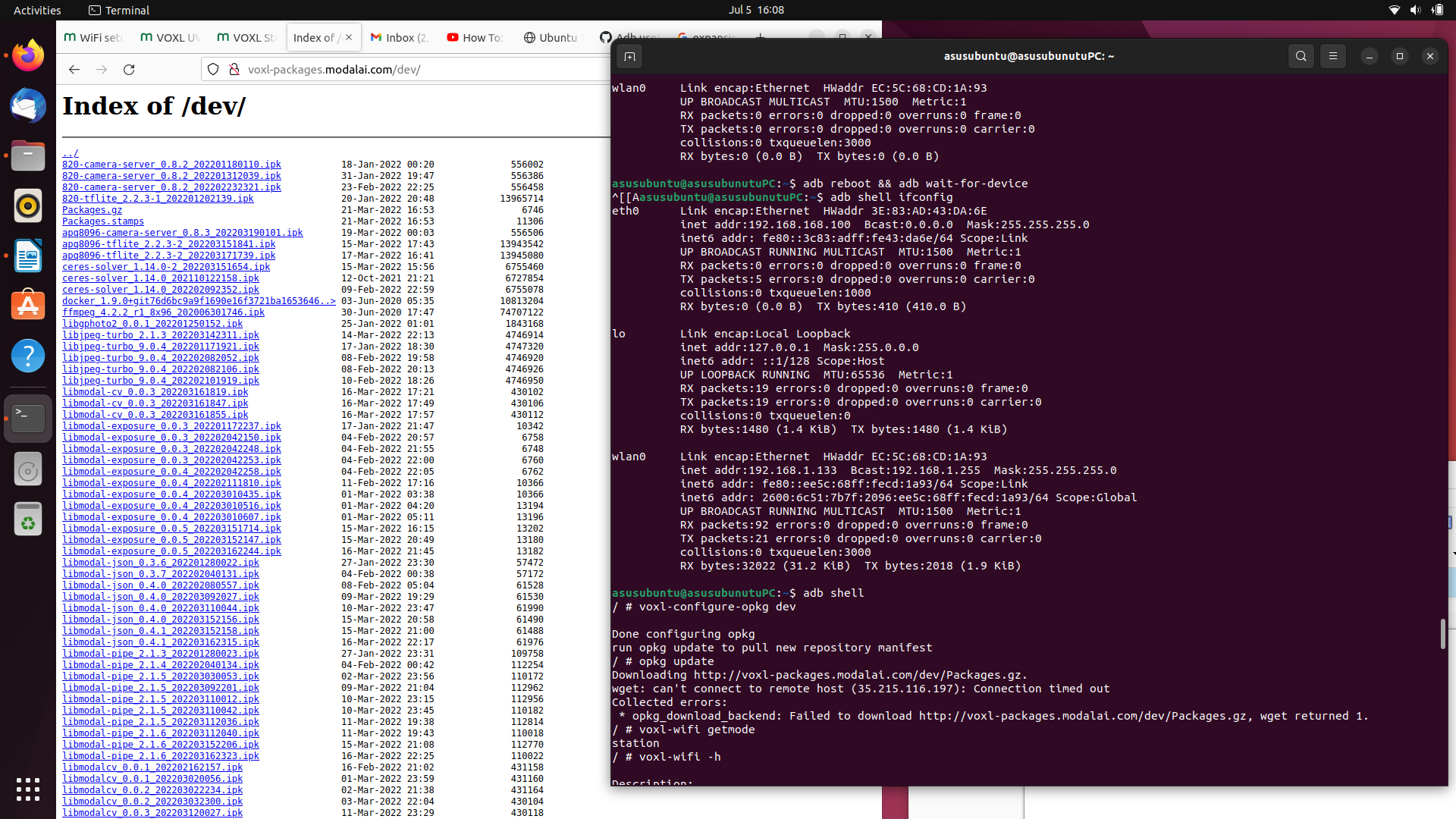
                            Today we did a system flash and went through steps to reconnect our microhard and have control through microhard. We Installed and configured our voxl-vision-px4. We are now trying to update the opkg package and it is not finding the server. We checked to make sure that the internet is connected as you can see in the top part of the window. What could be causing this issue? Our goal is to install the uvc-server.
                            84abb43e-da66-40bf-a06e-6b5580b6999b-image.png

                            Eric KatzfeyE 1 Reply Last reply
                            0
                            • Caleb RievleyC Caleb Rievley

                              @Eric-Katzfey

                              Today we did a system flash and went through steps to reconnect our microhard and have control through microhard. We Installed and configured our voxl-vision-px4. We are now trying to update the opkg package and it is not finding the server. We checked to make sure that the internet is connected as you can see in the top part of the window. What could be causing this issue? Our goal is to install the uvc-server.

                              84abb43e-da66-40bf-a06e-6b5580b6999b-image.png

                              Eric KatzfeyE Offline
                              Eric KatzfeyE Offline
                              Eric Katzfey
                              ModalAI Team
                              wrote on last edited by
                              #15

                              @Caleb-Rievley You probably don't have connectivity to the internet. It would be best to get everything setup without Microhard and then setup Microhard last. Having both Microhard running and wlan can cause problems connecting to the internet.

                              Caleb RievleyC 1 Reply Last reply
                              0
                              • Eric KatzfeyE Eric Katzfey

                                @Caleb-Rievley You probably don't have connectivity to the internet. It would be best to get everything setup without Microhard and then setup Microhard last. Having both Microhard running and wlan can cause problems connecting to the internet.

                                Caleb RievleyC Offline
                                Caleb RievleyC Offline
                                Caleb Rievley
                                Contributor
                                wrote on last edited by
                                #16

                                @Eric-Katzfey Thank you that worked. We did have to remove the microhard. We think that we remember that the connectivity worked with the microhard before we flashed it? Is that a possibility?

                                Eric KatzfeyE 1 Reply Last reply
                                0
                                • Caleb RievleyC Caleb Rievley

                                  @Eric-Katzfey Thank you that worked. We did have to remove the microhard. We think that we remember that the connectivity worked with the microhard before we flashed it? Is that a possibility?

                                  Eric KatzfeyE Offline
                                  Eric KatzfeyE Offline
                                  Eric Katzfey
                                  ModalAI Team
                                  wrote on last edited by
                                  #17

                                  @Caleb-Rievley Generally, that won't work.

                                  1 Reply Last reply
                                  0

                                  Hello! It looks like you're interested in this conversation, but you don't have an account yet.

                                  Getting fed up of having to scroll through the same posts each visit? When you register for an account, you'll always come back to exactly where you were before, and choose to be notified of new replies (either via email, or push notification). You'll also be able to save bookmarks and upvote posts to show your appreciation to other community members.

                                  With your input, this post could be even better 💗

                                  Register Login
                                  Reply
                                  • Reply as topic
                                  Log in to reply
                                  • Oldest to Newest
                                  • Newest to Oldest
                                  • Most Votes


                                  ModalAI
                                  Categories Recent Tags ModalAI.com Docs
                                  © 2026 ModalAI® · Accelerating autonomy for smaller, smarter, safer drones · Powered by NodeBB
                                  • Login

                                  • Login or register to search.
                                  • First post
                                    Last post
                                  0
                                  • Categories
                                  • Recent
                                  • Tags
                                  • Popular
                                  • Users
                                  • Groups