
How to set up a static IP in RB5
-
@Roberto It's probably a timing thing. Your service file doesn't have any dependencies so it gets run immediately on startup. Then a different service comes along and changes everything. Ideally you specify the service that is doing that as a dependency so you know yours will run after it. Just to debug you could add a big sleep before the commands and see if that solves the issue.
@Eric-Katzfey
Thank you for help, what would you suggest? Perhaps a delay in the script or something similar?
how do you suggest to do the startup log? and how could this sequence be organized correctly?
Do you have a RB5 to test? Thank you for any help -
@Roberto The "dumb" way to do it is to just put a sleep at the start of
mystatic-ip.shand gradually decrease the length to find the quickest sleep that works.Otherwise you'd have to reference another service in an "After" section to tell the service to start after the stated one
Example:
[Unit]
Description=My static IP
After=wlan_daemon.service
I know on VOXL wlan_daemon.service can be referenced, not positive whether it is on RB5 as well
-
@Roberto The "dumb" way to do it is to just put a sleep at the start of
mystatic-ip.shand gradually decrease the length to find the quickest sleep that works.Otherwise you'd have to reference another service in an "After" section to tell the service to start after the stated one
Example:
[Unit]
Description=My static IP
After=wlan_daemon.service
I know on VOXL wlan_daemon.service can be referenced, not positive whether it is on RB5 as well
RESOLVED: Thanks to @Eric-Katzfey & @tom
- First create a script:
vi /etc/sudoers.d/mystatic-ip.shContent of mystatic-ip.sh script:
#!/bin/bash sudo ifconfig wlan0 192.168.178.201 netmask 255.255.255.0 sudo route add default gw 192.168.178.1 wlan0- Create a service:
vi /etc/systemd/system/mystatic-ip.serviceContent of mystatic-ip.service file (that starts after wlan daemon):
[Unit]
Description=My static IP
After=wlan_daemon.service

[Service]
ExecStart=/etc/sudoers.d/mystatic-ip.sh start

[Install]
WantedBy=multi-user.target
To enable this service when the RB5 boots:
systemctl enable mystatic-ipReboot and you will have a static IP!
Roberto Calvi
-
RESOLVED: Thanks to @Eric-Katzfey & @tom
- First create a script:
vi /etc/sudoers.d/mystatic-ip.shContent of mystatic-ip.sh script:
#!/bin/bash sudo ifconfig wlan0 192.168.178.201 netmask 255.255.255.0 sudo route add default gw 192.168.178.1 wlan0- Create a service:
vi /etc/systemd/system/mystatic-ip.serviceContent of mystatic-ip.service file (that starts after wlan daemon):
[Unit]
Description=My static IP
After=wlan_daemon.service

[Service]
ExecStart=/etc/sudoers.d/mystatic-ip.sh start

[Install]
WantedBy=multi-user.target
To enable this service when the RB5 boots:
systemctl enable mystatic-ipReboot and you will have a static IP!
-
@Roberto The "dumb" way to do it is to just put a sleep at the start of
mystatic-ip.shand gradually decrease the length to find the quickest sleep that works.Otherwise you'd have to reference another service in an "After" section to tell the service to start after the stated one
Example:
[Unit]
Description=My static IP
After=wlan_daemon.service
I know on VOXL wlan_daemon.service can be referenced, not positive whether it is on RB5 as well
List of services: (command to show active services)
systemctl list-units --type=service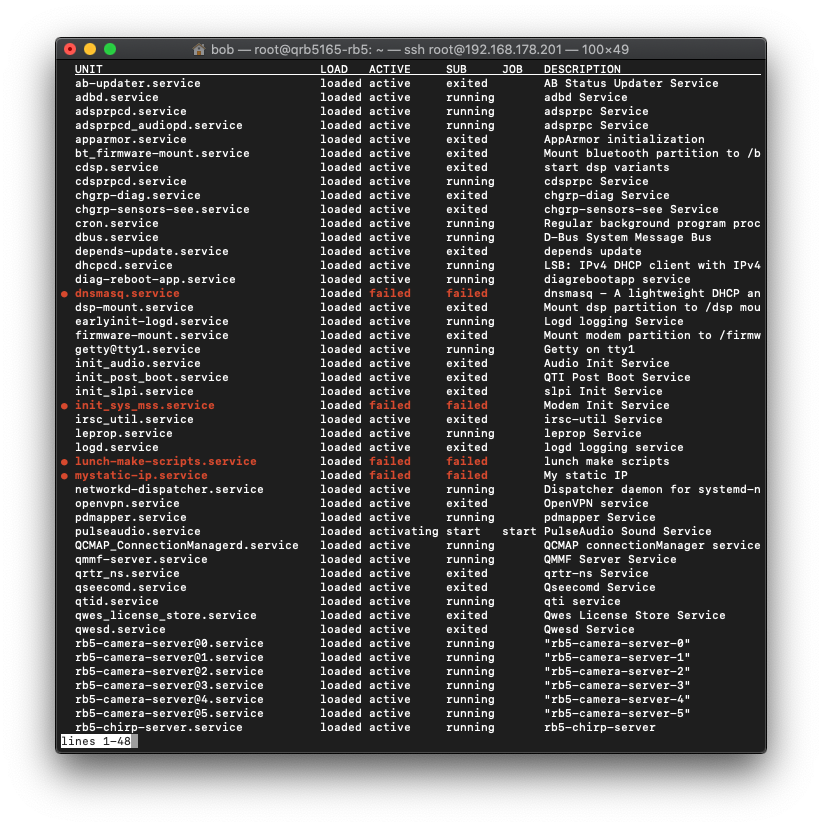
Some services are down like:
● dnsmasq.service loaded failed failed dnsmasq - A lightweight DHCP and caching DNS server
● lunch-make-scripts.service loaded failed failed lunch make scripts
● mystatic-ip.service loaded failed failed My static IPSomebody could please help me?
Roberto Calvi
-
List of services: (command to show active services)
systemctl list-units --type=serviceSome services are down like:
● dnsmasq.service loaded failed failed dnsmasq - A lightweight DHCP and caching DNS server
● lunch-make-scripts.service loaded failed failed lunch make scripts
● mystatic-ip.service loaded failed failed My static IPSomebody could please help me?
@Roberto We will take a look and see if we can put together a solution over the next few days.
-
@Roberto This combo consistently works for me:
sh-4.4# cat /usr/bin/rb5-wifi-static-ip.sh
#!/bin/bash

# wait for wlan0 to get it's initial IP from router
rb5-net-check wlan0 192.168

# set new IP
sudo ifconfig wlan0 192.168.1.150 netmask 255.255.255.0
sudo route add default gw 192.168.1.1 wlan0
sh-4.4# cat /etc/systemd/system/rb5-wifi-static-ip.service [Unit] Description=WLAN0 Static IP Service After=wlan_daemon.service [Service] ExecStart=/usr/bin/rb5-wifi-static-ip.sh [Install] WantedBy=multi-user.targetBasically adding the
rb5-net-checkcall which waits for wlan0 to get an initial valid IP before proceeding. -
@Roberto Or a slightly cleaner solution would be to keep your same script and just have the service depend on the
rb5-net-check.servicethat is already enabled by default if you're running PX4:sh-4.4# cat /etc/systemd/system/rb5-wifi-static-ip.service [Unit] Description=WLAN0 Static IP Service After=rb5-net-check.service [Service] ExecStart=/usr/bin/rb5-wifi-static-ip.sh [Install] WantedBy=multi-user.target -
@Roberto Or a slightly cleaner solution would be to keep your same script and just have the service depend on the
rb5-net-check.servicethat is already enabled by default if you're running PX4:sh-4.4# cat /etc/systemd/system/rb5-wifi-static-ip.service [Unit] Description=WLAN0 Static IP Service After=rb5-net-check.service [Service] ExecStart=/usr/bin/rb5-wifi-static-ip.sh [Install] WantedBy=multi-user.targetFINALLY SOLVED: Thanks to @tom
(added chmod and complete procedure for other users)- First create a script:
vi /usr/bin/rb5-wifi-static-ip.shContent of rb5-wifi-static-ip.sh script (with sample IP):
#!/bin/bash rb5_net='192.168' drone_IP='192.168.178.201' router_IP='192.168.178.1' netmask_IP='255.255.255.0' network_interface='wlan0' # wait for wlan to get it's initial IP from router rb5-net-check $network_interface $rb5_net # set new IP sudo ifconfig $network_interface $drone_IP netmask $netmask_IP sudo route add default gw $router_IP $network_interface- Give permission to script (if not, will give you message "Permission denied"):
chmod u+x /usr/bin/rb5-wifi-static-ip.sh- Create a service:
vi /etc/systemd/system/rb5-wifi-static-ip.serviceContent of rb5-wifi-static-ip.service file:
[Unit] Description=WLAN0 Static IP Service After=wlan_daemon.service [Service] ExecStart=/usr/bin/rb5-wifi-static-ip.sh [Install] WantedBy=multi-user.target- Enable this service when RB5 boots:
systemctl enable rb5-wifi-static-ip.serviceRestart RB5 and you will have a static IP!
-
If anyone else is interested - I found a way to enable static ip's for ethernet and wlan interfaces.
You'll need to install a file like below under
/etc/systemd/systetem/and run the following commands:systemctl enable ipconfig.service systemctl disable dhcpcd.service[Unit] Description=A description for your custom service goes here Requires=systemd-networkd.service After=systemd-networkd-wait-online.service [Service] Type=simple ExecStartPre=/bin/sleep 10 ExecStart=/bin/systemctl restart systemd-networkd.service [Install] WantedBy=multi-user.targetYou'll also need to add this file under
/etc/systemd/network/wlan0.network[Match] Name=wlan0 [Network] Address=192.168.0.169/24 #DHCP=yesSimply installing this service will allow most routers to keep the rb5 address the same when assigning IPs for a lease. Just comment #Address and uncomment DHCP to use dhcp.
You will also need to make sure to add the gatway to the routing table:
route add default gw $router_IP $network_interfacethis is best to be configured as a oneshot service where the service has the field
Requires=ipconfig.service




Reading along? Create a free ModalAI Forum account to join in.
With an account you can reply, ask your own question, get an email when a ModalAI engineer answers, and mark the reply that solved it. Your place in each thread is saved between visits.
Questions about VOXL, Flight Core, ESCs and ModalAI drones are answered here by the engineers who build them.
Register Login