Skip to content
  • Categories
  • Recent
  • Tags
  • Popular
  • Users
  • Groups
Collapse
Brand Logo

ModalAI Forum

  1. ModalAI Support Forum
  2. VOXL Dev Drones
  3. Qualcomm Flight RB5 5G Drone
  4. How to set up a static IP in RB5

How to set up a static IP in RB5

Scheduled Pinned Locked Moved Qualcomm Flight RB5 5G Drone
17 Posts 4 Posters 3.7k Views 3 Watching
  • Oldest to Newest
  • Newest to Oldest
  • Most Votes
Reply
  • Reply as topic
Log in to reply
This topic has been deleted. Only users with topic management privileges can see it.
  • tomT tom

    @Roberto When you run the script manually outside of the service file does it work?

    RobertoR Offline
    RobertoR Offline
    Roberto
    wrote on last edited by
    #5

    @tom
    Thank you for reply, yes If I run:

    sudo ifconfig wlan0 192.168.178.201 netmask 255.255.255.0
    sudo route add default gw 192.168.178.1 wlan0
    

    works, but if I restart RB5 the script does not do his work, perhaps a chmod is needed?

    Roberto Calvi

    Eric KatzfeyE 1 Reply Last reply
    0
    • RobertoR Roberto

      @tom
      Thank you for reply, yes If I run:

      sudo ifconfig wlan0 192.168.178.201 netmask 255.255.255.0
      sudo route add default gw 192.168.178.1 wlan0
      

      works, but if I restart RB5 the script does not do his work, perhaps a chmod is needed?

      Eric KatzfeyE Offline
      Eric KatzfeyE Offline
      Eric Katzfey
      ModalAI Team
      wrote on last edited by
      #6

      @Roberto It's probably a timing thing. Your service file doesn't have any dependencies so it gets run immediately on startup. Then a different service comes along and changes everything. Ideally you specify the service that is doing that as a dependency so you know yours will run after it. Just to debug you could add a big sleep before the commands and see if that solves the issue.

      RobertoR 1 Reply Last reply
      0
      • Eric KatzfeyE Eric Katzfey

        @Roberto It's probably a timing thing. Your service file doesn't have any dependencies so it gets run immediately on startup. Then a different service comes along and changes everything. Ideally you specify the service that is doing that as a dependency so you know yours will run after it. Just to debug you could add a big sleep before the commands and see if that solves the issue.

        RobertoR Offline
        RobertoR Offline
        Roberto
        wrote on last edited by
        #7

        @Eric-Katzfey
        Thank you for help, what would you suggest? Perhaps a delay in the script or something similar?
        how do you suggest to do the startup log? and how could this sequence be organized correctly?
        Do you have a RB5 to test? Thank you for any help

        Roberto Calvi

        1 Reply Last reply
        0
        • tomT Offline
          tomT Offline
          tom
          admin
          wrote on last edited by
          #8

          @Roberto The "dumb" way to do it is to just put a sleep at the start of mystatic-ip.sh and gradually decrease the length to find the quickest sleep that works.

          Otherwise you'd have to reference another service in an "After" section to tell the service to start after the stated one

          Example:

          [Unit]
          Description=My static IP
          After=wlan_daemon.service 
          

          I know on VOXL wlan_daemon.service can be referenced, not positive whether it is on RB5 as well

          RobertoR 2 Replies Last reply
          0
          • tomT tom

            @Roberto The "dumb" way to do it is to just put a sleep at the start of mystatic-ip.sh and gradually decrease the length to find the quickest sleep that works.

            Otherwise you'd have to reference another service in an "After" section to tell the service to start after the stated one

            Example:

            [Unit]
            Description=My static IP
            After=wlan_daemon.service 
            

            I know on VOXL wlan_daemon.service can be referenced, not positive whether it is on RB5 as well

            RobertoR Offline
            RobertoR Offline
            Roberto
            wrote on last edited by Roberto
            #9

            RESOLVED: Thanks to @Eric-Katzfey & @tom

            1. First create a script:
            vi /etc/sudoers.d/mystatic-ip.sh
            

            Content of mystatic-ip.sh script:

            #!/bin/bash
            sudo ifconfig wlan0 192.168.178.201 netmask 255.255.255.0
            sudo route add default gw 192.168.178.1 wlan0
            
            1. Create a service:
            vi /etc/systemd/system/mystatic-ip.service
            

            Content of mystatic-ip.service file (that starts after wlan daemon):

            [Unit]
            Description=My static IP
            After=wlan_daemon.service
            
            [Service]
            ExecStart=/etc/sudoers.d/mystatic-ip.sh start
            
            [Install]
            WantedBy=multi-user.target
            

            To enable this service when the RB5 boots:

            systemctl enable mystatic-ip
            

            Reboot and you will have a static IP!

            Roberto Calvi

            RobertoR 1 Reply Last reply
            0
            • RobertoR Roberto

              RESOLVED: Thanks to @Eric-Katzfey & @tom

              1. First create a script:
              vi /etc/sudoers.d/mystatic-ip.sh
              

              Content of mystatic-ip.sh script:

              #!/bin/bash
              sudo ifconfig wlan0 192.168.178.201 netmask 255.255.255.0
              sudo route add default gw 192.168.178.1 wlan0
              
              1. Create a service:
              vi /etc/systemd/system/mystatic-ip.service
              

              Content of mystatic-ip.service file (that starts after wlan daemon):

              [Unit]
              Description=My static IP
              After=wlan_daemon.service
              
              [Service]
              ExecStart=/etc/sudoers.d/mystatic-ip.sh start
              
              [Install]
              WantedBy=multi-user.target
              

              To enable this service when the RB5 boots:

              systemctl enable mystatic-ip
              

              Reboot and you will have a static IP!

              RobertoR Offline
              RobertoR Offline
              Roberto
              wrote on last edited by Roberto
              #10

              NOT RESOLVED 😖 @Eric-Katzfey & @tom

              Works on Reboot but not if I turn RB5 OFF wait a wile and afterwards I turn it ON

              Sometimes work and sometimes doesn't

              Somebody could please help me?

              Roberto Calvi

              1 Reply Last reply
              0
              • tomT tom

                @Roberto The "dumb" way to do it is to just put a sleep at the start of mystatic-ip.sh and gradually decrease the length to find the quickest sleep that works.

                Otherwise you'd have to reference another service in an "After" section to tell the service to start after the stated one

                Example:

                [Unit]
                Description=My static IP
                After=wlan_daemon.service 
                

                I know on VOXL wlan_daemon.service can be referenced, not positive whether it is on RB5 as well

                RobertoR Offline
                RobertoR Offline
                Roberto
                wrote on last edited by
                #11

                @tom & @Eric-Katzfey

                List of services: (command to show active services)

                systemctl list-units --type=service
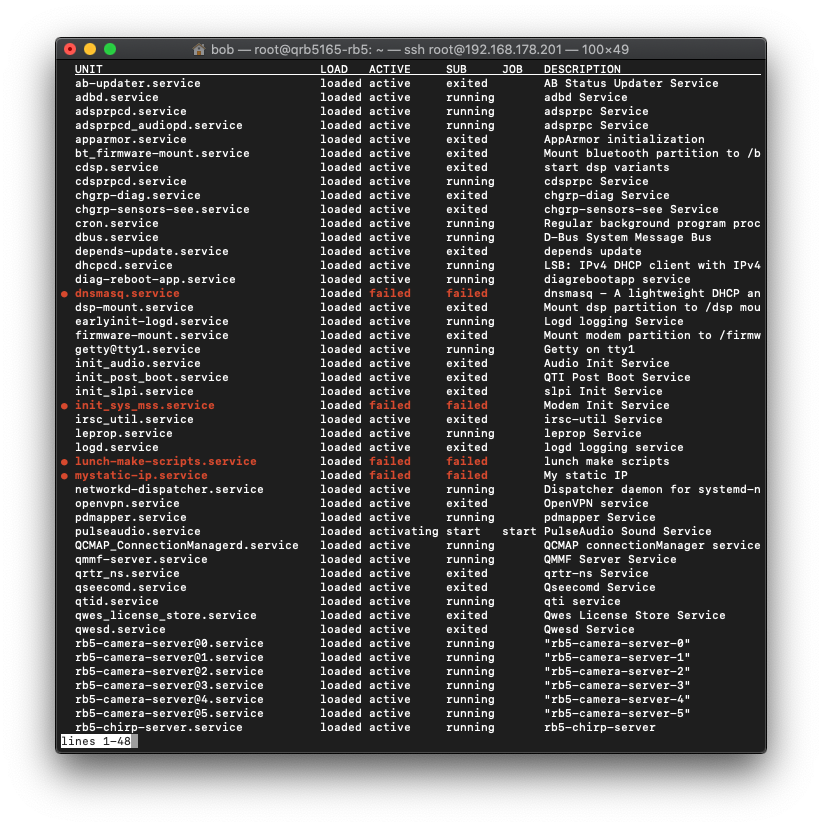
                

                Screenshot 2022-03-10 alle 17.56.18.png

                Some services are down like:
                ● dnsmasq.service loaded failed failed dnsmasq - A lightweight DHCP and caching DNS server
                ● lunch-make-scripts.service loaded failed failed lunch make scripts
                ● mystatic-ip.service loaded failed failed My static IP

                Somebody could please help me?

                Roberto Calvi

                Eric KatzfeyE 1 Reply Last reply
                0
                • RobertoR Roberto

                  @tom & @Eric-Katzfey

                  List of services: (command to show active services)

                  systemctl list-units --type=service
                  

                  Screenshot 2022-03-10 alle 17.56.18.png

                  Some services are down like:
                  ● dnsmasq.service loaded failed failed dnsmasq - A lightweight DHCP and caching DNS server
                  ● lunch-make-scripts.service loaded failed failed lunch make scripts
                  ● mystatic-ip.service loaded failed failed My static IP

                  Somebody could please help me?

                  Eric KatzfeyE Offline
                  Eric KatzfeyE Offline
                  Eric Katzfey
                  ModalAI Team
                  wrote on last edited by
                  #12

                  @Roberto We will take a look and see if we can put together a solution over the next few days.

                  1 Reply Last reply
                  0
                  • tomT Offline
                    tomT Offline
                    tom
                    admin
                    wrote on last edited by
                    #13

                    @Roberto This combo consistently works for me:

                    sh-4.4# cat /usr/bin/rb5-wifi-static-ip.sh 
                    #!/bin/bash
                    
                    # wait for wlan0 to get it's initial IP from router
                    rb5-net-check wlan0 192.168
                    
                    # set new IP
                    sudo ifconfig wlan0 192.168.1.150 netmask 255.255.255.0
                    sudo route add default gw 192.168.1.1 wlan0
                    
                    sh-4.4# cat /etc/systemd/system/rb5-wifi-static-ip.service 
                    [Unit]
                    Description=WLAN0 Static IP Service
                    After=wlan_daemon.service
                    
                    [Service]
                    ExecStart=/usr/bin/rb5-wifi-static-ip.sh
                    
                    [Install]
                    WantedBy=multi-user.target
                    

                    Basically adding the rb5-net-check call which waits for wlan0 to get an initial valid IP before proceeding.

                    1 Reply Last reply
                    0
                    • tomT Offline
                      tomT Offline
                      tom
                      admin
                      wrote on last edited by
                      #14

                      @Roberto Or a slightly cleaner solution would be to keep your same script and just have the service depend on the rb5-net-check.service that is already enabled by default if you're running PX4:

                      sh-4.4# cat /etc/systemd/system/rb5-wifi-static-ip.service 
                      [Unit]
                      Description=WLAN0 Static IP Service
                      After=rb5-net-check.service
                      
                      [Service]
                      ExecStart=/usr/bin/rb5-wifi-static-ip.sh
                      
                      [Install]
                      WantedBy=multi-user.target
                      
                      RobertoR 1 Reply Last reply
                      0
                      • tomT tom

                        @Roberto Or a slightly cleaner solution would be to keep your same script and just have the service depend on the rb5-net-check.service that is already enabled by default if you're running PX4:

                        sh-4.4# cat /etc/systemd/system/rb5-wifi-static-ip.service 
                        [Unit]
                        Description=WLAN0 Static IP Service
                        After=rb5-net-check.service
                        
                        [Service]
                        ExecStart=/usr/bin/rb5-wifi-static-ip.sh
                        
                        [Install]
                        WantedBy=multi-user.target
                        
                        RobertoR Offline
                        RobertoR Offline
                        Roberto
                        wrote on last edited by Roberto
                        #15

                        FINALLY SOLVED: Thanks to @tom
                        (added chmod and complete procedure for other users)

                        1. First create a script:
                        vi /usr/bin/rb5-wifi-static-ip.sh 
                        

                        Content of rb5-wifi-static-ip.sh script (with sample IP):

                        #!/bin/bash
                        
                        rb5_net='192.168'
                        drone_IP='192.168.178.201'
                        router_IP='192.168.178.1'
                        netmask_IP='255.255.255.0'
                        network_interface='wlan0'
                        
                        # wait for wlan to get it's initial IP from router
                        rb5-net-check $network_interface $rb5_net
                        
                        # set new IP
                        sudo ifconfig $network_interface $drone_IP netmask $netmask_IP
                        sudo route add default gw $router_IP $network_interface
                        
                        1. Give permission to script (if not, will give you message "Permission denied"):
                        chmod u+x /usr/bin/rb5-wifi-static-ip.sh
                        
                        1. Create a service:
                        vi /etc/systemd/system/rb5-wifi-static-ip.service
                        

                        Content of rb5-wifi-static-ip.service file:

                        [Unit]
                        Description=WLAN0 Static IP Service
                        After=wlan_daemon.service
                        
                        [Service]
                        ExecStart=/usr/bin/rb5-wifi-static-ip.sh
                        
                        [Install]
                        WantedBy=multi-user.target
                        
                        1. Enable this service when RB5 boots:
                        systemctl enable rb5-wifi-static-ip.service
                        

                        Restart RB5 and you will have a static IP!

                        Roberto Calvi

                        1 Reply Last reply
                        0
                        • tomT Offline
                          tomT Offline
                          tom
                          admin
                          wrote on last edited by
                          #16

                          @Roberto Thanks for your patience with this, I will make sure this script / service makes it into our next SDK release as well.

                          1 Reply Last reply
                          0
                          • M Offline
                            M Offline
                            mrawding
                            wrote on last edited by
                            #17

                            If anyone else is interested - I found a way to enable static ip's for ethernet and wlan interfaces.

                            You'll need to install a file like below under /etc/systemd/systetem/ and run the following commands:

                            systemctl enable ipconfig.service
                            systemctl disable dhcpcd.service
                            
                            [Unit]
                            Description=A description for your custom service goes here
                            Requires=systemd-networkd.service
                            After=systemd-networkd-wait-online.service
                            
                            [Service]
                            Type=simple
                            ExecStartPre=/bin/sleep 10
                            ExecStart=/bin/systemctl restart systemd-networkd.service
                            
                            
                            [Install]
                            WantedBy=multi-user.target
                            

                            You'll also need to add this file under /etc/systemd/network/wlan0.network

                            [Match]
                            Name=wlan0
                            
                            [Network]
                            Address=192.168.0.169/24
                            #DHCP=yes
                            

                            Simply installing this service will allow most routers to keep the rb5 address the same when assigning IPs for a lease. Just comment #Address and uncomment DHCP to use dhcp.

                            You will also need to make sure to add the gatway to the routing table:

                            route add default gw $router_IP $network_interface

                            this is best to be configured as a oneshot service where the service has the field Requires=ipconfig.service

                            1 Reply Last reply
                            0

                            Hello! It looks like you're interested in this conversation, but you don't have an account yet.

                            Getting fed up of having to scroll through the same posts each visit? When you register for an account, you'll always come back to exactly where you were before, and choose to be notified of new replies (either via email, or push notification). You'll also be able to save bookmarks and upvote posts to show your appreciation to other community members.

                            With your input, this post could be even better 💗

                            Register Login
                            Reply
                            • Reply as topic
                            Log in to reply
                            • Oldest to Newest
                            • Newest to Oldest
                            • Most Votes


                            ModalAI
                            Categories Recent Tags ModalAI.com Docs
                            © 2026 ModalAI® · Accelerating autonomy for smaller, smarter, safer drones · Powered by NodeBB
                            • Login

                            • Login or register to search.
                            • First post
                              Last post
                            0
                            • Categories
                            • Recent
                            • Tags
                            • Popular
                            • Users
                            • Groups