
Sensor Fusion Question w/ GPS, VIO, and downward distance sensor on Starling 2
-
Re: Running VIO with GPS active
Hi @Cliff-Wong ,
Following up on your reply in the post "Running VIO w/ GPS Active". I am flying a Starling 2 and have been unable to conclude how Modal handles various sensor input streams to PX4.
I see that the Starling 2 has a downward distance sensor, VIO, and GPS (in addition to IMU). This is where the confusion begins because I also see that default Starling PX4 parameters only have Vision enabled for heading, velocity, and position via EKF, that GPS is disabled & set to not exist, and that downward lidar sensor input is disabled.
Does the VOXL perform some sort of sensor fusion on these input sources, then send the output of fusion to PX4 through the vision topic such that vision encompasses GPS, downward distance sensor, and VIO? Or is it the case that the sensor streams other than VIO are actually ignored by PX4 and/or not sent by default (in which case I can simply enable the sensor input and update EKF parameters).
Could you provide more clarity and maybe any recommendation on how I could leverage the sensors in PX4?
-
Hi @Eric-Katzfey @Alex-Kushleyev , would y'all be able to answer the questions above?
Just to recap, I ordered the Starling 2 and the default PX4 parameters shown via QGC have pretty much everything but vision sensor input turned off. As far as I know, the Starling 2 comes with a GPS (no mag) and downward facing distance sensor. Both could be used as sensor input sources into PX4s EKF. So, I'm curious if y'all use those sensors as input into your VIO implementation as a sort of upstream sensor fusion. In which case I can leave those PX4 parameters as is
-
Hi @Eric-Katzfey @Alex-Kushleyev , would y'all be able to answer the questions above?
Just to recap, I ordered the Starling 2 and the default PX4 parameters shown via QGC have pretty much everything but vision sensor input turned off. As far as I know, the Starling 2 comes with a GPS (no mag) and downward facing distance sensor. Both could be used as sensor input sources into PX4s EKF. So, I'm curious if y'all use those sensors as input into your VIO implementation as a sort of upstream sensor fusion. In which case I can leave those PX4 parameters as is
@shawn_ricardo Historically, PX4 hasn't dealt well with GPS combined with VIO. That's supposedly not the case anymore but we haven't yet proven to ourselves that we can run them concurrently. So, we provide parameter sets that allow you to choose between different configurations. See them here: https://gitlab.com/voxl-public/voxl-sdk/utilities/voxl-px4-params/-/tree/master/params/v1.14/EKF2_helpers?ref_type=heads. But you are more than welcome to test with GPS and VIO concurrently to see how it works for you.
-
@shawn_ricardo Historically, PX4 hasn't dealt well with GPS combined with VIO. That's supposedly not the case anymore but we haven't yet proven to ourselves that we can run them concurrently. So, we provide parameter sets that allow you to choose between different configurations. See them here: https://gitlab.com/voxl-public/voxl-sdk/utilities/voxl-px4-params/-/tree/master/params/v1.14/EKF2_helpers?ref_type=heads. But you are more than welcome to test with GPS and VIO concurrently to see how it works for you.
-
@shawn_ricardo @Eric-Katzfey @Alex-Kushleyev
Hi!We are flying indoors, and trying to configure PX4 for our vertical position to relay on the downward distance sensor only.
following https://docs.modalai.com/rangefinders/#px4-autopilot-height-estimate-integration :
EKF2_RNG_CTRL: (0-->1) set to 1 to enable integration of the rangefinder data into EKF2's height estimate
EKF2_HGT_REF: (3-->2) set to 2 to use the rangefinder as the primary height reference.this was not enough, so in addition, we changed these:
EKF2_RNG_NOISE: 0.1-->0.01
EKF2_EV_CTRL 15-->13 (remove external vision sensor aiding from vertical position calc)
(EKF2_RNG_A_HMAX = 5)In any case we couldn't achieve usage of downward distance sensor in altitude estimation :
Thank you in advance! Meytal and Valentin
-
@shawn_ricardo @Eric-Katzfey @Alex-Kushleyev
Hi!We are flying indoors, and trying to configure PX4 for our vertical position to relay on the downward distance sensor only.
following https://docs.modalai.com/rangefinders/#px4-autopilot-height-estimate-integration :
EKF2_RNG_CTRL: (0-->1) set to 1 to enable integration of the rangefinder data into EKF2's height estimate
EKF2_HGT_REF: (3-->2) set to 2 to use the rangefinder as the primary height reference.this was not enough, so in addition, we changed these:
EKF2_RNG_NOISE: 0.1-->0.01
EKF2_EV_CTRL 15-->13 (remove external vision sensor aiding from vertical position calc)
(EKF2_RNG_A_HMAX = 5)In any case we couldn't achieve usage of downward distance sensor in altitude estimation :
Thank you in advance! Meytal and Valentin
@Eric-Katzfey any thoughts?
-
I haven't gotten around to this yet
From what I recall, I think the range sensor is disabled. So, try to enable that sensor itself and verify via mavlink inspector that the range data is being received as expected.
Then, once the range data exists, configure the EKF parameters to take as one of the sensor input sources the range values (what you've done above seems correct / along the correct direction).
I think it would be okay to enable vision as an input sensor source, as well. But maybe not GPS + Vision, from what @Eric-Katzfey had mentioned.
Or, you can allow for GPS input into EKF but make your GPS specific EKF parameters reject the GPS sensor input source outside of non-nominal conditions. By tuning the GPS EKF parameters to allow for only conditions that mimic strong GPS lock outside and reject GPS characteristics seen when inside (e.g., low GPS count).
-
I haven't gotten around to this yet
From what I recall, I think the range sensor is disabled. So, try to enable that sensor itself and verify via mavlink inspector that the range data is being received as expected.
Then, once the range data exists, configure the EKF parameters to take as one of the sensor input sources the range values (what you've done above seems correct / along the correct direction).
I think it would be okay to enable vision as an input sensor source, as well. But maybe not GPS + Vision, from what @Eric-Katzfey had mentioned.
Or, you can allow for GPS input into EKF but make your GPS specific EKF parameters reject the GPS sensor input source outside of non-nominal conditions. By tuning the GPS EKF parameters to allow for only conditions that mimic strong GPS lock outside and reject GPS characteristics seen when inside (e.g., low GPS count).
@shawn_ricardo
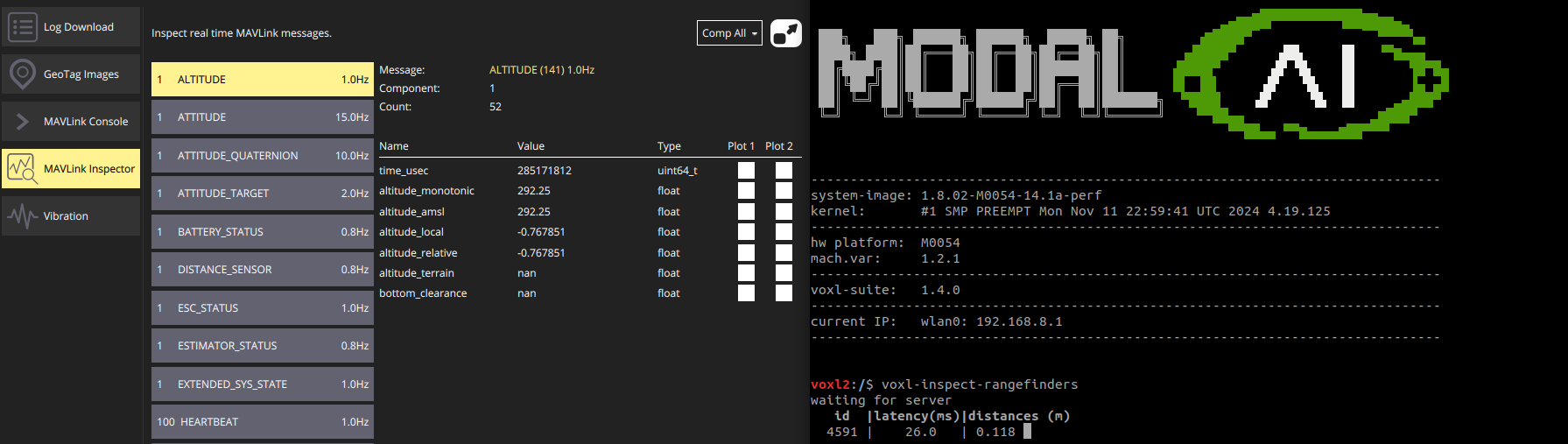
Thank you for your response,My GPS is not connected, and the px4 does get the distance sensor (I can see it through the qground app, matching the same values as in the right terminal "voxl-inspect-rangefinders")
Any other suggestions?
-
@shawn_ricardo
Thank you for your response,My GPS is not connected, and the px4 does get the distance sensor (I can see it through the qground app, matching the same values as in the right terminal "voxl-inspect-rangefinders")
Any other suggestions?
You still need vision input, so undo
EKF2_EV_CTRL 15-->13 (remove external vision sensor aiding from vertical position calc)to ensure vision is aiding 3D position, yaw, and velocity. Then select range sensor as primary height input (EKF2_HGT_REF).
for your purpose, you only want vision + range_finder as input sources into EKF (obv. you want to keep IMU data; no baro, no GPS). So ensure EKF parameters are turned on for only vision + range.
Prior to flight, ensure the local_position supplied to PX4 from voxl qvio exists, that the position data makes sense (upon power on, should be 0s for xyzrpy on level ground), and that picking up the drone and moving around physically known distances (use a measuring tape or something) results in a corresponding update to /fmu/out/vehicle_local_position (I think that's the correct ROS2 topic) or instead of /fmu/out/vehicle_local_position, you can mavlink inspect local position
For the Starling 2, since default params were vision only, my intent would be to turn on the range sensor and then update EKF2_HGT_REF to range. So maybe reset your parameters back to default Starling 2 params and make those adjustments?
-
You still need vision input, so undo
EKF2_EV_CTRL 15-->13 (remove external vision sensor aiding from vertical position calc)to ensure vision is aiding 3D position, yaw, and velocity. Then select range sensor as primary height input (EKF2_HGT_REF).
for your purpose, you only want vision + range_finder as input sources into EKF (obv. you want to keep IMU data; no baro, no GPS). So ensure EKF parameters are turned on for only vision + range.
Prior to flight, ensure the local_position supplied to PX4 from voxl qvio exists, that the position data makes sense (upon power on, should be 0s for xyzrpy on level ground), and that picking up the drone and moving around physically known distances (use a measuring tape or something) results in a corresponding update to /fmu/out/vehicle_local_position (I think that's the correct ROS2 topic) or instead of /fmu/out/vehicle_local_position, you can mavlink inspect local position
For the Starling 2, since default params were vision only, my intent would be to turn on the range sensor and then update EKF2_HGT_REF to range. So maybe reset your parameters back to default Starling 2 params and make those adjustments?
@shawn_ricardo Hi!
To my understanding EKF2_EV_CTRL 15-->13 only remove EV from pos_z estimation, so it should be ok to do that if the range sensor is active. However, I did revert all parameters to the default settings (matching the VOXL-SDK definitions).
As my attempts to integrate the range-sensor data in altitude estimation did not seem to succeed, I decided to try and integrate the range-sensor in the VIO solution.
I created a version of the voxl-qvio-server in which pos_z estimation from VIO is replaced by the equivalent value based on the rangefinder:s.T_imu_wrt_vio[2] = - down_range_m;
This seem to work better, however it is a workaround and not a full solution. My current experiments are performed in low altitude (~40-90 cm), so I am not concerned with the limited range of the rangefinder sensor.
I'm not sure what is the current implemented behaviour when EV estimation is not good, there should be some fall-back relying on the range sensor and imu. From my short experience with such cases of poor EV estimation mid-flight, the drone just crushes or jump to the ceiling with no control.
Any suggestions or further explanations will be much appreciated. Thank you


Reading along? Create a free ModalAI Forum account to join in.
With an account you can reply, ask your own question, get an email when a ModalAI engineer answers, and mark the reply that solved it. Your place in each thread is saved between visits.
Questions about VOXL, Flight Core, ESCs and ModalAI drones are answered here by the engineers who build them.
Register Login