
VOXL FPV Racing 4-in-1 ESC with flight core v2 and voxl2
-
@Jetson-Nano How are the VOXL_ESC parameters set on your FCv2? There could be a UART baud rate mismatch between what FCv2 is using and what the ESC is using.
@Jetson-Nano , if the voxl_esc driver is started by PX4 running on the Flight Core, it should print out debugging information to the UART console. The log below was taken from PX4 running on VOXL2 DSP, but the output should be the same when using Flight Core V2.
Please also note that the Flight Core (V2), when powered up, starts immediately (as opposed to VOXL2 booting takes a few seconds), so FC V2 will try to detect the ESC before the ESC exits bootloader (which takes 1 second after power is applied) and will fail to detect the ESC. This was fixed in our FC V2 drone config, please check your voxl-esc driver behavior. Here is the commit that added the delay of 1.5 seconds before starting voxl esc driver on FC V2:
- https://github.com/modalai/px4-firmware/pull/70/commits/55742d298bf9241a2af5aa2c7ba3a26788073356
- https://github.com/modalai/px4-firmware/pull/70/commits/1c11e2e0ac3fcc19cb45ab59292b3cf5f4fdb348
(voxl-esc driver log from VOXL2 DSP is below)
INFO [muorb] SLPI: VOXL_ESC: Starting VOXL ESC driver INFO [muorb] SLPI: VOXL_ESC: Opening UART ESC device 2, baud rate 2000000 INFO [muorb] SLPI: VOXL_ESC: Successfully opened UART ESC device INFO [muorb] SLPI: VOXL_ESC: Detecting ESCs... INFO [muorb] SLPI: VOXL_ESC: ESC ID : 0 INFO [muorb] SLPI: VOXL_ESC: Board Type : 37: ModalAi 4-in-1 ESC (M0134-1) INFO [muorb] SLPI: VOXL_ESC: Unique ID : 0x203330385246571900480024 INFO [muorb] SLPI: VOXL_ESC: Firmware : version 39, hash eb6fb500 INFO [muorb] SLPI: VOXL_ESC: Bootloader : version 183, hash b4fa2cf8 INFO [muorb] SLPI: VOXL_ESC: Reply time : 1646us INFO [muorb] SLPI: VOXL_ESC: INFO [muorb] SLPI: VOXL_ESC: ESC ID : 1 INFO [muorb] SLPI: VOXL_ESC: Board Type : 37: ModalAi 4-in-1 ESC (M0134-1) INFO [muorb] SLPI: VOXL_ESC: Unique ID : 0x2033303852465719004D004D INFO [muorb] SLPI: VOXL_ESC: Firmware : version 39, hash eb6fb500 INFO [muorb] SLPI: VOXL_ESC: Bootloader : version 183, hash b4fa2cf8 INFO [muorb] SLPI: VOXL_ESC: Reply time : 621us INFO [muorb] SLPI: VOXL_ESC: INFO [muorb] SLPI: VOXL_ESC: ESC ID : 2 INFO [muorb] SLPI: VOXL_ESC: Board Type : 37: ModalAi 4-in-1 ESC (M0134-1) INFO [muorb] SLPI: VOXL_ESC: Unique ID : 0x203330385246571900500042 INFO [muorb] SLPI: VOXL_ESC: Firmware : version 39, hash eb6fb500 INFO [muorb] SLPI: VOXL_ESC: Bootloader : versiINFO [qshell] Send cmd: 'voxl_esc start' INFO [muorb] SLPI: VOXL_ESC: Reply time : 1120us INFO [muorb] SLPI: VOXL_ESC: INFO [muorb] SLPI: VOXL_ESC: ESC ID : 3 INFO [muorb] SLPI: VOXL_ESC: Board Type : 37: ModalAi 4-in-1 ESC (M0134-1) INFO [muorb] SLPI: VOXL_ESC: Unique ID : 0x2033303852465719004D0050 INFO [muorb] SLPI: VOXL_ESC: Firmware : version 39, hash eb6fb500 INFO [muorb] SLPI: VOXL_ESC: Bootloader : version 183, hash b4fa2cf8 INFO [muorb] SLPI: VOXL_ESC: Reply time : 617us INFO [muorb] SLPI: VOXL_ESC: INFO [muorb] SLPI: VOXL_ESC: Use extened rpm packet : 1 INFO [muorb] SLPI: VOXL_ESC: All ESCs successfully detected -
@Jetson-Nano , if the voxl_esc driver is started by PX4 running on the Flight Core, it should print out debugging information to the UART console. The log below was taken from PX4 running on VOXL2 DSP, but the output should be the same when using Flight Core V2.
Please also note that the Flight Core (V2), when powered up, starts immediately (as opposed to VOXL2 booting takes a few seconds), so FC V2 will try to detect the ESC before the ESC exits bootloader (which takes 1 second after power is applied) and will fail to detect the ESC. This was fixed in our FC V2 drone config, please check your voxl-esc driver behavior. Here is the commit that added the delay of 1.5 seconds before starting voxl esc driver on FC V2:
- https://github.com/modalai/px4-firmware/pull/70/commits/55742d298bf9241a2af5aa2c7ba3a26788073356
- https://github.com/modalai/px4-firmware/pull/70/commits/1c11e2e0ac3fcc19cb45ab59292b3cf5f4fdb348
(voxl-esc driver log from VOXL2 DSP is below)
INFO [muorb] SLPI: VOXL_ESC: Starting VOXL ESC driver INFO [muorb] SLPI: VOXL_ESC: Opening UART ESC device 2, baud rate 2000000 INFO [muorb] SLPI: VOXL_ESC: Successfully opened UART ESC device INFO [muorb] SLPI: VOXL_ESC: Detecting ESCs... INFO [muorb] SLPI: VOXL_ESC: ESC ID : 0 INFO [muorb] SLPI: VOXL_ESC: Board Type : 37: ModalAi 4-in-1 ESC (M0134-1) INFO [muorb] SLPI: VOXL_ESC: Unique ID : 0x203330385246571900480024 INFO [muorb] SLPI: VOXL_ESC: Firmware : version 39, hash eb6fb500 INFO [muorb] SLPI: VOXL_ESC: Bootloader : version 183, hash b4fa2cf8 INFO [muorb] SLPI: VOXL_ESC: Reply time : 1646us INFO [muorb] SLPI: VOXL_ESC: INFO [muorb] SLPI: VOXL_ESC: ESC ID : 1 INFO [muorb] SLPI: VOXL_ESC: Board Type : 37: ModalAi 4-in-1 ESC (M0134-1) INFO [muorb] SLPI: VOXL_ESC: Unique ID : 0x2033303852465719004D004D INFO [muorb] SLPI: VOXL_ESC: Firmware : version 39, hash eb6fb500 INFO [muorb] SLPI: VOXL_ESC: Bootloader : version 183, hash b4fa2cf8 INFO [muorb] SLPI: VOXL_ESC: Reply time : 621us INFO [muorb] SLPI: VOXL_ESC: INFO [muorb] SLPI: VOXL_ESC: ESC ID : 2 INFO [muorb] SLPI: VOXL_ESC: Board Type : 37: ModalAi 4-in-1 ESC (M0134-1) INFO [muorb] SLPI: VOXL_ESC: Unique ID : 0x203330385246571900500042 INFO [muorb] SLPI: VOXL_ESC: Firmware : version 39, hash eb6fb500 INFO [muorb] SLPI: VOXL_ESC: Bootloader : versiINFO [qshell] Send cmd: 'voxl_esc start' INFO [muorb] SLPI: VOXL_ESC: Reply time : 1120us INFO [muorb] SLPI: VOXL_ESC: INFO [muorb] SLPI: VOXL_ESC: ESC ID : 3 INFO [muorb] SLPI: VOXL_ESC: Board Type : 37: ModalAi 4-in-1 ESC (M0134-1) INFO [muorb] SLPI: VOXL_ESC: Unique ID : 0x2033303852465719004D0050 INFO [muorb] SLPI: VOXL_ESC: Firmware : version 39, hash eb6fb500 INFO [muorb] SLPI: VOXL_ESC: Bootloader : version 183, hash b4fa2cf8 INFO [muorb] SLPI: VOXL_ESC: Reply time : 617us INFO [muorb] SLPI: VOXL_ESC: INFO [muorb] SLPI: VOXL_ESC: Use extened rpm packet : 1 INFO [muorb] SLPI: VOXL_ESC: All ESCs successfully detected@Alex-Kushleyev Thank you for reverting back. I will verify this and get back.
I changed the firmware version to the
voxl-fpv-devstill the FC is not detecting the ESC.if i start esc through voxl_esc start , it is starting
could please verify the parameters I mentioned.
nsh> voxl_esc status INFO [voxl_esc] Max update rate: 0 Hz INFO [voxl_esc] Outputs on: no INFO [voxl_esc] UART port: /dev/ttyS4 INFO [voxl_esc] UART open: no INFO [voxl_esc] INFO [voxl_esc] Params: VOXL_ESC_CONFIG: 1 INFO [voxl_esc] Params: VOXL_ESC_MODE: 0 INFO [voxl_esc] Params: VOXL_ESC_BAUD: 250000 INFO [voxl_esc] Params: VOXL_ESC_FUNC1: 101 INFO [voxl_esc] Params: VOXL_ESC_FUNC2: 104 INFO [voxl_esc] Params: VOXL_ESC_FUNC3: 102 INFO [voxl_esc] Params: VOXL_ESC_FUNC4: 103 INFO [voxl_esc] Params: VOXL_ESC_SDIR1: 0 INFO [voxl_esc] Params: VOXL_ESC_SDIR2: 0 INFO [voxl_esc] Params: VOXL_ESC_SDIR3: 0 INFO [voxl_esc] Params: VOXL_ESC_SDIR4: 0 INFO [voxl_esc] Params: VOXL_ESC_RPM_MIN: 5500 INFO [voxl_esc] Params: VOXL_ESC_RPM_MAX: 15000 INFO [voxl_esc] Params: VOXL_ESC_T_PERC: 90 INFO [voxl_esc] Params: VOXL_ESC_T_DEAD: 20 INFO [voxl_esc] Params: VOXL_ESC_T_EXPO: 35 INFO [voxl_esc] Params: VOXL_ESC_T_MINF: 0.150000 INFO [voxl_esc] Params: VOXL_ESC_T_COSP: 0.990000 INFO [voxl_esc] Params: VOXL_ESC_VLOG: 0 INFO [voxl_esc] Params: VOXL_ESC_PUB_BST: 1 INFO [voxl_esc] Params: VOXL_ESC_T_WARN: 0 INFO [voxl_esc] Params: VOXL_ESC_T_OVER: 0 INFO [voxl_esc] Params: GPIO_CTL_CH: 0 INFO [voxl_esc] INFO [voxl_esc] -- ID: 0 INFO [voxl_esc] Motor: 1 INFO [voxl_esc] Direction: 1 INFO [voxl_esc] State: 0 INFO [voxl_esc] Requested: 0 RPM INFO [voxl_esc] Measured: 0 RPM INFO [voxl_esc] Command Counter: 0 INFO [voxl_esc] Voltage: 0.000000 VDC INFO [voxl_esc] INFO [voxl_esc] -- ID: 1 INFO [voxl_esc] Motor: 4 INFO [voxl_esc] Direction: 1 INFO [voxl_esc] State: 0 INFO [voxl_esc] Requested: 0 RPM INFO [voxl_esc] Measured: 0 RPM INFO [voxl_esc] Command Counter: 0 INFO [voxl_esc] Voltage: 0.000000 VDC INFO [voxl_esc] INFO [voxl_esc] -- ID: 2 INFO [voxl_esc] Motor: 2 INFO [voxl_esc] Direction: 1 INFO [voxl_esc] State: 0 INFO [voxl_esc] Requested: 0 RPM INFO [voxl_esc] Measured: 0 RPM INFO [voxl_esc] Command Counter: 0 INFO [voxl_esc] Voltage: 0.000000 VDC INFO [voxl_esc] INFO [voxl_esc] -- ID: 3 INFO [voxl_esc] Motor: 3 INFO [voxl_esc] Direction: 1 INFO [voxl_esc] State: 0 INFO [voxl_esc] Requested: 0 RPM INFO [voxl_esc] Measured: 0 RPM INFO [voxl_esc] Command Counter: 0 INFO [voxl_esc] Voltage: 0.000000 VDC INFO [voxl_esc] voxl_esc: cycle: 0 events, 0us elapsed, 0.00us avg, min 0us max 0us 0.000us rms voxl_esc: output update interval: 0 events, 0.00us avg, min 0us max 0us 0.000us rms INFO [mixer_module] Param prefix: VOXL_ESC control latency: 0 events, 0us elapsed, 0.00us avg, min 0us max 0us 0.000us rms Channel Configuration: Channel 0: func: 0, value: 0, failsafe: 0, disarmed: 0, min: 5500, max: 15000 Channel 1: func: 0, value: 0, failsafe: 0, disarmed: 0, min: 5500, max: 15000 Channel 2: func: 0, value: 0, failsafe: 0, disarmed: 0, min: 5500, max: 15000 Channel 3: func: 0, value: 0, failsafe: 0, disarmed: 0, min: 5500, max: 15000 -
@Jetson-Nano How are the VOXL_ESC parameters set on your FCv2? There could be a UART baud rate mismatch between what FCv2 is using and what the ESC is using.
Voxl2 is connected to Flight core v2 through telem 1.
ESC is connected to flight core through telem 2.
the parameters are the following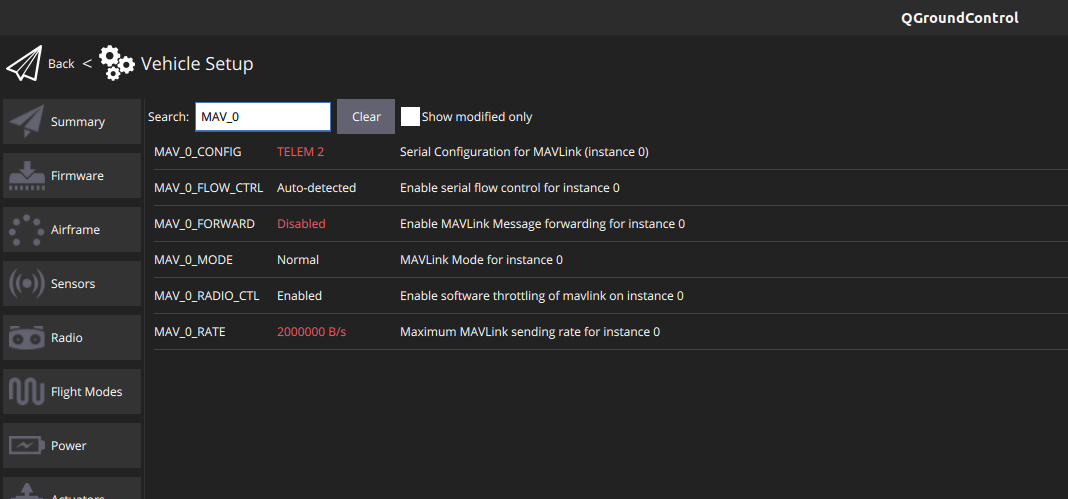
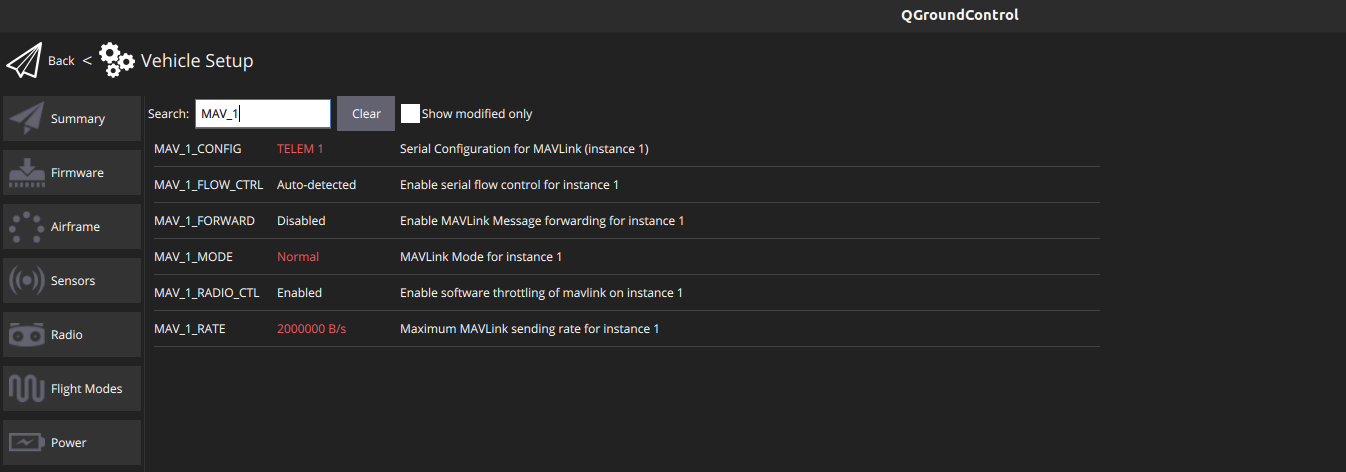
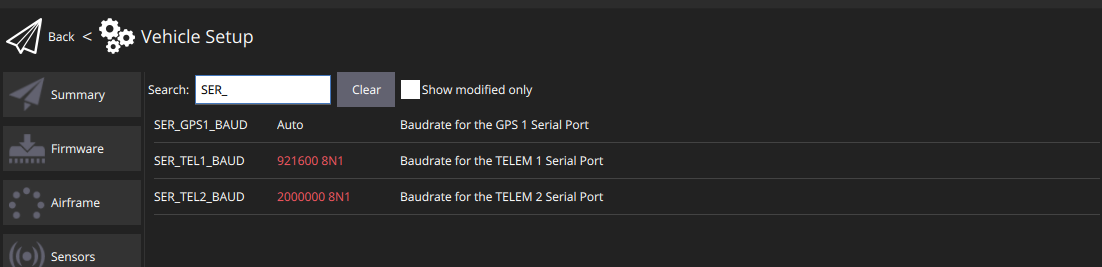
-
@Alex-Kushleyev Thank you for reverting back. I will verify this and get back.
I changed the firmware version to the
voxl-fpv-devstill the FC is not detecting the ESC.if i start esc through voxl_esc start , it is starting
could please verify the parameters I mentioned.
nsh> voxl_esc status INFO [voxl_esc] Max update rate: 0 Hz INFO [voxl_esc] Outputs on: no INFO [voxl_esc] UART port: /dev/ttyS4 INFO [voxl_esc] UART open: no INFO [voxl_esc] INFO [voxl_esc] Params: VOXL_ESC_CONFIG: 1 INFO [voxl_esc] Params: VOXL_ESC_MODE: 0 INFO [voxl_esc] Params: VOXL_ESC_BAUD: 250000 INFO [voxl_esc] Params: VOXL_ESC_FUNC1: 101 INFO [voxl_esc] Params: VOXL_ESC_FUNC2: 104 INFO [voxl_esc] Params: VOXL_ESC_FUNC3: 102 INFO [voxl_esc] Params: VOXL_ESC_FUNC4: 103 INFO [voxl_esc] Params: VOXL_ESC_SDIR1: 0 INFO [voxl_esc] Params: VOXL_ESC_SDIR2: 0 INFO [voxl_esc] Params: VOXL_ESC_SDIR3: 0 INFO [voxl_esc] Params: VOXL_ESC_SDIR4: 0 INFO [voxl_esc] Params: VOXL_ESC_RPM_MIN: 5500 INFO [voxl_esc] Params: VOXL_ESC_RPM_MAX: 15000 INFO [voxl_esc] Params: VOXL_ESC_T_PERC: 90 INFO [voxl_esc] Params: VOXL_ESC_T_DEAD: 20 INFO [voxl_esc] Params: VOXL_ESC_T_EXPO: 35 INFO [voxl_esc] Params: VOXL_ESC_T_MINF: 0.150000 INFO [voxl_esc] Params: VOXL_ESC_T_COSP: 0.990000 INFO [voxl_esc] Params: VOXL_ESC_VLOG: 0 INFO [voxl_esc] Params: VOXL_ESC_PUB_BST: 1 INFO [voxl_esc] Params: VOXL_ESC_T_WARN: 0 INFO [voxl_esc] Params: VOXL_ESC_T_OVER: 0 INFO [voxl_esc] Params: GPIO_CTL_CH: 0 INFO [voxl_esc] INFO [voxl_esc] -- ID: 0 INFO [voxl_esc] Motor: 1 INFO [voxl_esc] Direction: 1 INFO [voxl_esc] State: 0 INFO [voxl_esc] Requested: 0 RPM INFO [voxl_esc] Measured: 0 RPM INFO [voxl_esc] Command Counter: 0 INFO [voxl_esc] Voltage: 0.000000 VDC INFO [voxl_esc] INFO [voxl_esc] -- ID: 1 INFO [voxl_esc] Motor: 4 INFO [voxl_esc] Direction: 1 INFO [voxl_esc] State: 0 INFO [voxl_esc] Requested: 0 RPM INFO [voxl_esc] Measured: 0 RPM INFO [voxl_esc] Command Counter: 0 INFO [voxl_esc] Voltage: 0.000000 VDC INFO [voxl_esc] INFO [voxl_esc] -- ID: 2 INFO [voxl_esc] Motor: 2 INFO [voxl_esc] Direction: 1 INFO [voxl_esc] State: 0 INFO [voxl_esc] Requested: 0 RPM INFO [voxl_esc] Measured: 0 RPM INFO [voxl_esc] Command Counter: 0 INFO [voxl_esc] Voltage: 0.000000 VDC INFO [voxl_esc] INFO [voxl_esc] -- ID: 3 INFO [voxl_esc] Motor: 3 INFO [voxl_esc] Direction: 1 INFO [voxl_esc] State: 0 INFO [voxl_esc] Requested: 0 RPM INFO [voxl_esc] Measured: 0 RPM INFO [voxl_esc] Command Counter: 0 INFO [voxl_esc] Voltage: 0.000000 VDC INFO [voxl_esc] voxl_esc: cycle: 0 events, 0us elapsed, 0.00us avg, min 0us max 0us 0.000us rms voxl_esc: output update interval: 0 events, 0.00us avg, min 0us max 0us 0.000us rms INFO [mixer_module] Param prefix: VOXL_ESC control latency: 0 events, 0us elapsed, 0.00us avg, min 0us max 0us 0.000us rms Channel Configuration: Channel 0: func: 0, value: 0, failsafe: 0, disarmed: 0, min: 5500, max: 15000 Channel 1: func: 0, value: 0, failsafe: 0, disarmed: 0, min: 5500, max: 15000 Channel 2: func: 0, value: 0, failsafe: 0, disarmed: 0, min: 5500, max: 15000 Channel 3: func: 0, value: 0, failsafe: 0, disarmed: 0, min: 5500, max: 15000@Jetson-Nano said in VOXL FPV Racing 4-in-1 ESC with flight core v2 and voxl2:
if i start esc through voxl_esc start , it is starting
Can you please provide the debug prints that
voxl_escdriver outputs when you callvoxl_esc start?Alex
-
@Jetson-Nano said in VOXL FPV Racing 4-in-1 ESC with flight core v2 and voxl2:
if i start esc through voxl_esc start , it is starting
Can you please provide the debug prints that
voxl_escdriver outputs when you callvoxl_esc start?Alex
@Alex-Kushleyev When I run it for sometime it is makes the ESC blink once.
then once again if I run the command it gives the following statement
Error [voxl_esc] Task already running -
@Alex-Kushleyev When I run it for sometime it is makes the ESC blink once.
then once again if I run the command it gives the following statement
Error [voxl_esc] Task already running@Jetson-Nano , you can stop the task and run it again or just look at the console output when you power on FC V2, so you see what happens when
voxl_esctask prints when it start for the first time. -
@Jetson-Nano , you can stop the task and run it again or just look at the console output when you power on FC V2, so you see what happens when
voxl_esctask prints when it start for the first time.nsh> voxl_esc stop ERROR [voxl_esc] timeout, forcing stop ERROR [voxl_esc] failed restoring uart to original state ERROR [voxl_esc] error closing uart nsh> voxl_esc start ERROR [px4_work_queue] wq:ttyS4 not available ERROR [px4_work_queue] init failed INFO [voxl_esc] Starting VOXL ESC driver INFO [voxl_esc] Params: VOXL_ESC_CONFIG: 1 INFO [voxl_esc] Params: VOXL_ESC_MODE: 0 INFO [voxl_esc] Params: VOXL_ESC_BAUD: 250000 INFO [voxl_esc] Params: VOXL_ESC_FUNC1: 101 INFO [voxl_esc] Params: VOXL_ESC_FUNC2: 104 INFO [voxl_esc] Params: VOXL_ESC_FUNC3: 102 INFO [voxl_esc] Params: VOXL_ESC_FUNC4: 103 INFO [voxl_esc] Params: VOXL_ESC_SDIR1: 0 INFO [voxl_esc] Params: VOXL_ESC_SDIR2: 0 INFO [voxl_esc] Params: VOXL_ESC_SDIR3: 0 INFO [voxl_esc] Params: VOXL_ESC_SDIR4: 0 INFO [voxl_esc] Params: VOXL_ESC_RPM_MIN: 5500 INFO [voxl_esc] Params: VOXL_ESC_RPM_MAX: 15000 INFO [voxl_esc] Params: VOXL_ESC_T_PERC: 90 INFO [voxl_esc] Params: VOXL_ESC_T_DEAD: 20 INFO [voxl_esc] Params: VOXL_ESC_T_EXPO: 35 INFO [voxl_esc] Params: VOXL_ESC_T_MINF: 0.150000 INFO [voxl_esc] Params: VOXL_ESC_T_COSP: 0.990000 INFO [voxl_esc] Params: VOXL_ESC_VLOG: 0 INFO [voxl_esc] Params: VOXL_ESC_PUB_BST: 1 INFO [voxl_esc] Params: VOXL_ESC_T_WARN: 0 INFO [voxl_esc] Params: VOXL_ESC_T_OVER: 0 INFO [voxl_esc] Params: GPIO_CTL_CH: 0 nsh>can you verify whether it is a parameter related error. I have mentioned the parameters in the above thread.
-
nsh> voxl_esc stop
ERROR [voxl_esc] timeout, forcing stop
ERROR [voxl_esc] failed restoring uart to original state
ERROR [voxl_esc] error closing uart
nsh> voxl_esc start
ERROR [px4_work_queue] wq:ttyS4 not available
ERROR [px4_work_queue] init failed
INFO  [voxl_esc] Starting VOXL ESC driver
INFO  [voxl_esc] Params: VOXL_ESC_CONFIG: 1
INFO  [voxl_esc] Params: VOXL_ESC_MODE: 0
INFO  [voxl_esc] Params: VOXL_ESC_BAUD: 250000
INFO  [voxl_esc] Params: VOXL_ESC_FUNC1: 101
INFO  [voxl_esc] Params: VOXL_ESC_FUNC2: 104
INFO  [voxl_esc] Params: VOXL_ESC_FUNC3: 102
INFO  [voxl_esc] Params: VOXL_ESC_FUNC4: 103
INFO  [voxl_esc] Params: VOXL_ESC_SDIR1: 0
INFO  [voxl_esc] Params: VOXL_ESC_SDIR2: 0
INFO  [voxl_esc] Params: VOXL_ESC_SDIR3: 0
INFO  [voxl_esc] Params: VOXL_ESC_SDIR4: 0
INFO  [voxl_esc] Params: VOXL_ESC_RPM_MIN: 5500
INFO  [voxl_esc] Params: VOXL_ESC_RPM_MAX: 15000
INFO  [voxl_esc] Params: VOXL_ESC_T_PERC: 90
INFO  [voxl_esc] Params: VOXL_ESC_T_DEAD: 20
INFO  [voxl_esc] Params: VOXL_ESC_T_EXPO: 35
INFO  [voxl_esc] Params: VOXL_ESC_T_MINF: 0.150000
INFO  [voxl_esc] Params: VOXL_ESC_T_COSP: 0.990000
INFO  [voxl_esc] Params: VOXL_ESC_VLOG: 0
INFO  [voxl_esc] Params: VOXL_ESC_PUB_BST: 1
INFO  [voxl_esc] Params: VOXL_ESC_T_WARN: 0
INFO  [voxl_esc] Params: VOXL_ESC_T_OVER: 0
INFO  [voxl_esc] Params: GPIO_CTL_CH: 0
nsh>
can you verify whether it is a parameter related error. I have mentioned the parameters in the above thread.
@Jetson-Nano said in VOXL FPV Racing 4-in-1 ESC with flight core v2 and voxl2:
ERROR [px4_work_queue] wq:ttyS4 not available
the error above seems like an issue.
Also is your ESC actually running at 250K baud rate? Did you verify this using
voxl-esctools?Additionally, it seems the
voxl_escdriver does not produce the prints I was expecting, let me check to make sure the FC V2 is using the latestvoxl_escimplementation.Alex
-
@Jetson-Nano said in VOXL FPV Racing 4-in-1 ESC with flight core v2 and voxl2:
ERROR [px4_work_queue] wq:ttyS4 not available
the error above seems like an issue.
Also is your ESC actually running at 250K baud rate? Did you verify this using
voxl-esctools?Additionally, it seems the
voxl_escdriver does not produce the prints I was expecting, let me check to make sure the FC V2 is using the latestvoxl_escimplementation.Alex
@Alex-Kushleyev
Yes it is running in the 250k baud rate.
I did not verify with the voxl-esc tools. I directly connected it to the FC.
I am using the voxl-fpv-dev version of px4 -
@Alex-Kushleyev
Yes it is running in the 250k baud rate.
I did not verify with the voxl-esc tools. I directly connected it to the FC.
I am using the voxl-fpv-dev version of px4@Jetson-Nano , what do you mean
voxl-fpv-devversion of px4? can you provide the link to the exact release? -
@Jetson-Nano , what do you mean
voxl-fpv-devversion of px4? can you provide the link to the exact release? -
@Jetson-Nano , if the voxl_esc driver is started by PX4 running on the Flight Core, it should print out debugging information to the UART console. The log below was taken from PX4 running on VOXL2 DSP, but the output should be the same when using Flight Core V2.
Please also note that the Flight Core (V2), when powered up, starts immediately (as opposed to VOXL2 booting takes a few seconds), so FC V2 will try to detect the ESC before the ESC exits bootloader (which takes 1 second after power is applied) and will fail to detect the ESC. This was fixed in our FC V2 drone config, please check your voxl-esc driver behavior. Here is the commit that added the delay of 1.5 seconds before starting voxl esc driver on FC V2:
- https://github.com/modalai/px4-firmware/pull/70/commits/55742d298bf9241a2af5aa2c7ba3a26788073356
- https://github.com/modalai/px4-firmware/pull/70/commits/1c11e2e0ac3fcc19cb45ab59292b3cf5f4fdb348
(voxl-esc driver log from VOXL2 DSP is below)
INFO [muorb] SLPI: VOXL_ESC: Starting VOXL ESC driver INFO [muorb] SLPI: VOXL_ESC: Opening UART ESC device 2, baud rate 2000000 INFO [muorb] SLPI: VOXL_ESC: Successfully opened UART ESC device INFO [muorb] SLPI: VOXL_ESC: Detecting ESCs... INFO [muorb] SLPI: VOXL_ESC: ESC ID : 0 INFO [muorb] SLPI: VOXL_ESC: Board Type : 37: ModalAi 4-in-1 ESC (M0134-1) INFO [muorb] SLPI: VOXL_ESC: Unique ID : 0x203330385246571900480024 INFO [muorb] SLPI: VOXL_ESC: Firmware : version 39, hash eb6fb500 INFO [muorb] SLPI: VOXL_ESC: Bootloader : version 183, hash b4fa2cf8 INFO [muorb] SLPI: VOXL_ESC: Reply time : 1646us INFO [muorb] SLPI: VOXL_ESC: INFO [muorb] SLPI: VOXL_ESC: ESC ID : 1 INFO [muorb] SLPI: VOXL_ESC: Board Type : 37: ModalAi 4-in-1 ESC (M0134-1) INFO [muorb] SLPI: VOXL_ESC: Unique ID : 0x2033303852465719004D004D INFO [muorb] SLPI: VOXL_ESC: Firmware : version 39, hash eb6fb500 INFO [muorb] SLPI: VOXL_ESC: Bootloader : version 183, hash b4fa2cf8 INFO [muorb] SLPI: VOXL_ESC: Reply time : 621us INFO [muorb] SLPI: VOXL_ESC: INFO [muorb] SLPI: VOXL_ESC: ESC ID : 2 INFO [muorb] SLPI: VOXL_ESC: Board Type : 37: ModalAi 4-in-1 ESC (M0134-1) INFO [muorb] SLPI: VOXL_ESC: Unique ID : 0x203330385246571900500042 INFO [muorb] SLPI: VOXL_ESC: Firmware : version 39, hash eb6fb500 INFO [muorb] SLPI: VOXL_ESC: Bootloader : versiINFO [qshell] Send cmd: 'voxl_esc start' INFO [muorb] SLPI: VOXL_ESC: Reply time : 1120us INFO [muorb] SLPI: VOXL_ESC: INFO [muorb] SLPI: VOXL_ESC: ESC ID : 3 INFO [muorb] SLPI: VOXL_ESC: Board Type : 37: ModalAi 4-in-1 ESC (M0134-1) INFO [muorb] SLPI: VOXL_ESC: Unique ID : 0x2033303852465719004D0050 INFO [muorb] SLPI: VOXL_ESC: Firmware : version 39, hash eb6fb500 INFO [muorb] SLPI: VOXL_ESC: Bootloader : version 183, hash b4fa2cf8 INFO [muorb] SLPI: VOXL_ESC: Reply time : 617us INFO [muorb] SLPI: VOXL_ESC: INFO [muorb] SLPI: VOXL_ESC: Use extened rpm packet : 1 INFO [muorb] SLPI: VOXL_ESC: All ESCs successfully detected@Alex-Kushleyev here you had mentioned a version where the change has been made with respect to the delay.
https://forum.modalai.com/post/21951 -
@Alex-Kushleyev here you had mentioned a version where the change has been made with respect to the delay.
https://forum.modalai.com/post/21951@Jetson-Nano , from your above screen shot from QGC, it seems you are using TELEM2 for MAV0, so that is probably why the port is not able to open. You should probably set MAV_0_CONFIG to
Disabled...ERROR [px4_work_queue] wq:ttyS4 not available -
@Jetson-Nano , from your above screen shot from QGC, it seems you are using TELEM2 for MAV0, so that is probably why the port is not able to open. You should probably set MAV_0_CONFIG to
Disabled...ERROR [px4_work_queue] wq:ttyS4 not available@Alex-Kushleyev Thank you for the help . I changed the parameter and now the ESC has been initialised. motor are able to rotate.
Also is there any other parameter i should be aware of -
@Alex-Kushleyev Thank you for the help . I changed the parameter and now the ESC has been initialised. motor are able to rotate.
Also is there any other parameter i should be aware of@Jetson-Nano , since you are probably using a custom motor and propeller you should:
- first of all, update the ESC firmware to the latest
- calibrate the ESC for the motor/propeller and upload params
- update min and max rpm params in PX4 because they are used to scale the control output
- set the correct motor mapping and direction in px4 params
- i also recommend updating the baud rate to at least 921600 (or 1M). We are using 2Mbit for all latest ESC configs now. This reduces latency and ensures that you don't have ESC packet drops (depending on the update rate of your flight control loop)
In order to perform the updates and tuning, you will need to use
voxl-esctools. Please see the following page for more info: https://docs.modalai.com/voxl-escs/faq/Alex
-
@Jetson-Nano , since you are probably using a custom motor and propeller you should:
- first of all, update the ESC firmware to the latest
- calibrate the ESC for the motor/propeller and upload params
- update min and max rpm params in PX4 because they are used to scale the control output
- set the correct motor mapping and direction in px4 params
- i also recommend updating the baud rate to at least 921600 (or 1M). We are using 2Mbit for all latest ESC configs now. This reduces latency and ensures that you don't have ESC packet drops (depending on the update rate of your flight control loop)
In order to perform the updates and tuning, you will need to use
voxl-esctools. Please see the following page for more info: https://docs.modalai.com/voxl-escs/faq/Alex
@Alex-Kushleyev Thank you for the support. I will make the changes you have mentioned.
-
@Alex-Kushleyev Thank you for the support. I will make the changes you have mentioned.
hey @Alex-Kushleyev
I am facing the same issue again, the ESC is not initialising when connected through fc v2 , i have followed all the suggestions you mentioned earlier. the FC as well as VOXL 2 is powered through ESC.nsh> voxl_esc start INFO [voxl_esc] VOXL_ESC: Starting VOXL ESC driver INFO [voxl_esc] Params: VOXL_ESC_CONFIG: 1 INFO [voxl_esc] Params: VOXL_ESC_MODE: 0 INFO [voxl_esc] Params: VOXL_ESC_BAUD: 2000000 INFO [voxl_esc] Params: VOXL_ESC_FUNC1: 101 INFO [voxl_esc] Params: VOXL_ESC_FUNC2: 104 INFO [voxl_esc] Params: VOXL_ESC_FUNC3: 102 INFO [voxl_esc] Params: VOXL_ESC_FUNC4: 103 INFO [voxl_esc] Params: VOXL_ESC_SDIR1: 0 INFO [voxl_esc] Params: VOXL_ESC_SDIR2: 0 INFO [voxl_esc] Params: VOXL_ESC_SDIR3: 0 INFO [voxl_esc] Params: VOXL_ESC_SDIR4: 0 INFO [voxl_esc] Params: VOXL_ESC_RPM_MIN: 5500 INFO [voxl_esc] Params: VOXL_ESC_RPM_MAX: 15000 INFO [voxl_esc] Params: VOXL_ESC_T_PERC: 90 INFO [voxl_esc] Params: VOXL_ESC_T_DEAD: 20 INFO [voxl_esc] Params: VOXL_ESC_T_EXPO: 35 INFO [voxl_esc] Params: VOXL_ESC_T_MINF: 0.150000 INFO [voxl_esc] Params: VOXL_ESC_T_COSP: 0.990000 INFO [voxl_esc] Params: VOXL_ESC_VLOG: 0 INFO [voxl_esc] Params: VOXL_ESC_PUB_BST: 1 INFO [voxl_esc] Params: VOXL_ESC_T_WARN: 0 INFO [voxl_esc] Params: VOXL_ESC_T_OVER: 0 INFO [voxl_esc] Params: GPIO_CTL_CH: 0 nsh> voxl_esc status INFO [voxl_esc] not running nsh> voxl_esc start INFO [voxl_esc] VOXL_ESC: Starting VOXL ESC driver INFO [voxl_esc] Params: VOXL_ESC_CONFIG: 1 INFO [voxl_esc] Params: VOXL_ESC_MODE: 0 INFO [voxl_esc] Params: VOXL_ESC_BAUD: 2000000 INFO [voxl_esc] Params: VOXL_ESC_FUNC1: 101 INFO [voxl_esc] Params: VOXL_ESC_FUNC2: 104 INFO [voxl_esc] Params: VOXL_ESC_FUNC3: 102 INFO [voxl_esc] Params: VOXL_ESC_FUNC4: 103 INFO [voxl_esc] Params: VOXL_ESC_SDIR1: 0 INFO [voxl_esc] Params: VOXL_ESC_SDIR2: 0 INFO [voxl_esc] Params: VOXL_ESC_SDIR3: 0 INFO [voxl_esc] Params: VOXL_ESC_SDIR4: 0 INFO [voxl_esc] Params: VOXL_ESC_RPM_MIN: 5500 INFO [voxl_esc] Params: VOXL_ESC_RPM_MAX: 15000 INFO [voxl_esc] Params: VOXL_ESC_T_PERC: 90 INFO [voxl_esc] Params: VOXL_ESC_T_DEAD: 20 INFO [voxl_esc] Params: VOXL_ESC_T_EXPO: 35 INFO [voxl_esc] Params: VOXL_ESC_T_MINF: 0.150000 INFO [voxl_esc] Params: VOXL_ESC_T_COSP: 0.990000 INFO [voxl_esc] Params: VOXL_ESC_VLOG: 0 INFO [voxl_esc] Params: VOXL_ESC_PUB_BST: 1 INFO [voxl_esc] Params: VOXL_ESC_T_WARN: 0 INFO [voxl_esc] Params: VOXL_ESC_T_OVER: 0 INFO [voxl_esc] Params: GPIO_CTL_CH: 0 nsh> -
hey @Alex-Kushleyev
I am facing the same issue again, the ESC is not initialising when connected through fc v2 , i have followed all the suggestions you mentioned earlier. the FC as well as VOXL 2 is powered through ESC.nsh> voxl_esc start INFO [voxl_esc] VOXL_ESC: Starting VOXL ESC driver INFO [voxl_esc] Params: VOXL_ESC_CONFIG: 1 INFO [voxl_esc] Params: VOXL_ESC_MODE: 0 INFO [voxl_esc] Params: VOXL_ESC_BAUD: 2000000 INFO [voxl_esc] Params: VOXL_ESC_FUNC1: 101 INFO [voxl_esc] Params: VOXL_ESC_FUNC2: 104 INFO [voxl_esc] Params: VOXL_ESC_FUNC3: 102 INFO [voxl_esc] Params: VOXL_ESC_FUNC4: 103 INFO [voxl_esc] Params: VOXL_ESC_SDIR1: 0 INFO [voxl_esc] Params: VOXL_ESC_SDIR2: 0 INFO [voxl_esc] Params: VOXL_ESC_SDIR3: 0 INFO [voxl_esc] Params: VOXL_ESC_SDIR4: 0 INFO [voxl_esc] Params: VOXL_ESC_RPM_MIN: 5500 INFO [voxl_esc] Params: VOXL_ESC_RPM_MAX: 15000 INFO [voxl_esc] Params: VOXL_ESC_T_PERC: 90 INFO [voxl_esc] Params: VOXL_ESC_T_DEAD: 20 INFO [voxl_esc] Params: VOXL_ESC_T_EXPO: 35 INFO [voxl_esc] Params: VOXL_ESC_T_MINF: 0.150000 INFO [voxl_esc] Params: VOXL_ESC_T_COSP: 0.990000 INFO [voxl_esc] Params: VOXL_ESC_VLOG: 0 INFO [voxl_esc] Params: VOXL_ESC_PUB_BST: 1 INFO [voxl_esc] Params: VOXL_ESC_T_WARN: 0 INFO [voxl_esc] Params: VOXL_ESC_T_OVER: 0 INFO [voxl_esc] Params: GPIO_CTL_CH: 0 nsh> voxl_esc status INFO [voxl_esc] not running nsh> voxl_esc start INFO [voxl_esc] VOXL_ESC: Starting VOXL ESC driver INFO [voxl_esc] Params: VOXL_ESC_CONFIG: 1 INFO [voxl_esc] Params: VOXL_ESC_MODE: 0 INFO [voxl_esc] Params: VOXL_ESC_BAUD: 2000000 INFO [voxl_esc] Params: VOXL_ESC_FUNC1: 101 INFO [voxl_esc] Params: VOXL_ESC_FUNC2: 104 INFO [voxl_esc] Params: VOXL_ESC_FUNC3: 102 INFO [voxl_esc] Params: VOXL_ESC_FUNC4: 103 INFO [voxl_esc] Params: VOXL_ESC_SDIR1: 0 INFO [voxl_esc] Params: VOXL_ESC_SDIR2: 0 INFO [voxl_esc] Params: VOXL_ESC_SDIR3: 0 INFO [voxl_esc] Params: VOXL_ESC_SDIR4: 0 INFO [voxl_esc] Params: VOXL_ESC_RPM_MIN: 5500 INFO [voxl_esc] Params: VOXL_ESC_RPM_MAX: 15000 INFO [voxl_esc] Params: VOXL_ESC_T_PERC: 90 INFO [voxl_esc] Params: VOXL_ESC_T_DEAD: 20 INFO [voxl_esc] Params: VOXL_ESC_T_EXPO: 35 INFO [voxl_esc] Params: VOXL_ESC_T_MINF: 0.150000 INFO [voxl_esc] Params: VOXL_ESC_T_COSP: 0.990000 INFO [voxl_esc] Params: VOXL_ESC_VLOG: 0 INFO [voxl_esc] Params: VOXL_ESC_PUB_BST: 1 INFO [voxl_esc] Params: VOXL_ESC_T_WARN: 0 INFO [voxl_esc] Params: VOXL_ESC_T_OVER: 0 INFO [voxl_esc] Params: GPIO_CTL_CH: 0 nsh>The primary causes of ESC not being detected by the FC (aside from hardware / wiring issues) is using incorrect UART port or incorrect baud rate. So you should make sure the ESC is running the latest firmware, double check the params that you want to use on the ESC (for your motor / prop) and you can also set the ESC baud rate in the ESC params. You should set up your ESC (using
voxl-esctools) before plugging it into your FC, so that you know exactly what your ESC is set up to do and then you just need to match your PX4 params to what you set in the ESC (baud rate, rpm limits, and use correct UART port).Alex
-
The primary causes of ESC not being detected by the FC (aside from hardware / wiring issues) is using incorrect UART port or incorrect baud rate. So you should make sure the ESC is running the latest firmware, double check the params that you want to use on the ESC (for your motor / prop) and you can also set the ESC baud rate in the ESC params. You should set up your ESC (using
voxl-esctools) before plugging it into your FC, so that you know exactly what your ESC is set up to do and then you just need to match your PX4 params to what you set in the ESC (baud rate, rpm limits, and use correct UART port).Alex
@Alex-Kushleyev Thank you for reverting, I didnt change anything with respect to the fc or ESC, the firmware is the same.
could you help me with understanding why it was working earlier , it is not now.
The firmware of the FC is voxl-fpv-dev version, and when i tried to build again it is giving error, and not building.
I still dont know whether the issue is with respect to FC firmware or ESC -
@Alex-Kushleyev Thank you for reverting, I didnt change anything with respect to the fc or ESC, the firmware is the same.
could you help me with understanding why it was working earlier , it is not now.
The firmware of the FC is voxl-fpv-dev version, and when i tried to build again it is giving error, and not building.
I still dont know whether the issue is with respect to FC firmware or ESC@Jetson-Nano , please confirm the ESC is working by using a usb to serial connection directly to the esc and voxl-esc Python tools on a Linux PC or VM.
You can run simple commands to detect the esc and perform spin tests if needed, this is all documented.
https://docs.modalai.com/voxl-escs/faq/
If the esc is ok, then you will need to double check the FC v2 setup.
Alex



Reading along? Create a free ModalAI Forum account to join in.
With an account you can reply, ask your own question, get an email when a ModalAI engineer answers, and mark the reply that solved it. Your place in each thread is saved between visits.
Questions about VOXL, Flight Core, ESCs and ModalAI drones are answered here by the engineers who build them.
Register Login