Skip to content
  • Categories
  • Recent
  • Tags
  • Popular
  • Users
  • Groups
Collapse
Brand Logo

ModalAI Forum

Riccardo FranceschiniR

Riccardo Franceschini

@Riccardo Franceschini
Contributor
Unfollow Follow
About
Posts
17
Topics
6
Shares
0
Groups
1
Followers
0
Following
0

Posts

Recent Best Controversial

  • Using realsense camera for tflite-server inference
    Riccardo FranceschiniR Riccardo Franceschini

    Hi @K-Stute, sorry for the late reply .

    Anyway, I connected the camera over the usb connection on the 5G modem, you need to be sure to have the proper cable (the standard one of the realsense is fine) and that the connection is over a usb 3.0 (only one of the two port of the modem works), otherwise everything works quite out of the box if you run everything on docker container (haven't tried without a container).

    Ask your questions right here!

  • Mavros/local_position/odom Z-Axis drift
    Riccardo FranceschiniR Riccardo Franceschini

    Hi @Moderator and @Kashish-Garg, we have noticed a similar behavior involving a discrepancy between the qvio server and /mavros/local_position/pose on the z-axis. We have attempted to resolve this by disabling and re-enabling the barometer sensor, but the issue persists. The inconsistency does not always occur and does not appear to be related to aggressive flight behaviors.

    Ask your questions right here!

  • Voxl2 custom segmentation model lead to unwanted reboot
    Riccardo FranceschiniR Riccardo Franceschini

    Hi @Alex-Kushleyev @thomas sorry for the late reply, but the problem seems to be solved when we changed the power module which probably was causing the failure.

    Ask your questions right here!

  • Voxl2 custom segmentation model lead to unwanted reboot
    Riccardo FranceschiniR Riccardo Franceschini

    Hi @thomas,

    I createad a custom ai_segmentation_t struct as

    #define MASK_HEIGHT 480
    #define MASK_WIDTH 640
    typedef struct ai_segmentation_t
    {
        uint32_t magic_number;
        int64_t timestamp_ns;
        uint32_t class_id;
        int32_t frame_id;
        char class_name[BUF_LEN];
        char cam[BUF_LEN];
        bool first_segmentation;
        bool last_segmentation;
        float class_confidence;
        float detection_confidence;
        float x_min;
        float y_min;
        float x_max;
        float y_max;
        int8_t mask[MASK_HEIGHT * MASK_WIDTH]; // 2D array for segmentation mask
    } __attribute__((packed)) ai_segmentation_t;
    

    which are then written down to the pipe as (main.cpp file of the voxl-tflite-server)

    
                std::vector<ai_segmentation_t> detections;
                if (!inf_helper->postprocess_seg(output_image, detections, last_inference_time))
                    continue;
                if (!detections.empty())
                {
    
                        for (unsigned int i = 0; i < detections.size(); i++)
                        {
                            pipe_server_write(DETECTION_CH, (char *)&detections[i], sizeof(ai_segmentation_t));
                        }
    
                }
                new_frame->metadata.timestamp_ns = rc_nanos_monotonic_time();
                pipe_server_write_camera_frame(IMAGE_CH, new_frame->metadata, (char *)output_image.data);
            }
    

    And retrieved by the ai_detection_interface.h in the callback function of voxl-mpa-to-ros

    static void _helper_cb(__attribute__((unused)) int ch, char *data, int bytes, void *context)
    {
        AiDetectionInterface *interface = (AiDetectionInterface *)context;
        if (interface->GetState() != ST_RUNNING)
            return;
        ros::Publisher &publisher = interface->GetPublisher();
    
        voxl_mpa_to_ros::AiSegmentation &obj = interface->GetSegMsg();
        std::vector<voxl_mpa_to_ros::AiSegmentation> obj_array;
        voxl_mpa_to_ros::AiSegmentationArray obj_arrayMsg;
    
        int n_packets = bytes / sizeof(ai_segmentation_t);
        ai_segmentation_t *detections = (ai_segmentation_t *)data;
        
        bool first_segmentation = false;
        bool last_segmentation = false;
        for (int i = 0; i < n_packets; i++)
        {
            if (detections[i].magic_number != AI_DETECTION_MAGIC_NUMBER)
                return;
    
            // publish the sample
            obj.timestamp_ns = detections[i].timestamp_ns;
            obj.class_id = detections[i].class_id;
            obj.frame_id = detections[i].frame_id;
            obj.class_name = detections[i].class_name;
            obj.cam = detections[i].cam;
            obj.class_confidence = detections[i].class_confidence;
            obj.detection_confidence = detections[i].detection_confidence;
            obj.x_min = detections[i].x_min;
            obj.y_min = detections[i].y_min;
            obj.x_max = detections[i].x_max;
            obj.y_max = detections[i].y_max;
            obj.first_segmentation = detections[i].first_segmentation;
            obj.last_segmentation = detections[i].last_segmentation;
    
            if (detections[i].first_segmentation)
            {
                first_segmentation = true;
            }
    
            if (detections[i].last_segmentation)
            {
                last_segmentation = true;
            }
            last_segmentation = true;
            first_segmentation = true;
    
            obj.mask = std::vector<int8_t>(detections[i].mask, detections[i].mask + sizeof(detections[i].mask) / sizeof(detections[i].mask[0]));
    
            // add the
            obj_array.push_back(obj);
    
        }
    
        obj_arrayMsg.segmentation_array = obj_array;
    
        if (n_packets > 0 && publisher.getNumSubscribers() > 0 && first_segmentation && last_segmentation)
        {
            publisher.publish(obj_arrayMsg);
        }
    
        return;
    }


    and inside the ai_detection_interface has the ai_segmentation and ai_segmentation_array defined as (same as the tflite-server):

    typedef struct ai_segmentation_t
    {
        uint32_t magic_number;
        int64_t timestamp_ns;
        uint32_t class_id;
        int32_t frame_id;
        char class_name[BUF_LEN];
        char cam[BUF_LEN];
        bool first_segmentation;
        bool last_segmentation;
        float class_confidence;
        float detection_confidence;
        float x_min;
        float y_min;
        float x_max;
        float y_max;
        int8_t mask[MASK_HEIGHT * MASK_WIDTH]; // 2D array for segmentation mask
    } __attribute__((packed)) ai_segmentation_t;
    
    typedef struct ai_array_segmentation_t {
        std::vector<ai_segmentation_t> segmentations;
    } __attribute__((packed)) ai_array_segmentation_t;


    The problem is that the model runs and the output of the detection makes sense :
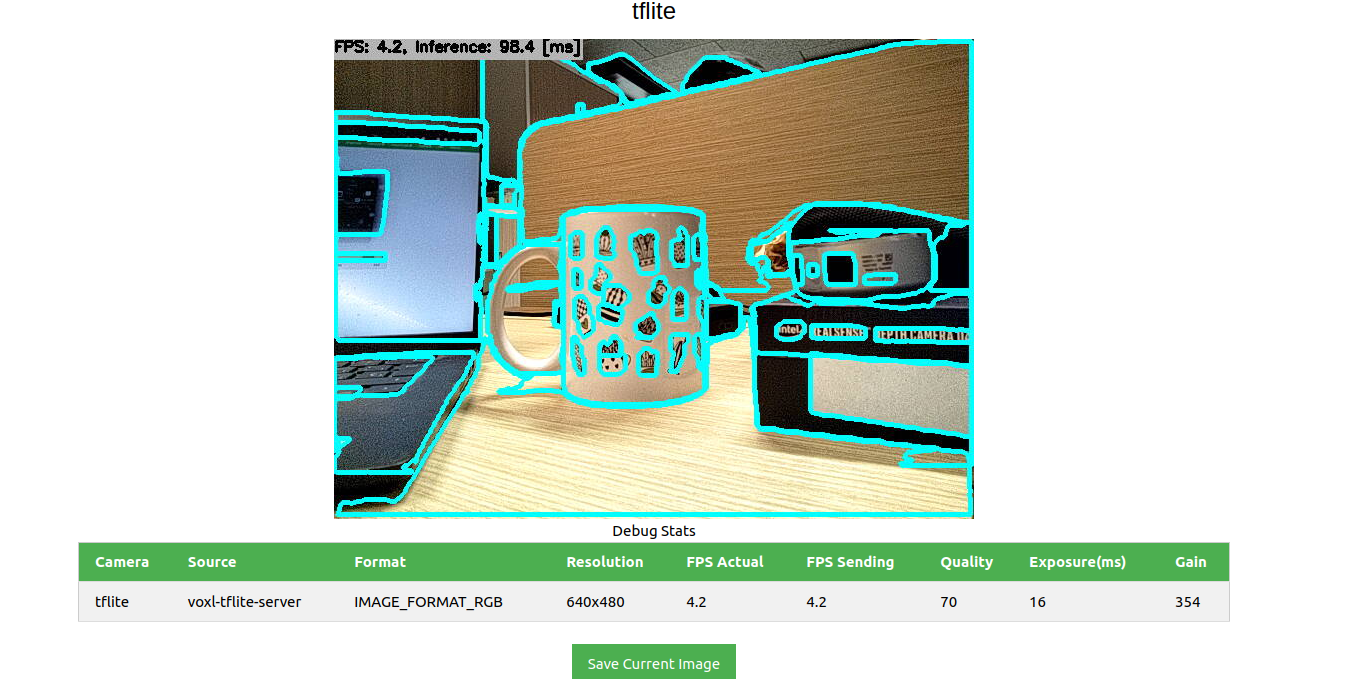
    244da0e2-d530-4a16-9df1-b74e323597f2-image.png

    The usage of the GPU is:

    
    [Name   Freq (MHz) Temp (C) Util (%)
    -----------------------------------
    cpu0       1075.2     67.1    33.30
    cpu1       1075.2     65.5    26.08
    cpu2       1075.2     65.9    26.77
    cpu3       1075.2     65.9    26.34
    cpu4        710.4     67.1    16.08
    cpu5        710.4     65.5    25.00
    cpu6        710.4     65.5    23.67
    cpu7        844.8     67.1     6.61
    Total                 67.1    22.98
    10s avg                       22.78
    -----------------------------------
    GPU         587.0     67.1    97.92
    GPU 10s avg                   49.08
    -----------------------------------
    memory temp:       65.0 C
    memory used:  1125/7671 MB
    -----------------------------------
    Flags
    CPU freq scaling mode: auto
    Standby Not Active
    -----------------------------------]
    

    However, when I attempt to retrieve the segmentation from the voxl-mpa-to-ros the voxl2 reboot, even though some messages are received. While I might expect a crash at the code level or a segmentation fault, a total reboot occurs, which can create a few problems, especially when flying.

    Also even tought it occurs more sporadically, the voxl2 also reboot by simply running the model and displaying on the portal the segmentations. However the voxl-inspect-cpu does not complain about overheating neither I notice any extra memory usage.

    Any help is welcome! 🙂

    Ask your questions right here!

  • Voxl2 custom segmentation model lead to unwanted reboot
    Riccardo FranceschiniR Riccardo Franceschini

    Hello everyone, I'm currently dealing with an issue while running a custom segmentation model on the tflite server. The board is maintaining an approximate inference time of 5Hz, which is good. However, I'm facing problems when trying to pass segmentation masks over pipes to be retrieved by the voxl-mpa-to-ros pipeline.

    I've implemented a solution using a new data structure for the masks, which are larger than normal bounding boxes. I publish these masks to the pipe, and on the receiving end, the mpa_to_ros node reads and forwards the mask as a custom message. This process worked well with SDK 0.9.5, but after upgrading to SDK 1.1.2, the board crashes and reboots when attempting to subscribe to the tflite data (I can get few samples but then it crash). The code remains the same, and I've also tested changing the buffer, but the issue persists.

    Interestingly, subscribing to the camera portal works fine, but subscribing to the pipe causes the crash. I'm wondering if it could be a problem with the SDK, perhaps an issue with memory management causing the board to crash and reboot. Or could it be a power supply problem?

    Has anyone else experienced a similar issue after upgrading to SDK 1.1.2, or does anyone have insights into what might be causing the problem? Any suggestions for troubleshooting or potential solutions would be greatly appreciated. Thank you!

    Ask your questions right here!

  • Voxl2 reboot due to what it seems a power limitation
    Riccardo FranceschiniR Riccardo Franceschini

    Hi,

    after experimenting, we found that the problem was a RealSense external camera that we plugged in.

    It was connected through USB via the 5G module. Probably, this was causing a short circuit or overload of the board. Anyway, modifying the connection cable so that only the data goes through the board while it is powered separately seems to solve the problem.

    VOXL 2

  • Voxl2 reboot due to what it seems a power limitation
    Riccardo FranceschiniR Riccardo Franceschini

    I'm currently facing a challenge with my VoXL2 Flight Deck (with power module v3), where it seems to reboot due to a power limitation issue. I'm running SDK version 1.1.2 and trying to execute a segmentation model converted to TFLite. The model runs successfully at 5Hz, but the problem arises when I observe a significant increase in power consumption, particularly the current, when I try to run anything else.

    Here are the power metrics before and after starting the model:

    Before Starting Model:

    Voltage | Charge | Current
    14.70V  | 100%   | 0.63A
    

    After Starting Model:

    Voltage | Charge | Current
    14.70V  | 100%   | 0.91A
    

    The current spikes to 0.8A, with peaks of 0.9A. When I also run the voxl-mpa-to-ros node and another custom node, the power change is significant enough to trigger a reboot of the drone. I've experimented with the skip_n_frames parameter to achieve a more stable result, but the board seems to be operating at its limit. Any attempt to surpass 1.0A, easily triggered by subscribing to ROS topics or running basic logging scripts, results in a reboot, rendering it unsuitable for flying.

    Key observations:

    GPU usage is at its limit.
    CPU and temperature are within acceptable ranges.
    I'm seeking guidance on how to address this power limitation. Are there specific parameters that can be configured or ways to modify the power limit of the board to handle the increased load without triggering reboots?

    Any insights or suggestions would be greatly appreciated. Thank you in advance!

    VOXL 2

  • Problem contacting ESC
    Riccardo FranceschiniR Riccardo Franceschini

    Hi @Eric-Katzfey eventually we managed to solve the problem by resetting to default the parameter of px4 and performing the calibration from qgc

    Ask your questions right here!

  • Problem contacting ESC
    Riccardo FranceschiniR Riccardo Franceschini

    @Eric-Katzfey
    Hi Eric, I tried using QGroundControl. The accelerometer and gyro have been successfully calibrated, but I encountered an error stating "no mags" when attempting to calibrate the compass and then nothing happen. Do you have any ideas about what could be causing this issue?

    Ask your questions right here!

  • Problem contacting ESC
    Riccardo FranceschiniR Riccardo Franceschini

    @Alex-Kushleyev sure are those :

    Calibration File Status:
    Missing /data/modalai/voxl-imu-server.cal 
    Missing /data/modalai/opencv_tracking_intrinsics.yml 
    Missing /data/modalai/opencv_stereo_front_intrinsics.yml 
    Missing /data/modalai/opencv_stereo_front_extrinsics.yml 
    Missing /data/modalai/opencv_stereo_rear_intrinsics.yml 
    Missing /data/modalai/opencv_stereo_rear_extrinsics.yml 
    Missing /data/px4/param/parameters_gyro.cal 
    Missing /data/px4/param/parameters_acc.cal 
    Missing /data/px4/param/parameters_level.cal 
    Missing /data/px4/param/parameters_mag.ca
    

    The camera ones and the IMU I can recover them by using the calibration tools but I haven't found a solution for the px4 ones

    Ask your questions right here!

  • Using realsense camera for tflite-server inference
    Riccardo FranceschiniR Riccardo Franceschini

    Hi need to use a realsense camera (L515 in particular but I tried also with a d455 and is the same) as a uvc device to be used with the voxl-tflite-server, on voxl2 with sdk 1.1.2 but also tried with a 0.9.5 and the behaviour was the same.

    The camera is connected and detected as shown by

    lsusb
    Bus 002 Device 004: ID 8086:0b64 Intel Corp. 
    Bus 002 Device 003: ID 2c7c:0800  
    Bus 002 Device 002: ID 0424:5744 Standard Microsystems Corp. 
    Bus 002 Device 001: ID 1d6b:0003 Linux Foundation 3.0 root hub
    Bus 001 Device 005: ID 0424:2740 Standard Microsystems Corp. 
    Bus 001 Device 004: ID 0b95:1790 ASIX Electronics Corp. AX88179 Gigabit Ethernet
    Bus 001 Device 002: ID 0424:2744 Standard Microsystems Corp. 
    Bus 001 Device 001: ID 1d6b:0002 Linux Foundation 2.0 root hub
    

    with video streams from 2 to 9

    voxl2:~$ ls /dev/video
    video0   video2   video32  video4   video6   video8   
    video1   video3   video33  video5   video7   video9```
    

    When I try to run

    voxl-uvc-server -v 8086 -p 0b64 -d
    

    specifying the vendor and the product, the camera is detected but when it tries to open the camera the server crash (I have also changed image dimension but nothing changed)

    loading config file
    Enabling debug messages
    =================================================================
    width:                            640
    height:                           480
    fps:                              30
    pipe_name:                        uvc
    =================================================================
    voxl-uvc-server starting
    Image resolution 640x480, 30 fps chosen
    Vendor ID 0x8086 chosen
    Product ID 0x0b64 chosen
    UVC initialized
    Device 8086:0b64 found
    uvc_open failed
    UVC exited
    voxl-uvc-server ending
    

    I have tried to run the uvc-server with a standar logitech webcam and it works fine.

    I tried also to simulate the behaviour of a webcam using v4l2loopback as suggested here but the kernel module is not supported and I am not able to install the package, I have then tried also the start the compilation of the kernel to understand if it was feasible to add it manually but also this process crashed at the sync phase within the container tutorial :

    user@54bf0bc04ffb:~$ ./qrb5165-sync.sh 
    [INFO] - Syncing CLO repo...
      File "/usr/bin/repo", line 51
        def print(self, *args, **kwargs):
                ^
    SyntaxError: invalid syntax
    

    Also the camera works properly when connected the voxl2 and with the realsense packages installed inside a seperate container.

    The question is, how can I achieve to connect the camera to the tflite server? any suggestion or different solution is welcome 🙂

    Ask your questions right here!

  • Problem contacting ESC
    Riccardo FranceschiniR Riccardo Franceschini

    Hi, the voxl-px4 was not affecting the problem. It seems to be solved by performing a new factory reset, as explained here. However, we have now lost the calibration files. How can those be retrieved? We encountered a similar problem on two boards with serials M2100000J2R and M22000003EV.

    Ask your questions right here!

  • Starling V2 voxl-configure-mpa fails to execute voxl-esc setup_starling_v2 and voxl-elrs --scan
    Riccardo FranceschiniR Riccardo Franceschini

    Hi @tom, we are facing a similar problem on two boards that we have, and we solved the issue by following your suggestions. However, we no longer have the calibration files. Would it be possible to also obtain the calibration files? The serials are : M2100000J2R and M22000003EV

    Ask your questions right here!

  • Problem contacting ESC
    Riccardo FranceschiniR Riccardo Franceschini

    Hi we are trying to configure the flight deck voxl2 board with the sdk 1.1.1 recently flashed.

    We are encountering problems detecting the ESC in particular while running

    voxl-esc
    

    with the option 1 (scan), the output is the following

    Found voxl-esc tools bin version: 1.4
    VOXL Platform: M0054
    Detected RB5 Flight, VOXL2 M0054 or M0104!
    INFO: Scanning for ESC firmware: /dev/slpi-uart-2, baud: 2000000
    terminate called after throwing an instance of 'qmi_error'
      what():  qmi_client_send_msg_sync() failed, (client_id=)0, result=0: qmi service error (-2)
    /usr/bin/voxl-esc: line 133:  4321 Aborted                 python3 voxl-esc-scan.py
    FAILED to ping ESCs
    disabling bridge
    bridge disabled
    DONE
    

    while running the option detect (2)

    enabling bridge
    bridge enabled
    Received standard error event 2
    Received standard error event 2
    Couldn't configure flight_controller sensor
    ERROR:   fc_sensor_initialize failed
    ERROR:   Failed to initialize slpi
    ERROR:   Encountered error while initializing bus 12
    ERROR:   voxl_uart_flush: Bus '12' is not initialized
    ERROR:   voxl_uart_read_bytes: Bus '12' is not initialized
    ERROR:   voxl_uart_write: Bus '12' is not initialized
    ERROR:   voxl_uart_write: Bus '12' is not initialized
    ERROR:   voxl_uart_read_bytes: Bus '12' is not initialized
    ERROR:   voxl_uart_write: Bus '12' is not initialized
    ERROR:   voxl_uart_write: Bus '12' is not initialized
    ERROR:   voxl_uart_read_bytes: Bus '12' is not initialized
    ERROR:   voxl_uart_write: Bus '12' is not initialized
    ERROR:   voxl_uart_write: Bus '12' is not initialized
    ERROR:   voxl_uart_read_bytes: Bus '12' is not initialized
    ERROR:   voxl_uart_write: Bus '12' is not initialized
    ERROR:   voxl_uart_write: Bus '12' is not initialized
    ERROR:   voxl_uart_read_bytes: Bus '12' is not initialized
    ERROR:   voxl_uart_read_bytes: Bus '12' is not initialized
    ERROR:   voxl_uart_read_bytes: Bus '12' is not initialized
    ERROR:   voxl_uart_flush: Bus '12' is not initialized
    ERROR:   voxl_uart_close: Bus '12' is not initialized
    

    Do you have any idea of why we are encountering this error?

    Ask your questions right here!

  • Unable to retrieve camera information
    Riccardo FranceschiniR Riccardo Franceschini

    Hi @Kashish-Garg unfortunately no update on this side

    Ask your questions right here!

  • Unable to retrieve camera information
    Riccardo FranceschiniR Riccardo Franceschini

    Hello,

    I have observed that when running roslaunch voxl_mpa_to_ros voxl_mpa_to_ros.launch, the CameraInfo is not being published. Upon examining the code, I couldn't find any references to it. However, in the older voxl_camera_ros package (which is now deprecated), the CameraInfo was published. I'm interested in understanding how I can obtain this information without the need to create a separate node, which might introduce issues like computation and camera synchronization.

    I am currently running on a voxl2 flight deck.

    Ask your questions right here!
  • Login

  • Don't have an account? Register

  • Login or register to search.
  • First post
    Last post
0
  • Categories
  • Recent
  • Tags
  • Popular
  • Users
  • Groups