Skip to content
  • Categories
  • Recent
  • Tags
  • Popular
  • Users
  • Groups
Collapse
Brand Logo

ModalAI Forum

A

abdullah

@abdullah
Unfollow Follow
About
Posts
7
Topics
3
Shares
0
Groups
0
Followers
0
Following
0

Posts

Recent Best Controversial

  • Unable to access Tracking camera
    A abdullah

    @Chad-Sweet
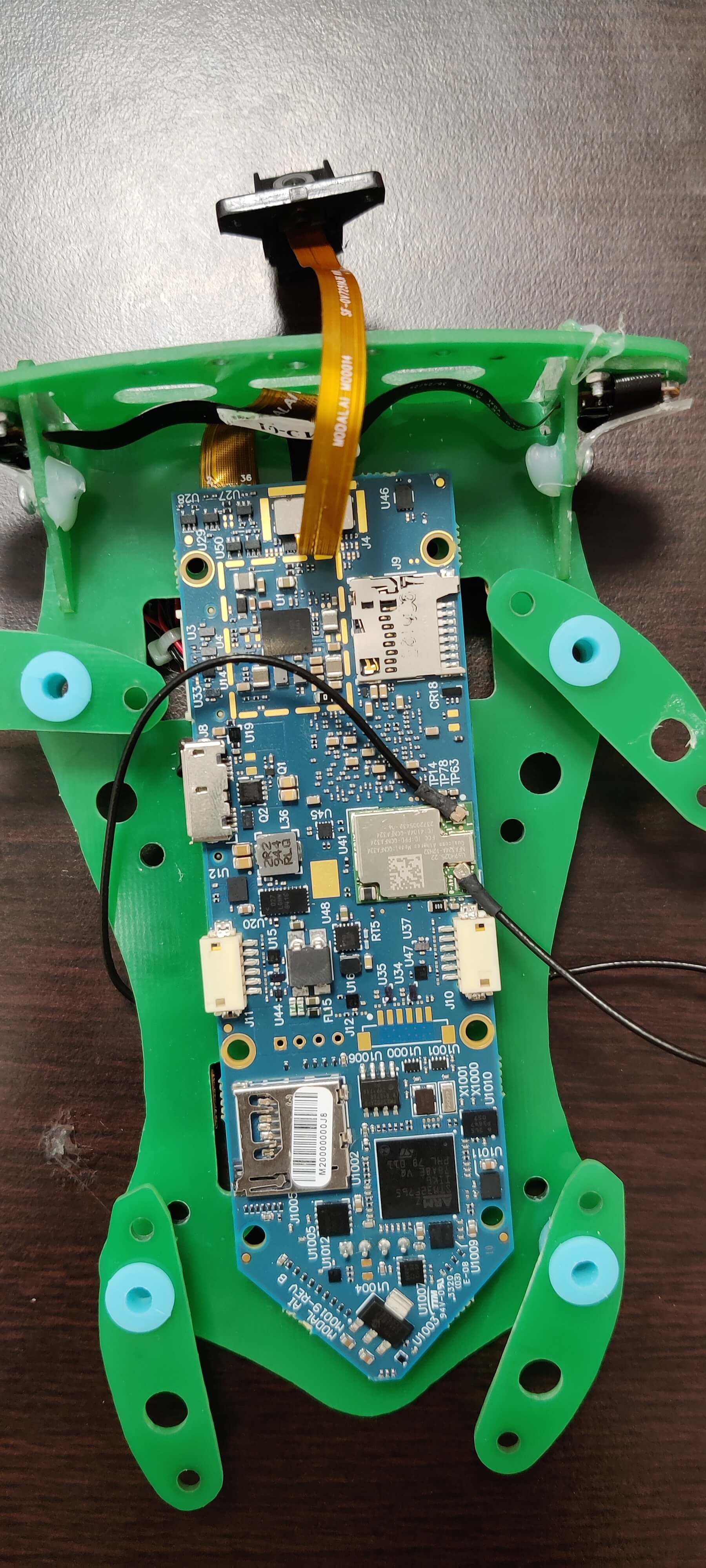
    IMG_20210504_100858(1).jpg

    These are default connection on the board

    yocto:/# voxl-configure-cameras 3
    attempting to use camera configuration 3
    adding override_cam_id value=1 to /etc/snav/camera.downward.xml
    adding override_cam_id value=2 to /etc/snav/camera.stereo.xml
    
    yocto:/# cat /etc/modalai/camera_env.sh
    export CAM_CONFIG_ID=3
    export HIRES_CAM_ID=0
    export TRACKING_CAM_ID=1
    export STEREO_CAM_ID=2
    export TOF_CAM_ID=-1
    

    After setting configuration to 3 as well

    yocto# roslaunch voxl_cam_ros tracking 
    ... logging to /home/root/.ros/log/1f7737e8-ad09-11eb-b4a1-ec5c68cd1745/roslaunch-apq8096-3742.log
    Checking log directory for disk usage. This may take awhile.
    Press Ctrl-C to interrupt
    Done checking log file disk usage. Usage is <1GB.
    
    started roslaunch server http://192.168.100.90:46578/
    
    SUMMARY
    ========
    
    PARAMETERS
     * /rosdistro: indigo
     * /rosversion: 1.11.21
     * /tracking/voxl_cam_nodelet/cam_id: 0
     * /tracking/voxl_cam_nodelet/cam_name: tracking
     * /tracking/voxl_cam_nodelet/frame_id: tracking_frame
     * /tracking/voxl_cam_nodelet/frame_rate: 15
     * /tracking/voxl_cam_nodelet/height: 480
     * /tracking/voxl_cam_nodelet/is_cam_master: False
     * /tracking/voxl_cam_nodelet/skip_n_frames: 0
     * /tracking/voxl_cam_nodelet/snav_raw10_compatability: True
     * /tracking/voxl_cam_nodelet/width: 640
    
    NODES
      /tracking/
        tracking_nodelet_manager (nodelet/nodelet)
        voxl_cam_nodelet (nodelet/nodelet)
    
    auto-starting new master
    process[master]: started with pid [3761]
    ROS_MASTER_URI=http://localhost:11311/
    
    setting /run_id to 1f7737e8-ad09-11eb-b4a1-ec5c68cd1745
    process[rosout-1]: started with pid [3774]
    started core service [/rosout]
    process[tracking/tracking_nodelet_manager-2]: started with pid [3780]
    process[tracking/voxl_cam_nodelet-3]: started with pid [3788]
    [ INFO] [1620154027.140051685]: Initializing nodelet with 4 worker threads.
    [ INFO] [1620154027.459145704]: SnapCamDriver Starting
    [ INFO] [1620154027.459566279]: Monotonic offset: 1620153449.753732686
    libcam.enable.publish  1
    libcam.enable.publish.dump 0
    libcam.publish.buffer.policy max
    libcam.publish.buffer.max 3
    libcam.debug.level info
    libcam.dump.dir /data/misc/camera/dumps
    ERROR: could not open camera subscriber for cam id 0
    [ERROR] [1620154044.976910041]: CameraManager::Initialize() failed
    [ERROR] [1620154044.977876660]: Unable to open camera.
    
    
    Ask your questions right here! flight-dec tracking-camera voxl-3.1.0

  • Unable to access Tracking camera
    A abdullah

    I am having some issue with tracking camera. No matter what configuration I select It does not allow me to access the tracking camera.

    I cross checked all the connect on flight-deck. And connections looks fine

    yocto:/#  voxl-configure-cameras 3
    attempting to use camera configuration 3
    adding override_cam_id value=1 to /etc/snav/camera.downward.xml
    adding override_cam_id value=2 to /etc/snav/camera.stereo.xml
    
    yocto:/# cat /etc/modalai/camera_env.sh
    export CAM_CONFIG_ID=3
    export HIRES_CAM_ID=0
    export TRACKING_CAM_ID=1
    export STEREO_CAM_ID=2
    export TOF_CAM_ID=-1
    
    yocto:/#  voxl-image-streamer -c 2 -n 4 -i 192.168.100.90
    STEREO camera selected.
    using cam_id=2
    Segmentation fault
    

    But for -c 1 it is opening stereo instead of tracking

    yocto:/#  voxl-configure-cameras 1
    attempting to use camera configuration 1
    adding override_cam_id value=0 to /etc/snav/camera.downward.xml
    adding override_cam_id value=1 to /etc/snav/camera.stereo.xml
    
    yocto:/# cat /etc/modalai/camera_env.sh
    export CAM_CONFIG_ID=1
    export HIRES_CAM_ID=-1
    export TRACKING_CAM_ID=0
    export STEREO_CAM_ID=1
    export TOF_CAM_ID=-1
    
    yocto:/# voxl-image-streamer -c 0 -n 4 -i 192.168.100.90
    HIRES camera selected.
    using cam_id=0
    libcam.enable.publish  1
    libcam.enable.publish.dump 0
    libcam.publish.buffer.policy max
    libcam.publish.buffer.max 3
    libcam.debug.level info
    libcam.dump.dir /data/misc/camera/dumps
    Opened camera 0 Type: 0
    Preview FPS range 0: [ 15, 15 ]
    Preview FPS range 1: [ 20, 20 ]
    Preview FPS range 2: [ 24, 24 ]
    Preview FPS range 3: [ 7, 30 ]
    Preview FPS range 4: [ 30, 30 ]
    Preview FPS range 5: [ 60, 60 ]
    Preview FPS range 6: [ 90, 90 ]
    Preview FPS range 7: [ 120, 120 ]
    Preview size 0: [ 4160 x 3120 ]
    Preview size 1: [ 4056 x 3040 ]
    Preview size 2: [ 4000 x 3000 ]
    Preview size 3: [ 3040 x 3040 ]
    Preview size 4: [ 3016 x 3016 ]
    Preview size 5: [ 3840 x 2160 ]
    Preview size 6: [ 3648 x 2736 ]
    Preview size 7: [ 3264 x 2448 ]
    Preview size 8: [ 3200 x 2400 ]
    Preview size 9: [ 2976 x 2976 ]
    Preview size 10: [ 3044 x 1720 ]
    Preview size 11: [ 2704 x 2028 ]
    Preview size 12: [ 2704 x 1520 ]
    Preview size 13: [ 2592 x 1944 ]
    Preview size 14: [ 2688 x 1512 ]
    Preview size 15: [ 2028 x 1144 ]
    Preview size 16: [ 2160 x 2160 ]
    Preview size 17: [ 1920 x 2160 ]
    Preview size 18: [ 1920 x 1920 ]
    Preview size 19: [ 1880 x 1880 ]
    Preview size 20: [ 2048 x 1536 ]
    Preview size 21: [ 1920 x 1440 ]
    Preview size 22: [ 1920 x 1080 ]
    Preview size 23: [ 1600 x 1600 ]
    Preview size 24: [ 1600 x 1200 ]
    Preview size 25: [ 1520 x 1520 ]
    Preview size 26: [ 1440 x 1080 ]
    Preview size 27: [ 1080 x 1080 ]
    Preview size 28: [ 1280 x 960 ]
    Preview size 29: [ 1340 x 760 ]
    Preview size 30: [ 1280 x 768 ]
    Preview size 31: [ 1280 x 720 ]
    Preview size 32: [ 1200 x 1200 ]
    Preview size 33: [ 1280 x 640 ]
    Preview size 34: [ 1280 x 480 ]
    Preview size 35: [ 1040 x 780 ]
    Preview size 36: [ 1024 x 768 ]
    Preview size 37: [ 960 x 960 ]
    Preview size 38: [ 720 x 720 ]
    Preview size 39: [ 800 x 600 ]
    Preview size 40: [ 960 x 720 ]
    Preview size 41: [ 848 x 480 ]
    Preview size 42: [ 858 x 480 ]
    Preview size 43: [ 864 x 480 ]
    Preview size 44: [ 800 x 480 ]
    Preview size 45: [ 720 x 480 ]
    Preview size 46: [ 640 x 480 ]
    Preview size 47: [ 640 x 240 ]
    Preview size 48: [ 640 x 360 ]
    Preview size 49: [ 480 x 640 ]
    Preview size 50: [ 480 x 480 ]
    Preview size 51: [ 480 x 360 ]
    Preview size 52: [ 480 x 320 ]
    Preview size 53: [ 432 x 240 ]
    Preview size 54: [ 352 x 288 ]
    Preview size 55: [ 320 x 240 ]
    Preview format 0: nv12-venus
    Preview format 1: raw10
    Preview format 2: raw12
    Setting FPS to 30
    Setting preview size to 640x480
    Using default preview format of YUV_FORMAT
    Starting camera
    Created socket
    Bind successful
    Listen successful, waiting for connection...
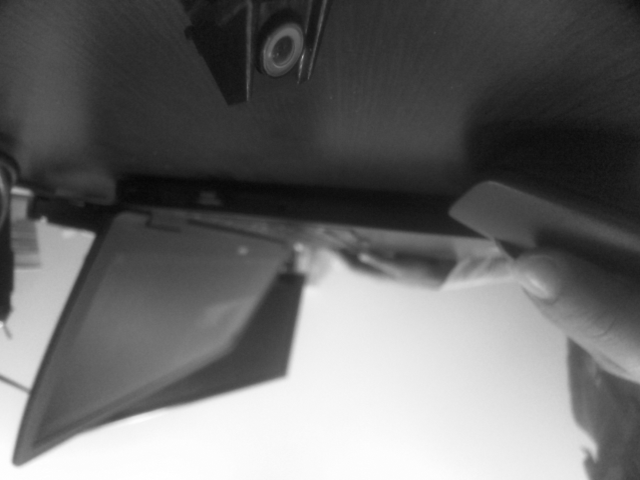
    

    hires.png

    yocto:/# voxl-image-streamer -c 1 -n 4 -i 192.168.100.90
    TRACKING camera selected.
    using cam_id=1
    libcam.enable.publish  1
    libcam.enable.publish.dump 0
    libcam.publish.buffer.policy max
    libcam.publish.buffer.max 3
    libcam.debug.level info
    libcam.dump.dir /data/misc/camera/dumps
    Opened camera 1 Type: 1
    Preview FPS range 0: [ 15, 15 ]
    Preview FPS range 1: [ 20, 20 ]
    Preview FPS range 2: [ 24, 24 ]
    Preview FPS range 3: [ 7, 30 ]
    Preview FPS range 4: [ 30, 30 ]
    Preview FPS range 5: [ 60, 60 ]
    Preview FPS range 6: [ 90, 90 ]
    Preview FPS range 7: [ 120, 120 ]
    Preview size 0: [ 1280 x 480 ]
    Preview size 1: [ 848 x 480 ]
    Preview size 2: [ 858 x 480 ]
    Preview size 3: [ 864 x 480 ]
    Preview size 4: [ 800 x 480 ]
    Preview size 5: [ 720 x 480 ]
    Preview size 6: [ 640 x 480 ]
    Preview size 7: [ 640 x 240 ]
    Preview size 8: [ 640 x 360 ]
    Preview size 9: [ 480 x 480 ]
    Preview size 10: [ 480 x 360 ]
    Preview size 11: [ 480 x 320 ]
    Preview size 12: [ 432 x 240 ]
    Preview size 13: [ 352 x 288 ]
    Preview size 14: [ 320 x 240 ]
    Preview format 0: nv12-venus
    Preview format 1: raw10
    Preview format 2: raw12
    Setting FPS to 30
    Setting preview size to 640x480
    Using default preview format of YUV_FORMAT
    Starting camera
    Created socket
    Bind successful
    Listen successful, waiting for connection...
    Connection established
    starting image stream
    Creating TCP processing thread.
    running!
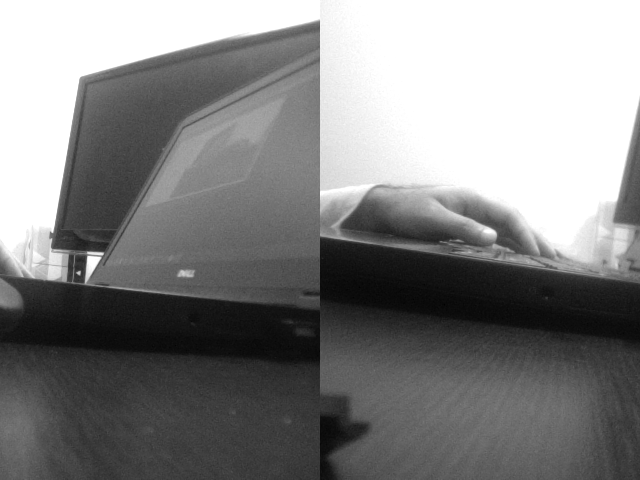


    stereo.png

    No matter what camera configuration I select I am just able to access hire and stereo even if I dont set voxl-configure-cameras 1

    yocto:/#  voxl-configure-cameras  
    
    Which camera configuration are you using?
    1 Tracking + Stereo (default)
    2 Tracking Only
    3 Hires + Stereo + Tracking
    4 Hires + Tracking
    5 TOF + Tracking
    6 Hires + TOF + Tracking
    7 TOF + Stereo + Tracking (not currently supported)
    8 None
    
    2
    attempting to use camera configuration 2
    adding override_cam_id value=0 to /etc/snav/camera.downward.xml
    adding override_cam_id value=-1 to /etc/snav/camera.stereo.xml
    

    Even in the above situation where I have just set to tracking it still open Hires

    The same happens with voxl-cam-ros
    I am not able to access tracking cameras

    Ask your questions right here! flight-dec tracking-camera voxl-3.1.0

  • Camera configuration error
    A abdullah

    Hello,
    I am having a problem with my cameras. I was trying to fly my drone in position mode. And for a while It flew properly but then it lost its odometry from the QGround control.
    After inspecting further I found that camera configuration is messedup. When I try to run
    roslaunch voxl_cam_ros tracking.launch the output that I get is stereo_merged.
    I tried to reconfigure my cameras by selecting option HIres-tracking-stereo but the problem persist
    I tried restarting a couple of times and still saw no difference.

    I also checked the ID's of the camera using voxl-env show it shoed proper Id but when run the ros script the output does not match the camera I intend to run

    Ask your questions right here! flight-deck camera

  • Odometry Not working properly
    A abdullah

    We have been testing on the same configuration for a while and never had that problem. We tried with position mode and off-board mode as well everything worked fine and have not made any changes in configuration.

    Enclosed is the log of the recent flight. We might be missing something. Your insight is needed

    Link Preview Image
    Flight Review

    favicon

    (review.px4.io)

    Ask your questions right here! odometry flight-deck mavros

  • Odometry Not working properly
    A abdullah

    Hello,
    I have been testing voxl for a while everything was working properly. But in one flight drone odometery started showing unusual readings.

    I was flying the drone in manual mode and it flew properly. Than I landed the drone and switched to position mode and started to monitor the odometery in QGroundControl and in mavros. When the drone is not armed the odometery value are near to 0 which is correct . But as soon as it is armed The odometery gets haywire. The drone is just armed and is on the ground but orometery show it is 40meters in the air or sometimes is below ground and the values keep on increasing.

    I re-calibrated the drone's optical flow sensor as well as the imu but the problem still persist.

    Than I tried the dry run just turning on the voxl and lifting up the drone with the hand and moving around. for reasons unknown the odometery works properly.
    So I tried it again to arm the drone and watch the odometery and its started to act weirdly again.

    If anyone have any clue why is it acting like this or might have encountered similar problem please do help.
    Any input is appreciated.

    Ask your questions right here! odometry flight-deck mavros
  • Login

  • Don't have an account? Register

  • Login or register to search.
  • First post
    Last post
0
  • Categories
  • Recent
  • Tags
  • Popular
  • Users
  • Groups