Skip to content
  • Categories
  • Recent
  • Tags
  • Popular
  • Users
  • Groups
Collapse
Brand Logo

ModalAI Forum

  1. ModalAI Support Forum
  2. Ask your questions right here!
  3. Getting voxl-streamer running

Getting voxl-streamer running

Scheduled Pinned Locked Moved Ask your questions right here!
18 Posts 6 Posters 3.1k Views 3 Watching
  • Oldest to Newest
  • Newest to Oldest
  • Most Votes
Reply
  • Reply as topic
Log in to reply
This topic has been deleted. Only users with topic management privileges can see it.
  • ? Offline
    ? Offline
    A Former User
    wrote on last edited by A Former User
    #7

    For completeness here, you can start with a clean image, then:
    Update /etc/opkg/opkg.conf by un-commenting the last line for include development packages: src/gz dev http://voxl-packages.modalai.com/dev

    Ensure you're connected to the internet via voxl-wifi station mode.

    opkg update

    opkg install voxl-suite-dev

    1 Reply Last reply
    0
    • Lynn KoudsiL Offline
      Lynn KoudsiL Offline
      Lynn Koudsi
      Contributor
      wrote on last edited by Lynn Koudsi
      #8

      Hi @RichieRich @MattO ,

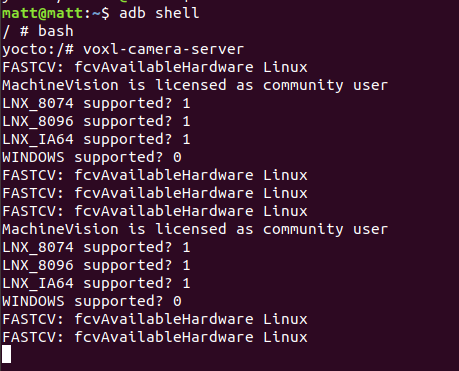
      I've followed this thread cause I got the same issue when attempting to run voxl-streamer, but I'm now getting a different error after a clean installation of the image 3.1.1 without installing the voxl suite:

      ec8d21a1-dd75-4f51-8ac4-6319bd6b20b1-image.png

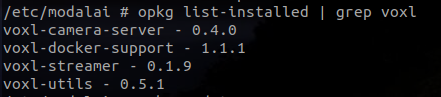
      This is all I have installed:
      ec8720d4-4c3d-4bb4-880e-b8d734fc0e86-image.png

      Thank you in advance!

      1 Reply Last reply
      0
      • Eric KatzfeyE Online
        Eric KatzfeyE Online
        Eric Katzfey
        ModalAI Team
        wrote on last edited by
        #9

        Our dev repo is very active and occasionally we end up with some dependency mismatches in it. I fixed the problem with voxl-streamer. Can you please start with a fresh install of the system image and follow the instructions in this thread to try again? It should all be working now. Thanks!

        Lynn KoudsiL 1 Reply Last reply
        0
        • Eric KatzfeyE Eric Katzfey

          Our dev repo is very active and occasionally we end up with some dependency mismatches in it. I fixed the problem with voxl-streamer. Can you please start with a fresh install of the system image and follow the instructions in this thread to try again? It should all be working now. Thanks!

          Lynn KoudsiL Offline
          Lynn KoudsiL Offline
          Lynn Koudsi
          Contributor
          wrote on last edited by
          #10

          @Eric-Katzfey Hi Eric,

          Thanks for the reply!

          I actually found the issue. the camera server was broadcasting under /run/mpa/hires_preview when vox-streamer was looking for run/mpa/hires/preview so I just changed that value in the script and it works 🙂

          Eric KatzfeyE Dean FortierD 2 Replies Last reply
          0
          • Lynn KoudsiL Lynn Koudsi

            @Eric-Katzfey Hi Eric,

            Thanks for the reply!

            I actually found the issue. the camera server was broadcasting under /run/mpa/hires_preview when vox-streamer was looking for run/mpa/hires/preview so I just changed that value in the script and it works 🙂

            Eric KatzfeyE Online
            Eric KatzfeyE Online
            Eric Katzfey
            ModalAI Team
            wrote on last edited by
            #11

            @Lynn-Koudsi Great! Yep, that was the issue 🙂

            1 Reply Last reply
            0
            • Lynn KoudsiL Lynn Koudsi

              @Eric-Katzfey Hi Eric,

              Thanks for the reply!

              I actually found the issue. the camera server was broadcasting under /run/mpa/hires_preview when vox-streamer was looking for run/mpa/hires/preview so I just changed that value in the script and it works 🙂

              Dean FortierD Offline
              Dean FortierD Offline
              Dean Fortier
              wrote on last edited by
              #12

              Hi @Lynn-Koudsi and @Eric-Katzfey,

              I am having the same issue as you Lynn where I am getting the error:

              yocto:/# voxl-streamer
              Using configuration file /etc/modalai/voxl-streamer.conf
              closing FDs for client channel 0
              ERROR: Couldn't open MPA pipe /run/mpa/hires/preview/
              

              Where is the script where you changed /run/mpa/hires_preview?

              Thanks,

              Dean

              Eric KatzfeyE 1 Reply Last reply
              0
              • Eric KatzfeyE Online
                Eric KatzfeyE Online
                Eric Katzfey
                ModalAI Team
                wrote on last edited by
                #13

                @Dean-Fortier It is in the voxl-streamer configuration file. /etc/modalai/voxl-streamer.conf.

                Dean FortierD 1 Reply Last reply
                0
                • Dean FortierD Dean Fortier

                  Hi @Lynn-Koudsi and @Eric-Katzfey,

                  I am having the same issue as you Lynn where I am getting the error:

                  yocto:/# voxl-streamer
                  Using configuration file /etc/modalai/voxl-streamer.conf
                  closing FDs for client channel 0
                  ERROR: Couldn't open MPA pipe /run/mpa/hires/preview/
                  

                  Where is the script where you changed /run/mpa/hires_preview?

                  Thanks,

                  Dean

                  Eric KatzfeyE Online
                  Eric KatzfeyE Online
                  Eric Katzfey
                  ModalAI Team
                  wrote on last edited by
                  #14

                  @Dean-Fortier BTW, The latest software installer is now available at https://developer.modalai.com/asset. With the new release you won't need to modify the configuration file manually. (beta) VOXL Platform Release 3.2.0-0.3.4-b https://developer.modalai.com/asset/download/69

                  1 Reply Last reply
                  0
                  • Eric KatzfeyE Eric Katzfey

                    @Dean-Fortier It is in the voxl-streamer configuration file. /etc/modalai/voxl-streamer.conf.

                    Dean FortierD Offline
                    Dean FortierD Offline
                    Dean Fortier
                    wrote on last edited by
                    #15

                    Hi @Eric-Katzfey,
                    Thanks for the tip, I installed the 3.2.0-0.3.4-b release and still have the same issue. Also I am not sure what to modify in the voxl-streamer.conf file. I modified line 6 from:

                    "mpa-camera": "hires_preview" },
                    

                    to:

                    "mpa-camera": "hires/preview" },
                    

                    but I think I am missing something as I am getting the same error message.

                    Thanks,
                    Dean

                    Eric KatzfeyE 1 Reply Last reply
                    0
                    • Dean FortierD Dean Fortier

                      Hi @Eric-Katzfey,
                      Thanks for the tip, I installed the 3.2.0-0.3.4-b release and still have the same issue. Also I am not sure what to modify in the voxl-streamer.conf file. I modified line 6 from:

                      "mpa-camera": "hires_preview" },
                      

                      to:

                      "mpa-camera": "hires/preview" },
                      

                      but I think I am missing something as I am getting the same error message.

                      Thanks,
                      Dean

                      Eric KatzfeyE Online
                      Eric KatzfeyE Online
                      Eric Katzfey
                      ModalAI Team
                      wrote on last edited by Eric Katzfey
                      #16

                      @Dean-Fortier The issue with the path was that, originally, it was specified as "hires/preview". This is where voxl-camera-server created the pipe and where voxl-streamer looked for it. In a newer version of voxl-camera-server, the name changed to "hires_preview". Until voxl-streamer was updated, you had to manually go into the configuration file and change it yourself. Now voxl-streamer has been updated and the manual change is no longer necessary. That is what is in 3.2.0-0.3.4-b. You can take a look at the directories yourself to see what voxl-camera-server is doing. After a power cycle and before you start voxl-camera-server you should see something like this:

                      yocto:/run/mpa# ls
                      imu0  imu1
                      

                      And then after starting voxl-camera-server you will see the new directories:

                      yocto:/run/mpa# ls
                      hires_preview  imu0  imu1  stereo  tracking
                      

                      If you don't see those directories then the problem is somewhere else.

                      1 Reply Last reply
                      0
                      • Dean FortierD Offline
                        Dean FortierD Offline
                        Dean Fortier
                        wrote on last edited by
                        #17

                        @Eric-Katzfey Thanks for the explanation, I was not starting the voxl-camera-server before.

                        When I started the voxl-camera-server, I had my camera configuration include the tracking camera which stopped the voxl-camera-server from starting correctly.

                        Once I changed my camera configuration with voxl-configure-cameras to "hires only" I was able to start the camera server and then start the voxl-streamer as well.

                        1 Reply Last reply
                        0
                        • Eric KatzfeyE Eric Katzfey

                          Okay, so don't do the auto download and install of packages after flashing system image 3.1.0. And don't run any of the voxl-configure-* scripts. See if you can just flash system image 3.1.0 without any other packages and then run the steps.

                          G Offline
                          G Offline
                          Gaurav Borade
                          Contributor
                          wrote on last edited by
                          #18
                          This post is deleted!
                          1 Reply Last reply
                          0

                          Hello! It looks like you're interested in this conversation, but you don't have an account yet.

                          Getting fed up of having to scroll through the same posts each visit? When you register for an account, you'll always come back to exactly where you were before, and choose to be notified of new replies (either via email, or push notification). You'll also be able to save bookmarks and upvote posts to show your appreciation to other community members.

                          With your input, this post could be even better 💗

                          Register Login
                          Reply
                          • Reply as topic
                          Log in to reply
                          • Oldest to Newest
                          • Newest to Oldest
                          • Most Votes


                          ModalAI
                          Categories Recent Tags ModalAI.com Docs
                          © 2026 ModalAI® · Accelerating autonomy for smaller, smarter, safer drones · Powered by NodeBB
                          • Login

                          • Don't have an account? Register

                          • Login or register to search.
                          • First post
                            Last post
                          0
                          • Categories
                          • Recent
                          • Tags
                          • Popular
                          • Users
                          • Groups