
Opkg install voxl-streamer

-
It's not clear what you are trying to achieve, but there is no reason to install VOXL (ARM) binaries on an Ubuntu PC
If you are trying to build custom applications for VOXL, or to update components of the VOXL SDK, please refer to this page on building applications https://docs.modalai.com/build-environments/
Hi @Chad-Sweet ,
I am running Ubuntu 20.04 virtual instance on my macbook with m1 max chip (arm64). So if I would continue to develop this PC, I should have to install arm binaries.Thanks for your advice, and I will take a closer look at the building environments.
-
@yu-zhang You need to do this in voxl-emulator. Here is an example:
modalai@modalai-XPS-15-9570:~$ voxl-docker -i voxl-emulator launching image: voxl-emulator with the following command: docker run --rm -it --net=host --privileged -w /home/modalai --volume=/dev/bus/usb:/dev/bus/usb -e LOCAL_USER_ID=0 -e LOCAL_USER_NAME=root -e LOCAL_GID=0 -v /home/modalai:/home/root:rw -w /home/root voxl-emulator /bin/bash -l + USER_ID=0 + USER_NAME=root + GID=0 + getent group 0 root:x:0: + echo 'Starting with UID : 0' Starting with UID : 0 + useradd --shell /bin/bash -u 0 -g 0 -o -c '' -M root useradd: user 'root' already exists + addgroup root users + export HOME=/home/root + HOME=/home/root + ls -ld /home/root drwxr-xr-x 35 james host_group 4096 Feb 3 22:04 /home/root + echo 'root ALL=(ALL) NOPASSWD: ALL' + ls -l /etc/sudoers.d/ total 8 -rw-r--r-- 1 root root 30 Nov 23 2020 james -rw-r--r-- 1 root root 29 Feb 4 16:30 root + cat /etc/sudoers.d/root root ALL=(ALL) NOPASSWD: ALL + chmod 777 /tmp + chmod 711 /usr/bin/sudo + chmod +s /usr/bin/sudo + ls -l /usr/local/bin/su-exec -rwxr-xr-x 1 root root 7660 Aug 14 2018 /usr/local/bin/su-exec + ls -l /bin/bash -rwxrwxrwx 1 root root 959344 Aug 12 2018 /bin/bash + echo 'exec /usr/local/bin/su-exec root /bin/bash' -l exec /usr/local/bin/su-exec root /bin/bash -l + exec /usr/local/bin/su-exec root /bin/bash -l root@modalai-XPS-15-9570:~# opkg update Downloading http://voxl-packages.modalai.com/dev/Packages.gz. Updated source 'dev'. root@modalai-XPS-15-9570:~# opkg install voxl-streamer Installing voxl-streamer (0.2.8) on root. Downloading http://voxl-packages.modalai.com/dev/voxl-streamer_0.2.8_202201241806.ipk. Installing libmodal-pipe (2.1.4) on root. Downloading http://voxl-packages.modalai.com/dev/libmodal-pipe_2.1.4_202202040134.ipk. Installing libmodal-json (0.3.7) on root. Downloading http://voxl-packages.modalai.com/dev/libmodal-json_0.3.7_202202040131.ipk. Configuring libmodal-json. Configuring libmodal-pipe. Configuring voxl-streamer. INFO: making new /etc/modalai/voxl-streamer.conf Done installing voxl-streamer root@modalai-XPS-15-9570:~# -
@yu-zhang You need to do this in voxl-emulator. Here is an example:
modalai@modalai-XPS-15-9570:~$ voxl-docker -i voxl-emulator launching image: voxl-emulator with the following command: docker run --rm -it --net=host --privileged -w /home/modalai --volume=/dev/bus/usb:/dev/bus/usb -e LOCAL_USER_ID=0 -e LOCAL_USER_NAME=root -e LOCAL_GID=0 -v /home/modalai:/home/root:rw -w /home/root voxl-emulator /bin/bash -l + USER_ID=0 + USER_NAME=root + GID=0 + getent group 0 root:x:0: + echo 'Starting with UID : 0' Starting with UID : 0 + useradd --shell /bin/bash -u 0 -g 0 -o -c '' -M root useradd: user 'root' already exists + addgroup root users + export HOME=/home/root + HOME=/home/root + ls -ld /home/root drwxr-xr-x 35 james host_group 4096 Feb 3 22:04 /home/root + echo 'root ALL=(ALL) NOPASSWD: ALL' + ls -l /etc/sudoers.d/ total 8 -rw-r--r-- 1 root root 30 Nov 23 2020 james -rw-r--r-- 1 root root 29 Feb 4 16:30 root + cat /etc/sudoers.d/root root ALL=(ALL) NOPASSWD: ALL + chmod 777 /tmp + chmod 711 /usr/bin/sudo + chmod +s /usr/bin/sudo + ls -l /usr/local/bin/su-exec -rwxr-xr-x 1 root root 7660 Aug 14 2018 /usr/local/bin/su-exec + ls -l /bin/bash -rwxrwxrwx 1 root root 959344 Aug 12 2018 /bin/bash + echo 'exec /usr/local/bin/su-exec root /bin/bash' -l exec /usr/local/bin/su-exec root /bin/bash -l + exec /usr/local/bin/su-exec root /bin/bash -l root@modalai-XPS-15-9570:~# opkg update Downloading http://voxl-packages.modalai.com/dev/Packages.gz. Updated source 'dev'. root@modalai-XPS-15-9570:~# opkg install voxl-streamer Installing voxl-streamer (0.2.8) on root. Downloading http://voxl-packages.modalai.com/dev/voxl-streamer_0.2.8_202201241806.ipk. Installing libmodal-pipe (2.1.4) on root. Downloading http://voxl-packages.modalai.com/dev/libmodal-pipe_2.1.4_202202040134.ipk. Installing libmodal-json (0.3.7) on root. Downloading http://voxl-packages.modalai.com/dev/libmodal-json_0.3.7_202202040131.ipk. Configuring libmodal-json. Configuring libmodal-pipe. Configuring voxl-streamer. INFO: making new /etc/modalai/voxl-streamer.conf Done installing voxl-streamer root@modalai-XPS-15-9570:~#Hi @Eric-Katzfey ,
I used the latest
voxl-emulator V1.7, but it only works for amd64.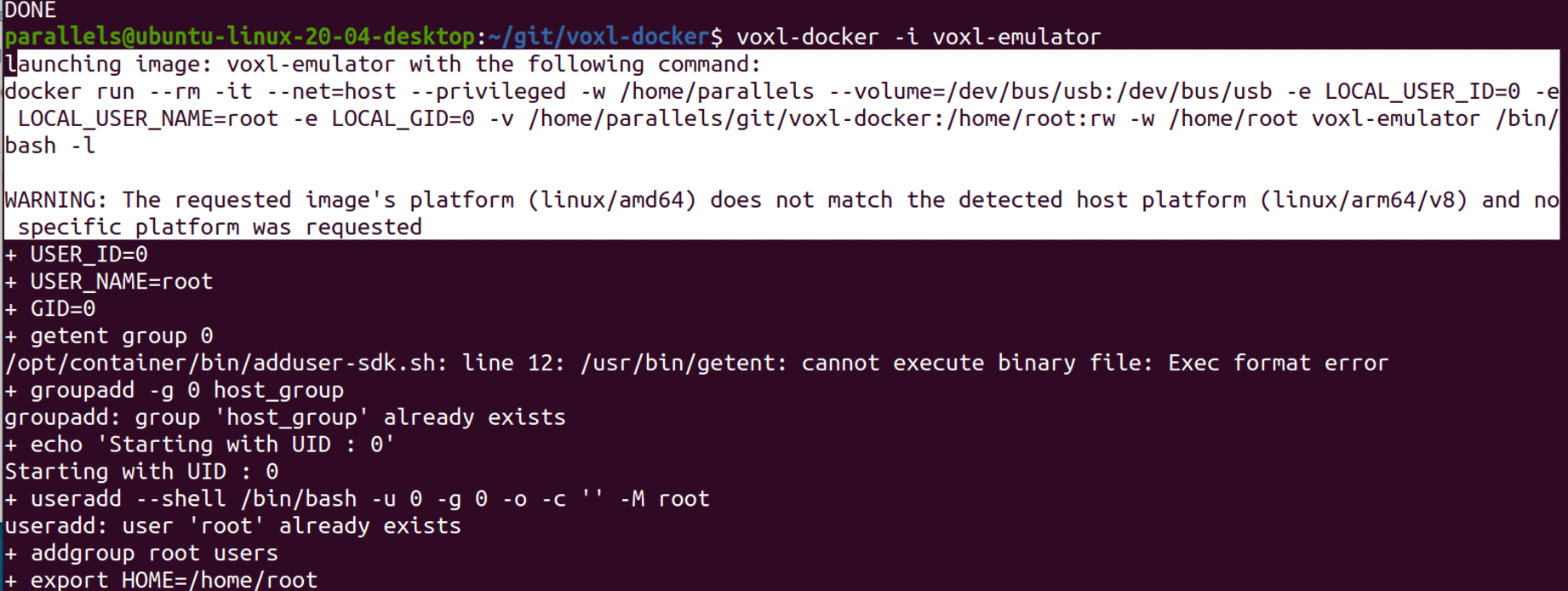
I checked how to rebuild the emulator, but it seems that all sources should be re-built for this. So, I am wondering if you already support the binaries for arm64?
I also am wondering if I could use
voxl-cross V1.1instead or I should have to compile arm64 binaries?I am using the Macbook pro 2021 14 with m1 max and running Ubuntu 20.04 in this PC. Or if I should have to change to another regular PC for developing voxl easier? Thanks.
-
Hi @Eric-Katzfey ,
I used the latest
voxl-emulator V1.7, but it only works for amd64.I checked how to rebuild the emulator, but it seems that all sources should be re-built for this. So, I am wondering if you already support the binaries for arm64?
I also am wondering if I could use
voxl-cross V1.1instead or I should have to compile arm64 binaries?I am using the Macbook pro 2021 14 with m1 max and running Ubuntu 20.04 in this PC. Or if I should have to change to another regular PC for developing voxl easier? Thanks.
@yu-zhang The emulator runs arm code on non-arm code computers using QEMU. I'm not sure anyone has ever tried on an Apple M1 chip but there is no reason the same concept wouldn't work. Are you sure you installed all of the prerequisites for voxl-emulator including QEMU?
-
@yu-zhang The emulator runs arm code on non-arm code computers using QEMU. I'm not sure anyone has ever tried on an Apple M1 chip but there is no reason the same concept wouldn't work. Are you sure you installed all of the prerequisites for voxl-emulator including QEMU?
@Eric-Katzfey I installed all of the prerequisites, but I didn't use QEMU. I will have a try if QEMU could work on m1 to simulate an amd based environment.
Also, if any reasons that I would re-build a few of voxl packages, I should go for the voxl-cross and using dev version to do, like the voxl-portal building we mentioned before, right?
-
@yu-zhang The emulator runs arm code on non-arm code computers using QEMU. I'm not sure anyone has ever tried on an Apple M1 chip but there is no reason the same concept wouldn't work. Are you sure you installed all of the prerequisites for voxl-emulator including QEMU?
@Eric-Katzfey I double-check installing qemu, but it seems it still doesn't work due to the arm64 platform.
parallels@ubuntu-linux-20-04-desktop:~/git/voxl-docker$ sudo apt install -y qemu
Reading package lists... Done
Building dependency tree
Reading state information... Done
The following NEW packages will be installed:
  qemu
0 upgraded, 1 newly installed, 0 to remove and 43 not upgraded.
Need to get 15.2 kB of archives.
After this operation, 125 kB of additional disk space will be used.
Get:1 http://ports.ubuntu.com/ubuntu-ports focal-updates/main arm64 qemu arm64 1:4.2-3ubuntu6.19 [15.2 kB]
Fetched 15.2 kB in 2s (9,772 B/s)
Selecting previously unselected package qemu.
(Reading database ... 185537 files and directories currently installed.)
Preparing to unpack .../qemu_1%3a4.2-3ubuntu6.19_arm64.deb ...
Unpacking qemu (1:4.2-3ubuntu6.19) ...
Setting up qemu (1:4.2-3ubuntu6.19) ...
parallels@ubuntu-linux-20-04-desktop:~/git/voxl-docker$ voxl-docker -i voxl-emulator
launching image: voxl-emulator with the following command:
docker run --rm -it --net=host --privileged -w /home/parallels --volume=/dev/bus/usb:/dev/bus/usb -e LOCAL_USER_ID=0 -e LOCAL_USER_NAME=root -e LOCAL_GID=0 -v /home/parallels/git/voxl-docker:/home/root:rw -w /home/root voxl-emulator /bin/bash -l

WARNING: The requested image's platform (linux/amd64) does not match the detected host platform (linux/arm64/v8) and no specific platform was requested
+ USER_ID=0
+ USER_NAME=root
+ GID=0
+ getent group 0
/opt/container/bin/adduser-sdk.sh: line 12: /usr/bin/getent: cannot execute binary file: Exec format error
+ groupadd -g 0 host_group
groupadd: group 'host_group' already exists
+ echo 'Starting with UID : 0'
Starting with UID : 0
+ useradd --shell /bin/bash -u 0 -g 0 -o -c '' -M root
useradd: user 'root' already exists
+ addgroup root users
+ export HOME=/home/root
+ HOME=/home/root
+ ls -ld /home/root
/opt/container/bin/adduser-sdk.sh: line 18: /bin/ls: cannot execute binary file: Exec format error
+ echo 'root ALL=(ALL) NOPASSWD: ALL'
+ ls -l /etc/sudoers.d/
/opt/container/bin/adduser-sdk.sh: line 21: /bin/ls: cannot execute binary file: Exec format error
+ cat /etc/sudoers.d/root
/opt/container/bin/adduser-sdk.sh: line 22: /bin/cat: cannot execute binary file: Exec format error
+ chmod 777 /tmp
/opt/container/bin/adduser-sdk.sh: line 24: /bin/chmod: cannot execute binary file: Exec format error
+ chmod 711 /usr/bin/sudo
/opt/container/bin/adduser-sdk.sh: line 27: /bin/chmod: cannot execute binary file: Exec format error
+ chmod +s /usr/bin/sudo
/opt/container/bin/adduser-sdk.sh: line 28: /bin/chmod: cannot execute binary file: Exec format error
+ ls -l /usr/local/bin/su-exec
/opt/container/bin/adduser-sdk.sh: line 31: /bin/ls: cannot execute binary file: Exec format error
+ ls -l /bin/bash
/opt/container/bin/adduser-sdk.sh: line 32: /bin/ls: cannot execute binary file: Exec format error
+ echo 'exec /usr/local/bin/su-exec root /bin/bash' -l
exec /usr/local/bin/su-exec root /bin/bash -l
+ exec /usr/local/bin/su-exec root /bin/bash -l
/opt/container/bin/adduser-sdk.sh: line 34: /usr/local/bin/su-exec: cannot execute binary file: Exec format error
/opt/container/bin/adduser-sdk.sh: line 34: /usr/local/bin/su-exec: Success
I am also trying to install voxl-cross, but it's failed by the same issue.
parallels@ubuntu-linux-20-04-desktop:~/git/voxl-docker$ ./install-cross-docker.sh
Sending build context to Docker daemon  8.327MB
Step 1/46 : FROM  ubuntu:18.04
 ---> 1e7ccc70f4ca
Step 2/46 : COPY sources.list /etc/apt/sources.list
 ---> Using cache
 ---> b2b4eb0123e7
Step 3/46 : COPY xenial-sources.list /etc/apt/sources.list.d
 ---> Using cache
 ---> 6a09551e1019
Step 4/46 : ENV DEBIAN_FRONTEND noninteractive
 ---> Using cache
 ---> e30dbea0cf3d
Step 5/46 : RUN apt-get -y update
 ---> Using cache
 ---> f4cf6af06827
Step 6/46 : RUN apt-get -y install apt-utils sudo
 ---> Running in 73b1c2daa50f
Reading package lists...E: LZ4F: /var/lib/apt/lists/security.ubuntu.com_ubuntu_dists_bionic-security_restricted_binary-amd64_Packages.lz4 Read error (18446744073709551600: ERROR_decompressionFailed)
E: LZ4F: /var/lib/apt/lists/security.ubuntu.com_ubuntu_dists_bionic-security_universe_binary-amd64_Packages.lz4 Read error (18446744073709551603: ERROR_frameType_unknown)
E: The package lists or status file could not be parsed or opened.

The command '/bin/sh -c apt-get -y install apt-utils sudo' returned a non-zero code: 100
It seems it's a bit difficult for developing voxl on m1 chip. Please any ideas about this, or I may have to move onto another amd64 based PC?
I am also wondering where could I locate the source code for running the off-board mode (flying as 8-path)?
-
@Eric-Katzfey I double-check installing qemu, but it seems it still doesn't work due to the arm64 platform.
parallels@ubuntu-linux-20-04-desktop:~/git/voxl-docker$ sudo apt install -y qemu
Reading package lists... Done
Building dependency tree
Reading state information... Done
The following NEW packages will be installed:
  qemu
0 upgraded, 1 newly installed, 0 to remove and 43 not upgraded.
Need to get 15.2 kB of archives.
After this operation, 125 kB of additional disk space will be used.
Get:1 http://ports.ubuntu.com/ubuntu-ports focal-updates/main arm64 qemu arm64 1:4.2-3ubuntu6.19 [15.2 kB]
Fetched 15.2 kB in 2s (9,772 B/s)
Selecting previously unselected package qemu.
(Reading database ... 185537 files and directories currently installed.)
Preparing to unpack .../qemu_1%3a4.2-3ubuntu6.19_arm64.deb ...
Unpacking qemu (1:4.2-3ubuntu6.19) ...
Setting up qemu (1:4.2-3ubuntu6.19) ...
parallels@ubuntu-linux-20-04-desktop:~/git/voxl-docker$ voxl-docker -i voxl-emulator
launching image: voxl-emulator with the following command:
docker run --rm -it --net=host --privileged -w /home/parallels --volume=/dev/bus/usb:/dev/bus/usb -e LOCAL_USER_ID=0 -e LOCAL_USER_NAME=root -e LOCAL_GID=0 -v /home/parallels/git/voxl-docker:/home/root:rw -w /home/root voxl-emulator /bin/bash -l

WARNING: The requested image's platform (linux/amd64) does not match the detected host platform (linux/arm64/v8) and no specific platform was requested
+ USER_ID=0
+ USER_NAME=root
+ GID=0
+ getent group 0
/opt/container/bin/adduser-sdk.sh: line 12: /usr/bin/getent: cannot execute binary file: Exec format error
+ groupadd -g 0 host_group
groupadd: group 'host_group' already exists
+ echo 'Starting with UID : 0'
Starting with UID : 0
+ useradd --shell /bin/bash -u 0 -g 0 -o -c '' -M root
useradd: user 'root' already exists
+ addgroup root users
+ export HOME=/home/root
+ HOME=/home/root
+ ls -ld /home/root
/opt/container/bin/adduser-sdk.sh: line 18: /bin/ls: cannot execute binary file: Exec format error
+ echo 'root ALL=(ALL) NOPASSWD: ALL'
+ ls -l /etc/sudoers.d/
/opt/container/bin/adduser-sdk.sh: line 21: /bin/ls: cannot execute binary file: Exec format error
+ cat /etc/sudoers.d/root
/opt/container/bin/adduser-sdk.sh: line 22: /bin/cat: cannot execute binary file: Exec format error
+ chmod 777 /tmp
/opt/container/bin/adduser-sdk.sh: line 24: /bin/chmod: cannot execute binary file: Exec format error
+ chmod 711 /usr/bin/sudo
/opt/container/bin/adduser-sdk.sh: line 27: /bin/chmod: cannot execute binary file: Exec format error
+ chmod +s /usr/bin/sudo
/opt/container/bin/adduser-sdk.sh: line 28: /bin/chmod: cannot execute binary file: Exec format error
+ ls -l /usr/local/bin/su-exec
/opt/container/bin/adduser-sdk.sh: line 31: /bin/ls: cannot execute binary file: Exec format error
+ ls -l /bin/bash
/opt/container/bin/adduser-sdk.sh: line 32: /bin/ls: cannot execute binary file: Exec format error
+ echo 'exec /usr/local/bin/su-exec root /bin/bash' -l
exec /usr/local/bin/su-exec root /bin/bash -l
+ exec /usr/local/bin/su-exec root /bin/bash -l
/opt/container/bin/adduser-sdk.sh: line 34: /usr/local/bin/su-exec: cannot execute binary file: Exec format error
/opt/container/bin/adduser-sdk.sh: line 34: /usr/local/bin/su-exec: Success
I am also trying to install voxl-cross, but it's failed by the same issue.
parallels@ubuntu-linux-20-04-desktop:~/git/voxl-docker$ ./install-cross-docker.sh
Sending build context to Docker daemon  8.327MB
Step 1/46 : FROM  ubuntu:18.04
 ---> 1e7ccc70f4ca
Step 2/46 : COPY sources.list /etc/apt/sources.list
 ---> Using cache
 ---> b2b4eb0123e7
Step 3/46 : COPY xenial-sources.list /etc/apt/sources.list.d
 ---> Using cache
 ---> 6a09551e1019
Step 4/46 : ENV DEBIAN_FRONTEND noninteractive
 ---> Using cache
 ---> e30dbea0cf3d
Step 5/46 : RUN apt-get -y update
 ---> Using cache
 ---> f4cf6af06827
Step 6/46 : RUN apt-get -y install apt-utils sudo
 ---> Running in 73b1c2daa50f
Reading package lists...E: LZ4F: /var/lib/apt/lists/security.ubuntu.com_ubuntu_dists_bionic-security_restricted_binary-amd64_Packages.lz4 Read error (18446744073709551600: ERROR_decompressionFailed)
E: LZ4F: /var/lib/apt/lists/security.ubuntu.com_ubuntu_dists_bionic-security_universe_binary-amd64_Packages.lz4 Read error (18446744073709551603: ERROR_frameType_unknown)
E: The package lists or status file could not be parsed or opened.

The command '/bin/sh -c apt-get -y install apt-utils sudo' returned a non-zero code: 100
It seems it's a bit difficult for developing voxl on m1 chip. Please any ideas about this, or I may have to move onto another amd64 based PC?
I am also wondering where could I locate the source code for running the off-board mode (flying as 8-path)?
@yu-zhang For now I'd say that switching to an amd64 PC would be the quickest route to getting something going.
-
@Eric-Katzfey I double-check installing qemu, but it seems it still doesn't work due to the arm64 platform.
parallels@ubuntu-linux-20-04-desktop:~/git/voxl-docker$ sudo apt install -y qemu
Reading package lists... Done
Building dependency tree
Reading state information... Done
The following NEW packages will be installed:
  qemu
0 upgraded, 1 newly installed, 0 to remove and 43 not upgraded.
Need to get 15.2 kB of archives.
After this operation, 125 kB of additional disk space will be used.
Get:1 http://ports.ubuntu.com/ubuntu-ports focal-updates/main arm64 qemu arm64 1:4.2-3ubuntu6.19 [15.2 kB]
Fetched 15.2 kB in 2s (9,772 B/s)
Selecting previously unselected package qemu.
(Reading database ... 185537 files and directories currently installed.)
Preparing to unpack .../qemu_1%3a4.2-3ubuntu6.19_arm64.deb ...
Unpacking qemu (1:4.2-3ubuntu6.19) ...
Setting up qemu (1:4.2-3ubuntu6.19) ...
parallels@ubuntu-linux-20-04-desktop:~/git/voxl-docker$ voxl-docker -i voxl-emulator
launching image: voxl-emulator with the following command:
docker run --rm -it --net=host --privileged -w /home/parallels --volume=/dev/bus/usb:/dev/bus/usb -e LOCAL_USER_ID=0 -e LOCAL_USER_NAME=root -e LOCAL_GID=0 -v /home/parallels/git/voxl-docker:/home/root:rw -w /home/root voxl-emulator /bin/bash -l

WARNING: The requested image's platform (linux/amd64) does not match the detected host platform (linux/arm64/v8) and no specific platform was requested
+ USER_ID=0
+ USER_NAME=root
+ GID=0
+ getent group 0
/opt/container/bin/adduser-sdk.sh: line 12: /usr/bin/getent: cannot execute binary file: Exec format error
+ groupadd -g 0 host_group
groupadd: group 'host_group' already exists
+ echo 'Starting with UID : 0'
Starting with UID : 0
+ useradd --shell /bin/bash -u 0 -g 0 -o -c '' -M root
useradd: user 'root' already exists
+ addgroup root users
+ export HOME=/home/root
+ HOME=/home/root
+ ls -ld /home/root
/opt/container/bin/adduser-sdk.sh: line 18: /bin/ls: cannot execute binary file: Exec format error
+ echo 'root ALL=(ALL) NOPASSWD: ALL'
+ ls -l /etc/sudoers.d/
/opt/container/bin/adduser-sdk.sh: line 21: /bin/ls: cannot execute binary file: Exec format error
+ cat /etc/sudoers.d/root
/opt/container/bin/adduser-sdk.sh: line 22: /bin/cat: cannot execute binary file: Exec format error
+ chmod 777 /tmp
/opt/container/bin/adduser-sdk.sh: line 24: /bin/chmod: cannot execute binary file: Exec format error
+ chmod 711 /usr/bin/sudo
/opt/container/bin/adduser-sdk.sh: line 27: /bin/chmod: cannot execute binary file: Exec format error
+ chmod +s /usr/bin/sudo
/opt/container/bin/adduser-sdk.sh: line 28: /bin/chmod: cannot execute binary file: Exec format error
+ ls -l /usr/local/bin/su-exec
/opt/container/bin/adduser-sdk.sh: line 31: /bin/ls: cannot execute binary file: Exec format error
+ ls -l /bin/bash
/opt/container/bin/adduser-sdk.sh: line 32: /bin/ls: cannot execute binary file: Exec format error
+ echo 'exec /usr/local/bin/su-exec root /bin/bash' -l
exec /usr/local/bin/su-exec root /bin/bash -l
+ exec /usr/local/bin/su-exec root /bin/bash -l
/opt/container/bin/adduser-sdk.sh: line 34: /usr/local/bin/su-exec: cannot execute binary file: Exec format error
/opt/container/bin/adduser-sdk.sh: line 34: /usr/local/bin/su-exec: Success
I am also trying to install voxl-cross, but it's failed by the same issue.
parallels@ubuntu-linux-20-04-desktop:~/git/voxl-docker$ ./install-cross-docker.sh
Sending build context to Docker daemon  8.327MB
Step 1/46 : FROM  ubuntu:18.04
 ---> 1e7ccc70f4ca
Step 2/46 : COPY sources.list /etc/apt/sources.list
 ---> Using cache
 ---> b2b4eb0123e7
Step 3/46 : COPY xenial-sources.list /etc/apt/sources.list.d
 ---> Using cache
 ---> 6a09551e1019
Step 4/46 : ENV DEBIAN_FRONTEND noninteractive
 ---> Using cache
 ---> e30dbea0cf3d
Step 5/46 : RUN apt-get -y update
 ---> Using cache
 ---> f4cf6af06827
Step 6/46 : RUN apt-get -y install apt-utils sudo
 ---> Running in 73b1c2daa50f
Reading package lists...E: LZ4F: /var/lib/apt/lists/security.ubuntu.com_ubuntu_dists_bionic-security_restricted_binary-amd64_Packages.lz4 Read error (18446744073709551600: ERROR_decompressionFailed)
E: LZ4F: /var/lib/apt/lists/security.ubuntu.com_ubuntu_dists_bionic-security_universe_binary-amd64_Packages.lz4 Read error (18446744073709551603: ERROR_frameType_unknown)
E: The package lists or status file could not be parsed or opened.

The command '/bin/sh -c apt-get -y install apt-utils sudo' returned a non-zero code: 100
It seems it's a bit difficult for developing voxl on m1 chip. Please any ideas about this, or I may have to move onto another amd64 based PC?
I am also wondering where could I locate the source code for running the off-board mode (flying as 8-path)?
@yu-zhang Figure 8 source code is here: https://gitlab.com/voxl-public/modal-pipe-architecture/voxl-vision-px4/-/blob/master/src/offboard_figure_eight.c
-
Hi @Eric-Katzfey ,
I used the latest
voxl-emulator V1.7, but it only works for amd64.I checked how to rebuild the emulator, but it seems that all sources should be re-built for this. So, I am wondering if you already support the binaries for arm64?
I also am wondering if I could use
voxl-cross V1.1instead or I should have to compile arm64 binaries?I am using the Macbook pro 2021 14 with m1 max and running Ubuntu 20.04 in this PC. Or if I should have to change to another regular PC for developing voxl easier? Thanks.
I found this command one day searching for something similar, and it resolved my "issue", but I can't say why....
This might work, but no warranties provided!!

docker run --rm --privileged multiarch/qemu-user-static --reset -p yes -
@yu-zhang Figure 8 source code is here: https://gitlab.com/voxl-public/modal-pipe-architecture/voxl-vision-px4/-/blob/master/src/offboard_figure_eight.c
-
I found this command one day searching for something similar, and it resolved my "issue", but I can't say why....
This might work, but no warranties provided!!
docker run --rm --privileged multiarch/qemu-user-static --reset -p yes@modaltb Thanks for the information.
I tried this one, but I got this:
parallels@ubuntu-linux-20-04-desktop:~/git/voxl-docker$ docker run --rm --privileged multiarch/qemu-user-static --reset -p yes
Unable to find image 'multiarch/qemu-user-static:latest' locally
latest: Pulling from multiarch/qemu-user-static
01c2cdc13739: Pull complete
11933eee4160: Pull complete
30abb83a18eb: Pull complete
0657daef200b: Pull complete
10094524a9f3: Pull complete
Digest: sha256:2c8b8fcf1d6badfca797c3fb46b7bb5f705ec7e66363e1cfeb7b7d4c7086e360
Status: Downloaded newer image for multiarch/qemu-user-static:latest
WARNING: The requested image's platform (linux/amd64) does not match the detected host platform (linux/arm64/v8) and no specific platform was requested
It seems it requests to download the
multiarch/qemu-user-static, but it seems this package cannot be installed on m1.Anyways, I may try to find another PC to do, and hope voxl could work on m1 soon
-
@yu-zhang Figure 8 source code is here: https://gitlab.com/voxl-public/modal-pipe-architecture/voxl-vision-px4/-/blob/master/src/offboard_figure_eight.c
Hi @Eric-Katzfey , I think I am still a little bit unclear about the voxl development after reviewing the documents.
As a target example, I am thinking about how to develop my own version Figure 8 (maybe different flying path) using VIO for off-board mode (may invlove enabling GPU for running Tensflow lite model onboard).
I list some questions based on my understanding, please correct me if anything is wrong:
-
If I would develop the off-board flying based on the Figure 8, I should rewirte some parts of the source code, and re-build it by voxl-cross, then deploy it to the voxl on m500 for testing, right? I think I may not need to use voxl-emulator, and it should be used only for testing some new applications, right?
-
For voxl-emulator, does voxl include a flying simulation environment that allows developers use voxl-emulator to test flying function virually, like using simulated IMU or video data?
-
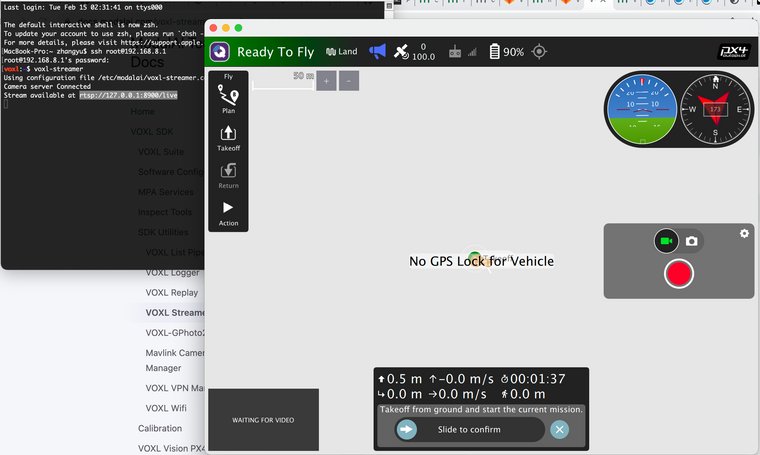
I asked you about using voxl-streamer to enable real-time video on hosting PC. I realize I don't need to use voxl-emulator to install voxl-streamer, instead I should directly use it on m500 via ssh to start a RTSP server, then config QGC to get video data on hosting PC, right?
I tried this in QGC, but it seems QGC couldn't show anything (only "waiting for video"). So, I am not sure if I manage it correctly:
-
For the use of voxl-portal, I should run it on m500 to start a server. Then I should make the source code on hosting PC, and using
sudo ./build/voxl-portal ./web_root/andsudo build/vins-camera-imu-serverto view data in a browser on PC, right? -
For developing on top of the Figure 8, I would define a different flying path like a simple triangle. I am wondering how to achieve this and where I should get started? What if I would enlarge the flying area of the existing Figure 8? Or how to change the flying speed?
-
For the voxl-qvio-server, existing VIO uses the Qualcomm MV SDK mvVISLAM algorithm. What if I would collect the tracking video of Figure 8 as input and its coordinates as labels to train a tflite model, then adding a new VIO for off-board mode, how should I first collect the tracking video and coordinates? After training, how should I deploy it on m500, and using off-board mode to test it?
-
How could I access all 3 types (hi, stereo, and tracking) of cameras' raw data? Are there any configrations to set for recording all 3 together and storing on disk as video output?
-
For testing m500 fly speed, it seems I could only manually speed-up to 5m/s in the Poisiton mode (maximum speed parameter is 12m/s as defult), I am wondering if there are any constraints to keep flying safe when in the Poisiton mode? I haven't tested the speed-up in a mission mode, but I will test it if m500 could fly over 10m/s+.
Any other suggestions for my target would be much appreciated.
-
-
Hi Yu,
I've got answers to some of your questions, and will ping others to help with the rest.
-
voxl-crossandvoxl-emulator(andvoxl-hexagonif you're trying to make apps that use the SDSP) are build environments.voxl-emulatorhas a lot of the rootfs from voxl, allowing you to use some of the proprietary libs like MVSDK on voxl (which is why it's behind a EULA).voxl-crossis intended to be a lighter-weight image with the proper toolchains to allow you to build code for use on voxl in a more user-friendly environment. For your use case, you'll want to clonevoxl-vision-px4, modify (or add your own) offboard mode to do the behavior you want, rebuild it invoxl-cross, and then deploy it to your drone. -
As in 1, voxl-emulator is a build environment, we do not provide a simulator in there. If you want to test code against simulated data, you can use the
voxl-loggercommand on voxl to log camera and imu data (look through the docs to make sure you include all the data you want), then disable the camera and imu services and usevoxl-replayto replay the logs. -
Will ping others for this one
-
All of the code that we provide is intended to run on the platform, not on your host pc. You should just run
voxl-portalon the device (or enable the service to have it run in the background), and then you can view data in the browser. -
The source code for the figure eight offboard mode is here. There are parameters at the top that you can play with, and looking through this file would be the right starting point for how to write your own offboard mode. Additionally, if you want a more dynamic approach, we already support "offboard trajectory" which opens up a pipe in the filesystem for you to write a polynomial trajectory to have the drone fly, but note that it WILL fly the path, so if you're trying to play with that feature, start very carefully by writing a path from it's current location to fly forward a meter or something of the likes.
-
The output of the vio algorithm is written via MPA to
/run/mpa/qvioand can be accessed via an mpa pipe. An example of how to do this is thevoxl-inspect-qviotool, the source for which is here. I wouldn't exactly recommend trying to use an AI model for localization, as it'll run much more slowly than the VIO algorithm, which has been optimized for the hardware and outputs data much more frequently than it receives camera frames (as it uses the imu as well). For research purposes however, thish could be achieved withvoxl-logger, which can log imu, camera, and vio data, which could then be used to train a model. You could then then use tflite server to run the model, and write your own offboard mode to take whatever data your model provides and behave as you wish. -
All of the raw camera data is published via MPA pipes to
/run/mpa/{camera_name}. you can usevoxl-loggerto compress the data and write it to disk, or write a simple tool (using voxl-inspect-cam as a template for reading the raw data) and write it to a file. -
Will ping others for this one
-
-
Hi @Eric-Katzfey , I think I am still a little bit unclear about the voxl development after reviewing the documents.
As a target example, I am thinking about how to develop my own version Figure 8 (maybe different flying path) using VIO for off-board mode (may invlove enabling GPU for running Tensflow lite model onboard).
I list some questions based on my understanding, please correct me if anything is wrong:
-
If I would develop the off-board flying based on the Figure 8, I should rewirte some parts of the source code, and re-build it by voxl-cross, then deploy it to the voxl on m500 for testing, right? I think I may not need to use voxl-emulator, and it should be used only for testing some new applications, right?
-
For voxl-emulator, does voxl include a flying simulation environment that allows developers use voxl-emulator to test flying function virually, like using simulated IMU or video data?
-
I asked you about using voxl-streamer to enable real-time video on hosting PC. I realize I don't need to use voxl-emulator to install voxl-streamer, instead I should directly use it on m500 via ssh to start a RTSP server, then config QGC to get video data on hosting PC, right?
I tried this in QGC, but it seems QGC couldn't show anything (only "waiting for video"). So, I am not sure if I manage it correctly:
-
For the use of voxl-portal, I should run it on m500 to start a server. Then I should make the source code on hosting PC, and using
sudo ./build/voxl-portal ./web_root/andsudo build/vins-camera-imu-serverto view data in a browser on PC, right? -
For developing on top of the Figure 8, I would define a different flying path like a simple triangle. I am wondering how to achieve this and where I should get started? What if I would enlarge the flying area of the existing Figure 8? Or how to change the flying speed?
-
For the voxl-qvio-server, existing VIO uses the Qualcomm MV SDK mvVISLAM algorithm. What if I would collect the tracking video of Figure 8 as input and its coordinates as labels to train a tflite model, then adding a new VIO for off-board mode, how should I first collect the tracking video and coordinates? After training, how should I deploy it on m500, and using off-board mode to test it?
-
How could I access all 3 types (hi, stereo, and tracking) of cameras' raw data? Are there any configrations to set for recording all 3 together and storing on disk as video output?
-
For testing m500 fly speed, it seems I could only manually speed-up to 5m/s in the Poisiton mode (maximum speed parameter is 12m/s as defult), I am wondering if there are any constraints to keep flying safe when in the Poisiton mode? I haven't tested the speed-up in a mission mode, but I will test it if m500 could fly over 10m/s+.
Any other suggestions for my target would be much appreciated.
@yu-zhang For #3, How did you configure the video input for QGC?
-
-
Hi @yu-zhang ,
Regarding speed, we've flown at 8-10 m/s during missions safely. You can experiment and run a simple mission to ensure the behavior is what you expect.
Also keep in mind wind conditions. To keep things safe, we usually fly with maximum wind velocity of 15 mph (or ~7 m/s) with gusts of 5 mph (or ~2 m/s). Always good to have enough speed to overcome current wind conditions when returning to launch.
Hope this helps!
-
Hi Yu,
I've got answers to some of your questions, and will ping others to help with the rest.
-
voxl-crossandvoxl-emulator(andvoxl-hexagonif you're trying to make apps that use the SDSP) are build environments.voxl-emulatorhas a lot of the rootfs from voxl, allowing you to use some of the proprietary libs like MVSDK on voxl (which is why it's behind a EULA).voxl-crossis intended to be a lighter-weight image with the proper toolchains to allow you to build code for use on voxl in a more user-friendly environment. For your use case, you'll want to clonevoxl-vision-px4, modify (or add your own) offboard mode to do the behavior you want, rebuild it invoxl-cross, and then deploy it to your drone. -
As in 1, voxl-emulator is a build environment, we do not provide a simulator in there. If you want to test code against simulated data, you can use the
voxl-loggercommand on voxl to log camera and imu data (look through the docs to make sure you include all the data you want), then disable the camera and imu services and usevoxl-replayto replay the logs. -
Will ping others for this one
-
All of the code that we provide is intended to run on the platform, not on your host pc. You should just run
voxl-portalon the device (or enable the service to have it run in the background), and then you can view data in the browser. -
The source code for the figure eight offboard mode is here. There are parameters at the top that you can play with, and looking through this file would be the right starting point for how to write your own offboard mode. Additionally, if you want a more dynamic approach, we already support "offboard trajectory" which opens up a pipe in the filesystem for you to write a polynomial trajectory to have the drone fly, but note that it WILL fly the path, so if you're trying to play with that feature, start very carefully by writing a path from it's current location to fly forward a meter or something of the likes.
-
The output of the vio algorithm is written via MPA to
/run/mpa/qvioand can be accessed via an mpa pipe. An example of how to do this is thevoxl-inspect-qviotool, the source for which is here. I wouldn't exactly recommend trying to use an AI model for localization, as it'll run much more slowly than the VIO algorithm, which has been optimized for the hardware and outputs data much more frequently than it receives camera frames (as it uses the imu as well). For research purposes however, thish could be achieved withvoxl-logger, which can log imu, camera, and vio data, which could then be used to train a model. You could then then use tflite server to run the model, and write your own offboard mode to take whatever data your model provides and behave as you wish. -
All of the raw camera data is published via MPA pipes to
/run/mpa/{camera_name}. you can usevoxl-loggerto compress the data and write it to disk, or write a simple tool (using voxl-inspect-cam as a template for reading the raw data) and write it to a file. -
Will ping others for this one
Hi @Alex-Gardner , Thanks so much for your detailed reply!
It's more clear for my understanding now. And I already tried the
voxl-portal, and it works well for me.All right, I will follow your suggestions to start my first development on voxl, and hope I could achieve it very soon
-
-
@yu-zhang For #3, How did you configure the video input for QGC?
@Eric-Katzfey , The video input for QGC looks like this:
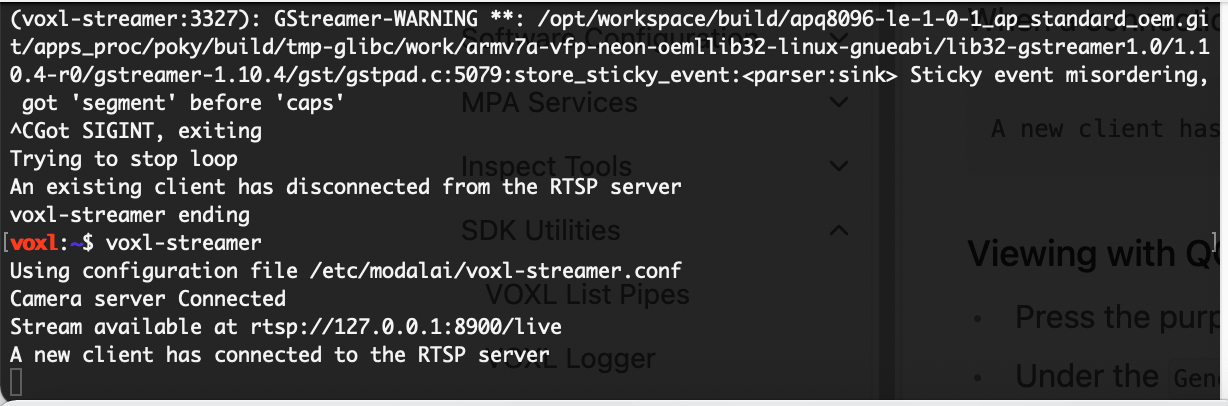
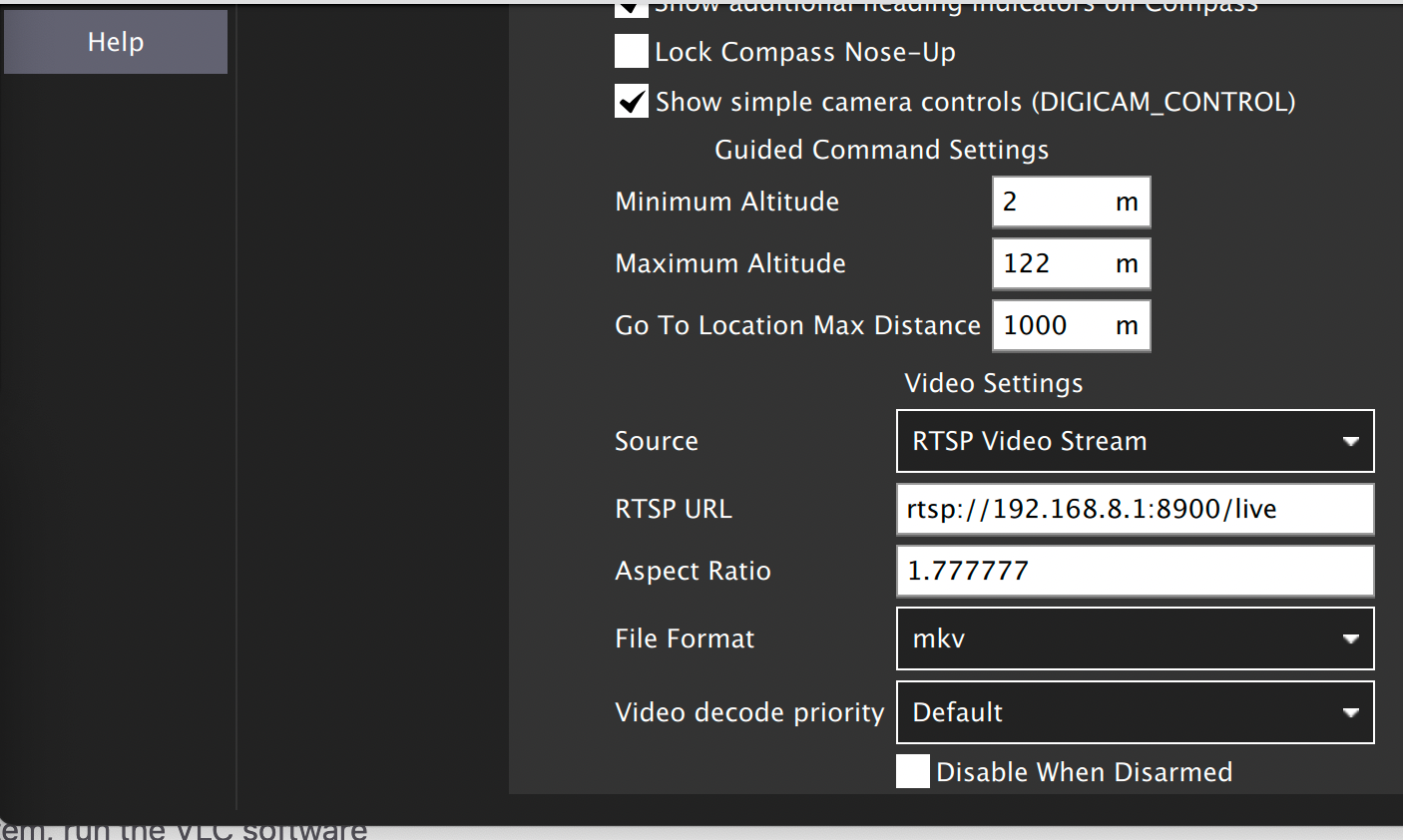
It seems the server on voxl already got a connection to QGC, but there is still no video in the fly view (showing for waiting for video).
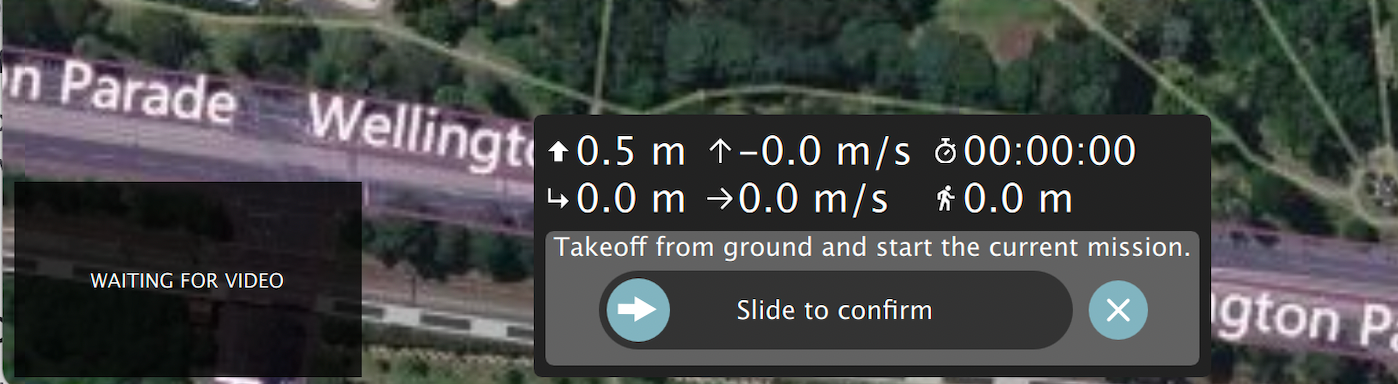
So, is there anything else that I should config in QGC?
-
Hi @yu-zhang ,
Regarding speed, we've flown at 8-10 m/s during missions safely. You can experiment and run a simple mission to ensure the behavior is what you expect.
Also keep in mind wind conditions. To keep things safe, we usually fly with maximum wind velocity of 15 mph (or ~7 m/s) with gusts of 5 mph (or ~2 m/s). Always good to have enough speed to overcome current wind conditions when returning to launch.
Hope this helps!
@RichieRich Thanks for the information!
I would test the maximum speed m500 could achieve in a normal condition. So, I will run the mission for this purpose.
By the way, for the motor on m500, I noticed it's the Motor 2216-880KV for 10in props. I also saw there was a 2216-920KV version on Holybro website for s500 frame.
https://shop.holybro.com/spare-parts-s500-v2-kit_p1251.htmlI double check that different the KV rating of a motor will be able to achieve different speeds. In general, the higher KV refers to the faster speed, but the lower in a heavy-lift.
For the defualt 880KV, m500 can achieve 1kg+ payload with up to 10m/s+ speed. So, I am thinking what if replacing 920KV on m500, will it achieve a faster speed? I am wondering do you hava any experiments to test using a higher KV motor before?
-
@Eric-Katzfey , The video input for QGC looks like this:
It seems the server on voxl already got a connection to QGC, but there is still no video in the fly view (showing for waiting for video).
So, is there anything else that I should config in QGC?
-
@yu-zhang For #3, How did you configure the video input for QGC?
@Eric-Katzfey , I have a look at the /etc/modalai/voxl-streamer.conf.
It seems this config includes a set of different input and output settings. I am wondering if my issue may refer to this config? Do you have a document to introduce the mapping of this config?
E.g., the second line is
"configuration": "tracking". Does it mean the view showing in QGC will be related to the view of the tracking camera?As default, QGC will show which camera's view? If I would prefer to show the Hi-res view, how should I config it?
I also simply try to type in 1.3333 for aspect ratio, but it seems it doesn't work.




Reading along? Create a free ModalAI Forum account to join in.
With an account you can reply, ask your own question, get an email when a ModalAI engineer answers, and mark the reply that solved it. Your place in each thread is saved between visits.
Questions about VOXL, Flight Core, ESCs and ModalAI drones are answered here by the engineers who build them.
Register Login