
Lumenier RID & M10Q GPS Module compatibility
-
@Alex-May It really looks like there is no communication going on between the GPS and the VOXL 2. Can you attach an oscilloscope to the rx and tx lines to look for activity? Usually the M10 units come up and start sending NMEA strings at 9600 so you would be able to detect that on the scope.
@Eric-Katzfey I don't believe we have a scope available for at least a few more days. But I do have other M10 GPS units I could try.
-
@Eric-Katzfey I am Alex's co-worker and helping with the building the magnetometer's driver into PX4.
I am following instructions outlined here: https://gitlab.com/voxl-public/rb5-flight/rb5-flight-px4-build-docker#install-qualcomm-package-manager
I am having hard time downloading the hexagon SDK from qualcomm. I see v3.1 is available on your website. Am I going to need 4.X or I can use 3.1
-
@Eric-Katzfey I am Alex's co-worker and helping with the building the magnetometer's driver into PX4.
I am following instructions outlined here: https://gitlab.com/voxl-public/rb5-flight/rb5-flight-px4-build-docker#install-qualcomm-package-manager
I am having hard time downloading the hexagon SDK from qualcomm. I see v3.1 is available on your website. Am I going to need 4.X or I can use 3.1
@psafi Yes, unfortunately it is a real pain to get the SDK from Qualcomm and you need that version.
-
@Alex-May The driver for that magnetometer has not been built into the image so it won't work without adding that driver. As for GPS it seems like it isn't communicating with the receiver. Can you run this experiment: Stop PX4 with
systemctl stop voxl-px4, wait a couple of seconds, then start px4 from the command line withvoxl-px4 -dand post the output from that? -
@psafi Yes, unfortunately it is a real pain to get the SDK from Qualcomm and you need that version.
@Eric-Katzfey I am able to build voxl-px4 now.
I am following instructions outlined here to add this magnetometer:
https://forum.modalai.com/post/16770I am adding following line:
CONFIG_DRIVERS_MAGNETOMETER_LIS3MDL=yto this file:
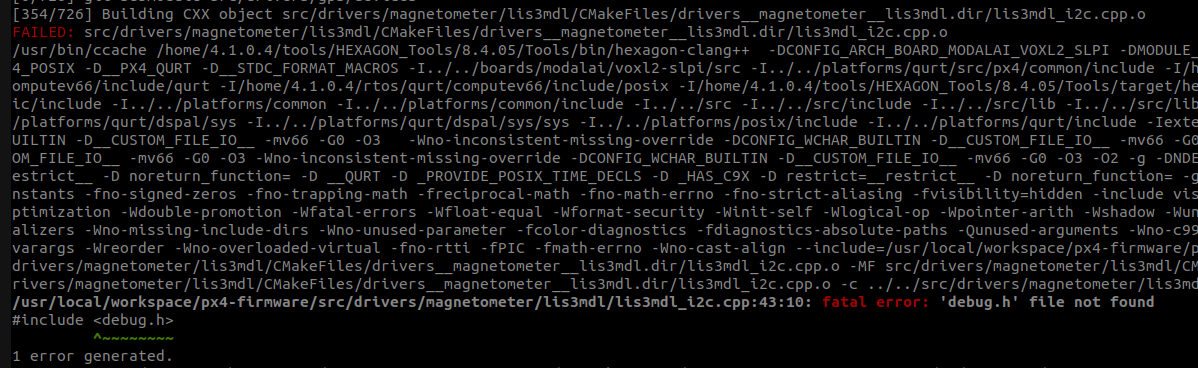
https://github.com/modalai/px4-firmware/blob/voxl-dev/boards/modalai/voxl2-slpi/default.px4boardwhen I attempt to build px4 I get the following error from the driver module:
-
@Eric-Katzfey I am able to build voxl-px4 now.
I am following instructions outlined here to add this magnetometer:
https://forum.modalai.com/post/16770I am adding following line:
CONFIG_DRIVERS_MAGNETOMETER_LIS3MDL=yto this file:
https://github.com/modalai/px4-firmware/blob/voxl-dev/boards/modalai/voxl2-slpi/default.px4boardwhen I attempt to build px4 I get the following error from the driver module:
@psafi Looks like it will compile if you comment out the
#include <debug.h>lines in both lis3mdl_i2c.cpp and lis3mdl_spi.cpp -
@Eric-Katzfey I am able to build voxl-px4 now.
I am following instructions outlined here to add this magnetometer:
https://forum.modalai.com/post/16770I am adding following line:
CONFIG_DRIVERS_MAGNETOMETER_LIS3MDL=yto this file:
https://github.com/modalai/px4-firmware/blob/voxl-dev/boards/modalai/voxl2-slpi/default.px4boardwhen I attempt to build px4 I get the following error from the driver module:
@psafi Those should only be there on the Nuttx platform.
-
@psafi Looks like it will compile if you comment out the
#include <debug.h>lines in both lis3mdl_i2c.cpp and lis3mdl_spi.cpp@Eric-Katzfey I did that and was able to build and install new px4. Thank you!
Sill not detecting lis3mdl module on the px4 side.
I tried adding the following to /usr/bin/voxl-px4-start
qshell lis3mdl start -R 10 -X -b 1but I think that causes px4 service fail to start. Not sure if that means the module has not been successfully added to voxl-px4 or some other issue.
Are there any steps I need to take besides adding sensor name to default.px4board file?
-
@Eric-Katzfey I did that and was able to build and install new px4. Thank you!
Sill not detecting lis3mdl module on the px4 side.
I tried adding the following to /usr/bin/voxl-px4-start
qshell lis3mdl start -R 10 -X -b 1but I think that causes px4 service fail to start. Not sure if that means the module has not been successfully added to voxl-px4 or some other issue.
Are there any steps I need to take besides adding sensor name to default.px4board file?
@psafi If you disable the px4 service (
systemctl stop voxl-px4) and then start it from the command line (voxl-px4 -d) what output do you get? And if you disconnect the magnetometer from the system how does that change things? Remove the start command from voxl-px4-start and enter it after px4 starts from the command prompt to see what happens. -
@Eric-Katzfey I did that and was able to build and install new px4. Thank you!
Sill not detecting lis3mdl module on the px4 side.
I tried adding the following to /usr/bin/voxl-px4-start
qshell lis3mdl start -R 10 -X -b 1but I think that causes px4 service fail to start. Not sure if that means the module has not been successfully added to voxl-px4 or some other issue.
Are there any steps I need to take besides adding sensor name to default.px4board file?
@psafi And how did you load your updated build to the VOXL 2?
-
@Eric-Katzfey I did that and was able to build and install new px4. Thank you!
Sill not detecting lis3mdl module on the px4 side.
I tried adding the following to /usr/bin/voxl-px4-start
qshell lis3mdl start -R 10 -X -b 1but I think that causes px4 service fail to start. Not sure if that means the module has not been successfully added to voxl-px4 or some other issue.
Are there any steps I need to take besides adding sensor name to default.px4board file?
@psafi I just built voxl-px4 with the lis3mdl driver and when I run it the command fails because it fails the probe (I don't have that magnetometer) but otherwise runs normally.
-
@psafi And how did you load your updated build to the VOXL 2?
@Eric-Katzfey by installing debian package and I got output similar to this after installation:
https://gitlab.com/voxl-public/voxl-sdk/services/voxl-px4#deployment -
@psafi If you disable the px4 service (
systemctl stop voxl-px4) and then start it from the command line (voxl-px4 -d) what output do you get? And if you disconnect the magnetometer from the system how does that change things? Remove the start command from voxl-px4-start and enter it after px4 starts from the command prompt to see what happens.@Eric-Katzfey I did the systemctl stop and started service again. I guess rebooting the board earlier did not have the same effect. The compass calibration in Q is working now (no more "no mag found" error) which I guess it means the mag is working now and our gps is working too.
here is the output of voxl-p4 -d by the way:
INFO  [qshell] Send cmd: 'lis3mdl start -R 10 -X -b 1'
INFO  [muorb] [uORB] Marking DeviceNode(qshell_req) as advertised in process_remote_topic
INFO  [muorb] [qshell] qshell gotten: lis3mdl start -R 10 -X -b 1
INFO  [muorb] [qshell]   arg0 = 'lis3mdl'
INFO  [muorb] [qshell]   arg1 = 'start'
INFO  [muorb] [qshell]   arg2 = '-R'
INFO  [muorb] [qshell]   arg3 = '10'
INFO  [muorb] [qshell]   arg4 = '-X'
INFO  [muorb] [qshell]   arg5 = '-b'
INFO  [muorb] [qshell]   arg6 = '1'
INFO  [muorb] [drivers__device] *** I2C Device ID 0x51e09 335369
INFO  [muorb] [drivers__device] Set up I2C bus mutex for bus 1
INFO  [muorb] lis3mdl #0 on I2C bus 1
INFO  [muorb]  (external)
INFO  [muorb]  address 0x1E
INFO  [muorb]  rotation 10
INFO  [muorb]

INFO  [muorb] [qshell] Ok executing command: lis3mdl start -R 10 -X -b 1


Reading along? Create a free ModalAI Forum account to join in.
With an account you can reply, ask your own question, get an email when a ModalAI engineer answers, and mark the reply that solved it. Your place in each thread is saved between visits.
Questions about VOXL, Flight Core, ESCs and ModalAI drones are answered here by the engineers who build them.
Register Login