
PX4 stops running

-
@kestrelsystemsbp Can you disable the px4 autostart (e.g.
systemctl disable voxl-px4) and then reboot the drone? Then start voxl-px4 from the command line and capture it's output (e.g.voxl-px4 -d)?@Eric-Katzfey
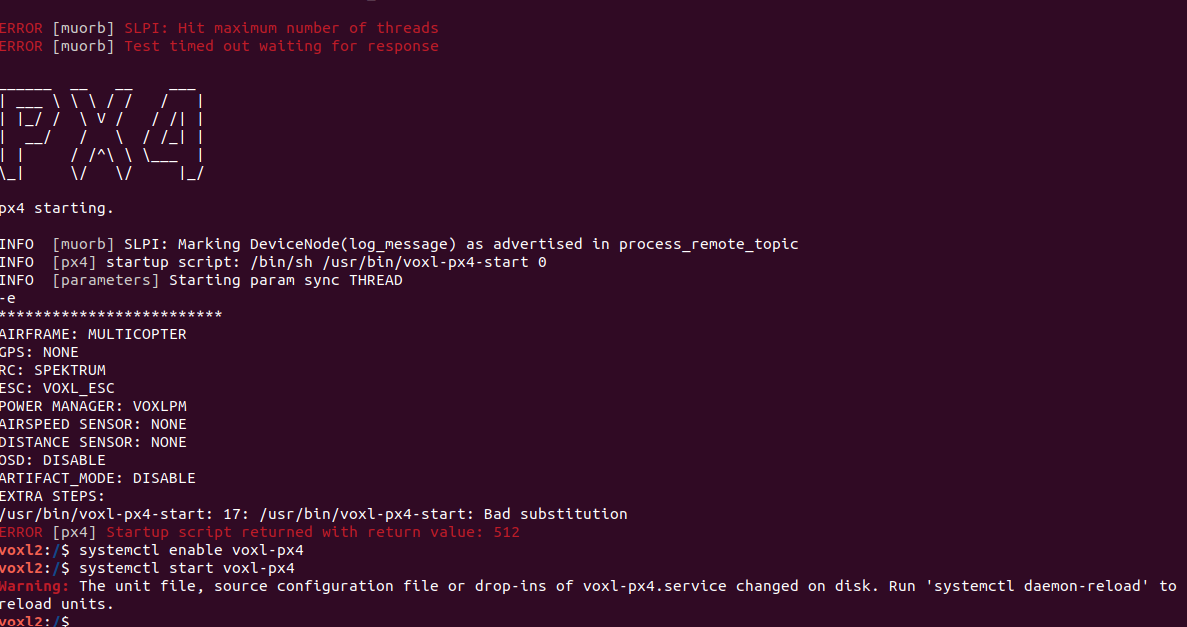
This is what I get when I try to start PX4 back up again. -
@Eric-Katzfey
This is what I get when I try to start PX4 back up again.@kestrelsystemsbp That's the entire output from
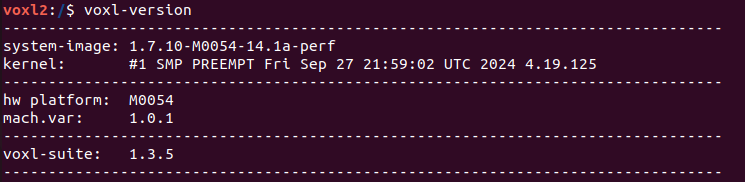
voxl-px4 -d? What version of the VOXL SDK is installed? Have you made any modifications to/usr/bin/voxl-px4-startor/etc/modalai/voxl-px4.conf? Have you made any modifications to the software on the Starling 2? -
@Eric-Katzfey
This is what I get when I try to start PX4 back up again. -
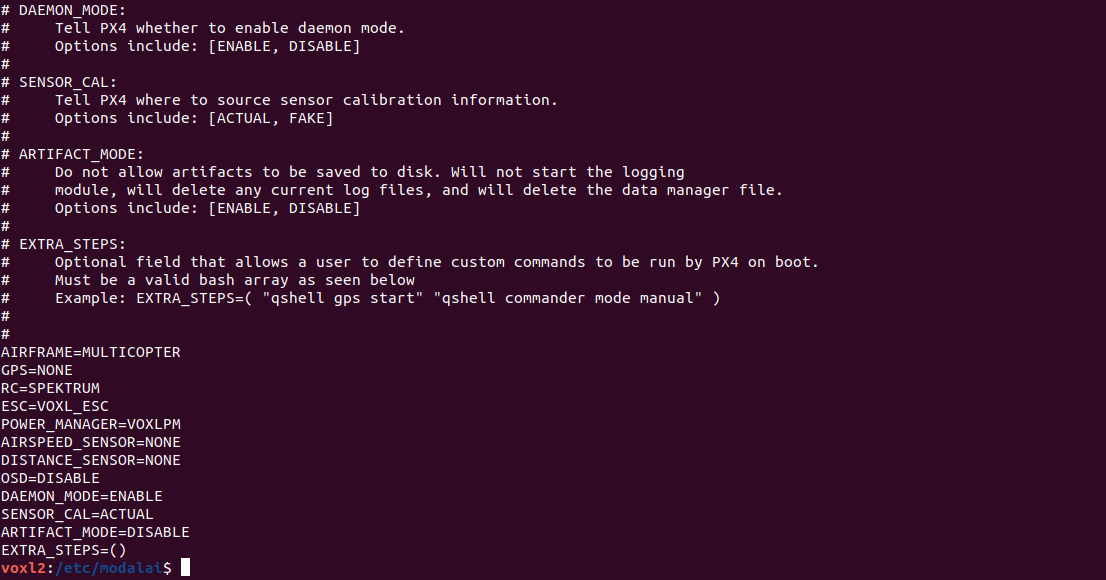
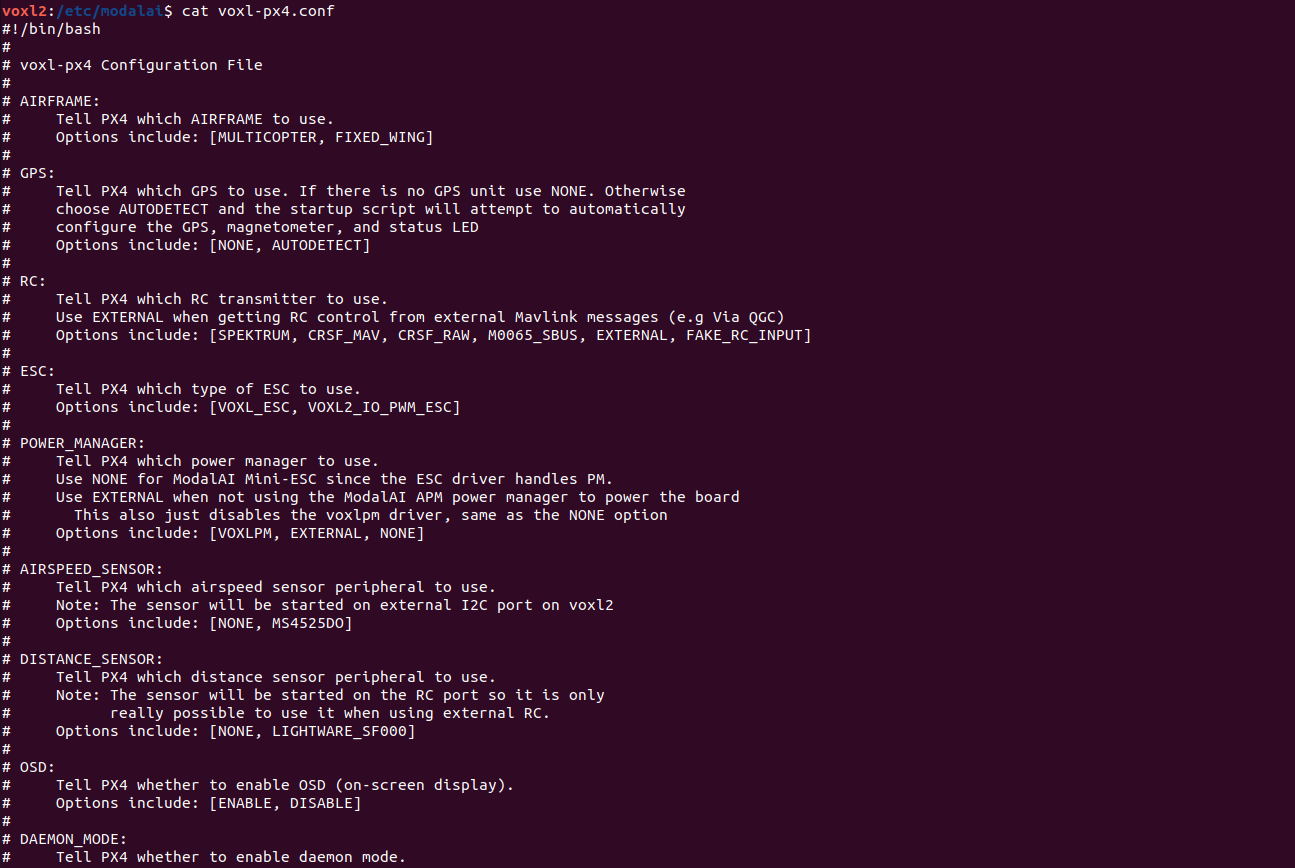
@kestrelsystemsbp Can you post the contents of
/etc/modalai/voxl-px4.conf -
@kestrelsystemsbp That's the entire output from
voxl-px4 -d? What version of the VOXL SDK is installed? Have you made any modifications to/usr/bin/voxl-px4-startor/etc/modalai/voxl-px4.conf? Have you made any modifications to the software on the Starling 2?@Eric-Katzfey Have not done any modifications to the software other than basic setup stuff for QGC.
-
@kestrelsystemsbp That's the entire output from
voxl-px4 -d? What version of the VOXL SDK is installed? Have you made any modifications to/usr/bin/voxl-px4-startor/etc/modalai/voxl-px4.conf? Have you made any modifications to the software on the Starling 2?@Eric-Katzfey said in PX4 stops running:
What version of the VOXL SDK is installed?
-
@Eric-Katzfey Have not done any modifications to the software other than basic setup stuff for QGC.
@kestrelsystemsbp said in PX4 stops running:
basic setup stuff for QGC
What changes were made for that?
-
@Eric-Katzfey Have not done any modifications to the software other than basic setup stuff for QGC.
-
@kestrelsystemsbp Would also be helpful to see the contents of
/usr/bin/voxl-px4-start@tom
#!/bin/shPX4 commands need the 'px4-' prefix in bash.
(px4-alias.sh is expected to be in the PATH)
echo -e "\n*************************"
echo "AIRFRAME: $AIRFRAME"
echo "GPS: $GPS"
echo "RC: $RC"
echo "ESC: $ESC"
echo "POWER MANAGER: $POWER_MANAGER"
echo "AIRSPEED SENSOR: $AIRSPEED_SENSOR"
echo "DISTANCE SENSOR: $DISTANCE_SENSOR"
echo "OSD: $OSD"
echo "ARTIFACT_MODE: $ARTIFACT_MODE"
echo "EXTRA STEPS:"
for i in "${EXTRA_STEPS[@]}"
do
echo -e "\t$i"
done
echo -e "*************************\n"In order to just exit after starting the uorb / muorb modules define
the environment variable MINIMAL_PX4. (e.g. export MINIMAL_PX4=1)
This is useful for testing / debug where you may want to start drivers
and modules manually from the px4 command shell
if [ ! -z $MINIMAL_PX4 ]; then
/bin/echo "Running minimal script"
exit 0
fiFigure out what platform we are running on.
PLATFORM=
/usr/bin/voxl-platform 2> /dev/null
RETURNCODE=$?
if [ $RETURNCODE -ne 0 ]; then
# If we couldn't get the platform from the voxl-platform utility then check
# /etc/version to see if there is an M0052 substring in the version string. If so,
# then we assume that we are on M0052.
VERSIONSTRING=$(</etc/version)
M0052SUBSTRING="M0052"
if [[ "$VERSIONSTRING" == "$M0052SUBSTRING" ]]; then
PLATFORM="M0052"
fi
fiWe can only run on M0052, M0054, or M0104 so exit with error if that is not the case
if [ $PLATFORM = "M0052" ]; then
/bin/echo "Running on M0052"
elif [ $PLATFORM = "M0054" ]; then
/bin/echo "Running on M0054"
elif [ $PLATFORM = "M0104" ]; then
/bin/echo "Running on M0104"
else
/bin/echo "Error, cannot determine platform!"
exit 0
fiSleep a little here. A lot happens when the uorb and muorb start
and we need to make sure that it all completes successfully to avoid
any possible race conditions.
/bin/sleep 1
param select /data/px4/param/parameters
Load in all of the parameters that have been saved in the file
param load
if [ "$ARTIFACT_MODE" == "ENABLE" ]; then
# Do not start the logger module if we are in artifact mode. Logging
# produces a log artifact. If there are currently any saved logs make
# sure to delete them now.
# Also remove the data manager file that may have saved GPS waypoint information
# in it.
# Use shred to remove all files so that they cannot be recovered.
# shred should be effective on the /data partition since it has this configuration:
# /dev/sda8 /data ext4 rw,nosuid,nodev,noatime,discard,noauto_da_alloc,data=ordered 0 0
/usr/bin/find /data/px4/log -name "*.ulg" -exec /usr/bin/shred -u -n 7 {} ;
/bin/rm -fR /data/px4/log
/usr/bin/shred -u -n 7 /data/px4/dataman
/bin/echo "Artifact mode has been enabled"
else
# Start logging and use timestamps for log files when possible.
# Add the "-e" option to start logging immediately. Default is
# to log only when armed. Caution must be used with the "-e" option
# because if power is removed without stopping the logger gracefully then
# the log file may be corrupted.
logger start -t
fiIMU (accelerometer / gyroscope)
if [ "$PLATFORM" == "M0104" ]; then
/bin/echo "Starting IMU driver with rotation 12"
qshell icm42688p start -s -R 12
else
/bin/echo "Starting IMU driver with no rotation"
qshell icm42688p start -s
fiStart Invensense ICP 101xx barometer built on to VOXL 2
qshell icp101xx start -I -b 5
Auto detect the magnetometer. If one or both of these devices
are not connected it will fail but not cause any harm.
/bin/echo "Looking for qmc5883l magnetometer"
qshell qmc5883l start -R 10 -X -b 1
/bin/echo "Looking for ist8310 magnetometer"
qshell ist8310 start -R 10 -X -b 1GPS and magnetometer
if [ "$GPS" != "NONE" ]; then
# On M0052 the GPS driver runs on the apps processor
if [ $PLATFORM = "M0052" ]; then
gps start -d /dev/ttyHS2
# On M0054 and M0104 the GPS driver runs on SLPI DSP
else
qshell gps start
fi
fiAuto detect an ncp5623c i2c RGB LED. If one isn't connected this will
fail but not cause any harm.
/bin/echo "Looking for ncp5623c RGB LED"
qshell rgbled_ncp5623c start -X -b 1 -f 400 -a 56We do not change the following parameters but QGC will complain if they aren't
being reported as "used" by px4. "Touching" them accomplishes that.
param touch SYS_AUTOCONFIG
param touch SDLOG_MODEESC driver
if [ "$ESC" == "VOXL_ESC" ]; then
/bin/echo "Starting VOXL ESC driver"
qshell voxl_esc start
elif [ "$ESC" == "VOXL2_IO_PWM_ESC" ]; then
if [ "$RC" == "M0065_SBUS" ]; then
/bin/echo "Starting VOXL IO for PWM ESC with SBUS RC"
qshell voxl2_io start
else
/bin/echo "Starting VOXL IO for PWM ESC without SBUS RC"
qshell voxl2_io start -e
fi
else
/bin/echo "No ESC type specified, not starting an ESC driver"
fiRC driver
if [ "$RC" == "FAKE_RC_INPUT" ]; then
/bin/echo "Starting fake RC driver"
qshell rc_controller start
elif [ "$RC" == "CRSF_RAW" ]; then
/bin/echo "Starting CRSF RC driver"
qshell crsf_rc start -d 7
elif [ "$RC" == "CRSF_MAV" ]; then
/bin/echo "Starting TBS crossfire RC - MAV Mode"
qshell mavlink_rc_in start -m -p 7 -b 115200
elif [ "$RC" == "SPEKTRUM" ]; then
/bin/echo "Starting Spektrum RC"
# On M0052 the RC driver runs on the apps processor
if [ $PLATFORM = "M0052" ]; then
rc_input start -d /dev/ttyHS1
# On M0054 and M0104 the RC driver runs on SLPI DSP
else
qshell spektrum_rc start
fi
elif [ "$RC" == "GHST" ]; then
/bin/echo "Starting GHST RC driver"
qshell ghst_rc start -d 7
elif [ "$RC" == "M0065_SBUS" ]; then
if [ $PLATFORM = "M0052" ]; then
apps_sbus start
elif [ "$ESC" != "VOXL2_IO_PWM_ESC" ]; then
/bin/echo "Attempting to start M0065 SBUS RC driver for original M0065 FW"
qshell dsp_sbus start
retVal=$?
if [ $retVal -ne 0 ]; then
/bin/echo "Starting M0065 SBUS RC driver for original M0065 FW failed"
/bin/echo "Attempting to start M0065 SBUS RC driver for new M0065 FW"
qshell voxl2_io start -d -p 7
fi
else
/bin/echo "M0065 SBUS RC driver already started with PWM ESC start"
fi
fiif [ "$DISTANCE_SENSOR" == "LIGHTWARE_SF000" ]; then
# Make sure to set the parameter SENS_EN_SF0X to 8 for sf000/b sensor
qshell lightware_laser_serial start -d 7
fiif [ "$POWER_MANAGER" == "VOXLPM" ]; then
# APM power monitor
qshell voxlpm start -X -b 2
fiif [ "$AIRSPEED_SENSOR" == "MS4525DO" ]; then
qshell ms4525do start -X -b 4
fiOptional distance sensor on spare i2c
qshell vl53l0x start -X -b 4
qshell vl53l1x start -X -b 4
Start all of the processing modules on DSP
qshell sensors start
qshell ekf2 startif [ "$AIRFRAME" == "FIXED_WING" ]; then
qshell fw_pos_control start
qshell fw_att_control start
qshell fw_rate_control start
qshell airspeed_selector start
qshell fw_autotune_attitude_control start
qshell land_detector start fixedwing
elif [ $AIRFRAME = "MULTICOPTER" ]; then
qshell mc_pos_control start
qshell mc_att_control start
qshell mc_rate_control start
qshell mc_hover_thrust_estimator start
qshell mc_autotune_attitude_control start
qshell land_detector start multicopter
fiqshell manual_control start
qshell control_allocator start
qshell load_mon startOnly start the rc_update module if an actual RC driver
is publishing input_rc topics. Otherwise for external RC
over Mavlink this isn't needed.
if [ "$RC" != "EXTERNAL" ]; then
qshell rc_update start
fiqshell commander start
This is needed for altitude and position hold modes
qshell flight_mode_manager start
Start all of the processing modules on the applications processor
dataman start
navigator start
load_mon startThis bridge allows raw data packets to be sent over UART to the ESC
modal_io_bridge start
Start microdds_client for ros2 offboard messages from agent over localhost
microdds_client start -t udp -h 127.0.0.1 -p 8888
On M0052 there is only one IMU. So, PX4 needs to
publish IMU samples externally for VIO to use.
if [ $PLATFORM = "M0052" ]; then
imu_server start
fistart the onboard fast link to connect to voxl-mavlink-server
mavlink start -x -u 14556 -o 14557 -r 100000 -n lo -m onboard
slow down some of the fastest streams
mavlink stream -u 14556 -s HIGHRES_IMU -r 10
mavlink stream -u 14556 -s ATTITUDE -r 10
mavlink stream -u 14556 -s ATTITUDE_QUATERNION -r 10
mavlink stream -u 14556 -s GLOBAL_POSITION_INT -r 30
mavlink stream -u 14556 -s SCALED_PRESSURE -r 10start the slow normal mode for voxl-mavlink-server to forward to GCS
mavlink start -x -u 14558 -o 14559 -r 100000 -n lo
mavlink boot_complete
Optional MSP OSD driver for DJI or HDZero goggles
This is only supported on M0054 (with M0125 accessory board)
if [ "$OSD" == "ENABLE" ] || [ "$OSD" == "DJI" ]; then
/bin/echo "Starting DJI OSD driver"
msp_osd start -d /dev/ttyHS1
elif [ "$PLATFORM" == "M0054" ] && [ "$OSD" == "HDZERO" ] || [ "$OSD" == "DJI_MSP_DP" ]; then
/bin/echo "Starting $OSD OSD driver for $PLATFORM"
msp_dp_osd start -d /dev/ttyHS1
elif [ "$PLATFORM" == "M0104" ] && [ "$OSD" == "HDZERO" ] || [ "$OSD" == "DJI_MSP_DP" ] ; then
/bin/echo "Starting $OSD OSD driver for $PLATFORM"
msp_dp_osd start -d /dev/ttyHS0
fiStart optional EXTRA_STEPS
for i in "${EXTRA_STEPS[@]}"
do
$i
done -
@Eric-Katzfey said in PX4 stops running:
What version of the VOXL SDK is installed?
-
@kestrelsystemsbp Perhaps you can do a fresh installation on 1.3.5 and see if the problem goes away? v1.3.5 has a lot of test time on it and nothing like the issue you are seeing has been encountered by us or any of our customers so this is a bit of a mystery. I would try the fresh install and, without making any modifications at all, see if it comes up and stays up. If so you can start introducing any configuration changes you need one by one to see if any of them are causing the issue.
-
@kestrelsystemsbp Perhaps you can do a fresh installation on 1.3.5 and see if the problem goes away? v1.3.5 has a lot of test time on it and nothing like the issue you are seeing has been encountered by us or any of our customers so this is a bit of a mystery. I would try the fresh install and, without making any modifications at all, see if it comes up and stays up. If so you can start introducing any configuration changes you need one by one to see if any of them are causing the issue.
-
@Eric-Katzfey How do I do that?
@kestrelsystemsbp You can download the SDK from downloads.modalai.com,
Untar it with
tar -xzvf voxl2_SDK_1.3.5.tar.gzcd voxl2_SDK_1.3.5Install it with
./install.shAlthough if there isn't a specific reason you're on 1.3.5, I would recommend updating to 1.4.1
-
@kestrelsystemsbp You can download the SDK from downloads.modalai.com,
Untar it with
tar -xzvf voxl2_SDK_1.3.5.tar.gzcd voxl2_SDK_1.3.5Install it with
./install.shAlthough if there isn't a specific reason you're on 1.3.5, I would recommend updating to 1.4.1
@tom That did the trick, thanks for the help!



Reading along? Create a free ModalAI Forum account to join in.
With an account you can reply, ask your own question, get an email when a ModalAI engineer answers, and mark the reply that solved it. Your place in each thread is saved between visits.
Questions about VOXL, Flight Core, ESCs and ModalAI drones are answered here by the engineers who build them.
Register Login