
Sierra Modem not showing in Device Manager/wds errors
-
Hi,
Using the VOXL2 with the em9291 sierra wireless chip and WLAN board (setup does get an IP address).We are able to get the SIM profile working but still having issues with the Sierra wireless Modem and it does not show in Device manager on our PC
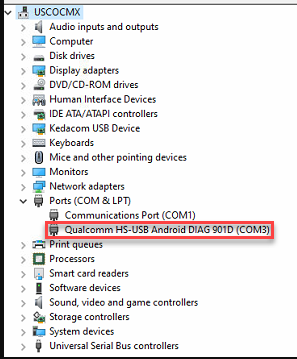
It does show as enabled and active (running) from the adb shell responses
Could this be the cause of 'wds' service not working or the QMI protocol errors below?voxl2:/$ systemctl status voxl-modem
● voxl-modem.service - Modem Initialization
Loaded: loaded (/etc/systemd/system/voxl-modem.service; enabled; vendor preset: enabled)
Active: active (running) since Thu 2023-03-02 13:25:00 UTC; 53min ago
Process: 8075 ExecStartPre=/bin/sleep 2 (code=exited, status=0/SUCCESS)
Main PID: 8076 (voxl-modem-star)
Tasks: 4 (limit: 4915)
CGroup: /system.slice/voxl-modem.service
├─ 8076 /bin/bash /usr/bin/voxl-modem-start
├─ 8104 /usr/lib/libmbim/mbim-proxy
└─19866 sleep 1Mar 02 14:18:29 m0054 voxl-modem-start[8076]: error: couldn't create client for the 'wds' service: QMI protocol error (5): 'ClientIdsExhausted'
Mar 02 14:18:29 m0054 voxl-modem-start[8076]: Error detected! Retrying...
Mar 02 14:18:30 m0054 voxl-modem-start[8076]: error: couldn't create client for the 'wds' service: QMI protocol error (5): 'ClientIdsExhausted'
Mar 02 14:18:30 m0054 voxl-modem-start[8076]: Error detected! Retrying...
Mar 02 14:18:31 m0054 voxl-modem-start[8076]: error: couldn't create client for the 'wds' service: QMI protocol error (5): 'ClientIdsExhausted'
Mar 02 14:18:31 m0054 voxl-modem-start[8076]: Error detected! Retrying...
Mar 02 14:18:32 m0054 voxl-modem-start[8076]: error: couldn't create client for the 'wds' service: QMI protocol error (5): 'ClientIdsExhausted'
Mar 02 14:18:32 m0054 voxl-modem-start[8076]: Error detected! Retrying...
Mar 02 14:18:33 m0054 voxl-modem-start[8076]: error: couldn't create client for the 'wds' service: QMI protocol error (5): 'ClientIdsExhausted'
Mar 02 14:18:33 m0054 voxl-modem-start[8076]: Error detected! Retrying...I checked the board and all the cabling looks connected and boards fully seated.
Thanks!
-
Hi,
Using the VOXL2 with the em9291 sierra wireless chip and WLAN board (setup does get an IP address).We are able to get the SIM profile working but still having issues with the Sierra wireless Modem and it does not show in Device manager on our PC
It does show as enabled and active (running) from the adb shell responses
Could this be the cause of 'wds' service not working or the QMI protocol errors below?voxl2:/$ systemctl status voxl-modem
● voxl-modem.service - Modem Initialization
Loaded: loaded (/etc/systemd/system/voxl-modem.service; enabled; vendor preset: enabled)
Active: active (running) since Thu 2023-03-02 13:25:00 UTC; 53min ago
Process: 8075 ExecStartPre=/bin/sleep 2 (code=exited, status=0/SUCCESS)
Main PID: 8076 (voxl-modem-star)
Tasks: 4 (limit: 4915)
CGroup: /system.slice/voxl-modem.service
├─ 8076 /bin/bash /usr/bin/voxl-modem-start
├─ 8104 /usr/lib/libmbim/mbim-proxy
└─19866 sleep 1Mar 02 14:18:29 m0054 voxl-modem-start[8076]: error: couldn't create client for the 'wds' service: QMI protocol error (5): 'ClientIdsExhausted'
Mar 02 14:18:29 m0054 voxl-modem-start[8076]: Error detected! Retrying...
Mar 02 14:18:30 m0054 voxl-modem-start[8076]: error: couldn't create client for the 'wds' service: QMI protocol error (5): 'ClientIdsExhausted'
Mar 02 14:18:30 m0054 voxl-modem-start[8076]: Error detected! Retrying...
Mar 02 14:18:31 m0054 voxl-modem-start[8076]: error: couldn't create client for the 'wds' service: QMI protocol error (5): 'ClientIdsExhausted'
Mar 02 14:18:31 m0054 voxl-modem-start[8076]: Error detected! Retrying...
Mar 02 14:18:32 m0054 voxl-modem-start[8076]: error: couldn't create client for the 'wds' service: QMI protocol error (5): 'ClientIdsExhausted'
Mar 02 14:18:32 m0054 voxl-modem-start[8076]: Error detected! Retrying...
Mar 02 14:18:33 m0054 voxl-modem-start[8076]: error: couldn't create client for the 'wds' service: QMI protocol error (5): 'ClientIdsExhausted'
Mar 02 14:18:33 m0054 voxl-modem-start[8076]: Error detected! Retrying...I checked the board and all the cabling looks connected and boards fully seated.
Thanks!
-
@RSAUser1 Have you confirmed that your network provider supports the em9291 modem?
It won't be possible to see the Sierra modem under device manager if it is an add-on board, USB devices aren't passed through in that way
@tom This is a test SIM and the manufacture does support Sierra wireless. It uses the GSMA TS48 SIM profile which is a universal test profile that works with everything I have used it with as well. When we inject a signal from a base station emulator the EM9291 does not respond and this SIM works with other devices when connecting to the emulator.
Ok I wasn't sure because the EM9291 user guide states both QC and Sierra wireless should show up but yes that is not used as a add-on board.
Any idea why the wds service is giving the error?
-
@tom This is a test SIM and the manufacture does support Sierra wireless. It uses the GSMA TS48 SIM profile which is a universal test profile that works with everything I have used it with as well. When we inject a signal from a base station emulator the EM9291 does not respond and this SIM works with other devices when connecting to the emulator.
Ok I wasn't sure because the EM9291 user guide states both QC and Sierra wireless should show up but yes that is not used as a add-on board.
Any idea why the wds service is giving the error?
@RSAUser1 I can't provide too much help when it comes to the modem itself. We test each modem with a Google Fi SIM card / network connection before shipping so hardware-wise it should be functional. Sierra may be able to provide more detail on the errors being generated.
-
@RSAUser1 I can't provide too much help when it comes to the modem itself. We test each modem with a Google Fi SIM card / network connection before shipping so hardware-wise it should be functional. Sierra may be able to provide more detail on the errors being generated.
-
@RSAUser1 , Can you see if there is any useful information at the beginning when you run
voxl-modem-start?You can stop the background service using
systemctl stop voxl-modemand then just run it in the foreground usingvoxl-modem-startcommand.Alex
-
@RSAUser1 I can't provide too much help when it comes to the modem itself. We test each modem with a Google Fi SIM card / network connection before shipping so hardware-wise it should be functional. Sierra may be able to provide more detail on the errors being generated.
@tom I just heard back from Sierra wireless and they are stating this is an issue on your guys side. Not sure how to proceed. Any insight on the path forward is appreciated. Maybe if we can speak with you and Sierra wireless in a joint chat that would be easiest?
Thanks.
-
@tom I just heard back from Sierra wireless and they are stating this is an issue on your guys side. Not sure how to proceed. Any insight on the path forward is appreciated. Maybe if we can speak with you and Sierra wireless in a joint chat that would be easiest?
Thanks.
@RSAUser1 said in Sierra Modem not showing in Device Manager/wds errors:
@tom I just heard back from Sierra wireless and they are stating this is an issue on your guys side. Not sure how to proceed. Any insight on the path forward is appreciated. Maybe if we can speak with you and Sierra wireless in a joint chat that would be easiest?
Thanks.
Sorry just want to add. We were able to get a connection to our emulator but only when the modem status shows:
voxl2:/$ systemctl status -l voxl-modem
● voxl-modem.service - Modem Initialization
Loaded: loaded (/etc/systemd/system/voxl-modem.service; enabled; vendor preset: enabled)
Active: inactive (dead)Which seems to have confused me more. What we did was disable the vision-hub , just to allow another service to start (in theory) but then disabled modem, adb rebooted, enabled modem all while we were injecting the 5G signal (only band n5 works but handovers to supported bands do work).
Any deviation from these steps does not work, like if we reboot then inspect-services or anything besides just enabling modem it will not connect. Is this because if the drone loses power or anything the first thing it needs to do is find the network (another theory)? Even if we are connected and turn of the 5G cell from our side and turn it back on the chipset does not reconnect and it looks like it is not trying to find a cell.
Looks like this is on sierra wireless, is there anyway we can have a joint chat to troubleshoot this?Thanks!


Reading along? Create a free ModalAI Forum account to join in.
With an account you can reply, ask your own question, get an email when a ModalAI engineer answers, and mark the reply that solved it. Your place in each thread is saved between visits.
Questions about VOXL, Flight Core, ESCs and ModalAI drones are answered here by the engineers who build them.
Register Login