
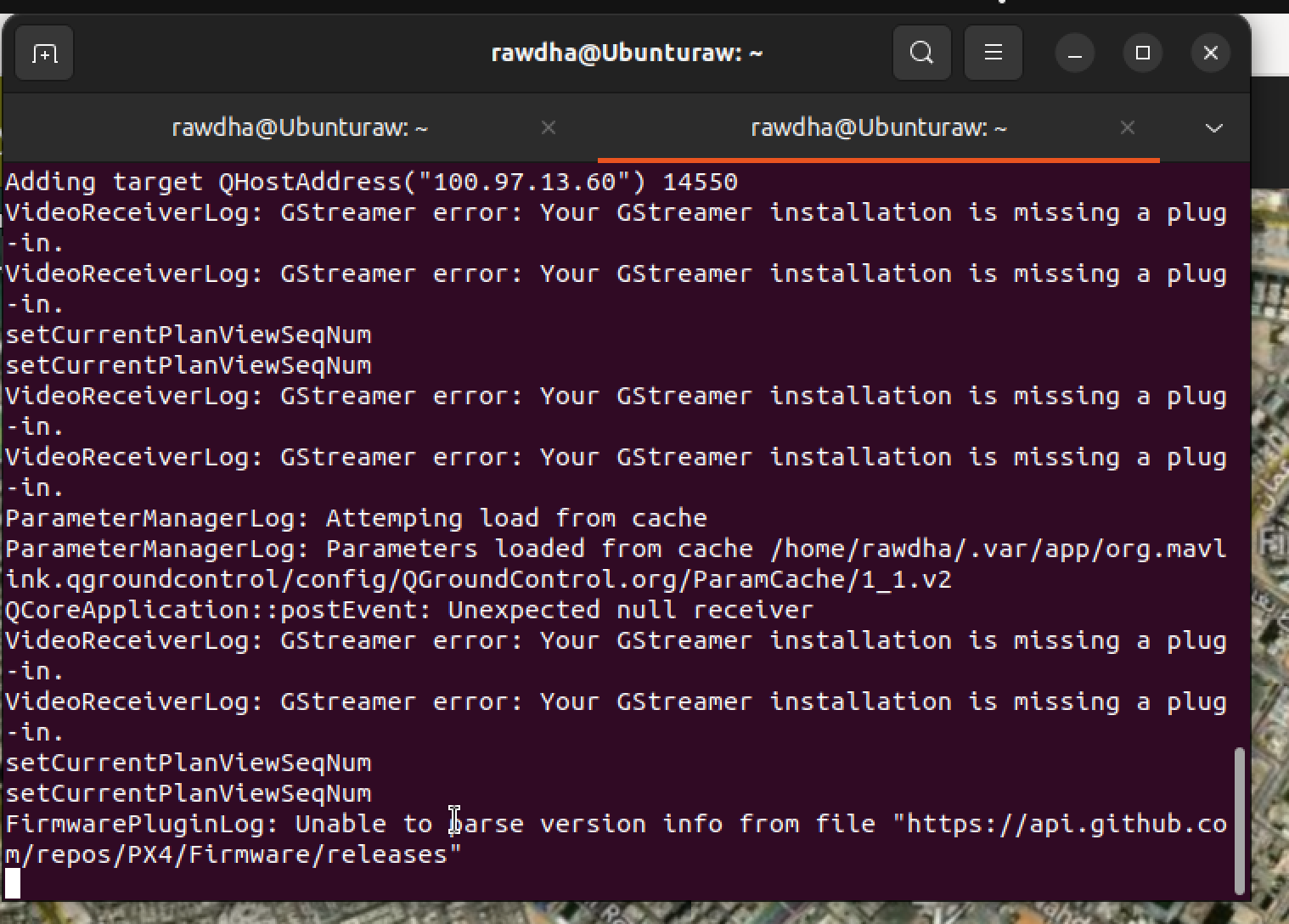
Gstreamer error: Streaming video to QGC over LTE
-
Hi @Rawdha-R I think there is just an interface error you are doing incorrectly with your tailscale setup.
I am able to connect over both 4g and 5g via tailscale to both PX4 from QGC and to VLC from voxl-streamer.
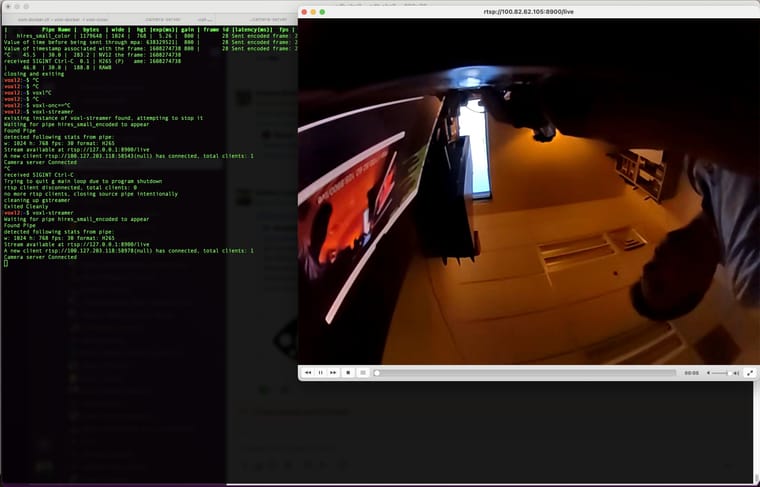

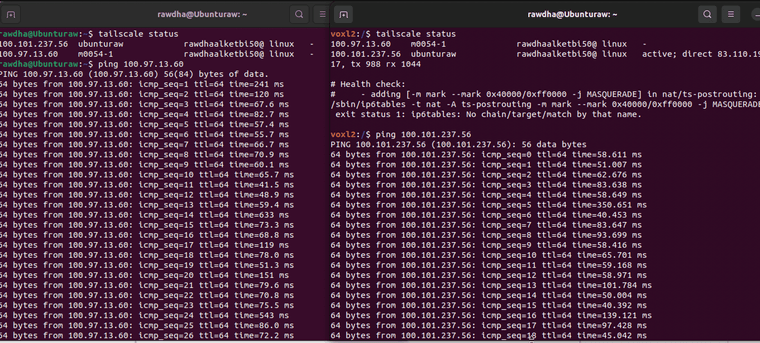
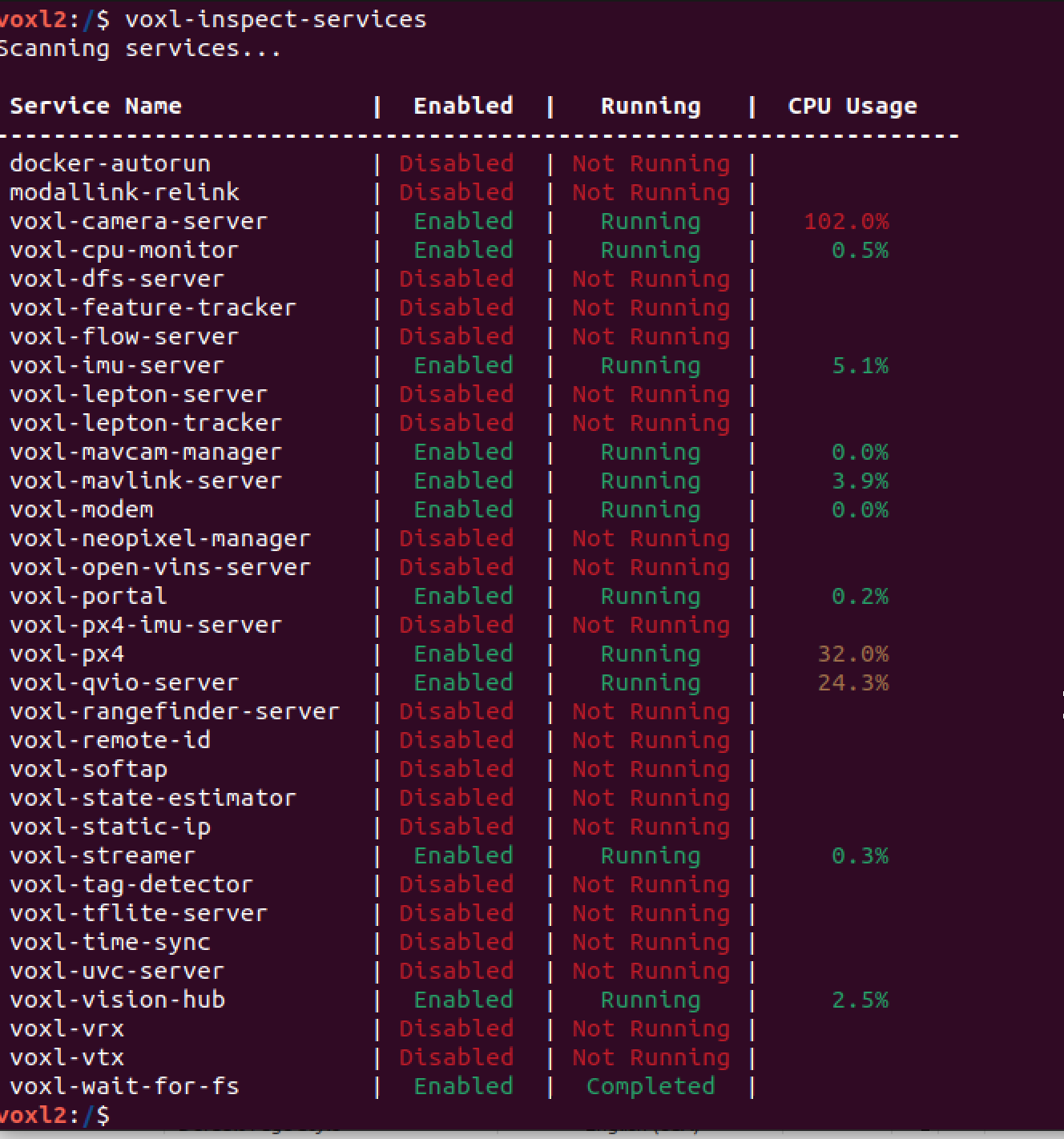
What services do you have running on your voxl2? Do you have voxl-camera-server and voxl-streamer both configured? Are both the voxl2 and the parent computer you are trying to view the stream with both on the same VPN on tailscale? Can you ping the voxl2 from the parent computer over tailscale and vice versa?
@Zachary-Lowell-0
@tom @groupoThe setup is working well. I successfully pinged both the VOXL drone and the parent computer:
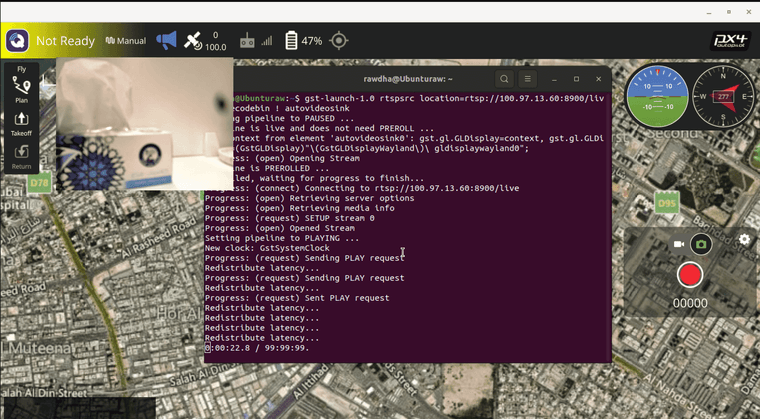
Additionally, I managed to stream using MVP, and it functioned:
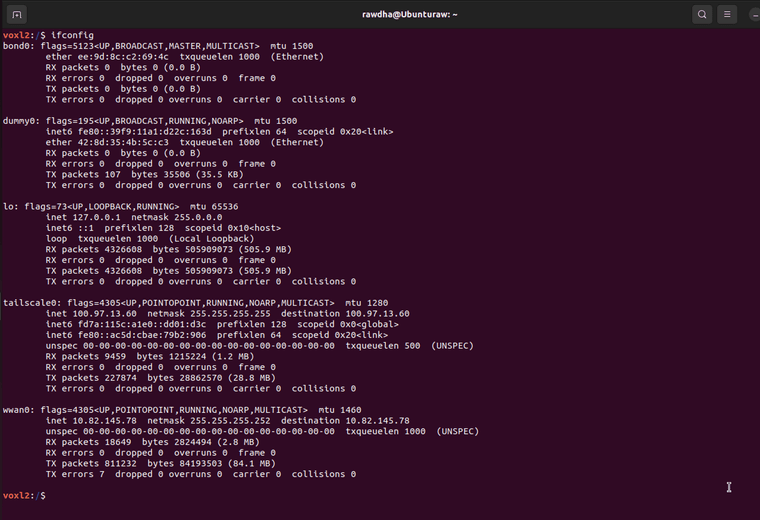
As for the wwan0, I have confirmed that an IP address is displayed:
Both voxl-streamer and voxl-camera-server is enabled and running:
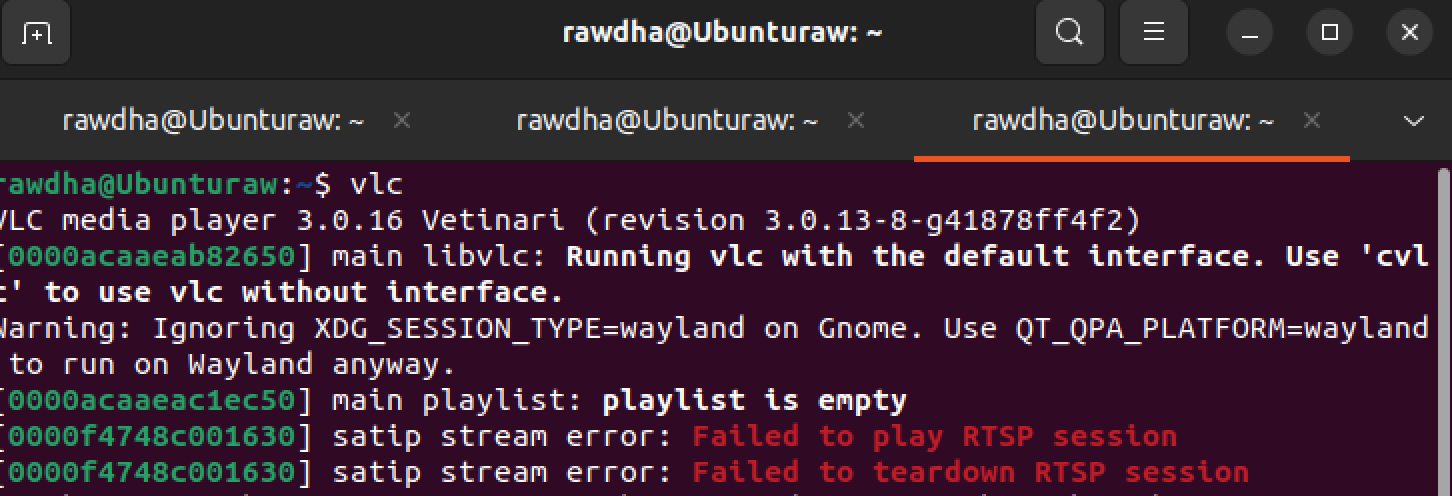
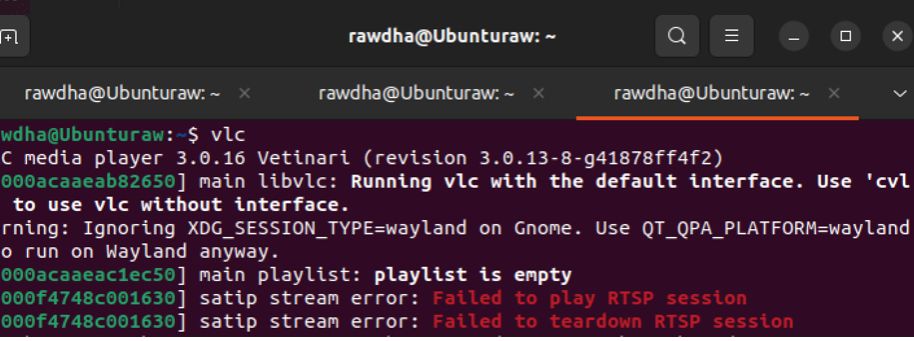
However, I'm still encountering some difficulties with streaming on VLC and QGroundControl (QGC). I've installed the necessary GStreamer dependencies, but I continue to receive errors when attempting to stream on both platforms.
I have following the instructions in this link to install gstreamer properly:
https://gstreamer.freedesktop.org/documentation/installing/on-linux.html?gi-language=cP.S: I'm using Ubuntu 22.04.5 LTS
-
@Zachary-Lowell-0
@tom @groupoThe setup is working well. I successfully pinged both the VOXL drone and the parent computer:
Additionally, I managed to stream using MVP, and it functioned:
As for the wwan0, I have confirmed that an IP address is displayed:
Both voxl-streamer and voxl-camera-server is enabled and running:
However, I'm still encountering some difficulties with streaming on VLC and QGroundControl (QGC). I've installed the necessary GStreamer dependencies, but I continue to receive errors when attempting to stream on both platforms.
I have following the instructions in this link to install gstreamer properly:
https://gstreamer.freedesktop.org/documentation/installing/on-linux.html?gi-language=cP.S: I'm using Ubuntu 22.04.5 LTS
-
@Rawdha-R Can you try adding
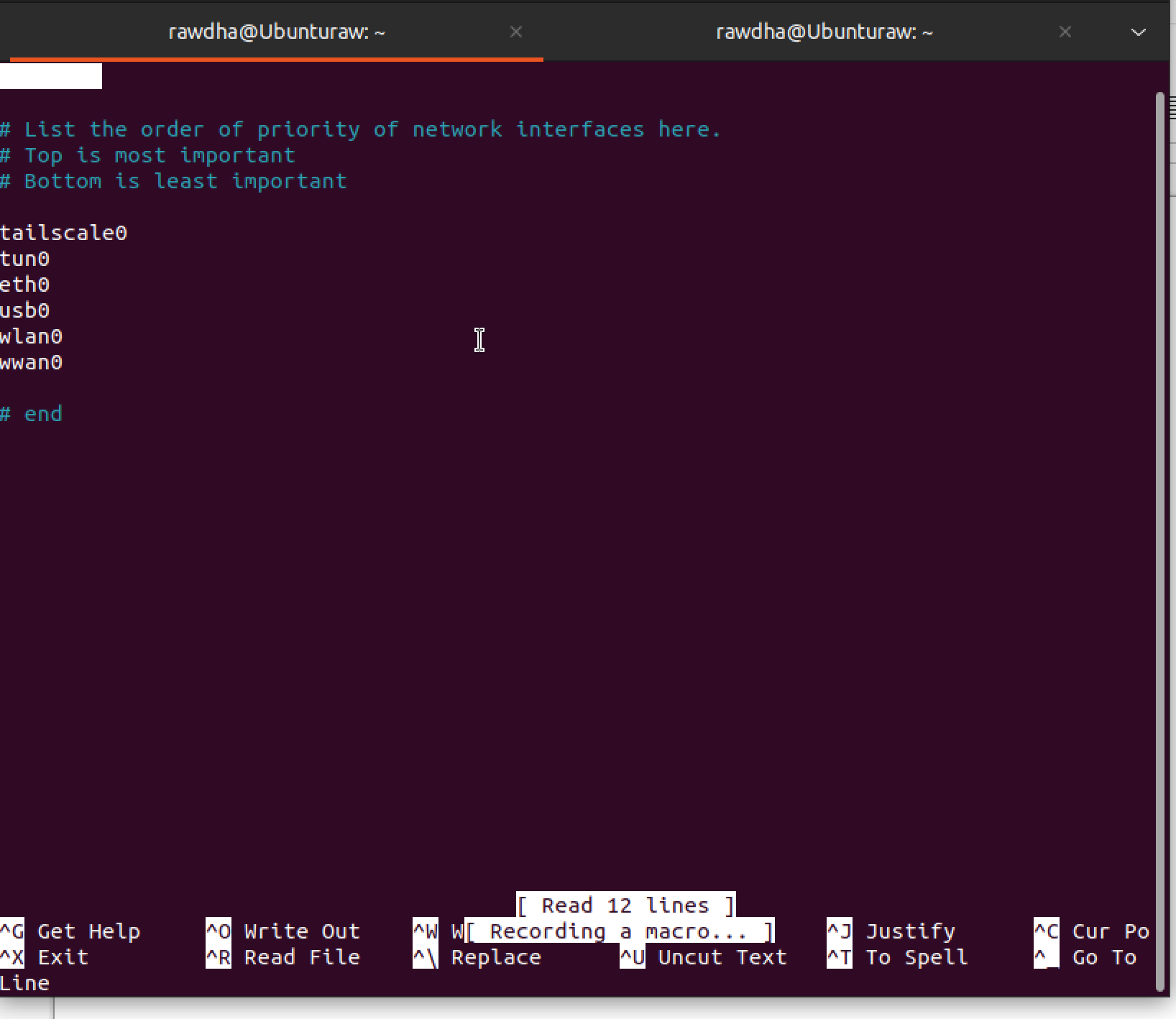
tailscale0to the top of the list in/etc/modalai/network_interface_preferences.txtand power cycling your voxl? -
@Rawdha-R please go into voxl-streamer config /etc/modalai/voxl-streamer.conf and change the auto ip to false and then change the url to match the IP address of that in your tailscale IP. I believe what is happening right now is voxl streamer might be prioritizing a different IP as Tom mentioned above.
Zach
-
@Rawdha-R please go into voxl-streamer config /etc/modalai/voxl-streamer.conf and change the auto ip to false and then change the url to match the IP address of that in your tailscale IP. I believe what is happening right now is voxl streamer might be prioritizing a different IP as Tom mentioned above.
Zach
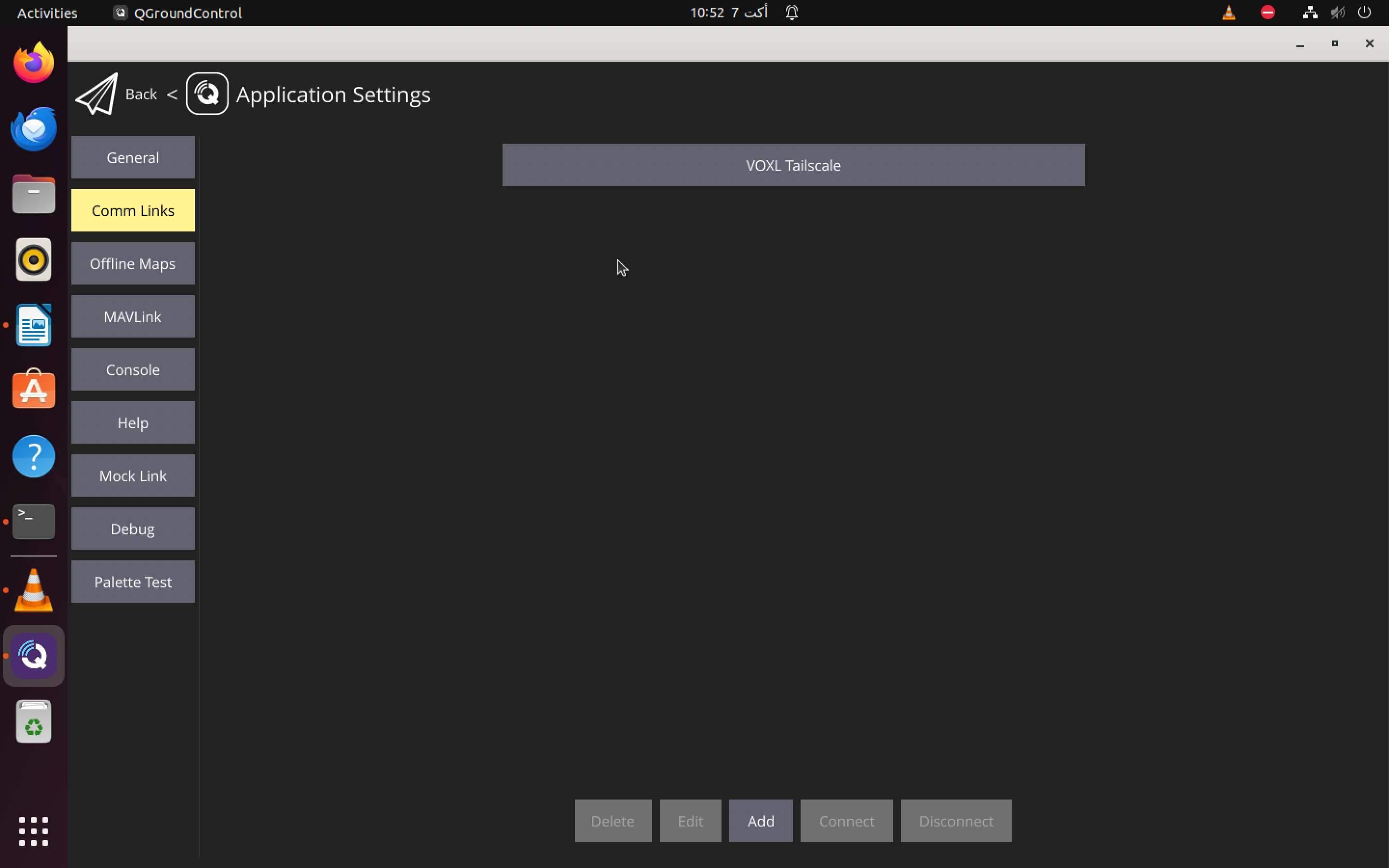
I have configured Tailscale as a priority network:
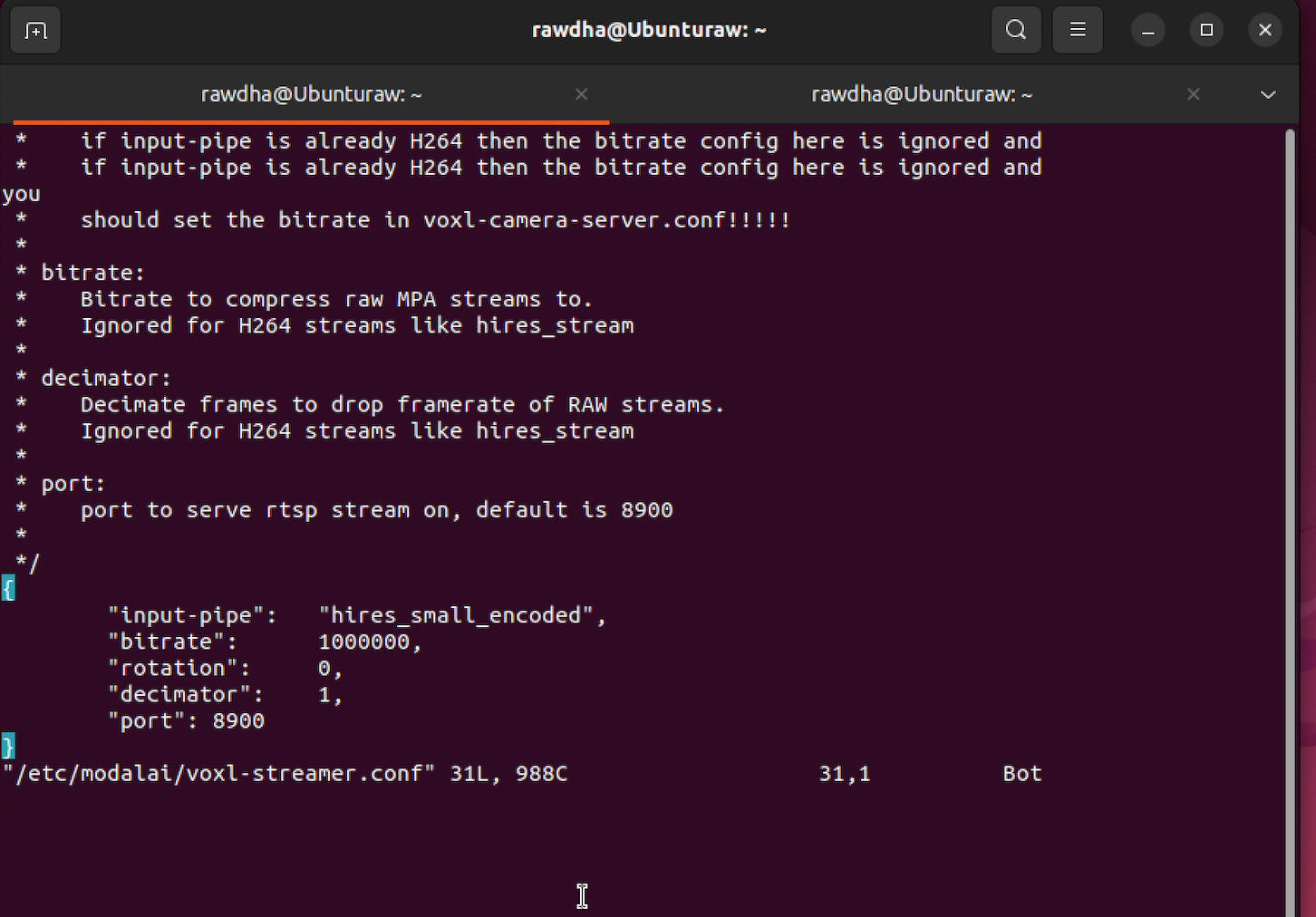
While setting up the voxl-streamer (located at /etc/modalai/voxl-streamer.conf) with the new URL, I noticed that the parameters auto_ip and url were missing:
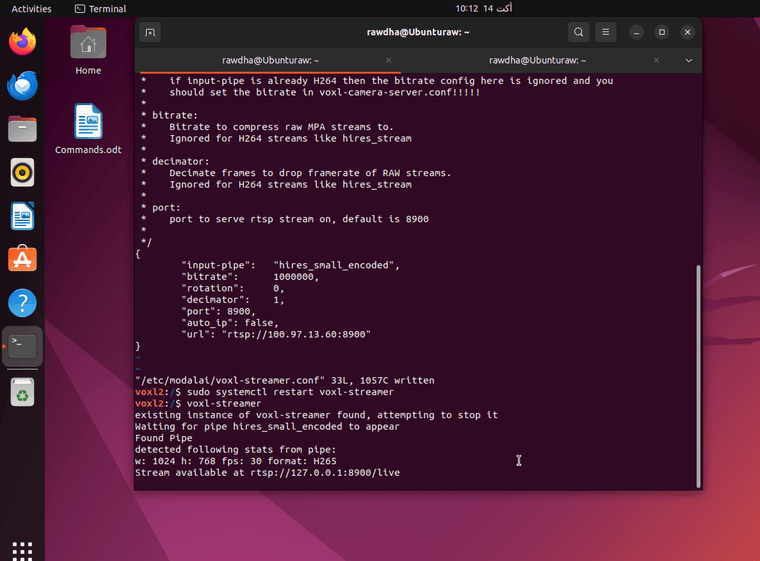
I have added both parameters, setting auto_ip to false and updating the url with the Tailscale IP address and I checked the voxl-streamer and found that the stream value is still showing as 127.0.0.1:
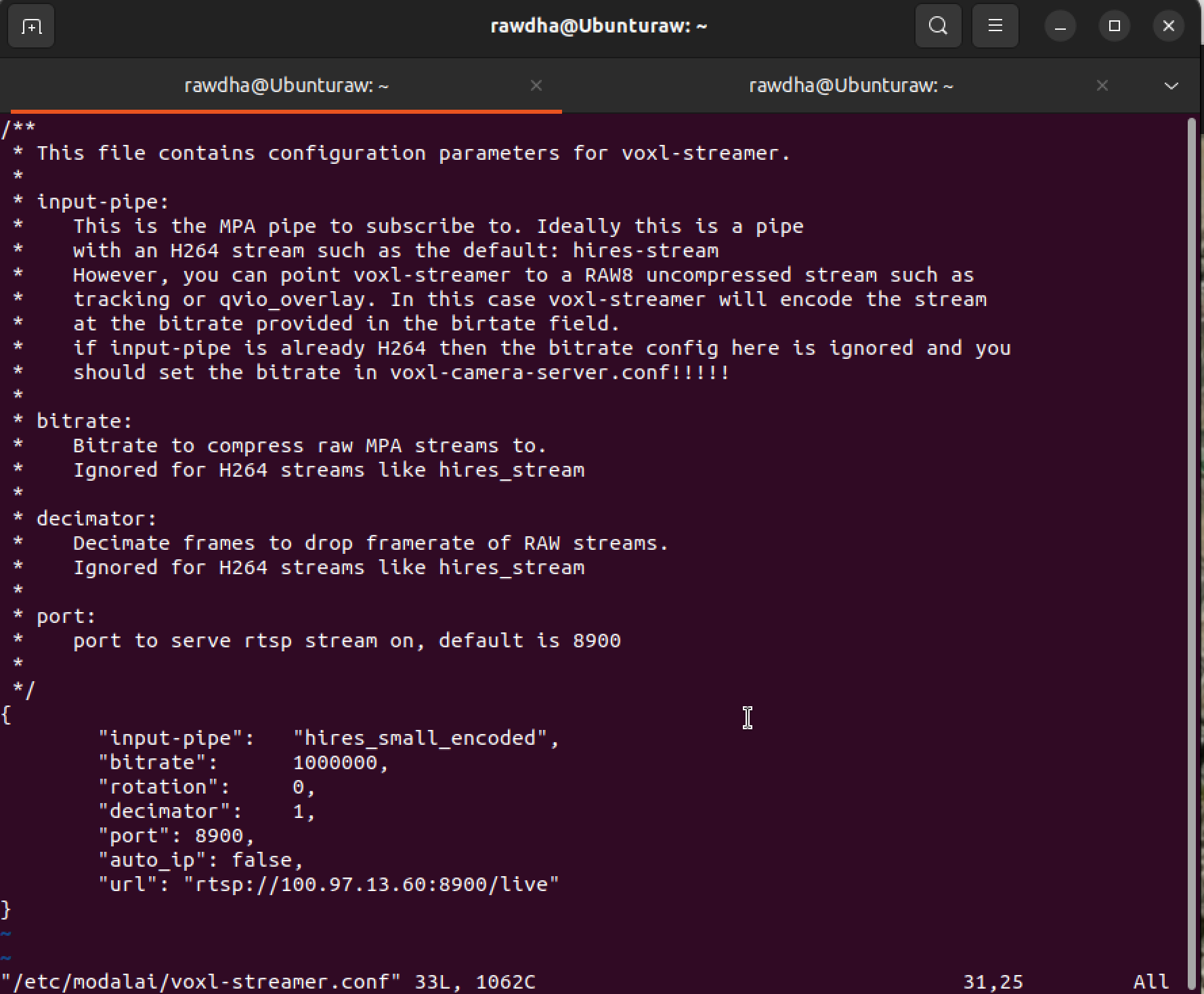
After these adjustments and power cycling the device, Additionally, I attempted to check the connection in QGroundControl and VLC, but I'm encountering some errors:
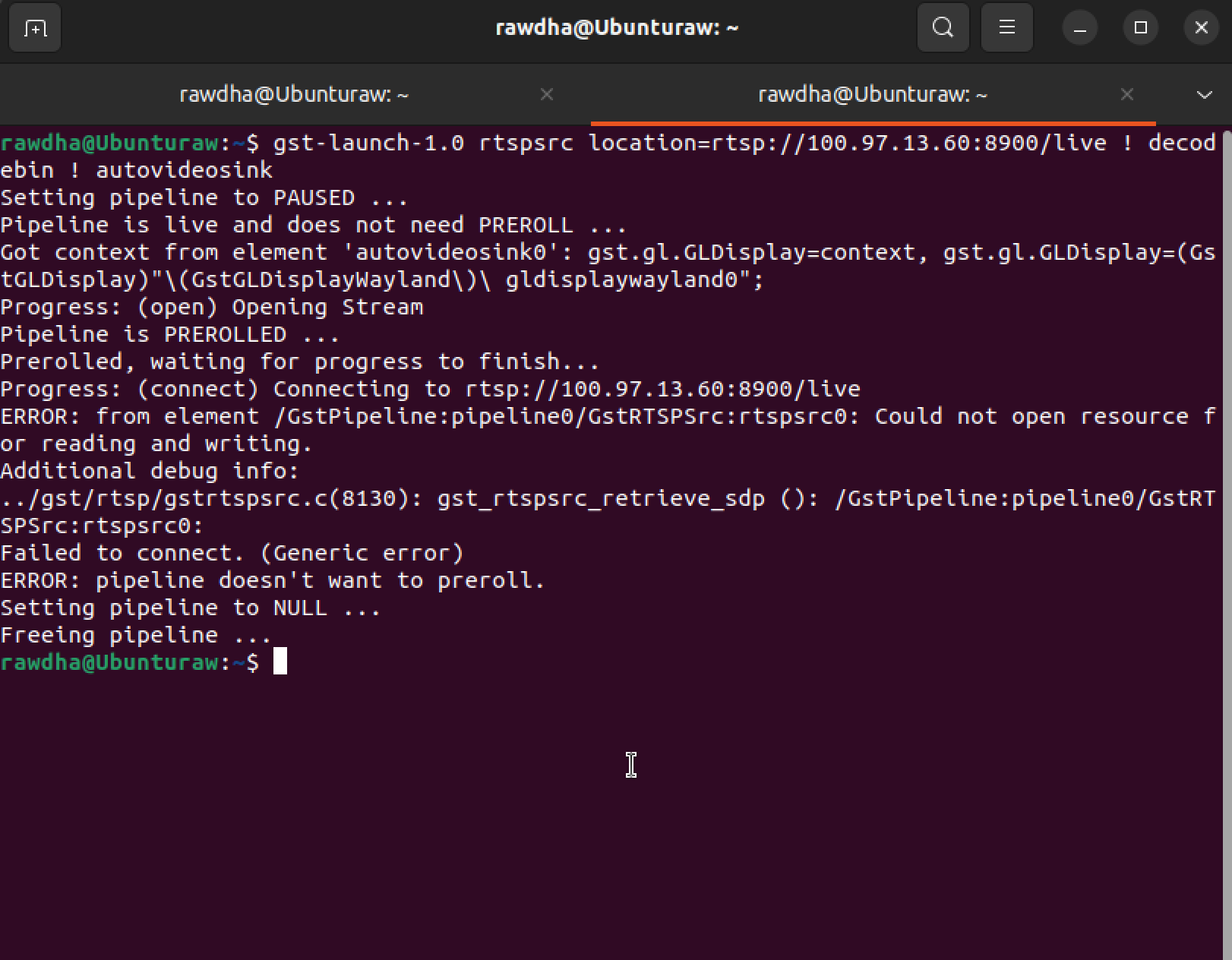
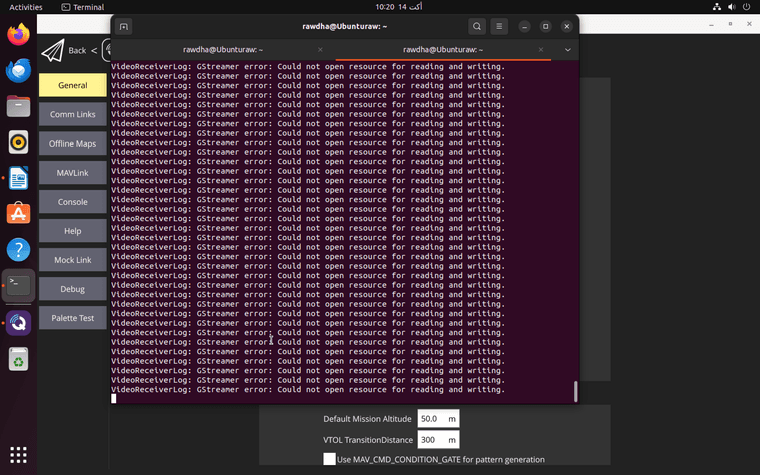
-
@Rawdha-R those parameters are in voxl-mavcam-manager.conf not voxl-streamer. Apologies for mispeaking. Please remove those from voxl-streamer as it is most likley causing it to crash and then restart voxl-streamer and voxl-mavcam-manager.
-
@Rawdha-R those parameters are in voxl-mavcam-manager.conf not voxl-streamer. Apologies for mispeaking. Please remove those from voxl-streamer as it is most likley causing it to crash and then restart voxl-streamer and voxl-mavcam-manager.
No worries, I reverted the voxl-streamer configuration to its original settings, restarted it, then updated and restarted voxl-mavcam-manager.conf.
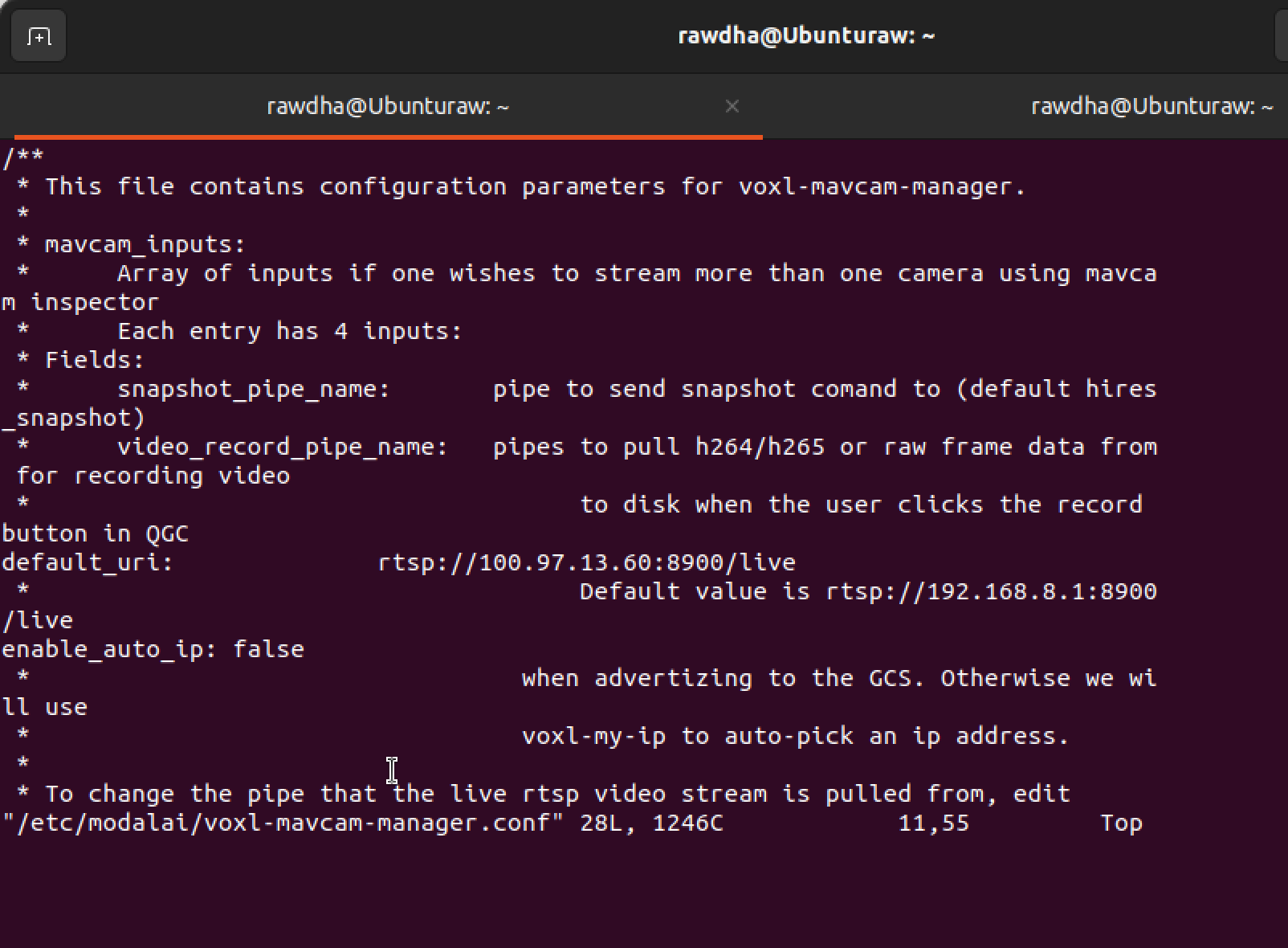
Afterwards, I attempted to set the RTSP stream to the specific IP address:
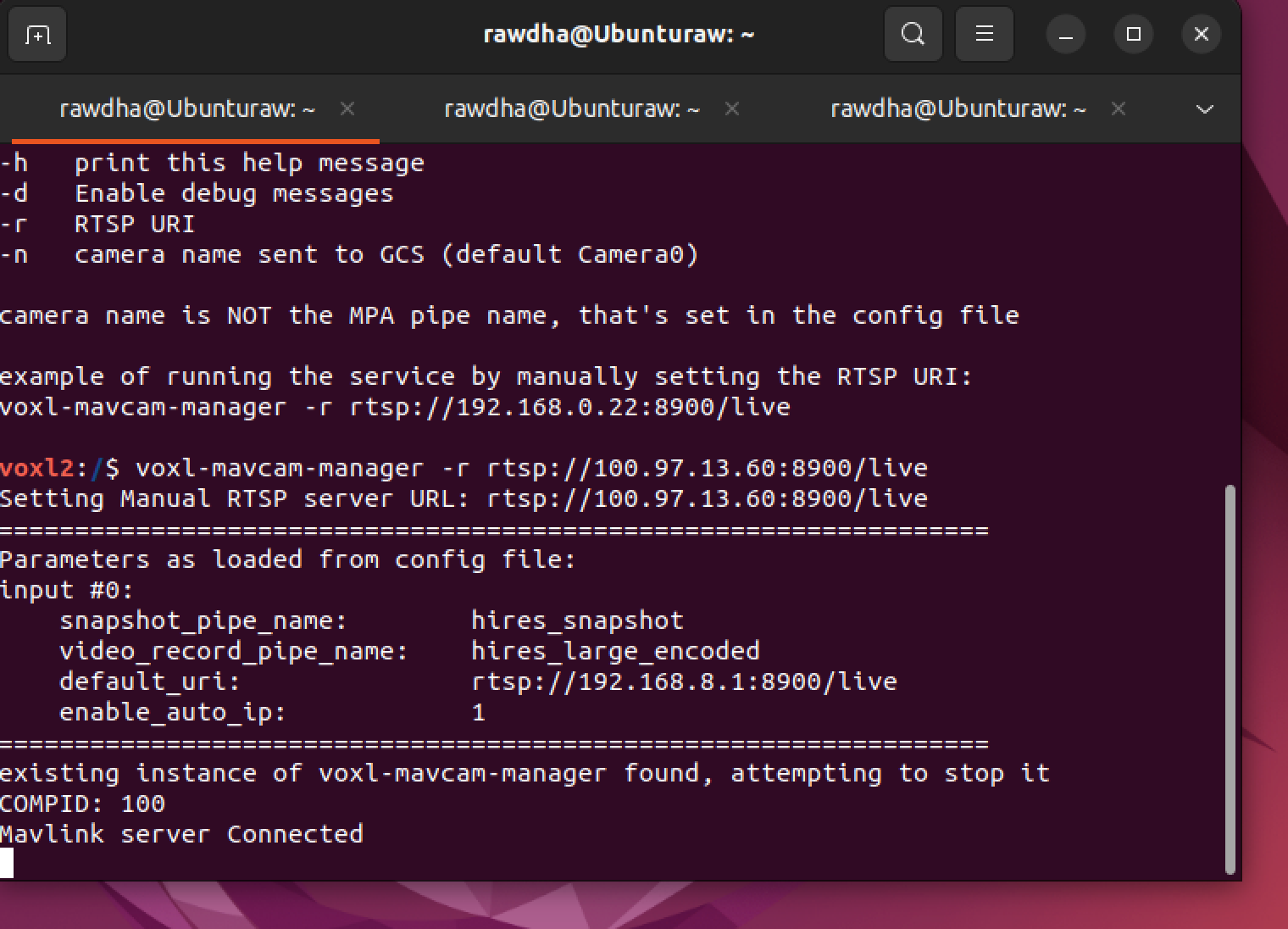
When I checked voxl-streamer, the output showed the following:
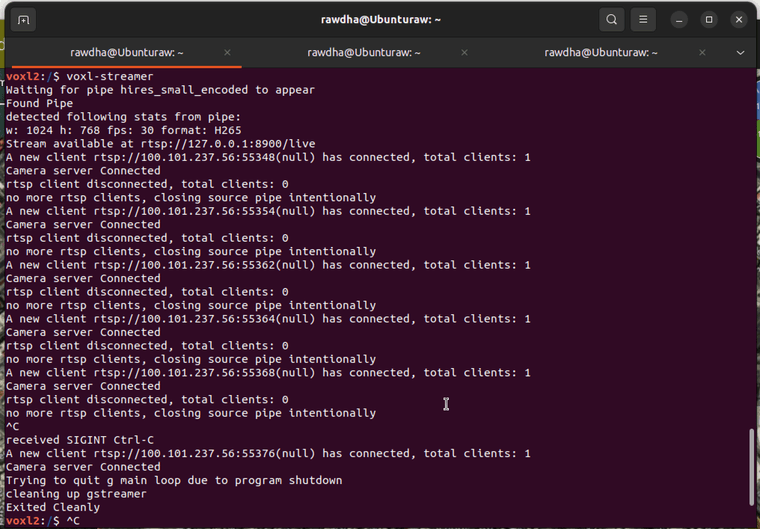
This is the errors that I got from Qground:
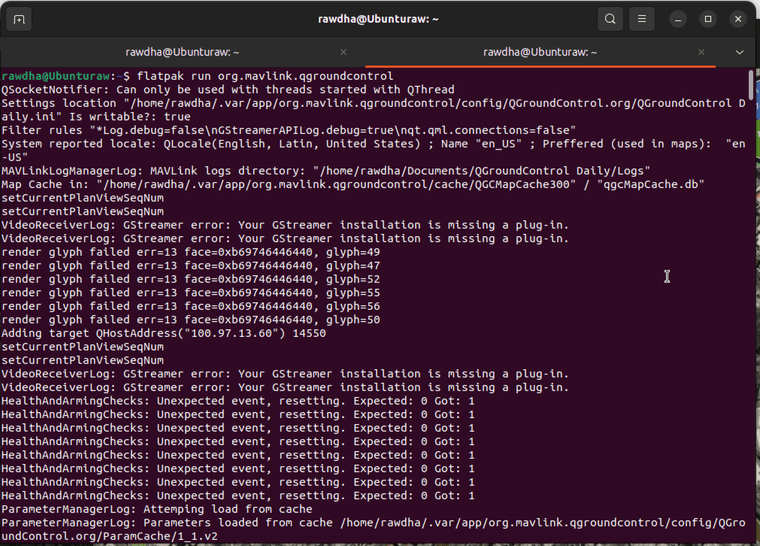
-
No worries, I reverted the voxl-streamer configuration to its original settings, restarted it, then updated and restarted voxl-mavcam-manager.conf.
Afterwards, I attempted to set the RTSP stream to the specific IP address:
When I checked voxl-streamer, the output showed the following:
This is the errors that I got from Qground:
-
@Rawdha-R Are you able to pull up the stream in something like VLC? Trying to determine if it is indeed a QGC issue
-
I am also having issues now seeing my stream in VLC. It works as expected in QGC but I get similar errors to @Rawdha-R.
I had this working before in August, in fact I reverted from 13.3. to 1.3.0 just to see if that was an issue, but it persists. I will include some screenshots of my process below
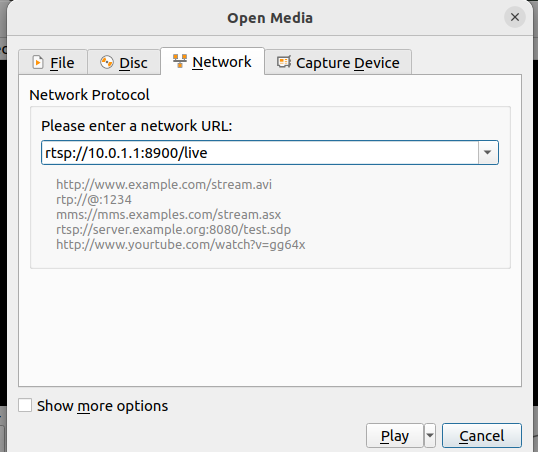
You can see in the next screenshot below that the video is being received by QGC
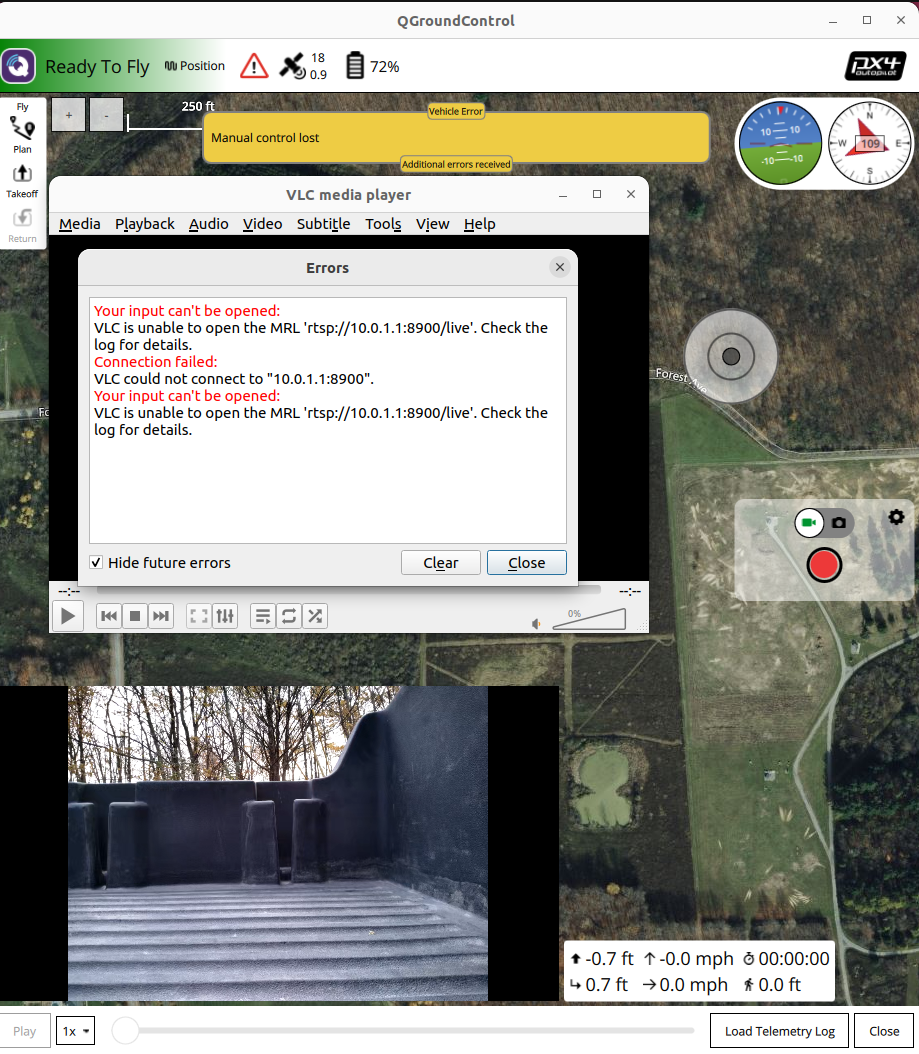
@tom wwan0 is in my network interface file, the default URI is set to that of the cellular modem, but of course auto_ip is set to true as well. Voxl-my-ip returns that of the cellular modem. I am a little confused though about how the config of mavcam-manager determines the behavior of voxl-streamer. In the diagram on the docs they seem decoupled.
I have included the verbose vlc log at the end of this file as well.
-- logger module started -- main debug: VLC media player - 3.0.16 Vetinari main debug: Copyright © 1996-2021 the VideoLAN team main debug: revision 3.0.13-8-g41878ff4f2 main debug: configured with ./configure '--build=x86_64-linux-gnu' '--prefix=/usr' '--includedir=${prefix}/include' '--mandir=${prefix}/share/man' '--infodir=${prefix}/share/info' '--sysconfdir=/etc' '--localstatedir=/var' '--disable-option-checking' '--disable-silent-rules' '--libdir=${prefix}/lib/x86_64-linux-gnu' '--runstatedir=/run' '--disable-maintainer-mode' '--disable-dependency-tracking' '--disable-debug' '--config-cache' '--disable-update-check' '--enable-fast-install' '--docdir=/usr/share/doc/vlc' '--with-binary-version=3.0.16-1build7' '--enable-a52' '--enable-aa' '--enable-aribsub' '--enable-avahi' '--enable-bluray' '--enable-caca' '--enable-chromaprint' '--enable-chromecast' '--enable-dav1d' '--enable-dbus' '--enable-dca' '--enable-dvbpsi' '--enable-dvdnav' '--enable-faad' '--enable-flac' '--enable-fluidsynth' '--enable-freetype' '--enable-fribidi' '--enable-gles2' '--enable-gnutls' '--enable-harfbuzz' '--enable-jack' '--enable-kate' '--enable-libass' '--enable-libmpeg2' '--enable-libxml2' '--enable-lirc' '--enable-mad' '--enable-matroska' '--enable-mod' '--enable-mpc' '--enable-mpg123' '--enable-mtp' '--enable-ncurses' '--enable-notify' '--enable-ogg' '--enable-opus' '--enable-pulse' '--enable-qt' '--enable-realrtsp' '--enable-samplerate' '--enable-sdl-image' '--enable-sftp' '--enable-shine' '--enable-shout' '--enable-skins2' '--enable-sndio' '--enable-soxr' '--enable-spatialaudio' '--enable-speex' '--enable-svg' '--enable-svgdec' '--enable-taglib' '--enable-theora' '--enable-twolame' '--enable-upnp' '--enable-vdpau' '--enable-vnc' '--enable-vorbis' '--enable-x264' '--enable-x265' '--enable-zvbi' '--with-kde-solid=/usr/share/solid/actions/' '--disable-aom' '--disable-crystalhd' '--disable-d3d11va' '--disable-decklink' '--disable-directx' '--disable-dsm' '--disable-dxva2' '--disable-fdkaac' '--disable-fluidlite' '--disable-freerdp' '--disable-goom' '--disable-gst-decode' '--disable-libtar' '--disable-live555' '--disable-macosx' '--disable-macosx-avfoundation' '--disable-macosx-qtkit' '--disable-mfx' '--disable-microdns' '--disable-opencv' '--disable-projectm' '--disable-schroedinger' '--disable-sparkle' '--disable-srt' '--disable-telx' '--disable-vpx' '--disable-vsxu' '--disable-wasapi' '--enable-alsa' '--enable-dc1394' '--enable-dv1394' '--enable-libplacebo' '--enable-linsys' '--enable-nfs' '--enable-udev' '--enable-v4l2' '--enable-wayland' '--enable-libva' '--enable-vcd' '--enable-smbclient' '--disable-oss' '--enable-mmx' '--enable-sse' '--disable-neon' '--disable-altivec' '--disable-omxil' 'build_alias=x86_64-linux-gnu' 'CFLAGS=-g -O2 -ffile-prefix-map=/build/vlc-hoXXw1/vlc-3.0.16=. -flto=auto -ffat-lto-objects -flto=auto -ffat-lto-objects -fstack-protector-strong -Wformat -Werror=format-security ' 'LDFLAGS=-Wl,-Bsymbolic-functions -flto=auto -ffat-lto-objects -flto=auto -Wl,-z,relro -Wl,-z,now' 'CPPFLAGS=-Wdate-time -D_FORTIFY_SOURCE=2' 'CXXFLAGS=-g -O2 -ffile-prefix-map=/build/vlc-hoXXw1/vlc-3.0.16=. -flto=auto -ffat-lto-objects -flto=auto -ffat-lto-objects -fstack-protector-strong -Wformat -Werror=format-security ' 'OBJCFLAGS=-g -O2 -ffile-prefix-map=/build/vlc-hoXXw1/vlc-3.0.16=. -flto=auto -ffat-lto-objects -flto=auto -ffat-lto-objects -fstack-protector-strong -Wformat -Werror=format-security' main debug: searching plug-in modules main debug: loading plugins cache file /usr/lib/x86_64-linux-gnu/vlc/plugins/plugins.dat main debug: recursively browsing `/usr/lib/x86_64-linux-gnu/vlc/plugins' main debug: plug-ins loaded: 519 modules main debug: opening config file (/home/welchj/.config/vlc/vlcrc) main debug: looking for logger module matching "any": 4 candidates file debug: opening logfile `/home/welchj/vlc-log.txt' main debug: using logger module "file" main debug: translation test: code is "C" main debug: looking for keystore module matching "memory": 4 candidates main debug: using keystore module "memory" main debug: CPU has capabilities MMX MMXEXT SSE SSE2 SSE3 SSSE3 SSE4.1 SSE4.2 AVX AVX2 FPU main debug: Creating an input for 'Media Library' main debug: Input is a meta file: disabling unneeded options main debug: using timeshift granularity of 50 MiB main debug: using default timeshift path main debug: `file/directory:///home/welchj/.local/share/vlc/ml.xspf' gives access `file' demux `directory' path `/home/welchj/.local/share/vlc/ml.xspf' main debug: creating demux: access='file' demux='directory' location='/home/welchj/.local/share/vlc/ml.xspf' file='/home/welchj/.local/share/vlc/ml.xspf' main debug: looking for access_demux module matching "file": 18 candidates main debug: no access_demux modules matched main debug: creating access: file:///home/welchj/.local/share/vlc/ml.xspf main debug: (path: /home/welchj/.local/share/vlc/ml.xspf) main debug: looking for access module matching "file": 29 candidates main debug: using access module "filesystem" main debug: looking for stream_filter module matching "prefetch,cache_read": 26 candidates cache_read debug: Using stream method for AStream* cache_read debug: starting pre-buffering cache_read debug: received first data after 0 ms cache_read debug: pre-buffering done 296 bytes in 0s - 13139 KiB/s main debug: using stream_filter module "cache_read" main debug: looking for stream_filter module matching "any": 26 candidates playlist debug: using XSPF playlist reader main debug: using stream_filter module "playlist" main debug: stream filter added to 0x5abe03deb8d0 main debug: looking for stream_filter module matching "any": 26 candidates main debug: no stream_filter modules matched main debug: looking for stream_directory module matching "any": 1 candidates main debug: no stream_directory modules matched main debug: attachment of directory-extractor failed for file:///home/welchj/.local/share/vlc/ml.xspf main debug: looking for stream_filter module matching "record": 26 candidates main debug: using stream_filter module "record" main debug: creating demux: access='file' demux='directory' location='/home/welchj/.local/share/vlc/ml.xspf' file='/home/welchj/.local/share/vlc/ml.xspf' main debug: looking for demux module matching "directory": 54 candidates main debug: using demux module "directory" main debug: looking for meta reader module matching "any": 2 candidates lua debug: Trying Lua scripts in /home/welchj/.local/share/vlc/lua/meta/reader lua debug: Trying Lua scripts in /usr/lib/x86_64-linux-gnu/vlc/lua/meta/reader lua debug: Trying Lua playlist script /usr/lib/x86_64-linux-gnu/vlc/lua/meta/reader/filename.luac lua debug: Trying Lua scripts in /usr/share/vlc/lua/meta/reader main debug: no meta reader modules matched main debug: `file/directory:///home/welchj/.local/share/vlc/ml.xspf' successfully opened main debug: looking for xml reader module matching "any": 1 candidates main debug: using xml reader module "xml" main debug: EOF reached main debug: removing module "directory" main debug: removing module "record" main debug: removing module "playlist" main debug: removing module "cache_read" main debug: removing module "filesystem" main debug: creating audio output main debug: looking for audio output module matching "any": 6 candidates vlcpulse debug: using library version 15.99.0 vlcpulse debug: (compiled with version 15.99.0, protocol 35) vlcpulse debug: connected locally to /run/user/1004/pulse/native as client #23 vlcpulse debug: using protocol 35, server protocol 35 pulse debug: adding sink 1: alsa_output.pci-0000_00_1f.3.analog-stereo (Built-in Audio Analog Stereo) main debug: using audio output module "pulse" main debug: keeping audio output main debug: looking for interface module matching "dbus,none": 19 candidates dbus debug: listening on dbus as: org.mpris.MediaPlayer2.vlc main debug: using interface module "dbus" main debug: looking for interface module matching "hotkeys,none": 19 candidates main debug: using interface module "hotkeys" main debug: looking for interface module matching "globalhotkeys,none": 19 candidates main debug: using interface module "xcb_hotkeys" main: Running vlc with the default interface. Use 'cvlc' to use vlc without interface. main debug: looking for interface module matching "any": 19 candidates dbus debug: Getting All properties dbus debug: Getting All properties dbus debug: Getting All properties dbus debug: Getting All properties dbus debug: Getting All properties main debug: looking for extension module matching "any": 1 candidates lua debug: Opening Lua Extension module lua debug: Trying Lua scripts in /home/welchj/.local/share/vlc/lua/extensions lua debug: Trying Lua scripts in /usr/lib/x86_64-linux-gnu/vlc/lua/extensions lua debug: Trying Lua playlist script /usr/lib/x86_64-linux-gnu/vlc/lua/extensions/VLSub.luac lua debug: Scanning Lua script /usr/lib/x86_64-linux-gnu/vlc/lua/extensions/VLSub.luac lua debug: Script /usr/lib/x86_64-linux-gnu/vlc/lua/extensions/VLSub.luac has the following capability flags: 0x5 lua debug: Trying Lua scripts in /usr/share/vlc/lua/extensions main debug: using extension module "lua" main debug: using interface module "qt" main: playlist is empty main debug: nothing to play main debug: processing request item: rtsp://10.0.1.1:8900/live, node: Playlist, skip: 0 main debug: rebuilding array of current - root Playlist main debug: rebuild done - 1 items, index 0 main debug: starting playback of new item main debug: resyncing on rtsp://10.0.1.1:8900/live main debug: rtsp://10.0.1.1:8900/live is at 0 main debug: creating new input thread main debug: Creating an input for 'rtsp://10.0.1.1:8900/live' main debug: requesting art for new input thread main debug: using timeshift granularity of 50 MiB main debug: using default timeshift path main debug: `rtsp://10.0.1.1:8900/live' gives access `rtsp' demux `any' path `10.0.1.1:8900/live' main debug: creating demux: access='rtsp' demux='any' location='10.0.1.1:8900/live' file='(null)' main debug: looking for access_demux module matching "rtsp": 18 candidates main debug: no access_demux modules matched main debug: creating access: rtsp://10.0.1.1:8900/live main debug: looking for access module matching "rtsp": 29 candidates main debug: looking for meta fetcher module matching "any": 1 candidates lua debug: Trying Lua scripts in /home/welchj/.local/share/vlc/lua/meta/fetcher lua debug: Trying Lua scripts in /usr/lib/x86_64-linux-gnu/vlc/lua/meta/fetcher lua debug: Trying Lua scripts in /usr/share/vlc/lua/meta/fetcher main debug: no meta fetcher modules matched main debug: looking for art finder module matching "any": 2 candidates satip debug: try to open 'rtsp://10.0.1.1:8900/live' satip debug: connect to host '10.0.1.1' main debug: net: connecting to 10.0.1.1 port 8900 lua debug: Trying Lua scripts in /home/welchj/.local/share/vlc/lua/meta/art lua debug: Trying Lua scripts in /usr/lib/x86_64-linux-gnu/vlc/lua/meta/art lua debug: Trying Lua playlist script /usr/lib/x86_64-linux-gnu/vlc/lua/meta/art/00_musicbrainz.luac lua debug: skipping script (unmatched scope) /usr/lib/x86_64-linux-gnu/vlc/lua/meta/art/00_musicbrainz.luac lua debug: Trying Lua playlist script /usr/lib/x86_64-linux-gnu/vlc/lua/meta/art/01_googleimage.luac lua debug: skipping script (unmatched scope) /usr/lib/x86_64-linux-gnu/vlc/lua/meta/art/01_googleimage.luac lua debug: Trying Lua playlist script /usr/lib/x86_64-linux-gnu/vlc/lua/meta/art/02_frenchtv.luac lua debug: skipping script (unmatched scope) /usr/lib/x86_64-linux-gnu/vlc/lua/meta/art/02_frenchtv.luac lua debug: Trying Lua playlist script /usr/lib/x86_64-linux-gnu/vlc/lua/meta/art/03_lastfm.luac lua debug: skipping script (unmatched scope) /usr/lib/x86_64-linux-gnu/vlc/lua/meta/art/03_lastfm.luac lua debug: Trying Lua scripts in /usr/share/vlc/lua/meta/art main debug: no art finder modules matched main debug: looking for meta fetcher module matching "any": 1 candidates lua debug: Trying Lua scripts in /home/welchj/.local/share/vlc/lua/meta/fetcher lua debug: Trying Lua scripts in /usr/lib/x86_64-linux-gnu/vlc/lua/meta/fetcher lua debug: Trying Lua scripts in /usr/share/vlc/lua/meta/fetcher main debug: no meta fetcher modules matched main debug: looking for art finder module matching "any": 2 candidates lua debug: Trying Lua scripts in /home/welchj/.local/share/vlc/lua/meta/art lua debug: Trying Lua scripts in /usr/lib/x86_64-linux-gnu/vlc/lua/meta/art lua debug: Trying Lua playlist script /usr/lib/x86_64-linux-gnu/vlc/lua/meta/art/00_musicbrainz.luac lua debug: Trying Lua playlist script /usr/lib/x86_64-linux-gnu/vlc/lua/meta/art/01_googleimage.luac lua debug: Trying Lua playlist script /usr/lib/x86_64-linux-gnu/vlc/lua/meta/art/02_frenchtv.luac lua debug: Trying Lua playlist script /usr/lib/x86_64-linux-gnu/vlc/lua/meta/art/03_lastfm.luac lua debug: Trying Lua scripts in /usr/share/vlc/lua/meta/art main debug: no art finder modules matched main debug: connection succeeded (socket = 45) main debug: net: opening 0.0.0.0 datagram port 9322 main debug: net: opening 0.0.0.0 datagram port 9323 qt debug: IM: Setting an input satip error: Failed to play RTSP session satip error: Failed to teardown RTSP session main debug: net: connecting to 10.0.1.1 port 8900 main debug: connection succeeded (socket = 44) access_realrtsp warning: Cseq mismatch, got 1, assumed 0 access_realrtsp debug: rtsp connected access_realrtsp warning: only real/helix rtsp servers supported for now main debug: no access modules matched main debug: dead input qt debug: IM: Deleting the input main debug: changing item without a request (current 0/1) main debug: nothing to play main debug: processing request item: rtsp://10.0.1.1:8900/live, node: Playlist, skip: 0 main debug: rebuilding array of current - root Playlist main debug: rebuild done - 2 items, index 1 main debug: starting playback of new item main debug: resyncing on rtsp://10.0.1.1:8900/live main debug: rtsp://10.0.1.1:8900/live is at 1 main debug: creating new input thread main debug: Creating an input for 'rtsp://10.0.1.1:8900/live' main debug: requesting art for new input thread main debug: using timeshift granularity of 50 MiB main debug: using default timeshift path main debug: `rtsp://10.0.1.1:8900/live' gives access `rtsp' demux `any' path `10.0.1.1:8900/live' main debug: creating demux: access='rtsp' demux='any' location='10.0.1.1:8900/live' file='(null)' main debug: looking for access_demux module matching "rtsp": 18 candidates main debug: no access_demux modules matched main debug: creating access: rtsp://10.0.1.1:8900/live main debug: looking for access module matching "rtsp": 29 candidates satip debug: try to open 'rtsp://10.0.1.1:8900/live' satip debug: connect to host '10.0.1.1' main debug: looking for meta fetcher module matching "any": 1 candidates lua debug: Trying Lua scripts in /home/welchj/.local/share/vlc/lua/meta/fetcher lua debug: Trying Lua scripts in /usr/lib/x86_64-linux-gnu/vlc/lua/meta/fetcher lua debug: Trying Lua scripts in /usr/share/vlc/lua/meta/fetcher main debug: net: connecting to 10.0.1.1 port 8900 main debug: no meta fetcher modules matched main debug: looking for art finder module matching "any": 2 candidates lua debug: Trying Lua scripts in /home/welchj/.local/share/vlc/lua/meta/art lua debug: Trying Lua scripts in /usr/lib/x86_64-linux-gnu/vlc/lua/meta/art lua debug: Trying Lua playlist script /usr/lib/x86_64-linux-gnu/vlc/lua/meta/art/00_musicbrainz.luac lua debug: skipping script (unmatched scope) /usr/lib/x86_64-linux-gnu/vlc/lua/meta/art/00_musicbrainz.luac lua debug: Trying Lua playlist script /usr/lib/x86_64-linux-gnu/vlc/lua/meta/art/01_googleimage.luac lua debug: skipping script (unmatched scope) /usr/lib/x86_64-linux-gnu/vlc/lua/meta/art/01_googleimage.luac lua debug: Trying Lua playlist script /usr/lib/x86_64-linux-gnu/vlc/lua/meta/art/02_frenchtv.luac lua debug: skipping script (unmatched scope) /usr/lib/x86_64-linux-gnu/vlc/lua/meta/art/02_frenchtv.luac lua debug: Trying Lua playlist script /usr/lib/x86_64-linux-gnu/vlc/lua/meta/art/03_lastfm.luac lua debug: skipping script (unmatched scope) /usr/lib/x86_64-linux-gnu/vlc/lua/meta/art/03_lastfm.luac lua debug: Trying Lua scripts in /usr/share/vlc/lua/meta/art main debug: no art finder modules matched main debug: looking for meta fetcher module matching "any": 1 candidates lua debug: Trying Lua scripts in /home/welchj/.local/share/vlc/lua/meta/fetcher lua debug: Trying Lua scripts in /usr/lib/x86_64-linux-gnu/vlc/lua/meta/fetcher lua debug: Trying Lua scripts in /usr/share/vlc/lua/meta/fetcher main debug: no meta fetcher modules matched main debug: looking for art finder module matching "any": 2 candidates lua debug: Trying Lua scripts in /home/welchj/.local/share/vlc/lua/meta/art lua debug: Trying Lua scripts in /usr/lib/x86_64-linux-gnu/vlc/lua/meta/art lua debug: Trying Lua playlist script /usr/lib/x86_64-linux-gnu/vlc/lua/meta/art/00_musicbrainz.luac lua debug: Trying Lua playlist script /usr/lib/x86_64-linux-gnu/vlc/lua/meta/art/01_googleimage.luac lua debug: Trying Lua playlist script /usr/lib/x86_64-linux-gnu/vlc/lua/meta/art/02_frenchtv.luac lua debug: Trying Lua playlist script /usr/lib/x86_64-linux-gnu/vlc/lua/meta/art/03_lastfm.luac lua debug: Trying Lua scripts in /usr/share/vlc/lua/meta/art main debug: no art finder modules matched main error: connection failed: Connection refused satip error: Failed to connect to RTSP server 10.0.1.1:8900 main debug: net: connecting to 10.0.1.1 port 8900 main error: connection failed: Connection refused access_realrtsp error: cannot connect to 10.0.1.1:8900 access_realrtsp debug: could not connect to: 10.0.1.1:8900/live main debug: no access modules matched main debug: dead input main debug: changing item without a request (current 1/2) main debug: nothing to play -
SO, I used ffplay and was able to see the stream successfully. A quick google about vlc/rtsp brought up many issues in the community after some recent updates. I am not sure how I was able to do this before and cannot now, but I did find a fix for windows
In case that link is ever deleted, I will paste the instructions here
"In VLC, under the Tools menu, go to Preferences (or Ctrl+p), open the Input/Codecs tab, and at the bottom in the Network area, the selection for "live555 stream transport" should be moved from "HTTP (default)" to "RTP over RTSP (TCP)". This worked, I can now view the video stream in VLC player."This resolves the RTSP stream for windows. Those config options are not available in the linux version of VLC but I did see some config options you can build VLC with. I did not venture too far down that path
-
@tom
The issue still persists for me. Do you think my setup could be causing the problem? I have an M1 Mac processor, and I'm using a virtual machine with UTM(Visualizer). Could that be causing any limitations? Should I try a different setup, and do you have any recommendations? -
@tom
The issue still persists for me. Do you think my setup could be causing the problem? I have an M1 Mac processor, and I'm using a virtual machine with UTM(Visualizer). Could that be causing any limitations? Should I try a different setup, and do you have any recommendations?




Reading along? Create a free ModalAI Forum account to join in.
With an account you can reply, ask your own question, get an email when a ModalAI engineer answers, and mark the reply that solved it. Your place in each thread is saved between visits.
Questions about VOXL, Flight Core, ESCs and ModalAI drones are answered here by the engineers who build them.
Register Login