Skip to content
  • Categories
  • Recent
  • Tags
  • Popular
  • Users
  • Groups
Collapse
Brand Logo

ModalAI Forum

  1. ModalAI Support Forum
  2. VOXL Compute & Autopilot
  3. VOXL
  4. voxl-docker-mavsdk-python build issues

voxl-docker-mavsdk-python build issues

Scheduled Pinned Locked Moved VOXL
48 Posts 6 Posters 19.0k Views 4 Watching
  • Oldest to Newest
  • Newest to Oldest
  • Most Votes
Reply
  • Reply as topic
Log in to reply
This topic has been deleted. Only users with topic management privileges can see it.
  • VinnyV Vinny

    Hi @Stefan-Amundarain
    Not all FTDI cables are the same. There are literally over a dozen variations out there.
    If the specific FTDI cable requires a "VTREF" to set the logic levels, then a VCC is needed as on Ascend's example. If you use one that is USB powered and TTL levles, then likely it is already set for 3.3V, and no power is required.
    So, please double check your specific FTDI cable before following any tutorials you may see and make appropriate mods as needed.

    Thanks!

    Alexander SaundersA Offline
    Alexander SaundersA Offline
    Alexander Saunders
    Contributor
    wrote on last edited by Alexander Saunders
    #32

    @Vinny @brahim @Eric-Katzfey We're still running into the issue of no meaningful data being sent to gazebo. The only data is still the heartbeat packets.
    We're referencing: https://docs.modalai.com/voxl2-PX4-hitl/

    We've done the steps up to: docker run --rm -it --net=host --privileged -e DISPLAY=$DISPLAY -v /dev/input:/dev/input:rw -v /tmp/.X11-unix:/tmp/.X11-unix:ro voxl-gazebo-docker ./run_gazebo.bash

    and

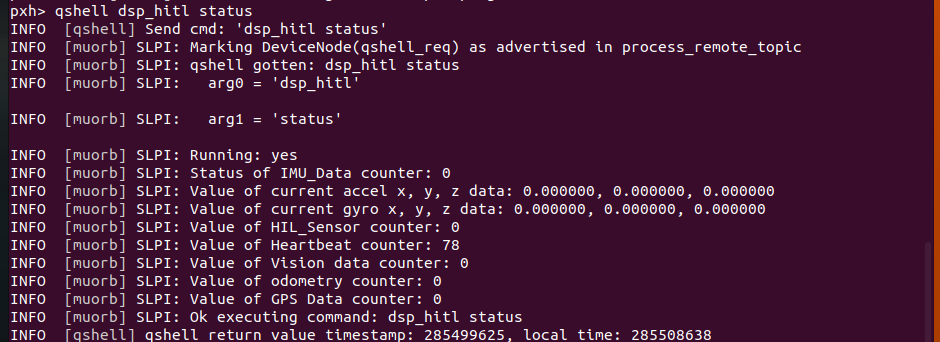
    qshell dsp_hitl status which is telling us about the heartbeat only.

    Also, we tried the archived instructions to see if we would get a different output.

    The FTDI cable used is the same, but the serial port closed issue has stopped. Don't know why.

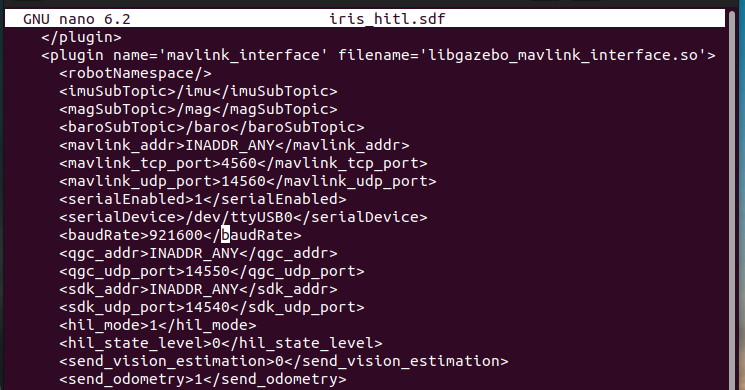
    The warning for SDF I feel like is the source of the problem.

    The warning when running docker run --rm:
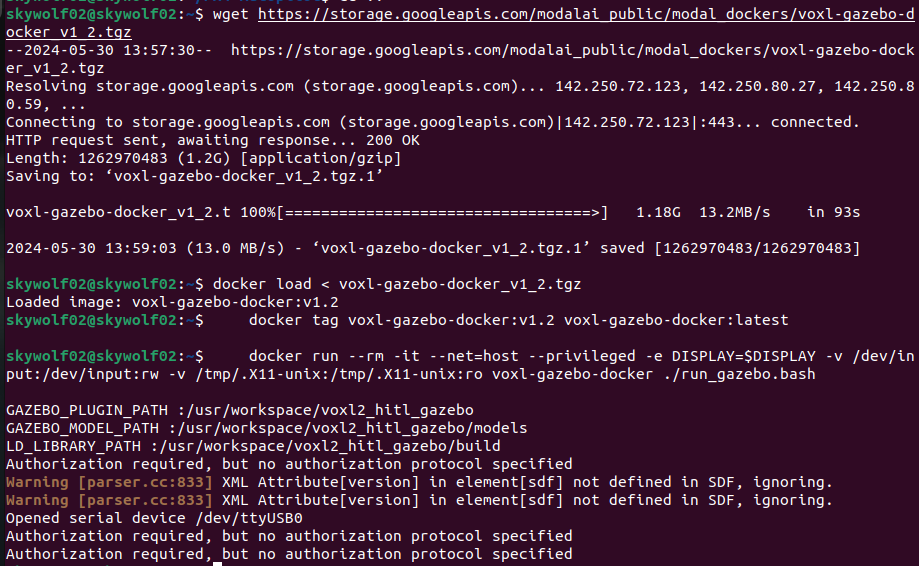
    image (5).png

    Status output:
    image (3).png

    Eric KatzfeyE 1 Reply Last reply
    0
    • Alexander SaundersA Alexander Saunders

      @Vinny @brahim @Eric-Katzfey We're still running into the issue of no meaningful data being sent to gazebo. The only data is still the heartbeat packets.
      We're referencing: https://docs.modalai.com/voxl2-PX4-hitl/

      We've done the steps up to: docker run --rm -it --net=host --privileged -e DISPLAY=$DISPLAY -v /dev/input:/dev/input:rw -v /tmp/.X11-unix:/tmp/.X11-unix:ro voxl-gazebo-docker ./run_gazebo.bash

      and

      qshell dsp_hitl status which is telling us about the heartbeat only.

      Also, we tried the archived instructions to see if we would get a different output.

      The FTDI cable used is the same, but the serial port closed issue has stopped. Don't know why.

      The warning for SDF I feel like is the source of the problem.

      The warning when running docker run --rm:
      image (5).png

      Status output:
      image (3).png

      Eric KatzfeyE Offline
      Eric KatzfeyE Offline
      Eric Katzfey
      ModalAI Team
      wrote on last edited by
      #33

      @Alexander-Saunders Are you doing xhost + before running docker?

      Alexander SaundersA 1 Reply Last reply
      0
      • Eric KatzfeyE Eric Katzfey

        @Alexander-Saunders Are you doing xhost + before running docker?

        Alexander SaundersA Offline
        Alexander SaundersA Offline
        Alexander Saunders
        Contributor
        wrote on last edited by
        #34

        @Eric-Katzfey The latest attempts, yes. After running that and

        docker run --rm -it --net=host --privileged -e DISPLAY=$DISPLAY -v /dev/input:/dev/input:rw -v /tmp/.X11-unix:/tmp/.X11-unix:ro voxl-gazebo-docker ./run_gazebo.bash
        

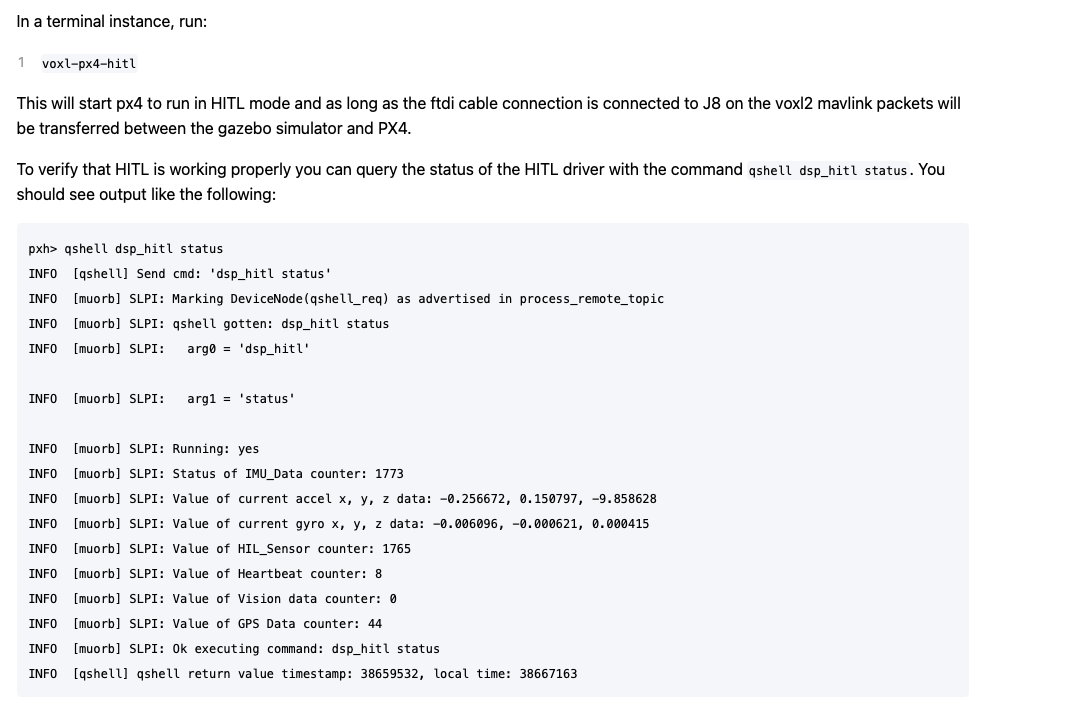
        gazebo will open up. The issue is connect gazebo with VOXL2 to run in HITL mode. I've followed two of the video from Modalai and Ascend exactly with no luck. Also went through the documentation again.

        All instances are being ran on the host computer. When comparing the image from above to docs, we are only getting heartbeat packets.
        Screenshot 2024-05-31 at 8.48.34 AM.png

        Eric KatzfeyE 3 Replies Last reply
        0
        • Alexander SaundersA Alexander Saunders

          @Eric-Katzfey The latest attempts, yes. After running that and

          docker run --rm -it --net=host --privileged -e DISPLAY=$DISPLAY -v /dev/input:/dev/input:rw -v /tmp/.X11-unix:/tmp/.X11-unix:ro voxl-gazebo-docker ./run_gazebo.bash
          

          gazebo will open up. The issue is connect gazebo with VOXL2 to run in HITL mode. I've followed two of the video from Modalai and Ascend exactly with no luck. Also went through the documentation again.

          All instances are being ran on the host computer. When comparing the image from above to docs, we are only getting heartbeat packets.
          Screenshot 2024-05-31 at 8.48.34 AM.png

          Eric KatzfeyE Offline
          Eric KatzfeyE Offline
          Eric Katzfey
          ModalAI Team
          wrote on last edited by
          #35

          @Alexander-Saunders The heartbeat counter is the amount of heartbeat messages being sent out, not received. So you are not getting anything on the serial port.

          1 Reply Last reply
          0
          • Alexander SaundersA Alexander Saunders

            @Eric-Katzfey The latest attempts, yes. After running that and

            docker run --rm -it --net=host --privileged -e DISPLAY=$DISPLAY -v /dev/input:/dev/input:rw -v /tmp/.X11-unix:/tmp/.X11-unix:ro voxl-gazebo-docker ./run_gazebo.bash
            

            gazebo will open up. The issue is connect gazebo with VOXL2 to run in HITL mode. I've followed two of the video from Modalai and Ascend exactly with no luck. Also went through the documentation again.

            All instances are being ran on the host computer. When comparing the image from above to docs, we are only getting heartbeat packets.
            Screenshot 2024-05-31 at 8.48.34 AM.png

            Eric KatzfeyE Offline
            Eric KatzfeyE Offline
            Eric Katzfey
            ModalAI Team
            wrote on last edited by
            #36

            @Alexander-Saunders Also, take a look at this: https://www.reddit.com/r/linux4noobs/comments/lu1plx/hi_i_get_this_authorization_required_but_no/

            1 Reply Last reply
            0
            • Alexander SaundersA Alexander Saunders

              @Eric-Katzfey The latest attempts, yes. After running that and

              docker run --rm -it --net=host --privileged -e DISPLAY=$DISPLAY -v /dev/input:/dev/input:rw -v /tmp/.X11-unix:/tmp/.X11-unix:ro voxl-gazebo-docker ./run_gazebo.bash
              

              gazebo will open up. The issue is connect gazebo with VOXL2 to run in HITL mode. I've followed two of the video from Modalai and Ascend exactly with no luck. Also went through the documentation again.

              All instances are being ran on the host computer. When comparing the image from above to docs, we are only getting heartbeat packets.
              Screenshot 2024-05-31 at 8.48.34 AM.png

              Eric KatzfeyE Offline
              Eric KatzfeyE Offline
              Eric Katzfey
              ModalAI Team
              wrote on last edited by
              #37

              @Alexander-Saunders Definitely looks like a permissions issue of some sort in your system.

              Alexander SaundersA 1 Reply Last reply
              0
              • Eric KatzfeyE Eric Katzfey

                @Alexander-Saunders Definitely looks like a permissions issue of some sort in your system.

                Alexander SaundersA Offline
                Alexander SaundersA Offline
                Alexander Saunders
                Contributor
                wrote on last edited by
                #38

                @Eric-Katzfey Are you suggesting giving the file/repo permissions with

                xhost si:localuser:root
                

                Also we are using the FDTI cable provided with the ESC AND USB C to A to connect to host.

                Eric KatzfeyE 1 Reply Last reply
                0
                • Alexander SaundersA Alexander Saunders

                  @Eric-Katzfey Are you suggesting giving the file/repo permissions with

                  xhost si:localuser:root
                  

                  Also we are using the FDTI cable provided with the ESC AND USB C to A to connect to host.

                  Eric KatzfeyE Offline
                  Eric KatzfeyE Offline
                  Eric Katzfey
                  ModalAI Team
                  wrote on last edited by
                  #39

                  @Alexander-Saunders I'm only suggesting that there is a permissions problem of some sort. I don't see that on my machine so just trying to figure out what is different in your environment.

                  Alexander SaundersA 3 Replies Last reply
                  0
                  • Eric KatzfeyE Eric Katzfey

                    @Alexander-Saunders I'm only suggesting that there is a permissions problem of some sort. I don't see that on my machine so just trying to figure out what is different in your environment.

                    Alexander SaundersA Offline
                    Alexander SaundersA Offline
                    Alexander Saunders
                    Contributor
                    wrote on last edited by
                    #40

                    @Eric-Katzfey I tried giving permission to user with no change.
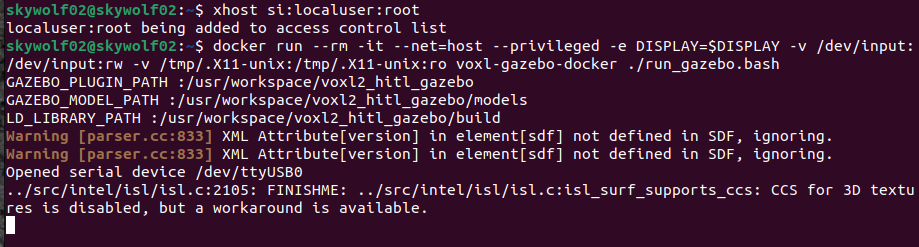
                    image (6).png image (7).png

                    1 Reply Last reply
                    0
                    • Eric KatzfeyE Eric Katzfey

                      @Alexander-Saunders I'm only suggesting that there is a permissions problem of some sort. I don't see that on my machine so just trying to figure out what is different in your environment.

                      Alexander SaundersA Offline
                      Alexander SaundersA Offline
                      Alexander Saunders
                      Contributor
                      wrote on last edited by
                      #41

                      @Eric-Katzfey Is it possible to see a picture of your terminal of the commands you sent?

                      Eric KatzfeyE 3 Replies Last reply
                      0
                      • Eric KatzfeyE Eric Katzfey

                        @Alexander-Saunders I'm only suggesting that there is a permissions problem of some sort. I don't see that on my machine so just trying to figure out what is different in your environment.

                        Alexander SaundersA Offline
                        Alexander SaundersA Offline
                        Alexander Saunders
                        Contributor
                        wrote on last edited by
                        #42

                        @Eric-Katzfey image (8).png

                        Eric KatzfeyE 1 Reply Last reply
                        0
                        • Alexander SaundersA Alexander Saunders

                          @Eric-Katzfey image (8).png

                          Eric KatzfeyE Offline
                          Eric KatzfeyE Offline
                          Eric Katzfey
                          ModalAI Team
                          wrote on last edited by
                          #43

                          @Alexander-Saunders iris_hitl.sdf is part of the docker image so it will be the same.

                          1 Reply Last reply
                          0
                          • Alexander SaundersA Alexander Saunders

                            @Eric-Katzfey Is it possible to see a picture of your terminal of the commands you sent?

                            Eric KatzfeyE Offline
                            Eric KatzfeyE Offline
                            Eric Katzfey
                            ModalAI Team
                            wrote on last edited by
                            #44

                            @Alexander-Saunders

                            modalai@modalai-XPS-15-9570:~$ docker run --rm -it --net=host --privileged -v /dev/input:/dev/input:rw voxl-gazebo-docker
                            root@modalai-XPS-15-9570:/usr/workspace/voxl2_hitl_gazebo# ls
                            CMakeLists.txt           build-gazebo.bash    include       package.xml            scripts
                            Dockerfile               build-mavlink.bash   mavlink       resources              src
                            README.md                cmake                mavlink-libs  run-docker-image.bash  unit_tests
                            build                    docker-commands.txt  models        run_gazebo.bash        worlds
                            build-docker-image.bash  external             msgs          run_headless.bash
                            root@modalai-XPS-15-9570:/usr/workspace/voxl2_hitl_gazebo# ls /dev/ttyUSB0
                            /dev/ttyUSB0
                            root@modalai-XPS-15-9570:/usr/workspace/voxl2_hitl_gazebo# ls -l /dev/ttyUSB0
                            crw-rw---- 1 root dialout 188, 0 Jun  3 16:02 /dev/ttyUSB0
                            root@modalai-XPS-15-9570:/usr/workspace/voxl2_hitl_gazebo# ./run_headless.bash 
                            GAZEBO_PLUGIN_PATH :/usr/workspace/voxl2_hitl_gazebo
                            GAZEBO_MODEL_PATH :/usr/workspace/voxl2_hitl_gazebo/models
                            LD_LIBRARY_PATH :/usr/workspace/voxl2_hitl_gazebo/build
                            Warning [parser.cc:833] XML Attribute[version] in element[sdf] not defined in SDF, ignoring.
                            Warning [parser.cc:833] XML Attribute[version] in element[sdf] not defined in SDF, ignoring.
                            Opened serial device /dev/ttyUSB0
                            
                            1 Reply Last reply
                            0
                            • Alexander SaundersA Alexander Saunders

                              @Eric-Katzfey Is it possible to see a picture of your terminal of the commands you sent?

                              Eric KatzfeyE Offline
                              Eric KatzfeyE Offline
                              Eric Katzfey
                              ModalAI Team
                              wrote on last edited by
                              #45

                              @Alexander-Saunders

                              modalai@modalai-XPS-15-9570:~$ docker images | grep gazebo
                              voxl-gazebo-docker            latest       1c8ce4f31e4f   3 months ago    3.73GB
                              voxl-gazebo-docker            v1.2         1c8ce4f31e4f   3 months ago    3.73GB
                              
                              1 Reply Last reply
                              0
                              • Alexander SaundersA Alexander Saunders

                                @Eric-Katzfey Is it possible to see a picture of your terminal of the commands you sent?

                                Eric KatzfeyE Offline
                                Eric KatzfeyE Offline
                                Eric Katzfey
                                ModalAI Team
                                wrote on last edited by
                                #46

                                @Alexander-Saunders We have quite a few customers using HITL successfully and they are using the instructions in the document so I'm thinking there is something in your environment that is causing the issue. Do you have access to a different Linux machine that you can use?

                                Alexander SaundersA 1 Reply Last reply
                                0
                                • Eric KatzfeyE Eric Katzfey

                                  @Alexander-Saunders We have quite a few customers using HITL successfully and they are using the instructions in the document so I'm thinking there is something in your environment that is causing the issue. Do you have access to a different Linux machine that you can use?

                                  Alexander SaundersA Offline
                                  Alexander SaundersA Offline
                                  Alexander Saunders
                                  Contributor
                                  wrote on last edited by
                                  #47

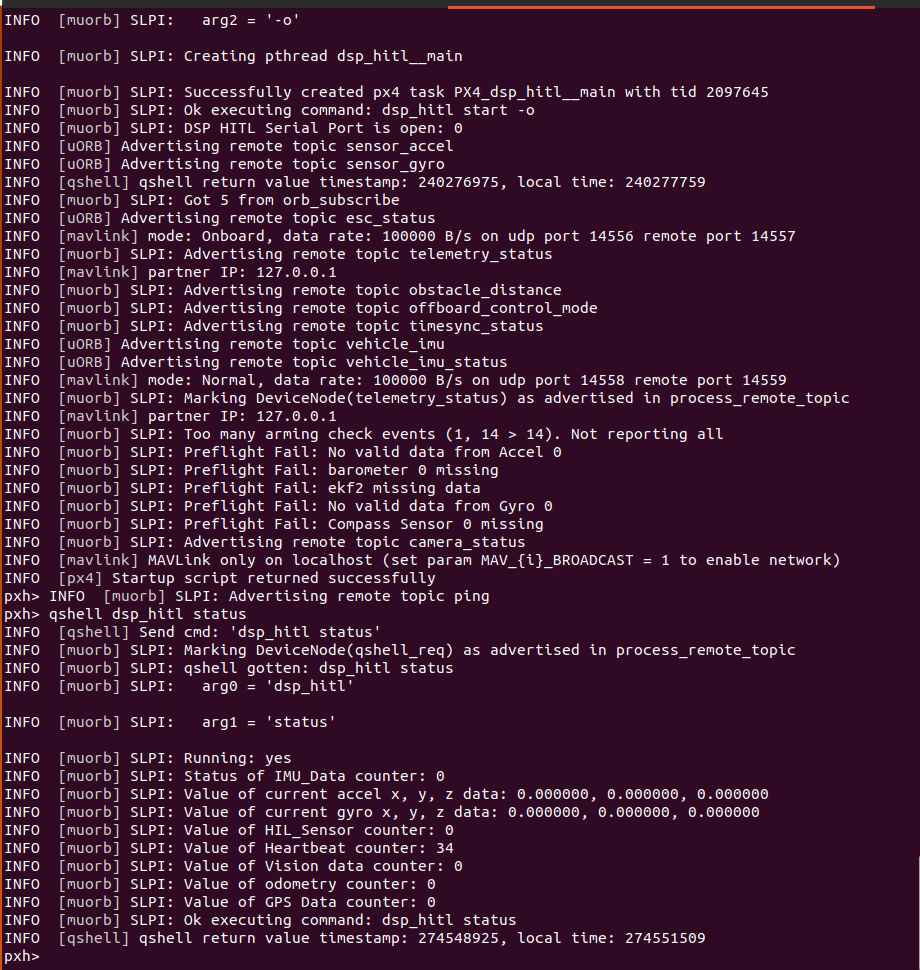
                                  @Eric-Katzfey Update:

                                  We switched some of the wires for the FTDI cable and now receiving data. We went back to following the HITL docs along with https://forum.modalai.com/topic/3511/serial-port-closed-and-other-hitl-errors/9 . We have the drone running in HITL via QGC and running the voxl-px4-hitl command. Despite this, gazebo is still not showing the drone or connecting. Could the issue possibly be with the Dockerfile that reflects bionic instead of focal since that had to be changed for the image to be pulled? We also tried running ./run-docker.sh within the directory and received docker run --help.
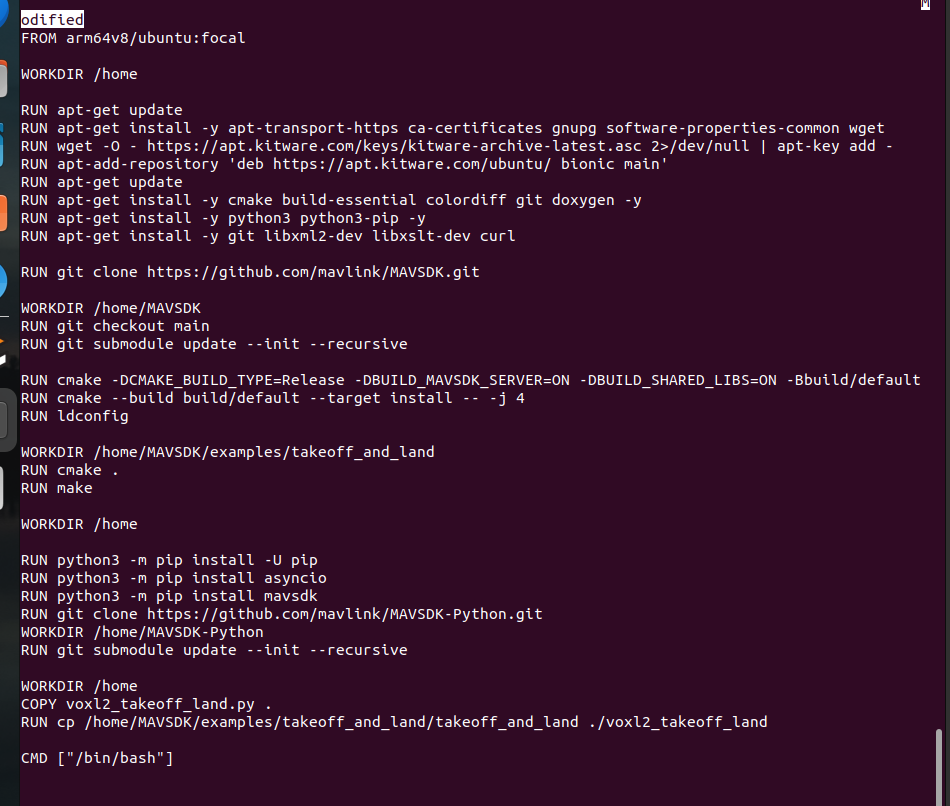
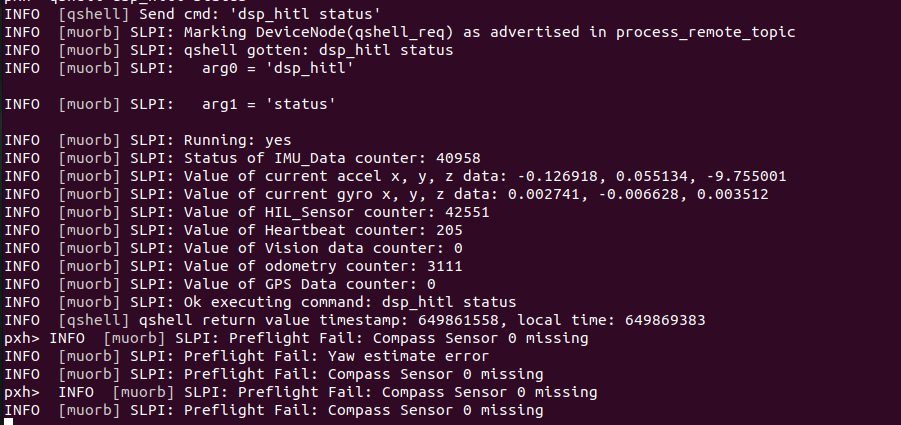
                                  image (11).png image (12).png

                                  Eric KatzfeyE 1 Reply Last reply
                                  0
                                  • Alexander SaundersA Alexander Saunders

                                    @Eric-Katzfey Update:

                                    We switched some of the wires for the FTDI cable and now receiving data. We went back to following the HITL docs along with https://forum.modalai.com/topic/3511/serial-port-closed-and-other-hitl-errors/9 . We have the drone running in HITL via QGC and running the voxl-px4-hitl command. Despite this, gazebo is still not showing the drone or connecting. Could the issue possibly be with the Dockerfile that reflects bionic instead of focal since that had to be changed for the image to be pulled? We also tried running ./run-docker.sh within the directory and received docker run --help.

                                    image (11).png image (12).png

                                    Eric KatzfeyE Offline
                                    Eric KatzfeyE Offline
                                    Eric Katzfey
                                    ModalAI Team
                                    wrote on last edited by
                                    #48

                                    @Alexander-Saunders Looks better now. What does the dsp_hitl start command look like now? Seems like it is setup for VIO only.

                                    1 Reply Last reply
                                    0

                                    Hello! It looks like you're interested in this conversation, but you don't have an account yet.

                                    Getting fed up of having to scroll through the same posts each visit? When you register for an account, you'll always come back to exactly where you were before, and choose to be notified of new replies (either via email, or push notification). You'll also be able to save bookmarks and upvote posts to show your appreciation to other community members.

                                    With your input, this post could be even better 💗

                                    Register Login
                                    Reply
                                    • Reply as topic
                                    Log in to reply
                                    • Oldest to Newest
                                    • Newest to Oldest
                                    • Most Votes


                                    ModalAI
                                    Categories Recent Tags ModalAI.com Docs
                                    © 2026 ModalAI® · Accelerating autonomy for smaller, smarter, safer drones · Powered by NodeBB
                                    • Login

                                    • Don't have an account? Register

                                    • Login or register to search.
                                    • First post
                                      Last post
                                    0
                                    • Categories
                                    • Recent
                                    • Tags
                                    • Popular
                                    • Users
                                    • Groups