
VOXL2 microdds agent namespace
-
Hi @Moderator I am wondering if I can change the namespace as mentioned in the PX4-ROS2 docs here https://docs.px4.io/main/en/ros/ros2_comm.html#customizing-the-topic-namespace . I have 5 starlings in a swarm and I fear that at some point all of them might be subscribing or publishing to the same topic
-
Hi @Moderator I am wondering if I can change the namespace as mentioned in the PX4-ROS2 docs here https://docs.px4.io/main/en/ros/ros2_comm.html#customizing-the-topic-namespace . I have 5 starlings in a swarm and I fear that at some point all of them might be subscribing or publishing to the same topic
@Darshit-Desai it doesn't seem voxl-mpa-to-ros2 supports that today. Have you thought about modifying the code to add that feature?
-
@Darshit-Desai it doesn't seem voxl-mpa-to-ros2 supports that today. Have you thought about modifying the code to add that feature?
@Moderator Actually this is related to MicroUXRCE Agent for streaming PX4 FMU uORB topics as ROS2 topics, there is a way to rename the namespace for that but in MODAL AI I am not sure. MPATOROS2 is perfectly fine, I can just change the namespace using this command and that is not the issue here:
ros2 run voxl_mpa_to_ros2 voxl_mpa_to_ros2_node --ros-args -r __ns:=/drone3. I am talking about when there is no mpatoros2 node running and the Microdds agent streams the PX4 uorb topics as shown below: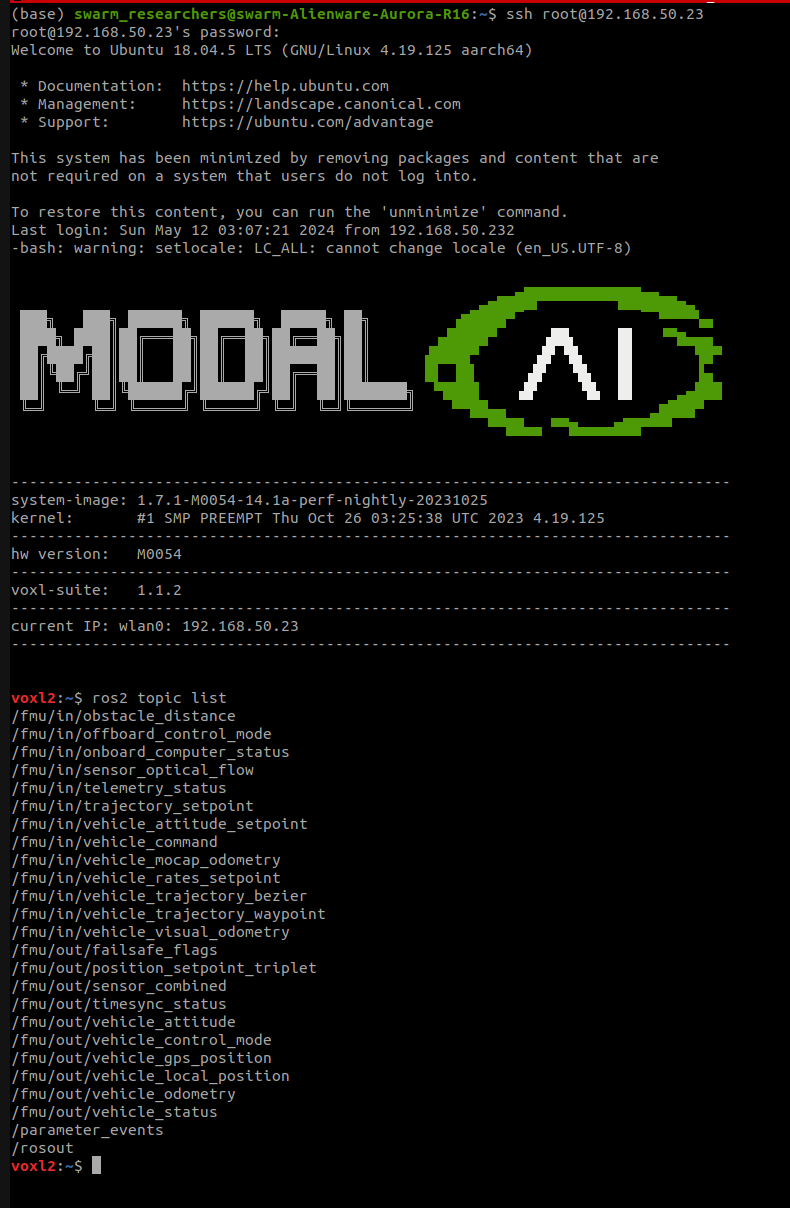
-
@Darshit-Desai it doesn't seem voxl-mpa-to-ros2 supports that today. Have you thought about modifying the code to add that feature?
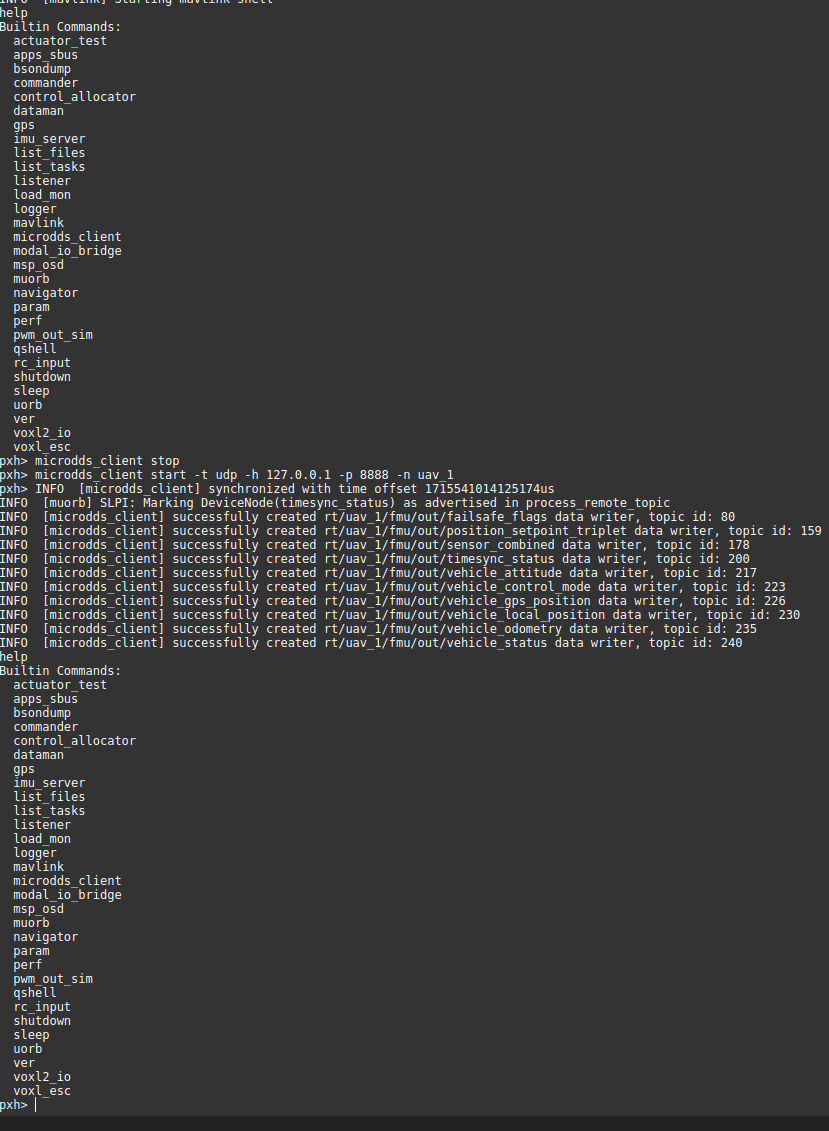
@Moderator THe only way to change microdds namespace is through QGC I tried that and it worked, but the issue is I need to manually type it up on each bootup of the FMU. As shown below:
Microdds service stopped and started with a namespace
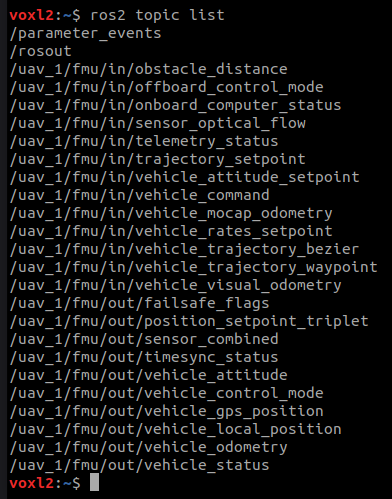
Topics remapped on VOXL2
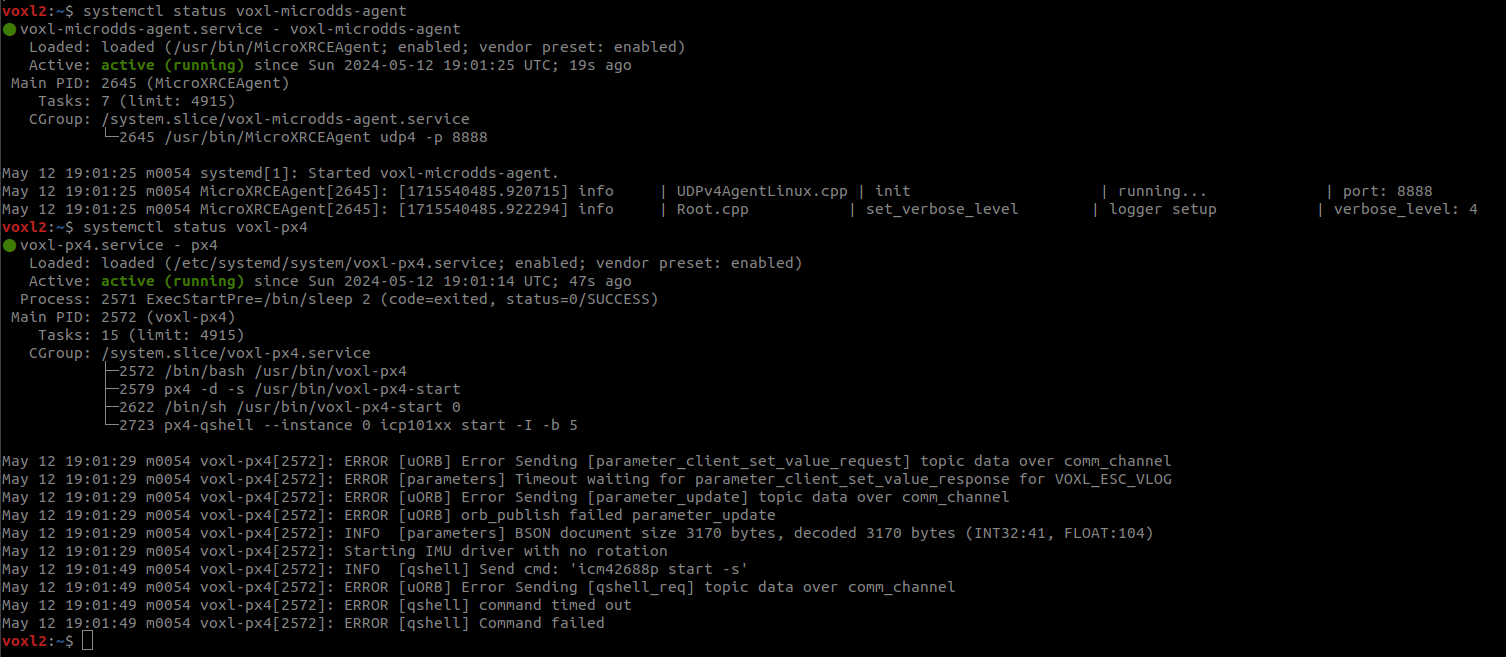
So I thought I could change the voxl-px4.conf to include this as a qshell command but that also didn't work as shown below
voxl-px4.conf file v1
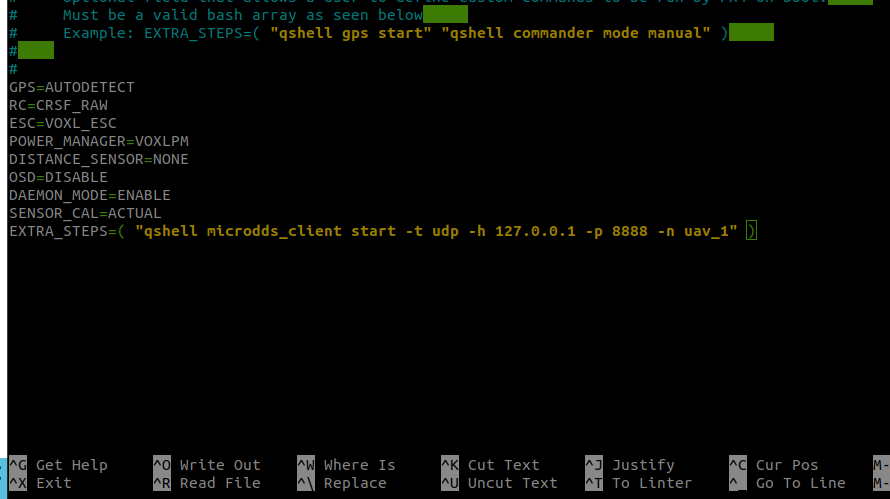
voxl-px4.conf file v2
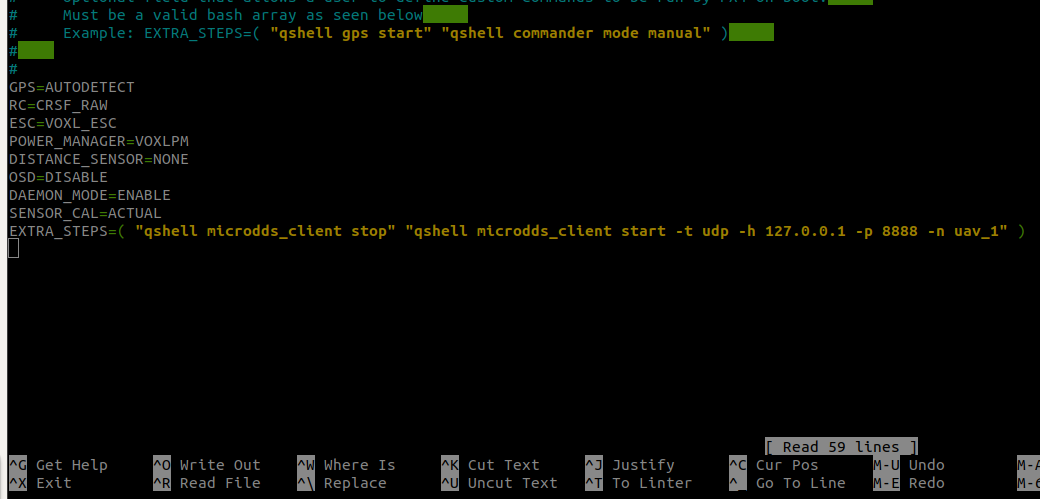
Both versions resulted in the Error in the restart/power cycle of systemd service
-
@Moderator THe only way to change microdds namespace is through QGC I tried that and it worked, but the issue is I need to manually type it up on each bootup of the FMU. As shown below:
Microdds service stopped and started with a namespace
Topics remapped on VOXL2
So I thought I could change the voxl-px4.conf to include this as a qshell command but that also didn't work as shown below
voxl-px4.conf file v1
voxl-px4.conf file v2
Both versions resulted in the Error in the restart/power cycle of systemd service
@Darshit-Desai Rather than modifying voxl-px4.conf to use EXTRA_STEPS, can you try directly modifying
/usr/bin/voxl-px4-startand adding that command? -
@Darshit-Desai Rather than modifying voxl-px4.conf to use EXTRA_STEPS, can you try directly modifying
/usr/bin/voxl-px4-startand adding that command?Hi @Eric-Katzfey that worked, now I actually want to export a variable which states the namespace of the relevant drone and the voxl-px4-start file picks up that variable and assigns the namespace but I am facing some errors because of that, could you have a look
Here's my bashrc file
#!/bin/bash
# ModalAI default bashrc file

#VERSION 1.2

# If not running interactively, don't do anything
case $- in
    *i*) ;;
      *) return;;
esac

# don't put duplicate lines or lines starting with space in the history.
# See bash(1) for more options
HISTCONTROL=ignoreboth

# append to the history file, don't overwrite it
shopt -s histappend

# for setting history length see HISTSIZE and HISTFILESIZE in bash(1)
HISTSIZE=1000
HISTFILESIZE=2000

# check the window size after each command and, if necessary,
# update the values of LINES and COLUMNS.
shopt -s checkwinsize

# ubuntu ssh sets TERM to xterm-256color which screws with ROS
# change it to linux spec
export TERM=linux

if [ -d /home/root/.profile.d/ ]; then
  for i in /home/root/.profile.d/* ; do
    if [ -d $i ]; then
        for j in $i/* ; do
            if [ -f $j ]; then
                . $j
            fi
        done
    else
        . $i
    fi
  done
fi

# Put user-specific tweaks here or in a file in ~/.profile.d/
export PX4_NAMESPACE="uav_1"
Here's my voxl-px4-start file
#!/bin/sh
# PX4 commands need the 'px4-' prefix in bash.
# (px4-alias.sh is expected to be in the PATH)
. px4-alias.sh

echo -e "\n*************************"
echo "GPS: $GPS"
echo "RC: $RC"
echo "ESC: $ESC"
echo "POWER MANAGER: $POWER_MANAGER"
echo "DISTANCE SENSOR: $DISTANCE_SENSOR"
echo "OSD: $OSD"
echo "EXTRA STEPS:"
for i in "${EXTRA_STEPS[@]}"
do
	echo -e "\t$i"
done
echo -e "*************************\n"

# In order to just exit after starting the uorb / muorb modules define
# the environment variable MINIMAL_PX4. (e.g. export MINIMAL_PX4=1)
# This is useful for testing / debug where you may want to start drivers
# and modules manually from the px4 command shell
if [ ! -z $MINIMAL_PX4 ]; then
    /bin/echo "Running minimal script"
    exit 0
fi

# Figure out what platform we are running on.
PLATFORM=`/usr/bin/voxl-platform 2> /dev/null`
RETURNCODE=$?
if [ $RETURNCODE -ne 0 ]; then
    # If we couldn't get the platform from the voxl-platform utility then check
    # /etc/version to see if there is an M0052 substring in the version string. If so,
    # then we assume that we are on M0052.
    VERSIONSTRING=$(</etc/version)
    M0052SUBSTRING="M0052"
    if [[ "$VERSIONSTRING" == *"$M0052SUBSTRING"* ]]; then
        PLATFORM="M0052"
    fi
fi

# We can only run on M0052, M0054, or M0104 so exit with error if that is not the case
if [ $PLATFORM = "M0052" ]; then
    /bin/echo "Running on M0052"
elif [ $PLATFORM = "M0054" ]; then
    /bin/echo "Running on M0054"
elif [ $PLATFORM = "M0104" ]; then
    /bin/echo "Running on M0104"
else
    /bin/echo "Error, cannot determine platform!"
    exit 0
fi

# Sleep a little here. A lot happens when the uorb and muorb start
# and we need to make sure that it all completes successfully to avoid
# any possible race conditions.
/bin/sleep 1

param select /data/px4/param/parameters

# Load in all of the parameters that have been saved in the file
param load

# Start logging and use timestamps for log files when possible.
# Add the "-e" option to start logging immediately. Default is
# to log only when armed. Caution must be used with the "-e" option
# because if power is removed without stopping the logger gracefully then
# the log file may be corrupted.
logger start -t

# IMU (accelerometer / gyroscope)
if [ "$PLATFORM" == "M0104" ]; then
    /bin/echo "Starting IMU driver with rotation 12"
    qshell icm42688p start -s -R 12
else
    /bin/echo "Starting IMU driver with no rotation"
    qshell icm42688p start -s
fi

# Start Invensense ICP 101xx barometer built on to VOXL 2
qshell icp101xx start -I -b 5

# Auto detect the magnetometer. If one or both of these devices
# are not connected it will fail but not cause any harm.
/bin/echo "Looking for qmc5883l magnetometer"
qshell qmc5883l start -R 10 -X -b 1
/bin/echo "Looking for ist8310 magnetometer"
qshell ist8310 start -R 10 -X -b 1

# GPS and magnetometer
if [ "$GPS" != "NONE" ]; then
	# On M0052 the GPS driver runs on the apps processor
	if [ $PLATFORM = "M0052" ]; then
	    gps start -d /dev/ttyHS2
	# On M0054 and M0104 the GPS driver runs on SLPI DSP
	else
	    qshell gps start
	fi
fi

# Auto detect an ncp5623c i2c RGB LED. If one isn't connected this will
# fail but not cause any harm.
/bin/echo "Looking for ncp5623c RGB LED"
qshell rgbled_ncp5623c start -X -b 1 -f 400 -a 56

# We do not change the value of SYS_AUTOCONFIG but if it does not
# show up as used then it is not reported to QGC and we get a
# missing parameter error.
param touch SYS_AUTOCONFIG

# ESC driver
if [ "$ESC" == "VOXL_ESC" ]; then
    /bin/echo "Starting VOXL ESC driver"
	qshell voxl_esc start
elif [ "$ESC" == "VOXL2_IO_PWM_ESC" ]; then
	if [ "$RC" == "M0065_SBUS" ]; then
		/bin/echo "Starting VOXL IO for PWM ESC with SBUS RC"
		qshell voxl2_io start
	else
		/bin/echo "Starting VOXL IO for PWM ESC without SBUS RC"
		qshell voxl2_io start -e
	fi
else
	/bin/echo "No ESC type specified, not starting an ESC driver"
fi


# RC driver
if [ "$RC" == "FAKE_RC_INPUT" ]; then
    /bin/echo "Starting fake RC driver"
    qshell rc_controller start
elif [ "$RC" == "CRSF_RAW" ]; then
    /bin/echo "Starting CRSF RC driver"
    qshell crsf_rc start -d 7
elif [ "$RC" == "CRSF_MAV" ]; then
    /bin/echo "Starting TBS crossfire RC - MAV Mode"
    qshell mavlink_rc_in start -m -p 7 -b 115200
elif [ "$RC" == "SPEKTRUM" ]; then
    /bin/echo "Starting Spektrum RC"
	# On M0052 the RC driver runs on the apps processor
	if [ $PLATFORM = "M0052" ]; then
        rc_input start -d /dev/ttyHS1
	# On M0054 and M0104 the RC driver runs on SLPI DSP
	else
        qshell spektrum_rc start
	fi
elif [ "$RC" == "GHST" ]; then
    /bin/echo "Starting GHST RC driver"
    qshell ghst_rc start -d 7
elif [ "$RC" == "M0065_SBUS" ]; then
	if [ $PLATFORM = "M0052" ]; then
		apps_sbus start
	elif [ "$ESC" != "VOXL2_IO_PWM_ESC" ]; then
    	/bin/echo "Attempting to start M0065 SBUS RC driver for original M0065 FW"
    	qshell dsp_sbus start
		retVal=$?
		if [ $retVal -ne 0 ]; then
	    	/bin/echo "Starting M0065 SBUS RC driver for original M0065 FW failed"
	    	/bin/echo "Attempting to start M0065 SBUS RC driver for new M0065 FW"
			qshell voxl2_io start -d -p 7
		fi
	else
    	/bin/echo "M0065 SBUS RC driver already started with PWM ESC start"
	fi
fi

if [ "$DISTANCE_SENSOR" == "LIGHTWARE_SF000" ]; then
	# Make sure to set the parameter SENS_EN_SF0X to 8 for sf000/b sensor
	qshell lightware_laser_serial start -d 7
fi

if [ "$POWER_MANAGER" == "VOXLPM" ]; then
	# APM power monitor
	qshell voxlpm start -X -b 2
fi

# Optional distance sensor on spare i2c
# qshell vl53l0x start -X -b 4
# qshell vl53l1x start -X -b 4

# Start all of the processing modules on DSP
qshell sensors start
qshell ekf2 start
qshell mc_pos_control start
qshell mc_att_control start
qshell mc_rate_control start
qshell mc_hover_thrust_estimator start
qshell mc_autotune_attitude_control start
qshell land_detector start multicopter
qshell manual_control start
qshell control_allocator start
qshell load_mon start

# Only start the rc_update module if an actual RC driver
# is publishing input_rc topics. Otherwise for external RC
# over Mavlink this isn't needed.
if [ "$RC" != "EXTERNAL" ]; then
	qshell rc_update start
fi

qshell commander start

# This is needed for altitude and position hold modes
qshell flight_mode_manager start

# Start all of the processing modules on the applications processor
dataman start
navigator start
load_mon start

# This bridge allows raw data packets to be sent over UART to the ESC
modal_io_bridge start

# Start microdds_client for ros2 offboard messages from agent over localhost
microdds_client start -t udp -h 127.0.0.1 -p 8888 -n $PX4_NAMESPACE

# On M0052 there is only one IMU. So, PX4 needs to
# publish IMU samples externally for VIO to use.
if [ $PLATFORM = "M0052" ]; then
	imu_server start
fi

# start the onboard fast link to connect to voxl-mavlink-server
mavlink start -x -u 14556 -o 14557 -r 100000 -n lo -m onboard

# slow down some of the fastest streams
mavlink stream -u 14556 -s HIGHRES_IMU -r 10
mavlink stream -u 14556 -s ATTITUDE -r 10
mavlink stream -u 14556 -s ATTITUDE_QUATERNION -r 10
mavlink stream -u 14556 -s GLOBAL_POSITION_INT -r 30
mavlink stream -u 14556 -s SCALED_PRESSURE -r 10

# start the slow normal mode for voxl-mavlink-server to forward to GCS
mavlink start -x -u 14558 -o 14559 -r 100000 -n lo

mavlink boot_complete

# Optional MSP OSD driver for DJI goggles
# This is only supported on M0054 (with M0125 accessory board)
if [ "$OSD" == "ENABLE" ]; then
    /bin/echo "Starting OSD driver"
    msp_osd start -d /dev/ttyHS1
fi

# Start optional EXTRA_STEPS
for i in "${EXTRA_STEPS[@]}"
do
	$i
done
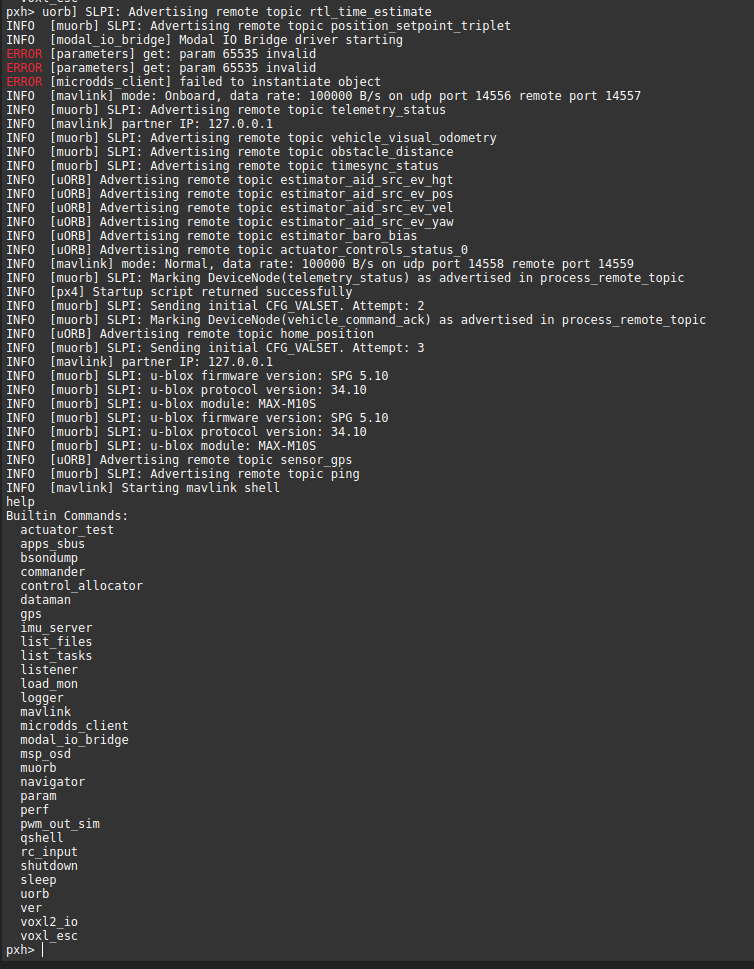
The errors that I get:
-
Hi @Eric-Katzfey that worked, now I actually want to export a variable which states the namespace of the relevant drone and the voxl-px4-start file picks up that variable and assigns the namespace but I am facing some errors because of that, could you have a look
Here's my bashrc file
#!/bin/bash
# ModalAI default bashrc file

#VERSION 1.2

# If not running interactively, don't do anything
case $- in
    *i*) ;;
      *) return;;
esac

# don't put duplicate lines or lines starting with space in the history.
# See bash(1) for more options
HISTCONTROL=ignoreboth

# append to the history file, don't overwrite it
shopt -s histappend

# for setting history length see HISTSIZE and HISTFILESIZE in bash(1)
HISTSIZE=1000
HISTFILESIZE=2000

# check the window size after each command and, if necessary,
# update the values of LINES and COLUMNS.
shopt -s checkwinsize

# ubuntu ssh sets TERM to xterm-256color which screws with ROS
# change it to linux spec
export TERM=linux

if [ -d /home/root/.profile.d/ ]; then
  for i in /home/root/.profile.d/* ; do
    if [ -d $i ]; then
        for j in $i/* ; do
            if [ -f $j ]; then
                . $j
            fi
        done
    else
        . $i
    fi
  done
fi

# Put user-specific tweaks here or in a file in ~/.profile.d/
export PX4_NAMESPACE="uav_1"
Here's my voxl-px4-start file
#!/bin/sh
# PX4 commands need the 'px4-' prefix in bash.
# (px4-alias.sh is expected to be in the PATH)
. px4-alias.sh

echo -e "\n*************************"
echo "GPS: $GPS"
echo "RC: $RC"
echo "ESC: $ESC"
echo "POWER MANAGER: $POWER_MANAGER"
echo "DISTANCE SENSOR: $DISTANCE_SENSOR"
echo "OSD: $OSD"
echo "EXTRA STEPS:"
for i in "${EXTRA_STEPS[@]}"
do
	echo -e "\t$i"
done
echo -e "*************************\n"

# In order to just exit after starting the uorb / muorb modules define
# the environment variable MINIMAL_PX4. (e.g. export MINIMAL_PX4=1)
# This is useful for testing / debug where you may want to start drivers
# and modules manually from the px4 command shell
if [ ! -z $MINIMAL_PX4 ]; then
    /bin/echo "Running minimal script"
    exit 0
fi

# Figure out what platform we are running on.
PLATFORM=`/usr/bin/voxl-platform 2> /dev/null`
RETURNCODE=$?
if [ $RETURNCODE -ne 0 ]; then
    # If we couldn't get the platform from the voxl-platform utility then check
    # /etc/version to see if there is an M0052 substring in the version string. If so,
    # then we assume that we are on M0052.
    VERSIONSTRING=$(</etc/version)
    M0052SUBSTRING="M0052"
    if [[ "$VERSIONSTRING" == *"$M0052SUBSTRING"* ]]; then
        PLATFORM="M0052"
    fi
fi

# We can only run on M0052, M0054, or M0104 so exit with error if that is not the case
if [ $PLATFORM = "M0052" ]; then
    /bin/echo "Running on M0052"
elif [ $PLATFORM = "M0054" ]; then
    /bin/echo "Running on M0054"
elif [ $PLATFORM = "M0104" ]; then
    /bin/echo "Running on M0104"
else
    /bin/echo "Error, cannot determine platform!"
    exit 0
fi

# Sleep a little here. A lot happens when the uorb and muorb start
# and we need to make sure that it all completes successfully to avoid
# any possible race conditions.
/bin/sleep 1

param select /data/px4/param/parameters

# Load in all of the parameters that have been saved in the file
param load

# Start logging and use timestamps for log files when possible.
# Add the "-e" option to start logging immediately. Default is
# to log only when armed. Caution must be used with the "-e" option
# because if power is removed without stopping the logger gracefully then
# the log file may be corrupted.
logger start -t

# IMU (accelerometer / gyroscope)
if [ "$PLATFORM" == "M0104" ]; then
    /bin/echo "Starting IMU driver with rotation 12"
    qshell icm42688p start -s -R 12
else
    /bin/echo "Starting IMU driver with no rotation"
    qshell icm42688p start -s
fi

# Start Invensense ICP 101xx barometer built on to VOXL 2
qshell icp101xx start -I -b 5

# Auto detect the magnetometer. If one or both of these devices
# are not connected it will fail but not cause any harm.
/bin/echo "Looking for qmc5883l magnetometer"
qshell qmc5883l start -R 10 -X -b 1
/bin/echo "Looking for ist8310 magnetometer"
qshell ist8310 start -R 10 -X -b 1

# GPS and magnetometer
if [ "$GPS" != "NONE" ]; then
	# On M0052 the GPS driver runs on the apps processor
	if [ $PLATFORM = "M0052" ]; then
	    gps start -d /dev/ttyHS2
	# On M0054 and M0104 the GPS driver runs on SLPI DSP
	else
	    qshell gps start
	fi
fi

# Auto detect an ncp5623c i2c RGB LED. If one isn't connected this will
# fail but not cause any harm.
/bin/echo "Looking for ncp5623c RGB LED"
qshell rgbled_ncp5623c start -X -b 1 -f 400 -a 56

# We do not change the value of SYS_AUTOCONFIG but if it does not
# show up as used then it is not reported to QGC and we get a
# missing parameter error.
param touch SYS_AUTOCONFIG

# ESC driver
if [ "$ESC" == "VOXL_ESC" ]; then
    /bin/echo "Starting VOXL ESC driver"
	qshell voxl_esc start
elif [ "$ESC" == "VOXL2_IO_PWM_ESC" ]; then
	if [ "$RC" == "M0065_SBUS" ]; then
		/bin/echo "Starting VOXL IO for PWM ESC with SBUS RC"
		qshell voxl2_io start
	else
		/bin/echo "Starting VOXL IO for PWM ESC without SBUS RC"
		qshell voxl2_io start -e
	fi
else
	/bin/echo "No ESC type specified, not starting an ESC driver"
fi


# RC driver
if [ "$RC" == "FAKE_RC_INPUT" ]; then
    /bin/echo "Starting fake RC driver"
    qshell rc_controller start
elif [ "$RC" == "CRSF_RAW" ]; then
    /bin/echo "Starting CRSF RC driver"
    qshell crsf_rc start -d 7
elif [ "$RC" == "CRSF_MAV" ]; then
    /bin/echo "Starting TBS crossfire RC - MAV Mode"
    qshell mavlink_rc_in start -m -p 7 -b 115200
elif [ "$RC" == "SPEKTRUM" ]; then
    /bin/echo "Starting Spektrum RC"
	# On M0052 the RC driver runs on the apps processor
	if [ $PLATFORM = "M0052" ]; then
        rc_input start -d /dev/ttyHS1
	# On M0054 and M0104 the RC driver runs on SLPI DSP
	else
        qshell spektrum_rc start
	fi
elif [ "$RC" == "GHST" ]; then
    /bin/echo "Starting GHST RC driver"
    qshell ghst_rc start -d 7
elif [ "$RC" == "M0065_SBUS" ]; then
	if [ $PLATFORM = "M0052" ]; then
		apps_sbus start
	elif [ "$ESC" != "VOXL2_IO_PWM_ESC" ]; then
    	/bin/echo "Attempting to start M0065 SBUS RC driver for original M0065 FW"
    	qshell dsp_sbus start
		retVal=$?
		if [ $retVal -ne 0 ]; then
	    	/bin/echo "Starting M0065 SBUS RC driver for original M0065 FW failed"
	    	/bin/echo "Attempting to start M0065 SBUS RC driver for new M0065 FW"
			qshell voxl2_io start -d -p 7
		fi
	else
    	/bin/echo "M0065 SBUS RC driver already started with PWM ESC start"
	fi
fi

if [ "$DISTANCE_SENSOR" == "LIGHTWARE_SF000" ]; then
	# Make sure to set the parameter SENS_EN_SF0X to 8 for sf000/b sensor
	qshell lightware_laser_serial start -d 7
fi

if [ "$POWER_MANAGER" == "VOXLPM" ]; then
	# APM power monitor
	qshell voxlpm start -X -b 2
fi

# Optional distance sensor on spare i2c
# qshell vl53l0x start -X -b 4
# qshell vl53l1x start -X -b 4

# Start all of the processing modules on DSP
qshell sensors start
qshell ekf2 start
qshell mc_pos_control start
qshell mc_att_control start
qshell mc_rate_control start
qshell mc_hover_thrust_estimator start
qshell mc_autotune_attitude_control start
qshell land_detector start multicopter
qshell manual_control start
qshell control_allocator start
qshell load_mon start

# Only start the rc_update module if an actual RC driver
# is publishing input_rc topics. Otherwise for external RC
# over Mavlink this isn't needed.
if [ "$RC" != "EXTERNAL" ]; then
	qshell rc_update start
fi

qshell commander start

# This is needed for altitude and position hold modes
qshell flight_mode_manager start

# Start all of the processing modules on the applications processor
dataman start
navigator start
load_mon start

# This bridge allows raw data packets to be sent over UART to the ESC
modal_io_bridge start

# Start microdds_client for ros2 offboard messages from agent over localhost
microdds_client start -t udp -h 127.0.0.1 -p 8888 -n $PX4_NAMESPACE

# On M0052 there is only one IMU. So, PX4 needs to
# publish IMU samples externally for VIO to use.
if [ $PLATFORM = "M0052" ]; then
	imu_server start
fi

# start the onboard fast link to connect to voxl-mavlink-server
mavlink start -x -u 14556 -o 14557 -r 100000 -n lo -m onboard

# slow down some of the fastest streams
mavlink stream -u 14556 -s HIGHRES_IMU -r 10
mavlink stream -u 14556 -s ATTITUDE -r 10
mavlink stream -u 14556 -s ATTITUDE_QUATERNION -r 10
mavlink stream -u 14556 -s GLOBAL_POSITION_INT -r 30
mavlink stream -u 14556 -s SCALED_PRESSURE -r 10

# start the slow normal mode for voxl-mavlink-server to forward to GCS
mavlink start -x -u 14558 -o 14559 -r 100000 -n lo

mavlink boot_complete

# Optional MSP OSD driver for DJI goggles
# This is only supported on M0054 (with M0125 accessory board)
if [ "$OSD" == "ENABLE" ]; then
    /bin/echo "Starting OSD driver"
    msp_osd start -d /dev/ttyHS1
fi

# Start optional EXTRA_STEPS
for i in "${EXTRA_STEPS[@]}"
do
	$i
done
The errors that I get:
@Darshit-Desai Seems like some bash scripting issues. Perhaps
echo $PX4_NAMESPACEbefore the microdds_client start line to see what is in that variable. -
@Darshit-Desai Seems like some bash scripting issues. Perhaps
echo $PX4_NAMESPACEbefore the microdds_client start line to see what is in that variable.@Eric-Katzfey I know this is a question for the px4 forum, but can you guys help me figure out how to run the https://github.com/PX4/px4_ros_com/blob/main/src/examples/offboard/offboard_control_srv.cpp service server here. I changed the namespace for my microdds client as you know and I am not sure if that service server is running or not, I can't find the server when I do
ros2 service listorros2 service find



Reading along? Create a free ModalAI Forum account to join in.
With an account you can reply, ask your own question, get an email when a ModalAI engineer answers, and mark the reply that solved it. Your place in each thread is saved between visits.
Questions about VOXL, Flight Core, ESCs and ModalAI drones are answered here by the engineers who build them.
Register Login