Skip to content
  • Categories
  • Recent
  • Tags
  • Popular
  • Users
  • Groups
Collapse
Brand Logo

ModalAI Forum

  1. ModalAI Support Forum
  2. VOXL Compute & Autopilot
  3. Flight Core v2
  4. PX4 Firmware flashing - Flight Core V2

PX4 Firmware flashing - Flight Core V2

Scheduled Pinned Locked Moved Flight Core v2
19 Posts 3 Posters 3.3k Views 3 Watching
  • Oldest to Newest
  • Newest to Oldest
  • Most Votes
Reply
  • Reply as topic
Log in to reply
This topic has been deleted. Only users with topic management privileges can see it.
  • Jetson NanoJ Offline
    Jetson NanoJ Offline
    Jetson Nano
    Veteran
    wrote on last edited by
    #1

    Hello, @Eric-Katzfey @tom @Chad-Sweet

    I'm having a Flight core V2 from ModalAI. I'm trying upload PX4 firmware as prescribed in documentation. But the device(flight core) is not getting detected in QGC even after power cycling the Flightcore V2(disconnecting the Battery power and reconnecting even though the USB debug port is constantly connected).

    I'm using QGC latest build 4.3.

    referred to documentation: https://docs.modalai.com/flight-core-v2-firmware/#qgroundcontrol-fw-update

    Eric KatzfeyE 1 Reply Last reply
    0
    • Jetson NanoJ Jetson Nano

      Hello, @Eric-Katzfey @tom @Chad-Sweet

      I'm having a Flight core V2 from ModalAI. I'm trying upload PX4 firmware as prescribed in documentation. But the device(flight core) is not getting detected in QGC even after power cycling the Flightcore V2(disconnecting the Battery power and reconnecting even though the USB debug port is constantly connected).

      I'm using QGC latest build 4.3.

      referred to documentation: https://docs.modalai.com/flight-core-v2-firmware/#qgroundcontrol-fw-update

      Eric KatzfeyE Offline
      Eric KatzfeyE Offline
      Eric Katzfey
      ModalAI Team
      wrote on last edited by Eric Katzfey
      #2

      @Jetson-Nano Not exactly sure what the issue is. If you disconnect the battery but still leave USB plugged in then the flight core is still powered (so that isn't a power cycle). Are you saying that the firmware update did not happen? Or it did happen but afterwards QGC doesn't connect with Flight Core? Did you try the px_uploader method?

      Jetson NanoJ 1 Reply Last reply
      0
      • Eric KatzfeyE Eric Katzfey

        @Jetson-Nano Not exactly sure what the issue is. If you disconnect the battery but still leave USB plugged in then the flight core is still powered (so that isn't a power cycle). Are you saying that the firmware update did not happen? Or it did happen but afterwards QGC doesn't connect with Flight Core? Did you try the px_uploader method?

        Jetson NanoJ Offline
        Jetson NanoJ Offline
        Jetson Nano
        Veteran
        wrote on last edited by
        #3

        @Eric-Katzfey I followed this

        Link Preview Image
        Flight Core v2 Firmware

        ModalAI technical documentation for VOXL and VOXL 2 Companion Computers for PX4 and ArduPilot Obstacle Avoidance and GPS-denied navigation, assembled in the USA

        favicon

        ModalAI Technical Docs (docs.modalai.com)

        I tried using the px4_uploader script and then I executed the script, I got the following output

        image.png

        Then when I connected the MicroUSB cable the green LED flashes but it is not recognized and there is no change in the output, it remais the same as in the photo. Then the green LED stops blinking after sometime. Both green and blue LED is there. I did not power it externally as mentioned in the documentation and only used MicrosUSB along with the MCBL-00010 (JST-to-micro-USB).

        Eric KatzfeyE 1 Reply Last reply
        0
        • Jetson NanoJ Jetson Nano

          @Eric-Katzfey I followed this

          Link Preview Image
          Flight Core v2 Firmware

          ModalAI technical documentation for VOXL and VOXL 2 Companion Computers for PX4 and ArduPilot Obstacle Avoidance and GPS-denied navigation, assembled in the USA

          favicon

          ModalAI Technical Docs (docs.modalai.com)

          I tried using the px4_uploader script and then I executed the script, I got the following output

          image.png

          Then when I connected the MicroUSB cable the green LED flashes but it is not recognized and there is no change in the output, it remais the same as in the photo. Then the green LED stops blinking after sometime. Both green and blue LED is there. I did not power it externally as mentioned in the documentation and only used MicrosUSB along with the MCBL-00010 (JST-to-micro-USB).

          Eric KatzfeyE Offline
          Eric KatzfeyE Offline
          Eric Katzfey
          ModalAI Team
          wrote on last edited by
          #4

          @Jetson-Nano Are you sure that it is showing up as /dev/ttyACM1? Make sure it's looking for the correct port. For example, on my machine I see it show up as /dev/ttyACM0 so I have to modify the command accordingly.

          tomT 1 Reply Last reply
          0
          • Eric KatzfeyE Eric Katzfey

            @Jetson-Nano Are you sure that it is showing up as /dev/ttyACM1? Make sure it's looking for the correct port. For example, on my machine I see it show up as /dev/ttyACM0 so I have to modify the command accordingly.

            tomT Online
            tomT Online
            tom
            admin
            wrote on last edited by
            #5

            @Jetson-Nano @Eric-Katzfey To add on to what Eric is saying, it can be helpful to run sudo dmesg -wH in a different terminal to see what port the device is enumerating on when plugged in

            1 Reply Last reply
            0
            • Jetson NanoJ Offline
              Jetson NanoJ Offline
              Jetson Nano
              Veteran
              wrote on last edited by Jetson Nano
              #6

              Hey @tom @Eric-Katzfey

              Once the board is connected to a PC running Ubuntu 20, the device is not detected. The ports remain the same before and after connecting Flight core. The default port is also not detected (ie. /ttyACM0).

              Printed the sudo dmesg -wH in terminal and got the following output,
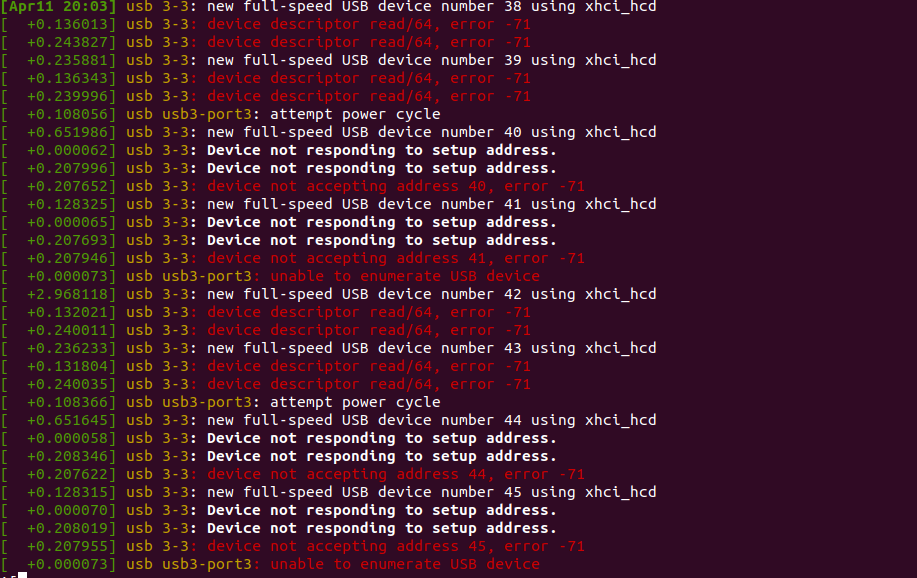
              d9613b0c-e362-4554-af8e-0658e00cb5eb-image.png

              And also is there any particular SD Card we should use or any SD Card from the PX4 website is fine?
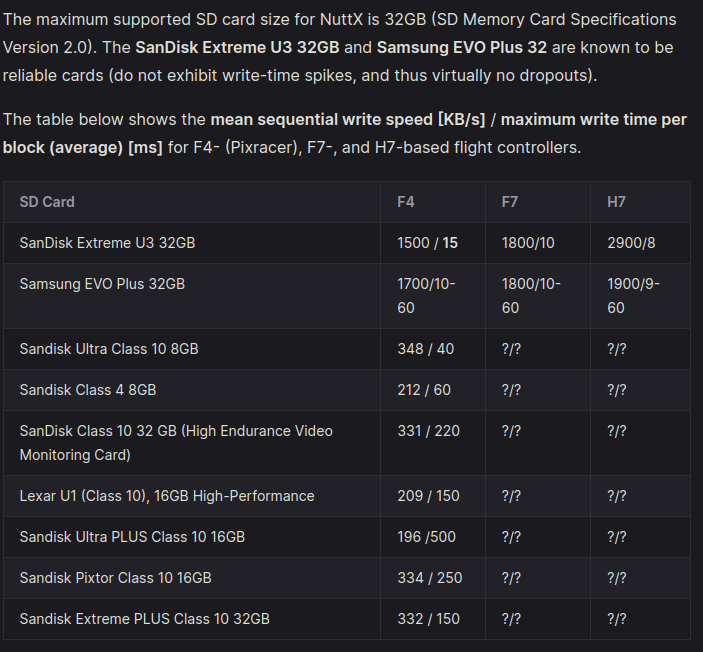
              4f44585c-5664-499e-95d9-8c3c62e43152-image.png

              tomT 1 Reply Last reply
              0
              • Jetson NanoJ Jetson Nano

                Hey @tom @Eric-Katzfey

                Once the board is connected to a PC running Ubuntu 20, the device is not detected. The ports remain the same before and after connecting Flight core. The default port is also not detected (ie. /ttyACM0).

                Printed the sudo dmesg -wH in terminal and got the following output,

                d9613b0c-e362-4554-af8e-0658e00cb5eb-image.png

                And also is there any particular SD Card we should use or any SD Card from the PX4 website is fine?

                4f44585c-5664-499e-95d9-8c3c62e43152-image.png

                tomT Online
                tomT Online
                tom
                admin
                wrote on last edited by
                #7

                @Jetson-Nano I would try a different port or cable.
                Those SD cards should be fine

                Jetson NanoJ 1 Reply Last reply
                0
                • tomT tom

                  @Jetson-Nano I would try a different port or cable.
                  Those SD cards should be fine

                  Jetson NanoJ Offline
                  Jetson NanoJ Offline
                  Jetson Nano
                  Veteran
                  wrote on last edited by Jetson Nano
                  #8
                  This post is deleted!
                  1 Reply Last reply
                  0
                  • Jetson NanoJ Offline
                    Jetson NanoJ Offline
                    Jetson Nano
                    Veteran
                    wrote on last edited by
                    #9

                    Hey @tom @Eric-Katzfey

                    As depicted earlier, I have used a Class 4 - SD card(16 GB) for the FCv2. I have tried running the command, sudo dmesg -wH. I get the following error again, the device is not able to enumerate the fcv2.
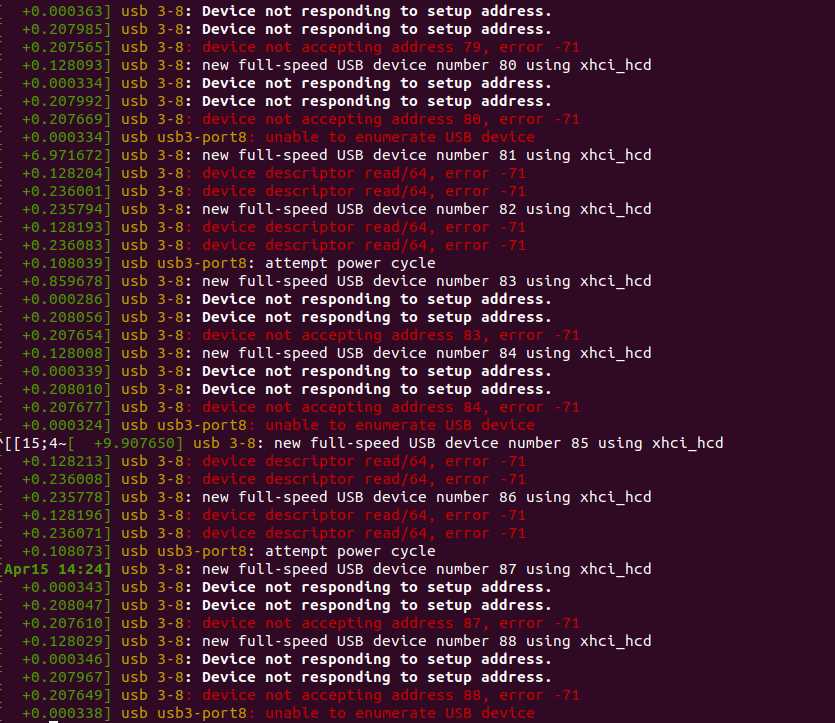
                    unnamed.png

                    Also, the cable I used works with other industrial flight controllers. Checked with different ports and cables too. Is there force boot switch on fcv2 which is to be enabled?
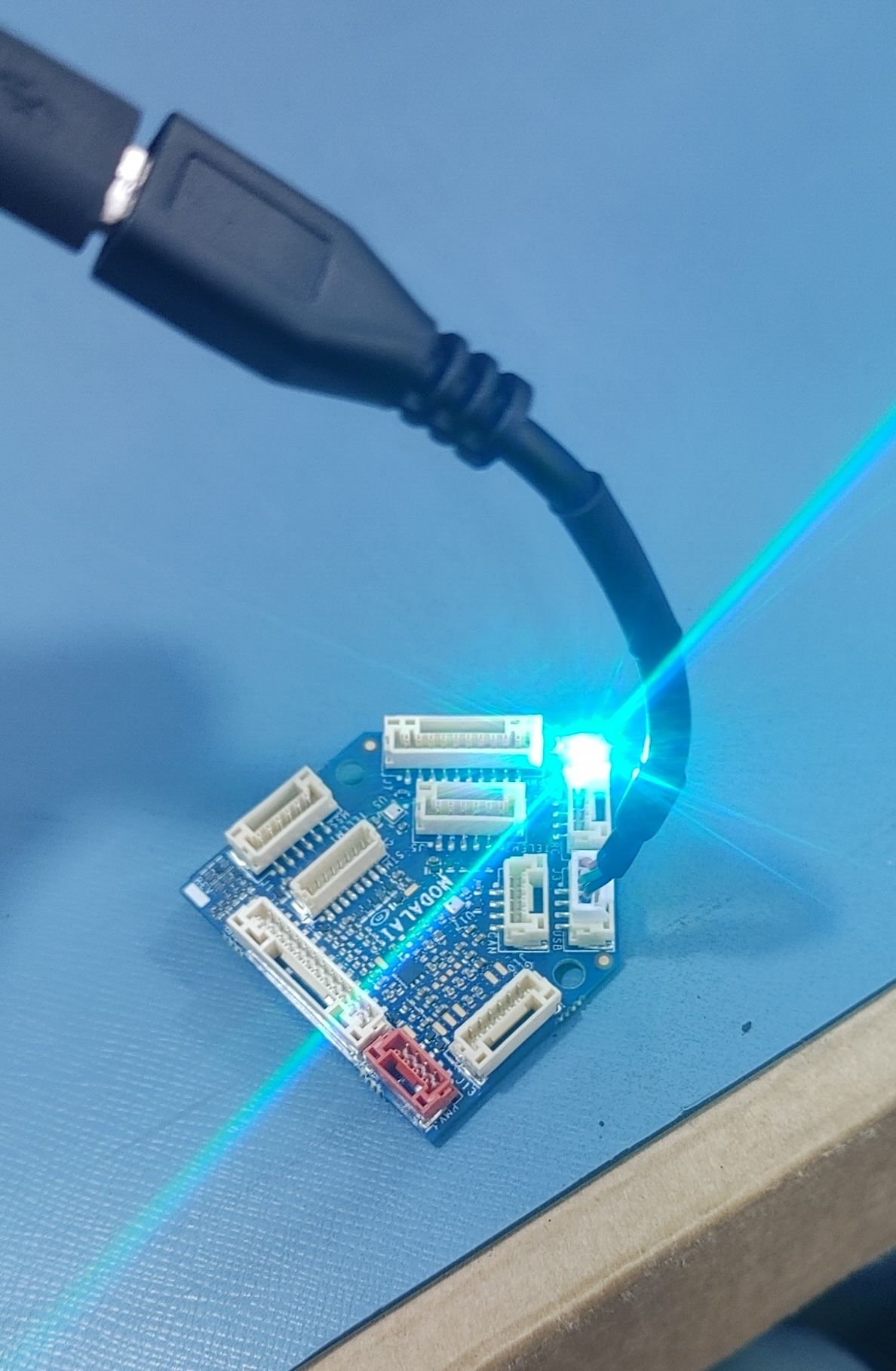
                    20240415_141752_HDR.jpg

                    Above is the image of the flight core V2 after flashing of LED once powered or connected via USB UART. I'm using MCBL-00010 type connector as recommended.

                    Is there a way to flash the fc_v2 via VOXL2. Connecting the fcv2 as external flight controller to VOXL2 as prescribed here ?

                    Jetson NanoJ 1 Reply Last reply
                    0
                    • Jetson NanoJ Jetson Nano

                      Hey @tom @Eric-Katzfey

                      As depicted earlier, I have used a Class 4 - SD card(16 GB) for the FCv2. I have tried running the command, sudo dmesg -wH. I get the following error again, the device is not able to enumerate the fcv2.

                      unnamed.png

                      Also, the cable I used works with other industrial flight controllers. Checked with different ports and cables too. Is there force boot switch on fcv2 which is to be enabled?

                      20240415_141752_HDR.jpg

                      Above is the image of the flight core V2 after flashing of LED once powered or connected via USB UART. I'm using MCBL-00010 type connector as recommended.

                      Is there a way to flash the fc_v2 via VOXL2. Connecting the fcv2 as external flight controller to VOXL2 as prescribed here ?

                      Jetson NanoJ Offline
                      Jetson NanoJ Offline
                      Jetson Nano
                      Veteran
                      wrote on last edited by
                      #10

                      @tom @Eric-Katzfey anything that I can try out here to flash fc_v2?

                      tomT 1 Reply Last reply
                      0
                      • Jetson NanoJ Jetson Nano

                        @tom @Eric-Katzfey anything that I can try out here to flash fc_v2?

                        tomT Online
                        tomT Online
                        tom
                        admin
                        wrote on last edited by
                        #11

                        @Jetson-Nano Are you making sure to start the flash either via. qgc or the script, then plugging in USB?

                        Jetson NanoJ 1 Reply Last reply
                        0
                        • tomT tom

                          @Jetson-Nano Are you making sure to start the flash either via. qgc or the script, then plugging in USB?

                          Jetson NanoJ Offline
                          Jetson NanoJ Offline
                          Jetson Nano
                          Veteran
                          wrote on last edited by
                          #12

                          @tom yes, while using QGC, I connect and wait for sometime, but the firmware upload option doesn't appear. I try reconnecting but still the same.

                          Similarly while trying to use the python script, I start the flash sequence but since serial port allocation is'nt reflected the program throws runtime.

                          tomT 1 Reply Last reply
                          0
                          • Jetson NanoJ Jetson Nano

                            @tom yes, while using QGC, I connect and wait for sometime, but the firmware upload option doesn't appear. I try reconnecting but still the same.

                            Similarly while trying to use the python script, I start the flash sequence but since serial port allocation is'nt reflected the program throws runtime.

                            tomT Online
                            tomT Online
                            tom
                            admin
                            wrote on last edited by
                            #13

                            @Jetson-Nano Just to confirm, in QGC you're getting to this page: 81b5572c-41ed-4386-822f-70f664afb32b-image.png
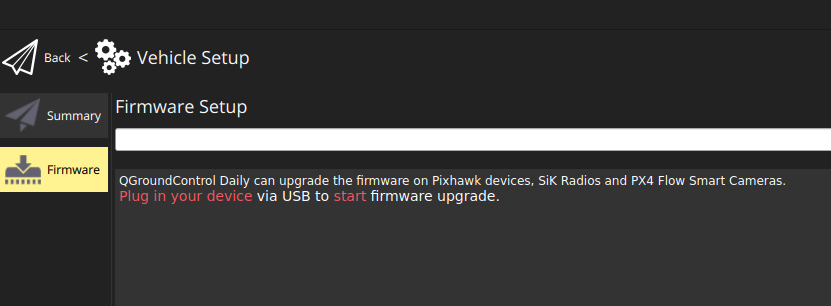
                            before plugging in USB correct?

                            Jetson NanoJ 1 Reply Last reply
                            0
                            • tomT tom

                              @Jetson-Nano Just to confirm, in QGC you're getting to this page: 81b5572c-41ed-4386-822f-70f664afb32b-image.png

                              before plugging in USB correct?

                              Jetson NanoJ Offline
                              Jetson NanoJ Offline
                              Jetson Nano
                              Veteran
                              wrote on last edited by
                              #14

                              @tom yes, I get into this page and as mentioned earlier trying QGC build 4.3.

                              tomT 1 Reply Last reply
                              0
                              • Jetson NanoJ Jetson Nano

                                @tom yes, I get into this page and as mentioned earlier trying QGC build 4.3.

                                tomT Online
                                tomT Online
                                tom
                                admin
                                wrote on last edited by
                                #15

                                @Jetson-Nano So when you get to that page the flight core needs to be completely disconnected from both power and USB.

                                Then you should plug in USB

                                Jetson NanoJ 1 Reply Last reply
                                0
                                • tomT tom

                                  @Jetson-Nano So when you get to that page the flight core needs to be completely disconnected from both power and USB.

                                  Then you should plug in USB

                                  Jetson NanoJ Offline
                                  Jetson NanoJ Offline
                                  Jetson Nano
                                  Veteran
                                  wrote on last edited by
                                  #16

                                  @tom tried out the same as you told, kept the fc_v2 connected to USB after opening firmware page section. Was observing the page section for couple of minutes, received no response. On checking the terminal using sudo dmesg -wH, the USB enumeration error(address not found) error same as earlier is thrown.

                                  tomT Jetson NanoJ 2 Replies Last reply
                                  0
                                  • Jetson NanoJ Jetson Nano

                                    @tom tried out the same as you told, kept the fc_v2 connected to USB after opening firmware page section. Was observing the page section for couple of minutes, received no response. On checking the terminal using sudo dmesg -wH, the USB enumeration error(address not found) error same as earlier is thrown.

                                    tomT Online
                                    tomT Online
                                    tom
                                    admin
                                    wrote on last edited by
                                    #17

                                    @Jetson-Nano Sounds like there's either a hardware issue with your PC or an issue with the board, I'd recommend submitting an RMA: https://www.modalai.com/pages/rma

                                    1 Reply Last reply
                                    0
                                    • Jetson NanoJ Jetson Nano

                                      @tom tried out the same as you told, kept the fc_v2 connected to USB after opening firmware page section. Was observing the page section for couple of minutes, received no response. On checking the terminal using sudo dmesg -wH, the USB enumeration error(address not found) error same as earlier is thrown.

                                      Jetson NanoJ Offline
                                      Jetson NanoJ Offline
                                      Jetson Nano
                                      Veteran
                                      wrote on last edited by
                                      #18

                                      @Jetson-Nano any other method which could be tried out to flash the fc_v2?

                                      tomT 1 Reply Last reply
                                      0
                                      • Jetson NanoJ Jetson Nano

                                        @Jetson-Nano any other method which could be tried out to flash the fc_v2?

                                        tomT Online
                                        tomT Online
                                        tom
                                        admin
                                        wrote on last edited by
                                        #19

                                        @Jetson-Nano Unfortunately not given the state of the board

                                        1 Reply Last reply
                                        0

                                        Hello! It looks like you're interested in this conversation, but you don't have an account yet.

                                        Getting fed up of having to scroll through the same posts each visit? When you register for an account, you'll always come back to exactly where you were before, and choose to be notified of new replies (either via email, or push notification). You'll also be able to save bookmarks and upvote posts to show your appreciation to other community members.

                                        With your input, this post could be even better 💗

                                        Register Login
                                        Reply
                                        • Reply as topic
                                        Log in to reply
                                        • Oldest to Newest
                                        • Newest to Oldest
                                        • Most Votes


                                        ModalAI
                                        Categories Recent Tags ModalAI.com Docs
                                        © 2026 ModalAI® · Accelerating autonomy for smaller, smarter, safer drones · Powered by NodeBB
                                        • Login

                                        • Don't have an account? Register

                                        • Login or register to search.
                                        • First post
                                          Last post
                                        0
                                        • Categories
                                        • Recent
                                        • Tags
                                        • Popular
                                        • Users
                                        • Groups
