
Considerate VIO drift (z-axis) in Starling V2.
-
Hello, @Chad-Sweet @James-Strawson @modaltb
I had recently purchased a pair of Starling V2s. After using one of them for two months, a VIO issue arose. A consistent and considerate amount of drift quickly accumulates during flight, (especially on the z-axis). A constant incorrect height estimation is present, which causes the drone to shoot up while using the voxl-mapper.
Things I tried :
- Cleaning the tracking camera lens.
- Made sure Odometery data is in the NED frame
- Double-checking the extrinsics.conf.
- Redid calibration for IMU and tracking camera. (This was quite hard for the camera as it failed most of the time).
- Checked IMU vibration and confirmed they're low noise measurements.
- Made sure the environment is well-lit and has sufficient features.
- Inspected and restarted QVIO server (camera-server and vision hub as well)
The weird thing is that both starling v2s have the same issue, one after using it for 2 months and the other which was never used. My current SDK version is 1.1.1
I tried the other SDK versions, and the z-axis drift is not present only in SDK = 1.0.0.-
I want to know the reason behind this drift and how I could correct it. (Any solution/ suggestion except downgrading to SDK 1.0.0).
-
Another follow-up question is I planned on reducing the overall drift by combing the system with a flightcore v2, and optical flow/ rangefinder and fusing it in the EKF. Is this possible/ done before?
I have attached some pictures for reference. You can see that the floor of the map is below the horizon and the height in QGC is negative.
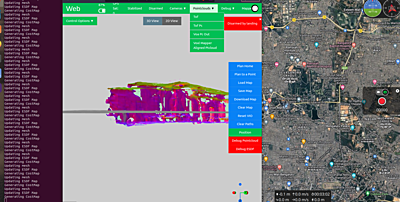
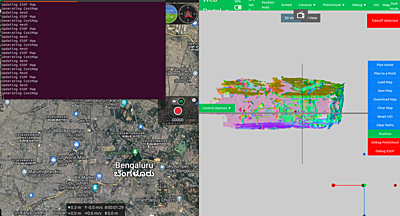
Any help/suggestion would be greatly appreciated
Thank you, -
Hello, @Chad-Sweet @James-Strawson @modaltb
I had recently purchased a pair of Starling V2s. After using one of them for two months, a VIO issue arose. A consistent and considerate amount of drift quickly accumulates during flight, (especially on the z-axis). A constant incorrect height estimation is present, which causes the drone to shoot up while using the voxl-mapper.
Things I tried :
- Cleaning the tracking camera lens.
- Made sure Odometery data is in the NED frame
- Double-checking the extrinsics.conf.
- Redid calibration for IMU and tracking camera. (This was quite hard for the camera as it failed most of the time).
- Checked IMU vibration and confirmed they're low noise measurements.
- Made sure the environment is well-lit and has sufficient features.
- Inspected and restarted QVIO server (camera-server and vision hub as well)
The weird thing is that both starling v2s have the same issue, one after using it for 2 months and the other which was never used. My current SDK version is 1.1.1
I tried the other SDK versions, and the z-axis drift is not present only in SDK = 1.0.0.-
I want to know the reason behind this drift and how I could correct it. (Any solution/ suggestion except downgrading to SDK 1.0.0).
-
Another follow-up question is I planned on reducing the overall drift by combing the system with a flightcore v2, and optical flow/ rangefinder and fusing it in the EKF. Is this possible/ done before?
I have attached some pictures for reference. You can see that the floor of the map is below the horizon and the height in QGC is negative.
Any help/suggestion would be greatly appreciated
Thank you,It's interesting that you see a difference in performance between SDK1.0 and SDK1.1, between those releases was a change in the way IMU timestamps were calculated that now provide more consistent and accurate timestamps which should have improved vio performance.
Do you mind trying SDK 1.1.3 with both the newest qrb5165_imu_server (1.0.1) and the old qrb5165-imu-server (0.6.0) from the old SDK to see if the problem is tied to the IMU server or something else?
http://voxl-packages.modalai.com/dists/qrb5165/sdk-1.0/binary-arm64/qrb5165-imu-server_0.6.0_arm64.deb
http://voxl-packages.modalai.com/dists/qrb5165/sdk-1.1/binary-arm64/qrb5165-imu-server_1.0.1_arm64.debThank you!
-
It's interesting that you see a difference in performance between SDK1.0 and SDK1.1, between those releases was a change in the way IMU timestamps were calculated that now provide more consistent and accurate timestamps which should have improved vio performance.
Do you mind trying SDK 1.1.3 with both the newest qrb5165_imu_server (1.0.1) and the old qrb5165-imu-server (0.6.0) from the old SDK to see if the problem is tied to the IMU server or something else?
http://voxl-packages.modalai.com/dists/qrb5165/sdk-1.0/binary-arm64/qrb5165-imu-server_0.6.0_arm64.deb
http://voxl-packages.modalai.com/dists/qrb5165/sdk-1.1/binary-arm64/qrb5165-imu-server_1.0.1_arm64.debThank you!
@James-Strawson
Thank you. Will test and get back to you. -
@James-Strawson
Thank you. Will test and get back to you.@Jetson-Nano Please reference our VIO troubleshooting guide as well https://docs.modalai.com/flying-with-vio/#troubleshooting-vio
-
@Jetson-Nano Please reference our VIO troubleshooting guide as well https://docs.modalai.com/flying-with-vio/#troubleshooting-vio
Thanks for your suggestions.
I could not use mapper with SDK 1.1.3, and the old qrb5165-imu-server (0.6.0). During "apt-get install voxl-mapper", it said that the mapper needed imu version >=1.0.1. I also want to report that I tried these tests with SDK 1.2.0.
SDK 1.2.0 performs well and has no z-axis drift issue. So there is no z-axis drift in SDK 1.0.0 and 1.2.0.
There is a different issue about the VIO now,
After consistent testing, drifts accumulate much faster, making point-to-point planning hard. The VIO drift was visible in the Figure-eight offboard mode. This is not just in SDK 1.2.0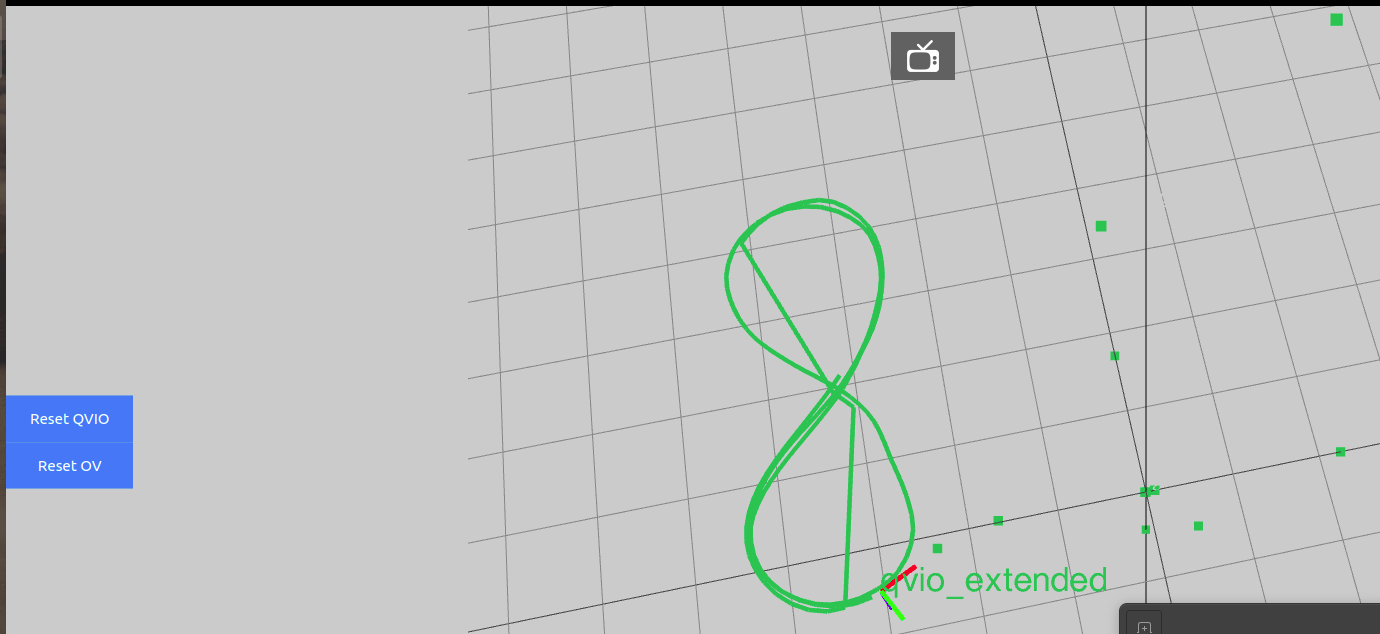
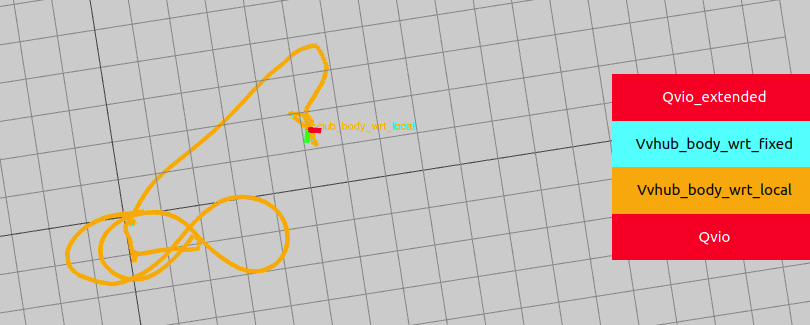
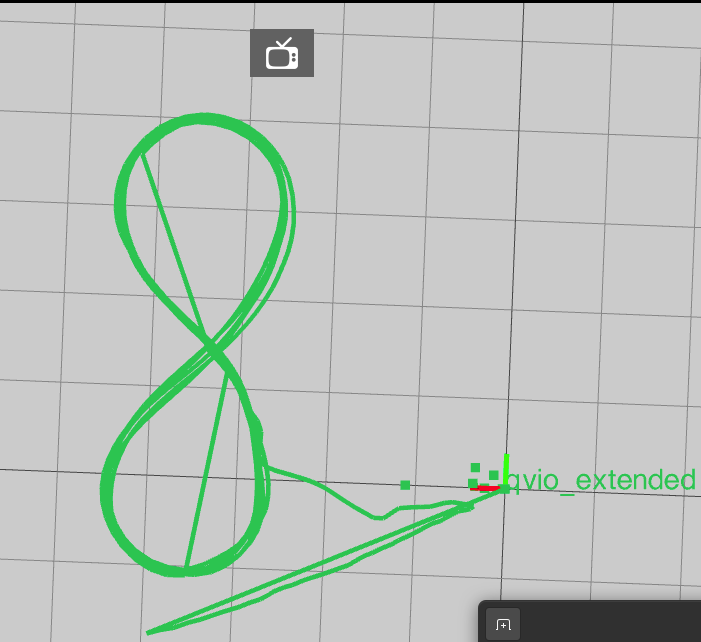
I have followed all the steps in the VIO troubleshooting guide. Nothing seems to help. I've made sure the cameras are clean and are recalibrated ( reprojection error = 0.22). There are enough features ( & illumination) and the quality of QVIO was always high. It is much worse than before and doesn't even work for short distances.
Any help/suggestions would be greatly appreciated
Thank you, -
Thanks for your suggestions.
I could not use mapper with SDK 1.1.3, and the old qrb5165-imu-server (0.6.0). During "apt-get install voxl-mapper", it said that the mapper needed imu version >=1.0.1. I also want to report that I tried these tests with SDK 1.2.0.
SDK 1.2.0 performs well and has no z-axis drift issue. So there is no z-axis drift in SDK 1.0.0 and 1.2.0.
There is a different issue about the VIO now,
After consistent testing, drifts accumulate much faster, making point-to-point planning hard. The VIO drift was visible in the Figure-eight offboard mode. This is not just in SDK 1.2.0I have followed all the steps in the VIO troubleshooting guide. Nothing seems to help. I've made sure the cameras are clean and are recalibrated ( reprojection error = 0.22). There are enough features ( & illumination) and the quality of QVIO was always high. It is much worse than before and doesn't even work for short distances.
Any help/suggestions would be greatly appreciated
Thank you,Hey @James-Strawson @Eric-Katzfey ,
The z-axis issue recently arose, even in the latest SDK. I have followed all the VIO troubleshooting steps and even reflashed the system. The issue is consistent. The only trend I notice is that the issue originates when I continue to use the voxl-mapper for long distances and duration.
Is there any fix to this issue? Any suggestion is appreciated as I'm currently testing the system and will report back immediately. Will be waiting for your response.
Thank you
-
Hey @James-Strawson @Eric-Katzfey ,
The z-axis issue recently arose, even in the latest SDK. I have followed all the VIO troubleshooting steps and even reflashed the system. The issue is consistent. The only trend I notice is that the issue originates when I continue to use the voxl-mapper for long distances and duration.
Is there any fix to this issue? Any suggestion is appreciated as I'm currently testing the system and will report back immediately. Will be waiting for your response.
Thank you
In SDK 1.2.0 we did start pushing the default config of voxl-mapper a big harder with smaller voxl sizes, longer ray lengths, and double the UI update rate to better complement the newer TOF sensors on the Starling 2. Part of this update was also to lock some of the heavier parts of the mapper processing to cores 4,5,6 to make sure VIO wasn't affected too much. However, if you are still seeing a difference in VIO performance between mapper being on and off then there may still be some optimization to be done.
Just to confirm you are seeing worse VIO performance when mapper is enabled, correct?
If so, please try increasing the voxl_size parameter in /etc/modalai/voxl-mapper.conf from the default 0.1 to 0.25, and set the cpu into performance mode on bootup by changing the normal_cpu_mode field to "performance" in /etc/modalai/voxl-cpu-monitor.conf. The map will be very course and ugly with such a big voxel size but I'm just curious if the power cpu use helps resolve the issue.
For reference, here is the commit history for voxl-mapper showing the recent tweaks for SDK 1.2 and newer that turn up some of the knobs.



Reading along? Create a free ModalAI Forum account to join in.
With an account you can reply, ask your own question, get an email when a ModalAI engineer answers, and mark the reply that solved it. Your place in each thread is saved between visits.
Questions about VOXL, Flight Core, ESCs and ModalAI drones are answered here by the engineers who build them.
Register Login