
Adding USB camera to Voxl1
-
I am trying to find a way to add two USB camera to Voxl1, The reason for doing so is that the MIPI cable length for connecting Hires Camera is too short for my project. The only usb connector provided on the voxl1 is being used by FLIR BOSON (Thermal) Camera and there is no way to add another USB Hires Camera. Can you please provide some insight into this?
@riteshsharma you can use the LTE board with no modem as a 2 port USB hub https://www.modalai.com/products/voxl-lte?variant=39300535681075
-
@riteshsharma you can use the LTE board with no modem as a 2 port USB hub https://www.modalai.com/products/voxl-lte?variant=39300535681075
Can we use MIPI repeater to extend the length of the cable? Do you have some suggestion what kind of MIPI repeater will be compatible with the existing pin connection on Voxl1-Deck?
-
Can we use MIPI repeater to extend the length of the cable? Do you have some suggestion what kind of MIPI repeater will be compatible with the existing pin connection on Voxl1-Deck?
Hi @riteshsharma
We've had one customer successfully use this part from TI, but we have not made any hardware internally.
So, we'd recommend trying that solution from TI such as: https://www.ti.com/product/SN65DPHY440SS -
@riteshsharma you can use the LTE board with no modem as a 2 port USB hub https://www.modalai.com/products/voxl-lte?variant=39300535681075
@Moderator Thank you for your suggestion. I would like to know if two USB supported camera (Thermal and Hires) can use UVC configurations. In other words, Can I use UVC pipe to connect attached USB cameras together? If yes, Can you provide example of the configuration file.
-
@Moderator Thank you for your suggestion. I would like to know if two USB supported camera (Thermal and Hires) can use UVC configurations. In other words, Can I use UVC pipe to connect attached USB cameras together? If yes, Can you provide example of the configuration file.
@riteshsharma we don't have an example of this, sorry. It seems like it would be feasible
-
@riteshsharma we don't have an example of this, sorry. It seems like it would be feasible
Thank you for your reply. It gives me hope that I can connect two camera together. However, I wonder how should I configure uvc for each of my camera. Each time I use voxl-uvc-server with one of the option popping up on my terminal (options are shown below), the configuration file at /etc/modalai/voxl-uvc-server.conf get replaced with new settings.
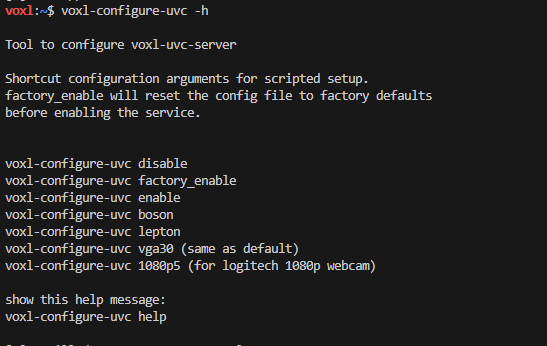
Also, I tried changing configuration file manually but then only the first configuration shows up on voxl-portal.
{
"pipe_name": "uvc_hires",
"width": 1920,
"height": 1080,
"fps": 5,"pipe_name": "uvc_boson", "width": 640, "height": 480, "fps": 30}
-
Thank you for your reply. It gives me hope that I can connect two camera together. However, I wonder how should I configure uvc for each of my camera. Each time I use voxl-uvc-server with one of the option popping up on my terminal (options are shown below), the configuration file at /etc/modalai/voxl-uvc-server.conf get replaced with new settings.
Also, I tried changing configuration file manually but then only the first configuration shows up on voxl-portal.
{
"pipe_name": "uvc_hires",
"width": 1920,
"height": 1080,
"fps": 5,"pipe_name": "uvc_boson", "width": 640, "height": 480, "fps": 30}
@Moderator I was able to start two camera (thermal camera and hires camera) connected through two USB using the command below.
voxl-uvc-server -d -v 0c45 -p 636b -r 1920x1080 -f 5 -o uvc_hires (Hires Camera)
voxl-uvc-server -d -v 09cb -p4007 -r 640x512 -f 30 -o uvc_boson (Thermal Camera)
But I could not find a way to start both the camera together. Only one works at a time as the configuration file overrides. It can only accept one UVC configuration settings. I would appreciate if you could provide me a way to correctly set up configuration file for both the camera.
I have already gone through documentation at https://docs.modalai.com/voxl-uvc-server/. It only mentions that we need to have different setup for each camera which in my case is evident from the two commands above.
-
@Moderator I was able to start two camera (thermal camera and hires camera) connected through two USB using the command below.
voxl-uvc-server -d -v 0c45 -p 636b -r 1920x1080 -f 5 -o uvc_hires (Hires Camera)
voxl-uvc-server -d -v 09cb -p4007 -r 640x512 -f 30 -o uvc_boson (Thermal Camera)
But I could not find a way to start both the camera together. Only one works at a time as the configuration file overrides. It can only accept one UVC configuration settings. I would appreciate if you could provide me a way to correctly set up configuration file for both the camera.
I have already gone through documentation at https://docs.modalai.com/voxl-uvc-server/. It only mentions that we need to have different setup for each camera which in my case is evident from the two commands above.
@riteshsharma Here's the source code to where the voxl-uvc-server is killing other processes: https://gitlab.com/voxl-public/voxl-sdk/services/voxl-uvc-server/-/blob/master/src/main.c?ref_type=heads#L302
you should fork that repository and add a command line flag to disable that feature. We're happy to look at a merge request if you feel that feature is helpful
-
@riteshsharma Here's the source code to where the voxl-uvc-server is killing other processes: https://gitlab.com/voxl-public/voxl-sdk/services/voxl-uvc-server/-/blob/master/src/main.c?ref_type=heads#L302
you should fork that repository and add a command line flag to disable that feature. We're happy to look at a merge request if you feel that feature is helpful
@Moderator Can you please provide updated instruction to build voxl-uvc-server package so that I can deploy it to Voxl1? I followed the instruction on the link (https://gitlab.com/voxl-public/voxl-sdk/services/voxl-uvc-server). It is giving me errors.
voxl-emulator:~$  ./install_build_deps.sh apq8096 dev
using apq8096 dev repo
Downloading http://voxl-packages.modalai.com/dists/apq8096/dev/binary-arm64//Packages.gz.
Updated source 'dev'.
installing:
libmodal-json
libmodal-pipe
voxl-libuvc
Package libmodal-json (0.4.3) installed in root is up to date.
Package libmodal-pipe (2.10.0) installed in root is up to date.
Package voxl-libuvc (1.0.7) installed in root is up to date.

Done installing dependencies

voxl-emulator:~$ ./build.sh  apq8096
CMake Error at /usr/share/cmake-3.3/Modules/CMakeDetermineSystem.cmake:104 (message):
  Could not find toolchain file:
  /opt/cross_toolchain/arm-gnueabi-4.9.toolchain.cmake
Call Stack (most recent call first):
  CMakeLists.txt:2 (project)


CMake Error: Error required internal CMake variable not set, cmake may be not be built correctly.
Missing variable is:
CMAKE_C_COMPILER_ENV_VAR
CMake Error: Error required internal CMake variable not set, cmake may be not be built correctly.
Missing variable is:
CMAKE_C_COMPILER
CMake Error: Could not find cmake module file: /home/root/build/CMakeFiles/3.3.1/CMakeCCompiler.cmake
CMake Error: Error required internal CMake variable not set, cmake may be not be built correctly.
Missing variable is:
CMAKE_CXX_COMPILER_ENV_VAR
CMake Error: Error required internal CMake variable not set, cmake may be not be built correctly.
Missing variable is:
CMAKE_CXX_COMPILER
CMake Error: Could not find cmake module file: /home/root/build/CMakeFiles/3.3.1/CMakeCXXCompiler.cmake
CMake Error at CMakeLists.txt:2 (project):
  No CMAKE_C_COMPILER could be found.

  Tell CMake where to find the compiler by setting the CMake cache entry
  CMAKE_C_COMPILER to the full path to the compiler, or to the compiler name
  if it is in the PATH.


CMake Error at CMakeLists.txt:2 (project):
  No CMAKE_CXX_COMPILER could be found.

  Tell CMake where to find the compiler by setting the CMake cache entry
  CMAKE_CXX_COMPILER to the full path to the compiler, or to the compiler
  name if it is in the PATH.


CMake Error: CMAKE_C_COMPILER not set, after EnableLanguage
CMake Error: CMAKE_CXX_COMPILER not set, after EnableLanguage
-- Configuring incomplete, errors occurred!
make: *** No targets specified and no makefile found.  Stop.
I also tried using voxl-cross. It was able to build the package correctly but gave me error while executing.
voxl:~$ voxl-uvc-server voxl-uvc-server: error while loading shared libraries: libuvc.so.0: cannot open shared object file: No such file or directory -
@Moderator Can you please provide updated instruction to build voxl-uvc-server package so that I can deploy it to Voxl1? I followed the instruction on the link (https://gitlab.com/voxl-public/voxl-sdk/services/voxl-uvc-server). It is giving me errors.
voxl-emulator:~$  ./install_build_deps.sh apq8096 dev
using apq8096 dev repo
Downloading http://voxl-packages.modalai.com/dists/apq8096/dev/binary-arm64//Packages.gz.
Updated source 'dev'.
installing:
libmodal-json
libmodal-pipe
voxl-libuvc
Package libmodal-json (0.4.3) installed in root is up to date.
Package libmodal-pipe (2.10.0) installed in root is up to date.
Package voxl-libuvc (1.0.7) installed in root is up to date.

Done installing dependencies

voxl-emulator:~$ ./build.sh  apq8096
CMake Error at /usr/share/cmake-3.3/Modules/CMakeDetermineSystem.cmake:104 (message):
  Could not find toolchain file:
  /opt/cross_toolchain/arm-gnueabi-4.9.toolchain.cmake
Call Stack (most recent call first):
  CMakeLists.txt:2 (project)


CMake Error: Error required internal CMake variable not set, cmake may be not be built correctly.
Missing variable is:
CMAKE_C_COMPILER_ENV_VAR
CMake Error: Error required internal CMake variable not set, cmake may be not be built correctly.
Missing variable is:
CMAKE_C_COMPILER
CMake Error: Could not find cmake module file: /home/root/build/CMakeFiles/3.3.1/CMakeCCompiler.cmake
CMake Error: Error required internal CMake variable not set, cmake may be not be built correctly.
Missing variable is:
CMAKE_CXX_COMPILER_ENV_VAR
CMake Error: Error required internal CMake variable not set, cmake may be not be built correctly.
Missing variable is:
CMAKE_CXX_COMPILER
CMake Error: Could not find cmake module file: /home/root/build/CMakeFiles/3.3.1/CMakeCXXCompiler.cmake
CMake Error at CMakeLists.txt:2 (project):
  No CMAKE_C_COMPILER could be found.

  Tell CMake where to find the compiler by setting the CMake cache entry
  CMAKE_C_COMPILER to the full path to the compiler, or to the compiler name
  if it is in the PATH.


CMake Error at CMakeLists.txt:2 (project):
  No CMAKE_CXX_COMPILER could be found.

  Tell CMake where to find the compiler by setting the CMake cache entry
  CMAKE_CXX_COMPILER to the full path to the compiler, or to the compiler
  name if it is in the PATH.


CMake Error: CMAKE_C_COMPILER not set, after EnableLanguage
CMake Error: CMAKE_CXX_COMPILER not set, after EnableLanguage
-- Configuring incomplete, errors occurred!
make: *** No targets specified and no makefile found.  Stop.
I also tried using voxl-cross. It was able to build the package correctly but gave me error while executing.
voxl:~$ voxl-uvc-server voxl-uvc-server: error while loading shared libraries: libuvc.so.0: cannot open shared object file: No such file or directoryCan you please try to put the source code of voxl-uvc-server on VOXL1 and just build it on target?
You will need to modify the build.sh file (https://gitlab.com/voxl-public/voxl-sdk/services/voxl-uvc-server/-/blob/master/build.sh)
to have an entry like below and execute using
./build.sh nativenative) mkdir -p build cd build cmake -DBUILDSIZE=32 ../ make -j$(nproc) cd ../ ;; -
Can you please try to put the source code of voxl-uvc-server on VOXL1 and just build it on target?
You will need to modify the build.sh file (https://gitlab.com/voxl-public/voxl-sdk/services/voxl-uvc-server/-/blob/master/build.sh)
to have an entry like below and execute using
./build.sh nativenative) mkdir -p build cd build cmake -DBUILDSIZE=32 ../ make -j$(nproc) cd ../ ;;@Alex-Kushleyev
Thank you @Alex-Kushleyev . Finally I was able to modify the code to make it work for 2 USB cameras. -
@Alex-Kushleyev
Thank you @Alex-Kushleyev . Finally I was able to modify the code to make it work for 2 USB cameras.@riteshsharma excellent!
-
@Alex-Kushleyev
Thank you @Alex-Kushleyev . Finally I was able to modify the code to make it work for 2 USB cameras.@riteshsharma Was there an error in our documentation that we need to fix? Did you make some changes that you think may be valuable to others and, if so, are you willing to share them?




Reading along? Create a free ModalAI Forum account to join in.
With an account you can reply, ask your own question, get an email when a ModalAI engineer answers, and mark the reply that solved it. Your place in each thread is saved between visits.
Questions about VOXL, Flight Core, ESCs and ModalAI drones are answered here by the engineers who build them.
Register Login