Skip to content
  • Categories
  • Recent
  • Tags
  • Popular
  • Users
  • Groups
Skins
  • Light
  • Brite
  • Cerulean
  • Cosmo
  • Flatly
  • Journal
  • Litera
  • Lumen
  • Lux
  • Materia
  • Minty
  • Morph
  • Pulse
  • Sandstone
  • Simplex
  • Sketchy
  • Spacelab
  • United
  • Yeti
  • Zephyr
  • Dark
  • Cyborg
  • Darkly
  • Quartz
  • Slate
  • Solar
  • Superhero
  • Vapor

  • Default (No Skin)
  • No Skin
Collapse
Brand Logo

ModalAI Forum

  1. ModalAI Support Forum
  2. VOXL Compute & Autopilot
  3. VOXL 2 Mini
  4. Resolution problem when using VOXL2-mini USB3 to HDMI adapter

Resolution problem when using VOXL2-mini USB3 to HDMI adapter
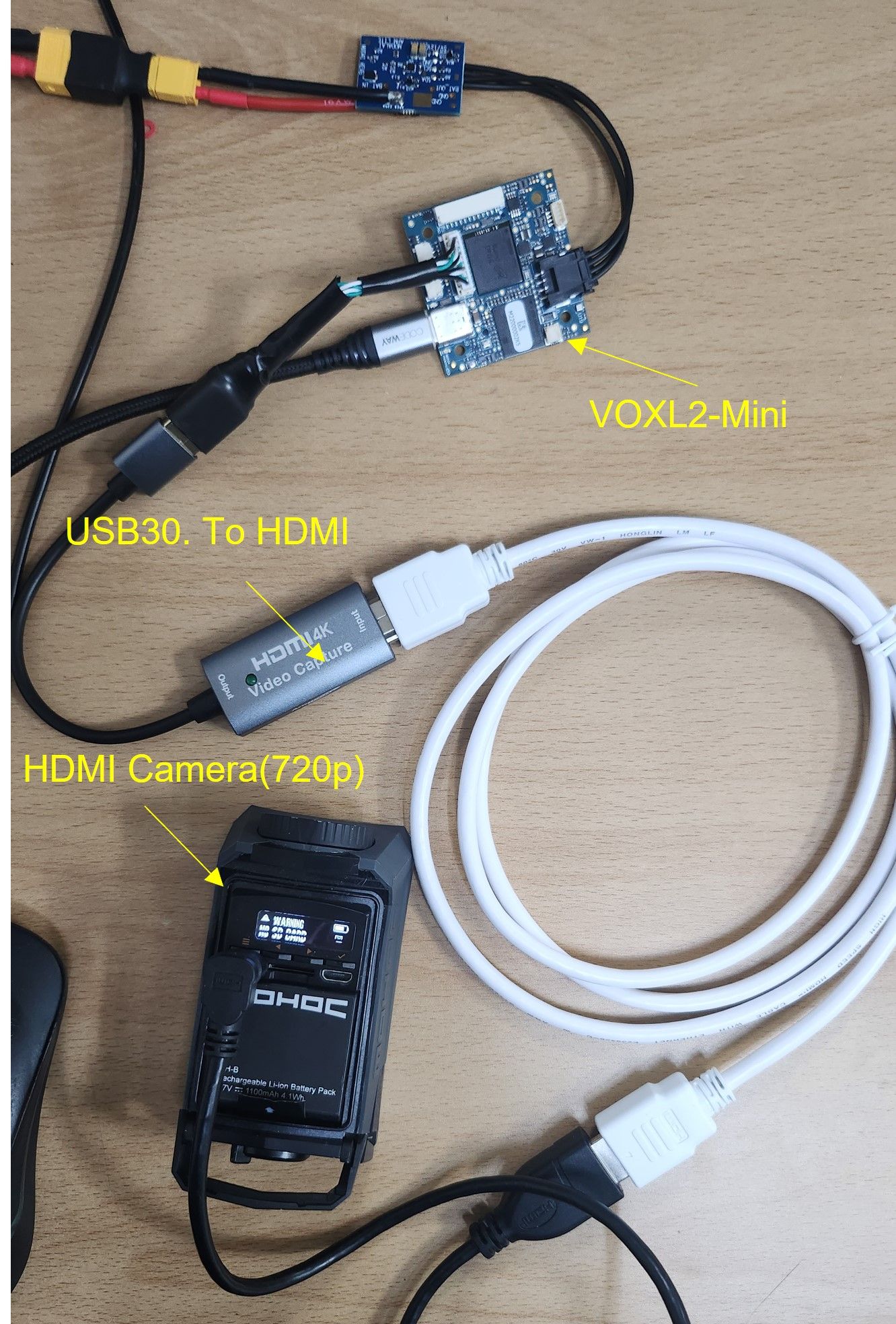
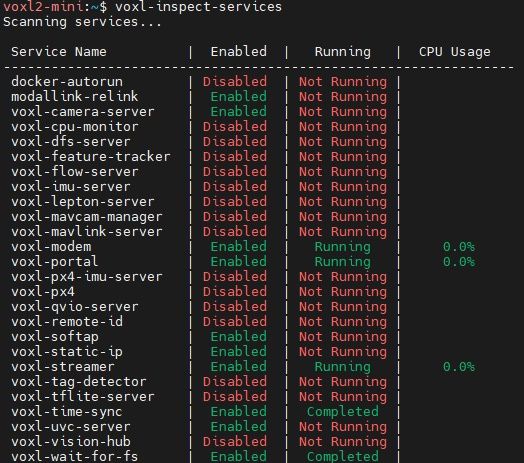
Scheduled Pinned Locked Moved VOXL 2 Mini
22 Posts 5 Posters 5.2k Views 2 Watching
  • Oldest to Newest
  • Newest to Oldest
  • Most Votes
Reply
  • Reply as topic
Log in to reply
This topic has been deleted. Only users with topic management privileges can see it.
  • VinnyV Vinny

    Hi @Jskim
    I'd like to remind you of this post/exchange we had a few weeks ago:
    https://forum.modalai.com/post/13799
    So, I'm not sure if this is creating extra issues with your setup unless you did indeed add series caps on the TX lines from VOXL 2 Mini in the MCBL-00022-2.

    Pretty neat camera, and we want to help you succeed.
    I see they run on internal batteries, I was curious why there was no power cord to it.
    I see it comes in variations with WiFi. Wonder if maybe you can try an IP based format version instead of UVC?
    You can try our WiFI adapter with MCBL-00022-2 as a test.
    Like this, but instead of MCBL-00041, use the MCBL-00022-2 (The Alfa dongle only uses USB2).
    https://www.modalai.com/collections/accessories/products/wifi-usb-cable-add-on

    For the HDMI adapter, I cannot find enough specs in English to see which side provides power (HDMI side, or USB3 side). I would explore further options here to make sure this adapter works with other devices, since we have no experience with it. This item to me is the biggest risk item to your success.

    Hope this helps a little bit, and maybe SW team can help you with the other issues.

    Thanks!

    J Offline
    J Offline
    Jskim
    wrote on last edited by Jskim
    #11

    @Vinny
    Thank you so much for your quick reply.

    1. The HDMI to USB dongle is powered by USB3 from the VOXL2-mini.
    2. We have no problem using the TP link wifi dongle on the USB3 port. I have already tested it.
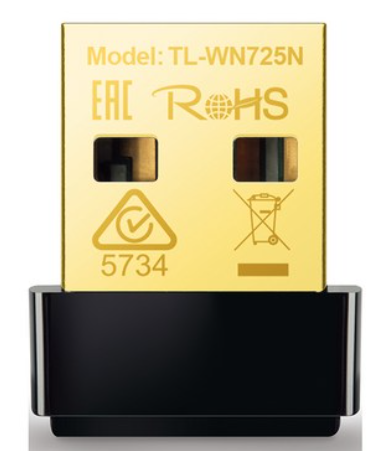
    TP link WiFi dongle.PNG

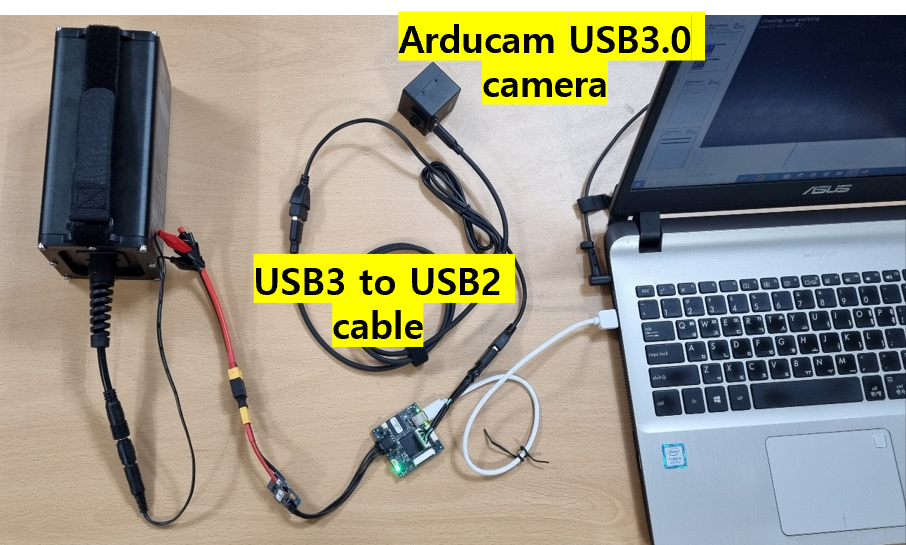
    3. We will tell you the results of the test with the arducam USB3.0 camera.
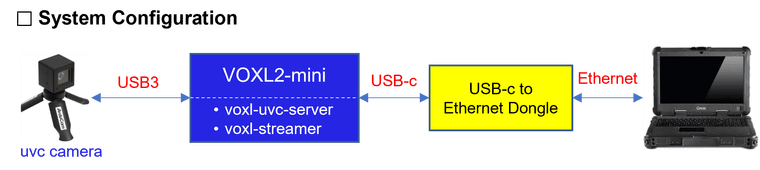
    system configuration.png
    1) You need to check whether the problem is with the USB3.0 port or the streamer or the uvc server.???
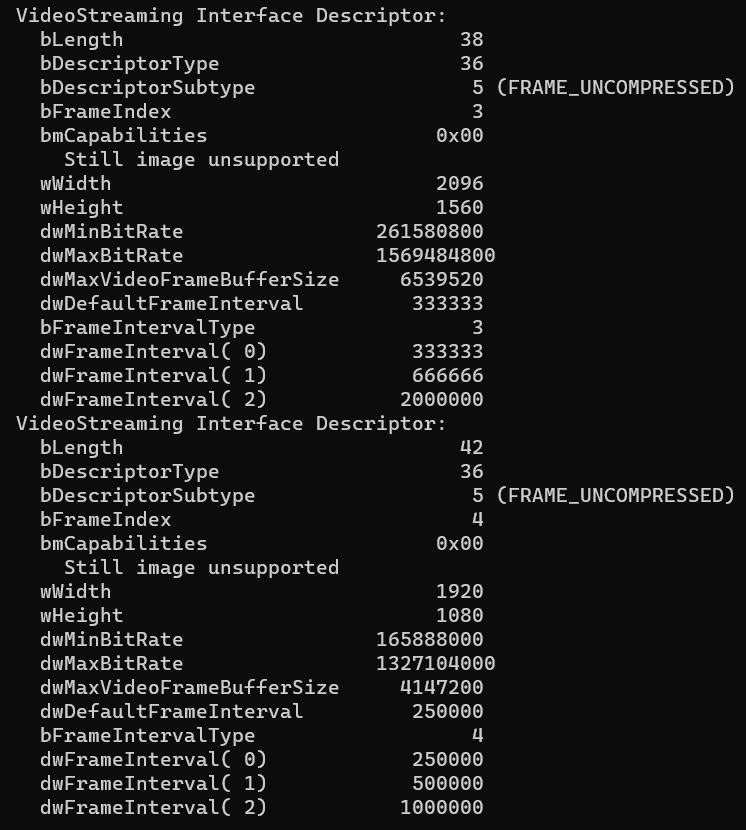
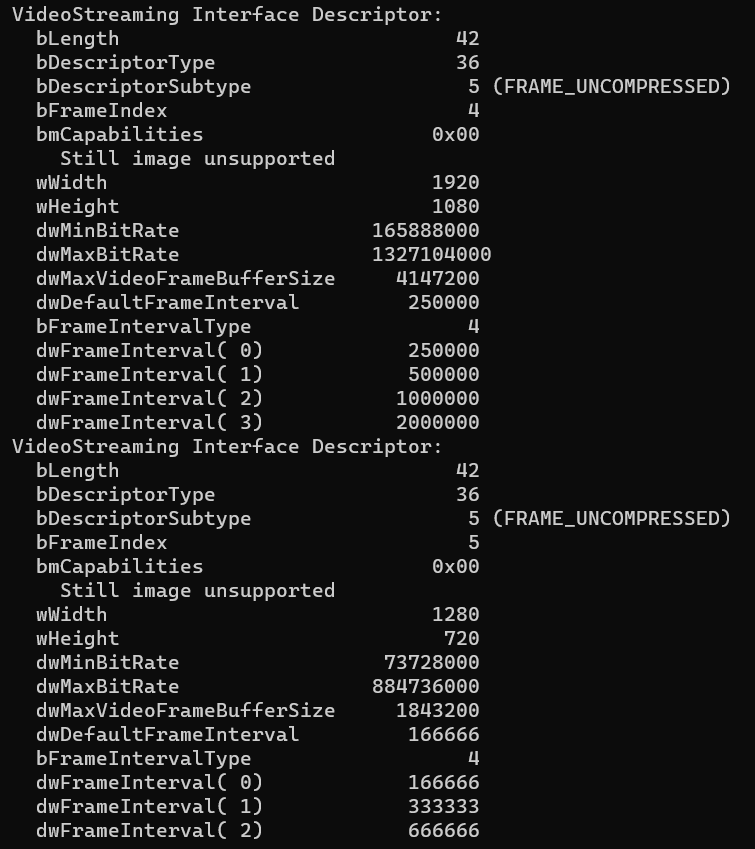
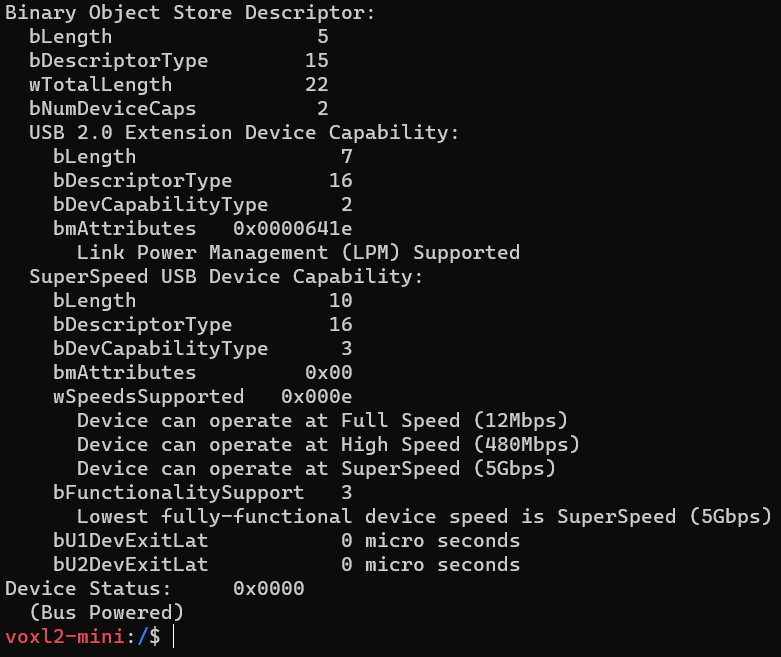
    2) You can see the voxl2-mini test result in the image below.

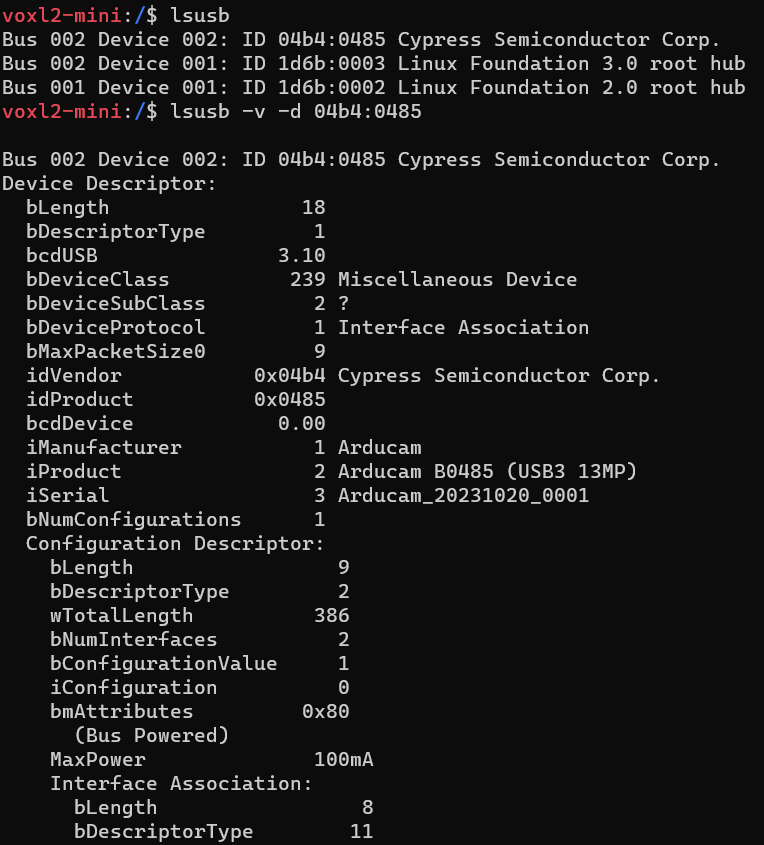
    lsusb 명령어.PNG
    lsusb 명령어_01.PNG
    lsusb 명령어_02.PNG
    lsusb 명령어_03.PNG
    lsusb 명령어_04.PNG
    lsusb 명령어_05.PNG

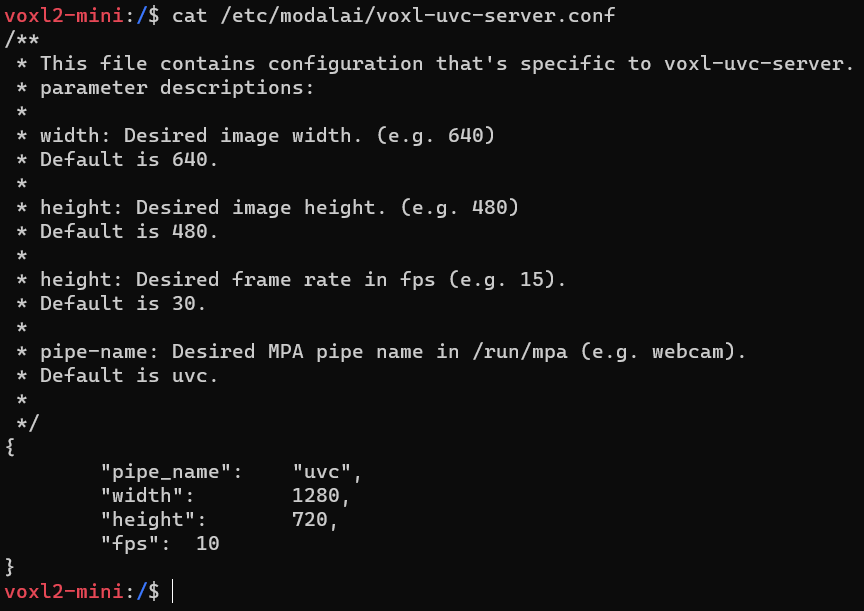
    uvc server config.PNG
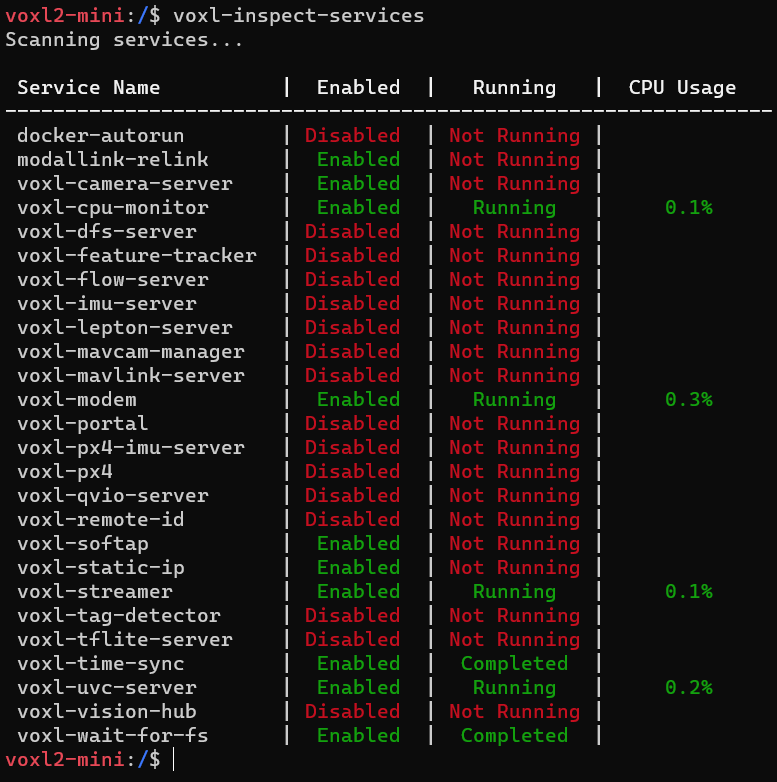
    inspect service.PNG
    inspect cam 명령어.PNG
    inspect cam 결과.PNG

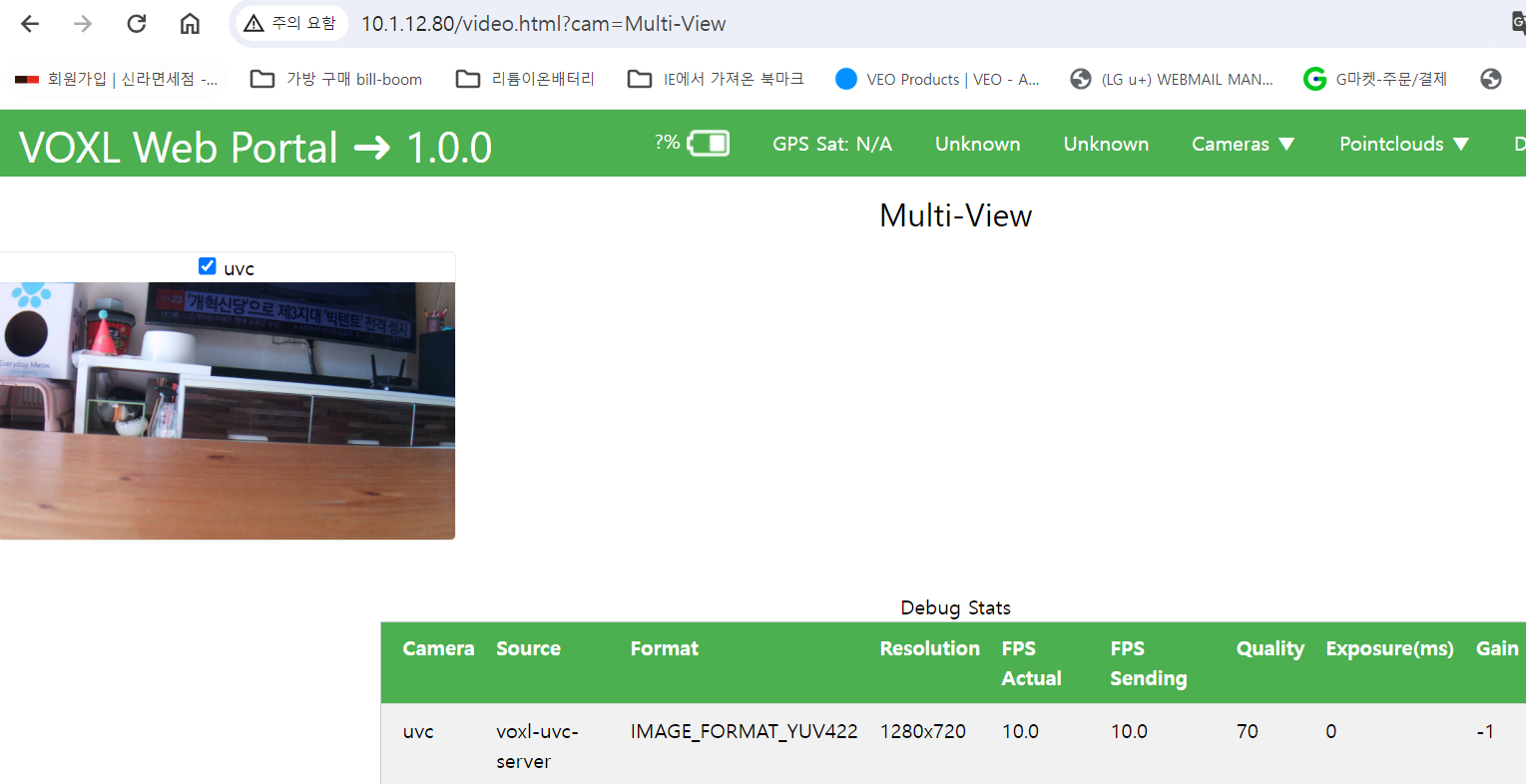
    *Note: We use USB3 to USb2 conversion, 1280x720 @10fps no problem.
    USB3 to USB2 conversion 1280x720.PNG
    USB3 to USB2 conversion Portal.PNG

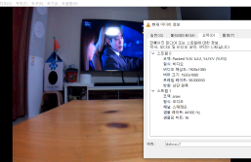
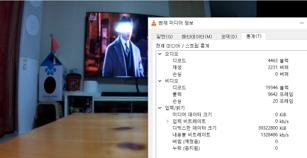
    1. We tested arducam directly connected to Windows PC USB3 port and there is no problem.
      윈도우 PC 결과.png

    VLC 결과_01.png
    VLC 결과_02.png

    Thanks,

    Eric KatzfeyE 1 Reply Last reply
    0
    • J Jskim

      @Vinny
      Thank you so much for your quick reply.

      1. The HDMI to USB dongle is powered by USB3 from the VOXL2-mini.
      2. We have no problem using the TP link wifi dongle on the USB3 port. I have already tested it.
      TP link WiFi dongle.PNG

      3. We will tell you the results of the test with the arducam USB3.0 camera.

      system configuration.png
      1) You need to check whether the problem is with the USB3.0 port or the streamer or the uvc server.???
      2) You can see the voxl2-mini test result in the image below.
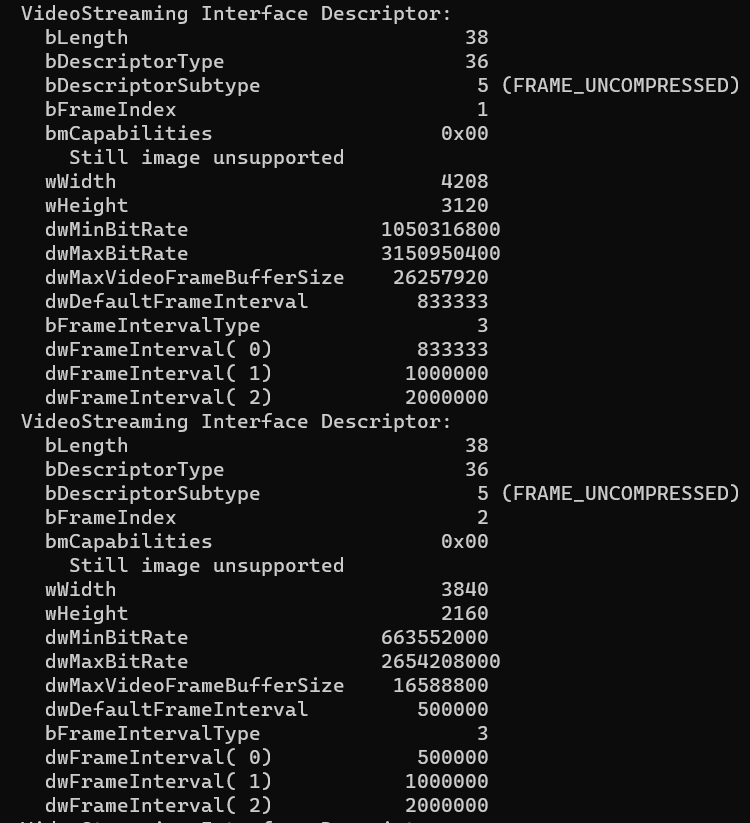
      lsusb 명령어.PNG
      lsusb 명령어_01.PNG
      lsusb 명령어_02.PNG
      lsusb 명령어_03.PNG
      lsusb 명령어_04.PNG
      lsusb 명령어_05.PNG

      uvc server config.PNG
      inspect service.PNG
      inspect cam 명령어.PNG
      inspect cam 결과.PNG

      *Note: We use USB3 to USb2 conversion, 1280x720 @10fps no problem.

      USB3 to USB2 conversion 1280x720.PNG
      USB3 to USB2 conversion Portal.PNG

      1. We tested arducam directly connected to Windows PC USB3 port and there is no problem.
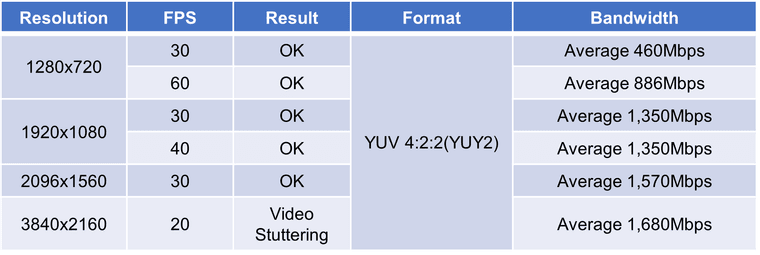
        윈도우 PC 결과.png

      VLC 결과_01.png
      VLC 결과_02.png

      Thanks,

      Eric KatzfeyE Offline
      Eric KatzfeyE Offline
      Eric Katzfey
      ModalAI Team
      wrote on last edited by
      #12

      @Jskim I'm sorry but I keep reading through your messages and am finding it hard to understand what you are asking. It sounds like everything works fine up to 1280x720@10fps. But you want at least 1280x720@30fps. What happens when you change 10 to 30? Does voxl-uvc-server not run? Or does it run fine but you see no output?

      J 1 Reply Last reply
      0
      • Eric KatzfeyE Eric Katzfey

        @Jskim I'm sorry but I keep reading through your messages and am finding it hard to understand what you are asking. It sounds like everything works fine up to 1280x720@10fps. But you want at least 1280x720@30fps. What happens when you change 10 to 30? Does voxl-uvc-server not run? Or does it run fine but you see no output?

        J Offline
        J Offline
        Jskim
        wrote on last edited by
        #13

        @Eric-Katzfey
        Thank you for your quick reply.

        I have a problem with the VOXL2-mini USB3 port.
        When I connect a USB3 camera directly to the VOXL2-mini, the camera is recognised but no output.
        However, when we change the USB3 to USB2, the camera output is only 1280x720@10fps.

        1. Correct. we want a minimum of 1280x720@30fps.

        2. voxl-uvc-server is running. But no output is displayed.

        3. what happens when you change 10 to 30?
          A) When you change to 30, there is no output.

        Thanks,

        Eric KatzfeyE 1 Reply Last reply
        0
        • J Jskim

          @Eric-Katzfey
          Thank you for your quick reply.

          I have a problem with the VOXL2-mini USB3 port.
          When I connect a USB3 camera directly to the VOXL2-mini, the camera is recognised but no output.
          However, when we change the USB3 to USB2, the camera output is only 1280x720@10fps.

          1. Correct. we want a minimum of 1280x720@30fps.

          2. voxl-uvc-server is running. But no output is displayed.

          3. what happens when you change 10 to 30?
            A) When you change to 30, there is no output.

          Thanks,

          Eric KatzfeyE Offline
          Eric KatzfeyE Offline
          Eric Katzfey
          ModalAI Team
          wrote on last edited by
          #14

          @Jskim Ah, okay, that's more clear now. Have you considered the suggestions from @Vinny ? The USB 3.0 port on VOXL2 mini requires some extra capacitance or else it won't work. This is not normally provided by any standard cable and needs to be added in separately. Also, as per the documentation https://docs.modalai.com/voxl-uvc-server/ what output do you see if you enable debug messages? (e.g. voxl-uvc-server -d)

          J 1 Reply Last reply
          0
          • Eric KatzfeyE Eric Katzfey

            @Jskim Ah, okay, that's more clear now. Have you considered the suggestions from @Vinny ? The USB 3.0 port on VOXL2 mini requires some extra capacitance or else it won't work. This is not normally provided by any standard cable and needs to be added in separately. Also, as per the documentation https://docs.modalai.com/voxl-uvc-server/ what output do you see if you enable debug messages? (e.g. voxl-uvc-server -d)

            J Offline
            J Offline
            Jskim
            wrote on last edited by
            #15

            @Eric-Katzfey
            Thank you very much for the quick reply.

            1. When I executed the voxl-uvc-server -d command, the screen froze.
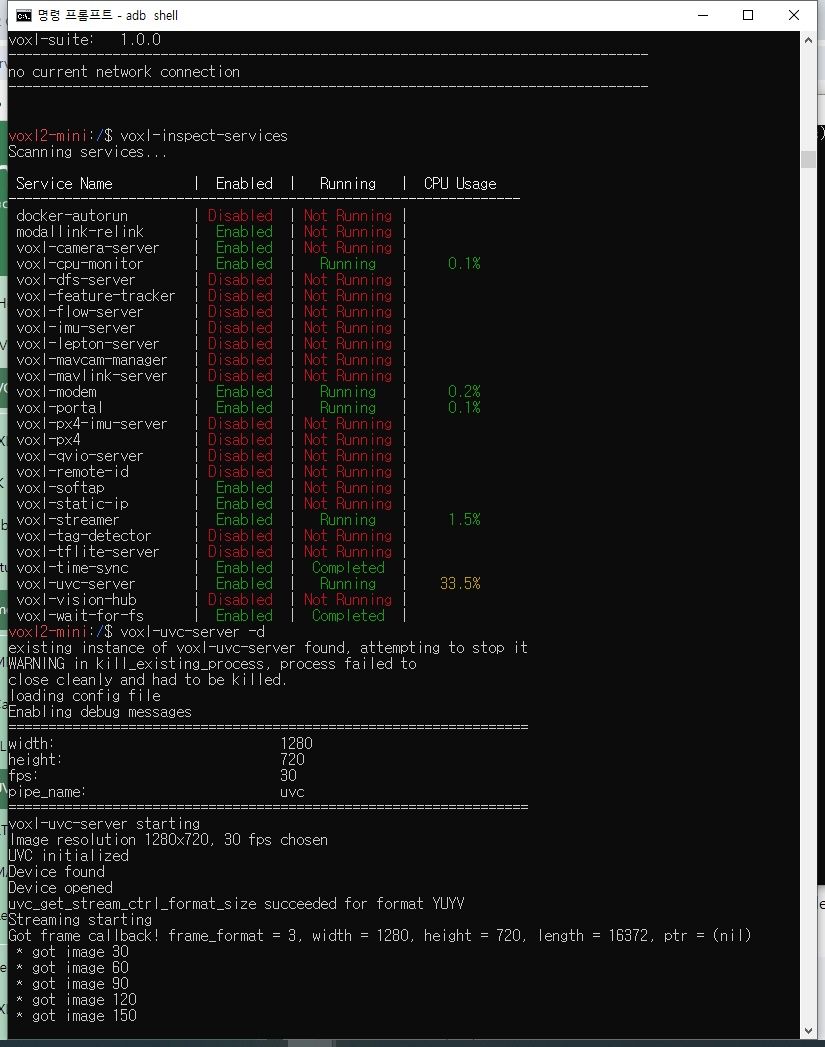
              voxl-uvc-server -d.jpg

            Thanks,

            Eric KatzfeyE 1 Reply Last reply
            0
            • J Jskim

              @Eric-Katzfey
              Thank you very much for the quick reply.

              1. When I executed the voxl-uvc-server -d command, the screen froze.
                voxl-uvc-server -d.jpg

              Thanks,

              Eric KatzfeyE Offline
              Eric KatzfeyE Offline
              Eric Katzfey
              ModalAI Team
              wrote on last edited by
              #16

              @Jskim Have you added the required capacitors as explained by @Vinny ?

              J 1 Reply Last reply
              0
              • Eric KatzfeyE Eric Katzfey

                @Jskim Have you added the required capacitors as explained by @Vinny ?

                J Offline
                J Offline
                Jskim
                wrote on last edited by
                #17

                @Eric-Katzfey

                Sorry, please tell me again how to add capacitors.

                Thanks,

                J 1 Reply Last reply
                0
                • J Jskim

                  @Eric-Katzfey

                  Sorry, please tell me again how to add capacitors.

                  Thanks,

                  J Offline
                  J Offline
                  Jskim
                  wrote on last edited by
                  #18

                  @Jskim
                  USB3 to USB2 dongle.png

                  We tested it using a USB30 to USB2.0 cable.

                  1. 1280x720@10fps is no problem.
                  2. 1280x720@30fps does not work.

                  Thanks

                  1 Reply Last reply
                  0
                  • M Offline
                    M Offline
                    milanerd
                    wrote on last edited by
                    #19

                    We also encountered the problem of 10 FPS limit when trying to stream HD video (1280x720 at more than 10 FPS) using USB3 to HDMI adapter on VOXL2.

                    @Jskim did you manage to identify/solve the issues somehow?

                    ModeratorM 1 Reply Last reply
                    0
                    • M milanerd

                      We also encountered the problem of 10 FPS limit when trying to stream HD video (1280x720 at more than 10 FPS) using USB3 to HDMI adapter on VOXL2.

                      @Jskim did you manage to identify/solve the issues somehow?

                      ModeratorM Offline
                      ModeratorM Offline
                      Moderator
                      ModalAI Team
                      wrote on last edited by
                      #20

                      @milanerd We have added a cable with built in extra capacitance https://www.modalai.com/products/mcbl-00022?variant=49030324060464

                      M 1 Reply Last reply
                      0
                      • ModeratorM Moderator

                        @milanerd We have added a cable with built in extra capacitance https://www.modalai.com/products/mcbl-00022?variant=49030324060464

                        M Offline
                        M Offline
                        milanerd
                        wrote on last edited by
                        #21

                        @Moderator Thank you. If I understood well, the adapter with added capacitance solved the issue with HD stream at 30 FPS?


                        ModeratorM 1 Reply Last reply
                        0
                        • M milanerd

                          @Moderator Thank you. If I understood well, the adapter with added capacitance solved the issue with HD stream at 30 FPS?
                          ModeratorM Offline
                          ModeratorM Offline
                          Moderator
                          ModalAI Team
                          wrote on last edited by
                          #22

                          @milanerd The added capacitance helps VOXL 2 Mini's USB port achieve USB 3 speeds. We don't have that adapter to confirm a fix for your issue, but with the cable the link should transfer much faster

                          1 Reply Last reply
                          0

                          Hello! It looks like you're interested in this conversation, but you don't have an account yet.

                          Getting fed up of having to scroll through the same posts each visit? When you register for an account, you'll always come back to exactly where you were before, and choose to be notified of new replies (either via email, or push notification). You'll also be able to save bookmarks and upvote posts to show your appreciation to other community members.

                          With your input, this post could be even better 💗

                          Register Login
                          Reply
                          • Reply as topic
                          Log in to reply
                          • Oldest to Newest
                          • Newest to Oldest
                          • Most Votes


                          ModalAI
                          Categories Recent Tags ModalAI.com Docs
                          © 2026 ModalAI® · Accelerating autonomy for smaller, smarter, safer drones · Powered by NodeBB
                          • Login

                          • Don't have an account? Register

                          • Login or register to search.
                          • First post
                            Last post
                          0
                          • Categories
                          • Recent
                          • Tags
                          • Popular
                          • Users
                          • Groups