
Resolution problem when using VOXL2-mini USB3 to HDMI adapter
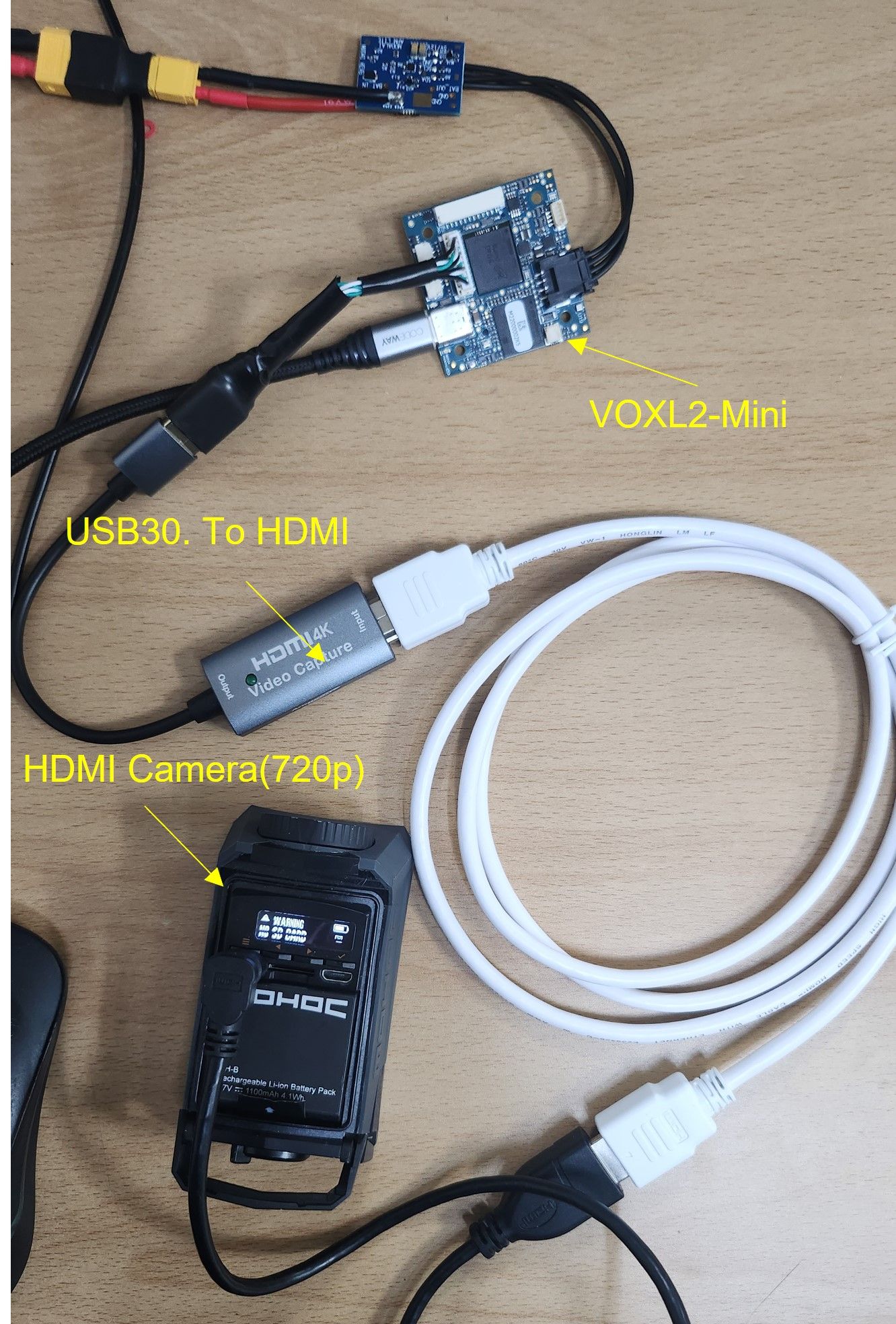
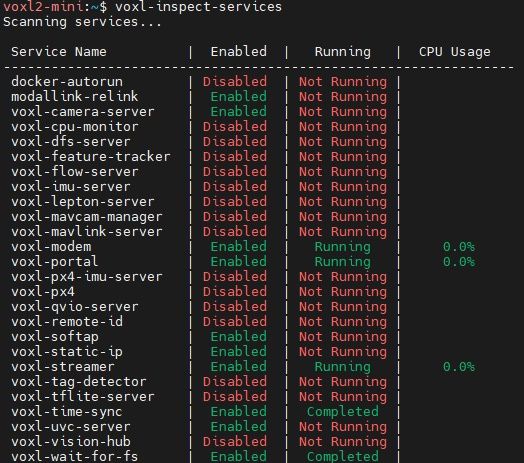
-
-
The documentation for voxl-uvc-server is here:
A) I fully understand the contents and am using the UVC camera without any problems.
I think that's beside the point. We are talking about HDMI cameras. (When using an HDMI camera, 640x480@30fps and 1024x720@10fps operate without any problems.) -
The problem mentioned above is not a UVC camera problem, but that the HDMI camera does not support FHD and HD on the VOXL2-mini when using the USB3.0 to HDMI adapter.
-
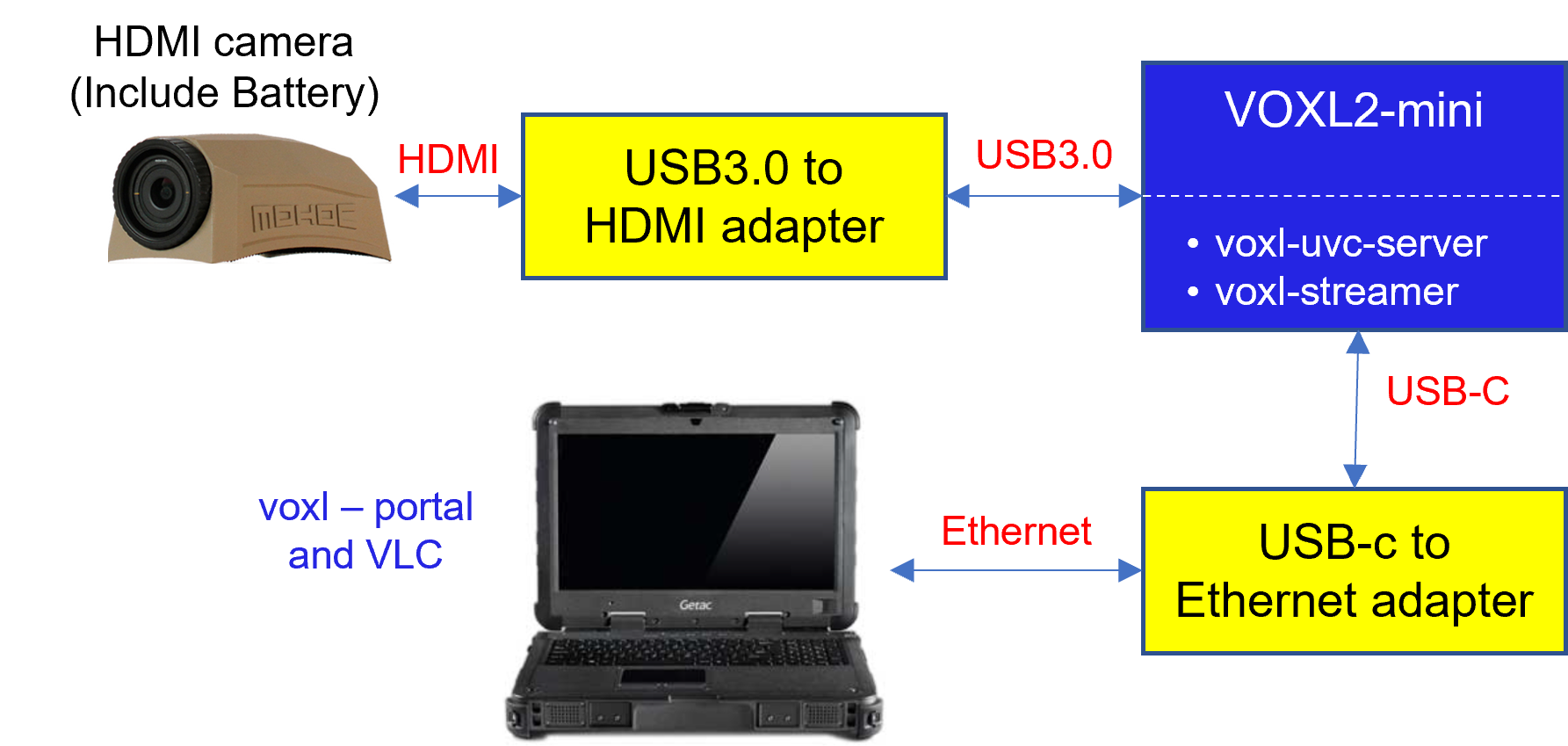
System configuration diagram:
VOXL2-mini (USB3.0 Port) -> USB3.0 to HDMI adapter -> HDMI camera -
Questions
- When using an HDMI camera, does VOXL2-mini not support FHD (@30fps) and HD (@30fps)?
- If support is not provided, what is the reason?
- If supported, what is the connectivity solution?
- Notes
- MIPI CSI-2 cameras are mainly used for very small drones, but
USB, HDMI, and IP cameras are mainly used for medium-sized and larger drones. - We are testing an H.265 IP camera using an Ethernet adapter on the USB3.0 port of VOXL-mini. I will ask additional questions once the results come out.
- I will share the USB3.0 camera test results.
@Jskim Okay, I guess I don't really understand the problem then. How is the HDMI camera exposed to the system when attached to the USB to HDMI adapter? I thought you were mentioning UVC because it shows up as a UVC device. But I guess that's not the case. Can you explain the system / software interface to the camera? When you attach that same camera / adapter to a Linux computer how do you access it?
-
-
-
The documentation for voxl-uvc-server is here:
A) I fully understand the contents and am using the UVC camera without any problems.
I think that's beside the point. We are talking about HDMI cameras. (When using an HDMI camera, 640x480@30fps and 1024x720@10fps operate without any problems.) -
The problem mentioned above is not a UVC camera problem, but that the HDMI camera does not support FHD and HD on the VOXL2-mini when using the USB3.0 to HDMI adapter.
-
System configuration diagram:
VOXL2-mini (USB3.0 Port) -> USB3.0 to HDMI adapter -> HDMI camera -
Questions
- When using an HDMI camera, does VOXL2-mini not support FHD (@30fps) and HD (@30fps)?
- If support is not provided, what is the reason?
- If supported, what is the connectivity solution?
- Notes
- MIPI CSI-2 cameras are mainly used for very small drones, but
USB, HDMI, and IP cameras are mainly used for medium-sized and larger drones. - We are testing an H.265 IP camera using an Ethernet adapter on the USB3.0 port of VOXL-mini. I will ask additional questions once the results come out.
- I will share the USB3.0 camera test results.
HI @Jskim
Can you also elaborate what is going on here electrically?
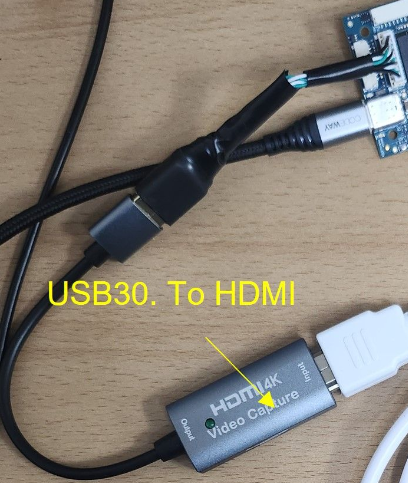
That does not look like our standard MCBL-00022-2. Did you do some additional splicing/merging to make this connect to the HDMI adapter? Did you add the series caps needed on TX (output) for USB3 speeds?
https://docs.modalai.com/voxl2-mini-connectors/#j3-usb-3-10-pin
Did you remove the USB3 lines altogether? (USB2 is plenty of bandwidth for most video applications)Can you also please share the specs of your HDMI adapter and HDMI camera as well? I'm curious how that is working from a hardware standpoint. You could be missing some power features here to power all these adapters correctly, making the link not work. I'd like to help double check for everyone involved.
Thanks!
-
-
HI @Jskim
Can you also elaborate what is going on here electrically?
That does not look like our standard MCBL-00022-2. Did you do some additional splicing/merging to make this connect to the HDMI adapter? Did you add the series caps needed on TX (output) for USB3 speeds?
https://docs.modalai.com/voxl2-mini-connectors/#j3-usb-3-10-pin
Did you remove the USB3 lines altogether? (USB2 is plenty of bandwidth for most video applications)Can you also please share the specs of your HDMI adapter and HDMI camera as well? I'm curious how that is working from a hardware standpoint. You could be missing some power features here to power all these adapters correctly, making the link not work. I'd like to help double check for everyone involved.
Thanks!
-
That does not look like our standard MCBL-00022-2.
A) This is the same cable as MCBL-00022-2. It is wrapped with insulating tape. -
Did you do some additional splicing/merging to make this connect to the HDMI adapter? Did you add the series caps needed on TX (output) for USB3 speeds?
A) This is a standard cable purchased from MODALAI and no work was done. -
https://docs.modalai.com/voxl2-mini-connectors/#j3-usb-3-10-pin
Did you remove the USB3 lines altogether? (USB2 is plenty of bandwidth for most video applications)
When we use a USB2.0 adapter on the VOXL2-mini USB3.0 port, only 640x480@30fps is supported.
A) We need uvc camera resolution 720p@30fps. The USB2.0 supported resolution is only 640x480@30fps. -
Can you also please share the specs of your HDMI adapter and HDMI camera as well? I'm curious how that is working from a hardware standpoint. You could be missing some power features here to power all these adapters correctly, making the link not work. I'd like to help double check for everyone involved.
1) HDMI adapter maker and model name : Anyport & AP-HDC4K
2) HDMI camera maker and model : MOHOC &MOHOC(https://www.mohoc.com/)5. We have purchased and are testing an Arducam USB3.0 camera.
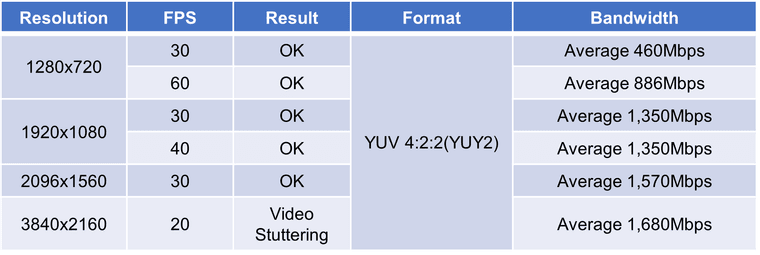
(Arducam 13MP IMX258 OIS Motorized Focus USB 3.0 Camera Module)- Format : YUY2
- Frame Rate (USB 3.0) : 1280720@60fps,19201080@40fps,20961560@30fps,38402160@20fps,4208*3120@12fps
- Interface : USB 3.2 Gen 1 device, backward compatible with USB 2.0 hosts
- UVC Compliant : No additional drivers required
Thanks,
-
-
-
That does not look like our standard MCBL-00022-2.
A) This is the same cable as MCBL-00022-2. It is wrapped with insulating tape. -
Did you do some additional splicing/merging to make this connect to the HDMI adapter? Did you add the series caps needed on TX (output) for USB3 speeds?
A) This is a standard cable purchased from MODALAI and no work was done. -
https://docs.modalai.com/voxl2-mini-connectors/#j3-usb-3-10-pin
Did you remove the USB3 lines altogether? (USB2 is plenty of bandwidth for most video applications)
When we use a USB2.0 adapter on the VOXL2-mini USB3.0 port, only 640x480@30fps is supported.
A) We need uvc camera resolution 720p@30fps. The USB2.0 supported resolution is only 640x480@30fps. -
Can you also please share the specs of your HDMI adapter and HDMI camera as well? I'm curious how that is working from a hardware standpoint. You could be missing some power features here to power all these adapters correctly, making the link not work. I'd like to help double check for everyone involved.
1) HDMI adapter maker and model name : Anyport & AP-HDC4K
2) HDMI camera maker and model : MOHOC &MOHOC(https://www.mohoc.com/)5. We have purchased and are testing an Arducam USB3.0 camera.
(Arducam 13MP IMX258 OIS Motorized Focus USB 3.0 Camera Module)- Format : YUY2
- Frame Rate (USB 3.0) : 1280720@60fps,19201080@40fps,20961560@30fps,38402160@20fps,4208*3120@12fps
- Interface : USB 3.2 Gen 1 device, backward compatible with USB 2.0 hosts
- UVC Compliant : No additional drivers required
Thanks,
Hi @Jskim
I'd like to remind you of this post/exchange we had a few weeks ago:
https://forum.modalai.com/post/13799
So, I'm not sure if this is creating extra issues with your setup unless you did indeed add series caps on the TX lines from VOXL 2 Mini in the MCBL-00022-2.Pretty neat camera, and we want to help you succeed.
I see they run on internal batteries, I was curious why there was no power cord to it.
I see it comes in variations with WiFi. Wonder if maybe you can try an IP based format version instead of UVC?
You can try our WiFI adapter with MCBL-00022-2 as a test.
Like this, but instead of MCBL-00041, use the MCBL-00022-2 (The Alfa dongle only uses USB2).
https://www.modalai.com/collections/accessories/products/wifi-usb-cable-add-onFor the HDMI adapter, I cannot find enough specs in English to see which side provides power (HDMI side, or USB3 side). I would explore further options here to make sure this adapter works with other devices, since we have no experience with it. This item to me is the biggest risk item to your success.
Hope this helps a little bit, and maybe SW team can help you with the other issues.
Thanks!
-
-
Hi @Jskim
I'd like to remind you of this post/exchange we had a few weeks ago:
https://forum.modalai.com/post/13799
So, I'm not sure if this is creating extra issues with your setup unless you did indeed add series caps on the TX lines from VOXL 2 Mini in the MCBL-00022-2.Pretty neat camera, and we want to help you succeed.
I see they run on internal batteries, I was curious why there was no power cord to it.
I see it comes in variations with WiFi. Wonder if maybe you can try an IP based format version instead of UVC?
You can try our WiFI adapter with MCBL-00022-2 as a test.
Like this, but instead of MCBL-00041, use the MCBL-00022-2 (The Alfa dongle only uses USB2).
https://www.modalai.com/collections/accessories/products/wifi-usb-cable-add-onFor the HDMI adapter, I cannot find enough specs in English to see which side provides power (HDMI side, or USB3 side). I would explore further options here to make sure this adapter works with other devices, since we have no experience with it. This item to me is the biggest risk item to your success.
Hope this helps a little bit, and maybe SW team can help you with the other issues.
Thanks!
@Vinny
Thank you so much for your quick reply.1. The HDMI to USB dongle is powered by USB3 from the VOXL2-mini.
2. We have no problem using the TP link wifi dongle on the USB3 port. I have already tested it.
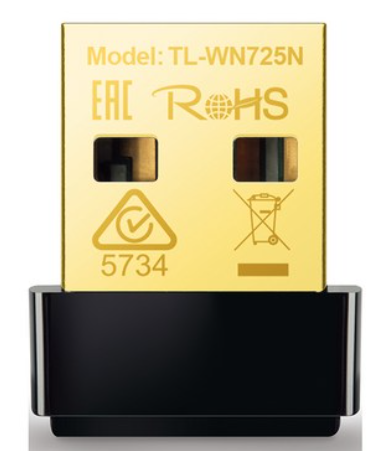
3. We will tell you the results of the test with the arducam USB3.0 camera.
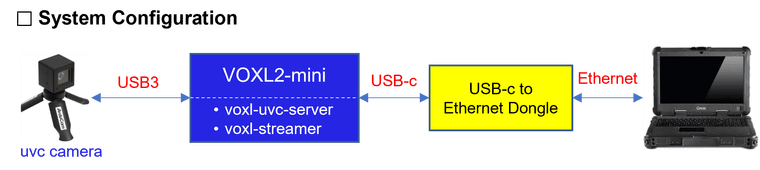
1) You need to check whether the problem is with the USB3.0 port or the streamer or the uvc server.???
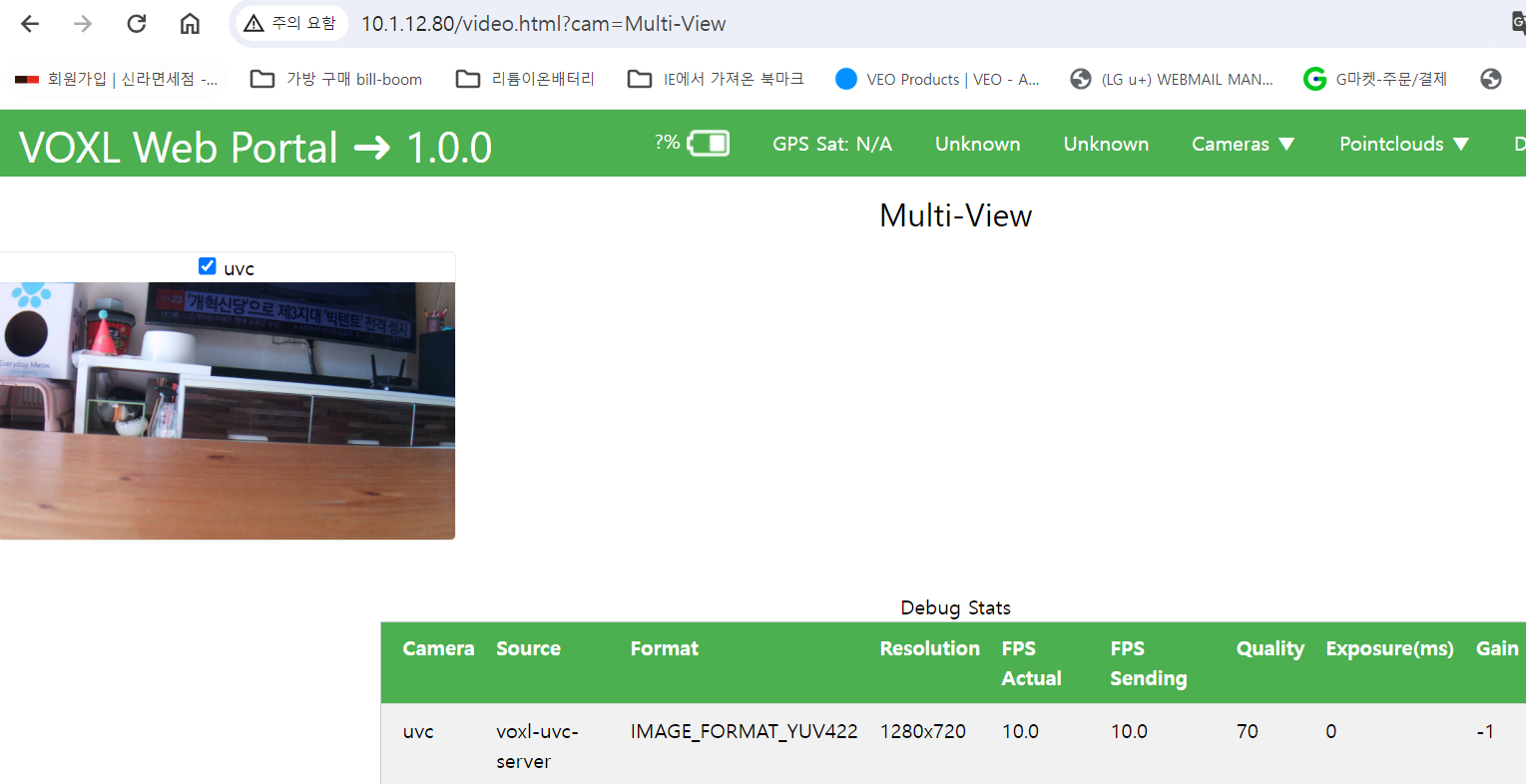
2) You can see the voxl2-mini test result in the image below.
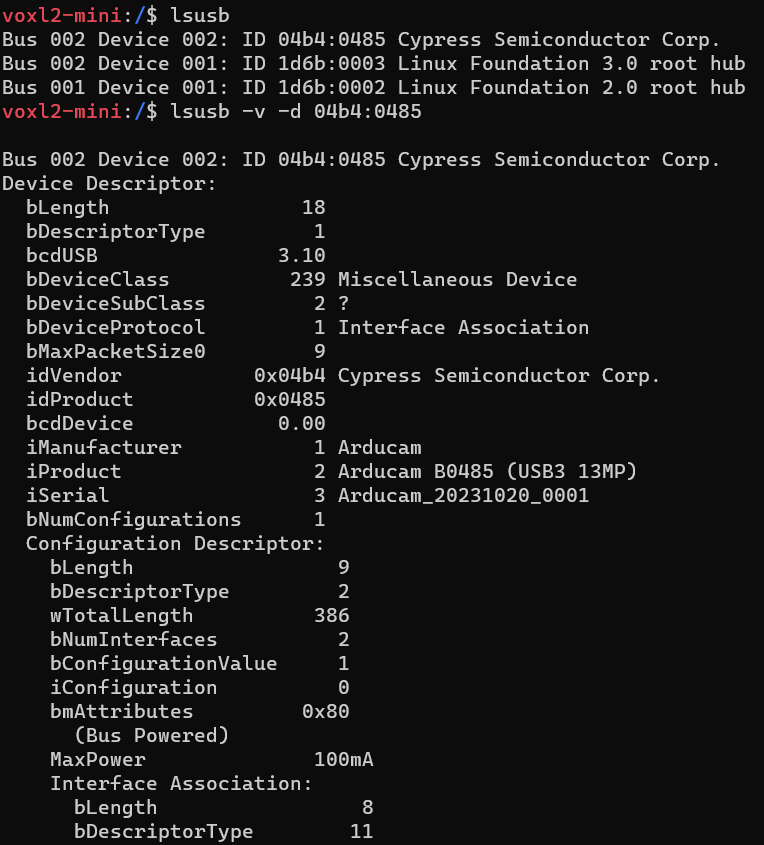
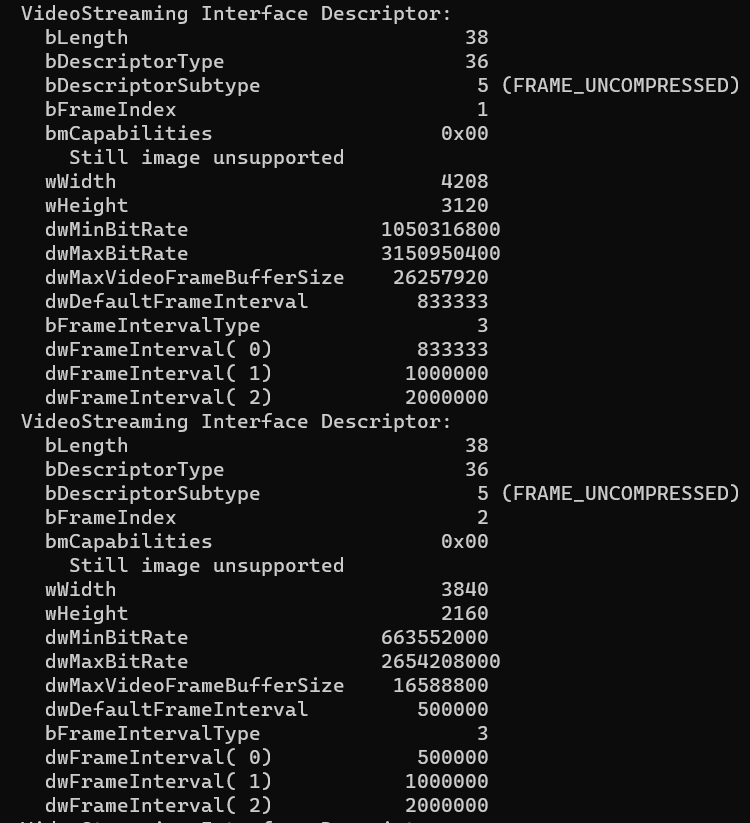
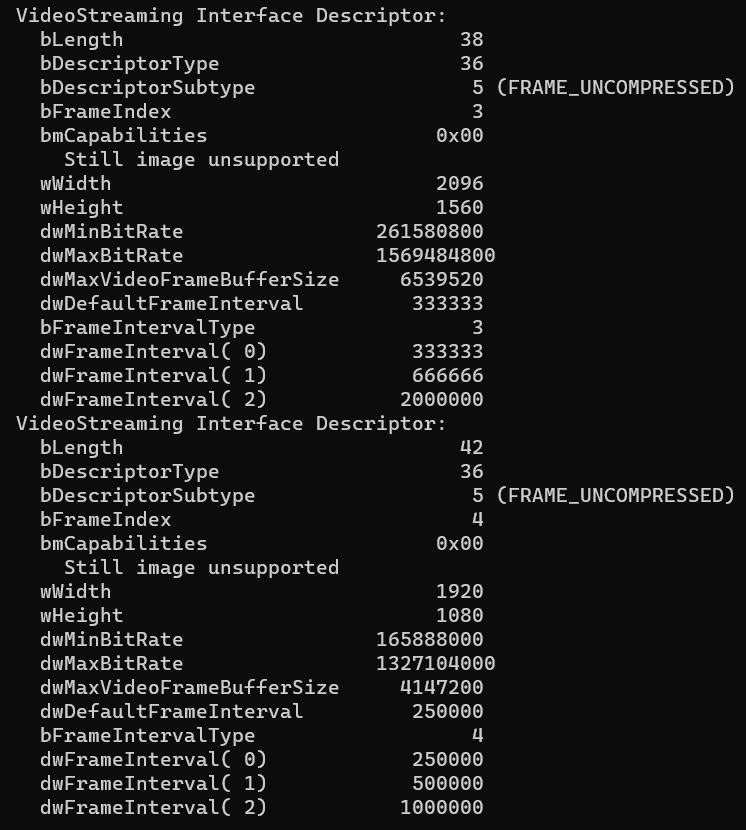
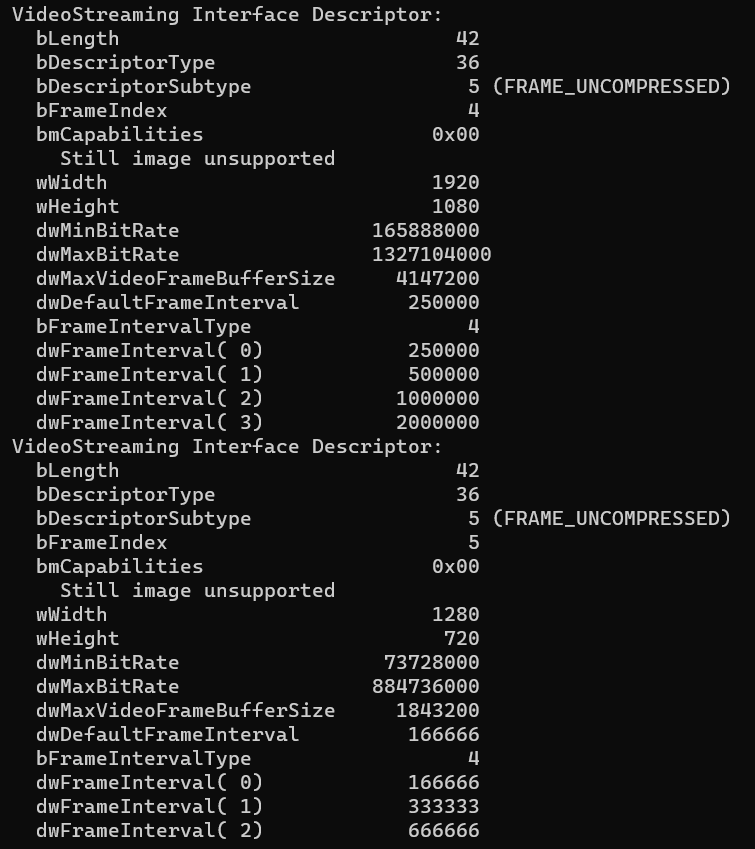
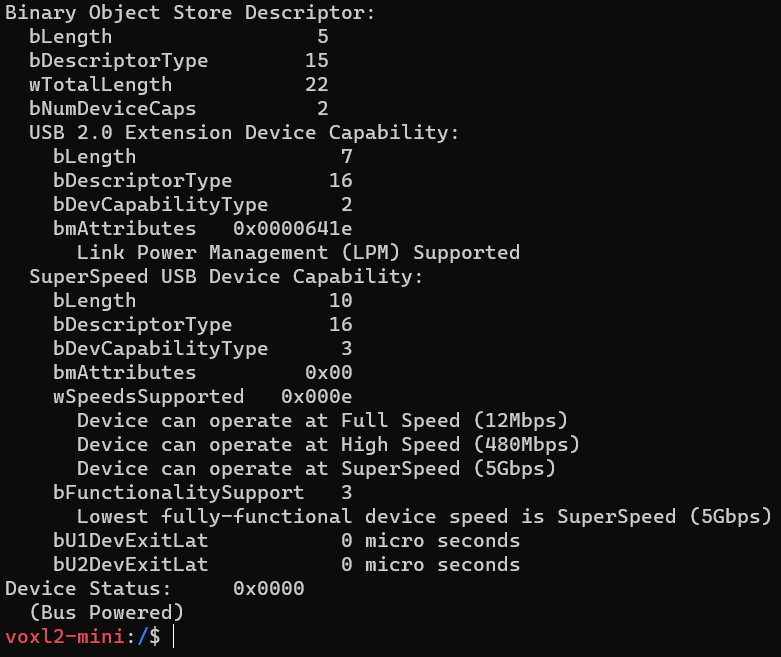
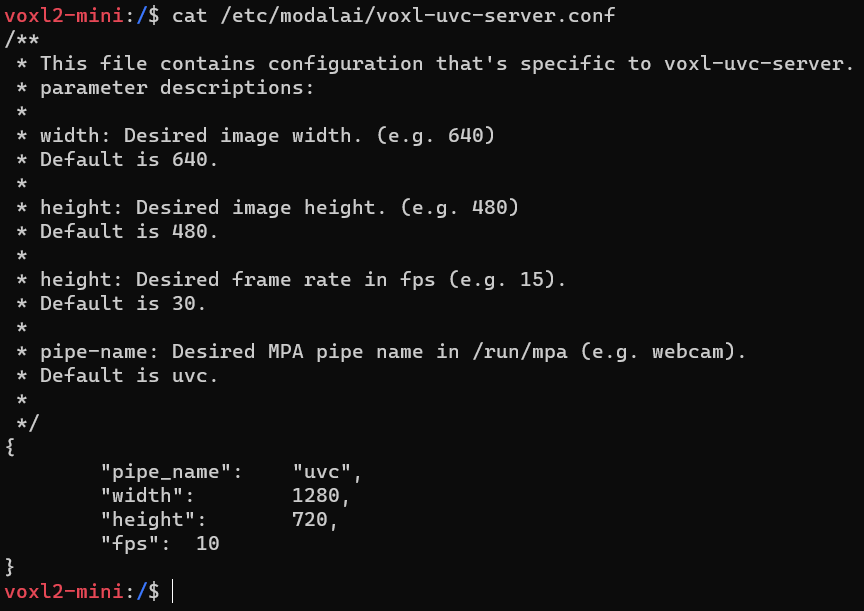
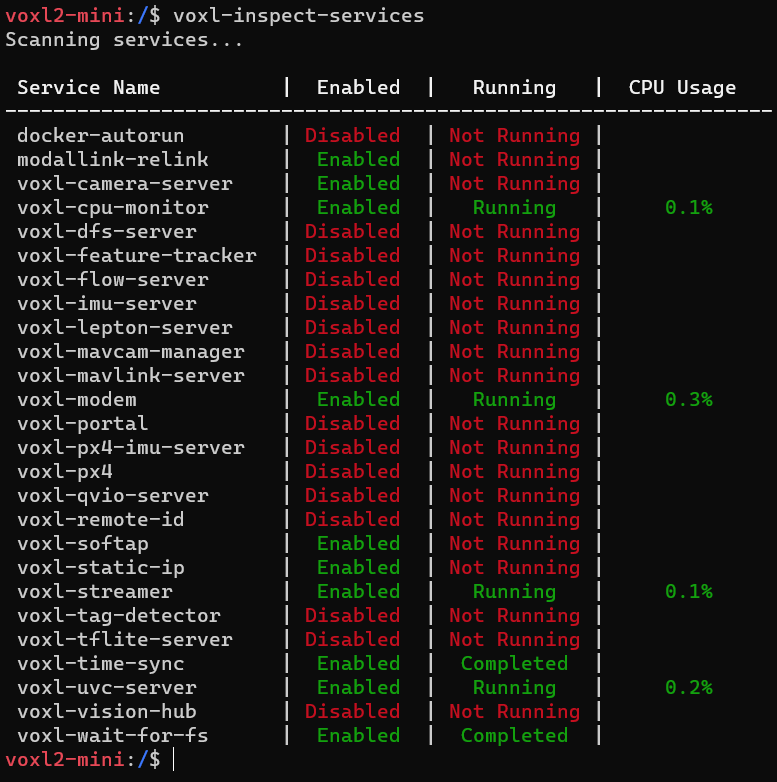


*Note: We use USB3 to USb2 conversion, 1280x720 @10fps no problem.

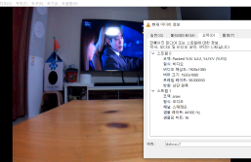
- We tested arducam directly connected to Windows PC USB3 port and there is no problem.
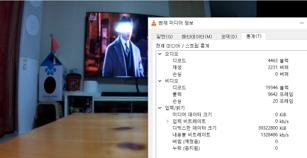
Thanks,
- We tested arducam directly connected to Windows PC USB3 port and there is no problem.
-
@Vinny
Thank you so much for your quick reply.1. The HDMI to USB dongle is powered by USB3 from the VOXL2-mini.
2. We have no problem using the TP link wifi dongle on the USB3 port. I have already tested it.
3. We will tell you the results of the test with the arducam USB3.0 camera.
1) You need to check whether the problem is with the USB3.0 port or the streamer or the uvc server.???
2) You can see the voxl2-mini test result in the image below.
*Note: We use USB3 to USb2 conversion, 1280x720 @10fps no problem.
- We tested arducam directly connected to Windows PC USB3 port and there is no problem.
Thanks,
@Jskim I'm sorry but I keep reading through your messages and am finding it hard to understand what you are asking. It sounds like everything works fine up to 1280x720@10fps. But you want at least 1280x720@30fps. What happens when you change 10 to 30? Does voxl-uvc-server not run? Or does it run fine but you see no output?
- We tested arducam directly connected to Windows PC USB3 port and there is no problem.
-
@Jskim I'm sorry but I keep reading through your messages and am finding it hard to understand what you are asking. It sounds like everything works fine up to 1280x720@10fps. But you want at least 1280x720@30fps. What happens when you change 10 to 30? Does voxl-uvc-server not run? Or does it run fine but you see no output?
@Eric-Katzfey
Thank you for your quick reply.I have a problem with the VOXL2-mini USB3 port.
When I connect a USB3 camera directly to the VOXL2-mini, the camera is recognised but no output.
However, when we change the USB3 to USB2, the camera output is only 1280x720@10fps.-
Correct. we want a minimum of 1280x720@30fps.
-
voxl-uvc-server is running. But no output is displayed.
-
what happens when you change 10 to 30?
A) When you change to 30, there is no output.
Thanks,
-
-
@Eric-Katzfey
Thank you for your quick reply.I have a problem with the VOXL2-mini USB3 port.
When I connect a USB3 camera directly to the VOXL2-mini, the camera is recognised but no output.
However, when we change the USB3 to USB2, the camera output is only 1280x720@10fps.-
Correct. we want a minimum of 1280x720@30fps.
-
voxl-uvc-server is running. But no output is displayed.
-
what happens when you change 10 to 30?
A) When you change to 30, there is no output.
Thanks,
@Jskim Ah, okay, that's more clear now. Have you considered the suggestions from @Vinny ? The USB 3.0 port on VOXL2 mini requires some extra capacitance or else it won't work. This is not normally provided by any standard cable and needs to be added in separately. Also, as per the documentation https://docs.modalai.com/voxl-uvc-server/ what output do you see if you enable debug messages? (e.g.
voxl-uvc-server -d) -
-
@Jskim Ah, okay, that's more clear now. Have you considered the suggestions from @Vinny ? The USB 3.0 port on VOXL2 mini requires some extra capacitance or else it won't work. This is not normally provided by any standard cable and needs to be added in separately. Also, as per the documentation https://docs.modalai.com/voxl-uvc-server/ what output do you see if you enable debug messages? (e.g.
voxl-uvc-server -d) -
@Eric-Katzfey
Thank you very much for the quick reply.- When I executed the voxl-uvc-server -d command, the screen froze.
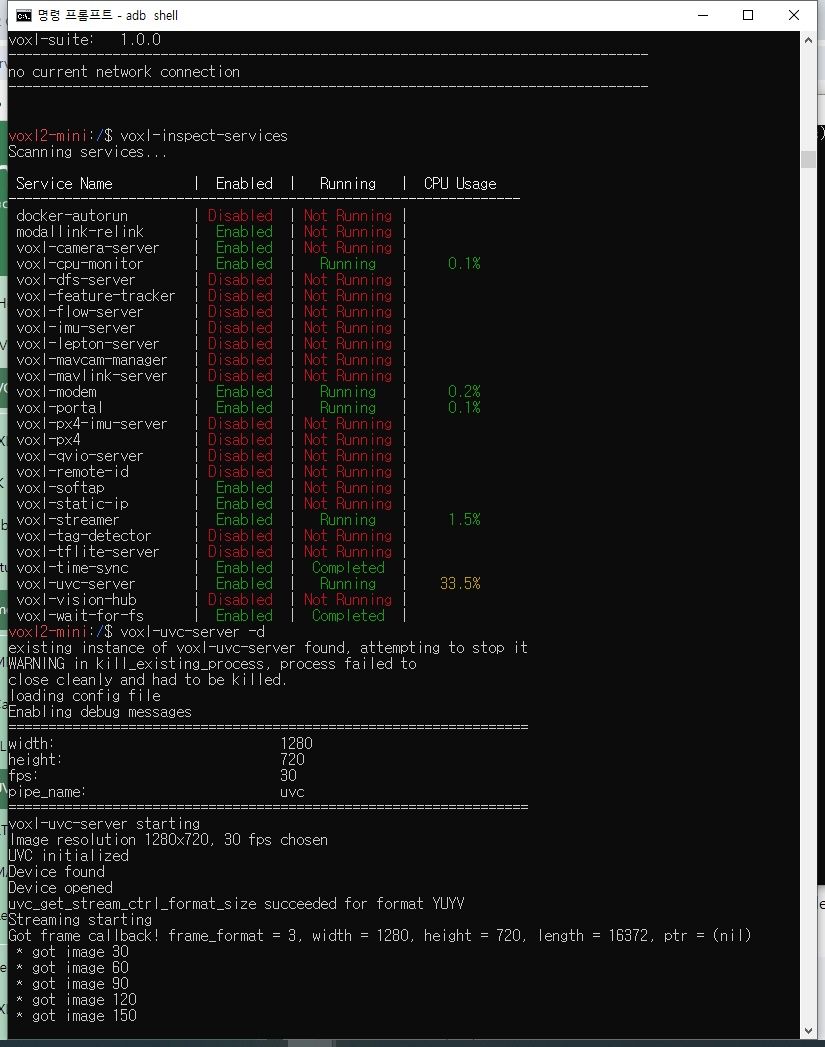
Thanks,
- When I executed the voxl-uvc-server -d command, the screen froze.
-
-
-
We also encountered the problem of 10 FPS limit when trying to stream HD video (1280x720 at more than 10 FPS) using USB3 to HDMI adapter on VOXL2.
@Jskim did you manage to identify/solve the issues somehow?
@milanerd We have added a cable with built in extra capacitance https://www.modalai.com/products/mcbl-00022?variant=49030324060464
-
@milanerd We have added a cable with built in extra capacitance https://www.modalai.com/products/mcbl-00022?variant=49030324060464
-
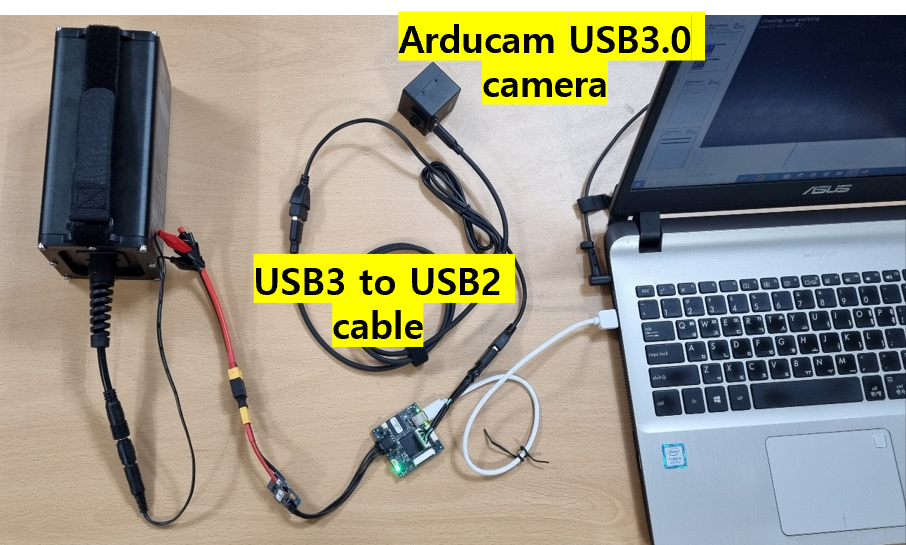
@Moderator Thank you. If I understood well, the adapter with added capacitance solved the issue with HD stream at 30 FPS?



Reading along? Create a free ModalAI Forum account to join in.
With an account you can reply, ask your own question, get an email when a ModalAI engineer answers, and mark the reply that solved it. Your place in each thread is saved between visits.
Questions about VOXL, Flight Core, ESCs and ModalAI drones are answered here by the engineers who build them.
Register Login