
RPM control
-
Regarding question 2, you are right, we did not use px4 before this and ran a custom node on the CPU. But now, we need to do some outdoor flights with GPS, and therefore need the voxl-px4.
Do you think there is any other way we can do this? For us to be able to get vehicle odometry using GPS without PX4?Regarding question 1,
I confirmed that the voxl-px4 is infact disabled and the voxl-esc scan successfully finds 4 ESC's. I wonder if this is related to the voxl_uart_write function call?Thank you!
You can probably set up PX4 to run entirely on CPU . VOXL2 has an IMU attached directly to CPU (available via voxl-imu-server). You can also hook up a generic GPS unit to UART that is mapped to CPU -- that is all you would need, right? Maybe Mag as well, that would be i2c. Then you can pull off the state estimate from PX4 based on imu/gps/mag..
Hmm not sure why "ringbuffer" issue. I will need to update the C++ example we had for the slpi bridge to use the new API and test.. I will try to do it soon.
Another approach would be to include the slpi bridge functionality into PX4 build. it does not exist now, but it could potentially be added.. I will take a look at it.
Alex
-
You can probably set up PX4 to run entirely on CPU . VOXL2 has an IMU attached directly to CPU (available via voxl-imu-server). You can also hook up a generic GPS unit to UART that is mapped to CPU -- that is all you would need, right? Maybe Mag as well, that would be i2c. Then you can pull off the state estimate from PX4 based on imu/gps/mag..
Hmm not sure why "ringbuffer" issue. I will need to update the C++ example we had for the slpi bridge to use the new API and test.. I will try to do it soon.
Another approach would be to include the slpi bridge functionality into PX4 build. it does not exist now, but it could potentially be added.. I will take a look at it.
Alex
Regarding the ring buffer issue, please double check your code and refer to the voxl-esc python code, which loads the .so and calls the C functions just like you would call from a C++ app:
I suspect that you are not reading data from the uart bridge and the buffer fills with the ESC feedback data. The ESC feedback is requested as part of the ESC commands that you send.
Here is the line of code that is printing the error : https://gitlab.com/voxl-public/voxl-sdk/core-libs/libqrb5165-io/-/blob/master/apps/library/src/uart.c?ref_type=heads#L156 -- it is inside the function that receives data from SLPI
Finally, what I initially said about including SLPI bridge into PX4, that was just an idea, but it is not a long-term solution, so it will not be implemented. Sorry!
Alex
-
Alex,
Regarding the ring buffer issue...
We checked our code and the only two functions we use are voxl_uart_init and voxl_uart_write, which from the voxl_serial.py script, we should be find to use.
For the voxl_uart_write function, we are currently passing (SLPI_QUP2_UART, tx_buf, packet_length) where
uint8_t tx_buf[128];
int32_t packet_length = qc_esc_create_rpm_packet4_fb(rpm0, rpm1, rpm2, rpm3, led, led, led, led, cntr, tx_buf, sizeof(tx_buf));
Aside from this, we are not interacting with the ESC at all, so the error must be coming from one of these functions being called.
Do you have any ideas for us by chance?
Thank you for your insights and time! -
Alex,
Regarding the ring buffer issue...
We checked our code and the only two functions we use are voxl_uart_init and voxl_uart_write, which from the voxl_serial.py script, we should be find to use.
For the voxl_uart_write function, we are currently passing (SLPI_QUP2_UART, tx_buf, packet_length) where
uint8_t tx_buf[128];
int32_t packet_length = qc_esc_create_rpm_packet4_fb(rpm0, rpm1, rpm2, rpm3, led, led, led, led, cntr, tx_buf, sizeof(tx_buf));
Aside from this, we are not interacting with the ESC at all, so the error must be coming from one of these functions being called.
Do you have any ideas for us by chance?
Thank you for your insights and time!@nbobbili , when you send rpm control packet, this also requests feedback from ESCs, so each ESC will send some data back to VOXL2 (one ESC id at a time).
If you do not read from the same serial port that you are writing to, the data coming back from ESCs will fill the RX buffer (in slpi-cpu bridge) and you will get this message of ring buffer full.
If you do not wish to parse the ESC feedback data, just read and discard all bytes right after you write the RPM commands.
Alex
-
We were seeing the same issue, but for a different reason.. this is how we fixed it
https://www.loom.com/share/72ed330246414d8db0f7d4f1c18999e8
We essentially deleted the ips for primary_gcs and secondary_gcs in voxl-mavlink-server
-
We were seeing the same issue, but for a different reason.. this is how we fixed it
https://www.loom.com/share/72ed330246414d8db0f7d4f1c18999e8
We essentially deleted the ips for primary_gcs and secondary_gcs in voxl-mavlink-server
@wilkinsaf For context we are connected to an external flight controller over UART DSP
-
@nbobbili , when you send rpm control packet, this also requests feedback from ESCs, so each ESC will send some data back to VOXL2 (one ESC id at a time).
If you do not read from the same serial port that you are writing to, the data coming back from ESCs will fill the RX buffer (in slpi-cpu bridge) and you will get this message of ring buffer full.
If you do not wish to parse the ESC feedback data, just read and discard all bytes right after you write the RPM commands.
Alex
@Alex-Kushleyev going back to getting RPM control working on ROS2 and SDK 1.1+...
Our current findings:
ROS2 Humble with SDK 0.8 and the old library (installed withvoxl-slpi-uart-bridge_1.0.0-202303130921_arm64.deb) is working well without any issues.
ROS2 Humble with SDK 1.1+ and the new librarylibvoxl_io.soand new interface (uart.h) has high frequency oscillations when flying the drone.We've tried many things to incldue:
- Updating the
crc16.h/candqc_esc_packet.h/cand other dependent code from:
[https://github.com/modalai/px4-firmware/blob/main/src/drivers/actuators/voxl_esc] - Exhaustive gain tuing

- Delay time analysis within our control stack
- Experiments with different baudrates
None of which solved the issue or clarified why we are currently having this issue on SDK 1.1+ with the new SLPI library.
Of note, we are using the functions:
voxl_uart_init(SLPI_QUP2_UART, 250000, 0.1, 0, 1, 0);to initialize the UART,
int32_t packet_length = qc_esc_create_rpm_packet4_fb(rpm0, rpm1, rpm2, rpm3, led, led, led, led, cntr, tx_buf, sizeof(tx_buf), 0);to create packets,
andint ret2 = voxl_uart_write(SLPI_QUP2_UART, tx_buf, packet_length);to actually send the rpms.
Additionally we are usingvoxl_uart_flush(SLPI_QUP2_UART);because we were having issues with the ring buffer overflow.
We are running everything in ROS2 at 500Hz.Do you have any thoughts on this?
Any ideas on what we might try next?
Thanks in advance. - Updating the
-
@Alex-Kushleyev going back to getting RPM control working on ROS2 and SDK 1.1+...
Our current findings:
ROS2 Humble with SDK 0.8 and the old library (installed withvoxl-slpi-uart-bridge_1.0.0-202303130921_arm64.deb) is working well without any issues.
ROS2 Humble with SDK 1.1+ and the new librarylibvoxl_io.soand new interface (uart.h) has high frequency oscillations when flying the drone.We've tried many things to incldue:
- Updating the
crc16.h/candqc_esc_packet.h/cand other dependent code from:
[https://github.com/modalai/px4-firmware/blob/main/src/drivers/actuators/voxl_esc] - Exhaustive gain tuing
- Delay time analysis within our control stack
- Experiments with different baudrates
None of which solved the issue or clarified why we are currently having this issue on SDK 1.1+ with the new SLPI library.
Of note, we are using the functions:
voxl_uart_init(SLPI_QUP2_UART, 250000, 0.1, 0, 1, 0);to initialize the UART,
int32_t packet_length = qc_esc_create_rpm_packet4_fb(rpm0, rpm1, rpm2, rpm3, led, led, led, led, cntr, tx_buf, sizeof(tx_buf), 0);to create packets,
andint ret2 = voxl_uart_write(SLPI_QUP2_UART, tx_buf, packet_length);to actually send the rpms.
Additionally we are usingvoxl_uart_flush(SLPI_QUP2_UART);because we were having issues with the ring buffer overflow.
We are running everything in ROS2 at 500Hz.Do you have any thoughts on this?
Any ideas on what we might try next?
Thanks in advance.I would recommend somehow logging the timestamps right before and after sensing our the uart packet to the uart bridge. This will give you two things: you can analyze how regular the rpm updates are coming from ROS, and if for some reason the write call takes too long. Also check how long uart flush is taking!
If you dont want any esc to send feedback, you can set the esc feedback id to -1, i believe, then you dont need to do uart flush. It should be documented in the packet api source code
- Updating the
-
I would recommend somehow logging the timestamps right before and after sensing our the uart packet to the uart bridge. This will give you two things: you can analyze how regular the rpm updates are coming from ROS, and if for some reason the write call takes too long. Also check how long uart flush is taking!
If you dont want any esc to send feedback, you can set the esc feedback id to -1, i believe, then you dont need to do uart flush. It should be documented in the packet api source code
@Alex-Kushleyev thanks for the suggestions!
I did some testing logging timestamps today and here is what I've found.There was definitely some additional delay when using the
voxl_uart_read_bytesfunction, so currently I am exclusively running theqc_esc_create_rpm_packet4_fbandvoxl_uart_writefunctions.
With those two functions, we are still experiencing high frequency oscillations.
Here is what the time differences (dt) look like when sending rpms to the esc:
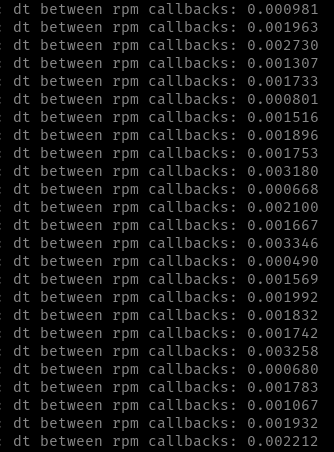
The dt goes up to greater than 0.003 sec every now and then, which is why I think we have oscillation issues as we trying to send rpm commands at 500 Hz.Are these 'spikes' in time something you would expect?
We are not currently running any other functions in the rpm callback, only the creation of the packets and writing to the uart.
Thanks for your help, Alex. -
@Alex-Kushleyev thanks for the suggestions!
I did some testing logging timestamps today and here is what I've found.There was definitely some additional delay when using the
voxl_uart_read_bytesfunction, so currently I am exclusively running theqc_esc_create_rpm_packet4_fbandvoxl_uart_writefunctions.
With those two functions, we are still experiencing high frequency oscillations.
Here is what the time differences (dt) look like when sending rpms to the esc:
The dt goes up to greater than 0.003 sec every now and then, which is why I think we have oscillation issues as we trying to send rpm commands at 500 Hz.Are these 'spikes' in time something you would expect?
We are not currently running any other functions in the rpm callback, only the creation of the packets and writing to the uart.
Thanks for your help, Alex.@jenyeom , you are running your application on the CPU, so there are no real time guarantees. You should set the cpu into perf mode if you are not already doing that (voxl-set-cpu-mode perf). Additionally, if you can increase cpu priority of your ros node, do that. Finally, i would suggest updating the baud rate of the esc to 2Mbit (2000000) from 250k. This will further reduce actuator latency. Change the param in esc params first and then update your ros node to use 2mbit. Finally, it can help, if you have an oscilloscope, to look at tx line from voxl2 to see if there are 500hz on average packets going out or are there frequent gaps that would suggest dropped outgoing packets (for whatever reason).
-
@jenyeom , you are running your application on the CPU, so there are no real time guarantees. You should set the cpu into perf mode if you are not already doing that (voxl-set-cpu-mode perf). Additionally, if you can increase cpu priority of your ros node, do that. Finally, i would suggest updating the baud rate of the esc to 2Mbit (2000000) from 250k. This will further reduce actuator latency. Change the param in esc params first and then update your ros node to use 2mbit. Finally, it can help, if you have an oscilloscope, to look at tx line from voxl2 to see if there are 500hz on average packets going out or are there frequent gaps that would suggest dropped outgoing packets (for whatever reason).
By the way Alex to add on to this would it be possible for us to acquire a version of the libqrb5165-io that does NOT contain the slpi_uart_bridge portion?
https://gitlab.com/voxl-public/voxl-sdk/core-libs/libqrb5165-io/-/tree/master?ref_type=heads
Or we can have a version that allows us to to old voxl-slpi-uart-bridge_1.0.0-202303130921_arm64.deb on the newest SDK?
I don't believe it is a CPU performance issue because our drone is always in performance mode and has a very high baud rate as recommended and the osccilations in flight. The only way to remove those oscillations is to downgrade the SDK 0.8 and use this library voxl-slpi-uart-bridge_1.0.0-202303130921_arm64.deb to send RPM.
Since the hardware and our own software stack hasn't changed between these runs. I think the problem lies somewhere inside the SDK and the library. If we could simply install the older SDK Uart bridge then I believe that should show where the problem is.
Thanks,
Jeff
-
By the way Alex to add on to this would it be possible for us to acquire a version of the libqrb5165-io that does NOT contain the slpi_uart_bridge portion?
https://gitlab.com/voxl-public/voxl-sdk/core-libs/libqrb5165-io/-/tree/master?ref_type=heads
Or we can have a version that allows us to to old voxl-slpi-uart-bridge_1.0.0-202303130921_arm64.deb on the newest SDK?
I don't believe it is a CPU performance issue because our drone is always in performance mode and has a very high baud rate as recommended and the osccilations in flight. The only way to remove those oscillations is to downgrade the SDK 0.8 and use this library voxl-slpi-uart-bridge_1.0.0-202303130921_arm64.deb to send RPM.
Since the hardware and our own software stack hasn't changed between these runs. I think the problem lies somewhere inside the SDK and the library. If we could simply install the older SDK Uart bridge then I believe that should show where the problem is.
Thanks,
Jeff
It should be possible. You would need an older slpi firmware image that goes with the older uart bridge. I will check with @Eric-Katzfey . Since you dont use px4 on slpi, i think we may be able to downgrade the slpi image without affecting anything else.
I am curious why you are having performance issues with the latest bridge. I will be back to office on Wednesday and can run some tests using our python and c++ api for the uart bridge.
-
It should be possible. You would need an older slpi firmware image that goes with the older uart bridge. I will check with @Eric-Katzfey . Since you dont use px4 on slpi, i think we may be able to downgrade the slpi image without affecting anything else.
I am curious why you are having performance issues with the latest bridge. I will be back to office on Wednesday and can run some tests using our python and c++ api for the uart bridge.
@Alex-Kushleyev
Just a quick update on this journey...
We completed a full downgrade to SDK 0.8 and still experienced oscillations - so it doesn't seem to be an SDK issue.
The last thing that I can think could be an issue is the updated firmware of the ESC (39) that automatically happens when you update the SDK to 1.1+
Or maybe it was an ESC issue all along..? its hard to say at this point.In order to track this down, I attempted to downgrade our current ESC to version 36 and had some issues with the baud rate not updating (it seemed to be stuck at a baud rate of 57600). And while updating and checking firmware/parameters, I lost all communication with the ESC.
Here is my post on the ESC page about it:
(https://forum.modalai.com/topic/3310/escs-not-found-esc-bricked) -
@Alex-Kushleyev
Just a quick update on this journey...
We completed a full downgrade to SDK 0.8 and still experienced oscillations - so it doesn't seem to be an SDK issue.
The last thing that I can think could be an issue is the updated firmware of the ESC (39) that automatically happens when you update the SDK to 1.1+
Or maybe it was an ESC issue all along..? its hard to say at this point.In order to track this down, I attempted to downgrade our current ESC to version 36 and had some issues with the baud rate not updating (it seemed to be stuck at a baud rate of 57600). And while updating and checking firmware/parameters, I lost all communication with the ESC.
Here is my post on the ESC page about it:
(https://forum.modalai.com/topic/3310/escs-not-found-esc-bricked)@jenyeom , there have not been any performance-related changes in the ESC firmware since version 36. The only main change was a change in param structure, if you wanted to use that firmware, you would have to use
voxl-esctools and params from this branch : https://gitlab.com/voxl-public/voxl-sdk/utilities/voxl-esc/-/tree/params-v1/voxl-esc-tools.What could have happened, if you were running older firmware / params before, after the SDK install, the firmware was updated and params as well, and it is possible that ESC params that were installed are not what you needed - that would definitely mess things up.
At this point, i would suggest finding the old ESC params that you were using (i am assuming that you have a custom motor / propeller and you performed the ESC calibration). I can help you updating these params to be compatible with latest firmware (easy).
To recover the ESC to latest firmware, use:
- latest
voxl-esctools fromdevbranch : https://gitlab.com/voxl-public/voxl-sdk/utilities/voxl-esc/-/tree/dev/voxl-esc-tools - perform
voxl-esc-scan.py, it should find all 4 ESCs, potentially running at different uart baud rates - upgrade firmware to latest using
./voxl-esc-upload-firmware-all.sh, which is a wrapper forvoxl-esc-upload-firmware.py. please keep track of which ESCs were updated - upload latest compatible params (you can use generic params for now) : for example from here https://gitlab.com/voxl-public/voxl-sdk/utilities/voxl-esc/-/blob/master/voxl-esc-params/boards/esc_params_generic_m0134.xml . Later you can update params with your actual tuning results.
./voxl-esc-scan.pyto scan the escs- './voxl-esc-verify-params.py` to verify params
- latest
-
@jenyeom , there have not been any performance-related changes in the ESC firmware since version 36. The only main change was a change in param structure, if you wanted to use that firmware, you would have to use
voxl-esctools and params from this branch : https://gitlab.com/voxl-public/voxl-sdk/utilities/voxl-esc/-/tree/params-v1/voxl-esc-tools.What could have happened, if you were running older firmware / params before, after the SDK install, the firmware was updated and params as well, and it is possible that ESC params that were installed are not what you needed - that would definitely mess things up.
At this point, i would suggest finding the old ESC params that you were using (i am assuming that you have a custom motor / propeller and you performed the ESC calibration). I can help you updating these params to be compatible with latest firmware (easy).
To recover the ESC to latest firmware, use:
- latest
voxl-esctools fromdevbranch : https://gitlab.com/voxl-public/voxl-sdk/utilities/voxl-esc/-/tree/dev/voxl-esc-tools - perform
voxl-esc-scan.py, it should find all 4 ESCs, potentially running at different uart baud rates - upgrade firmware to latest using
./voxl-esc-upload-firmware-all.sh, which is a wrapper forvoxl-esc-upload-firmware.py. please keep track of which ESCs were updated - upload latest compatible params (you can use generic params for now) : for example from here https://gitlab.com/voxl-public/voxl-sdk/utilities/voxl-esc/-/blob/master/voxl-esc-params/boards/esc_params_generic_m0134.xml . Later you can update params with your actual tuning results.
./voxl-esc-scan.pyto scan the escs- './voxl-esc-verify-params.py` to verify params
@Alex-Kushleyev
Thanks for the quick response.
I was able to upload firmware version 36, but had issues getting the ESC set to the right baud rate, usingvoxl-esc-upload-params.py. Even though I was giving it 250,000 as the baud rate, it seemed to be stuck at 57600, which may have been a hint that the params were not loading well (after further reading in the forums and modalai documentation).
However, now I cannot even communicate with the ESC.
Here is what I get when I try thevoxl-esc-scan.pyscript: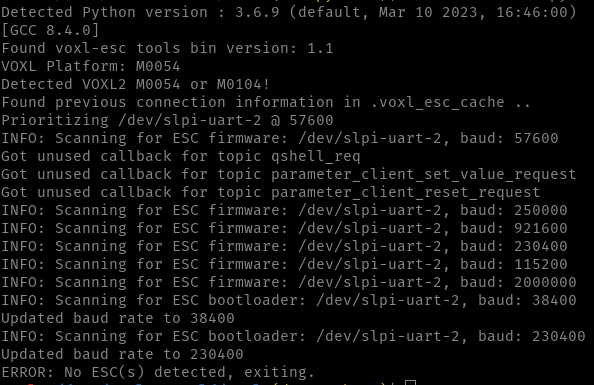
Could I have bricked the ESC...?
Any idea how I might go about reviving it?
Nothing (uplading firmware or parameter or scanning) seems to work at this point.
Thanks much! - latest
-
@Alex-Kushleyev
Thanks for the quick response.
I was able to upload firmware version 36, but had issues getting the ESC set to the right baud rate, usingvoxl-esc-upload-params.py. Even though I was giving it 250,000 as the baud rate, it seemed to be stuck at 57600, which may have been a hint that the params were not loading well (after further reading in the forums and modalai documentation).
However, now I cannot even communicate with the ESC.
Here is what I get when I try thevoxl-esc-scan.pyscript:Could I have bricked the ESC...?
Any idea how I might go about reviving it?
Nothing (uplading firmware or parameter or scanning) seems to work at this point.
Thanks much!@jenyeom ,
As i just mentioned above, i will repeat again

use latest voxl-esc tools from dev branch : https://gitlab.com/voxl-public/voxl-sdk/utilities/voxl-esc/-/tree/dev/voxl-esc-tools
You should recover the ESC to the latest state and then if you want to go back to older firmware and params, i can tell you how to do it properly.
-
@jenyeom ,
As i just mentioned above, i will repeat again
use latest voxl-esc tools from dev branch : https://gitlab.com/voxl-public/voxl-sdk/utilities/voxl-esc/-/tree/dev/voxl-esc-tools
You should recover the ESC to the latest state and then if you want to go back to older firmware and params, i can tell you how to do it properly.
Once you recover to the newest firmware, before going to the old firmware, i would suggest that we figure out if you used wrong ESC params in the recent tests. So if you had old params, did you upload them after the ESC firmware was updated to version 39?
-
Once you recover to the newest firmware, before going to the old firmware, i would suggest that we figure out if you used wrong ESC params in the recent tests. So if you had old params, did you upload them after the ESC firmware was updated to version 39?
Also, if you are using very old SDK on VOXL2, the uart bridge may not be working 100% properly.
When in doubt, the best thing to do is to connect to the ESC using a serial to usb adapter going directly to a Linux PC (and run
voxl-esctools on the PC). do you have that available?



Reading along? Create a free ModalAI Forum account to join in.
With an account you can reply, ask your own question, get an email when a ModalAI engineer answers, and mark the reply that solved it. Your place in each thread is saved between visits.
Questions about VOXL, Flight Core, ESCs and ModalAI drones are answered here by the engineers who build them.
Register Login