Skip to content
  • Categories
  • Recent
  • Tags
  • Popular
  • Users
  • Groups
Collapse
Brand Logo

ModalAI Forum

  1. ModalAI Support Forum
  2. Ask your questions right here!
  3. px4 disconnected from uart

px4 disconnected from uart

Scheduled Pinned Locked Moved Ask your questions right here!
13 Posts 4 Posters 2.2k Views 1 Watching
  • Oldest to Newest
  • Newest to Oldest
  • Most Votes
Reply
  • Reply as topic
Log in to reply
This topic has been deleted. Only users with topic management privileges can see it.
  • Syed OmairS Offline
    Syed OmairS Offline
    Syed Omair
    wrote on last edited by
    #1

    I have the m500 drone. I get error PX4 DISCONNECTED FROM UART. can someone help ???

    Syed OmairS 1 Reply Last reply
    0
    • Syed OmairS Syed Omair

      I have the m500 drone. I get error PX4 DISCONNECTED FROM UART. can someone help ???

      Syed OmairS Offline
      Syed OmairS Offline
      Syed Omair
      wrote on last edited by
      #2

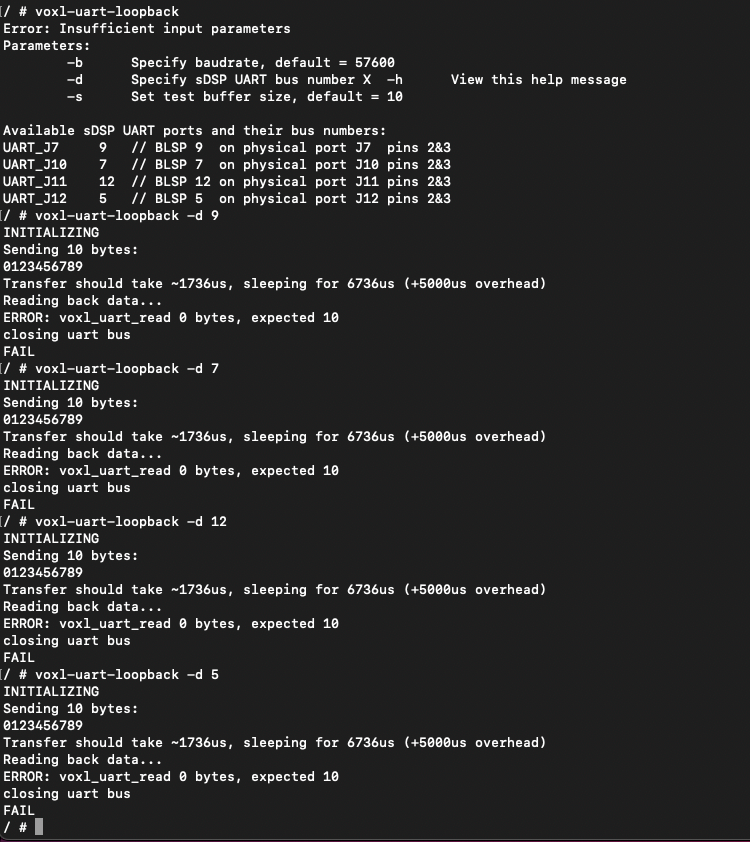
      @Syed-Omair I tried the voxl-uart-loopback tests and I fail all 4 of them. can someone please help!!!!
      Screenshot 2023-09-06 at 6.14.40 PM.png

      tomT 1 Reply Last reply
      0
      • Syed OmairS Syed Omair

        @Syed-Omair I tried the voxl-uart-loopback tests and I fail all 4 of them. can someone please help!!!!

        Screenshot 2023-09-06 at 6.14.40 PM.png

        tomT Offline
        tomT Offline
        tom
        admin
        wrote on last edited by
        #3

        @Syed-Omair The uart loopback tests are unrelated to this failure.

        Does your M500 have have the dual board or single board solution?

        i.e. voxl1 + flight core or voxl-flight all-in-one board

        Syed OmairS 1 Reply Last reply
        0
        • tomT tom

          @Syed-Omair The uart loopback tests are unrelated to this failure.

          Does your M500 have have the dual board or single board solution?

          i.e. voxl1 + flight core or voxl-flight all-in-one board

          Syed OmairS Offline
          Syed OmairS Offline
          Syed Omair
          wrote on last edited by
          #4

          @tom said in px4 disconnected from uart:

          Reply Quote 0

          I believe its all in one board. i have pictures.
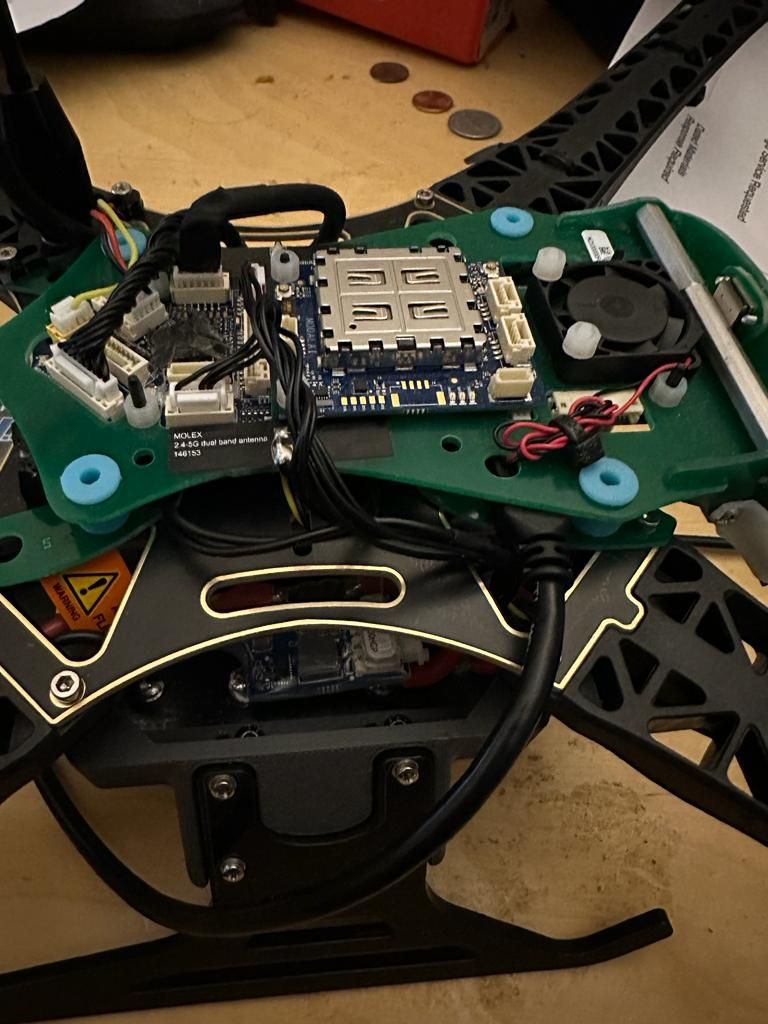
          drone1.jpeg
          drone2.jpeg

          and thanks for the quick reply !!!

          tomT 1 Reply Last reply
          0
          • Syed OmairS Syed Omair

            @tom said in px4 disconnected from uart:

            Reply Quote 0

            I believe its all in one board. i have pictures.
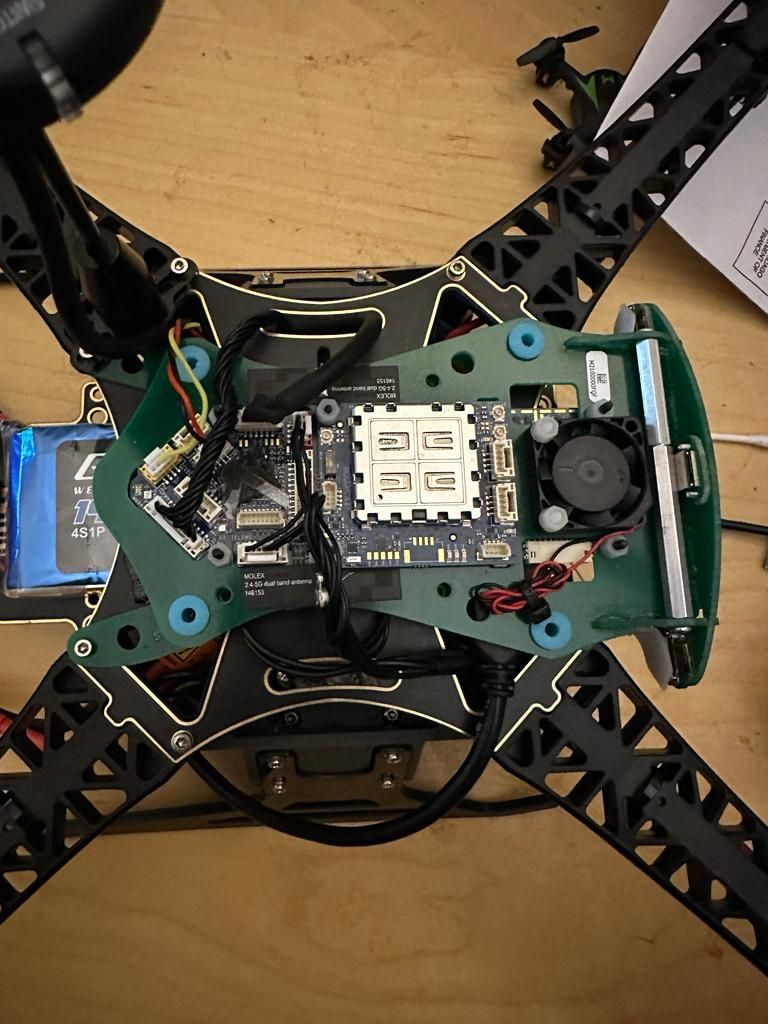
            drone1.jpeg
            drone2.jpeg

            and thanks for the quick reply !!!

            tomT Offline
            tomT Offline
            tom
            admin
            wrote on last edited by
            #5

            @Syed-Omair It looks like you have a Flight Core v2 + VOXL dual board solution.

            FCv2 connects from this port: https://docs.modalai.com/flight-core-v2-datasheets-connectors/#j1---telem1--uart7--voxl-mavlink-default-port

            Can you confirm through QGC that TELEM1 is set up with the proper baudrate (921,600)

            Also ensure in /etc/modalai/voxl-mavlink-server.conf that external_fc is enabled

            Syed OmairS 1 Reply Last reply
            0
            • tomT tom

              @Syed-Omair It looks like you have a Flight Core v2 + VOXL dual board solution.

              FCv2 connects from this port: https://docs.modalai.com/flight-core-v2-datasheets-connectors/#j1---telem1--uart7--voxl-mavlink-default-port

              Can you confirm through QGC that TELEM1 is set up with the proper baudrate (921,600)

              Also ensure in /etc/modalai/voxl-mavlink-server.conf that external_fc is enabled

              Syed OmairS Offline
              Syed OmairS Offline
              Syed Omair
              wrote on last edited by
              #6

              @tom apologies I saw this so late.

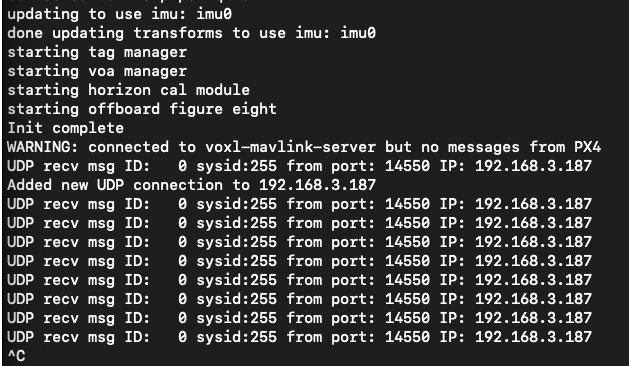
              I cannot connect to qgroundcontrol since the error started showing. it used to automatically connect but it doesn't anymore. I have the correct ip address and everything. I try to initiate a connection from qgroundcontrol but this is what i get.
              Screenshot 2023-09-07 at 8.32.50 PM.png

              also external_fc was disabled (false) so i made it true.

              tomT 1 Reply Last reply
              0
              • Syed OmairS Syed Omair

                @tom apologies I saw this so late.

                I cannot connect to qgroundcontrol since the error started showing. it used to automatically connect but it doesn't anymore. I have the correct ip address and everything. I try to initiate a connection from qgroundcontrol but this is what i get.

                Screenshot 2023-09-07 at 8.32.50 PM.png

                also external_fc was disabled (false) so i made it true.

                tomT Offline
                tomT Offline
                tom
                admin
                wrote on last edited by
                #7

                @Syed-Omair You should also be able to connect to QGC over USB using J3: https://docs.modalai.com/flight-core-v2-datasheets-connectors/#j3---usb-connector

                Syed OmairS 2 Replies Last reply
                0
                • tomT tom

                  @Syed-Omair You should also be able to connect to QGC over USB using J3: https://docs.modalai.com/flight-core-v2-datasheets-connectors/#j3---usb-connector

                  Syed OmairS Offline
                  Syed OmairS Offline
                  Syed Omair
                  wrote on last edited by
                  #8

                  @tom I’ll be in touch once I get the cable and test it out

                  1 Reply Last reply
                  0
                  • tomT tom

                    @Syed-Omair You should also be able to connect to QGC over USB using J3: https://docs.modalai.com/flight-core-v2-datasheets-connectors/#j3---usb-connector

                    Syed OmairS Offline
                    Syed OmairS Offline
                    Syed Omair
                    wrote on last edited by
                    #9

                    @tom hey tom. Thanks it worked. I just had to resrt TELEM1 to default settings through qgroundcontrol and then run voxl-configure-mavlink-server and reset the mavlink server to default settings and after that it connected wirelessly automatically.

                    But on a side note, can you also help me in pairing a taranis x7 transmitter to the m500 drone. I ordered the drone with the frsky transmitter but is it supposed to be on the drone somewhere or does it come separate like shown in the documentation??

                    like so https://www.youtube.com/watch?v=1IYg5mQdLVI

                    I am unable to find it on the drone anywhere. thank you.

                    Adrian HidalgoA Dobry KolaczD 2 Replies Last reply
                    0
                    • Syed OmairS Syed Omair

                      @tom hey tom. Thanks it worked. I just had to resrt TELEM1 to default settings through qgroundcontrol and then run voxl-configure-mavlink-server and reset the mavlink server to default settings and after that it connected wirelessly automatically.

                      But on a side note, can you also help me in pairing a taranis x7 transmitter to the m500 drone. I ordered the drone with the frsky transmitter but is it supposed to be on the drone somewhere or does it come separate like shown in the documentation??

                      like so https://www.youtube.com/watch?v=1IYg5mQdLVI

                      I am unable to find it on the drone anywhere. thank you.

                      Adrian HidalgoA Offline
                      Adrian HidalgoA Offline
                      Adrian Hidalgo
                      ModalAI Team
                      wrote on last edited by
                      #10

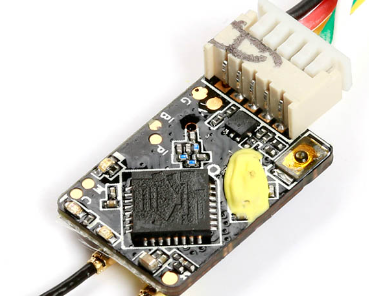
                      @Syed-Omair the receiver should be on the bottom of the drone and you might have the R-XSR receiver instead of the X8R. It's smaller in profile, should look like something below. Bind button on the right corner next to the connector. Follow same binding procedures as the video.
                      a0b34398-8431-42b9-b234-85f5acf3227e-image.png

                      Syed OmairS 1 Reply Last reply
                      1
                      • Syed OmairS Syed Omair

                        @tom hey tom. Thanks it worked. I just had to resrt TELEM1 to default settings through qgroundcontrol and then run voxl-configure-mavlink-server and reset the mavlink server to default settings and after that it connected wirelessly automatically.

                        But on a side note, can you also help me in pairing a taranis x7 transmitter to the m500 drone. I ordered the drone with the frsky transmitter but is it supposed to be on the drone somewhere or does it come separate like shown in the documentation??

                        like so https://www.youtube.com/watch?v=1IYg5mQdLVI

                        I am unable to find it on the drone anywhere. thank you.

                        Dobry KolaczD Offline
                        Dobry KolaczD Offline
                        Dobry Kolacz
                        ModalAI Team
                        wrote on last edited by
                        #11

                        @Syed-Omair Follow the Red/Black/Yellow cables coming out of the flight core to the receiver

                        Syed OmairS 1 Reply Last reply
                        1
                        • Adrian HidalgoA Adrian Hidalgo

                          @Syed-Omair the receiver should be on the bottom of the drone and you might have the R-XSR receiver instead of the X8R. It's smaller in profile, should look like something below. Bind button on the right corner next to the connector. Follow same binding procedures as the video.
                          a0b34398-8431-42b9-b234-85f5acf3227e-image.png

                          Syed OmairS Offline
                          Syed OmairS Offline
                          Syed Omair
                          wrote on last edited by
                          #12

                          @Adrian-Hidalgo thank you so much. I am sorry I saw this so late

                          1 Reply Last reply
                          0
                          • Dobry KolaczD Dobry Kolacz

                            @Syed-Omair Follow the Red/Black/Yellow cables coming out of the flight core to the receiver

                            Syed OmairS Offline
                            Syed OmairS Offline
                            Syed Omair
                            wrote on last edited by
                            #13

                            @Dobry-Kolacz thanksss!!!

                            1 Reply Last reply
                            0

                            Hello! It looks like you're interested in this conversation, but you don't have an account yet.

                            Getting fed up of having to scroll through the same posts each visit? When you register for an account, you'll always come back to exactly where you were before, and choose to be notified of new replies (either via email, or push notification). You'll also be able to save bookmarks and upvote posts to show your appreciation to other community members.

                            With your input, this post could be even better 💗

                            Register Login
                            Reply
                            • Reply as topic
                            Log in to reply
                            • Oldest to Newest
                            • Newest to Oldest
                            • Most Votes


                            ModalAI
                            Categories Recent Tags ModalAI.com Docs
                            © 2026 ModalAI® · Accelerating autonomy for smaller, smarter, safer drones · Powered by NodeBB
                            • Login

                            • Don't have an account? Register

                            • Login or register to search.
                            • First post
                              Last post
                            0
                            • Categories
                            • Recent
                            • Tags
                            • Popular
                            • Users
                            • Groups
